Compatibility Testing






Software compatibility testing means checking that
your software interacts with and shares information
correctly with other software.
This interaction could occur between two programs
simultaneously running on the same computer or even
on different computers connected through the Internet
thousands of miles apart.
The interaction could also be as simple as saving data
to a floppy disk and hand-carrying it to another
computer across the room.
Example of Compatible Software










Cutting text from a web page and pasting it into a document
opened in your word processor
Saving accounting data from one spreadsheet program and then
loading it into a completely different spreadsheet program
Having photograph touchup software work correctly on different
versions of the same operating system
Having your word processor load in the names and addresses
from your contact management program and print out
personalized invitations and envelopes
Upgrading to a new database program and having all your
existing databases load in and work just as they did with the old
program
Performing Software Compatibility
Testing


Software compatibility testing on a new piece of
software, need to get the answers to a few questions:
–

–

–

What other platforms (operating system, web browser, or other
operating environment) and other application software is your
software designed to be compatible with? If the software
you're testing is a platform, what applications are designed to
run under it?
What compatibility standards or guidelines should be followed
that define how your software should interact with other
software?
What types of data will your software use to interact and share
information with other platforms and software?
Performing Software Compatibility
Testing






Gaining the answers to these questions is basic static
testing both black-box and white-box.
It involves thoroughly analyzing the specification for the
product and any supporting specifications.
It could also entail discussions with the programmers
and possibly close review of the code to assure that all
links to and from your software are identified.
Platform and Application Versions
 Selecting

the target platforms or the compatible
applications is really a program management
or a marketing task.
 Each platform has its own development criteria
and it's important, from a project management
standpoint, to make this platform list as small
as possible but still fill the customer's needs.
Backward and Forward
Compatibility
 Two

terms regarding compatibility testing are
backward compatible and forward compatible.
 If something is backward compatible, it will
work with previous versions of the software.
 If something is forward compatible, it will work
with future versions of the software.
The Impact of Testing Multiple
Versions







Testing that multiple versions of platforms and software
applications work properly with each other can be a
huge task.
Consider the situation of having to compatibility test a
new version of a popular operating system.
The programmers have made numerous bug fixes and
performance improvements and have added many new
features to the code.
There could be tens or hundreds of thousands of
existing programs for the current versions of the OS.
The project's goal is to be 100 percent compatible with
them.
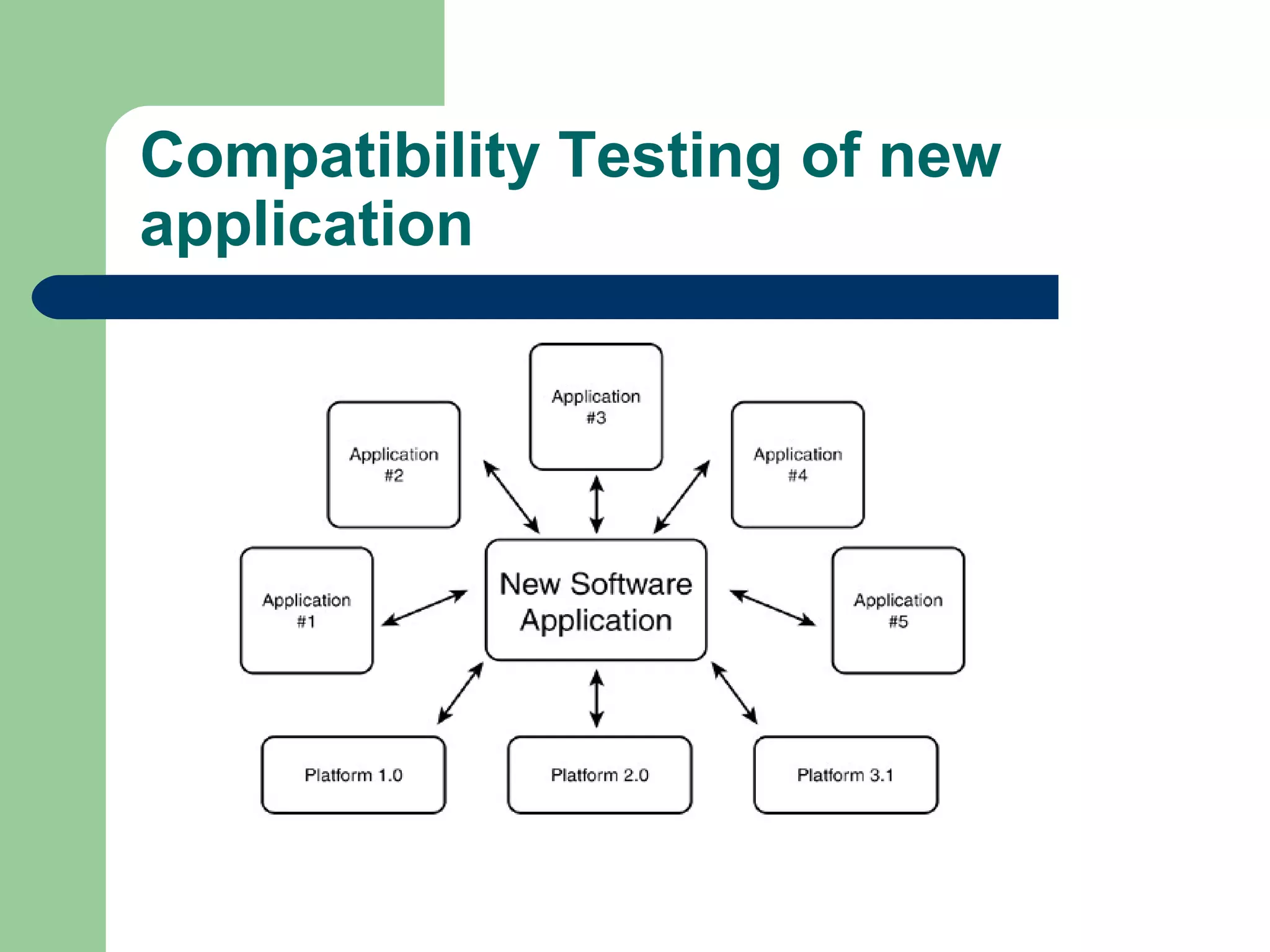
Compatibility Testing of new
application


The key word is important. The criteria that might go
into deciding what programs to choose could be:
–
–
–

–

Popularity. Use sales data to select the top 100 or 1,000 most
popular programs.
Age. You might want to select programs and versions that are
less than three years old.
Type. Break the software world into types such as painting,
writing, accounting, databases, communications, and so on.
Select software from each category for testing.
Manufacturer. Another criteria would be to pick software
based on the company that created it.
Compatibility Testing of new
application
Standards and Guidelines







There are two levels of requirements:
high-level:High-level standards are the ones that
guide your product's general operation,Its look and
feel, its supported features, and so on.
Low-level:Low-level standards are the nitty-gritty
details, such as the file formats and the network
communications protocols.
Both are important and both need to be tested to
assure compatibility.
High-Level Standards and
Guidelines
 Will

your software run under Windows, Mac, or
Linux operating systems?
 Is it a web application? If so, what browsers will
it run on?
 Each of these is considered a platform and
most have their own set of standards and
guidelines that must be followed if an
application is to claim that it's compatible with
the platform.
Logo Requirements
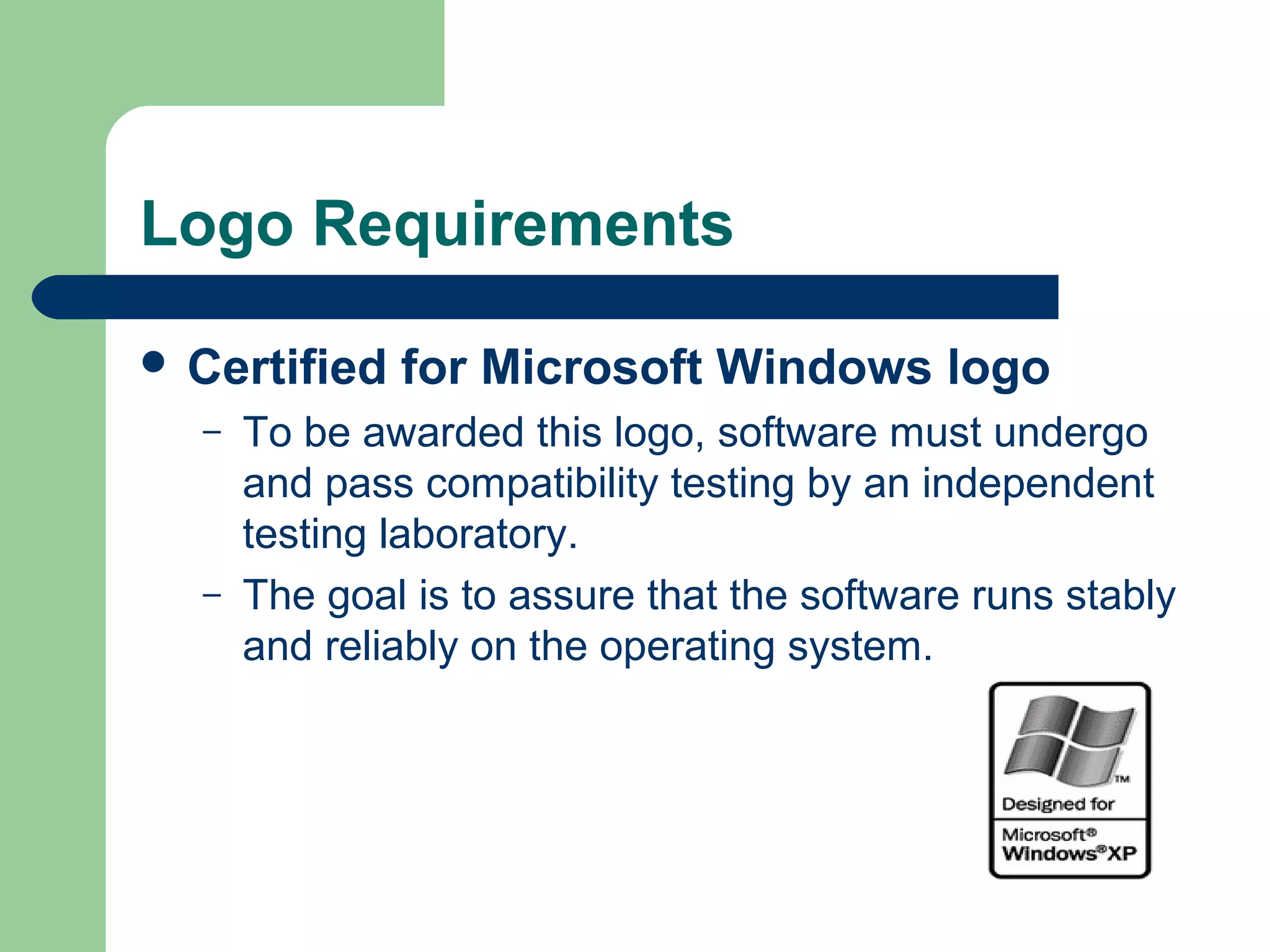
 Certified
–

–

for Microsoft Windows logo

To be awarded this logo, software must undergo
and pass compatibility testing by an independent
testing laboratory.
The goal is to assure that the software runs stably
and reliably on the operating system.
Examples of the logo requirements








Supports mice with more than three buttons
Supports installation on disk drives other than C: and
D:
Supports filenames longer than the DOS 8.3 format
Doesn't read, write, or otherwise use the old system
files win.ini, system.ini, autoexec.bat, or config.sys
The details of the Windows logo can be obtained at
msdn.microsoft.com/certification. Details for using the
Apple Mac logo are at developer.apple.com/testing.
Low-Level Standards and
Guidelines








Low-level standards are more important than the highlevel standards.
creating a program that would run on Windows that
didn't have the look and feel of other Windows
software.
It wouldn't be granted the Certified for Microsoft
Windows logo.
Users might not be thrilled with the differences from
other applications, but they could use the product.
Low-Level Standards and
Guidelines
 Software

is a graphics program that saves its
files to disk as .pict files (a standard Macintosh
file format for graphics) but the program
doesn't follow the standard for .pict files, users
won't be able to view the files in any other
program.
 Software wouldn't be compatible with the
standard and would likely be a short-lived
product.
Low-Level Standards and
Guidelines








Communications protocols, programming language syntax, and
any means that programs use to share information must adhere to
published standards and guidelines.
These low-level standards are often taken for granted
It must be tested from a tester's perspective
Treat low-level compatibility standards as an extension of the
software's specification
For example if software spec states, "The software will save and
load its graphics files as .bmp, .jpg, and .gif formats,"
Need to find the standards for these formats and design tests to
confirm that the software does indeed adhere to them.
Data Sharing Compatibility
 The

sharing of data among applications is
really gives software its power.
 A well-written program that supports and
adheres to published standards and allows
users to easily transfer data to and from other
software is a great compatible product.
 The most familiar means of transferring data
from one program to another is saving and
loading disk files.
Data Sharing Compatibility
 few
–
–
–

examples:

File save and file load are the data-sharing
methods.
The data format of the files needs to meet standards
for it to be compatible on multiple computers.
File export and file import are the means that many
programs use to be compatible with older versions
of themselves and with other programs.
Data Sharing Compatibility
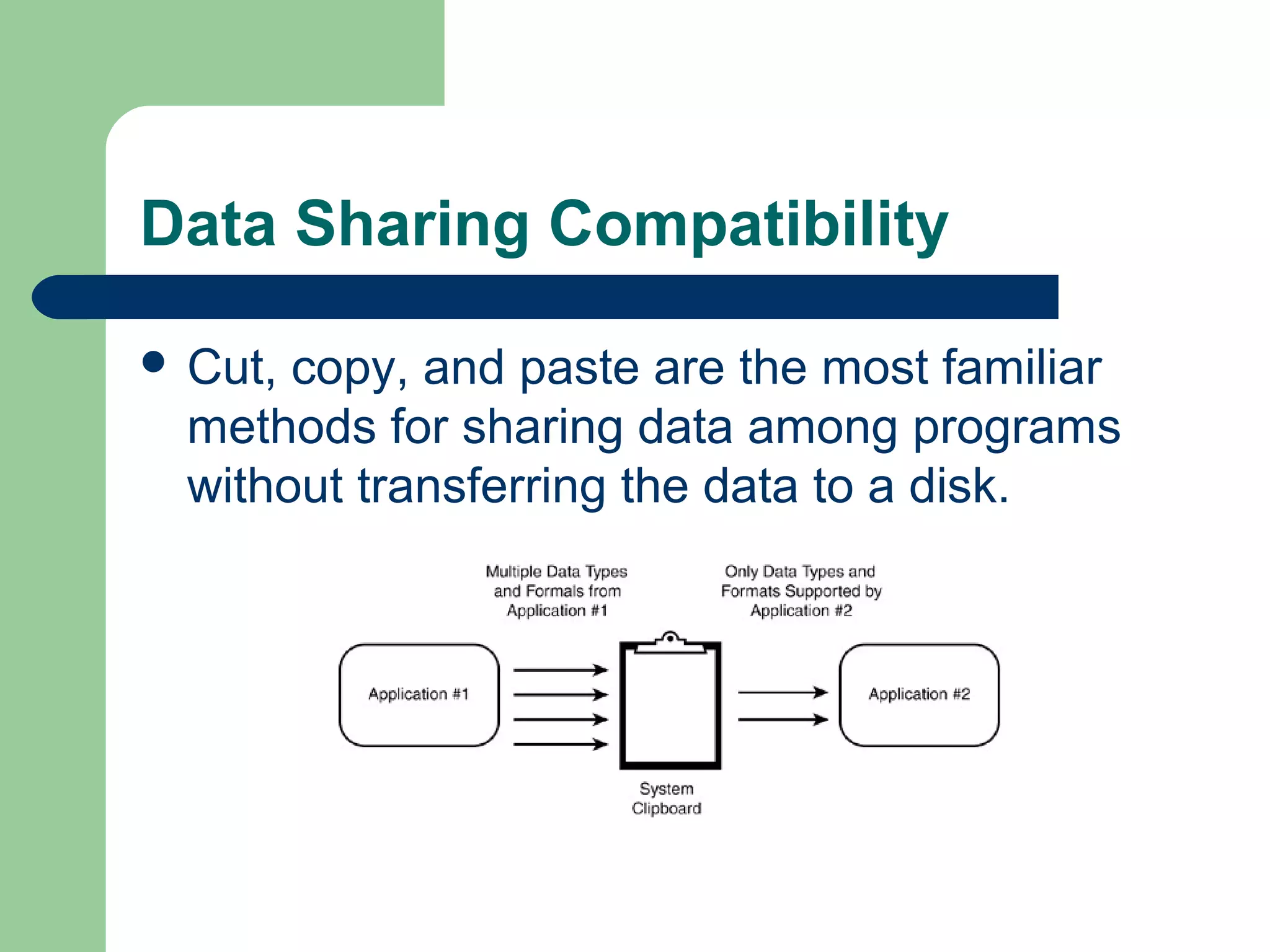
 Cut,

copy, and paste are the most familiar
methods for sharing data among programs
without transferring the data to a disk.
Data Sharing Compatibility






The Clipboard is designed to hold several different data
types.
DDE (pronounced D-D-E), COM (for Component
Object Model), and OLE (pronounced oh-lay) are the
methods in Windows of transferring data between two
applications. DDE stands for Dynamic Data Exchange
and OLE stands for Object Linking and Embedding.
Other platforms support similar methods.

Software Compatibility testing

  • 1.
    Compatibility Testing    Software compatibilitytesting means checking that your software interacts with and shares information correctly with other software. This interaction could occur between two programs simultaneously running on the same computer or even on different computers connected through the Internet thousands of miles apart. The interaction could also be as simple as saving data to a floppy disk and hand-carrying it to another computer across the room.
  • 2.
    Example of CompatibleSoftware      Cutting text from a web page and pasting it into a document opened in your word processor Saving accounting data from one spreadsheet program and then loading it into a completely different spreadsheet program Having photograph touchup software work correctly on different versions of the same operating system Having your word processor load in the names and addresses from your contact management program and print out personalized invitations and envelopes Upgrading to a new database program and having all your existing databases load in and work just as they did with the old program
  • 3.
    Performing Software Compatibility Testing  Softwarecompatibility testing on a new piece of software, need to get the answers to a few questions: – – – What other platforms (operating system, web browser, or other operating environment) and other application software is your software designed to be compatible with? If the software you're testing is a platform, what applications are designed to run under it? What compatibility standards or guidelines should be followed that define how your software should interact with other software? What types of data will your software use to interact and share information with other platforms and software?
  • 4.
    Performing Software Compatibility Testing    Gainingthe answers to these questions is basic static testing both black-box and white-box. It involves thoroughly analyzing the specification for the product and any supporting specifications. It could also entail discussions with the programmers and possibly close review of the code to assure that all links to and from your software are identified.
  • 5.
    Platform and ApplicationVersions  Selecting the target platforms or the compatible applications is really a program management or a marketing task.  Each platform has its own development criteria and it's important, from a project management standpoint, to make this platform list as small as possible but still fill the customer's needs.
  • 6.
    Backward and Forward Compatibility Two terms regarding compatibility testing are backward compatible and forward compatible.  If something is backward compatible, it will work with previous versions of the software.  If something is forward compatible, it will work with future versions of the software.
  • 7.
    The Impact ofTesting Multiple Versions     Testing that multiple versions of platforms and software applications work properly with each other can be a huge task. Consider the situation of having to compatibility test a new version of a popular operating system. The programmers have made numerous bug fixes and performance improvements and have added many new features to the code. There could be tens or hundreds of thousands of existing programs for the current versions of the OS. The project's goal is to be 100 percent compatible with them.
  • 8.
    Compatibility Testing ofnew application  The key word is important. The criteria that might go into deciding what programs to choose could be: – – – – Popularity. Use sales data to select the top 100 or 1,000 most popular programs. Age. You might want to select programs and versions that are less than three years old. Type. Break the software world into types such as painting, writing, accounting, databases, communications, and so on. Select software from each category for testing. Manufacturer. Another criteria would be to pick software based on the company that created it.
  • 9.
    Compatibility Testing ofnew application
  • 10.
    Standards and Guidelines     Thereare two levels of requirements: high-level:High-level standards are the ones that guide your product's general operation,Its look and feel, its supported features, and so on. Low-level:Low-level standards are the nitty-gritty details, such as the file formats and the network communications protocols. Both are important and both need to be tested to assure compatibility.
  • 11.
    High-Level Standards and Guidelines Will your software run under Windows, Mac, or Linux operating systems?  Is it a web application? If so, what browsers will it run on?  Each of these is considered a platform and most have their own set of standards and guidelines that must be followed if an application is to claim that it's compatible with the platform.
  • 12.
    Logo Requirements  Certified – – forMicrosoft Windows logo To be awarded this logo, software must undergo and pass compatibility testing by an independent testing laboratory. The goal is to assure that the software runs stably and reliably on the operating system.
  • 13.
    Examples of thelogo requirements      Supports mice with more than three buttons Supports installation on disk drives other than C: and D: Supports filenames longer than the DOS 8.3 format Doesn't read, write, or otherwise use the old system files win.ini, system.ini, autoexec.bat, or config.sys The details of the Windows logo can be obtained at msdn.microsoft.com/certification. Details for using the Apple Mac logo are at developer.apple.com/testing.
  • 14.
    Low-Level Standards and Guidelines     Low-levelstandards are more important than the highlevel standards. creating a program that would run on Windows that didn't have the look and feel of other Windows software. It wouldn't be granted the Certified for Microsoft Windows logo. Users might not be thrilled with the differences from other applications, but they could use the product.
  • 15.
    Low-Level Standards and Guidelines Software is a graphics program that saves its files to disk as .pict files (a standard Macintosh file format for graphics) but the program doesn't follow the standard for .pict files, users won't be able to view the files in any other program.  Software wouldn't be compatible with the standard and would likely be a short-lived product.
  • 16.
    Low-Level Standards and Guidelines       Communicationsprotocols, programming language syntax, and any means that programs use to share information must adhere to published standards and guidelines. These low-level standards are often taken for granted It must be tested from a tester's perspective Treat low-level compatibility standards as an extension of the software's specification For example if software spec states, "The software will save and load its graphics files as .bmp, .jpg, and .gif formats," Need to find the standards for these formats and design tests to confirm that the software does indeed adhere to them.
  • 17.
    Data Sharing Compatibility The sharing of data among applications is really gives software its power.  A well-written program that supports and adheres to published standards and allows users to easily transfer data to and from other software is a great compatible product.  The most familiar means of transferring data from one program to another is saving and loading disk files.
  • 18.
    Data Sharing Compatibility few – – – examples: File save and file load are the data-sharing methods. The data format of the files needs to meet standards for it to be compatible on multiple computers. File export and file import are the means that many programs use to be compatible with older versions of themselves and with other programs.
  • 19.
    Data Sharing Compatibility Cut, copy, and paste are the most familiar methods for sharing data among programs without transferring the data to a disk.
  • 20.
    Data Sharing Compatibility    TheClipboard is designed to hold several different data types. DDE (pronounced D-D-E), COM (for Component Object Model), and OLE (pronounced oh-lay) are the methods in Windows of transferring data between two applications. DDE stands for Dynamic Data Exchange and OLE stands for Object Linking and Embedding. Other platforms support similar methods.