INSTAGRAM BASICS
manyamedya.com
INSTAGRAM
Instagram is a mobile photo-sharing app and
social network created in 2010 by founders Kevin
Systrom and Mike Krieger.
In 2012, Facebook purchased the service for $1
billion. According to Instagram, the social platform
has more than 300 million daily active users and
500 million monthly users.
manyamedya.com
HOW DOES INSTAGRAM WORK?
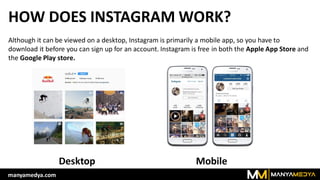
Although it can be viewed on a desktop, Instagram is primarily a mobile app, so you have to
download it before you can sign up for an account. Instagram is free in both the Apple App Store and
the Google Play store.
MobileDesktop
manyamedya.com
HOW DOES INSTAGRAM WORK?
You will likely want to convert your brand's Instagram to a "business account" to receive access to
analytics and insights. To do this, you'll need to connect the account with your business's Facebook
page by following the in-app prompts from the "Switch to Business Profile" option (in Settings).
manyamedya.com
HOW DOES INSTAGRAM WORK?
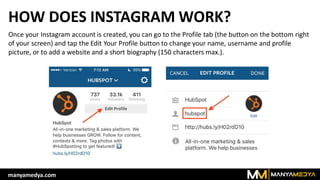
Once your Instagram account is created, you can go to the Profile tab (the button on the bottom right
of your screen) and tap the Edit Your Profile button to change your name, username and profile
picture, or to add a website and a short biography (150 characters max.).
manyamedya.com
HOW DOES INSTAGRAM WORK?
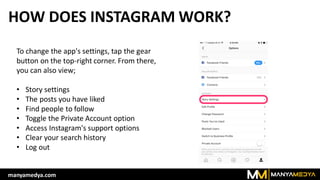
To change the app's settings, tap the gear
button on the top-right corner. From there,
you can also view;
• Story settings
• The posts you have liked
• Find people to follow
• Toggle the Private Account option
• Access Instagram's support options
• Clear your search history
• Log out
manyamedya.com
HOW DOES INSTAGRAM WORK?
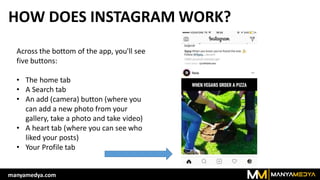
Across the bottom of the app, you'll see
five buttons:
• The home tab
• A Search tab
• An add (camera) button (where you
can add a new photo from your
gallery, take a photo and take video)
• A heart tab (where you can see who
liked your posts)
• Your Profile tab
manyamedya.com
CREATING CONTENT ON INSTAGRAM:
ADDING PHOTO(S)
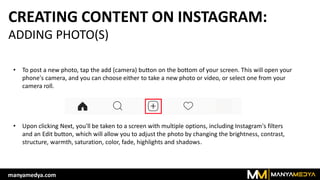
• To post a new photo, tap the add (camera) button on the bottom of your screen. This will open your
phone's camera, and you can choose either to take a new photo or video, or select one from your
camera roll.
• Upon clicking Next, you'll be taken to a screen with multiple options, including Instagram's filters
and an Edit button, which will allow you to adjust the photo by changing the brightness, contrast,
structure, warmth, saturation, color, fade, highlights and shadows.
manyamedya.com
CREATING CONTENT ON INSTAGRAM:
ADDING PHOTO(S)
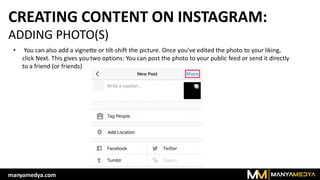
• You can also add a vignette or tilt-shift the picture. Once you've edited the photo to your liking,
click Next. This gives you two options: You can post the photo to your public feed or send it directly
to a friend (or friends)
manyamedya.com
CREATING CONTENT ON INSTAGRAM:
STORIES
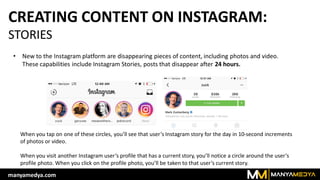
• New to the Instagram platform are disappearing pieces of content, including photos and video.
These capabilities include Instagram Stories, posts that disappear after 24 hours.
When you tap on one of these circles, you’ll see that user’s Instagram story for the day in 10-second increments
of photos or video.
When you visit another Instagram user’s profile that has a current story, you’ll notice a circle around the user’s
profile photo. When you click on the profile photo, you’ll be taken to that user’s current story.
manyamedya.com
CREATING CONTENT ON INSTAGRAM:
STORIES
• When you view a story where the
creator allows messaging,
you’ll see the option to send a
message at the bottom left of the
story. The message will end up in
the story creator’s Direct Message
inbox, as opposed to a publicly
visible comment on the story.
manyamedya.com
CREATING CONTENT ON INSTAGRAM:
CREATE YOUR FIRST INSTAGRAM STORY
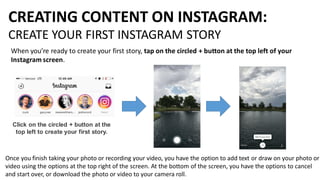
When you’re ready to create your first story, tap on the circled + button at the top left of your
Instagram screen.
Click on the circled + button at the
top left to create your first story.
Once you finish taking your photo or recording your video, you have the option to add text or draw on your photo or
video using the options at the top right of the screen. At the bottom of the screen, you have the options to cancel
and start over, or download the photo or video to your camera roll.
CREATING CONTENT ON INSTAGRAM:
CREATE YOUR FIRST INSTAGRAM STORY
Your story will appear first at the top
of your app above the news feed for
easy access.
If you want to add to your story, tap on the circled + icon at the
top left to record video or take a photo. Each new video or photo
you take will be added to the end of your story and lasts for 24
hours.
manyamedya.com
CREATING CONTENT ON INSTAGRAM:
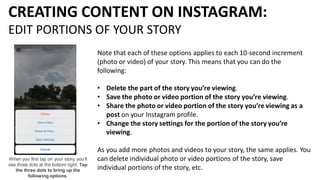
EDIT PORTIONS OF YOUR STORY
Note that each of these options applies to each 10-second increment
(photo or video) of your story. This means that you can do the
following:
• Delete the part of the story you’re viewing.
• Save the photo or video portion of the story you’re viewing.
• Share the photo or video portion of the story you’re viewing as a
post on your Instagram profile.
• Change the story settings for the portion of the story you’re
viewing.
As you add more photos and videos to your story, the same applies. You
can delete individual photo or video portions of the story, save
individual portions of the story, etc.
When you first tap on your story, you’ll
see three dots at the bottom right. Tap
the three dots to bring up the
following options.
CREATING CONTENT ON INSTAGRAM:
VIEW ANALYTICS OF YOUR STORY
When people start to
view your story,
you’ll see a number
at the bottom of
each portion of your
story.
You can swipe up on
that number to see
more details such as
how many views you
have for each portion
of your story and who
viewed those portions
of your story.
manyamedya.com
CREATING CONTENT ON INSTAGRAM:
LIVE STREAM
If you want to get streamin', make sure to head on over to the iTunes App Store or Google Play Store to check for the latest
update. Live Stories are currently in the testing phase, and will be rolling out globally over the next few weeks. Since no
exact date has been released, it's a good idea to make sure you are using the newest version of the app.
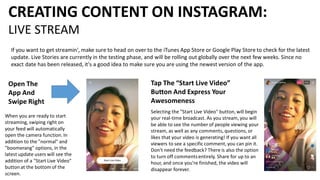
Open The
App And
Swipe Right
When you are ready to start
streaming, swiping right on
your feed will automatically
open the camera function. In
addition to the "normal" and
"boomerang" options, in the
latest update users will see the
addition of a "Start Live Video"
button at the bottom of the
screen.
Tap The “Start Live Video”
Button And Express Your
Awesomeness
Selecting the "Start Live Video" button, will begin
your real-time broadcast. As you stream, you will
be able to see the number of people viewing your
stream, as well as any comments, questions, or
likes that your video is generating! If you want all
viewers to see a specific comment, you can pin it.
Don't need the feedback? There is also the option
to turn off commentsentirely. Share for up to an
hour, and once you're finished, the video will
disappear forever.
CREATING CONTENT ON INSTAGRAM
REPOST
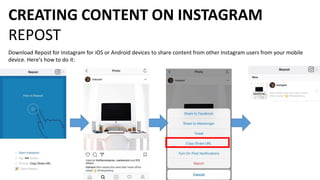
Download Repost for Instagram for iOS or Android devices to share content from other Instagram users from your mobile
device. Here's how to do it:
CREATING CONTENT ON INSTAGRAM
REPOST
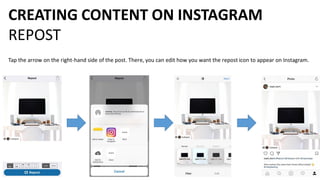
Tap the arrow on the right-hand side of the post. There, you can edit how you want the repost icon to appear on Instagram.
INSTAGRAM STRATEGIES
• Show off your products or services. Take pictures of cool new
products as you get them in, or share pictures of your most popular
products. Or, if you run a service business, like a hair salon or a
restaurant, take the time to take photos of your work.
• Go behind the scenes. Take pictures and videos to show how your
products or goods are made, especially if the process is unique or
interesting, or something your customers ask about often. This will not
only provide interesting content for your Instagram account, but will
also show your customers and followers exactly what goes on in the
background.
• Include your employees. Make your brand's Instagram page more
personal by including your employees in your posts. Share pictures of
your team members hard at work or having fun at company outings.
manyamedya.com
INSTAGRAM STRATEGIES
• Ask your customers to show off their photos. Put your Instagram
handle and custom hashtags on your products or promotional
materials to encourage customers to tag you when they share photos
of your product, service or work. This way, other users who want to
know where it came from can find you easily. Just make sure you're
checking them out, liking them and commenting on them, so they
continue to do so.
• Post exclusive deals on your Instagram. Give back to your Instagram
followers by offering them discounts for following you. Share an image
with instructions on how to use the deal — for example, you can
create a coupon code for use at your business online, or ask users
(when they're paying for a product or service) to show they follow
you. This will make your followers feel special, and likely get them
telling their friends about your business, too.
manyamedya.com
INSTAGRAM TIPS AND TRICKS
• Links don't work in Instagram captions. The only place you can share
a working link that actually takes users to a website is in your profile
(or through a button on a sponsored post). Links don't work in
captions or photo comments, so if you're trying to direct people to a
specific web page, you can change the default link in your bio to that
particular page and note in the caption that the link is on your profile.
• Make sure your posts relate to your brand. It can be tempting to
share photos of food, fashion and animals because they're so popular
on the platform, but if your business has nothing to do with those
things, this could make your social marketing look disjointed and could
confuse your followers. However, if you can find a way to incorporate
pictures like these while still making them relevant to your business, it
could make your social marketing strategy more successful.
manyamedya.com
INSTAGRAM TIPS AND TRICKS
• Run giveaways and promotions. Post an image advertising your
giveaway, sale or contest and asking users to repost that image with
a specific, custom hashtag in order to enter. You can then search that
hashtag to see who has reposted it and pick a winner. Promotions
like this allow your customers and followers to market your brand for
you by talking about your promotion on their personal pages, and it
will drive more people to visit your profile.
• Respond to other users' comments. When people comment on your
photos, reply to them. Interacting with your customers and followers
will show them that you are paying attention and that you care about
whether they see your photos and what they have to say. They'll be
more likely to continue following you and interacting with your
pictures if they feel like they matter.
manyamedya.com
THANK YOU!
manyamedya.com

Instagram Basics - Manyamedya

  • 1.
  • 2.
    INSTAGRAM Instagram is amobile photo-sharing app and social network created in 2010 by founders Kevin Systrom and Mike Krieger. In 2012, Facebook purchased the service for $1 billion. According to Instagram, the social platform has more than 300 million daily active users and 500 million monthly users. manyamedya.com
  • 3.
    HOW DOES INSTAGRAMWORK? Although it can be viewed on a desktop, Instagram is primarily a mobile app, so you have to download it before you can sign up for an account. Instagram is free in both the Apple App Store and the Google Play store. MobileDesktop manyamedya.com
  • 4.
    HOW DOES INSTAGRAMWORK? You will likely want to convert your brand's Instagram to a "business account" to receive access to analytics and insights. To do this, you'll need to connect the account with your business's Facebook page by following the in-app prompts from the "Switch to Business Profile" option (in Settings). manyamedya.com
  • 5.
    HOW DOES INSTAGRAMWORK? Once your Instagram account is created, you can go to the Profile tab (the button on the bottom right of your screen) and tap the Edit Your Profile button to change your name, username and profile picture, or to add a website and a short biography (150 characters max.). manyamedya.com
  • 6.
    HOW DOES INSTAGRAMWORK? To change the app's settings, tap the gear button on the top-right corner. From there, you can also view; • Story settings • The posts you have liked • Find people to follow • Toggle the Private Account option • Access Instagram's support options • Clear your search history • Log out manyamedya.com
  • 7.
    HOW DOES INSTAGRAMWORK? Across the bottom of the app, you'll see five buttons: • The home tab • A Search tab • An add (camera) button (where you can add a new photo from your gallery, take a photo and take video) • A heart tab (where you can see who liked your posts) • Your Profile tab manyamedya.com
  • 8.
    CREATING CONTENT ONINSTAGRAM: ADDING PHOTO(S) • To post a new photo, tap the add (camera) button on the bottom of your screen. This will open your phone's camera, and you can choose either to take a new photo or video, or select one from your camera roll. • Upon clicking Next, you'll be taken to a screen with multiple options, including Instagram's filters and an Edit button, which will allow you to adjust the photo by changing the brightness, contrast, structure, warmth, saturation, color, fade, highlights and shadows. manyamedya.com
  • 9.
    CREATING CONTENT ONINSTAGRAM: ADDING PHOTO(S) • You can also add a vignette or tilt-shift the picture. Once you've edited the photo to your liking, click Next. This gives you two options: You can post the photo to your public feed or send it directly to a friend (or friends) manyamedya.com
  • 10.
    CREATING CONTENT ONINSTAGRAM: STORIES • New to the Instagram platform are disappearing pieces of content, including photos and video. These capabilities include Instagram Stories, posts that disappear after 24 hours. When you tap on one of these circles, you’ll see that user’s Instagram story for the day in 10-second increments of photos or video. When you visit another Instagram user’s profile that has a current story, you’ll notice a circle around the user’s profile photo. When you click on the profile photo, you’ll be taken to that user’s current story. manyamedya.com
  • 11.
    CREATING CONTENT ONINSTAGRAM: STORIES • When you view a story where the creator allows messaging, you’ll see the option to send a message at the bottom left of the story. The message will end up in the story creator’s Direct Message inbox, as opposed to a publicly visible comment on the story. manyamedya.com
  • 12.
    CREATING CONTENT ONINSTAGRAM: CREATE YOUR FIRST INSTAGRAM STORY When you’re ready to create your first story, tap on the circled + button at the top left of your Instagram screen. Click on the circled + button at the top left to create your first story. Once you finish taking your photo or recording your video, you have the option to add text or draw on your photo or video using the options at the top right of the screen. At the bottom of the screen, you have the options to cancel and start over, or download the photo or video to your camera roll.
  • 13.
    CREATING CONTENT ONINSTAGRAM: CREATE YOUR FIRST INSTAGRAM STORY Your story will appear first at the top of your app above the news feed for easy access. If you want to add to your story, tap on the circled + icon at the top left to record video or take a photo. Each new video or photo you take will be added to the end of your story and lasts for 24 hours. manyamedya.com
  • 14.
    CREATING CONTENT ONINSTAGRAM: EDIT PORTIONS OF YOUR STORY Note that each of these options applies to each 10-second increment (photo or video) of your story. This means that you can do the following: • Delete the part of the story you’re viewing. • Save the photo or video portion of the story you’re viewing. • Share the photo or video portion of the story you’re viewing as a post on your Instagram profile. • Change the story settings for the portion of the story you’re viewing. As you add more photos and videos to your story, the same applies. You can delete individual photo or video portions of the story, save individual portions of the story, etc. When you first tap on your story, you’ll see three dots at the bottom right. Tap the three dots to bring up the following options.
  • 15.
    CREATING CONTENT ONINSTAGRAM: VIEW ANALYTICS OF YOUR STORY When people start to view your story, you’ll see a number at the bottom of each portion of your story. You can swipe up on that number to see more details such as how many views you have for each portion of your story and who viewed those portions of your story. manyamedya.com
  • 16.
    CREATING CONTENT ONINSTAGRAM: LIVE STREAM If you want to get streamin', make sure to head on over to the iTunes App Store or Google Play Store to check for the latest update. Live Stories are currently in the testing phase, and will be rolling out globally over the next few weeks. Since no exact date has been released, it's a good idea to make sure you are using the newest version of the app. Open The App And Swipe Right When you are ready to start streaming, swiping right on your feed will automatically open the camera function. In addition to the "normal" and "boomerang" options, in the latest update users will see the addition of a "Start Live Video" button at the bottom of the screen. Tap The “Start Live Video” Button And Express Your Awesomeness Selecting the "Start Live Video" button, will begin your real-time broadcast. As you stream, you will be able to see the number of people viewing your stream, as well as any comments, questions, or likes that your video is generating! If you want all viewers to see a specific comment, you can pin it. Don't need the feedback? There is also the option to turn off commentsentirely. Share for up to an hour, and once you're finished, the video will disappear forever.
  • 17.
    CREATING CONTENT ONINSTAGRAM REPOST Download Repost for Instagram for iOS or Android devices to share content from other Instagram users from your mobile device. Here's how to do it:
  • 18.
    CREATING CONTENT ONINSTAGRAM REPOST Tap the arrow on the right-hand side of the post. There, you can edit how you want the repost icon to appear on Instagram.
  • 19.
    INSTAGRAM STRATEGIES • Showoff your products or services. Take pictures of cool new products as you get them in, or share pictures of your most popular products. Or, if you run a service business, like a hair salon or a restaurant, take the time to take photos of your work. • Go behind the scenes. Take pictures and videos to show how your products or goods are made, especially if the process is unique or interesting, or something your customers ask about often. This will not only provide interesting content for your Instagram account, but will also show your customers and followers exactly what goes on in the background. • Include your employees. Make your brand's Instagram page more personal by including your employees in your posts. Share pictures of your team members hard at work or having fun at company outings. manyamedya.com
  • 20.
    INSTAGRAM STRATEGIES • Askyour customers to show off their photos. Put your Instagram handle and custom hashtags on your products or promotional materials to encourage customers to tag you when they share photos of your product, service or work. This way, other users who want to know where it came from can find you easily. Just make sure you're checking them out, liking them and commenting on them, so they continue to do so. • Post exclusive deals on your Instagram. Give back to your Instagram followers by offering them discounts for following you. Share an image with instructions on how to use the deal — for example, you can create a coupon code for use at your business online, or ask users (when they're paying for a product or service) to show they follow you. This will make your followers feel special, and likely get them telling their friends about your business, too. manyamedya.com
  • 21.
    INSTAGRAM TIPS ANDTRICKS • Links don't work in Instagram captions. The only place you can share a working link that actually takes users to a website is in your profile (or through a button on a sponsored post). Links don't work in captions or photo comments, so if you're trying to direct people to a specific web page, you can change the default link in your bio to that particular page and note in the caption that the link is on your profile. • Make sure your posts relate to your brand. It can be tempting to share photos of food, fashion and animals because they're so popular on the platform, but if your business has nothing to do with those things, this could make your social marketing look disjointed and could confuse your followers. However, if you can find a way to incorporate pictures like these while still making them relevant to your business, it could make your social marketing strategy more successful. manyamedya.com
  • 22.
    INSTAGRAM TIPS ANDTRICKS • Run giveaways and promotions. Post an image advertising your giveaway, sale or contest and asking users to repost that image with a specific, custom hashtag in order to enter. You can then search that hashtag to see who has reposted it and pick a winner. Promotions like this allow your customers and followers to market your brand for you by talking about your promotion on their personal pages, and it will drive more people to visit your profile. • Respond to other users' comments. When people comment on your photos, reply to them. Interacting with your customers and followers will show them that you are paying attention and that you care about whether they see your photos and what they have to say. They'll be more likely to continue following you and interacting with your pictures if they feel like they matter. manyamedya.com
  • 23.