Input TagsBastian, Jehazel Faye O.Pawid, KalehlaNikoleCompelio, Keren Joy T.
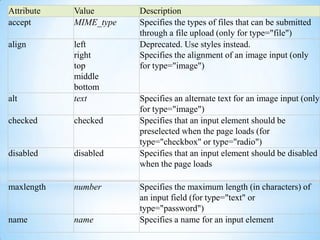
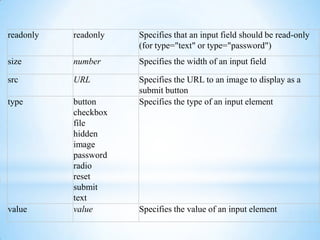
What is an input tag?The HTML input tag is used to display control elements that allow users to input data in a form. The conduct of the control depend mostly on the "type" attribute. This attribute defines the kind of control to be shown.
Types
1. Text<input type="text">
Most common input type
It defines a control designed for text input.
It lets the readers type in any text information into the box (e.g., names, titles, etc.). 2. Password<input type="password" />
It hides the characters inputted using dots or asterisks
When you type in it, the letters are hidden. 3. Checkbox<input type="checkbox" />
One can give a list of items to choose from. They can choose more than one in the list. Or it can be used as a "yes/no" toggle, when there is only one option.
Each checkbox works as an on/off switch (boolean values). This control is commonly used in forms to select options, interests, etc. Several checkboxes can share the same control name, allowing authors to set more than one value for a single property.4. Radio<input type="radio" />
Only one of those radio buttons can be checked, and when it's checked, the rest are automatically unchecked.
Radio button groupings all have the same name attribute, and each value is different. If a reader chooses one value, all the other values will be deselected.5. Submit<input type="submit">
 It creates a button. When a submit button is pressed it automatically submits the form.
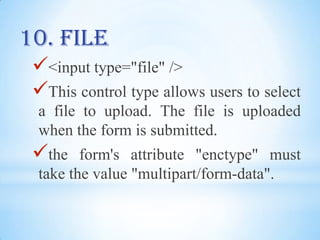
This field sends the form information to the web server when it is clicked. 6.Image<input type="image" src= "ABCbuttn.gif" width="88" height="31" alt="About.com - image courtesy About.com" border="0" />

Input tags (report)

  • 1.
    Input TagsBastian, JehazelFaye O.Pawid, KalehlaNikoleCompelio, Keren Joy T.
  • 2.
    What is aninput tag?The HTML input tag is used to display control elements that allow users to input data in a form. The conduct of the control depend mostly on the "type" attribute. This attribute defines the kind of control to be shown.
  • 3.
  • 4.
  • 5.
  • 6.
    It defines acontrol designed for text input.
  • 7.
    It lets thereaders type in any text information into the box (e.g., names, titles, etc.). 2. Password<input type="password" />
  • 8.
    It hides thecharacters inputted using dots or asterisks
  • 9.
    When you typein it, the letters are hidden. 3. Checkbox<input type="checkbox" />
  • 10.
    One can givea list of items to choose from. They can choose more than one in the list. Or it can be used as a "yes/no" toggle, when there is only one option.
  • 11.
    Each checkbox worksas an on/off switch (boolean values). This control is commonly used in forms to select options, interests, etc. Several checkboxes can share the same control name, allowing authors to set more than one value for a single property.4. Radio<input type="radio" />
  • 12.
    Only one ofthose radio buttons can be checked, and when it's checked, the rest are automatically unchecked.
  • 13.
    Radio button groupingsall have the same name attribute, and each value is different. If a reader chooses one value, all the other values will be deselected.5. Submit<input type="submit">
  • 14.
    It createsa button. When a submit button is pressed it automatically submits the form.
  • 15.
    This field sendsthe form information to the web server when it is clicked. 6.Image<input type="image" src= "ABCbuttn.gif" width="88" height="31" alt="About.com - image courtesy About.com" border="0" />