INPUT DEVICES
D.SEETHALAKSHMI
Assistant Professor
Department of Computer Applications
Bon Secours College for Women
INTRODUCTION
•When we work with computer we need to enter data
and insructions to the computer using some devices.
•These devices are called input devices
• These devices convert data and instructions to a form
that can be recognized by the computer.
• Some of the commonly ised input devices are:
◄ Keyboard
◄ Mouse
◄ Scanner
◄ Joystick
◄ Microphone
◄ Digital camera
KEYBOARD
•Standart input device attached tp all computers
•Layout is same as the traditional typewriter of the
type QWERTY
•of near-rectangular buttons called “keys” and
characters printed on the keys
•Each key press corresponds to a single written
symbol
•Contains some extra command keys and function
keys that affect the operation of computer or keyboard
itself
•Variations of keyboard:
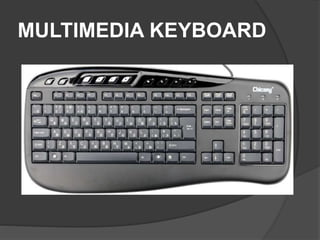
◄ Multimedia keyboard
◄ Internet keyboard
◄ Folding keyboard
◄ Wireless keyboard
KEYBOARD LAYOUT
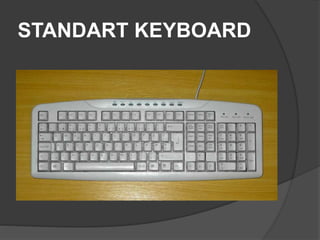
STANDART KEYBOARD
MULTIMEDIA KEYBOARD
WIRELESS KEYBOARD
FOLDABLE KEYBOARD
MOUSE
•Pointing device used to move a graphical pointer on the screen
• Graphical pointer also called cursor
• Mouse consists of a small case held under the user s hand
• Mouse has a ball underneath that helps to rool over a flat
surface
•Screen censors the direction of mouse movement and the
cursor on the screen follows the mouse path
•Has 2 or 3 buttons and can be clicked or double-clicked to
perform tasks
• Optical mouse doesn have a ball but uses a laser to sense the
motion
• Variations of mouse:
◄ Serial mouse
◄ PS/2 mouse
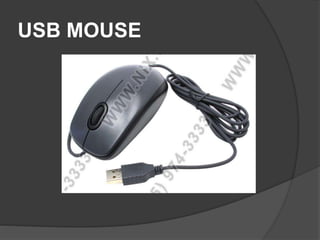
◄ USB mouse
◄ Optical mouse
◄ Wireless mouse
SERIAL MOUSE
PS/2 MOUSE
USB MOUSE
OPTICAL MOUSE
WIRELESS MOUSE
SCANNER
•Used to input a picture
•Analyzes images,printed text,or handwriting and converts it to
digital image
•Common scanner devices are:
◄ Magnetic Ink Character Recognition (MICR) reader:-used
by banks to process large volumes of cheques and drafts
◄ Optical Mark Reader (OMR) scanner:-scanning the
answer sheet of an objective type test in which answers are
marked by darkening a square or circle space by pencil
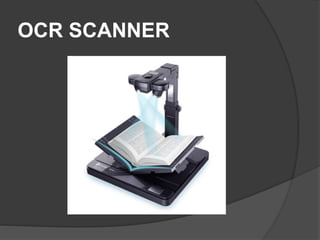
◄ Optical Character Recognition (OCR) scanner:-used for
direct reading of any printed character
◄ Barcode reader:-used to read the barcodes printed on
practically every item purchased from a department store
MICR READER
OMR SCANNER
OCR SCANNER
BARCODE READER
JOYSTICK
• Input device that is used to control onscreen objects
• A small lever called stick is used instead of cursor
keys or mouse
• Commonly used for controlling player movements in
video or computer games
• Most joystick are configured for 2-d movement
• Certain joystick control 3-d movement also
JOYSTICK
MICROPHONE
•Input device that is used for recording audio in a
computer
•To do this we also need a sound card installed in
computer
•Sound card converts analog sound signal to digital
form and vice-versa
•A speech recognition software is used with
microphone:
◄ to dictate text
◄ navigate programs
◄ select commands
MICROPHONE
DIGITAL CAMERA
•Input device used for capturing and storing still
images
•We can connect digital camera to a computer and
transfer the images from camera directly to the computer
DIGITAL CAMERA

Input Devices.pptx

  • 1.
    INPUT DEVICES D.SEETHALAKSHMI Assistant Professor Departmentof Computer Applications Bon Secours College for Women
  • 2.
    INTRODUCTION •When we workwith computer we need to enter data and insructions to the computer using some devices. •These devices are called input devices • These devices convert data and instructions to a form that can be recognized by the computer. • Some of the commonly ised input devices are: ◄ Keyboard ◄ Mouse ◄ Scanner ◄ Joystick ◄ Microphone ◄ Digital camera
  • 3.
    KEYBOARD •Standart input deviceattached tp all computers •Layout is same as the traditional typewriter of the type QWERTY •of near-rectangular buttons called “keys” and characters printed on the keys •Each key press corresponds to a single written symbol •Contains some extra command keys and function keys that affect the operation of computer or keyboard itself •Variations of keyboard: ◄ Multimedia keyboard ◄ Internet keyboard ◄ Folding keyboard ◄ Wireless keyboard
  • 4.
  • 5.
  • 6.
  • 7.
  • 8.
  • 9.
    MOUSE •Pointing device usedto move a graphical pointer on the screen • Graphical pointer also called cursor • Mouse consists of a small case held under the user s hand • Mouse has a ball underneath that helps to rool over a flat surface •Screen censors the direction of mouse movement and the cursor on the screen follows the mouse path •Has 2 or 3 buttons and can be clicked or double-clicked to perform tasks • Optical mouse doesn have a ball but uses a laser to sense the motion • Variations of mouse: ◄ Serial mouse ◄ PS/2 mouse ◄ USB mouse ◄ Optical mouse ◄ Wireless mouse
  • 10.
  • 11.
  • 12.
  • 13.
  • 14.
  • 15.
    SCANNER •Used to inputa picture •Analyzes images,printed text,or handwriting and converts it to digital image •Common scanner devices are: ◄ Magnetic Ink Character Recognition (MICR) reader:-used by banks to process large volumes of cheques and drafts ◄ Optical Mark Reader (OMR) scanner:-scanning the answer sheet of an objective type test in which answers are marked by darkening a square or circle space by pencil ◄ Optical Character Recognition (OCR) scanner:-used for direct reading of any printed character ◄ Barcode reader:-used to read the barcodes printed on practically every item purchased from a department store
  • 16.
  • 17.
  • 18.
  • 19.
  • 20.
    JOYSTICK • Input devicethat is used to control onscreen objects • A small lever called stick is used instead of cursor keys or mouse • Commonly used for controlling player movements in video or computer games • Most joystick are configured for 2-d movement • Certain joystick control 3-d movement also
  • 21.
  • 22.
    MICROPHONE •Input device thatis used for recording audio in a computer •To do this we also need a sound card installed in computer •Sound card converts analog sound signal to digital form and vice-versa •A speech recognition software is used with microphone: ◄ to dictate text ◄ navigate programs ◄ select commands
  • 23.
  • 24.
    DIGITAL CAMERA •Input deviceused for capturing and storing still images •We can connect digital camera to a computer and transfer the images from camera directly to the computer
  • 25.