IBM InfoSphere Streams
Technical Overview


Jerome Chailloux
Europe IOT - Sr. Technical Field Specialist - Big Data, Linux Advocate
jerome.chailloux@fr.ibm.com


   February 21, 2013                                                     © 2013 IBM Corporation
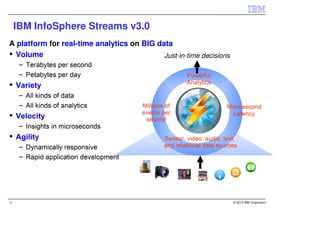
IBM InfoSphere Streams v3.0
A platform for real-time analytics on BIG data
  Volume                                    Just-in-time decisions


2                                                                    © 2013 IBM Corporation
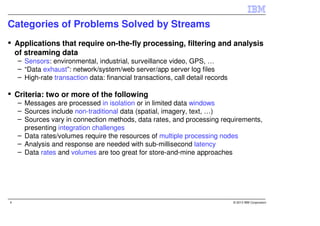
Categories of Problems Solved by Streams
    Applications that require on-the-fly processing, filtering and analysis
    of streaming data
    – Sensors: environmental, industrial, surveillance video, GPS, …
    – “Data exhaust”: network/system/web server/app server log files
    – High-rate transaction data: financial transactions, call detail records

    Criteria: two or more of the following
    – Messages are processed in isolation or in limited data windows
    – Sources include non-traditional data (spatial, imagery, text, …)
    – Sources vary in connection methods, data rates, and processing requirements,
      presenting integration challenges
    – Data rates/volumes require the resources of multiple processing nodes
    – Analysis and response are needed with sub-millisecond latency
    – Data rates and volumes are too great for store-and-mine approaches


4                                                                               © 2013 IBM Corporation
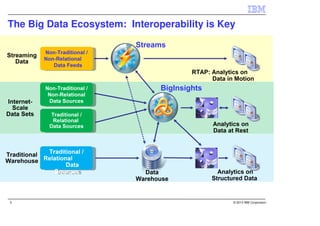
The Big Data Ecosystem: Interoperability is Key


5                                             © 2013 IBM Corporation
6
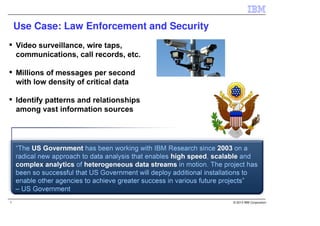
Use Case: Law Enforcement and Security


7                                            © 2013 IBM Corporation
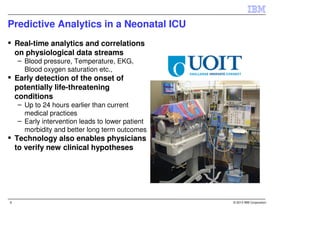
Predictive Analytics in a Neonatal ICU
    Real-time analytics and correlations
    on physiological data streams
    – Blood pressure, Temperature, EKG,
      Blood oxygen saturation etc.,
    Early detection of the onset of
    potentially life-threatening
    conditions
    – Up to 24 hours earlier than current
      medical practices
    – Early intervention leads to lower patient
      morbidity and better long term outcomes
    Technology also enables physicians
    to verify new clinical hypotheses


8                                                 © 2013 IBM Corporation
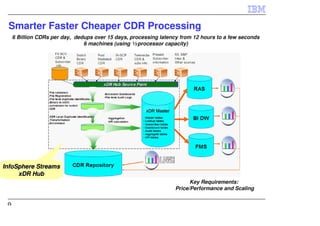
Smarter Faster Cheaper CDR Processing
     6 Billion CDRs per day, dedups over 15 days, processing latency from 12 hours to a few seconds
                                6 machines (using ½ processor capacity)


InfoSphere Streams
     xDR Hub
                                                                         Key Requirements:
                                                                   Price/Performance and Scaling


 9
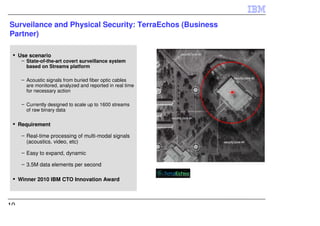
Surveilance and Physical Security: TerraEchos (Business
Partner)

     Use scenario
      – State-of-the-art covert surveillance system
        based on Streams platform

      – Acoustic signals from buried fiber optic cables
        are monitored, analyzed and reported in real time
        for necessary action

      – Currently designed to scale up to 1600 streams
        of raw binary data

     Requirement

      – Real-time processing of multi-modal signals
        (acoustics. video, etc)

      – Easy to expand, dynamic

      – 3.5M data elements per second

     Winner 2010 IBM CTO Innovation Award


10
11   © 2013 IBM Corporation
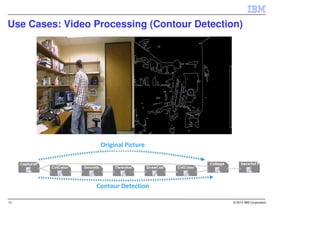
Use Cases: Video Processing (Contour Detection)


                  Original Picture


12                                           © 2013 IBM Corporation
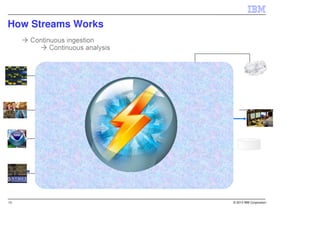
How Streams Works


13                  © 2013 IBM Corporation
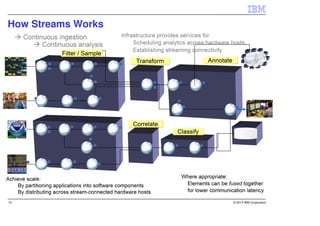
How Streams Works


14                  © 2013 IBM Corporation
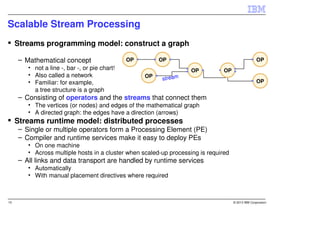
Scalable Stream Processing
     Streams programming model: construct a graph

     – Mathematical concept                    OP        OP                                         OP
        • not a line -, bar -, or pie chart!                        OP          OP
        • Also called a network                     OP
                                                         stream                                     OP
        • Familiar: for example,
          a tree structure is a graph
     – Consisting of operators and the streams that connect them
        • The vertices (or nodes) and edges of the mathematical graph
        • A directed graph: the edges have a direction (arrows)
     Streams runtime model: distributed processes
     – Single or multiple operators form a Processing Element (PE)
     – Compiler and runtime services make it easy to deploy PEs
        • On one machine
        • Across multiple hosts in a cluster when scaled-up processing is required
     – All links and data transport are handled by runtime services
        • Automatically
        • With manual placement directives where required


15                                                                                   © 2013 IBM Corporation
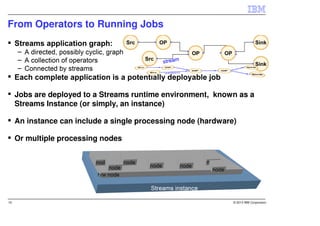
From Operators to Running Jobs


     Jobs are deployed to a Streams runtime environment, known as a
     Streams Instance (or simply, an instance)

     An instance can include a single processing node (hardware)

     Or multiple processing nodes


16                                                             © 2013 IBM Corporation
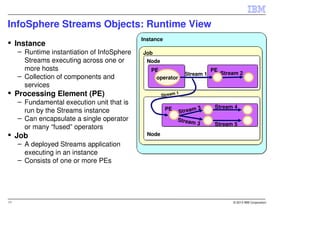
InfoSphere Streams Objects: Runtime View
                                             Instance
     Instance
     – Runtime instantiation of InfoSphere   Job
       Streams executing across one or        Node
       more hosts                               PE                          PE
                                                                 Stream 1        Stream 2
     – Collection of components and              operator
       services
     Processing Element (PE)                          Stream
                                                             1

     – Fundamental execution unit that is
                                                        PE            3      Stream 4
       run by the Streams instance                           Stream
     – Can encapsulate a single operator                     Stream
                                                                      3      Stream 5
       or many “fused” operators
     Job                                       Node
     – A deployed Streams application
       executing in an instance
     – Consists of one or more PEs


17                                                                                   © 2013 IBM Corporation
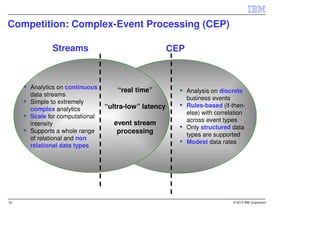
Competition: Complex-Event Processing (CEP)

            Streams                                  CEP


     Analytics on continuous
                                   “real time”             Analysis on discrete
     data streams
                                                           business events
     Simple to extremely
                               “ultra-low” latency         Rules-based (if-then-
     complex analytics
                                                           else) with correlation
     Scale for computational
                                                           across event types
     intensity                   event stream
                                                           Only structured data
     Supports a whole range       processing               types are supported
     of relational and non
                                                           Modest data rates
     relational data types


18                                                                          © 2013 IBM Corporation
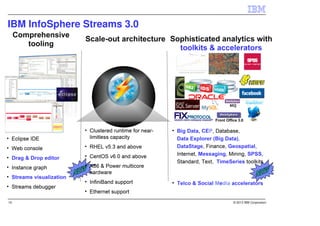
IBM InfoSphere Streams 3.0


19                           © 2013 IBM Corporation
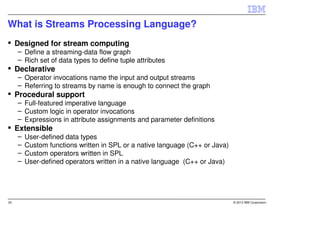
What is Streams Processing Language?
     Designed for stream computing
     – Define a streaming-data flow graph
     – Rich set of data types to define tuple attributes
     Declarative
     – Operator invocations name the input and output streams
     – Referring to streams by name is enough to connect the graph
     Procedural support
     – Full-featured imperative language
     – Custom logic in operator invocations
     – Expressions in attribute assignments and parameter definitions
     Extensible
     –   User-defined data types
     –   Custom functions written in SPL or a native language (C++ or Java)
     –   Custom operators written in SPL
     –   User-defined operators written in a native language (C++ or Java)


20                                                                            © 2013 IBM Corporation
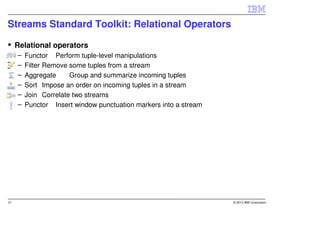
Streams Standard Toolkit: Relational Operators

     Relational operators
     –   Functor Perform tuple-level manipulations
     –   Filter Remove some tuples from a stream
     –   Aggregate     Group and summarize incoming tuples
     –   Sort Impose an order on incoming tuples in a stream
     –   Join Correlate two streams
     –   Punctor Insert window punctuation markers into a stream


21                                                                 © 2013 IBM Corporation
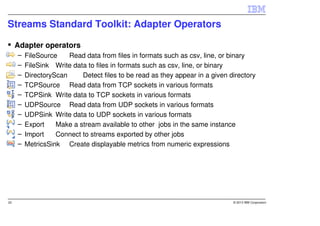
Streams Standard Toolkit: Adapter Operators

     Adapter operators
     –   FileSource    Read data from files in formats such as csv, line, or binary
     –   FileSink Write data to files in formats such as csv, line, or binary
     –   DirectoryScan     Detect files to be read as they appear in a given directory
     –   TCPSource Read data from TCP sockets in various formats
     –   TCPSink Write data to TCP sockets in various formats
     –   UDPSource Read data from UDP sockets in various formats
     –   UDPSink Write data to UDP sockets in various formats
     –   Export    Make a stream available to other jobs in the same instance
     –   Import    Connect to streams exported by other jobs
     –   MetricsSink Create displayable metrics from numeric expressions


22                                                                            © 2013 IBM Corporation
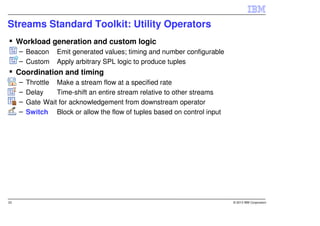
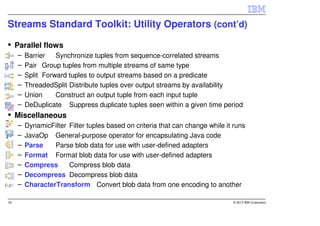
Streams Standard Toolkit: Utility Operators
     Workload generation and custom logic
     – Beacon      Emit generated values; timing and number configurable
     – Custom      Apply arbitrary SPL logic to produce tuples
     Coordination and timing
     –   Throttle Make a stream flow at a specified rate
     –   Delay    Time-shift an entire stream relative to other streams
     –   Gate Wait for acknowledgement from downstream operator
     –   Switch Block or allow the flow of tuples based on control input


23                                                                         © 2013 IBM Corporation
Streams Standard Toolkit: Utility Operators (cont’d)

     Parallel flows
     –   Barrier   Synchronize tuples from sequence-correlated streams
     –   Pair Group tuples from multiple streams of same type
     –   Split Forward tuples to output streams based on a predicate
     –   ThreadedSplit Distribute tuples over output streams by availability
     –   Union     Construct an output tuple from each input tuple
     –   DeDuplicate Suppress duplicate tuples seen within a given time period
     Miscellaneous
     –   DynamicFilter Filter tuples based on criteria that can change while it runs
     –   JavaOp General-purpose operator for encapsulating Java code
     –   Parse    Parse blob data for use with user-defined adapters
     –   Format Format blob data for use with user-defined adapters
     –   Compress      Compress blob data
     –   Decompress Decompress blob data
     –   CharacterTransform Convert blob data from one encoding to another

24                                                                             © 2013 IBM Corporation
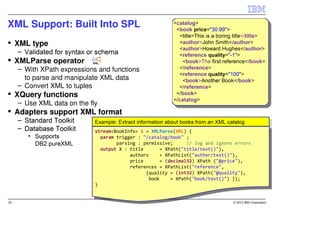
XML Support: Built Into SPL
 XML type


  – With XPath expressions and functions
    to parse and manipulate XML data
  – Convert XML to tuples
 XQuery functions
  – Use XML data on the fly
 Adapters support XML format
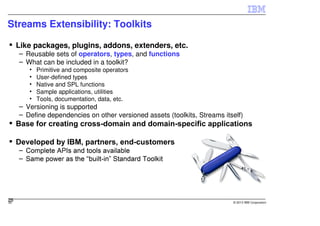
Streams Extensibility: Toolkits

     Like packages, plugins, addons, extenders, etc.
     – Reusable sets of operators, types, and functions
     – What can be included in a toolkit?
        •   Primitive and composite operators
        •   User-defined types
        •   Native and SPL functions
        •   Sample applications, utilities
        •   Tools, documentation, data, etc.
     – Versioning is supported
     – Define dependencies on other versioned assets (toolkits, Streams itself)


26
26                                                                         © 2013 IBM Corporation
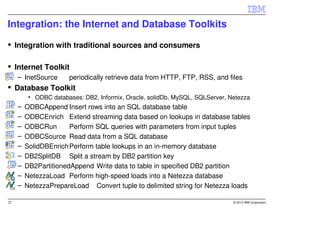
Integration: the Internet and Database Toolkits

     Integration with traditional sources and consumers

     Internet Toolkit
     – InetSource      periodically retrieve data from HTTP, FTP, RSS, and files
     Database Toolkit
          • ODBC databases: DB2, Informix, Oracle, solidDb, MySQL, SQLServer, Netezza
     –   ODBCAppend Insert rows into an SQL database table
     –   ODBCEnrich Extend streaming data based on lookups in database tables
     –   ODBCRun       Perform SQL queries with parameters from input tuples
     –   ODBCSource Read data from a SQL database
     –   SolidDBEnrich Perform table lookups in an in-memory database
     –   DB2SplitDB Split a stream by DB2 partition key
     –   DB2PartitionedAppend Write data to table in specified DB2 partition
     –   NetezzaLoad Perform high-speed loads into a Netezza database
     –   NetezzaPrepareLoad Convert tuple to delimited string for Netezza loads

27                                                                             © 2013 IBM Corporation
Integration: the Big Data Toolkit

     Integration with IBM’s Big Data Platform

     Data Explorer
     – DataExplorerPush        Insert records into a Data Explorer index


     BigInsights: Hadoop Distributed File System
     –   HDFSDirectoryScan     Like DirectoryScan, only for HDFS
     –   HDFSFileSource Like FileSource, only for HDFS
     –   HDFSFileSink Like FileSink, only for HDFS
     –   HDFSSplit    Write batches of data in parallel to HDFS


28                                                                         © 2013 IBM Corporation
Integration: the DataStage Integration Toolkit
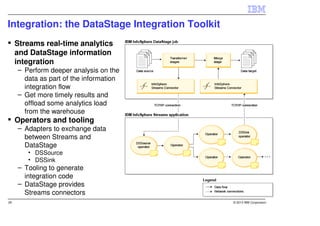
     Streams real-time analytics
     and DataStage information
     integration
     – Perform deeper analysis on the
       data as part of the information
       integration flow
     – Get more timely results and
       offload some analytics load
       from the warehouse
     Operators and tooling
     – Adapters to exchange data
       between Streams and
       DataStage
        • DSSource
        • DSSink
     – Tooling to generate
       integration code
     – DataStage provides
       Streams connectors
29                                               © 2013 IBM Corporation
Integration: the Messaging Toolkit
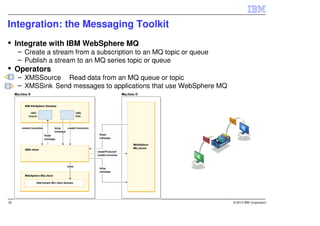
     Integrate with IBM WebSphere MQ
     – Create a stream from a subscription to an MQ topic or queue
     – Publish a stream to an MQ series topic or queue
     Operators
     – XMSSource Read data from an MQ queue or topic
     – XMSSink Send messages to applications that use WebSphere MQ


30                                                                   © 2013 IBM Corporation
Integration and Analytics: the Text Toolkit

     Derive structured information from unstructured text
     – Apply extractors
        •   Programs that encode rules for extracting information from text
        •   Written in AQL (Annotation Query Language)
        •   Developed against a static repository of text data
        •   AQL files can be combined into modules (directories)
        •   Modules can be compiled into TAM files
        •   NOTE: Old-style AOG files not supported by BigInsights 2.0 and this toolkit
               Can be used in Streams 3.0 with the Deprecated Text Toolkit
     Streams Studio plugins for developing AQL queries
     – Same tooling as in BigInsights
     Operator and utility
     – TextExtract Run AQL queries (module or TAM) over text documents
     – createtypes script
        • Create stream type definitions that match the output views of the extractors.
     Plays a major role in accelerators
     – SDA: Social Data Analytics
     – MDA: Machine Data Analytics


31                                                                                  © 2013 IBM Corporation
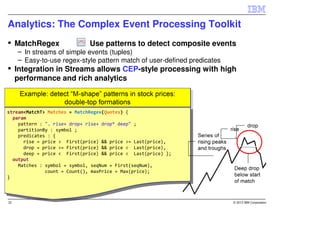
Analytics: The Complex Event Processing Toolkit
 MatchRegex              Use patterns to detect composite events
  – In streams of simple events (tuples)
  – Easy-to-use regex-style pattern match of user-defined predicates
 Integration in Streams allows CEP-style processing with high
 performance and rich analytics
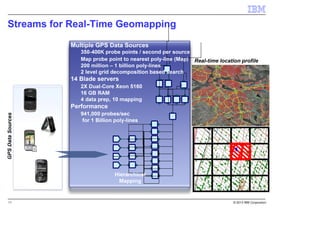
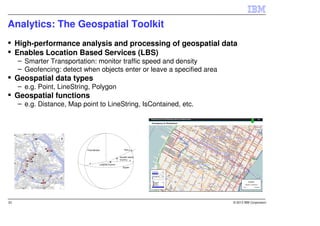
Analytics: The Geospatial Toolkit
     High-performance analysis and processing of geospatial data
     Enables Location Based Services (LBS)
     – Smarter Transportation: monitor traffic speed and density
     – Geofencing: detect when objects enter or leave a specified area
     Geospatial data types
     – e.g. Point, LineString, Polygon
     Geospatial functions
     – e.g. Distance, Map point to LineString, IsContained, etc.


33                                                                       © 2013 IBM Corporation
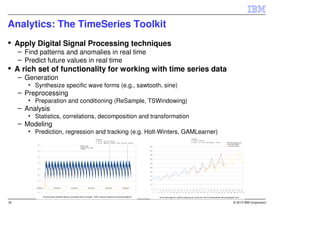
Analytics: The TimeSeries Toolkit
     Apply Digital Signal Processing techniques
     – Find patterns and anomalies in real time
     – Predict future values in real time
     A rich set of functionality for working with time series data
     – Generation
        • Synthesize specific wave forms (e.g., sawtooth, sine)
     – Preprocessing
        • Preparation and conditioning (ReSample, TSWindowing)
     – Analysis
        • Statistics, correlations, decomposition and transformation
     – Modeling
        • Prediction, regression and tracking (e.g. Holt-Winters, GAMLearner)


34                                                                              © 2013 IBM Corporation
Analytics: the Mining Toolkit
     Enables scoring of real-time data in a Streams application
     – Scoring is performed against a predefined model (in PMML file)
     – Supports a variety of model types and scoring algorithms
     Predictive Model Markup Language (PMML)
     – Standard for statistical and data mining models
     – Produced by Analytics tools: SPSS, ISAS, etc.
     – XML representation defined by http://www.dmg.org/
     Scoring operators
     –   Classification Assign tuple to a class and report confidence
     –   ClusteringAssign tuple to a cluster and compute score
     –   Regression Calculate predicted value and standard deviation
     –   Associations Identify the applicable rule and report consequent
          (rule head), support, and confidence
     Supports dynamic replacement of the PMML model used
     by an operator


35                                                                         © 2013 IBM Corporation
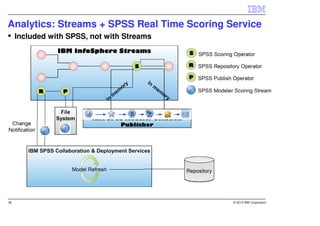
Analytics: Streams + SPSS Real Time Scoring Service
     Included with SPSS, not with Streams


36                                           © 2013 IBM Corporation
Analytics: the Financial Services Toolkit

     Adapters
     – Financial Information Exchange (FIX)
     – WebSphere Front Office for Financial Markets (WFO)
     – WebSphere MQ Low-Latency Messaging (LLM) Adapters
     Types and Functions
     – OptionType (put, call), TxType (buy, sell), Trade, Quote, OptionQuote, Order
     – Coefficient of Correlation
     – “The Greeks” (put/call values, delta, theta, etc.)
     Operators
     – Based on QuantLib financial analytics open source package.
     – Compute theoretical value of an option (European, American)
     Example applications
     – Equities Trading
     – Options Trading


37                                                                         © 2013 IBM Corporation
RESOURCE LINKS
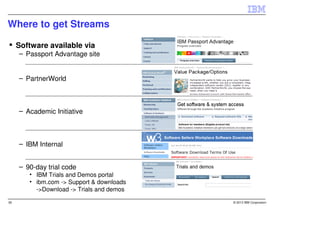
Where to get Streams

     Software available via
     – Passport Advantage site


     – PartnerWorld


     – Academic Initiative


     – IBM Internal


     – 90-day trial code
        • IBM Trials and Demos portal
        • ibm.com -> Support & downloads
          ->Download -> Trials and demos

39                                         © 2013 IBM Corporation
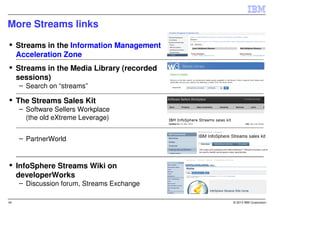
More Streams links

     Streams in the Information Management
     Acceleration Zone
     Streams in the Media Library (recorded
     sessions)
     – Search on “streams”

     The Streams Sales Kit
     – Software Sellers Workplace
       (the old eXtreme Leverage)


     – PartnerWorld


     InfoSphere Streams Wiki on
     developerWorks
     – Discussion forum, Streams Exchange

40                                            © 2013 IBM Corporation
41   © 2013 IBM Corporation

InfoSphere Streams Technical Overview - Use Cases Big Data - Jerome CHAILLOUX

  • 1.
    IBM InfoSphere Streams TechnicalOverview Jerome Chailloux Europe IOT - Sr. Technical Field Specialist - Big Data, Linux Advocate jerome.chailloux@fr.ibm.com February 21, 2013 © 2013 IBM Corporation
  • 2.
    IBM InfoSphere Streamsv3.0 A platform for real-time analytics on BIG data Volume Just-in-time decisions 2 © 2013 IBM Corporation
  • 4.
    Categories of ProblemsSolved by Streams Applications that require on-the-fly processing, filtering and analysis of streaming data – Sensors: environmental, industrial, surveillance video, GPS, … – “Data exhaust”: network/system/web server/app server log files – High-rate transaction data: financial transactions, call detail records Criteria: two or more of the following – Messages are processed in isolation or in limited data windows – Sources include non-traditional data (spatial, imagery, text, …) – Sources vary in connection methods, data rates, and processing requirements, presenting integration challenges – Data rates/volumes require the resources of multiple processing nodes – Analysis and response are needed with sub-millisecond latency – Data rates and volumes are too great for store-and-mine approaches 4 © 2013 IBM Corporation
  • 5.
    The Big DataEcosystem: Interoperability is Key 5 © 2013 IBM Corporation
  • 6.
  • 7.
    Use Case: LawEnforcement and Security 7 © 2013 IBM Corporation
  • 8.
    Predictive Analytics ina Neonatal ICU Real-time analytics and correlations on physiological data streams – Blood pressure, Temperature, EKG, Blood oxygen saturation etc., Early detection of the onset of potentially life-threatening conditions – Up to 24 hours earlier than current medical practices – Early intervention leads to lower patient morbidity and better long term outcomes Technology also enables physicians to verify new clinical hypotheses 8 © 2013 IBM Corporation
  • 9.
    Smarter Faster CheaperCDR Processing 6 Billion CDRs per day, dedups over 15 days, processing latency from 12 hours to a few seconds 6 machines (using ½ processor capacity) InfoSphere Streams xDR Hub Key Requirements: Price/Performance and Scaling 9
  • 10.
    Surveilance and PhysicalSecurity: TerraEchos (Business Partner) Use scenario – State-of-the-art covert surveillance system based on Streams platform – Acoustic signals from buried fiber optic cables are monitored, analyzed and reported in real time for necessary action – Currently designed to scale up to 1600 streams of raw binary data Requirement – Real-time processing of multi-modal signals (acoustics. video, etc) – Easy to expand, dynamic – 3.5M data elements per second Winner 2010 IBM CTO Innovation Award 10
  • 11.
    11 © 2013 IBM Corporation
  • 12.
    Use Cases: VideoProcessing (Contour Detection) Original Picture 12 © 2013 IBM Corporation
  • 13.
    How Streams Works 13 © 2013 IBM Corporation
  • 14.
    How Streams Works 14 © 2013 IBM Corporation
  • 15.
    Scalable Stream Processing Streams programming model: construct a graph – Mathematical concept OP OP OP • not a line -, bar -, or pie chart! OP OP • Also called a network OP stream OP • Familiar: for example, a tree structure is a graph – Consisting of operators and the streams that connect them • The vertices (or nodes) and edges of the mathematical graph • A directed graph: the edges have a direction (arrows) Streams runtime model: distributed processes – Single or multiple operators form a Processing Element (PE) – Compiler and runtime services make it easy to deploy PEs • On one machine • Across multiple hosts in a cluster when scaled-up processing is required – All links and data transport are handled by runtime services • Automatically • With manual placement directives where required 15 © 2013 IBM Corporation
  • 16.
    From Operators toRunning Jobs Jobs are deployed to a Streams runtime environment, known as a Streams Instance (or simply, an instance) An instance can include a single processing node (hardware) Or multiple processing nodes 16 © 2013 IBM Corporation
  • 17.
    InfoSphere Streams Objects:Runtime View Instance Instance – Runtime instantiation of InfoSphere Job Streams executing across one or Node more hosts PE PE Stream 1 Stream 2 – Collection of components and operator services Processing Element (PE) Stream 1 – Fundamental execution unit that is PE 3 Stream 4 run by the Streams instance Stream – Can encapsulate a single operator Stream 3 Stream 5 or many “fused” operators Job Node – A deployed Streams application executing in an instance – Consists of one or more PEs 17 © 2013 IBM Corporation
  • 18.
    Competition: Complex-Event Processing(CEP) Streams CEP Analytics on continuous “real time” Analysis on discrete data streams business events Simple to extremely “ultra-low” latency Rules-based (if-then- complex analytics else) with correlation Scale for computational across event types intensity event stream Only structured data Supports a whole range processing types are supported of relational and non Modest data rates relational data types 18 © 2013 IBM Corporation
  • 19.
    IBM InfoSphere Streams3.0 19 © 2013 IBM Corporation
  • 20.
    What is StreamsProcessing Language? Designed for stream computing – Define a streaming-data flow graph – Rich set of data types to define tuple attributes Declarative – Operator invocations name the input and output streams – Referring to streams by name is enough to connect the graph Procedural support – Full-featured imperative language – Custom logic in operator invocations – Expressions in attribute assignments and parameter definitions Extensible – User-defined data types – Custom functions written in SPL or a native language (C++ or Java) – Custom operators written in SPL – User-defined operators written in a native language (C++ or Java) 20 © 2013 IBM Corporation
  • 21.
    Streams Standard Toolkit:Relational Operators Relational operators – Functor Perform tuple-level manipulations – Filter Remove some tuples from a stream – Aggregate Group and summarize incoming tuples – Sort Impose an order on incoming tuples in a stream – Join Correlate two streams – Punctor Insert window punctuation markers into a stream 21 © 2013 IBM Corporation
  • 22.
    Streams Standard Toolkit:Adapter Operators Adapter operators – FileSource Read data from files in formats such as csv, line, or binary – FileSink Write data to files in formats such as csv, line, or binary – DirectoryScan Detect files to be read as they appear in a given directory – TCPSource Read data from TCP sockets in various formats – TCPSink Write data to TCP sockets in various formats – UDPSource Read data from UDP sockets in various formats – UDPSink Write data to UDP sockets in various formats – Export Make a stream available to other jobs in the same instance – Import Connect to streams exported by other jobs – MetricsSink Create displayable metrics from numeric expressions 22 © 2013 IBM Corporation
  • 23.
    Streams Standard Toolkit:Utility Operators Workload generation and custom logic – Beacon Emit generated values; timing and number configurable – Custom Apply arbitrary SPL logic to produce tuples Coordination and timing – Throttle Make a stream flow at a specified rate – Delay Time-shift an entire stream relative to other streams – Gate Wait for acknowledgement from downstream operator – Switch Block or allow the flow of tuples based on control input 23 © 2013 IBM Corporation
  • 24.
    Streams Standard Toolkit:Utility Operators (cont’d) Parallel flows – Barrier Synchronize tuples from sequence-correlated streams – Pair Group tuples from multiple streams of same type – Split Forward tuples to output streams based on a predicate – ThreadedSplit Distribute tuples over output streams by availability – Union Construct an output tuple from each input tuple – DeDuplicate Suppress duplicate tuples seen within a given time period Miscellaneous – DynamicFilter Filter tuples based on criteria that can change while it runs – JavaOp General-purpose operator for encapsulating Java code – Parse Parse blob data for use with user-defined adapters – Format Format blob data for use with user-defined adapters – Compress Compress blob data – Decompress Decompress blob data – CharacterTransform Convert blob data from one encoding to another 24 © 2013 IBM Corporation
  • 25.
    XML Support: BuiltInto SPL XML type – With XPath expressions and functions to parse and manipulate XML data – Convert XML to tuples XQuery functions – Use XML data on the fly Adapters support XML format
  • 26.
    Streams Extensibility: Toolkits Like packages, plugins, addons, extenders, etc. – Reusable sets of operators, types, and functions – What can be included in a toolkit? • Primitive and composite operators • User-defined types • Native and SPL functions • Sample applications, utilities • Tools, documentation, data, etc. – Versioning is supported – Define dependencies on other versioned assets (toolkits, Streams itself) 26 26 © 2013 IBM Corporation
  • 27.
    Integration: the Internetand Database Toolkits Integration with traditional sources and consumers Internet Toolkit – InetSource periodically retrieve data from HTTP, FTP, RSS, and files Database Toolkit • ODBC databases: DB2, Informix, Oracle, solidDb, MySQL, SQLServer, Netezza – ODBCAppend Insert rows into an SQL database table – ODBCEnrich Extend streaming data based on lookups in database tables – ODBCRun Perform SQL queries with parameters from input tuples – ODBCSource Read data from a SQL database – SolidDBEnrich Perform table lookups in an in-memory database – DB2SplitDB Split a stream by DB2 partition key – DB2PartitionedAppend Write data to table in specified DB2 partition – NetezzaLoad Perform high-speed loads into a Netezza database – NetezzaPrepareLoad Convert tuple to delimited string for Netezza loads 27 © 2013 IBM Corporation
  • 28.
    Integration: the BigData Toolkit Integration with IBM’s Big Data Platform Data Explorer – DataExplorerPush Insert records into a Data Explorer index BigInsights: Hadoop Distributed File System – HDFSDirectoryScan Like DirectoryScan, only for HDFS – HDFSFileSource Like FileSource, only for HDFS – HDFSFileSink Like FileSink, only for HDFS – HDFSSplit Write batches of data in parallel to HDFS 28 © 2013 IBM Corporation
  • 29.
    Integration: the DataStageIntegration Toolkit Streams real-time analytics and DataStage information integration – Perform deeper analysis on the data as part of the information integration flow – Get more timely results and offload some analytics load from the warehouse Operators and tooling – Adapters to exchange data between Streams and DataStage • DSSource • DSSink – Tooling to generate integration code – DataStage provides Streams connectors 29 © 2013 IBM Corporation
  • 30.
    Integration: the MessagingToolkit Integrate with IBM WebSphere MQ – Create a stream from a subscription to an MQ topic or queue – Publish a stream to an MQ series topic or queue Operators – XMSSource Read data from an MQ queue or topic – XMSSink Send messages to applications that use WebSphere MQ 30 © 2013 IBM Corporation
  • 31.
    Integration and Analytics:the Text Toolkit Derive structured information from unstructured text – Apply extractors • Programs that encode rules for extracting information from text • Written in AQL (Annotation Query Language) • Developed against a static repository of text data • AQL files can be combined into modules (directories) • Modules can be compiled into TAM files • NOTE: Old-style AOG files not supported by BigInsights 2.0 and this toolkit Can be used in Streams 3.0 with the Deprecated Text Toolkit Streams Studio plugins for developing AQL queries – Same tooling as in BigInsights Operator and utility – TextExtract Run AQL queries (module or TAM) over text documents – createtypes script • Create stream type definitions that match the output views of the extractors. Plays a major role in accelerators – SDA: Social Data Analytics – MDA: Machine Data Analytics 31 © 2013 IBM Corporation
  • 32.
    Analytics: The ComplexEvent Processing Toolkit MatchRegex Use patterns to detect composite events – In streams of simple events (tuples) – Easy-to-use regex-style pattern match of user-defined predicates Integration in Streams allows CEP-style processing with high performance and rich analytics
  • 33.
    Analytics: The GeospatialToolkit High-performance analysis and processing of geospatial data Enables Location Based Services (LBS) – Smarter Transportation: monitor traffic speed and density – Geofencing: detect when objects enter or leave a specified area Geospatial data types – e.g. Point, LineString, Polygon Geospatial functions – e.g. Distance, Map point to LineString, IsContained, etc. 33 © 2013 IBM Corporation
  • 34.
    Analytics: The TimeSeriesToolkit Apply Digital Signal Processing techniques – Find patterns and anomalies in real time – Predict future values in real time A rich set of functionality for working with time series data – Generation • Synthesize specific wave forms (e.g., sawtooth, sine) – Preprocessing • Preparation and conditioning (ReSample, TSWindowing) – Analysis • Statistics, correlations, decomposition and transformation – Modeling • Prediction, regression and tracking (e.g. Holt-Winters, GAMLearner) 34 © 2013 IBM Corporation
  • 35.
    Analytics: the MiningToolkit Enables scoring of real-time data in a Streams application – Scoring is performed against a predefined model (in PMML file) – Supports a variety of model types and scoring algorithms Predictive Model Markup Language (PMML) – Standard for statistical and data mining models – Produced by Analytics tools: SPSS, ISAS, etc. – XML representation defined by http://www.dmg.org/ Scoring operators – Classification Assign tuple to a class and report confidence – ClusteringAssign tuple to a cluster and compute score – Regression Calculate predicted value and standard deviation – Associations Identify the applicable rule and report consequent (rule head), support, and confidence Supports dynamic replacement of the PMML model used by an operator 35 © 2013 IBM Corporation
  • 36.
    Analytics: Streams +SPSS Real Time Scoring Service Included with SPSS, not with Streams 36 © 2013 IBM Corporation
  • 37.
    Analytics: the FinancialServices Toolkit Adapters – Financial Information Exchange (FIX) – WebSphere Front Office for Financial Markets (WFO) – WebSphere MQ Low-Latency Messaging (LLM) Adapters Types and Functions – OptionType (put, call), TxType (buy, sell), Trade, Quote, OptionQuote, Order – Coefficient of Correlation – “The Greeks” (put/call values, delta, theta, etc.) Operators – Based on QuantLib financial analytics open source package. – Compute theoretical value of an option (European, American) Example applications – Equities Trading – Options Trading 37 © 2013 IBM Corporation
  • 38.
  • 39.
    Where to getStreams Software available via – Passport Advantage site – PartnerWorld – Academic Initiative – IBM Internal – 90-day trial code • IBM Trials and Demos portal • ibm.com -> Support & downloads ->Download -> Trials and demos 39 © 2013 IBM Corporation
  • 40.
    More Streams links Streams in the Information Management Acceleration Zone Streams in the Media Library (recorded sessions) – Search on “streams” The Streams Sales Kit – Software Sellers Workplace (the old eXtreme Leverage) – PartnerWorld InfoSphere Streams Wiki on developerWorks – Discussion forum, Streams Exchange 40 © 2013 IBM Corporation
  • 41.
    41 © 2013 IBM Corporation