Introducing BigSheets
Spreadsheet-Style Tool
for IBM InfoSphere BigInsights

Cynthia M. Saracco
Senior Solution Architect
IBM Silicon Valley Lab
What is BigSheets?

Browser-based analytics tool for business users.

Why BigSheets?

How can BigSheets help?

Business users need a non-technical approach
for analyzing Big Data.

Translating untapped data into actionable
business insights is a common requirement.

Built-in “readers” can work with data in
several common formats (JSON, CSV, TSV, …)

Visualizing and drilling down into enterprise
and Web data promotes new business
intelligence.

2

Spreadsheet-like interface enables business
users to gather and analyze data easily.

Users can combine and explore various types
of data to identify “hidden” insights.

© 2013 IBM Corporation
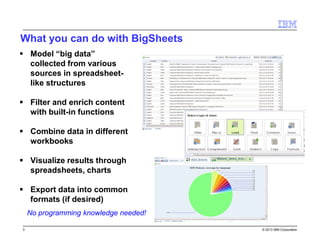
What you can do with BigSheets
Model “big data”
collected from various
sources in spreadsheetlike structures
Filter and enrich content
with built-in functions
Combine data in different
workbooks
Visualize results through
spreadsheets, charts
Export data into common
formats (if desired)
No programming knowledge needed!
3

© 2013 IBM Corporation
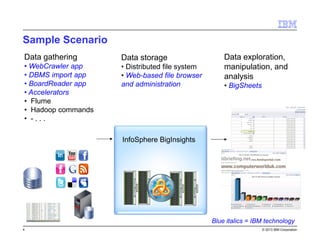
Sample Scenario
Data gathering

Data storage

• WebCrawler app
• DBMS import app
• BoardReader app
• Accelerators
• Flume
• Hadoop commands
• -...

• Distributed file system
• Web-based file browser
and administration

Data exploration,
manipulation, and
analysis
• BigSheets

InfoSphere BigInsights

Blue italics = IBM technology
4

© 2013 IBM Corporation
Technology

5

© 2013 IBM Corporation
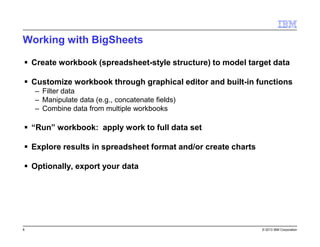
Working with BigSheets
Create workbook (spreadsheet-style structure) to model target data
Customize workbook through graphical editor and built-in functions
– Filter data
– Manipulate data (e.g., concatenate fields)
– Combine data from multiple workbooks

“Run” workbook: apply work to full data set
Explore results in spreadsheet format and/or create charts
Optionally, export your data

6

© 2013 IBM Corporation
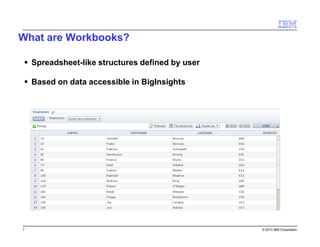
What are Workbooks?
Spreadsheet-like structures defined by user
Based on data accessible in BigInsights

7

© 2013 IBM Corporation
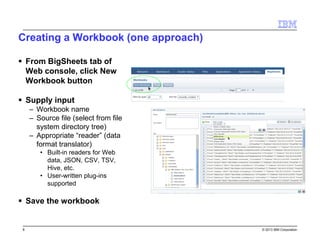
Creating a Workbook (one approach)
From BigSheets tab of
Web console, click New
Workbook button
Supply input
– Workbook name
– Source file (select from file
system directory tree)
– Appropriate “reader” (data
format translator)
• Built-in readers for Web
data, JSON, CSV, TSV,
Hive, etc.
• User-written plug-ins
supported

Save the workbook

8

© 2013 IBM Corporation
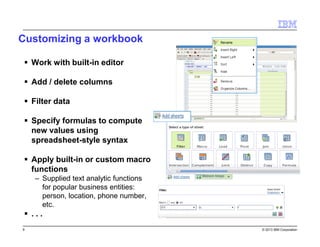
Customizing a workbook
Work with built-in editor
Add / delete columns
Filter data
Specify formulas to compute
new values using
spreadsheet-style syntax
Apply built-in or custom macro
functions
– Supplied text analytic functions
for popular business entities:
person, location, phone number,
etc.

...
9

© 2013 IBM Corporation
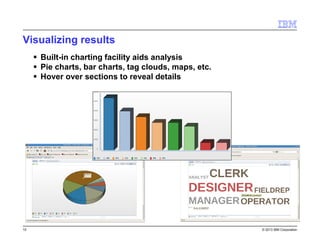
Visualizing results
Built-in charting facility aids analysis
Pie charts, bar charts, tag clouds, maps, etc.
Hover over sections to reveal details

10

© 2013 IBM Corporation
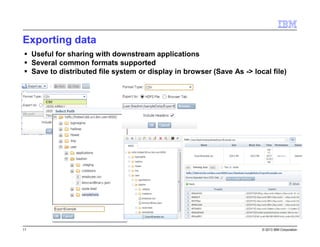
Exporting data
Useful for sharing with downstream applications
Several common formats supported
Save to distributed file system or display in browser (Save As -> local file)

11

© 2013 IBM Corporation
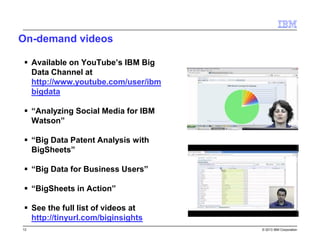
On-demand videos
Available on YouTube’s IBM Big
Data Channel at
http://www.youtube.com/user/ibm
bigdata
“Analyzing Social Media for IBM
Watson”
“Big Data Patent Analysis with
BigSheets”
“Big Data for Business Users”
“BigSheets in Action”
See the full list of videos at
http://tinyurl.com/biginsights
12

© 2013 IBM Corporation
Supplemental

13

© 2013 IBM Corporation
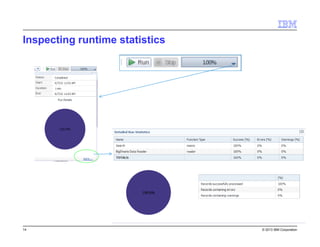
Inspecting runtime statistics

14

© 2013 IBM Corporation
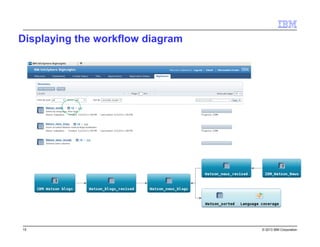
Displaying the workflow diagram

15

© 2013 IBM Corporation
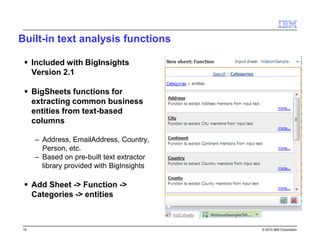
Built-in text analysis functions
Included with BigInsights
Version 2.1
BigSheets functions for
extracting common business
entities from text-based
columns
– Address, EmailAddress, Country,
Person, etc.
– Based on pre-built text extractor
library provided with BigInsights

Add Sheet -> Function ->
Categories -> entities

16

© 2013 IBM Corporation

Big Data: Technical Introduction to BigSheets for InfoSphere BigInsights

  • 1.
    Introducing BigSheets Spreadsheet-Style Tool forIBM InfoSphere BigInsights Cynthia M. Saracco Senior Solution Architect IBM Silicon Valley Lab
  • 2.
    What is BigSheets? Browser-basedanalytics tool for business users. Why BigSheets? How can BigSheets help? Business users need a non-technical approach for analyzing Big Data. Translating untapped data into actionable business insights is a common requirement. Built-in “readers” can work with data in several common formats (JSON, CSV, TSV, …) Visualizing and drilling down into enterprise and Web data promotes new business intelligence. 2 Spreadsheet-like interface enables business users to gather and analyze data easily. Users can combine and explore various types of data to identify “hidden” insights. © 2013 IBM Corporation
  • 3.
    What you cando with BigSheets Model “big data” collected from various sources in spreadsheetlike structures Filter and enrich content with built-in functions Combine data in different workbooks Visualize results through spreadsheets, charts Export data into common formats (if desired) No programming knowledge needed! 3 © 2013 IBM Corporation
  • 4.
    Sample Scenario Data gathering Datastorage • WebCrawler app • DBMS import app • BoardReader app • Accelerators • Flume • Hadoop commands • -... • Distributed file system • Web-based file browser and administration Data exploration, manipulation, and analysis • BigSheets InfoSphere BigInsights Blue italics = IBM technology 4 © 2013 IBM Corporation
  • 5.
  • 6.
    Working with BigSheets Createworkbook (spreadsheet-style structure) to model target data Customize workbook through graphical editor and built-in functions – Filter data – Manipulate data (e.g., concatenate fields) – Combine data from multiple workbooks “Run” workbook: apply work to full data set Explore results in spreadsheet format and/or create charts Optionally, export your data 6 © 2013 IBM Corporation
  • 7.
    What are Workbooks? Spreadsheet-likestructures defined by user Based on data accessible in BigInsights 7 © 2013 IBM Corporation
  • 8.
    Creating a Workbook(one approach) From BigSheets tab of Web console, click New Workbook button Supply input – Workbook name – Source file (select from file system directory tree) – Appropriate “reader” (data format translator) • Built-in readers for Web data, JSON, CSV, TSV, Hive, etc. • User-written plug-ins supported Save the workbook 8 © 2013 IBM Corporation
  • 9.
    Customizing a workbook Workwith built-in editor Add / delete columns Filter data Specify formulas to compute new values using spreadsheet-style syntax Apply built-in or custom macro functions – Supplied text analytic functions for popular business entities: person, location, phone number, etc. ... 9 © 2013 IBM Corporation
  • 10.
    Visualizing results Built-in chartingfacility aids analysis Pie charts, bar charts, tag clouds, maps, etc. Hover over sections to reveal details 10 © 2013 IBM Corporation
  • 11.
    Exporting data Useful forsharing with downstream applications Several common formats supported Save to distributed file system or display in browser (Save As -> local file) 11 © 2013 IBM Corporation
  • 12.
    On-demand videos Available onYouTube’s IBM Big Data Channel at http://www.youtube.com/user/ibm bigdata “Analyzing Social Media for IBM Watson” “Big Data Patent Analysis with BigSheets” “Big Data for Business Users” “BigSheets in Action” See the full list of videos at http://tinyurl.com/biginsights 12 © 2013 IBM Corporation
  • 13.
  • 14.
  • 15.
    Displaying the workflowdiagram 15 © 2013 IBM Corporation
  • 16.
    Built-in text analysisfunctions Included with BigInsights Version 2.1 BigSheets functions for extracting common business entities from text-based columns – Address, EmailAddress, Country, Person, etc. – Based on pre-built text extractor library provided with BigInsights Add Sheet -> Function -> Categories -> entities 16 © 2013 IBM Corporation