In design software evidence
Jodie foster-pilia
Step 1) How to open a new file
1)

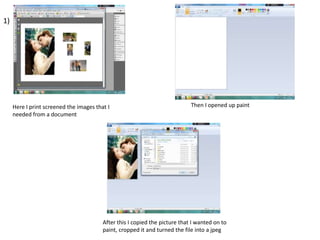
Here I print screened the images that I
needed from a document

Then I opened up paint

After this I copied the picture that I wanted on to
paint, cropped it and turned the file into a jpeg
Step 2) placing images
2)

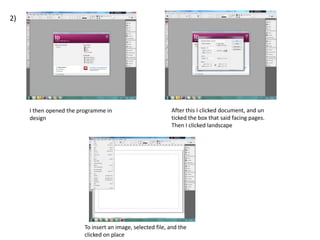
I then opened the programme in
design

After this I clicked document, and un
ticked the box that said facing pages.
Then I clicked landscape

To insert an image, selected file, and the
clicked on place
Step 3)Creating graphics
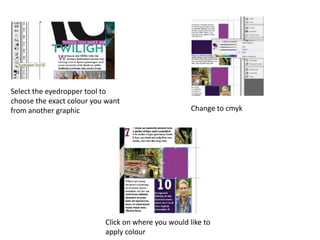
Select the eyedropper tool to
choose the exact colour you want
from another graphic

Change to cmyk

Click on where you would like to
apply colour
Step 4) creating stand first
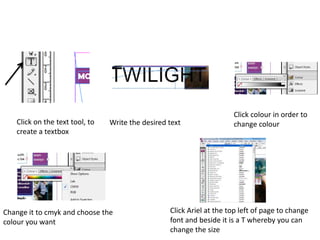
Click on the text tool, to
create a textbox

Write the desired text

Change it to cmyk and choose the
colour you want

Click colour in order to
change colour

Click Ariel at the top left of page to change
font and beside it is a T whereby you can
change the size

In design software evidence

  • 1.
    In design softwareevidence Jodie foster-pilia
  • 2.
    Step 1) Howto open a new file
  • 3.
    1) Here I printscreened the images that I needed from a document Then I opened up paint After this I copied the picture that I wanted on to paint, cropped it and turned the file into a jpeg
  • 4.
  • 5.
    2) I then openedthe programme in design After this I clicked document, and un ticked the box that said facing pages. Then I clicked landscape To insert an image, selected file, and the clicked on place
  • 6.
  • 7.
    Select the eyedroppertool to choose the exact colour you want from another graphic Change to cmyk Click on where you would like to apply colour
  • 8.
    Step 4) creatingstand first
  • 9.
    Click on thetext tool, to create a textbox Write the desired text Change it to cmyk and choose the colour you want Click colour in order to change colour Click Ariel at the top left of page to change font and beside it is a T whereby you can change the size