БорсукАлександр,
Архитектор инфраструктурных решений
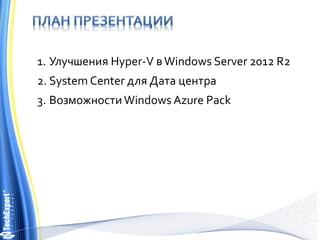
1. Улучшения Hyper-V вWindows Server 2012 R2
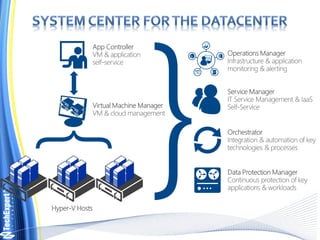
2. System Center для Дата центра
3. ВозможностиWindows Azure Pack
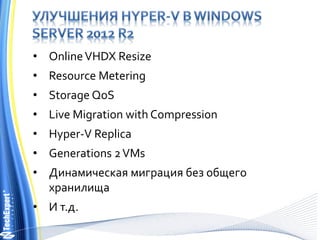
• OnlineVHDX Resize
• Resource Metering
• Storage QoS
• Live Migration with Compression
• Hyper-V Replica
• Generations 2VMs
• Динамическая миграция без общего
хранилища
• И т.д.
{
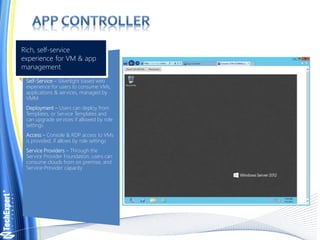
Self-Service – Silverlight based web
experience for users to consume VMs,
applications & services, managed by
VMM
Deployment – Users can deploy from
Templates, or Service Templates and
can upgrade services if allowed by role
settings
Access – Console & RDP access to VMs
is provided, if allows by role settings
Service Providers – Through the
Service Provider Foundation, users can
consume clouds from on premise, and
Service-Provider capacity
Rich, self-service
experience for VM & app
management
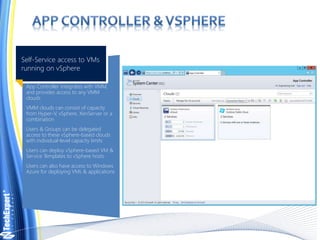
App Controller integrates with VMM,
and provides access to any VMM
clouds
VMM clouds can consist of capacity
from Hyper-V, vSphere, XenServer or a
combination
Users & Groups can be delegated
access to these vSphere-based clouds
with individual-level capacity limits
Users can deploy vSphere-based VM &
Service Templates to vSphere hosts
Users can also have access to Windows
Azure for deploying VMs & applications
Self-Service access to VMs
running on vSphere
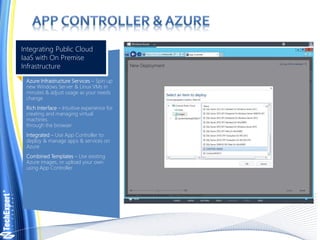
Azure Infrastructure Services – Spin up
new Windows Server & Linux VMs in
minutes & adjust usage as your needs
change
Rich Interface – Intuitive experience for
creating and managing virtual
machines
through the browser
Integrated – Use App Controller to
deploy & manage apps & services on
Azure
Combined Templates – Use existing
Azure images, or upload your own
using App Controller
Integrating Public Cloud
IaaS with On Premise
Infrastructure
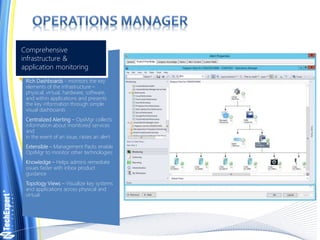
Rich Dashboards - monitors the key
elements of the infrastructure –
physical, virtual, hardware, software,
and within applications and presents
the key information through simple
visual dashboards
Centralized Alerting – OpsMgr collects
information about monitored services
and
in the event of an issue, raises an alert
Extensible – Management Packs enable
OpsMgr to monitor other technologies
Knowledge – Helps admins remediate
issues faster with inbox product
guidance
Topology Views – Visualize key systems
and applications across physical and
virtual
Comprehensive
infrastructure &
application monitoring
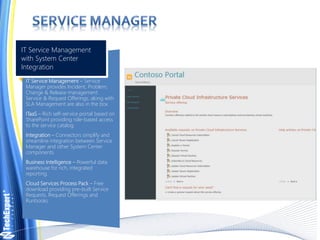
IT Service Management – Service
Manager provides Incident, Problem,
Change & Release management.
Service & Request Offerings, along with
SLA Management are also in the box
ITaaS – Rich self-service portal based on
SharePoint providing role-based access
to the service catalog.
Integration – Connectors simplify and
streamline integration between Service
Manager and other System Center
components.
Business Intelligence – Powerful data
warehouse for rich, integrated
reporting.
Cloud Services Process Pack – Free
download providing pre-built Service
Requests, Request Offerings and
Runbooks
IT Service Management
with System Center
Integration
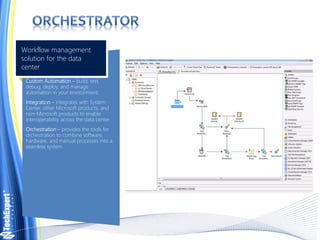
Custom Automation – build, test,
debug, deploy, and manage
automation in your environment.
Integration – integrates with System
Center, other Microsoft products, and
non-Microsoft products to enable
interoperability across the data center
Orchestration – provides the tools for
orchestration to combine software,
hardware, and manual processes into a
seamless system
Workflow management
solution for the data
center
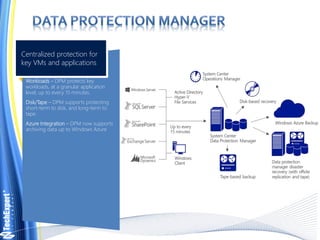
Workloads – DPM protects key
workloads, at a granular application
level, up to every 15 minutes.
Disk/Tape – DPM supports protecting
short-term to disk, and long-term to
tape.
Azure Integration – DPM now supports
archiving data up to Windows Azure
Centralized protection for
key VMs and applications
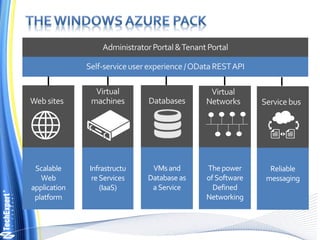
Scalable
Web
application
platform
Infrastructu
re Services
(IaaS)
Thepower
of Software
Defined
Networking
VMsand
Database as
aService
Reliable
messaging
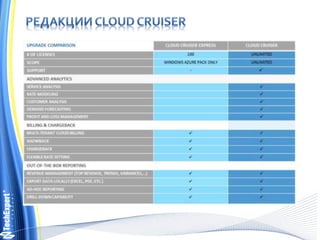
• статистика использования ресурсов, возможности
интеграции биллинга облачных систем с учетными
системами 1С, Dynamix AX, SAP --> Необходим Cloud
Cruiser Express
• отчеты о мгновенных используемых ресурсах и
доступности(масштабирования) ресурсов или
средствами ваших систем и/или использования для
этого средств BI SharePoint и др;
• прогнозирование необходимых ресурсов требуемых
через какое то время( месяц, квартал, полугодие, год)
на основе данных расходования ресурсов(Capacity
Management) --> Необходим Cloud Cruiser
Построение частного облака на примере использования Windows Server  2012R2 и семейства продуктов System Center 2012 R2

Построение частного облака на примере использования Windows Server 2012R2 и семейства продуктов System Center 2012 R2

  • 1.
  • 2.
    1. Улучшения Hyper-VвWindows Server 2012 R2 2. System Center для Дата центра 3. ВозможностиWindows Azure Pack
  • 3.
    • OnlineVHDX Resize •Resource Metering • Storage QoS • Live Migration with Compression • Hyper-V Replica • Generations 2VMs • Динамическая миграция без общего хранилища • И т.д.
  • 4.
  • 7.
    Self-Service – Silverlightbased web experience for users to consume VMs, applications & services, managed by VMM Deployment – Users can deploy from Templates, or Service Templates and can upgrade services if allowed by role settings Access – Console & RDP access to VMs is provided, if allows by role settings Service Providers – Through the Service Provider Foundation, users can consume clouds from on premise, and Service-Provider capacity Rich, self-service experience for VM & app management
  • 8.
    App Controller integrateswith VMM, and provides access to any VMM clouds VMM clouds can consist of capacity from Hyper-V, vSphere, XenServer or a combination Users & Groups can be delegated access to these vSphere-based clouds with individual-level capacity limits Users can deploy vSphere-based VM & Service Templates to vSphere hosts Users can also have access to Windows Azure for deploying VMs & applications Self-Service access to VMs running on vSphere
  • 9.
    Azure Infrastructure Services– Spin up new Windows Server & Linux VMs in minutes & adjust usage as your needs change Rich Interface – Intuitive experience for creating and managing virtual machines through the browser Integrated – Use App Controller to deploy & manage apps & services on Azure Combined Templates – Use existing Azure images, or upload your own using App Controller Integrating Public Cloud IaaS with On Premise Infrastructure
  • 10.
    Rich Dashboards -monitors the key elements of the infrastructure – physical, virtual, hardware, software, and within applications and presents the key information through simple visual dashboards Centralized Alerting – OpsMgr collects information about monitored services and in the event of an issue, raises an alert Extensible – Management Packs enable OpsMgr to monitor other technologies Knowledge – Helps admins remediate issues faster with inbox product guidance Topology Views – Visualize key systems and applications across physical and virtual Comprehensive infrastructure & application monitoring
  • 11.
    IT Service Management– Service Manager provides Incident, Problem, Change & Release management. Service & Request Offerings, along with SLA Management are also in the box ITaaS – Rich self-service portal based on SharePoint providing role-based access to the service catalog. Integration – Connectors simplify and streamline integration between Service Manager and other System Center components. Business Intelligence – Powerful data warehouse for rich, integrated reporting. Cloud Services Process Pack – Free download providing pre-built Service Requests, Request Offerings and Runbooks IT Service Management with System Center Integration
  • 12.
    Custom Automation –build, test, debug, deploy, and manage automation in your environment. Integration – integrates with System Center, other Microsoft products, and non-Microsoft products to enable interoperability across the data center Orchestration – provides the tools for orchestration to combine software, hardware, and manual processes into a seamless system Workflow management solution for the data center
  • 13.
    Workloads – DPMprotects key workloads, at a granular application level, up to every 15 minutes. Disk/Tape – DPM supports protecting short-term to disk, and long-term to tape. Azure Integration – DPM now supports archiving data up to Windows Azure Centralized protection for key VMs and applications
  • 14.
  • 15.
    • статистика использованияресурсов, возможности интеграции биллинга облачных систем с учетными системами 1С, Dynamix AX, SAP --> Необходим Cloud Cruiser Express • отчеты о мгновенных используемых ресурсах и доступности(масштабирования) ресурсов или средствами ваших систем и/или использования для этого средств BI SharePoint и др; • прогнозирование необходимых ресурсов требуемых через какое то время( месяц, квартал, полугодие, год) на основе данных расходования ресурсов(Capacity Management) --> Необходим Cloud Cruiser