ITIL FOUNDATION
Course objectives See value of IT Service Management Increase overall understanding of processes and their relationships Gain understanding of ITIL concepts Provide a common Service Management vocabulary
Agenda - I Introduction Configuration Management Service Desk Incident Management Problem Management Change Management Release Management
Agenda - II Capacity Management Availability Management IT Service Continuity Management Financial Management for IT Services Service Level Management Exam Preparation
Today’s reality Organizations increasingly dependent on IT Higher visibility of failures More specific requirements Increased complexity of IT-infrastructure Pressure to initiate (fair) charging for IT-services Increasing globalization   more competition
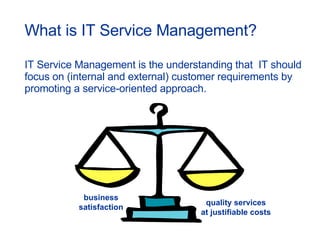
What is IT Service Management? IT Service Management is t he understanding that  IT should focus on (internal and external) customer requirements by promoting a service-oriented approach. business satisfaction quality services at justifiable costs
Benefits of IT Service Management Higher reliability of IT-service provision More detailed specification of requirements Better understanding of true capabilities of IT Information available to support decision making Greater control of IT-assets
What is ITIL? I nformation  T echnology  I nfrastructure  L ibrary ITIL is a means to help IT-organizations provide customer focused IT-services using an approach based upon processes to meet agreed and specified levels of service.
ITIL History Developed in the 1980's, ITIL has become the world- wide de facto standard in Service Management. Starting  as a guide for UK government, it has proved to be useful  to organizations in all sectors through its adoption by  many Service Management companies as the  basis   for  consultancy, education and software tools support.
ITIL ethos Collection of industry best practices World-wide de-facto standard Data owned by OGC but content is public domain International recognized certifications Continuous improvement via itSMF
40 Multiple choice questions closed book examination 60 minutes allocated time 26 correct answers to pass (65%) The ITIL Foundation certificate is a prerequisite for further  IT Service Management courses. Recognized examination
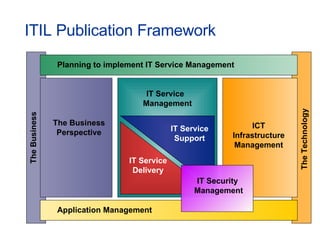
ITIL Publication Framework The Business The Business Perspective The Technology IT Service  Management Planning to implement IT Service Management Application Management ICT Infrastructure Management IT Service Delivery IT Service Support IT Security  Management
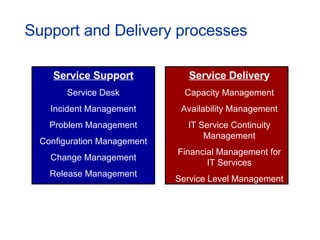
Support and Delivery processes Service Su pp ort Service Desk Incident Management Problem Management Configuration Management Change Management Release Management Service Deliver y Capacity Management Availability Management IT Service Continuity Management Financial Management for IT Services Service Level Management
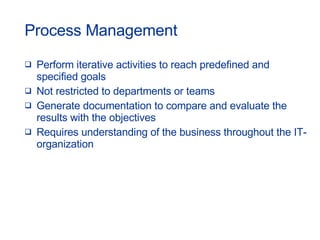
Perform iterative activities to reach predefined and specified goals Not restricted to departments or teams Generate documentation to compare and evaluate the results with the objectives Requires understanding of the business throughout the IT-organization Process Management
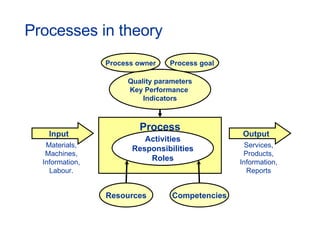
Processes in theory Input Output Process Activities Responsibilities Roles Quality parameters Key Performance  Indicators Resources Competencies Process goal Process owner Materials, Machines, Information, Labour. Services, Products, Information, Reports
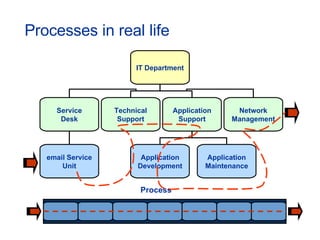
Processes in real life Process IT Department email Service Unit Service Desk Technical Support Network Management Application Support Application Development Application Maintenance
Some best practices Pay sufficient attention to (allocation of) roles Define tasks, responsibilities and authorities Ensure inputs and outputs are established Avoid process by-passing Do not reinvent the wheel Choose appropriate Project Management methodology DO NOT FORGET COMMUNICATION!!!
ITIL & IT-Governance British Standard Institute (BS15000 & BS7799) Deming (Plan, Do, Check, Act) Business Continuity Management Project Management Sarbanes Oxley ISO COBIT CMM Six Sigma ITIL goes mainstream in 2005 and widespread adoption will continue through 2008… (source: Forrester Research)
Configuration Management
Configuration Management - mission To provide a logical model of the IT-infrastructure and/or IT-services by identifying, controlling, maintaining and verifying the components used.
Some responsibilities Account for all IT-assets and configurations Provide accurate information on configurations to support all the other Service Management processes Provide a sound basis for Incident, Problem, Change and Release Management  Verify the configuration records against the actual IT-infrastructure and correct any exceptions
Definitions Components within the IT-infrastructure are referred to as  Configuration Items  (CI’s) Details of/on CI’s are stored in the  Configuration Management DataBase  (CMDB) from which queries about the IT-infrastructure can be answered; this data can be stored in multiple locations; e.g. electronic (relational) databases, books
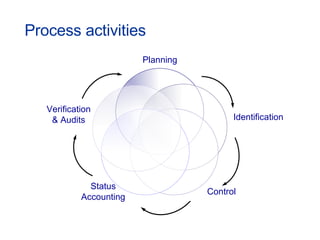
Process activities Planning Identification Control Status Accounting Verification &   Audits
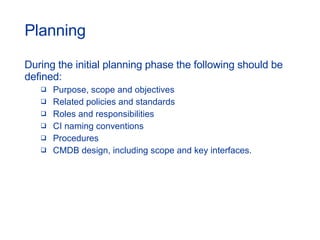
Planning During the initial planning phase the following should be defined: Purpose, scope and objectives Related policies and standards  Roles and responsibilities  CI naming conventions  Procedures  CMDB design, including scope and key interfaces.
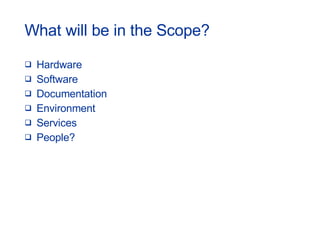
What will be in the Scope? Hardware Software Documentation Environment Services People?
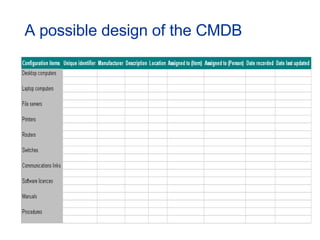
A possible design of the CMDB
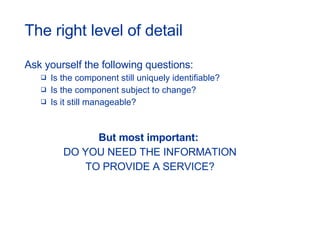
The right level of detail Ask yourself the following questions: Is the component still uniquely identifiable? Is the component subject to change? Is it still manageable? But most important:  DO YOU NEED THE INFORMATION TO PROVIDE A SERVICE?
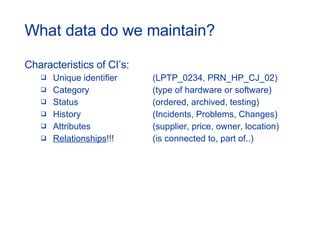
What data do we maintain? Characteristics of CI’s: Unique identifier (LPTP_0234, PRN_HP_CJ_02) Category (type of hardware or software) Status (ordered, archived, testing) History (Incidents, Problems, Changes) Attributes (supplier, price, owner, location) Relationships !!! (is connected to, part of..)
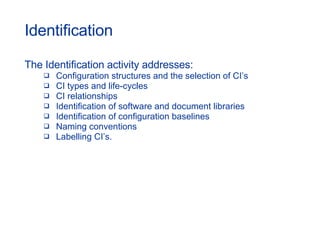
Identification The Identification activity addresses: Configuration structures and the selection of CI’s CI types and life-cycles CI relationships Identification of software and document libraries Identification of configuration baselines Naming conventions Labelling CI’s.
The identifier of a CI The identifier of a CI should be: Unique Taking existing references within the organization into account Clearly visible Ideally short and meaningful.
Configuration Baselines A  Configuration Baseline  is the configuration of a product or system established at a specific point in time, which captures both the structure and details of that product or system, and enables that product or system to be rebuilt at a later date.  Configuration baselines and approved, implemented Changes to those baselines should  together constitute the currently approved configuration.
Control The Control activity organizes:  Registration of new CI’s and versions Updating of CI records  Archiving of CI’s and their associated records  Protection of the integrity of configurations Updating of CMDB after periodic checking. To enable full control over your CI’s, updating of records must only be executed with proper approval of Change Management!
Status Accounting Status reports should be produced on a regular basis, listing, for all CI’s under control, their current version and history.  Status Accounting reports can be used to establish Baselines and enables changes between Baselines and Releases to be traceable.
Verification & Audit Before implementation into the live environment, new Releases, builds, equipment and standards should be verified against the contracted or specified requirements. Physical configuration audits should be carried out to verify that the 'as-built' configuration of a CI conforms to its 'as-planned' configuration and its associated documents.
Some best practices Address tool selection as early on as possible in the planning cycle Make use of discovery tools and/or inventory systems  Ensure no-one bypasses Change Management  “ Maximize control with a minimum of records"
Service Desk
Service Desk - mission To minimize disruptions to the business, due to failures in the provision of IT-services, by detecting, recording and  coordinating the activities required to restore these services.
Some responsibilities Act as the Single Point of Contact (SPoC) for users of IT Restore the service whenever possible Maximize service availability Manage ALL requests for support to a closure Be aware of the needs and requirements of the Customer(s)
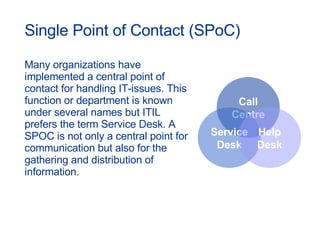
Single Point of Contact (SPoC) Many organizations have implemented a central point of contact for handling IT-issues. This function or department is known under several names but ITIL prefers the term Service Desk. A SPOC is not only a central point for communication but also for the  gathering and distribution of information. Call Centre Service Desk Help Desk
Different ways to organize Call Centre : main emphasis on professionally handling large call volumes of telephone-based communication Help Desk : primary purpose is to manage, co-ordinate and resolve failures as quickly as possible and to ensure that nothing is lost, forgotten or ignored Service Desk : extends the range of services, allowing business processes to be integrated into the Service Management infrastructure
Some characteristics Single Point of Contact (SPoC) Log of all reported issues, numbered and time-stamped Use of diagnostic scripts and other aids Automatic escalation procedures Communication with support staff (2 nd  & 3 rd  level) Interface to SLA’s Regular progress reporting
Service Desk implementation Staff – correct numbers, profile, skills Define effectiveness metrics (KPI’s) Select a suitable structure: Local Service Desk Central Service Desk Virtual Service Desk.
Function or process Some activities of the Service Support and Service Delivery processes are carried out at the Service Desk The management of a Service Desk is more a people issue than a process In many organizations, Service Desks are separate functional entities or departments For these reasons,  ITIL calls the Service Desk a  FUNCTION
Additional Information According to Genesys (manufacturer of software) 84% of people that contacted a Service Desk had a negative experience, 56% therefore changed supplier Service seems to be twice as important as a good product More information can be found at: http://www.helpdeskinst.com
Incident Management
Incident Management - mission To restore normal service operation as quickly as possible and minimize the adverse impact on business operations, thus ensuring the best possible levels of service.
Ensure optimal use of resources to support the organization during service failures Provide effective communication on the progress of  reported failures with all stakeholders Some responsibilities
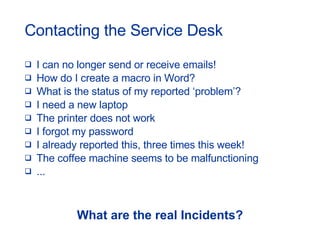
Contacting the Service Desk I can no longer send or receive emails! How do I create a macro in Word? What is the status of my reported ‘problem’? I need a new laptop The printer does not work I forgot my password I already reported this, three times this week! The coffee machine seems to be malfunctioning ... What are the real Incidents?
An Incident is any event which is not part of the standard operation of a service and which causes,  or may cause , an interruption to, or a reduction in, the quality of that service. What is an Incident?
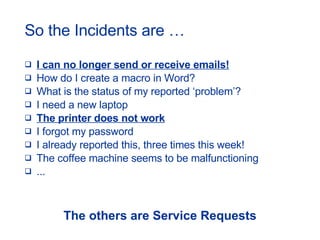
So the Incidents are … I can no longer send or receive emails! How do I create a macro in Word? What is the status of my reported ‘problem’? I need a new laptop The printer does not work I forgot my password I already reported this, three times this week! The coffee machine seems to be malfunctioning ... The others are Service Requests
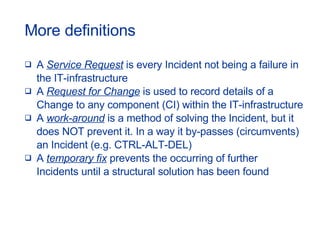
More definitions A  Service Request  is every Incident not being a failure in  the IT-infrastructure A  Request for Change  is used to record details of a  Change to any component (CI) within the IT-infrastructure A  work-around  is a method of solving the Incident, but it  does NOT prevent it. In a way it by-passes (circumvents)  an Incident (e.g. CTRL-ALT-DEL) A  temporary fix  prevents the occurring of further  Incidents until a structural solution has been found
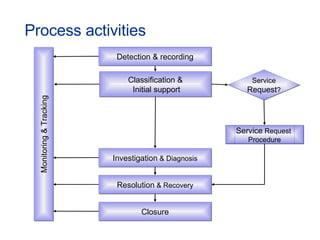
Process activities  Detection & recording Classification & Initial support Investigation  & Diagnosis Resolution  & Recovery Closure Service  Request  Procedure Service Request ? Monitoring & Tracking
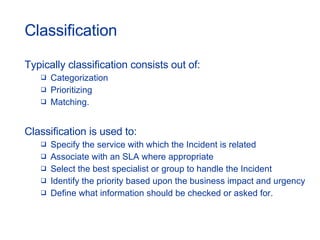
Classification Typically classification consists out of: Categorization Prioritizing Matching. Classification is used to:  Specify the service with which the Incident is related  Associate with an SLA where appropriate  Select the best specialist or group to handle the Incident  Identify the priority based upon the business impact and urgency Define what information should be checked or asked for.
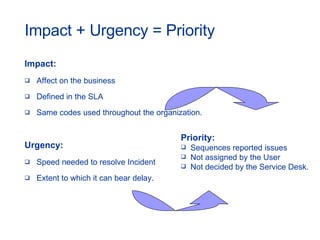
Impact + Urgency = Priority Impact: Affect on the business Defined in the SLA Same codes used throughout the organization. Urgency: Speed needed to resolve Incident Extent to which it can bear delay. Priority: Sequences reported issues Not assigned by the User Not decided by the Service Desk.
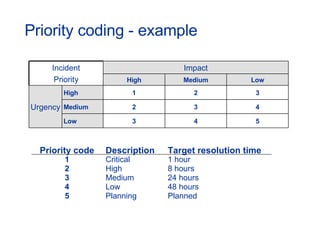
Priority coding - example Priority code Description Target resolution time 1 Critical 1 hour 2 High 8 hours 3 Medium 24 hours 4 Low 48 hours 5 Planning Planned Incident Priority Impact High Medium Low Urgency High 1 2 3 Medium 2 3 4 Low 3 4 5
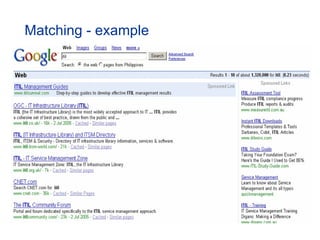
Incident Matching Matching is the activity whereby the Incident details are compared to knowledge that is already present in the organization. Successful matching could give access to proven resolution actions, and could therefore expedite the  resolution process.
Matching - example
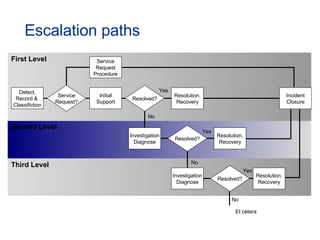
Escalation paths Service Request Procedure Detect, Record &  Classifiction Service Request? Initial Support Resolved? Resolution, Recovery Investigation Diagnose Resolved? Resolution, Recovery Investigation Diagnose Resolved? Resolution, Recovery Incident Closure Yes No Yes No Yes No Et cetera Third Level Second Level First Level
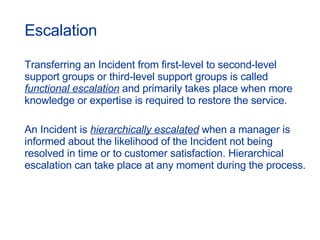
Escalation Transferring an Incident from first-level to second-level support groups or third-level support groups is called  functional escalation  and primarily takes place when more knowledge or expertise is required to restore the service. An Incident is  hierarchically escalated  when a manager is informed about the likelihood of the Incident not being resolved in time or to customer satisfaction. Hierarchical escalation can take place at any moment during the process.
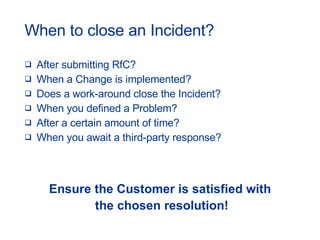
When to close an Incident? After submitting RfC? When a Change is implemented? Does a work-around close the Incident? When you defined a Problem? After a certain amount of time? When you await a third-party response? Ensure the Customer is satisfied with the chosen resolution!
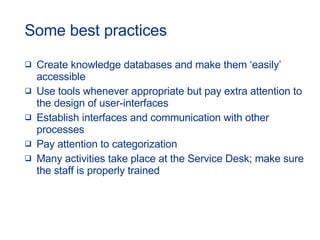
Some best practices Create knowledge databases and make them ‘easily’ accessible  Use tools whenever appropriate but pay extra attention to the design of user-interfaces Establish interfaces and communication with other processes Pay attention to categorization Many activities take place at the Service Desk; make sure the staff is properly trained
Problem Management
Problem Management - mission To minimize the adverse impact of Incidents and Problems on the business that are caused by failures within the IT-infrastructure, and to prevent  the recurrence of such failures.
Some responsibilities Ensure Problems are identified and resolved Minimize the impact of Problems and Incidents on the IT-service provision Ensure that the right level and number of resources are resolving specific Problems Provide information to Incident Management and the Service Desk
When is a Problem a Problem? Many criteria can be used to define a Problem: # of related Incidents Incident closed via workaround Major Incidents Information from third-parties An engineer with an excellent idea ……
Definitions Problem : The unknown root cause of one or more Incidents or potential Incidents  Error:   A condition that exists after the successful diagnosis of the root cause of a Problem when it is confirmed which CI is at fault Known Error:  Error + solution and/or workaround has been found The terms Error and Known Error are very often interchanged in everyday situations.
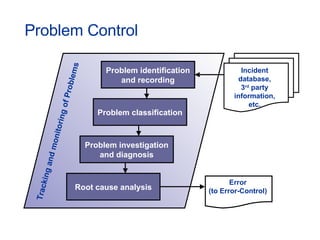
Problem Control Problem identification and recording Problem classification Problem investigation and diagnosis Root cause analysis Tracking and monitoring of Problems Incident database, 3 rd  party information, etc. Error (to Error-Control)
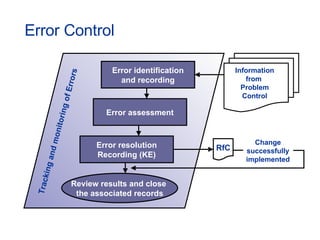
Error Control Error identification and recording Error assessment Error resolution Recording (KE) Tracking and monitoring of Errors Information from  Problem Control Review results and close  the associated records RfC Change successfully implemented
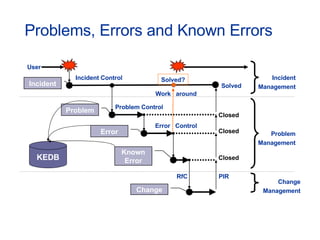
Problems, Errors and Known Errors RfC Incident Control Problem Control Solved? Solved Closed Closed User   Closed PIR Error  Control Work  around Incident Management Problem Management Change Management Problem Incident Error Known Error Change KEDB
Known Error DataBase Sometimes a system might be allowed to be released into the live environment even though (Known) Errors have been detected during testing. Problem Management needs to ensure any such (Known) Errors, and any resolutions, are recorded in the Known Error Database.
Proactive Problem Management Proactive Problem Management covers the activities aimed at identifying and resolving failures before they actually occur. These activities are: Trend analysis Targeting support/preventative action(s) Feed-back of information to relevant people.
Incident and Problem Management Often, the Incident Management registration is the basis for the definition of Problems. Also, information from Problem Management should be made available for Incident Matching.  However, keep in mind: Objectives are different Different skills/expertise required Time is less of an issue within Problem Management Activities carried out are different.
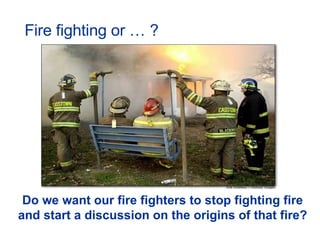
Fire fighting or … ? Do we want our fire fighters to stop fighting fire and start a discussion on the origins of that fire?
Some best practices Start with reactive Problem Management Try and separate Incident Management from Problem Management Make use of tools to detect (possible) trends Ensure a sound interface with Incident and Change Management exists
Change Management
Change Management - mission To manage all Changes that could impact the  ability to deliver (quality) IT-services; through a single, centralized process of approval, scheduling and control to ensure that the IT-infrastructure stays aligned to business requirements.
Some responsibilities Change Management is responsible for managing Change  processes involving: Hardware  Communications equipment and software  System software  ‘ Live' applications software  All documentation and procedures associated with the day-to-day operation, support and maintenance of live systems.
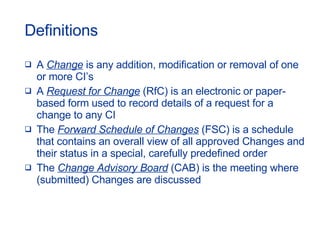
Definitions A  Change  is any addition, modification or removal of one or more CI’s A  Request for Change  (RfC) is an electronic or paper-based form used to record details of a request for a change to any CI The  Forward Schedule of Changes  (FSC) is a schedule that contains an overall view of all approved Changes and their status in a special, carefully predefined order  The  Change Advisory Board  (CAB) is the meeting where (submitted) Changes are discussed
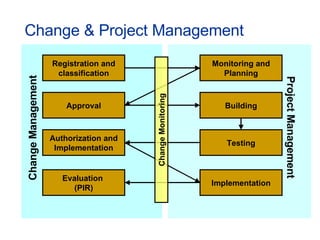
Change & Project Management Registration and classification Change Management Project Management Approval Authorization and Implementation Evaluation  (PIR) Monitoring and Planning Building Testing Implementation Change Monitoring
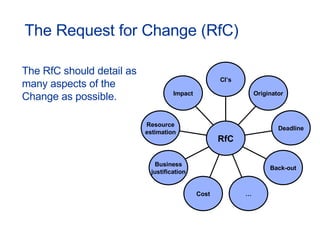
The Request for Change (RfC) The RfC should detail as many aspects of the Change as possible. Impact Resource estimation Business justification Cost … Back-out Deadline Originator CI’s RfC
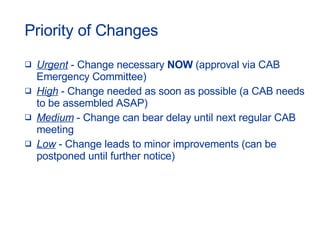
Priority of Changes Urgent  - Change necessary  NOW  (approval via CAB Emergency Committee) High  - Change needed as soon as possible (a CAB needs to be assembled ASAP) Medium  - Change can bear delay until next regular CAB meeting Low  - Change leads to minor improvements (can be postponed until further notice)
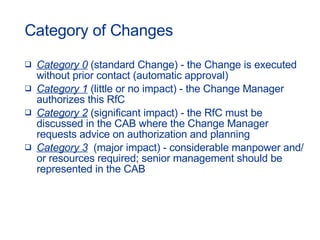
Category of Changes Category 0  (standard Change) - the Change is executed without prior contact (automatic approval) Category 1  (little or no impact) - the Change Manager authorizes this RfC Category 2  (significant impact) - the RfC must be discussed in the CAB where the Change Manager requests advice on authorization and planning Category 3   (major impact) - considerable manpower and/or resources required; senior management should be represented in the CAB
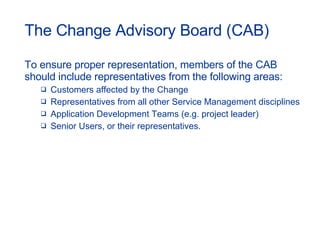
The Change Advisory Board (CAB) To ensure proper representation, members of the CAB should include representatives from the following areas: Customers affected by the Change Representatives from all other Service Management disciplines Application Development Teams (e.g. project leader) Senior Users, or their representatives.
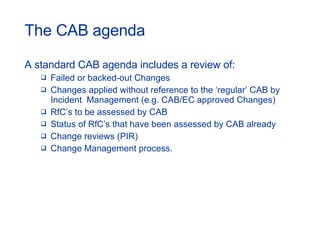
The CAB agenda A standard CAB agenda includes a review of: Failed or backed-out Changes Changes applied without reference to the ‘regular’ CAB by Incident  Management (e.g. CAB/EC approved Changes) RfC’s to be assessed by CAB Status of RfC’s that have been assessed by CAB already Change reviews (PIR) Change Management process.
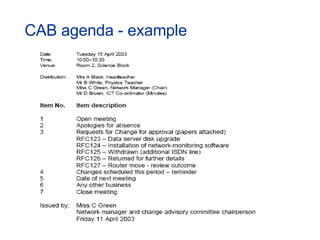
CAB agenda - example
Approval processes There are three principal approval processes: Financial approval  (indicated costs are within budgetary limits or  cost-benefit criteria are met) Technical approval  (assurance that the Change is feasible and sensible and can be performed without serious interruptions to the business) Customer approval  (to ensure that business managers are satisfied with the  proposals and accept the impact (if any) on their operations).
Some best practices Be prepared for dealing with Urgent Changes Integrate with Configuration and Release Management Ensure management commitment is present and let them set the example Choose appropriate Project Management methodologies (e.g. PMBOK, PRINCE2)
Release Management
Release Management - mission To take a holistic view of a Change to an IT-service and to ensure that all aspects of a Release, both technical and non-technical, are considered.
Some responsibilities Communicate Changes in CI’s to Configuration Management Physical distribution and installation of Changes Ensuring that only correctly released, tested and authorized CI’s are used Physical storage of software and hardware components
What is a Release? A Release consists of new or changed software and/or  hardware required to implement approved Changes.  Releases are divided into: Minor software Releases and hardware upgrades Major software Releases and hardware upgrades Emergency software and hardware fixes.
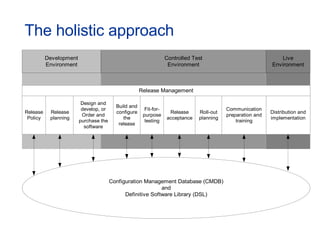
The holistic approach
The Release Policy A Release Policy should specify: Release naming and numbering conventions  A definition of major and minor Releases, plus a policy on issuing emergency Releases  Direction on the frequency of Releases Expected deliverables for Releases (e.g. installation instructions and Release notes)  Guidance as to how and where Releases should be documented (e.g. which tool to use and how)  The policy on the production of back-out/roll-back plans.
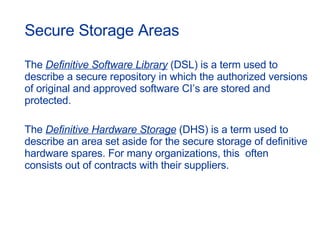
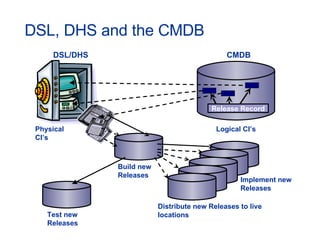
Secure Storage Areas The  Definitive Software Library  (DSL) is a term used to describe a secure repository in which the authorized versions of original and approved software CI’s are stored and protected. The  Definitive Hardware Storage  (DHS) is a term used to describe an area set aside for the secure storage of definitive hardware spares. For many organizations, this  often consists out of contracts with their suppliers.
DSL, DHS and the CMDB DSL/DHS Physical CI’s CMDB Logical CI’s Release Record Build new Releases Test new Releases Distribute new Releases to live locations Implement new Releases
Some best practices Don’t separate Development and Operations Seek alignment to Change and Configuration Management procedures Create test environments that represent the live hardware and software environments as closely as possible Take back-out plans seriously, even when history shows they are not used Allocate sufficient resources to communication, testing, documentation and training
Capacity Management
Capacity Management - mission To ensure that sufficient and cost justifiable capacity of IT (resources) is in place and that it is matched to the current and future identified needs of the business.
Some responsibilities Monitor performance and throughput of IT-services Initiate tuning activities to make the most efficient use of existing resources  Understand the demands currently being made for IT-resources and produce forecasts for future requirements
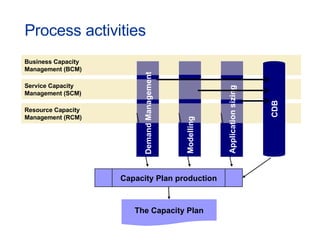
Process activities Business Capacity Management (BCM) Service Capacity Management (SCM) Resource Capacity Management (RCM) CDB Capacity Plan production The Capacity Plan Application sizing Demand Management Modelling
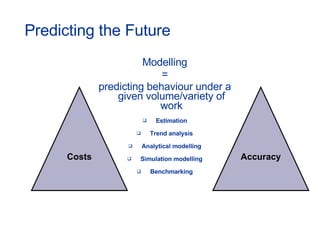
Predicting the Future Modelling = predicting behaviour under a given volume/variety of work Estimation Trend analysis Analytical modelling Simulation modelling Benchmarking Costs Accuracy
Application Sizing Application Sizing is the prediction of the consequences of new and/or changed applications on: Service Levels Resources Costs Existing applications.
The Capacity DataBase Capacity Management collects data from a variety of (distributed) hardware platforms and software applications. Data stored in a CDB could include: Service data from SLA’s Business data from business plans  Technical data Financial data Utilization data.
The Capacity Plan The Capacity Plan documents the current levels of resource utilization and service performance, and forecasts the future requirements for resources that underpin the business activities.
Some best practices Create interfaces with Availability, Financial and Change Management Do not rely too much on third-party statistics Ensure business expertise is available, especially for forecasting purposes Keep your overall Capacity Plan reviews and updates in line with budgetary cycles
Availability Management
Availability Management - mission To optimize the capability of the IT-infrastructure, services and supporting organization to deliver effective and sustained levels of availability that enable the business to satisfy its objectives.
Some responsibilities  Determine requirements from the business  Formulate Availability and Recovery design criteria  Determine the Vital Business Functions  Define targets, monitoring and reporting for Availability, Reliability and Maintainability of CI’s Produce and maintain an Availability Plan
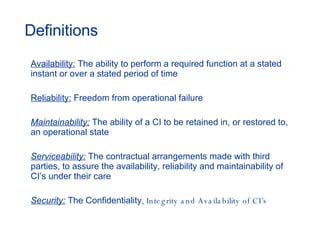
Definitions Availability:  The ability to perform a required function at a stated instant or over a stated period of time Reliability:  Freedom from operational failure Maintainability:  The ability of a CI to be retained in, or restored to, an operational state Serviceability:  The contractual arrangements made with third parties, to assure the availability, reliability and maintainability of CI’s under their care Security:  The Confidentiality , Integrity and Availability of CI’s
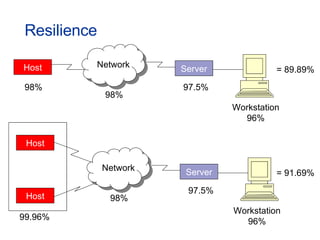
Resilience Server Network Host = 89.89% 98% 98% 97.5% Workstation 96% Server Network Host = 91.69% 99.96% 98% 97.5% Workstation 96% Host
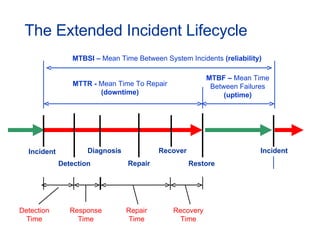
The Extended Incident Lifecycle Incident Recover Diagnosis Incident Restore MTBF –  Mean Time Between Failures  (uptime) Response Time Detection Time MTBSI –  Mean Time Between System Incidents  (reliability) MTTR -  Mean Time To Repair  (downtime) Repair Detection Repair Time Recovery Time
The Availability plan The Availability Plan includes goals (targets), objectives and deliverables and should consider the wider issues of people, process, tools and techniques as well as having a focus on technological developments/innovations. The Availability Plan is a ‘tactical’ plan aimed at improving the overall Availability of the IT-infrastructure to ensure that existing and future levels of Availability can be provided on a timely and cost effective basis.
Some best practices Integrate with IT Service Continuity Management Understand costs of unavailability Automate component downtime detection and data recording Availability Plan is considered complementary to the Capacity Plan; both should therefore be in alignment
IT Service Continuity Management
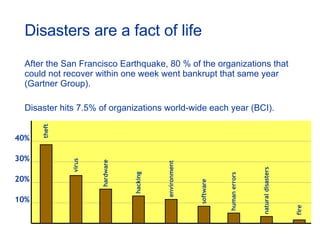
Disasters are a fact of life After the San Francisco Earthquake, 80 % of the organizations that could not recover within one week went bankrupt that same year (Gartner Group). Disaster hits 7.5% of organizations world-wide each year (BCI). 40% 30% 20% 10% fire theft human errors natural disasters virus hardware hacking environment software
ITSCM - mission To manage the risks of key IT-services failing by avoiding identified risks and by planning to recover key IT-services during a disaster, to support the continued functioning of the business to a specified level within agreed upon timescales.
Some responsibilities  Reduce the vulnerability of the organization Reduce identified risks and the threat of potential disasters Plan for recovery of (business) processes and IT-services Prevent loss of investor confidence
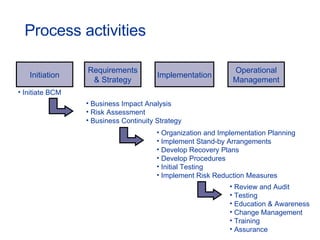
Process activities Requirements & Strategy Implementation Operational Management Initiation Initiate BCM Business Impact Analysis Risk Assessment Business Continuity Strategy Organization and Implementation Planning Implement Stand-by Arrangements Develop Recovery Plans Develop Procedures Initial Testing Implement Risk Reduction Measures Review and Audit Testing Education & Awareness Change Management Training Assurance
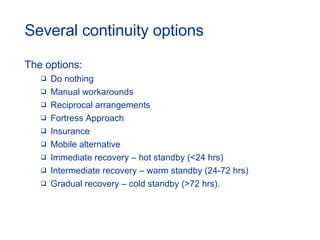
Several continuity options The options: Do nothing Manual workarounds Reciprocal arrangements Fortress Approach Insurance Mobile alternative Immediate recovery – hot standby (<24 hrs) Intermediate recovery – warm standby (24-72 hrs) Gradual recovery – cold standby (>72 hrs).
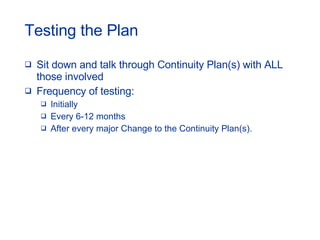
Testing the Plan Sit down and talk through Continuity Plan(s) with ALL those involved Frequency of testing: Initially Every 6-12 months After every major Change to the Continuity Plan(s).
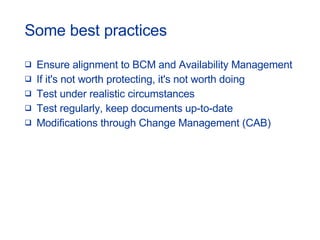
Some best practices Ensure alignment to BCM and Availability Management If it's not worth protecting, it's not worth doing Test under realistic circumstances Test regularly, keep documents up-to-date Modifications through Change Management (CAB)
Financial Management for IT Services
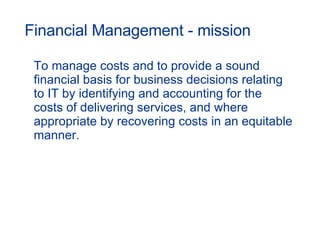
Financial Management - mission To manage costs and to provide a sound financial basis for business decisions relating to IT by identifying and accounting for the costs of delivering services, and where appropriate by recovering costs in an equitable manner.
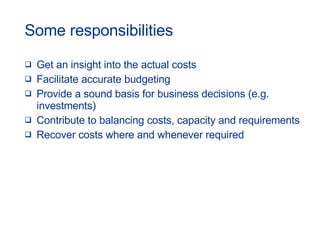
Some responsibilities Get an insight into the actual costs Facilitate accurate budgeting Provide a sound basis for business decisions (e.g. investments) Contribute to balancing costs, capacity and requirements Recover costs where and whenever required
Budgeting & Accounting Budgeting: The process of predicting and controlling the spending of money within the organization; budgeting consists of a periodic negotiation cycle to set budgets (annual) and the day-to-day monitoring of the current budgets. Accounting: The process that enables IT to fully account for the way money is spent which usually involves ledgers and should be overseen by someone trained in accountancy.
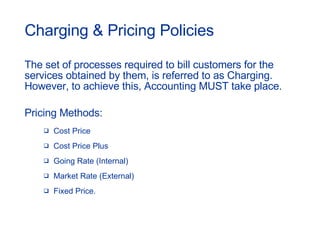
Charging & Pricing Policies The set of processes required to bill customers for the services obtained by them, is referred to as Charging. However, to achieve this, Accounting MUST take place.  Pricing Methods: Cost Price Cost Price Plus Going Rate (Internal) Market Rate (External) Fixed Price.
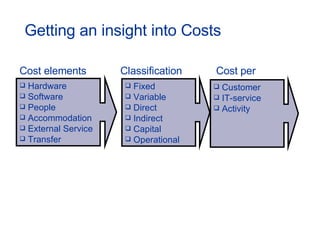
Getting an insight into Costs Cost elements Hardware Software  People Accommodation  External Service Transfer Classification Fixed Variable Direct Indirect Capital Operational Cost per Customer IT-service Activity
Some best practices Involve financial/accounting experts Ensure interfaces with other ITIL processes exist Use customer-based charging units
Service Level Management
Service Level Management - mission To maintain and improve the IT-service quality, through a constant cycle of agreeing, monitoring and reporting upon achievements and the instigation of actions to eradicate poor service.
Some responsibilities Have insight into the capabilities of IT Understand the requirements of the Customer(s) Catalog and quantify IT-services Define (realistic) internal and external service targets Ensure ongoing improvement of Service Levels
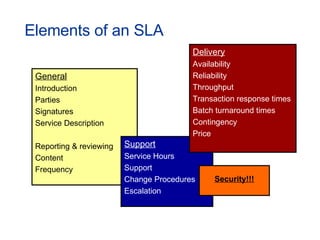
Elements of an SLA General Introduction Parties Signatures Service Description Reporting & reviewing Content Frequency Support Service Hours Support Change Procedures Escalation Delivery Availability Reliability Throughput Transaction response times Batch turnaround times Contingency Price Security!!!
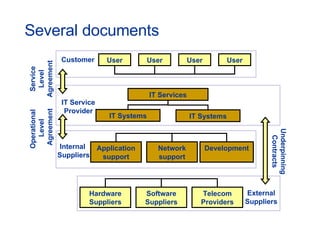
Several documents User User User User IT Services IT Systems IT Systems Application support Network support Development Hardware Suppliers Software Suppliers Telecom Providers Customer  Internal  Suppliers External Suppliers Service Level Agreement IT Service Provider Operational  Level Agreement Underpinning Contracts
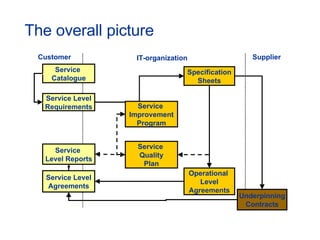
The overall picture Service  Catalogue Service  Level Reports Service Level Agreements Service Level Requirements Specification Sheets Operational  Level Agreements Underpinning Contracts Customer Supplier IT-organization Service  Improvement Program Service  Quality Plan
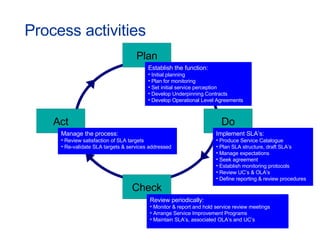
Process activities Plan Do Check Act Establish the function: Initial planning Plan for monitoring Set initial service perception Develop Underpinning Contracts Develop Operational Level Agreements Implement SLA’s: Produce Service Catalogue Plan SLA structure, draft SLA’s Manage expectations Seek agreement Establish monitoring protocols Review UC’s & OLA’s Define reporting & review procedures Manage the process: Review satisfaction of SLA targets Re-validate SLA targets & services addressed Review periodically: Monitor & report and hold service review meetings Arrange Service Improvement Programs Maintain SLA’s, associated OLA’s and UC’s
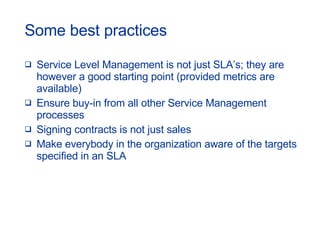
Some best practices Service Level Management is not just SLA’s; they are however a good starting point (provided metrics are available) Ensure buy-in from all other Service Management processes Signing contracts is not just sales Make everybody in the organization aware of the targets specified in an SLA

ITIL version 2: Foundation Training

  • 1.
  • 2.
    Course objectives Seevalue of IT Service Management Increase overall understanding of processes and their relationships Gain understanding of ITIL concepts Provide a common Service Management vocabulary
  • 3.
    Agenda - IIntroduction Configuration Management Service Desk Incident Management Problem Management Change Management Release Management
  • 4.
    Agenda - IICapacity Management Availability Management IT Service Continuity Management Financial Management for IT Services Service Level Management Exam Preparation
  • 5.
    Today’s reality Organizationsincreasingly dependent on IT Higher visibility of failures More specific requirements Increased complexity of IT-infrastructure Pressure to initiate (fair) charging for IT-services Increasing globalization more competition
  • 6.
    What is ITService Management? IT Service Management is t he understanding that IT should focus on (internal and external) customer requirements by promoting a service-oriented approach. business satisfaction quality services at justifiable costs
  • 7.
    Benefits of ITService Management Higher reliability of IT-service provision More detailed specification of requirements Better understanding of true capabilities of IT Information available to support decision making Greater control of IT-assets
  • 8.
    What is ITIL?I nformation T echnology I nfrastructure L ibrary ITIL is a means to help IT-organizations provide customer focused IT-services using an approach based upon processes to meet agreed and specified levels of service.
  • 9.
    ITIL History Developedin the 1980's, ITIL has become the world- wide de facto standard in Service Management. Starting as a guide for UK government, it has proved to be useful to organizations in all sectors through its adoption by many Service Management companies as the basis for consultancy, education and software tools support.
  • 10.
    ITIL ethos Collectionof industry best practices World-wide de-facto standard Data owned by OGC but content is public domain International recognized certifications Continuous improvement via itSMF
  • 11.
    40 Multiple choicequestions closed book examination 60 minutes allocated time 26 correct answers to pass (65%) The ITIL Foundation certificate is a prerequisite for further IT Service Management courses. Recognized examination
  • 12.
    ITIL Publication FrameworkThe Business The Business Perspective The Technology IT Service Management Planning to implement IT Service Management Application Management ICT Infrastructure Management IT Service Delivery IT Service Support IT Security Management
  • 13.
    Support and Deliveryprocesses Service Su pp ort Service Desk Incident Management Problem Management Configuration Management Change Management Release Management Service Deliver y Capacity Management Availability Management IT Service Continuity Management Financial Management for IT Services Service Level Management
  • 14.
    Perform iterative activitiesto reach predefined and specified goals Not restricted to departments or teams Generate documentation to compare and evaluate the results with the objectives Requires understanding of the business throughout the IT-organization Process Management
  • 15.
    Processes in theoryInput Output Process Activities Responsibilities Roles Quality parameters Key Performance Indicators Resources Competencies Process goal Process owner Materials, Machines, Information, Labour. Services, Products, Information, Reports
  • 16.
    Processes in reallife Process IT Department email Service Unit Service Desk Technical Support Network Management Application Support Application Development Application Maintenance
  • 17.
    Some best practicesPay sufficient attention to (allocation of) roles Define tasks, responsibilities and authorities Ensure inputs and outputs are established Avoid process by-passing Do not reinvent the wheel Choose appropriate Project Management methodology DO NOT FORGET COMMUNICATION!!!
  • 18.
    ITIL & IT-GovernanceBritish Standard Institute (BS15000 & BS7799) Deming (Plan, Do, Check, Act) Business Continuity Management Project Management Sarbanes Oxley ISO COBIT CMM Six Sigma ITIL goes mainstream in 2005 and widespread adoption will continue through 2008… (source: Forrester Research)
  • 19.
  • 20.
    Configuration Management -mission To provide a logical model of the IT-infrastructure and/or IT-services by identifying, controlling, maintaining and verifying the components used.
  • 21.
    Some responsibilities Accountfor all IT-assets and configurations Provide accurate information on configurations to support all the other Service Management processes Provide a sound basis for Incident, Problem, Change and Release Management Verify the configuration records against the actual IT-infrastructure and correct any exceptions
  • 22.
    Definitions Components withinthe IT-infrastructure are referred to as Configuration Items (CI’s) Details of/on CI’s are stored in the Configuration Management DataBase (CMDB) from which queries about the IT-infrastructure can be answered; this data can be stored in multiple locations; e.g. electronic (relational) databases, books
  • 23.
    Process activities PlanningIdentification Control Status Accounting Verification & Audits
  • 24.
    Planning During theinitial planning phase the following should be defined: Purpose, scope and objectives Related policies and standards Roles and responsibilities CI naming conventions Procedures CMDB design, including scope and key interfaces.
  • 25.
    What will bein the Scope? Hardware Software Documentation Environment Services People?
  • 26.
    A possible designof the CMDB
  • 27.
    The right levelof detail Ask yourself the following questions: Is the component still uniquely identifiable? Is the component subject to change? Is it still manageable? But most important: DO YOU NEED THE INFORMATION TO PROVIDE A SERVICE?
  • 28.
    What data dowe maintain? Characteristics of CI’s: Unique identifier (LPTP_0234, PRN_HP_CJ_02) Category (type of hardware or software) Status (ordered, archived, testing) History (Incidents, Problems, Changes) Attributes (supplier, price, owner, location) Relationships !!! (is connected to, part of..)
  • 29.
    Identification The Identificationactivity addresses: Configuration structures and the selection of CI’s CI types and life-cycles CI relationships Identification of software and document libraries Identification of configuration baselines Naming conventions Labelling CI’s.
  • 30.
    The identifier ofa CI The identifier of a CI should be: Unique Taking existing references within the organization into account Clearly visible Ideally short and meaningful.
  • 31.
    Configuration Baselines A Configuration Baseline is the configuration of a product or system established at a specific point in time, which captures both the structure and details of that product or system, and enables that product or system to be rebuilt at a later date. Configuration baselines and approved, implemented Changes to those baselines should together constitute the currently approved configuration.
  • 32.
    Control The Controlactivity organizes: Registration of new CI’s and versions Updating of CI records Archiving of CI’s and their associated records Protection of the integrity of configurations Updating of CMDB after periodic checking. To enable full control over your CI’s, updating of records must only be executed with proper approval of Change Management!
  • 33.
    Status Accounting Statusreports should be produced on a regular basis, listing, for all CI’s under control, their current version and history. Status Accounting reports can be used to establish Baselines and enables changes between Baselines and Releases to be traceable.
  • 34.
    Verification & AuditBefore implementation into the live environment, new Releases, builds, equipment and standards should be verified against the contracted or specified requirements. Physical configuration audits should be carried out to verify that the 'as-built' configuration of a CI conforms to its 'as-planned' configuration and its associated documents.
  • 35.
    Some best practicesAddress tool selection as early on as possible in the planning cycle Make use of discovery tools and/or inventory systems Ensure no-one bypasses Change Management “ Maximize control with a minimum of records&quot;
  • 36.
  • 37.
    Service Desk -mission To minimize disruptions to the business, due to failures in the provision of IT-services, by detecting, recording and coordinating the activities required to restore these services.
  • 38.
    Some responsibilities Actas the Single Point of Contact (SPoC) for users of IT Restore the service whenever possible Maximize service availability Manage ALL requests for support to a closure Be aware of the needs and requirements of the Customer(s)
  • 39.
    Single Point ofContact (SPoC) Many organizations have implemented a central point of contact for handling IT-issues. This function or department is known under several names but ITIL prefers the term Service Desk. A SPOC is not only a central point for communication but also for the gathering and distribution of information. Call Centre Service Desk Help Desk
  • 40.
    Different ways toorganize Call Centre : main emphasis on professionally handling large call volumes of telephone-based communication Help Desk : primary purpose is to manage, co-ordinate and resolve failures as quickly as possible and to ensure that nothing is lost, forgotten or ignored Service Desk : extends the range of services, allowing business processes to be integrated into the Service Management infrastructure
  • 41.
    Some characteristics SinglePoint of Contact (SPoC) Log of all reported issues, numbered and time-stamped Use of diagnostic scripts and other aids Automatic escalation procedures Communication with support staff (2 nd & 3 rd level) Interface to SLA’s Regular progress reporting
  • 42.
    Service Desk implementationStaff – correct numbers, profile, skills Define effectiveness metrics (KPI’s) Select a suitable structure: Local Service Desk Central Service Desk Virtual Service Desk.
  • 43.
    Function or processSome activities of the Service Support and Service Delivery processes are carried out at the Service Desk The management of a Service Desk is more a people issue than a process In many organizations, Service Desks are separate functional entities or departments For these reasons, ITIL calls the Service Desk a FUNCTION
  • 44.
    Additional Information Accordingto Genesys (manufacturer of software) 84% of people that contacted a Service Desk had a negative experience, 56% therefore changed supplier Service seems to be twice as important as a good product More information can be found at: http://www.helpdeskinst.com
  • 45.
  • 46.
    Incident Management -mission To restore normal service operation as quickly as possible and minimize the adverse impact on business operations, thus ensuring the best possible levels of service.
  • 47.
    Ensure optimal useof resources to support the organization during service failures Provide effective communication on the progress of reported failures with all stakeholders Some responsibilities
  • 48.
    Contacting the ServiceDesk I can no longer send or receive emails! How do I create a macro in Word? What is the status of my reported ‘problem’? I need a new laptop The printer does not work I forgot my password I already reported this, three times this week! The coffee machine seems to be malfunctioning ... What are the real Incidents?
  • 49.
    An Incident isany event which is not part of the standard operation of a service and which causes, or may cause , an interruption to, or a reduction in, the quality of that service. What is an Incident?
  • 50.
    So the Incidentsare … I can no longer send or receive emails! How do I create a macro in Word? What is the status of my reported ‘problem’? I need a new laptop The printer does not work I forgot my password I already reported this, three times this week! The coffee machine seems to be malfunctioning ... The others are Service Requests
  • 51.
    More definitions A Service Request is every Incident not being a failure in the IT-infrastructure A Request for Change is used to record details of a Change to any component (CI) within the IT-infrastructure A work-around is a method of solving the Incident, but it does NOT prevent it. In a way it by-passes (circumvents) an Incident (e.g. CTRL-ALT-DEL) A temporary fix prevents the occurring of further Incidents until a structural solution has been found
  • 52.
    Process activities Detection & recording Classification & Initial support Investigation & Diagnosis Resolution & Recovery Closure Service Request Procedure Service Request ? Monitoring & Tracking
  • 53.
    Classification Typically classificationconsists out of: Categorization Prioritizing Matching. Classification is used to: Specify the service with which the Incident is related Associate with an SLA where appropriate Select the best specialist or group to handle the Incident Identify the priority based upon the business impact and urgency Define what information should be checked or asked for.
  • 54.
    Impact + Urgency= Priority Impact: Affect on the business Defined in the SLA Same codes used throughout the organization. Urgency: Speed needed to resolve Incident Extent to which it can bear delay. Priority: Sequences reported issues Not assigned by the User Not decided by the Service Desk.
  • 55.
    Priority coding -example Priority code Description Target resolution time 1 Critical 1 hour 2 High 8 hours 3 Medium 24 hours 4 Low 48 hours 5 Planning Planned Incident Priority Impact High Medium Low Urgency High 1 2 3 Medium 2 3 4 Low 3 4 5
  • 56.
    Incident Matching Matchingis the activity whereby the Incident details are compared to knowledge that is already present in the organization. Successful matching could give access to proven resolution actions, and could therefore expedite the resolution process.
  • 57.
  • 58.
    Escalation paths ServiceRequest Procedure Detect, Record & Classifiction Service Request? Initial Support Resolved? Resolution, Recovery Investigation Diagnose Resolved? Resolution, Recovery Investigation Diagnose Resolved? Resolution, Recovery Incident Closure Yes No Yes No Yes No Et cetera Third Level Second Level First Level
  • 59.
    Escalation Transferring anIncident from first-level to second-level support groups or third-level support groups is called functional escalation and primarily takes place when more knowledge or expertise is required to restore the service. An Incident is hierarchically escalated when a manager is informed about the likelihood of the Incident not being resolved in time or to customer satisfaction. Hierarchical escalation can take place at any moment during the process.
  • 60.
    When to closean Incident? After submitting RfC? When a Change is implemented? Does a work-around close the Incident? When you defined a Problem? After a certain amount of time? When you await a third-party response? Ensure the Customer is satisfied with the chosen resolution!
  • 61.
    Some best practicesCreate knowledge databases and make them ‘easily’ accessible Use tools whenever appropriate but pay extra attention to the design of user-interfaces Establish interfaces and communication with other processes Pay attention to categorization Many activities take place at the Service Desk; make sure the staff is properly trained
  • 62.
  • 63.
    Problem Management -mission To minimize the adverse impact of Incidents and Problems on the business that are caused by failures within the IT-infrastructure, and to prevent the recurrence of such failures.
  • 64.
    Some responsibilities EnsureProblems are identified and resolved Minimize the impact of Problems and Incidents on the IT-service provision Ensure that the right level and number of resources are resolving specific Problems Provide information to Incident Management and the Service Desk
  • 65.
    When is aProblem a Problem? Many criteria can be used to define a Problem: # of related Incidents Incident closed via workaround Major Incidents Information from third-parties An engineer with an excellent idea ……
  • 66.
    Definitions Problem :The unknown root cause of one or more Incidents or potential Incidents Error: A condition that exists after the successful diagnosis of the root cause of a Problem when it is confirmed which CI is at fault Known Error: Error + solution and/or workaround has been found The terms Error and Known Error are very often interchanged in everyday situations.
  • 67.
    Problem Control Problemidentification and recording Problem classification Problem investigation and diagnosis Root cause analysis Tracking and monitoring of Problems Incident database, 3 rd party information, etc. Error (to Error-Control)
  • 68.
    Error Control Erroridentification and recording Error assessment Error resolution Recording (KE) Tracking and monitoring of Errors Information from Problem Control Review results and close the associated records RfC Change successfully implemented
  • 69.
    Problems, Errors andKnown Errors RfC Incident Control Problem Control Solved? Solved Closed Closed User Closed PIR Error Control Work around Incident Management Problem Management Change Management Problem Incident Error Known Error Change KEDB
  • 70.
    Known Error DataBaseSometimes a system might be allowed to be released into the live environment even though (Known) Errors have been detected during testing. Problem Management needs to ensure any such (Known) Errors, and any resolutions, are recorded in the Known Error Database.
  • 71.
    Proactive Problem ManagementProactive Problem Management covers the activities aimed at identifying and resolving failures before they actually occur. These activities are: Trend analysis Targeting support/preventative action(s) Feed-back of information to relevant people.
  • 72.
    Incident and ProblemManagement Often, the Incident Management registration is the basis for the definition of Problems. Also, information from Problem Management should be made available for Incident Matching. However, keep in mind: Objectives are different Different skills/expertise required Time is less of an issue within Problem Management Activities carried out are different.
  • 73.
    Fire fighting or… ? Do we want our fire fighters to stop fighting fire and start a discussion on the origins of that fire?
  • 74.
    Some best practicesStart with reactive Problem Management Try and separate Incident Management from Problem Management Make use of tools to detect (possible) trends Ensure a sound interface with Incident and Change Management exists
  • 75.
  • 76.
    Change Management -mission To manage all Changes that could impact the ability to deliver (quality) IT-services; through a single, centralized process of approval, scheduling and control to ensure that the IT-infrastructure stays aligned to business requirements.
  • 77.
    Some responsibilities ChangeManagement is responsible for managing Change processes involving: Hardware Communications equipment and software System software ‘ Live' applications software All documentation and procedures associated with the day-to-day operation, support and maintenance of live systems.
  • 78.
    Definitions A Change is any addition, modification or removal of one or more CI’s A Request for Change (RfC) is an electronic or paper-based form used to record details of a request for a change to any CI The Forward Schedule of Changes (FSC) is a schedule that contains an overall view of all approved Changes and their status in a special, carefully predefined order The Change Advisory Board (CAB) is the meeting where (submitted) Changes are discussed
  • 79.
    Change & ProjectManagement Registration and classification Change Management Project Management Approval Authorization and Implementation Evaluation (PIR) Monitoring and Planning Building Testing Implementation Change Monitoring
  • 80.
    The Request forChange (RfC) The RfC should detail as many aspects of the Change as possible. Impact Resource estimation Business justification Cost … Back-out Deadline Originator CI’s RfC
  • 81.
    Priority of ChangesUrgent - Change necessary NOW (approval via CAB Emergency Committee) High - Change needed as soon as possible (a CAB needs to be assembled ASAP) Medium - Change can bear delay until next regular CAB meeting Low - Change leads to minor improvements (can be postponed until further notice)
  • 82.
    Category of ChangesCategory 0 (standard Change) - the Change is executed without prior contact (automatic approval) Category 1 (little or no impact) - the Change Manager authorizes this RfC Category 2 (significant impact) - the RfC must be discussed in the CAB where the Change Manager requests advice on authorization and planning Category 3 (major impact) - considerable manpower and/or resources required; senior management should be represented in the CAB
  • 83.
    The Change AdvisoryBoard (CAB) To ensure proper representation, members of the CAB should include representatives from the following areas: Customers affected by the Change Representatives from all other Service Management disciplines Application Development Teams (e.g. project leader) Senior Users, or their representatives.
  • 84.
    The CAB agendaA standard CAB agenda includes a review of: Failed or backed-out Changes Changes applied without reference to the ‘regular’ CAB by Incident Management (e.g. CAB/EC approved Changes) RfC’s to be assessed by CAB Status of RfC’s that have been assessed by CAB already Change reviews (PIR) Change Management process.
  • 85.
    CAB agenda -example
  • 86.
    Approval processes Thereare three principal approval processes: Financial approval (indicated costs are within budgetary limits or cost-benefit criteria are met) Technical approval (assurance that the Change is feasible and sensible and can be performed without serious interruptions to the business) Customer approval (to ensure that business managers are satisfied with the proposals and accept the impact (if any) on their operations).
  • 87.
    Some best practicesBe prepared for dealing with Urgent Changes Integrate with Configuration and Release Management Ensure management commitment is present and let them set the example Choose appropriate Project Management methodologies (e.g. PMBOK, PRINCE2)
  • 88.
  • 89.
    Release Management -mission To take a holistic view of a Change to an IT-service and to ensure that all aspects of a Release, both technical and non-technical, are considered.
  • 90.
    Some responsibilities CommunicateChanges in CI’s to Configuration Management Physical distribution and installation of Changes Ensuring that only correctly released, tested and authorized CI’s are used Physical storage of software and hardware components
  • 91.
    What is aRelease? A Release consists of new or changed software and/or hardware required to implement approved Changes. Releases are divided into: Minor software Releases and hardware upgrades Major software Releases and hardware upgrades Emergency software and hardware fixes.
  • 92.
  • 93.
    The Release PolicyA Release Policy should specify: Release naming and numbering conventions A definition of major and minor Releases, plus a policy on issuing emergency Releases Direction on the frequency of Releases Expected deliverables for Releases (e.g. installation instructions and Release notes) Guidance as to how and where Releases should be documented (e.g. which tool to use and how) The policy on the production of back-out/roll-back plans.
  • 94.
    Secure Storage AreasThe Definitive Software Library (DSL) is a term used to describe a secure repository in which the authorized versions of original and approved software CI’s are stored and protected. The Definitive Hardware Storage (DHS) is a term used to describe an area set aside for the secure storage of definitive hardware spares. For many organizations, this often consists out of contracts with their suppliers.
  • 95.
    DSL, DHS andthe CMDB DSL/DHS Physical CI’s CMDB Logical CI’s Release Record Build new Releases Test new Releases Distribute new Releases to live locations Implement new Releases
  • 96.
    Some best practicesDon’t separate Development and Operations Seek alignment to Change and Configuration Management procedures Create test environments that represent the live hardware and software environments as closely as possible Take back-out plans seriously, even when history shows they are not used Allocate sufficient resources to communication, testing, documentation and training
  • 97.
  • 98.
    Capacity Management -mission To ensure that sufficient and cost justifiable capacity of IT (resources) is in place and that it is matched to the current and future identified needs of the business.
  • 99.
    Some responsibilities Monitorperformance and throughput of IT-services Initiate tuning activities to make the most efficient use of existing resources Understand the demands currently being made for IT-resources and produce forecasts for future requirements
  • 100.
    Process activities BusinessCapacity Management (BCM) Service Capacity Management (SCM) Resource Capacity Management (RCM) CDB Capacity Plan production The Capacity Plan Application sizing Demand Management Modelling
  • 101.
    Predicting the FutureModelling = predicting behaviour under a given volume/variety of work Estimation Trend analysis Analytical modelling Simulation modelling Benchmarking Costs Accuracy
  • 102.
    Application Sizing ApplicationSizing is the prediction of the consequences of new and/or changed applications on: Service Levels Resources Costs Existing applications.
  • 103.
    The Capacity DataBaseCapacity Management collects data from a variety of (distributed) hardware platforms and software applications. Data stored in a CDB could include: Service data from SLA’s Business data from business plans Technical data Financial data Utilization data.
  • 104.
    The Capacity PlanThe Capacity Plan documents the current levels of resource utilization and service performance, and forecasts the future requirements for resources that underpin the business activities.
  • 105.
    Some best practicesCreate interfaces with Availability, Financial and Change Management Do not rely too much on third-party statistics Ensure business expertise is available, especially for forecasting purposes Keep your overall Capacity Plan reviews and updates in line with budgetary cycles
  • 106.
  • 107.
    Availability Management -mission To optimize the capability of the IT-infrastructure, services and supporting organization to deliver effective and sustained levels of availability that enable the business to satisfy its objectives.
  • 108.
    Some responsibilities Determine requirements from the business Formulate Availability and Recovery design criteria Determine the Vital Business Functions Define targets, monitoring and reporting for Availability, Reliability and Maintainability of CI’s Produce and maintain an Availability Plan
  • 109.
    Definitions Availability: The ability to perform a required function at a stated instant or over a stated period of time Reliability: Freedom from operational failure Maintainability: The ability of a CI to be retained in, or restored to, an operational state Serviceability: The contractual arrangements made with third parties, to assure the availability, reliability and maintainability of CI’s under their care Security: The Confidentiality , Integrity and Availability of CI’s
  • 110.
    Resilience Server NetworkHost = 89.89% 98% 98% 97.5% Workstation 96% Server Network Host = 91.69% 99.96% 98% 97.5% Workstation 96% Host
  • 111.
    The Extended IncidentLifecycle Incident Recover Diagnosis Incident Restore MTBF – Mean Time Between Failures (uptime) Response Time Detection Time MTBSI – Mean Time Between System Incidents (reliability) MTTR - Mean Time To Repair (downtime) Repair Detection Repair Time Recovery Time
  • 112.
    The Availability planThe Availability Plan includes goals (targets), objectives and deliverables and should consider the wider issues of people, process, tools and techniques as well as having a focus on technological developments/innovations. The Availability Plan is a ‘tactical’ plan aimed at improving the overall Availability of the IT-infrastructure to ensure that existing and future levels of Availability can be provided on a timely and cost effective basis.
  • 113.
    Some best practicesIntegrate with IT Service Continuity Management Understand costs of unavailability Automate component downtime detection and data recording Availability Plan is considered complementary to the Capacity Plan; both should therefore be in alignment
  • 114.
  • 115.
    Disasters are afact of life After the San Francisco Earthquake, 80 % of the organizations that could not recover within one week went bankrupt that same year (Gartner Group). Disaster hits 7.5% of organizations world-wide each year (BCI). 40% 30% 20% 10% fire theft human errors natural disasters virus hardware hacking environment software
  • 116.
    ITSCM - missionTo manage the risks of key IT-services failing by avoiding identified risks and by planning to recover key IT-services during a disaster, to support the continued functioning of the business to a specified level within agreed upon timescales.
  • 117.
    Some responsibilities Reduce the vulnerability of the organization Reduce identified risks and the threat of potential disasters Plan for recovery of (business) processes and IT-services Prevent loss of investor confidence
  • 118.
    Process activities Requirements& Strategy Implementation Operational Management Initiation Initiate BCM Business Impact Analysis Risk Assessment Business Continuity Strategy Organization and Implementation Planning Implement Stand-by Arrangements Develop Recovery Plans Develop Procedures Initial Testing Implement Risk Reduction Measures Review and Audit Testing Education & Awareness Change Management Training Assurance
  • 119.
    Several continuity optionsThe options: Do nothing Manual workarounds Reciprocal arrangements Fortress Approach Insurance Mobile alternative Immediate recovery – hot standby (<24 hrs) Intermediate recovery – warm standby (24-72 hrs) Gradual recovery – cold standby (>72 hrs).
  • 120.
    Testing the PlanSit down and talk through Continuity Plan(s) with ALL those involved Frequency of testing: Initially Every 6-12 months After every major Change to the Continuity Plan(s).
  • 121.
    Some best practicesEnsure alignment to BCM and Availability Management If it's not worth protecting, it's not worth doing Test under realistic circumstances Test regularly, keep documents up-to-date Modifications through Change Management (CAB)
  • 122.
  • 123.
    Financial Management -mission To manage costs and to provide a sound financial basis for business decisions relating to IT by identifying and accounting for the costs of delivering services, and where appropriate by recovering costs in an equitable manner.
  • 124.
    Some responsibilities Getan insight into the actual costs Facilitate accurate budgeting Provide a sound basis for business decisions (e.g. investments) Contribute to balancing costs, capacity and requirements Recover costs where and whenever required
  • 125.
    Budgeting & AccountingBudgeting: The process of predicting and controlling the spending of money within the organization; budgeting consists of a periodic negotiation cycle to set budgets (annual) and the day-to-day monitoring of the current budgets. Accounting: The process that enables IT to fully account for the way money is spent which usually involves ledgers and should be overseen by someone trained in accountancy.
  • 126.
    Charging & PricingPolicies The set of processes required to bill customers for the services obtained by them, is referred to as Charging. However, to achieve this, Accounting MUST take place. Pricing Methods: Cost Price Cost Price Plus Going Rate (Internal) Market Rate (External) Fixed Price.
  • 127.
    Getting an insightinto Costs Cost elements Hardware Software People Accommodation External Service Transfer Classification Fixed Variable Direct Indirect Capital Operational Cost per Customer IT-service Activity
  • 128.
    Some best practicesInvolve financial/accounting experts Ensure interfaces with other ITIL processes exist Use customer-based charging units
  • 129.
  • 130.
    Service Level Management- mission To maintain and improve the IT-service quality, through a constant cycle of agreeing, monitoring and reporting upon achievements and the instigation of actions to eradicate poor service.
  • 131.
    Some responsibilities Haveinsight into the capabilities of IT Understand the requirements of the Customer(s) Catalog and quantify IT-services Define (realistic) internal and external service targets Ensure ongoing improvement of Service Levels
  • 132.
    Elements of anSLA General Introduction Parties Signatures Service Description Reporting & reviewing Content Frequency Support Service Hours Support Change Procedures Escalation Delivery Availability Reliability Throughput Transaction response times Batch turnaround times Contingency Price Security!!!
  • 133.
    Several documents UserUser User User IT Services IT Systems IT Systems Application support Network support Development Hardware Suppliers Software Suppliers Telecom Providers Customer Internal Suppliers External Suppliers Service Level Agreement IT Service Provider Operational Level Agreement Underpinning Contracts
  • 134.
    The overall pictureService Catalogue Service Level Reports Service Level Agreements Service Level Requirements Specification Sheets Operational Level Agreements Underpinning Contracts Customer Supplier IT-organization Service Improvement Program Service Quality Plan
  • 135.
    Process activities PlanDo Check Act Establish the function: Initial planning Plan for monitoring Set initial service perception Develop Underpinning Contracts Develop Operational Level Agreements Implement SLA’s: Produce Service Catalogue Plan SLA structure, draft SLA’s Manage expectations Seek agreement Establish monitoring protocols Review UC’s & OLA’s Define reporting & review procedures Manage the process: Review satisfaction of SLA targets Re-validate SLA targets & services addressed Review periodically: Monitor & report and hold service review meetings Arrange Service Improvement Programs Maintain SLA’s, associated OLA’s and UC’s
  • 136.
    Some best practicesService Level Management is not just SLA’s; they are however a good starting point (provided metrics are available) Ensure buy-in from all other Service Management processes Signing contracts is not just sales Make everybody in the organization aware of the targets specified in an SLA