ITILv3 Introduction and Overview Bhargab Pani
Agenda for the Session What is ITIL? What about v3? Key Concepts Service Management & Delivery  The Service Lifecycle The Five Stages of the lifecycle ITIL Roles Functions and Processes Further Learning Accreditation
What is ITIL? Systematic approach to high quality IT service delivery Documented best practice for IT Service Management Provides common language with well-defined terms Developed in 1980s by what is now The Office of Government Commerce itSMF also involved in maintaining best practice documentation in ITIL itSMF is global, independent, not-for-profit
What about v3? ITIL started in 80s.  40 publications! v2 came along in 2000-2002 Still Large and complex 8 Books Talks about what you should do v3 in 2007 Much simplified and rationalised to 5 books Much clearer guidance on how to provide service Easier, more modular accreditation paths Keeps tactical and operational guidance Gives more prominence to strategic ITIL guidance relevant to senior staff Aligned with ISO20000 standard for service management
Key Concepts Service Delivers value to customer by facilitating outcomes customers want to achieve without ownership of the specific costs and risks e.g. The HFS backup service means that you as Unit ITSS don’t have to care about how much tapes, disks or robots cost and you don’t have to worry if one of the HFS staff is off sick or leaves
Key Concepts Service Level Measured and reported achievement against one or more service level targets E.g. Red = 1 hour response 24/7 Amber = 4 hour response 8/5 Green = Next business day Service Level Agreement Written and negotiated agreement between Service Provider and Customer documenting agreed service levels and costs
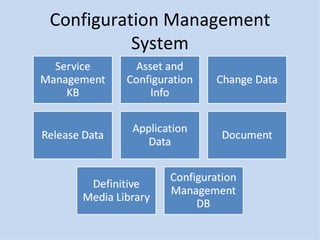
Key Concepts Configuration Management System (CMS) Tools and databases to manage IT service provider’s configuration data Contains Configuration ManagementDatabase (CMDB) Records hardware, software, documentation and anything else important to IT provision Release Collection of hardware, software, documentation, processes or other things require to implement one or more approved changes to IT Services
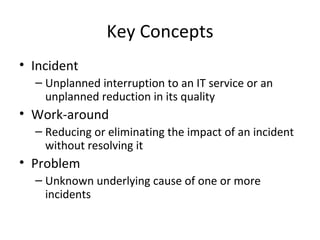
Key Concepts Incident Unplanned interruption to an IT service or an unplanned reduction in its quality Work-around Reducing or eliminating the impact of an incident without resolving it Problem Unknown underlying cause of one or more incidents
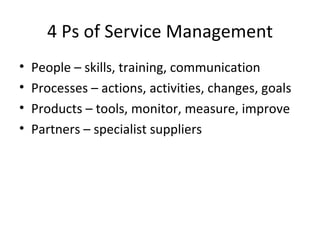
4 Ps of Service Management People – skills, training, communication Processes – actions, activities, changes, goals Products – tools, monitor, measure, improve Partners – specialist suppliers
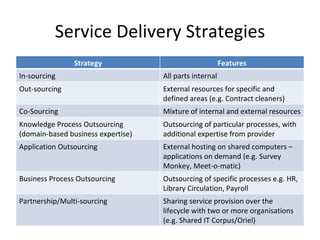
Service Delivery Strategies Strategy Features In-sourcing All parts internal Out-sourcing External resources for specific and defined areas (e.g. Contract cleaners) Co-Sourcing Mixture of internal and external resources Knowledge Process Outsourcing  (domain-based business expertise) Outsourcing of particular processes, with additional expertise from provider Application Outsourcing External hosting on shared computers – applications on demand (e.g. Survey Monkey, Meet-o-matic) Business Process Outsourcing Outsourcing of specific processes e.g. HR, Library Circulation, Payroll Partnership/Multi-sourcing Sharing service provision over the lifecycle with two or more organisations (e.g. Shared IT Corpus/Oriel)
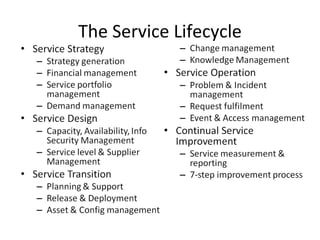
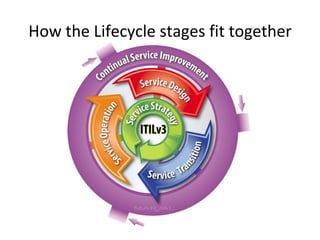
The Service Lifecycle
How the Lifecycle stages fit together
Service Strategy What are we going to provide? Can we afford it? Can we provide enough of it? How do we gain competitive advantage? Perspective Vision, mission and strategic goals Position Plan Pattern Must fit organisational culture
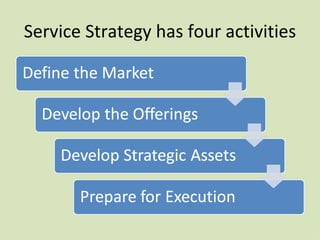
Service Strategy has four activities
Service Assets Resources Things you buy or pay for IT Infrastructure, people, money Tangible Assets Capabilities Things you grow Ability to carry out an activity Intangible assets Transform resources into Services
Service Portfolio Management Prioritises and manages investments and resource allocation Proposed services are properly assessed Business Case Existing Services Assessed .  Outcomes: Replace Rationalise Renew Retire
Demand Management Ensures we don’t waste money with excess capacity Ensures we have enough capacity to meet demand at agreed quality Patterns of Business Activity to be considered E.g. Economy 7 electricity, Congestion Charging
Service Design How are we going to provide it? How are we going to build it? How are we going to test it? How are we going to deploy it?
Processes in Service Design Availability Management Capacity Management ITSCM (disaster recovery) Supplier Management Service Level Management Information Security Management Service Catalogue Management
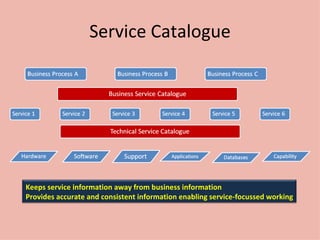
Service Catalogue Keeps service information away from business information Provides accurate and consistent information enabling service-focussed working
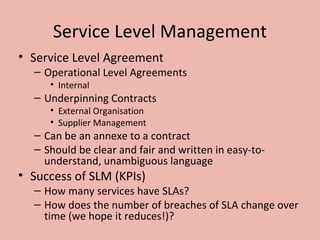
Service Level Management Service Level Agreement Operational Level Agreements Internal Underpinning Contracts External Organisation Supplier Management Can be an annexe to a contract Should be clear and fair and written in easy-to-understand, unambiguous language Success of SLM (KPIs) How many services have SLAs? How does the number of breaches of SLA change over time (we hope it reduces!)?
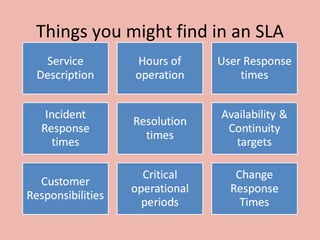
Things you might find in an SLA
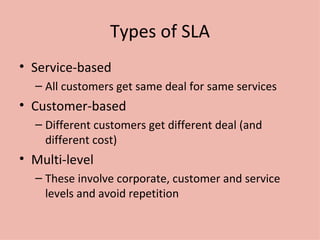
Types of SLA Service-based All customers get same deal for same services Customer-based Different customers get different deal (and different cost) Multi-level These involve corporate, customer and service levels and avoid repetition
Right Capacity, Right Time, Right Cost! This is capacity management Balances Cost against Capacity so minimises costs while maintaining quality of service
Is it available? Ensure that IT services matches or exceeds agreed targets Lots of Acronyms Mean Time Between Service Incidents Mean Time Between Failures Mean Time to Restore Service Resilience increases availability Service can remain functional even though one or more of its components have failed
ITSCM – what? IT Service Continuity Management Ensures resumption of services within agreed timescale Business Impact Analysis informs decisions about resources E.g. Stock Exchange can’t afford 5 minutes downtime but 2 hours downtime probably wont badly affect a departmental accounts office or a college bursary
Standby for liftoff... Cold Accommodation and environment ready but no IT equipment Warm As cold plus backup IT equipment to receive data Hot Full duplexing, redundancy and failover
Information Security Management Confidentiality Making sure only those authorised can see data Integrity Making sure the data is accurate and not corrupted Availability Making sure data is supplied when it is requested
Service Transition Build Deployment Testing User acceptance Bed-in
Good service transition Set customer expectations Enable release integration Reduce performance variation Document and reduce known errors Minimise risk Ensure proper use of services Some things excluded Swapping failed device Adding new user Installing standard software
Knowledge management Vital to enabling the right information to be provided at the right place and the right time to the right person to enable informed decision Stops data being locked away with individuals Obvious organisational advantage
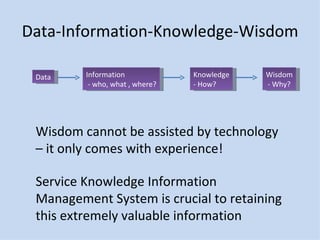
Data-Information-Knowledge-Wisdom Data Information - who, what , where? Knowledge - How? Wisdom - Why? Wisdom cannot be assisted by technology – it only comes with experience! Service Knowledge Information Management System is crucial to retaining this extremely valuable information
Service Asset and Configuration Managing these properly is key Provides Logical Model of Infrastructure and Accurate Configuration information Controls assets Minimised costs Enables proper change and release management Speeds incident and problem resolution
Configuration Management System
Painting the Forth Bridge... A Baseline is a “last known good configuration” But the CMS will always be a “work in progress” and probably always out of date.  But still worth having Current configuration will always be the most recent baseline plus any implemented approved changes
Change Management – or what we all get wrong! Respond to customers changing business requirements Respond to business and IT requests for change that will align the services with the business needs Roles Change Manager Change Authority Change Advisory Board (CAB) Emergency CAB (ECAB) 80% of service interruption is caused by operator error or poor change control (Gartner)
Change Types Normal Non-urgent, requires approval Standard Non-urgent, follows established path, no approval needed Emergency Requires approval but too urgent for normal procedure
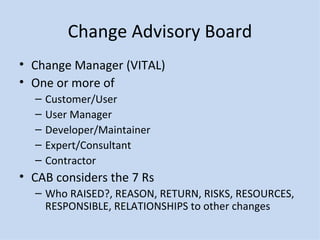
Change Advisory Board Change Manager (VITAL) One or more of Customer/User User Manager Developer/Maintainer Expert/Consultant Contractor CAB considers the 7 Rs Who RAISED?, REASON, RETURN, RISKS, RESOURCES, RESPONSIBLE, RELATIONSHIPS to other changes
Release Management Release is a collection of authorised and tested changes ready for deployment A rollout introduces a release into the live environment Full Release e.g. Office 2007 Delta (partial) release e.g. Windows Update Package e.g. Windows Service Pack
Phased or Big Bang? Phased release is less painful but more work Deploy can be manual or automatic Automatic can be push or pull Release Manager will produce a release policy Release MUST be tested and NOT by the developer or the change instigator
Service Operation Maintenance Management Realises Strategic Objectives and is where the Value is seen
Processes in Service Operation Incident Management Problem Management Event Management Request Fulfilment Access Management
Functions in Service Operation Service Desk Technical Management IT Operations Management Applications Management
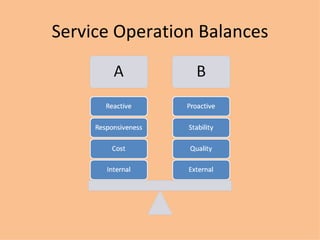
Service Operation Balances
Incident Management Deals with unplanned interruptions to IT Services or reductions in their quality Failure of a configuration item that has not impacted a service is also an incident (e.g. Disk in RAID failure) Reported by: Users Technical Staff Monitoring Tools
Event Management 3 Types of events Information Warning Exception Can we give examples? Need to make sense of events and have appropriate control actions planned and documented
Request Fulfilment Information, advice or a standard change Should not be classed as Incidents or Changes Can we give more examples?
Problem Management Aims to prevent problems and resulting incidents Minimises impact of unavoidable incidents Eliminates recurring incidents Proactive Problem Management Identifies areas of potential weakness Identifies workarounds Reactive  Problem Management Indentifies underlying causes of incidents Identifies changes to prevent recurrence
Access Management Right things for right users at right time Concepts Access Identity (Authentication, AuthN) Rights (Authorisation, AuthZ) Service Group Directory
Service Desk Local, Central or Virtual Examples? Single point of contact Skills for operators Customer Focus Articulate Interpersonal Skills (patient!) Understand Business Methodical/Analytical Technical knowledge Multi-lingual Service desk often seen as the bottom of the pile Bust most visible to customers so important to get right!
Continual Service Improvement Focus on Process owners and Service Owners Ensures that service management processes continue to support the business Monitor and enhance Service Level Achievements Plan – do –check – act  (Deming)
Service Measurement Technology (components, MTBF etc) Process (KPIs  - Critical Success Factors) Service (End-to end, e.g. Customer Satisfaction) Why? Validation – Soundness of decisions Direction – of future activities Justify – provide factual evidence Intervene – when changes or corrections are needed
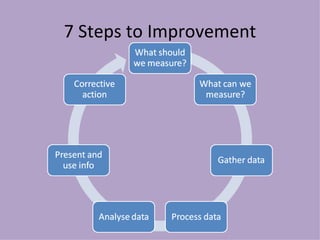
7 Steps to Improvement
ITIL Roles Process Owner Ensures Fit for Purpose Process Manager Monitors and Reports on Process Service Owner Accountable for Delivery Service Manager Responsible for initiation, transition and maintenance.  Lifecycle!
More Roles Business Relationship Manager Service Asset & Configuration Service Asset Manager Service Knowledge Manager Configuration Manager Configuration Analyst Configuration Librarian CMS tools administrator
Functions and Processes Process Structured set of activities designed to accomplish a defined objective Inputs & Outputs Measurable e.g. ?? Function Team or group of people and tools they use to carry out one or more processes or activities Own practices and knowledge body e.g. ??
Further Learning Many training companies run these courses ITSMF provides the full books Internet forums and Groups Linkedin Group FacebookGroup Both quite active
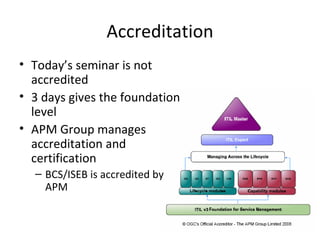
Accreditation Today’s seminar is not accredited 3 days gives the foundation level APM Group manages accreditation and certification BCS/ISEB is accredited by APM

Itilv3

  • 1.
    ITILv3 Introduction andOverview Bhargab Pani
  • 2.
    Agenda for theSession What is ITIL? What about v3? Key Concepts Service Management & Delivery The Service Lifecycle The Five Stages of the lifecycle ITIL Roles Functions and Processes Further Learning Accreditation
  • 3.
    What is ITIL?Systematic approach to high quality IT service delivery Documented best practice for IT Service Management Provides common language with well-defined terms Developed in 1980s by what is now The Office of Government Commerce itSMF also involved in maintaining best practice documentation in ITIL itSMF is global, independent, not-for-profit
  • 4.
    What about v3?ITIL started in 80s. 40 publications! v2 came along in 2000-2002 Still Large and complex 8 Books Talks about what you should do v3 in 2007 Much simplified and rationalised to 5 books Much clearer guidance on how to provide service Easier, more modular accreditation paths Keeps tactical and operational guidance Gives more prominence to strategic ITIL guidance relevant to senior staff Aligned with ISO20000 standard for service management
  • 5.
    Key Concepts ServiceDelivers value to customer by facilitating outcomes customers want to achieve without ownership of the specific costs and risks e.g. The HFS backup service means that you as Unit ITSS don’t have to care about how much tapes, disks or robots cost and you don’t have to worry if one of the HFS staff is off sick or leaves
  • 6.
    Key Concepts ServiceLevel Measured and reported achievement against one or more service level targets E.g. Red = 1 hour response 24/7 Amber = 4 hour response 8/5 Green = Next business day Service Level Agreement Written and negotiated agreement between Service Provider and Customer documenting agreed service levels and costs
  • 7.
    Key Concepts ConfigurationManagement System (CMS) Tools and databases to manage IT service provider’s configuration data Contains Configuration ManagementDatabase (CMDB) Records hardware, software, documentation and anything else important to IT provision Release Collection of hardware, software, documentation, processes or other things require to implement one or more approved changes to IT Services
  • 8.
    Key Concepts IncidentUnplanned interruption to an IT service or an unplanned reduction in its quality Work-around Reducing or eliminating the impact of an incident without resolving it Problem Unknown underlying cause of one or more incidents
  • 9.
    4 Ps ofService Management People – skills, training, communication Processes – actions, activities, changes, goals Products – tools, monitor, measure, improve Partners – specialist suppliers
  • 10.
    Service Delivery StrategiesStrategy Features In-sourcing All parts internal Out-sourcing External resources for specific and defined areas (e.g. Contract cleaners) Co-Sourcing Mixture of internal and external resources Knowledge Process Outsourcing (domain-based business expertise) Outsourcing of particular processes, with additional expertise from provider Application Outsourcing External hosting on shared computers – applications on demand (e.g. Survey Monkey, Meet-o-matic) Business Process Outsourcing Outsourcing of specific processes e.g. HR, Library Circulation, Payroll Partnership/Multi-sourcing Sharing service provision over the lifecycle with two or more organisations (e.g. Shared IT Corpus/Oriel)
  • 11.
  • 12.
    How the Lifecyclestages fit together
  • 13.
    Service Strategy Whatare we going to provide? Can we afford it? Can we provide enough of it? How do we gain competitive advantage? Perspective Vision, mission and strategic goals Position Plan Pattern Must fit organisational culture
  • 14.
    Service Strategy hasfour activities
  • 15.
    Service Assets ResourcesThings you buy or pay for IT Infrastructure, people, money Tangible Assets Capabilities Things you grow Ability to carry out an activity Intangible assets Transform resources into Services
  • 16.
    Service Portfolio ManagementPrioritises and manages investments and resource allocation Proposed services are properly assessed Business Case Existing Services Assessed . Outcomes: Replace Rationalise Renew Retire
  • 17.
    Demand Management Ensureswe don’t waste money with excess capacity Ensures we have enough capacity to meet demand at agreed quality Patterns of Business Activity to be considered E.g. Economy 7 electricity, Congestion Charging
  • 18.
    Service Design Howare we going to provide it? How are we going to build it? How are we going to test it? How are we going to deploy it?
  • 19.
    Processes in ServiceDesign Availability Management Capacity Management ITSCM (disaster recovery) Supplier Management Service Level Management Information Security Management Service Catalogue Management
  • 20.
    Service Catalogue Keepsservice information away from business information Provides accurate and consistent information enabling service-focussed working
  • 21.
    Service Level ManagementService Level Agreement Operational Level Agreements Internal Underpinning Contracts External Organisation Supplier Management Can be an annexe to a contract Should be clear and fair and written in easy-to-understand, unambiguous language Success of SLM (KPIs) How many services have SLAs? How does the number of breaches of SLA change over time (we hope it reduces!)?
  • 22.
    Things you mightfind in an SLA
  • 23.
    Types of SLAService-based All customers get same deal for same services Customer-based Different customers get different deal (and different cost) Multi-level These involve corporate, customer and service levels and avoid repetition
  • 24.
    Right Capacity, RightTime, Right Cost! This is capacity management Balances Cost against Capacity so minimises costs while maintaining quality of service
  • 25.
    Is it available?Ensure that IT services matches or exceeds agreed targets Lots of Acronyms Mean Time Between Service Incidents Mean Time Between Failures Mean Time to Restore Service Resilience increases availability Service can remain functional even though one or more of its components have failed
  • 26.
    ITSCM – what?IT Service Continuity Management Ensures resumption of services within agreed timescale Business Impact Analysis informs decisions about resources E.g. Stock Exchange can’t afford 5 minutes downtime but 2 hours downtime probably wont badly affect a departmental accounts office or a college bursary
  • 27.
    Standby for liftoff...Cold Accommodation and environment ready but no IT equipment Warm As cold plus backup IT equipment to receive data Hot Full duplexing, redundancy and failover
  • 28.
    Information Security ManagementConfidentiality Making sure only those authorised can see data Integrity Making sure the data is accurate and not corrupted Availability Making sure data is supplied when it is requested
  • 29.
    Service Transition BuildDeployment Testing User acceptance Bed-in
  • 30.
    Good service transitionSet customer expectations Enable release integration Reduce performance variation Document and reduce known errors Minimise risk Ensure proper use of services Some things excluded Swapping failed device Adding new user Installing standard software
  • 31.
    Knowledge management Vitalto enabling the right information to be provided at the right place and the right time to the right person to enable informed decision Stops data being locked away with individuals Obvious organisational advantage
  • 32.
    Data-Information-Knowledge-Wisdom Data Information- who, what , where? Knowledge - How? Wisdom - Why? Wisdom cannot be assisted by technology – it only comes with experience! Service Knowledge Information Management System is crucial to retaining this extremely valuable information
  • 33.
    Service Asset andConfiguration Managing these properly is key Provides Logical Model of Infrastructure and Accurate Configuration information Controls assets Minimised costs Enables proper change and release management Speeds incident and problem resolution
  • 34.
  • 35.
    Painting the ForthBridge... A Baseline is a “last known good configuration” But the CMS will always be a “work in progress” and probably always out of date. But still worth having Current configuration will always be the most recent baseline plus any implemented approved changes
  • 36.
    Change Management –or what we all get wrong! Respond to customers changing business requirements Respond to business and IT requests for change that will align the services with the business needs Roles Change Manager Change Authority Change Advisory Board (CAB) Emergency CAB (ECAB) 80% of service interruption is caused by operator error or poor change control (Gartner)
  • 37.
    Change Types NormalNon-urgent, requires approval Standard Non-urgent, follows established path, no approval needed Emergency Requires approval but too urgent for normal procedure
  • 38.
    Change Advisory BoardChange Manager (VITAL) One or more of Customer/User User Manager Developer/Maintainer Expert/Consultant Contractor CAB considers the 7 Rs Who RAISED?, REASON, RETURN, RISKS, RESOURCES, RESPONSIBLE, RELATIONSHIPS to other changes
  • 39.
    Release Management Releaseis a collection of authorised and tested changes ready for deployment A rollout introduces a release into the live environment Full Release e.g. Office 2007 Delta (partial) release e.g. Windows Update Package e.g. Windows Service Pack
  • 40.
    Phased or BigBang? Phased release is less painful but more work Deploy can be manual or automatic Automatic can be push or pull Release Manager will produce a release policy Release MUST be tested and NOT by the developer or the change instigator
  • 41.
    Service Operation MaintenanceManagement Realises Strategic Objectives and is where the Value is seen
  • 42.
    Processes in ServiceOperation Incident Management Problem Management Event Management Request Fulfilment Access Management
  • 43.
    Functions in ServiceOperation Service Desk Technical Management IT Operations Management Applications Management
  • 44.
  • 45.
    Incident Management Dealswith unplanned interruptions to IT Services or reductions in their quality Failure of a configuration item that has not impacted a service is also an incident (e.g. Disk in RAID failure) Reported by: Users Technical Staff Monitoring Tools
  • 46.
    Event Management 3Types of events Information Warning Exception Can we give examples? Need to make sense of events and have appropriate control actions planned and documented
  • 47.
    Request Fulfilment Information,advice or a standard change Should not be classed as Incidents or Changes Can we give more examples?
  • 48.
    Problem Management Aimsto prevent problems and resulting incidents Minimises impact of unavoidable incidents Eliminates recurring incidents Proactive Problem Management Identifies areas of potential weakness Identifies workarounds Reactive Problem Management Indentifies underlying causes of incidents Identifies changes to prevent recurrence
  • 49.
    Access Management Rightthings for right users at right time Concepts Access Identity (Authentication, AuthN) Rights (Authorisation, AuthZ) Service Group Directory
  • 50.
    Service Desk Local,Central or Virtual Examples? Single point of contact Skills for operators Customer Focus Articulate Interpersonal Skills (patient!) Understand Business Methodical/Analytical Technical knowledge Multi-lingual Service desk often seen as the bottom of the pile Bust most visible to customers so important to get right!
  • 51.
    Continual Service ImprovementFocus on Process owners and Service Owners Ensures that service management processes continue to support the business Monitor and enhance Service Level Achievements Plan – do –check – act (Deming)
  • 52.
    Service Measurement Technology(components, MTBF etc) Process (KPIs - Critical Success Factors) Service (End-to end, e.g. Customer Satisfaction) Why? Validation – Soundness of decisions Direction – of future activities Justify – provide factual evidence Intervene – when changes or corrections are needed
  • 53.
    7 Steps toImprovement
  • 54.
    ITIL Roles ProcessOwner Ensures Fit for Purpose Process Manager Monitors and Reports on Process Service Owner Accountable for Delivery Service Manager Responsible for initiation, transition and maintenance. Lifecycle!
  • 55.
    More Roles BusinessRelationship Manager Service Asset & Configuration Service Asset Manager Service Knowledge Manager Configuration Manager Configuration Analyst Configuration Librarian CMS tools administrator
  • 56.
    Functions and ProcessesProcess Structured set of activities designed to accomplish a defined objective Inputs & Outputs Measurable e.g. ?? Function Team or group of people and tools they use to carry out one or more processes or activities Own practices and knowledge body e.g. ??
  • 57.
    Further Learning Manytraining companies run these courses ITSMF provides the full books Internet forums and Groups Linkedin Group FacebookGroup Both quite active
  • 58.
    Accreditation Today’s seminaris not accredited 3 days gives the foundation level APM Group manages accreditation and certification BCS/ISEB is accredited by APM