How can use Hypertext, 
Hypermedia and 
Multimedia for 
improving the language 
skills 
LEARNING ACTIVITY 2.3
HYPERTEXT 
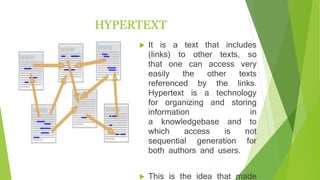
 It is a text that includes 
(links) to other texts, so 
that one can access very 
easily the other texts 
referenced by the links. 
Hypertext is a technology 
for organizing and storing 
information in 
a knowledgebase and to 
which access is not 
sequential generation for 
both authors and users. 
 This is the idea that made 
the internet so popular,
 It is a subset of hypermedia, and can be developed 
using specific software, such as Adobe Flash, Adobe 
Director and Macromedia Author ware. 
 Is not limited to textual data, we can find pictures, 
sounds or videos referred to the subject. 
 The usual form of hypertext computer is the automatic 
hyperlinks or cross-references to other documents
 We must work teaching strategies and activities 
through which these skills come into play taking into 
account the context and real world situations , since 
culture and technology involved in the teaching 
process , as well participate in the writing and 
reading is fundamental training for students and 
practitioners of literacy : take as fundamental 
reference the social practices of reading and writing; 
a foundation of education that the teaching of the 
language implies knowledge and attitudes according 
to teacher and student as emitter and receiver: but 
above all for the development of language skills is 
achieved properly it is necessary to know the context
MULTIMEDIA 
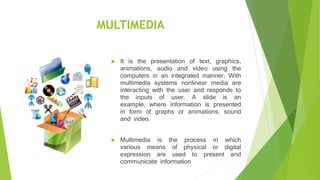
 It is the presentation of text, graphics, 
animations, audio and video using the 
computers in an integrated manner. With 
multimedia systems nonlinear media are 
interacting with the user and responds to 
the inputs of user. A slide is an 
example, where information is presented 
in form of graphs or animations, sound 
and video. 
 Multimedia is the process in which 
various means of physical or digital 
expression are used to present and 
communicate information
HYPERMEDIA 
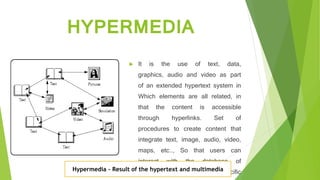
 It is the use of text, data, 
graphics, audio and video as part 
of an extended hypertext system in 
Which elements are all related, in 
that the content is accessible 
through hyperlinks. Set of 
procedures to create content that 
integrate text, image, audio, video, 
maps, etc.., So that users can 
interact with the database of 
information related to a specific 
topic. 
Hypermedia - Result of the hypertext and multimedia
 Students becomes an active participant and builder 
for their own learning and the teacher assumes the 
role of guide and facilitator which vary the way they 
interact with students, how to plan and design the 
learning environment. Also, these technological tools 
allow teachers find innovative techniques to stimulate 
the motivation of students and improve their learning 
with the use of multimedia, hypertext and other 
interactive systems, also learning resources to choose 
those best suited to the different areas of knowledge 
of students, such as virtual classrooms , video 
conferencing, and search for updates , among others.
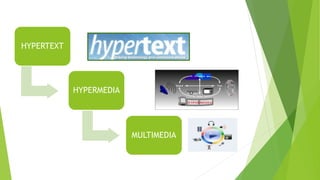
HYPERTEXT 
HYPERMEDIA 
MULTIMEDIA
THANKS FOR 
YOUR ATTENTION

Hypertext, hypermedia and multimedia Karina Chancusig

  • 1.
    How can useHypertext, Hypermedia and Multimedia for improving the language skills LEARNING ACTIVITY 2.3
  • 2.
    HYPERTEXT  Itis a text that includes (links) to other texts, so that one can access very easily the other texts referenced by the links. Hypertext is a technology for organizing and storing information in a knowledgebase and to which access is not sequential generation for both authors and users.  This is the idea that made the internet so popular,
  • 3.
     It isa subset of hypermedia, and can be developed using specific software, such as Adobe Flash, Adobe Director and Macromedia Author ware.  Is not limited to textual data, we can find pictures, sounds or videos referred to the subject.  The usual form of hypertext computer is the automatic hyperlinks or cross-references to other documents
  • 4.
     We mustwork teaching strategies and activities through which these skills come into play taking into account the context and real world situations , since culture and technology involved in the teaching process , as well participate in the writing and reading is fundamental training for students and practitioners of literacy : take as fundamental reference the social practices of reading and writing; a foundation of education that the teaching of the language implies knowledge and attitudes according to teacher and student as emitter and receiver: but above all for the development of language skills is achieved properly it is necessary to know the context
  • 5.
    MULTIMEDIA  Itis the presentation of text, graphics, animations, audio and video using the computers in an integrated manner. With multimedia systems nonlinear media are interacting with the user and responds to the inputs of user. A slide is an example, where information is presented in form of graphs or animations, sound and video.  Multimedia is the process in which various means of physical or digital expression are used to present and communicate information
  • 6.
    HYPERMEDIA  Itis the use of text, data, graphics, audio and video as part of an extended hypertext system in Which elements are all related, in that the content is accessible through hyperlinks. Set of procedures to create content that integrate text, image, audio, video, maps, etc.., So that users can interact with the database of information related to a specific topic. Hypermedia - Result of the hypertext and multimedia
  • 7.
     Students becomesan active participant and builder for their own learning and the teacher assumes the role of guide and facilitator which vary the way they interact with students, how to plan and design the learning environment. Also, these technological tools allow teachers find innovative techniques to stimulate the motivation of students and improve their learning with the use of multimedia, hypertext and other interactive systems, also learning resources to choose those best suited to the different areas of knowledge of students, such as virtual classrooms , video conferencing, and search for updates , among others.
  • 8.
  • 9.
    THANKS FOR YOURATTENTION