#engageug
The Other Face Of Domino,
Configuring and Securing
Gabriella Davis
The Turtle Partnership
gabriella@turtlepartnership.com
!1
#engageug
Domino HTTP
• The HTTP Server
• Securing your HTTP traffic
• Configuring HTTP for different applications
• Performance and Clustering
• Logging and Monitoring
• Vulnerabilities
!2
#engageug
The HTTP Server
The HTTP Server
!3
#engageug
The HTTP Server
• The Domino HTTP engine was introduced in 4.6 when the
product was renamed “Domino”
• Since then it has been modified for performance and
features but only re-engineered significantly in 8.5 when
XPages were introduced
• The HTTP task is now responsible for other services such as
iNotes, Traveler, XPages making its performance and
stability critical
• Running the latest version of Domino will always give an
improved HTTP experience
!4
#engageug
HTTP Threads
• Threads are assigned one per incoming HTTP request
• Each thread utilises up to 40kb of memory
• Configuring more threads doesn’t improve performance and
will usually do the opposite
• Configure the minimum number of threads you need
• domino.threads.active.peak (NSF requests only)
• http.currentconnections / http.peakconnections (all
requests)
• The default is 40, for most web only servers we would
increase that
!5
#engageug
HTTP Threads and Memory
• Too many threads will consume too much memory and
cause server issues
• Obviously with 64bit we have more memory, and therefore
threads, to play with
!6
#engageug
HTTP Agents
• Agents run via the HTTP tasks consume a HTTP thread and
are run outside of the Agent Manager task that handles
regular agents
• This includes WebQueryOpen and WebQuerySave
agents
• A long running agent will not release a HTTP thread
and consume too much memory
• Xpages code needs an HTTP thread too and will consume
JVM resources sometimes causes out of memory errors
• HTTPJVMMaxHeapSize allows you to increase the
memory allocated to the JVM related to HTTP only and
not the server wide JVM activity
!7
#engageug
iNotes
• Uses client side caching for performance in 8.5.1 and later
• Minimised use of applets with the exception of Sametime
• Replace stlinks with Sametime Proxy ajax code
• Use a standard template for everyone
• Enable OOO service rather than agents
• Enable full text indexing or disable on the fly indexing
!8
#engageug
Traveler
• Traveler requires enough concurrent threads to support
concurrent device connections
• A device configured for traveler is always consuming a
thread when it’s active
• Number of threads should be 1.2 x Number of active devices
• In a load balanced cluster of Traveler that isn’t the same
as the number of registered devices
!9
#engageug
The HTTP Server
Securing Your HTTP
Traffic
!10
#engageug
Server Security & HTTP Agents
• Use SSL for all HTTP traffic
• especially Traveler and iNotes
• Disable Anonymous access on HTTP unless it’s a public
facing server
• In which case have the server in an isolated domain
!
!
• Enable concurrent web agents for performance
!11
#engageug
Internet Site Documents
• Opt-In Security
• Without Internet Site Documents all services can run with no
restrictions
• connect to a web server on its ip address or any
resolvable host name BAD
• start a service you aren’t actually using such as LDAP
exposing a security hole BAD
• Using Internet Site documents ensures that a task may be
started but it won’t respond if the wrong hostname is part of
the request
!12
#engageug
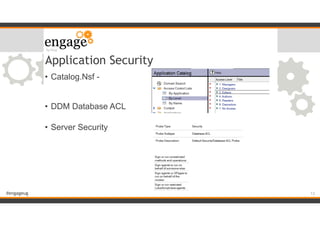
Application Security
• Catalog.Nsf -


• DDM Database ACL

• Server Security
!13
#engageug
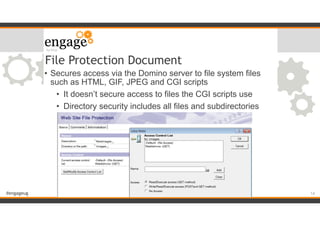
File Protection Document
• Secures access via the Domino server to file system files
such as HTML, GIF, JPEG and CGI scripts
• It doesn’t secure access to files the CGI scripts use
• Directory security includes all files and subdirectories
!14
#engageug
Internet Passwords
• Actions - Upgrade to more secure internet password
• inetlockout.nsf - configured in the server configuration
document
• lockout the account temporarily or permanently due to
failed logins
• Fewer name variations with higher security
!15
#engageug
Secure HTTP (SSL)
• SSL is a protocol (a subset of TLS) that encrypts traffic
between a client request and the server running HTTP
• SSL traffic can still be intercepted but can’t be decoded
easily
• The stronger the key used for encrypting the traffic,
the harder it will be to decode
• Keys are generated for each client session and
discarded when the session ends
• Using a SSL certificate also alerts the user if the server they
are connecting to has a different hostname than the one they
requested or if the certificate the server is using has expired
!16
#engageug
SSL Keyfiles
• Enabling SSL requires the existence of a keyfile with a
certificate in it on the server
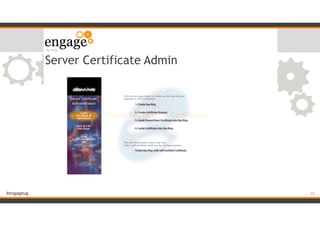
• The keyfile is created from the Server Certificate Admin
database (certsrv.nsf) which is on every server
• You can create a self certified certificate and that will work to
encrypt traffic
• users will be warned that the certificate isn’t recognised
!17
#engageug
SSL Keyfiles For Multiple Hosts
• A single SSL keyfile will bind to a specific ip address, one
that resolves from the hostname it is assigned to
• If you’re using Internet Site documents you can enter
different SSL keyfiles for different hostnames BUT each one
will only work if it resolves to a unique ip address
!18
#engageug
Public Certificate Authorities
• Buy a certificate from a public certificate authority
• If you buy a strong certificate go ahead and remove the
validation for 40 and 56 bit ciphers
!
!
!
• Ensure you import the trusted root and all intermediate
certificates into your keyfile
• Once you have a keyfile you can use that to encrypt any port
you want including HTTP and LDAP
!19
#engageug
Trusted Roots
• When buying a certificate from a public CA you need to
import the trusted roots for that certifier into your keyfile
• Different certificates even from the same CA have
different trusted roots
• Browsers come pre-installed with common CA trusted
roots so they can recognise and validate your certificate
• Some older technologies don’t recognise the newer, stronger
certificates
!20
#engageug
Tip
• Android devices ship with limited built in trusted roots that
aren’t easily updateable
• If you’re using SSL for Traveler and Android devices, verify
the devices will recgonise the certificate you’re buying before
you buy it
!21
#engageug
Server Certificate Admin
!22
#engageug
Client Certificates
• Allows you to issue certificates to clients so you can verify
their identity not just with their login information but with a
valid certificate
• There is a large administrative overhead in maintaining and
managing client side certificates for all connecting web users
• Use the CA process to enable a Certificate Authority on your
server for user requests
!23
#engageug
TLS via IHS
• TLS is an encryption protocol that is more secure than SSL.
It provides a higher level of encryption, validation and
security
• Domino 9 supports the use of TLS only by deploying an IBM
HTTP Server in front of Domino
• All Domino requests are routed through IHS to the
Domino HTTP Task
• IHS handles the TLS security
• TLS is only supported with IHS and Domino installed on a
Windows platform
• You will still need to enable SSL and have a certificate on the
Domino server !24
#engageug
Java Permissions
• /jvm/lib/security/java.policy
• Controls what the JVM, and code that uses it, can do
• Syntax for the permissions can be found here
• http://download.oracle.com/javase/1.4.2/docs/guide/
security/PolicyFiles.html
!25
#engageug
Tip!
• Java.Policy will often be overwritten during an upgrade
• To prevent that happening make the file read only
• My preference is simply to backup the file before upgrade
then compare the new file to the old
• Otherwise you might miss something that’s needed in a
later version
!26
#engageug
The HTTP Server
Configuring HTTP
!27
#engageug
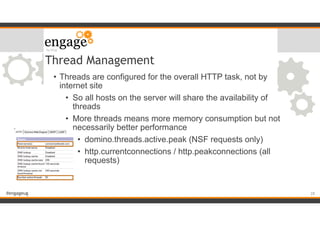
Thread Management
• Threads are configured for the overall HTTP task, not by
internet site
• So all hosts on the server will share the availability of
threads
• More threads means more memory consumption but not
necessarily better performance
• domino.threads.active.peak (NSF requests only)
• http.currentconnections / http.peakconnections (all
requests)
!28
#engageug
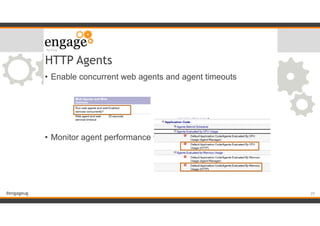
HTTP Agents
• Enable concurrent web agents and agent timeouts
!
!
!
!
• Monitor agent performance via DDM probes
!29
#engageug
Virtual Hosts
• A single server can answer to multiple host names so long
as they resolve to that server’s ip address
• You can configure different home pages as well as different
web server behaviour for each host
• security, location of files, single sign-on, browser
behaviour
• When using Internet Site Documents, a client request will
only be answered if there is a matching virtual host or a
default web site document
!30
#engageug
Redirection
• A Redirection rule repoints a URL request from the original
location to a new one
• If I had an application that I want users to browse to without
typing in the full application name I could use redirection to
change the URL from a short one to a full address
• /sponsor to /ggc.nsf/info.xsp for instance
• When a URL is redirected, the URL is actually rewritten in
the browser’s address bar
!31
#engageug
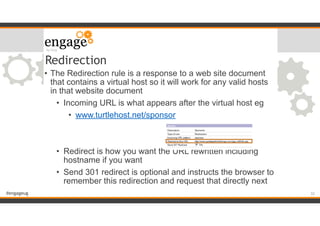
• The Redirection rule is a response to a web site document
that contains a virtual host so it will work for any valid hosts
in that website document
• Incoming URL is what appears after the virtual host eg
• www.turtlehost.net/sponsor
!
!
• Redirect is how you want the URL rewritten including
hostname if you want
• Send 301 redirect is optional and instructs the browser to
remember this redirection and request that directly next
Redirection
!32
#engageug
Substitution
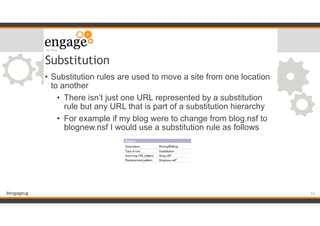
• Substitution rules are used to move a site from one location
to another
• There isn’t just one URL represented by a substitution
rule but any URL that is part of a substitution hierarchy
• For example if my blog were to change from blog.nsf to
blognew.nsf I would use a substitution rule as follows
!33
#engageug
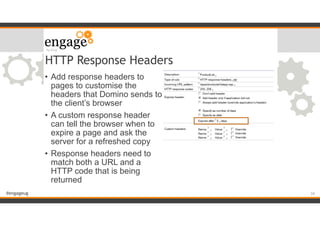
HTTP Response Headers
• Add response headers to
pages to customise the
headers that Domino sends to
the client’s browser
• A custom response header
can tell the browser when to
expire a page and ask the
server for a refreshed copy
• Response headers need to
match both a URL and a
HTTP code that is being
returned
!34
#engageug
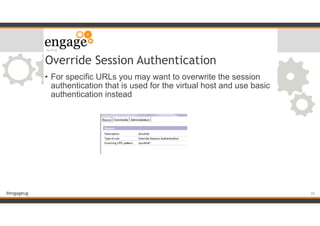
Override Session Authentication
• For specific URLs you may want to overwrite the session
authentication that is used for the virtual host and use basic
authentication instead
!35
#engageug
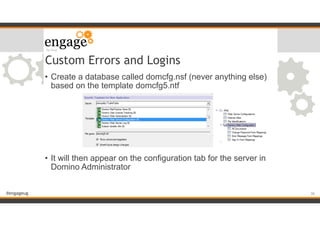
Custom Errors and Logins
• Create a database called domcfg.nsf (never anything else)
based on the template domcfg5.ntf
!
!
!
!
!
• It will then appear on the configuration tab for the server in
Domino Administrator
!36
#engageug
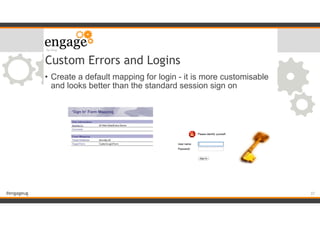
Custom Errors and Logins
• Create a default mapping for login - it is more customisable
and looks better than the standard session sign on
!37
#engageug
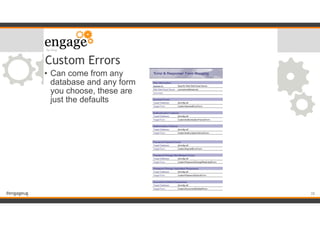
Custom Errors
• Can come from any
database and any form
you choose, these are
just the defaults
!38
#engageug
Httpd.cnf & Browser.cnf
• Files are written to the Domino program directory during
install and upgrades
• Browser.cnf has the configuration of each browser’s
supported features so Domino knows how to deliver content
to the user’s specific browser
• Httpd.cnf contains file types and associations so Domino
knows how to handle file attachments and embedded
content
• You would usually not edit either one of these files but if you
do you should mark them read only so they aren’t
overwritten on upgrade
• Or back them up and make them part of your upgrade
process !39
#engageug
The Browser Plug-In
• Client side deployment
• Not part of HTTP configuration
• Uses a version of the Notes client on the user’s machine
• No server configuration
• Any application that works through the Notes basic client
should work
• IBM don’t support accessing your mail via the Browser Plug-
In, but instead request you use iNotes
!40
#engageug
The HTTP Server
Performance &
Clustering
!41
#engageug
Why Cluster
• Clustering is usually considered when you want to expand
resources and provide multiple servers for users to access
• that is load balanced clustering, all servers provide the
same service and the users are assigned to whatever
server is available
• Clustering is also worthwhile deploying purely as a failover
solution so if your primary server goes offline, your users can
failover to a cluster mate
• Failover clustering is much cheaper than load balanced
clustering
• The redirection of users to a new server is usually done
via a manual DNS change so you don’t need a load
balanced piece of hardware !42
#engageug
Tip!
• If the system is important to your business and you can’t
have extended minutes or hours of downtime you are going
to want to Cluster at some level, it’s just a case of deciding
how much hardware and money you want to apply to the job
!43
#engageug
Clustering for HTTP
• Internet Cluster Manager
• A Domino based and Domino aware load balancer
• Runs as a task of your Domino server
• the ICM can be on the same server as the actual
websites
• but you would need two ips
• and it would be a single point of failure
!44
#engageug
ICM Design
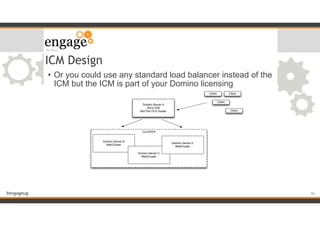
• The client requests a hostname that points to the ICM
• The ICM is assigned to a Domino cluster
• Using the cldbdir.nsf on the servers it rewrites the URL to
direct the client request to one of the Domino cluster servers
• The ICM sends out probes to monitor the health of the
Domino servers to ensure a user isn’t sent to a non
responsive server
!45
#engageug
• Or you could use any standard load balancer instead of the
ICM but the ICM is part of your Domino licensing
ICM Design
CLUSTER
Domino Server A
Runs ICM
Not Part Of A Cluster
Domino Server B
WebCluster
Domino Server C
WebCluster
Domino Server D
WebCluster
Client
Client
Client
Client
!46
#engageug
ICM Configuration
!
!47
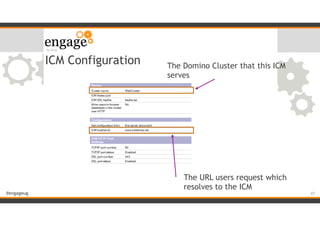
The Domino Cluster that this ICM
serves
The URL users request which
resolves to the ICM
#engageug
Traveler Clustering
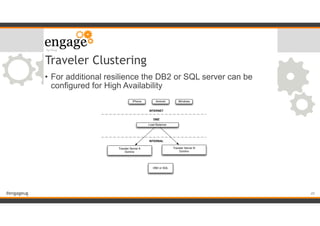
• Requires enabling Traveler High Availability which moves the
Traveler data from a local Derby database to an Enterprise
SQL or DB2 database
• The Traveler servers are added to a Traveler pool that share
users and data
• A load balancer must be placed in front of the Traveler
servers to ensure clients can be connected to any of the
servers
!48
#engageug
Traveler Clustering
• For additional resilience the DB2 or SQL server can be
configured for High Availability
!49
Load Balancer
Traveler Server A
Domino
DB2 or SQL
Traveler Server B
Domino
iPhone Android Windows
INTERNET
INTERNAL
DMZ
#engageug
IBM Edge Load Balancer
• The Edge Load Balancer is a software based Load Balancer
• There are two versions an IPV4 and an IPV4 & IPV6 ULB
(universal load balancer)
• The IPV4 one is being deprecated so you want the
newer IPV4 & IPV6 one
• Supported on multiple platforms and very easy to configure
it’s a good option if you’re considering clustering and don’t
already have a hardware solution
!50
#engageug
The HTTP Server
Logging & Monitoring
!51
#engageug
HTTP Logging
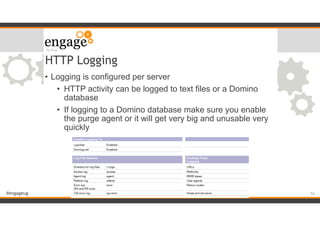
• Logging is configured per server
• HTTP activity can be logged to text files or a Domino
database
• If logging to a Domino database make sure you enable
the purge agent or it will get very big and unusable very
quickly
!52
#engageug
Debug HTTP
• tell HTTP debug thread on (use only temporarily)
• Websess_Trace_Verbose (SSO)
• WebAuth_Truce_Verbose (group cache & memberships)
!53
#engageug
DDM Probes
• Web Configuration Probe
• Agents evaluated by CPU or Memory
!54
#engageug
The HTTP Server
Vulnerabilities
!55
#engageug
Java Memory Issues
• Java code needs to be well written with recycles and
garbage collection or too much memory will be consumed
• HTTPUseNotesMemory
• JavaMaxHeapSize
!56
#engageug
Security
• Password Strength
• DDM Probe to monitor for Anonymous database access
• DIIOP, LDAP, SMTP
• SSL certificates
!57
#engageug
HTTP Threads
• Monitor HTTP statistics to ensure the server can handle
peak traffic
• Review ddm.nsf reports to verify there are no issues relating
to available threads
• An HTTP server that slows down until it becomes
unresponsive is often due to threads not being released /
sessions not be closed properly
• Do not over-assign threads as those consume memory you
will need to run applications and code
!58
#engageug
Questions?
• Gab Davis
• The Turtle Partnership
• gabriella@turtlepartnership.com
• gabturtle on twitter
!59

HTTP - The Other Face Of Domino

  • 1.
    #engageug The Other FaceOf Domino, Configuring and Securing Gabriella Davis The Turtle Partnership gabriella@turtlepartnership.com !1
  • 2.
    #engageug Domino HTTP • TheHTTP Server • Securing your HTTP traffic • Configuring HTTP for different applications • Performance and Clustering • Logging and Monitoring • Vulnerabilities !2
  • 3.
  • 4.
    #engageug The HTTP Server •The Domino HTTP engine was introduced in 4.6 when the product was renamed “Domino” • Since then it has been modified for performance and features but only re-engineered significantly in 8.5 when XPages were introduced • The HTTP task is now responsible for other services such as iNotes, Traveler, XPages making its performance and stability critical • Running the latest version of Domino will always give an improved HTTP experience !4
  • 5.
    #engageug HTTP Threads • Threadsare assigned one per incoming HTTP request • Each thread utilises up to 40kb of memory • Configuring more threads doesn’t improve performance and will usually do the opposite • Configure the minimum number of threads you need • domino.threads.active.peak (NSF requests only) • http.currentconnections / http.peakconnections (all requests) • The default is 40, for most web only servers we would increase that !5
  • 6.
    #engageug HTTP Threads andMemory • Too many threads will consume too much memory and cause server issues • Obviously with 64bit we have more memory, and therefore threads, to play with !6
  • 7.
    #engageug HTTP Agents • Agentsrun via the HTTP tasks consume a HTTP thread and are run outside of the Agent Manager task that handles regular agents • This includes WebQueryOpen and WebQuerySave agents • A long running agent will not release a HTTP thread and consume too much memory • Xpages code needs an HTTP thread too and will consume JVM resources sometimes causes out of memory errors • HTTPJVMMaxHeapSize allows you to increase the memory allocated to the JVM related to HTTP only and not the server wide JVM activity !7
  • 8.
    #engageug iNotes • Uses clientside caching for performance in 8.5.1 and later • Minimised use of applets with the exception of Sametime • Replace stlinks with Sametime Proxy ajax code • Use a standard template for everyone • Enable OOO service rather than agents • Enable full text indexing or disable on the fly indexing !8
  • 9.
    #engageug Traveler • Traveler requiresenough concurrent threads to support concurrent device connections • A device configured for traveler is always consuming a thread when it’s active • Number of threads should be 1.2 x Number of active devices • In a load balanced cluster of Traveler that isn’t the same as the number of registered devices !9
  • 10.
  • 11.
    #engageug Server Security &HTTP Agents • Use SSL for all HTTP traffic • especially Traveler and iNotes • Disable Anonymous access on HTTP unless it’s a public facing server • In which case have the server in an isolated domain ! ! • Enable concurrent web agents for performance !11
  • 12.
    #engageug Internet Site Documents •Opt-In Security • Without Internet Site Documents all services can run with no restrictions • connect to a web server on its ip address or any resolvable host name BAD • start a service you aren’t actually using such as LDAP exposing a security hole BAD • Using Internet Site documents ensures that a task may be started but it won’t respond if the wrong hostname is part of the request !12
  • 13.
    #engageug Application Security • Catalog.Nsf-
 
 • DDM Database ACL
 • Server Security !13
  • 14.
    #engageug File Protection Document •Secures access via the Domino server to file system files such as HTML, GIF, JPEG and CGI scripts • It doesn’t secure access to files the CGI scripts use • Directory security includes all files and subdirectories !14
  • 15.
    #engageug Internet Passwords • Actions- Upgrade to more secure internet password • inetlockout.nsf - configured in the server configuration document • lockout the account temporarily or permanently due to failed logins • Fewer name variations with higher security !15
  • 16.
    #engageug Secure HTTP (SSL) •SSL is a protocol (a subset of TLS) that encrypts traffic between a client request and the server running HTTP • SSL traffic can still be intercepted but can’t be decoded easily • The stronger the key used for encrypting the traffic, the harder it will be to decode • Keys are generated for each client session and discarded when the session ends • Using a SSL certificate also alerts the user if the server they are connecting to has a different hostname than the one they requested or if the certificate the server is using has expired !16
  • 17.
    #engageug SSL Keyfiles • EnablingSSL requires the existence of a keyfile with a certificate in it on the server • The keyfile is created from the Server Certificate Admin database (certsrv.nsf) which is on every server • You can create a self certified certificate and that will work to encrypt traffic • users will be warned that the certificate isn’t recognised !17
  • 18.
    #engageug SSL Keyfiles ForMultiple Hosts • A single SSL keyfile will bind to a specific ip address, one that resolves from the hostname it is assigned to • If you’re using Internet Site documents you can enter different SSL keyfiles for different hostnames BUT each one will only work if it resolves to a unique ip address !18
  • 19.
    #engageug Public Certificate Authorities •Buy a certificate from a public certificate authority • If you buy a strong certificate go ahead and remove the validation for 40 and 56 bit ciphers ! ! ! • Ensure you import the trusted root and all intermediate certificates into your keyfile • Once you have a keyfile you can use that to encrypt any port you want including HTTP and LDAP !19
  • 20.
    #engageug Trusted Roots • Whenbuying a certificate from a public CA you need to import the trusted roots for that certifier into your keyfile • Different certificates even from the same CA have different trusted roots • Browsers come pre-installed with common CA trusted roots so they can recognise and validate your certificate • Some older technologies don’t recognise the newer, stronger certificates !20
  • 21.
    #engageug Tip • Android devicesship with limited built in trusted roots that aren’t easily updateable • If you’re using SSL for Traveler and Android devices, verify the devices will recgonise the certificate you’re buying before you buy it !21
  • 22.
  • 23.
    #engageug Client Certificates • Allowsyou to issue certificates to clients so you can verify their identity not just with their login information but with a valid certificate • There is a large administrative overhead in maintaining and managing client side certificates for all connecting web users • Use the CA process to enable a Certificate Authority on your server for user requests !23
  • 24.
    #engageug TLS via IHS •TLS is an encryption protocol that is more secure than SSL. It provides a higher level of encryption, validation and security • Domino 9 supports the use of TLS only by deploying an IBM HTTP Server in front of Domino • All Domino requests are routed through IHS to the Domino HTTP Task • IHS handles the TLS security • TLS is only supported with IHS and Domino installed on a Windows platform • You will still need to enable SSL and have a certificate on the Domino server !24
  • 25.
    #engageug Java Permissions • /jvm/lib/security/java.policy •Controls what the JVM, and code that uses it, can do • Syntax for the permissions can be found here • http://download.oracle.com/javase/1.4.2/docs/guide/ security/PolicyFiles.html !25
  • 26.
    #engageug Tip! • Java.Policy willoften be overwritten during an upgrade • To prevent that happening make the file read only • My preference is simply to backup the file before upgrade then compare the new file to the old • Otherwise you might miss something that’s needed in a later version !26
  • 27.
  • 28.
    #engageug Thread Management • Threadsare configured for the overall HTTP task, not by internet site • So all hosts on the server will share the availability of threads • More threads means more memory consumption but not necessarily better performance • domino.threads.active.peak (NSF requests only) • http.currentconnections / http.peakconnections (all requests) !28
  • 29.
    #engageug HTTP Agents • Enableconcurrent web agents and agent timeouts ! ! ! ! • Monitor agent performance via DDM probes !29
  • 30.
    #engageug Virtual Hosts • Asingle server can answer to multiple host names so long as they resolve to that server’s ip address • You can configure different home pages as well as different web server behaviour for each host • security, location of files, single sign-on, browser behaviour • When using Internet Site Documents, a client request will only be answered if there is a matching virtual host or a default web site document !30
  • 31.
    #engageug Redirection • A Redirectionrule repoints a URL request from the original location to a new one • If I had an application that I want users to browse to without typing in the full application name I could use redirection to change the URL from a short one to a full address • /sponsor to /ggc.nsf/info.xsp for instance • When a URL is redirected, the URL is actually rewritten in the browser’s address bar !31
  • 32.
    #engageug • The Redirectionrule is a response to a web site document that contains a virtual host so it will work for any valid hosts in that website document • Incoming URL is what appears after the virtual host eg • www.turtlehost.net/sponsor ! ! • Redirect is how you want the URL rewritten including hostname if you want • Send 301 redirect is optional and instructs the browser to remember this redirection and request that directly next Redirection !32
  • 33.
    #engageug Substitution • Substitution rulesare used to move a site from one location to another • There isn’t just one URL represented by a substitution rule but any URL that is part of a substitution hierarchy • For example if my blog were to change from blog.nsf to blognew.nsf I would use a substitution rule as follows !33
  • 34.
    #engageug HTTP Response Headers •Add response headers to pages to customise the headers that Domino sends to the client’s browser • A custom response header can tell the browser when to expire a page and ask the server for a refreshed copy • Response headers need to match both a URL and a HTTP code that is being returned !34
  • 35.
    #engageug Override Session Authentication •For specific URLs you may want to overwrite the session authentication that is used for the virtual host and use basic authentication instead !35
  • 36.
    #engageug Custom Errors andLogins • Create a database called domcfg.nsf (never anything else) based on the template domcfg5.ntf ! ! ! ! ! • It will then appear on the configuration tab for the server in Domino Administrator !36
  • 37.
    #engageug Custom Errors andLogins • Create a default mapping for login - it is more customisable and looks better than the standard session sign on !37
  • 38.
    #engageug Custom Errors • Cancome from any database and any form you choose, these are just the defaults !38
  • 39.
    #engageug Httpd.cnf & Browser.cnf •Files are written to the Domino program directory during install and upgrades • Browser.cnf has the configuration of each browser’s supported features so Domino knows how to deliver content to the user’s specific browser • Httpd.cnf contains file types and associations so Domino knows how to handle file attachments and embedded content • You would usually not edit either one of these files but if you do you should mark them read only so they aren’t overwritten on upgrade • Or back them up and make them part of your upgrade process !39
  • 40.
    #engageug The Browser Plug-In •Client side deployment • Not part of HTTP configuration • Uses a version of the Notes client on the user’s machine • No server configuration • Any application that works through the Notes basic client should work • IBM don’t support accessing your mail via the Browser Plug- In, but instead request you use iNotes !40
  • 41.
  • 42.
    #engageug Why Cluster • Clusteringis usually considered when you want to expand resources and provide multiple servers for users to access • that is load balanced clustering, all servers provide the same service and the users are assigned to whatever server is available • Clustering is also worthwhile deploying purely as a failover solution so if your primary server goes offline, your users can failover to a cluster mate • Failover clustering is much cheaper than load balanced clustering • The redirection of users to a new server is usually done via a manual DNS change so you don’t need a load balanced piece of hardware !42
  • 43.
    #engageug Tip! • If thesystem is important to your business and you can’t have extended minutes or hours of downtime you are going to want to Cluster at some level, it’s just a case of deciding how much hardware and money you want to apply to the job !43
  • 44.
    #engageug Clustering for HTTP •Internet Cluster Manager • A Domino based and Domino aware load balancer • Runs as a task of your Domino server • the ICM can be on the same server as the actual websites • but you would need two ips • and it would be a single point of failure !44
  • 45.
    #engageug ICM Design • Theclient requests a hostname that points to the ICM • The ICM is assigned to a Domino cluster • Using the cldbdir.nsf on the servers it rewrites the URL to direct the client request to one of the Domino cluster servers • The ICM sends out probes to monitor the health of the Domino servers to ensure a user isn’t sent to a non responsive server !45
  • 46.
    #engageug • Or youcould use any standard load balancer instead of the ICM but the ICM is part of your Domino licensing ICM Design CLUSTER Domino Server A Runs ICM Not Part Of A Cluster Domino Server B WebCluster Domino Server C WebCluster Domino Server D WebCluster Client Client Client Client !46
  • 47.
    #engageug ICM Configuration ! !47 The DominoCluster that this ICM serves The URL users request which resolves to the ICM
  • 48.
    #engageug Traveler Clustering • Requiresenabling Traveler High Availability which moves the Traveler data from a local Derby database to an Enterprise SQL or DB2 database • The Traveler servers are added to a Traveler pool that share users and data • A load balancer must be placed in front of the Traveler servers to ensure clients can be connected to any of the servers !48
  • 49.
    #engageug Traveler Clustering • Foradditional resilience the DB2 or SQL server can be configured for High Availability !49 Load Balancer Traveler Server A Domino DB2 or SQL Traveler Server B Domino iPhone Android Windows INTERNET INTERNAL DMZ
  • 50.
    #engageug IBM Edge LoadBalancer • The Edge Load Balancer is a software based Load Balancer • There are two versions an IPV4 and an IPV4 & IPV6 ULB (universal load balancer) • The IPV4 one is being deprecated so you want the newer IPV4 & IPV6 one • Supported on multiple platforms and very easy to configure it’s a good option if you’re considering clustering and don’t already have a hardware solution !50
  • 51.
  • 52.
    #engageug HTTP Logging • Loggingis configured per server • HTTP activity can be logged to text files or a Domino database • If logging to a Domino database make sure you enable the purge agent or it will get very big and unusable very quickly !52
  • 53.
    #engageug Debug HTTP • tellHTTP debug thread on (use only temporarily) • Websess_Trace_Verbose (SSO) • WebAuth_Truce_Verbose (group cache & memberships) !53
  • 54.
    #engageug DDM Probes • WebConfiguration Probe • Agents evaluated by CPU or Memory !54
  • 55.
  • 56.
    #engageug Java Memory Issues •Java code needs to be well written with recycles and garbage collection or too much memory will be consumed • HTTPUseNotesMemory • JavaMaxHeapSize !56
  • 57.
    #engageug Security • Password Strength •DDM Probe to monitor for Anonymous database access • DIIOP, LDAP, SMTP • SSL certificates !57
  • 58.
    #engageug HTTP Threads • MonitorHTTP statistics to ensure the server can handle peak traffic • Review ddm.nsf reports to verify there are no issues relating to available threads • An HTTP server that slows down until it becomes unresponsive is often due to threads not being released / sessions not be closed properly • Do not over-assign threads as those consume memory you will need to run applications and code !58
  • 59.
    #engageug Questions? • Gab Davis •The Turtle Partnership • gabriella@turtlepartnership.com • gabturtle on twitter !59