Open Mic on

Important Tips on Router & SMTP
mail routing
Date: 20th Feb, 2014
Open Mic Team
• Jayesh Parmar - IBM ICS Support engineer
• Presenter

• Shrikant Ahire - IBM ICS Support engineer
• Presenter
• Ranjit Rai - IBM ICS SWAT
• Focussing on entire Notes/Domino

• Jayavel Rajendran - IBM ICS SWAT
• Focussing on entire Notes/Domino
• Hansraj Mali - IBM ICS SWAT
• Focussing on Notes/Domino
• Vinayak Tavargeri – IBM ICS Support
• Facilitator for Open Mics
2

|

© 2013 IBM Corporation
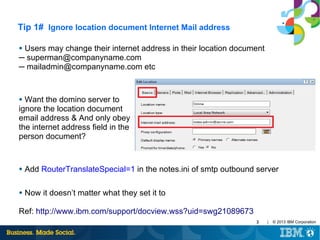
Tip 1# Ignore location document Internet Mail address
Users may change their internet address in their location document
─ superman@companyname.com
─ mailadmin@companyname.com etc
●

Want the domino server to
ignore the location document
email address & And only obey
the internet address field in the
person document?
●

●

Add RouterTranslateSpecial=1 in the notes.ini of smtp outbound server

●

Now it doesn’t matter what they set it to

Ref: http://www.ibm.com/support/docview.wss?uid=swg21089673
3

|

© 2013 IBM Corporation
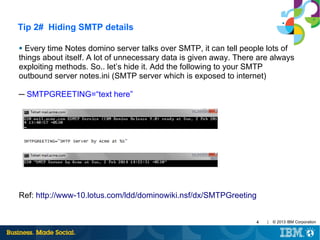
Tip 2# Hiding SMTP details
Every time Notes domino server talks over SMTP, it can tell people lots of
things about itself. A lot of unnecessary data is given away. There are always
exploiting methods. So.. let’s hide it. Add the following to your SMTP
outbound server notes.ini (SMTP server which is exposed to internet)
●

─ SMTPGREETING=“text here”

Ref: http://www-10.lotus.com/ldd/dominowiki.nsf/dx/SMTPGreeting
4

|

© 2013 IBM Corporation
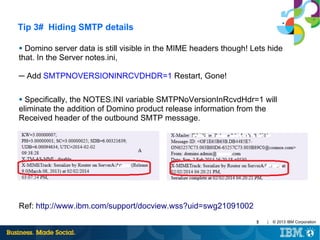
Tip 3# Hiding SMTP details
Domino server data is still visible in the MIME headers though! Lets hide
that. In the Server notes.ini,
●

─ Add SMTPNOVERSIONINRCVDHDR=1 Restart, Gone!
Specifically, the NOTES.INI variable SMTPNoVersionInRcvdHdr=1 will
eliminate the addition of Domino product release information from the
Received header of the outbound SMTP message.
●

Ref: http://www.ibm.com/support/docview.wss?uid=swg21091002
5

|

© 2013 IBM Corporation
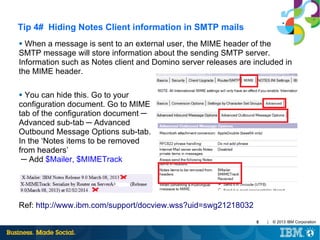
Tip 4# Hiding Notes Client information in SMTP mails
When a message is sent to an external user, the MIME header of the
SMTP message will store information about the sending SMTP server.
Information such as Notes client and Domino server releases are included in
the MIME header.
●

You can hide this. Go to your
configuration document. Go to MIME
tab of the configuration document ─
Advanced sub-tab ─ Advanced
Outbound Message Options sub-tab.
In the ‘Notes items to be removed
from headers’
─ Add $Mailer, $MIMETrack
●

Ref: http://www.ibm.com/support/docview.wss?uid=swg21218032
6

|

© 2013 IBM Corporation
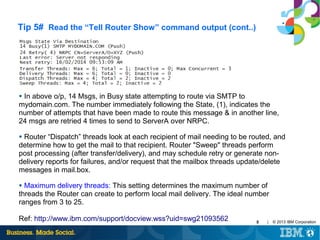
Tip 5# Read the “Tell Router Show” command output

In above o/p, 57 msgs in Busy state attempting to route via NRPC to
[$LocalDelivery]. 18 indicates the number of attempts made to deliver these
messages locally.
●

Maximum Transfer threads:The maximum number of server threads Domino
creates to transfer messages to all other servers. The value applies to both Notes
routing and SMTP. The Router sets a default maximum number of transfer threads
based on server memory. Letting the Router select the maximum number is usually
best. If you set the maximum number manually, set the maximum to between 1 and
25 threads, depending on server load. However, additional threads may increase
the demand for server processing time.
●

Maximum concurrent transfer threads: This setting determines the maximum
number of concurrent transfer threads per destination. The default is the value
entered for "Maximum transfer threads" divided by 2
●

7

|

© 2013 IBM Corporation
Tip 5# Read the “Tell Router Show” command output (cont..)

In above o/p, 14 Msgs, in Busy state attempting to route via SMTP to
mydomain.com. The number immediately following the State, (1), indicates the
number of attempts that have been made to route this message & in another line,
24 msgs are retried 4 times to send to ServerA over NRPC.
●

Router “Dispatch” threads look at each recipient of mail needing to be routed, and
determine how to get the mail to that recipient. Router "Sweep" threads perform
post processing (after transfer/delivery), and may schedule retry or generate nondelivery reports for failures, and/or request that the mailbox threads update/delete
messages in mail.box.
●

Maximum delivery threads: This setting determines the maximum number of
threads the Router can create to perform local mail delivery. The ideal number
ranges from 3 to 25.
●

Ref: http://www.ibm.com/support/docview.wss?uid=swg21093562

8

|

© 2013 IBM Corporation
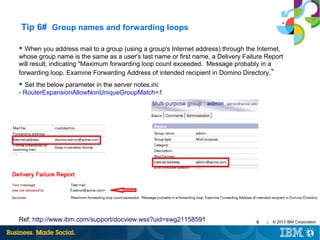
Tip 6# Group names and forwarding loops
● When you address mail to a group (using a group's Internet address) through the Internet,

whose group name is the same as a user's last name or first name, a Delivery Failure Report
will result, indicating "Maximum forwarding loop count exceeded. Message probably in a
forwarding loop. Examine Forwarding Address of intended recipient in Domino Directory.”
● Set the below parameter in the server notes.ini:

- RouterExpansionAllowNonUniqueGroupMatch=1

Ref: http://www.ibm.com/support/docview.wss?uid=swg21158591

9

|

© 2013 IBM Corporation
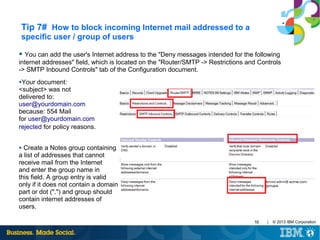
Tip 7# How to block incoming Internet mail addressed to a
specific user / group of users
● You can add the user's Internet address to the "Deny messages intended for the following

internet addresses" field, which is located on the "Router/SMTP -> Restrictions and Controls
-> SMTP Inbound Controls" tab of the Configuration document.
●Your

document:
<subject> was not
delivered to:
user@yourdomain.com
because: 554 Mail
for user@yourdomain.com
rejected for policy reasons.
Create a Notes group containing
a list of addresses that cannot
receive mail from the Internet
and enter the group name in
this field. A group entry is valid
only if it does not contain a domain
part or dot (".") and group should
contain internet addresses of
users.
●

10

|

© 2013 IBM Corporation
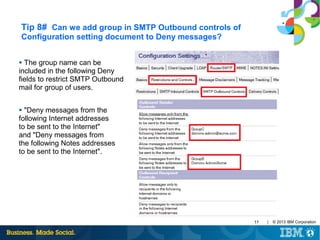
Tip 8# Can we add group in SMTP Outbound controls of
Configuration setting document to Deny messages?
The group name can be
included in the following Deny
fields to restrict SMTP Outbound
mail for group of users.
●

"Deny messages from the
following Internet addresses
to be sent to the Internet"
and "Deny messages from
the following Notes addresses
to be sent to the Internet".
●

11

|

© 2013 IBM Corporation
Tip 9# Is there a way to delay the delivery of Non Delivery
Reports by the Domino router
●

Undelivered mail is normally returned by the router to a user as a NDR after one
day (24 hours).
There are two notes.ini parameters available that can extend the time that the
messages sit in the mail.box and delay the router from issuing a NDR for each of
them. The parameters are "MailTimeout" and "MailTimeoutMinutes". Implementing
either of these parameters will apply to Notes-to-Notes mail, as well as Notes-toSMTP mail.
●

●

In order to change this default time, place the following parameter in Notes.ini:
mailtimeout=n (where "n" indicates the number of days to hold users mail)
mailtimeoutminutes=n (where "n" sets the retry interval in minutes)

Ref: http://www.ibm.com/support/docview.wss?uid=swg21087470
12

|

© 2013 IBM Corporation
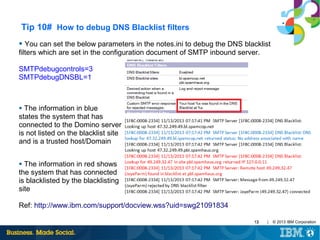
Tip 10# How to debug DNS Blacklist filters
●

You can set the below parameters in the notes.ini to debug the DNS blacklist
filters which are set in the configuration document of SMTP inbound server.
SMTPdebugcontrols=3
SMTPdebugDNSBL=1

The information in blue
states the system that has
connected to the Domino server
is not listed on the blacklist site
and is a trusted host/Domain
●

The information in red shows
the system that has connected
is blacklisted by the blacklisting
site
●

Ref: http://www.ibm.com/support/docview.wss?uid=swg21091834
13

|

© 2013 IBM Corporation
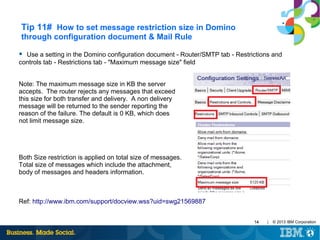
Tip 11# How to set message restriction size in Domino
through configuration document & Mail Rule
● Use a setting in the Domino configuration document - Router/SMTP tab - Restrictions and

controls tab - Restrictions tab - "Maximum message size" field
Note: The maximum message size in KB the server
accepts. The router rejects any messages that exceed
this size for both transfer and delivery. A non delivery
message will be returned to the sender reporting the
reason of the failure. The default is 0 KB, which does
not limit message size.

Both Size restriction is applied on total size of messages.
Total size of messages which include the attachment,
body of messages and headers information.

Ref: http://www.ibm.com/support/docview.wss?uid=swg21569887
14

|

© 2013 IBM Corporation
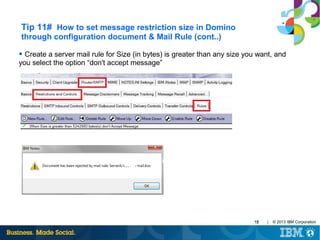
Tip 11# How to set message restriction size in Domino
through configuration document & Mail Rule (cont..)
●

Create a server mail rule for Size (in bytes) is greater than any size you want, and
you select the option “don't accept message”

15

|

© 2013 IBM Corporation
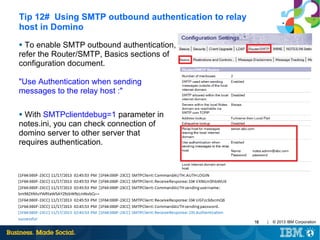
Tip 12# Using SMTP outbound authentication to relay
host in Domino
To enable SMTP outbound authentication,
refer the Router/SMTP, Basics sections of
configuration document.
●

"Use Authentication when sending
messages to the relay host :"
With SMTPclientdebug=1 parameter in
notes.ini, you can check connection of
domino server to other server that
requires authentication.
●

16

|

© 2013 IBM Corporation
Tip 13# Limit Mass Mailing
To configure, utilize the following setting: RouterMaxEffectiveSize=xxx
(where xxx is in kilobytes.)
●

When enabled, this restriction will cause the router to present the NonDelivery Failure (NDF) message when the number of recipients
multiplied by the message size (in k bytes) is greater than the value
specified by the notes.ini setting. Attachments are excluded.
●

Implement the following notes.ini setting:
RouterMaxEffectiveSizeIncAttach=1.
●

With this setting enabled, any file attachments are included in the
equation to calculate the size of the message.
●

Ref: http://www.ibm.com/support/docview.wss?uid=swg21271709
17

|

© 2013 IBM Corporation
Tip 14# Speed up mail delivery to a single destination
The parameter RouterAllowConcurrentXferToAll=1 allows multiple
transfer threads to all domains.
●

●By

default, the number of concurrent transfer threads will be half (1/2)
the number of available transfer threads.
●The

concurrent threads will only apply to servers in the same NNN and
servers in the local Internet domain that are configured as accessible
over SMTP (as per the Basics tab of Server Configuration document). By
enabling RouterAllowConcurrentXferToAll, multiple concurrent transfer
threads will also be used for: Servers in the local domain, but not in the
same NNN
If you have 100 messages going to another server or to gmail - only
one transfer thread will be generated This means that the server can
more efficiently use multiple threads for multiple destinations and mail is
less likely to be backlogged
●

18

|

© 2013 IBM Corporation
Tip 15# Slow mail delivery when large group is listed in bcc
field in a mail message
When a large group is listed in the bcc field in a mail message, it
causes a performance degradation on the Domino mail server delivering
the mail.
●

To improve performance on the mail server, use the notes.ini variable,
Disable_BCC_group_expansion=1, to disable bcc group expansion.
Even if the parameter is added through the "Set Config" command, for
example, Set Config Disable_BCC_group_expansion=1, the .ini
parameter will not take effect until the server has been restarted.
●

19

|

© 2013 IBM Corporation
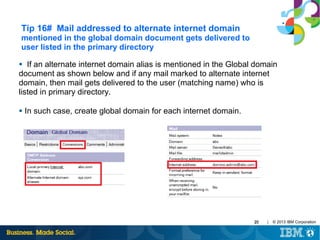
Tip 16# Mail addressed to alternate internet domain
mentioned in the global domain document gets delivered to
user listed in the primary directory
If an alternate internet domain alias is mentioned in the Global domain
document as shown below and if any mail marked to alternate internet
domain, then mail gets delivered to the user (matching name) who is
listed in primary directory.
●

●

In such case, create global domain for each internet domain.

20

|

© 2013 IBM Corporation
Tip 17# Mail Routing on priority basis
●

The "Low priority mail routing time range" field (Router/SMTP > Restrictions
and Controls > Transfer Controls tab) is set to the time range for low priority mail
routing. Default is between 12:00 AM and 6:00 AM.
Enable the "Low priority delay notification" option if you want users to be notified
that email will be delayed.
●

Set the "Ignore message priority" field (Router/SMTP > Advanced > Controls
tab) to Disable.
●

In the server's notes.ini file, check to see if the MailDisablePriority parameter is
set to 0 or if it exists at all. If it does not exist, change the priority of email to
Normal.MailDisablePriority=<value> description: When set to 1, the
MailDisablePriority setting causes the mail router to ignore the delivery priority of
mail messages. This causes all messages to be delivered with normal priority. If
this parameter is set to 0, mail routes according to the parameter determined by
the sender
●

21

|

© 2013 IBM Corporation
Tip 18# Determining the number of mailboxes required
for a server
●

Product Development recommends that when the percentage of access
conflicts consistently exceeds 2%, another mailbox should be created
●

To measure this percentage, you can use two statistics:

Mail.Mailbox.Accesses and Mail.Mailbox.AccessConflicts. These figures can be
obtained by issuing a "show stat mail" command on the Domino Server console
●

(Mail.Mailbox.AccessConflicts / Mail.Mailbox.Accesses) x 100 > 2.

Note: If the result is greater than 2 on a consistent basis, a new mailbox is
needed. At least two mailboxes are needed to gather the statistics for the above
formula. You must also open a mailbox on the server in order to generate the
statistics.
Ref: http://www.ibm.com/support/docview.wss?uid=swg21148438
22

|

© 2013 IBM Corporation
Tip 19# Disable Transaction logging on Mail boxes
●

MailBoxDisableTXNLogging=1 will enable new MAIL.BOX files to be created
with transaction logging disabled via the database advanced property
Background: Even if the advanced property "Disable Transaction Logging" is
set on the mailbox.ntf template, and a new MAIL.BOX database is created from
this template, the property "Disable Transaction Logging" is NOT set on the new
database made from the template. The "Disable Transaction Logging" property is
not inherited from templates intentionally. Instead, this setting must be set on a
per-database basis. When MailBoxDisableTXNLogging=1 the router will create
MAIL.BOX databases with transaction logging disabled.
●

This setting does not disable transaction logging for existing databases, only
MAIL.BOX databases created by the router after this setting has been enabled.
Manually created database will not have transaction logging disabled.
●

●

This will help avoid routing delays on busy mail servers
23

|

© 2013 IBM Corporation
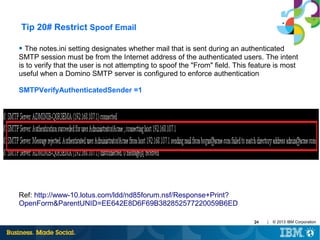
Tip 20# Restrict Spoof Email
●

The notes.ini setting designates whether mail that is sent during an authenticated
SMTP session must be from the Internet address of the authenticated users. The intent
is to verify that the user is not attempting to spoof the "From" field. This feature is most
useful when a Domino SMTP server is configured to enforce authentication
SMTPVerifyAuthenticatedSender =1

Ref: http://www-10.lotus.com/ldd/nd85forum.nsf/Response+Print?
OpenForm&ParentUNID=EE642E8D6F69B382852577220059B6ED
24

|

© 2013 IBM Corporation
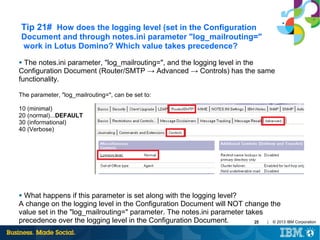
Tip 21# How does the logging level (set in the Configuration
Document and through notes.ini parameter "log_mailrouting="
work in Lotus Domino? Which value takes precedence?
The notes.ini parameter, "log_mailrouting=", and the logging level in the
Configuration Document (Router/SMTP → Advanced → Controls) has the same
functionality.
●

The parameter, "log_mailrouting=", can be set to:
10 (minimal)
20 (normal)...DEFAULT
30 (informational)
40 (Verbose)

What happens if this parameter is set along with the logging level?
A change on the logging level in the Configuration Document will NOT change the
value set in the "log_mailrouting=" parameter. The notes.ini parameter takes
precedence over the logging level in the Configuration Document.
| © 2013 IBM Corporation
25
●
Tip 22# Domino router shuts down when journaling database
is unavailable
If journaling is enabled on the domino server, but the journaled database is
unavailable, then the code dictates that the router should shutdown.
●

This was implemented to ensure that all messages are journaled as many
organizations have policies in place that require all messages to be journaled.
There is no automatic function in Domino to force the router to start up, hence the
router needs to be started manually or through a Program document.
●

Tip 23# Improving Message Recall Performance
●

Significant testing has been done on message recall. It was found that there was
an increase in message recall performance on databases that are on ODS 51. This
is not required but message recall performance is significantly improved if the
databases are on ODS 51.

26

|

© 2013 IBM Corporation
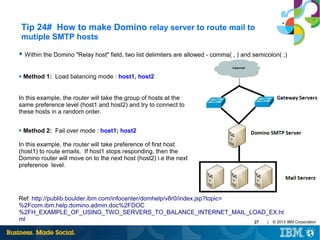
Tip 24# How to make Domino relay server to route mail to
mutiple SMTP hosts
● Within the Domino "Relay host" field, two list delimiters are allowed - comma( , ) and semicolon( ;)

●

Method 1: Load balancing mode : host1, host2

In this example, the router will take the group of hosts at the
same preference level (host1 and host2) and try to connect to
these hosts in a random order.
●

Method 2: Fail over mode : host1; host2

In this example, the router will take preference of first host
(host1) to route emails. If host1 stops responding, then the
Domino router will move on to the next host (host2) i.e the next
preference level.

Ref: http://publib.boulder.ibm.com/infocenter/domhelp/v8r0/index.jsp?topic=
%2Fcom.ibm.help.domino.admin.doc%2FDOC
%2FH_EXAMPLE_OF_USING_TWO_SERVERS_TO_BALANCE_INTERNET_MAIL_LOAD_EX.ht
ml
| © 2013 IBM Corporation
27
Tip 25# Duplicate mails received when email is addressed to
user in "To" field and group is listed in "cc" field, where in
user is a member of the group
The fix is to add below parameter which works starting with domino 8.5.1 and
eliminates duplicate message to be send to recipients:
●

RouterDupElimLookedUpFullName=number
●

Use the following values to set for this parameter:

0 - Do not eliminate the recipient's FullName from Router group expansion results
1 - Eliminate recipient's distinguished FullName from Router group expansion results
2 - Perform another recipient lookup by FullName for verification before eliminating
recipient's distinguished FullName from Router group expansion results
Ref : http://www-01.ibm.com/support/docview.wss?uid=swg21390024

28

|

© 2013 IBM Corporation
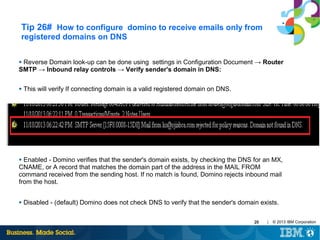
Tip 26# How to configure domino to receive emails only from
registered domains on DNS
Reverse Domain look-up can be done using settings in Configuration Document → Router
SMTP → Inbound relay controls → Verify sender's domain in DNS:
●

●

This will verify If connecting domain is a valid registered domain on DNS.

Enabled - Domino verifies that the sender's domain exists, by checking the DNS for an MX,
CNAME, or A record that matches the domain part of the address in the MAIL FROM
command received from the sending host. If no match is found, Domino rejects inbound mail
from the host.
●

●

Disabled - (default) Domino does not check DNS to verify that the sender's domain exists.
29

|

© 2013 IBM Corporation
Tip 27# Outgoing messages sporadically get stuck in Notes
user's local mail.box
There are many applications and hardware that do not conform to the normal MTU
of 1500 for TCP/IP actual packet size is lower [1472] due to header information.
This is not unique to any specific operating system that uses TCP/IP.
●

To get a successful connection you cannot exceed the MTU and you may have to
reduce the packet size to accommodate the product.
●

Use the following command at the Operating System prompt.
[note: the 1024 is only arbitrary start amount]
●

ping -f -l 1024 <IP Address>
where -f indicates do not fragment & -l indicates the packet size you will be sending
Ref: http://www-01.ibm.com/support/docview.wss?uid=swg21086718
30

|

© 2013 IBM Corporation
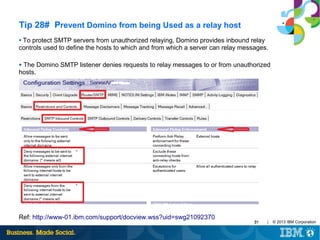
Tip 28# Prevent Domino from being Used as a relay host
To protect SMTP servers from unauthorized relaying, Domino provides inbound relay
controls used to define the hosts to which and from which a server can relay messages.
●

The Domino SMTP listener denies requests to relay messages to or from unauthorized
hosts.
●

Ref: http://www-01.ibm.com/support/docview.wss?uid=swg21092370

31

|

© 2013 IBM Corporation
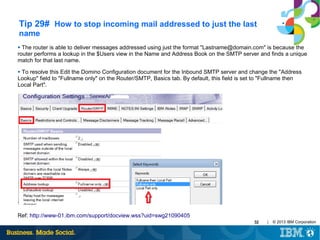
Tip 29# How to stop incoming mail addressed to just the last
name
The router is able to deliver messages addressed using just the format "Lastname@domain.com" is because the
router performs a lookup in the $Users view in the Name and Address Book on the SMTP server and finds a unique
match for that last name.
●

To resolve this Edit the Domino Configuration document for the Inbound SMTP server and change the "Address
Lookup" field to "Fullname only" on the Router/SMTP, Basics tab. By default, this field is set to "Fullname then
Local Part".
●

●

Ref: http://www-01.ibm.com/support/docview.wss?uid=swg21090405
32

|

© 2013 IBM Corporation
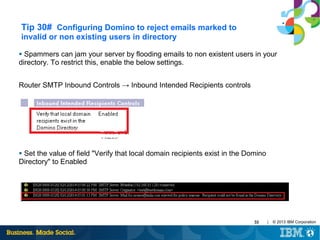
Tip 30# Configuring Domino to reject emails marked to
invalid or non existing users in directory
Spammers can jam your server by flooding emails to non existent users in your
directory. To restrict this, enable the below settings.
●

Router SMTP Inbound Controls → Inbound Intended Recipients controls

Set the value of field "Verify that local domain recipients exist in the Domino
Directory" to Enabled
●

33

|

© 2013 IBM Corporation
Tip 31# Configuring Domino to Ignore the Foreign SMTP
Domain document
You already have a foreign SMTP domain document and a SMTP connection document in
your Domino SMTP relay server. Now, you want to ignore the Foreign SMTP document so
How to configure particular server to ignore Foreign SMTP and rather use the configuration
document as relay host.
●

RouterIgnoreForeignSMTPDomains=1

Tip 32# How to mention multiple internet address for single user
when we have multiple internet domains?
The primary internet address of user should be mentioned in the field "Internet address" in
the Person document. The additional internet address can be mentioned in the field "User
Name" or in "Short name" in the person document of the user.
●

34

|

© 2013 IBM Corporation
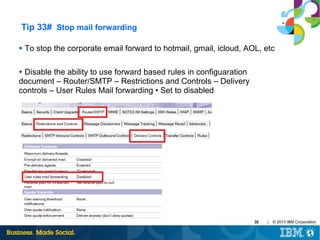
Tip 33# Stop mail forwarding
●

To stop the corporate email forward to hotmail, gmail, icloud, AOL, etc

Disable the ability to use forward based rules in configuaration
document – Router/SMTP – Restrictions and Controls – Delivery
controls – User Rules Mail forwarding • Set to disabled
●

35

|

© 2013 IBM Corporation
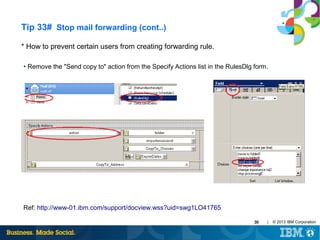
Tip 33# Stop mail forwarding (cont..)
* How to prevent certain users from creating forwarding rule.
●

Remove the "Send copy to" action from the Specify Actions list in the RulesDlg form.

Ref: http://www-01.ibm.com/support/docview.wss?uid=swg1LO41765
36

|

© 2013 IBM Corporation
Tip 34# How to extract message tracking data from old
mtstore.nsf
●

Install a test server and rename the default mtstore database.

●

Move mtdata folder from backup and place on test server.

●

Reindex the mtstore by giving command → Tell mtc reindex

●

Then track messages and you should be able to get the logs.

Note: Remove the document purge interval else once the mtstore is restored and indexed it
will delete all old documents.
●

37

|

© 2013 IBM Corporation
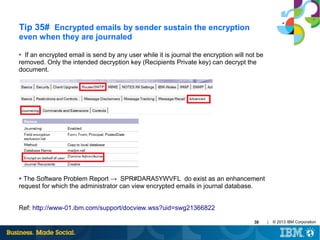
Tip 35# Encrypted emails by sender sustain the encryption
even when they are journaled
If an encrypted email is send by any user while it is journal the encryption will not be
removed. Only the intended decryption key (Recipients Private key) can decrypt the
document.
●

The Software Problem Report → SPR#DARA5YWVFL do exist as an enhancement
request for which the administrator can view encrypted emails in journal database.
●

Ref: http://www-01.ibm.com/support/docview.wss?uid=swg21366822
38

|

© 2013 IBM Corporation
Tip 36# Sender not included in Recipients field in mail delivery
You address a standard Lotus Notes memo to a group of which you are a
member and send it but you do not receive a copy
●

Notes is working as designed. The sender's name is not included in the
Recipients field if the group is located in the Lotus Domino Directory.
●

If you want to receive a copy of the memo when sending to groups located in the
public N&A Book, include your name in the To:, cc:, or bcc: field. Or, for a group
you regularly send to, create a group of the same or like name in your personal
NAB and add your name as an additional member.
●

You can use notes.ini file parameter, RouterDisableSenderElim=1, which was
created to prevent sender elimination on group expansion by the router. This
applies to all messages except non-delivery reports.
●

39

|

© 2013 IBM Corporation
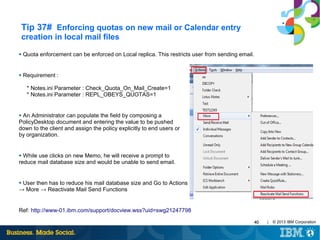
Tip 37# Enforcing quotas on new mail or Calendar entry
creation in local mail files
●

Quota enforcement can be enforced on Local replica. This restricts user from sending email.

●

Requirement :
* Notes.ini Parameter : Check_Quota_On_Mail_Create=1
* Notes.ini Parameter : REPL_OBEYS_QUOTAS=1

An Administrator can populate the field by composing a
PolicyDesktop document and entering the value to be pushed
down to the client and assign the policy explicitly to end users or
by organization.
●

While use clicks on new Memo, he will receive a prompt to
reduce mail database size and would be unable to send email.
●

User then has to reduce his mail database size and Go to Actions
→ More → Reactivate Mail Send Functions
●

Ref: http://www-01.ibm.com/support/docview.wss?uid=swg21247798
40

|

© 2013 IBM Corporation
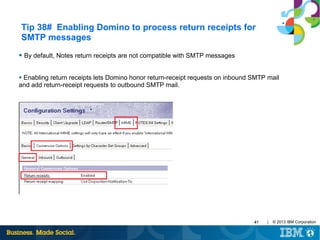
Tip 38# Enabling Domino to process return receipts for
SMTP messages
● By default, Notes return receipts are not compatible with SMTP messages

Enabling return receipts lets Domino honor return-receipt requests on inbound SMTP mail
and add return-receipt requests to outbound SMTP mail.
●

41

|

© 2013 IBM Corporation
Tip 39# Mail can not be delivered when mailfile is under
a consistency check (fixup)
If a database is marked for a consistency check, then it can not be opened or used until the
consistency check has completed. The server does this to prevent any issues such as
database corruption after a server goes down unexpectedly.
●

When the Router fails to access a mail file, it treats the error as a transient error and will
retry the message. It will hold the message and retry delivery for a period of 24 hours. If after
24 hours the message still can not be delivered, a delivery failure report will be generated.
●

●

Issuing a 'Tell router show' command results in the message below:

"Error delivery to [servername] [mailfile]: This database cannot be opened because a
consistency check of it is in progress."
Ref: http://www-01.ibm.com/support/docview.wss?uid=swg21577305

42

|

© 2013 IBM Corporation
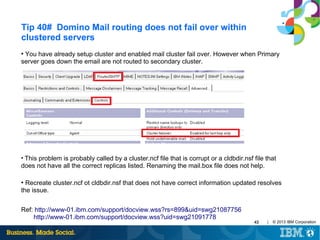
Tip 40# Domino Mail routing does not fail over within
clustered servers
You have already setup cluster and enabled mail cluster fail over. However when Primary
server goes down the email are not routed to secondary cluster.
●

This problem is probably called by a cluster.ncf file that is corrupt or a cldbdir.nsf file that
does not have all the correct replicas listed. Renaming the mail.box file does not help.
●

Recreate cluster.ncf ot cldbdir.nsf that does not have correct information updated resolves
the issue.
●

Ref: http://www-01.ibm.com/support/docview.wss?rs=899&uid=swg21087756
http://www-01.ibm.com/support/docview.wss?uid=swg21091778

43

|

© 2013 IBM Corporation
Collecting Data for Lotus Domino server NRPC mail
routing issues:
Typical mail routing issues include:

- Mail router hang or very slow, large amount of mails pending in mail.box
- Router process consumes excessive amount of CPU
- Error messages shown on server console during mail routing
- Messages received by unintended recipients
- Messages do not route through expected routes and so on.

Enable the below debug parameters on server to capture the necessary data while working with IBM
support:

CONSOLE_LOG_ENABLED=1 ( enable logging to the Console Log file )
DEBUG_THREADID=1 ( prepends all console output with the Process ID and Thread ID of the thread )
debug_show_timeout=1 ( The semaphore timeout messages will be written to SEMDEBUG.TXT )
debug_capture_timeout=1
debugrouter=3
( This key determine the debug output level for the router task )
log_mailrouting=40
( Add transfer messages, message queues, and full document information for
mail.boxes )
Ref: http://www-01.ibm.com/support/docview.wss?uid=swg21447237
44

|

© 2013 IBM Corporation
Collecting Data for Lotus Domino server SMTP mail
routing issues:
For inbound SMTP-related issues, enable below debug parameters on the STMP inbound server to
capture data:

CONSOLE_LOG_ENABLED=1 ( enable logging to the Console Log file )
DEBUG_THREADID=1 ( prepends all console output with Process ID and Thread ID of the thread )
debug_show_timeout=1 (the semaphore timeout messages will be written to SEMDEBUG.TXT file )
debug_capture_timeout=1
SMTPDEBUG=1
( this key determine the debug output level for the SMTP task )
SMTPSaveImportErrors=1 ( TRAP messages into temporary file )

For outbound SMTP-related issues, enable below debug parameters on the SMTP outbound server to
capture data:

CONSOLE_LOG_ENABLED=1
DEBUG_THREADID=1
debug_show_timeout=1
debug_capture_timeout=1
SMTPClientDebug=1
( Enable capture of outbound SMTP message transfer protocol.)

Ref: http://www-01.ibm.com/support/docview.wss?uid=swg21454020
45

|

© 2013 IBM Corporation
Important Links:
Understanding SMTP authentication and securing your IBM Lotus Domino 8 server from spam:
http://public.dhe.ibm.com/software/dw/lotus/SMTPAuthSpamFinal.pdf

Troubleshooting IBM® Lotus® Domino® 8 mail routing issues:
http://www.mmi-consult.de/FAQ/dx/MailroutingT-shootingFinal.pdf/$file/MailroutingT-shootingFinal.pdf

IBM Open Mic Session "Best Practices, Configuring and Troubleshooting SMTP mail routing":
http://www.ibm.com/support/docview.wss?uid=swg21502757

Open Mic "Best Practices & Troubleshooting SMTP Mail Routing":
http://www.ibm.com/support/docview.wss?uid=swg21593521

Open Mic Webcast Replay: Troubleshooting SMTP inbound and outbound issues:
http://www.ibm.com/support/docview.wss?uid=swg27023670

http://www.ibm.com/developerworks/lotus/library/smtp-dmz1/
https://www.ibm.com/developerworks/lotus/library/smtp-dmz2/
http://www.ibm.com/developerworks/lotus/library/spam-smtp1/
http://www.ibm.com/developerworks/lotus/library/spam-smtp2/
46

|

© 2013 IBM Corporation
Questions?
47

|

© 2013 IBM Corporation

Important tips on Router and SMTP mail routing

  • 1.
    Open Mic on ImportantTips on Router & SMTP mail routing Date: 20th Feb, 2014
  • 2.
    Open Mic Team •Jayesh Parmar - IBM ICS Support engineer • Presenter • Shrikant Ahire - IBM ICS Support engineer • Presenter • Ranjit Rai - IBM ICS SWAT • Focussing on entire Notes/Domino • Jayavel Rajendran - IBM ICS SWAT • Focussing on entire Notes/Domino • Hansraj Mali - IBM ICS SWAT • Focussing on Notes/Domino • Vinayak Tavargeri – IBM ICS Support • Facilitator for Open Mics 2 | © 2013 IBM Corporation
  • 3.
    Tip 1# Ignorelocation document Internet Mail address Users may change their internet address in their location document ─ superman@companyname.com ─ mailadmin@companyname.com etc ● Want the domino server to ignore the location document email address & And only obey the internet address field in the person document? ● ● Add RouterTranslateSpecial=1 in the notes.ini of smtp outbound server ● Now it doesn’t matter what they set it to Ref: http://www.ibm.com/support/docview.wss?uid=swg21089673 3 | © 2013 IBM Corporation
  • 4.
    Tip 2# HidingSMTP details Every time Notes domino server talks over SMTP, it can tell people lots of things about itself. A lot of unnecessary data is given away. There are always exploiting methods. So.. let’s hide it. Add the following to your SMTP outbound server notes.ini (SMTP server which is exposed to internet) ● ─ SMTPGREETING=“text here” Ref: http://www-10.lotus.com/ldd/dominowiki.nsf/dx/SMTPGreeting 4 | © 2013 IBM Corporation
  • 5.
    Tip 3# HidingSMTP details Domino server data is still visible in the MIME headers though! Lets hide that. In the Server notes.ini, ● ─ Add SMTPNOVERSIONINRCVDHDR=1 Restart, Gone! Specifically, the NOTES.INI variable SMTPNoVersionInRcvdHdr=1 will eliminate the addition of Domino product release information from the Received header of the outbound SMTP message. ● Ref: http://www.ibm.com/support/docview.wss?uid=swg21091002 5 | © 2013 IBM Corporation
  • 6.
    Tip 4# HidingNotes Client information in SMTP mails When a message is sent to an external user, the MIME header of the SMTP message will store information about the sending SMTP server. Information such as Notes client and Domino server releases are included in the MIME header. ● You can hide this. Go to your configuration document. Go to MIME tab of the configuration document ─ Advanced sub-tab ─ Advanced Outbound Message Options sub-tab. In the ‘Notes items to be removed from headers’ ─ Add $Mailer, $MIMETrack ● Ref: http://www.ibm.com/support/docview.wss?uid=swg21218032 6 | © 2013 IBM Corporation
  • 7.
    Tip 5# Readthe “Tell Router Show” command output In above o/p, 57 msgs in Busy state attempting to route via NRPC to [$LocalDelivery]. 18 indicates the number of attempts made to deliver these messages locally. ● Maximum Transfer threads:The maximum number of server threads Domino creates to transfer messages to all other servers. The value applies to both Notes routing and SMTP. The Router sets a default maximum number of transfer threads based on server memory. Letting the Router select the maximum number is usually best. If you set the maximum number manually, set the maximum to between 1 and 25 threads, depending on server load. However, additional threads may increase the demand for server processing time. ● Maximum concurrent transfer threads: This setting determines the maximum number of concurrent transfer threads per destination. The default is the value entered for "Maximum transfer threads" divided by 2 ● 7 | © 2013 IBM Corporation
  • 8.
    Tip 5# Readthe “Tell Router Show” command output (cont..) In above o/p, 14 Msgs, in Busy state attempting to route via SMTP to mydomain.com. The number immediately following the State, (1), indicates the number of attempts that have been made to route this message & in another line, 24 msgs are retried 4 times to send to ServerA over NRPC. ● Router “Dispatch” threads look at each recipient of mail needing to be routed, and determine how to get the mail to that recipient. Router "Sweep" threads perform post processing (after transfer/delivery), and may schedule retry or generate nondelivery reports for failures, and/or request that the mailbox threads update/delete messages in mail.box. ● Maximum delivery threads: This setting determines the maximum number of threads the Router can create to perform local mail delivery. The ideal number ranges from 3 to 25. ● Ref: http://www.ibm.com/support/docview.wss?uid=swg21093562 8 | © 2013 IBM Corporation
  • 9.
    Tip 6# Groupnames and forwarding loops ● When you address mail to a group (using a group's Internet address) through the Internet, whose group name is the same as a user's last name or first name, a Delivery Failure Report will result, indicating "Maximum forwarding loop count exceeded. Message probably in a forwarding loop. Examine Forwarding Address of intended recipient in Domino Directory.” ● Set the below parameter in the server notes.ini: - RouterExpansionAllowNonUniqueGroupMatch=1 Ref: http://www.ibm.com/support/docview.wss?uid=swg21158591 9 | © 2013 IBM Corporation
  • 10.
    Tip 7# Howto block incoming Internet mail addressed to a specific user / group of users ● You can add the user's Internet address to the "Deny messages intended for the following internet addresses" field, which is located on the "Router/SMTP -> Restrictions and Controls -> SMTP Inbound Controls" tab of the Configuration document. ●Your document: <subject> was not delivered to: user@yourdomain.com because: 554 Mail for user@yourdomain.com rejected for policy reasons. Create a Notes group containing a list of addresses that cannot receive mail from the Internet and enter the group name in this field. A group entry is valid only if it does not contain a domain part or dot (".") and group should contain internet addresses of users. ● 10 | © 2013 IBM Corporation
  • 11.
    Tip 8# Canwe add group in SMTP Outbound controls of Configuration setting document to Deny messages? The group name can be included in the following Deny fields to restrict SMTP Outbound mail for group of users. ● "Deny messages from the following Internet addresses to be sent to the Internet" and "Deny messages from the following Notes addresses to be sent to the Internet". ● 11 | © 2013 IBM Corporation
  • 12.
    Tip 9# Isthere a way to delay the delivery of Non Delivery Reports by the Domino router ● Undelivered mail is normally returned by the router to a user as a NDR after one day (24 hours). There are two notes.ini parameters available that can extend the time that the messages sit in the mail.box and delay the router from issuing a NDR for each of them. The parameters are "MailTimeout" and "MailTimeoutMinutes". Implementing either of these parameters will apply to Notes-to-Notes mail, as well as Notes-toSMTP mail. ● ● In order to change this default time, place the following parameter in Notes.ini: mailtimeout=n (where "n" indicates the number of days to hold users mail) mailtimeoutminutes=n (where "n" sets the retry interval in minutes) Ref: http://www.ibm.com/support/docview.wss?uid=swg21087470 12 | © 2013 IBM Corporation
  • 13.
    Tip 10# Howto debug DNS Blacklist filters ● You can set the below parameters in the notes.ini to debug the DNS blacklist filters which are set in the configuration document of SMTP inbound server. SMTPdebugcontrols=3 SMTPdebugDNSBL=1 The information in blue states the system that has connected to the Domino server is not listed on the blacklist site and is a trusted host/Domain ● The information in red shows the system that has connected is blacklisted by the blacklisting site ● Ref: http://www.ibm.com/support/docview.wss?uid=swg21091834 13 | © 2013 IBM Corporation
  • 14.
    Tip 11# Howto set message restriction size in Domino through configuration document & Mail Rule ● Use a setting in the Domino configuration document - Router/SMTP tab - Restrictions and controls tab - Restrictions tab - "Maximum message size" field Note: The maximum message size in KB the server accepts. The router rejects any messages that exceed this size for both transfer and delivery. A non delivery message will be returned to the sender reporting the reason of the failure. The default is 0 KB, which does not limit message size. Both Size restriction is applied on total size of messages. Total size of messages which include the attachment, body of messages and headers information. Ref: http://www.ibm.com/support/docview.wss?uid=swg21569887 14 | © 2013 IBM Corporation
  • 15.
    Tip 11# Howto set message restriction size in Domino through configuration document & Mail Rule (cont..) ● Create a server mail rule for Size (in bytes) is greater than any size you want, and you select the option “don't accept message” 15 | © 2013 IBM Corporation
  • 16.
    Tip 12# UsingSMTP outbound authentication to relay host in Domino To enable SMTP outbound authentication, refer the Router/SMTP, Basics sections of configuration document. ● "Use Authentication when sending messages to the relay host :" With SMTPclientdebug=1 parameter in notes.ini, you can check connection of domino server to other server that requires authentication. ● 16 | © 2013 IBM Corporation
  • 17.
    Tip 13# LimitMass Mailing To configure, utilize the following setting: RouterMaxEffectiveSize=xxx (where xxx is in kilobytes.) ● When enabled, this restriction will cause the router to present the NonDelivery Failure (NDF) message when the number of recipients multiplied by the message size (in k bytes) is greater than the value specified by the notes.ini setting. Attachments are excluded. ● Implement the following notes.ini setting: RouterMaxEffectiveSizeIncAttach=1. ● With this setting enabled, any file attachments are included in the equation to calculate the size of the message. ● Ref: http://www.ibm.com/support/docview.wss?uid=swg21271709 17 | © 2013 IBM Corporation
  • 18.
    Tip 14# Speedup mail delivery to a single destination The parameter RouterAllowConcurrentXferToAll=1 allows multiple transfer threads to all domains. ● ●By default, the number of concurrent transfer threads will be half (1/2) the number of available transfer threads. ●The concurrent threads will only apply to servers in the same NNN and servers in the local Internet domain that are configured as accessible over SMTP (as per the Basics tab of Server Configuration document). By enabling RouterAllowConcurrentXferToAll, multiple concurrent transfer threads will also be used for: Servers in the local domain, but not in the same NNN If you have 100 messages going to another server or to gmail - only one transfer thread will be generated This means that the server can more efficiently use multiple threads for multiple destinations and mail is less likely to be backlogged ● 18 | © 2013 IBM Corporation
  • 19.
    Tip 15# Slowmail delivery when large group is listed in bcc field in a mail message When a large group is listed in the bcc field in a mail message, it causes a performance degradation on the Domino mail server delivering the mail. ● To improve performance on the mail server, use the notes.ini variable, Disable_BCC_group_expansion=1, to disable bcc group expansion. Even if the parameter is added through the "Set Config" command, for example, Set Config Disable_BCC_group_expansion=1, the .ini parameter will not take effect until the server has been restarted. ● 19 | © 2013 IBM Corporation
  • 20.
    Tip 16# Mailaddressed to alternate internet domain mentioned in the global domain document gets delivered to user listed in the primary directory If an alternate internet domain alias is mentioned in the Global domain document as shown below and if any mail marked to alternate internet domain, then mail gets delivered to the user (matching name) who is listed in primary directory. ● ● In such case, create global domain for each internet domain. 20 | © 2013 IBM Corporation
  • 21.
    Tip 17# MailRouting on priority basis ● The "Low priority mail routing time range" field (Router/SMTP > Restrictions and Controls > Transfer Controls tab) is set to the time range for low priority mail routing. Default is between 12:00 AM and 6:00 AM. Enable the "Low priority delay notification" option if you want users to be notified that email will be delayed. ● Set the "Ignore message priority" field (Router/SMTP > Advanced > Controls tab) to Disable. ● In the server's notes.ini file, check to see if the MailDisablePriority parameter is set to 0 or if it exists at all. If it does not exist, change the priority of email to Normal.MailDisablePriority=<value> description: When set to 1, the MailDisablePriority setting causes the mail router to ignore the delivery priority of mail messages. This causes all messages to be delivered with normal priority. If this parameter is set to 0, mail routes according to the parameter determined by the sender ● 21 | © 2013 IBM Corporation
  • 22.
    Tip 18# Determiningthe number of mailboxes required for a server ● Product Development recommends that when the percentage of access conflicts consistently exceeds 2%, another mailbox should be created ● To measure this percentage, you can use two statistics: Mail.Mailbox.Accesses and Mail.Mailbox.AccessConflicts. These figures can be obtained by issuing a "show stat mail" command on the Domino Server console ● (Mail.Mailbox.AccessConflicts / Mail.Mailbox.Accesses) x 100 > 2. Note: If the result is greater than 2 on a consistent basis, a new mailbox is needed. At least two mailboxes are needed to gather the statistics for the above formula. You must also open a mailbox on the server in order to generate the statistics. Ref: http://www.ibm.com/support/docview.wss?uid=swg21148438 22 | © 2013 IBM Corporation
  • 23.
    Tip 19# DisableTransaction logging on Mail boxes ● MailBoxDisableTXNLogging=1 will enable new MAIL.BOX files to be created with transaction logging disabled via the database advanced property Background: Even if the advanced property "Disable Transaction Logging" is set on the mailbox.ntf template, and a new MAIL.BOX database is created from this template, the property "Disable Transaction Logging" is NOT set on the new database made from the template. The "Disable Transaction Logging" property is not inherited from templates intentionally. Instead, this setting must be set on a per-database basis. When MailBoxDisableTXNLogging=1 the router will create MAIL.BOX databases with transaction logging disabled. ● This setting does not disable transaction logging for existing databases, only MAIL.BOX databases created by the router after this setting has been enabled. Manually created database will not have transaction logging disabled. ● ● This will help avoid routing delays on busy mail servers 23 | © 2013 IBM Corporation
  • 24.
    Tip 20# RestrictSpoof Email ● The notes.ini setting designates whether mail that is sent during an authenticated SMTP session must be from the Internet address of the authenticated users. The intent is to verify that the user is not attempting to spoof the "From" field. This feature is most useful when a Domino SMTP server is configured to enforce authentication SMTPVerifyAuthenticatedSender =1 Ref: http://www-10.lotus.com/ldd/nd85forum.nsf/Response+Print? OpenForm&ParentUNID=EE642E8D6F69B382852577220059B6ED 24 | © 2013 IBM Corporation
  • 25.
    Tip 21# Howdoes the logging level (set in the Configuration Document and through notes.ini parameter "log_mailrouting=" work in Lotus Domino? Which value takes precedence? The notes.ini parameter, "log_mailrouting=", and the logging level in the Configuration Document (Router/SMTP → Advanced → Controls) has the same functionality. ● The parameter, "log_mailrouting=", can be set to: 10 (minimal) 20 (normal)...DEFAULT 30 (informational) 40 (Verbose) What happens if this parameter is set along with the logging level? A change on the logging level in the Configuration Document will NOT change the value set in the "log_mailrouting=" parameter. The notes.ini parameter takes precedence over the logging level in the Configuration Document. | © 2013 IBM Corporation 25 ●
  • 26.
    Tip 22# Dominorouter shuts down when journaling database is unavailable If journaling is enabled on the domino server, but the journaled database is unavailable, then the code dictates that the router should shutdown. ● This was implemented to ensure that all messages are journaled as many organizations have policies in place that require all messages to be journaled. There is no automatic function in Domino to force the router to start up, hence the router needs to be started manually or through a Program document. ● Tip 23# Improving Message Recall Performance ● Significant testing has been done on message recall. It was found that there was an increase in message recall performance on databases that are on ODS 51. This is not required but message recall performance is significantly improved if the databases are on ODS 51. 26 | © 2013 IBM Corporation
  • 27.
    Tip 24# Howto make Domino relay server to route mail to mutiple SMTP hosts ● Within the Domino "Relay host" field, two list delimiters are allowed - comma( , ) and semicolon( ;) ● Method 1: Load balancing mode : host1, host2 In this example, the router will take the group of hosts at the same preference level (host1 and host2) and try to connect to these hosts in a random order. ● Method 2: Fail over mode : host1; host2 In this example, the router will take preference of first host (host1) to route emails. If host1 stops responding, then the Domino router will move on to the next host (host2) i.e the next preference level. Ref: http://publib.boulder.ibm.com/infocenter/domhelp/v8r0/index.jsp?topic= %2Fcom.ibm.help.domino.admin.doc%2FDOC %2FH_EXAMPLE_OF_USING_TWO_SERVERS_TO_BALANCE_INTERNET_MAIL_LOAD_EX.ht ml | © 2013 IBM Corporation 27
  • 28.
    Tip 25# Duplicatemails received when email is addressed to user in "To" field and group is listed in "cc" field, where in user is a member of the group The fix is to add below parameter which works starting with domino 8.5.1 and eliminates duplicate message to be send to recipients: ● RouterDupElimLookedUpFullName=number ● Use the following values to set for this parameter: 0 - Do not eliminate the recipient's FullName from Router group expansion results 1 - Eliminate recipient's distinguished FullName from Router group expansion results 2 - Perform another recipient lookup by FullName for verification before eliminating recipient's distinguished FullName from Router group expansion results Ref : http://www-01.ibm.com/support/docview.wss?uid=swg21390024 28 | © 2013 IBM Corporation
  • 29.
    Tip 26# Howto configure domino to receive emails only from registered domains on DNS Reverse Domain look-up can be done using settings in Configuration Document → Router SMTP → Inbound relay controls → Verify sender's domain in DNS: ● ● This will verify If connecting domain is a valid registered domain on DNS. Enabled - Domino verifies that the sender's domain exists, by checking the DNS for an MX, CNAME, or A record that matches the domain part of the address in the MAIL FROM command received from the sending host. If no match is found, Domino rejects inbound mail from the host. ● ● Disabled - (default) Domino does not check DNS to verify that the sender's domain exists. 29 | © 2013 IBM Corporation
  • 30.
    Tip 27# Outgoingmessages sporadically get stuck in Notes user's local mail.box There are many applications and hardware that do not conform to the normal MTU of 1500 for TCP/IP actual packet size is lower [1472] due to header information. This is not unique to any specific operating system that uses TCP/IP. ● To get a successful connection you cannot exceed the MTU and you may have to reduce the packet size to accommodate the product. ● Use the following command at the Operating System prompt. [note: the 1024 is only arbitrary start amount] ● ping -f -l 1024 <IP Address> where -f indicates do not fragment & -l indicates the packet size you will be sending Ref: http://www-01.ibm.com/support/docview.wss?uid=swg21086718 30 | © 2013 IBM Corporation
  • 31.
    Tip 28# PreventDomino from being Used as a relay host To protect SMTP servers from unauthorized relaying, Domino provides inbound relay controls used to define the hosts to which and from which a server can relay messages. ● The Domino SMTP listener denies requests to relay messages to or from unauthorized hosts. ● Ref: http://www-01.ibm.com/support/docview.wss?uid=swg21092370 31 | © 2013 IBM Corporation
  • 32.
    Tip 29# Howto stop incoming mail addressed to just the last name The router is able to deliver messages addressed using just the format "Lastname@domain.com" is because the router performs a lookup in the $Users view in the Name and Address Book on the SMTP server and finds a unique match for that last name. ● To resolve this Edit the Domino Configuration document for the Inbound SMTP server and change the "Address Lookup" field to "Fullname only" on the Router/SMTP, Basics tab. By default, this field is set to "Fullname then Local Part". ● ● Ref: http://www-01.ibm.com/support/docview.wss?uid=swg21090405 32 | © 2013 IBM Corporation
  • 33.
    Tip 30# ConfiguringDomino to reject emails marked to invalid or non existing users in directory Spammers can jam your server by flooding emails to non existent users in your directory. To restrict this, enable the below settings. ● Router SMTP Inbound Controls → Inbound Intended Recipients controls Set the value of field "Verify that local domain recipients exist in the Domino Directory" to Enabled ● 33 | © 2013 IBM Corporation
  • 34.
    Tip 31# ConfiguringDomino to Ignore the Foreign SMTP Domain document You already have a foreign SMTP domain document and a SMTP connection document in your Domino SMTP relay server. Now, you want to ignore the Foreign SMTP document so How to configure particular server to ignore Foreign SMTP and rather use the configuration document as relay host. ● RouterIgnoreForeignSMTPDomains=1 Tip 32# How to mention multiple internet address for single user when we have multiple internet domains? The primary internet address of user should be mentioned in the field "Internet address" in the Person document. The additional internet address can be mentioned in the field "User Name" or in "Short name" in the person document of the user. ● 34 | © 2013 IBM Corporation
  • 35.
    Tip 33# Stopmail forwarding ● To stop the corporate email forward to hotmail, gmail, icloud, AOL, etc Disable the ability to use forward based rules in configuaration document – Router/SMTP – Restrictions and Controls – Delivery controls – User Rules Mail forwarding • Set to disabled ● 35 | © 2013 IBM Corporation
  • 36.
    Tip 33# Stopmail forwarding (cont..) * How to prevent certain users from creating forwarding rule. ● Remove the "Send copy to" action from the Specify Actions list in the RulesDlg form. Ref: http://www-01.ibm.com/support/docview.wss?uid=swg1LO41765 36 | © 2013 IBM Corporation
  • 37.
    Tip 34# Howto extract message tracking data from old mtstore.nsf ● Install a test server and rename the default mtstore database. ● Move mtdata folder from backup and place on test server. ● Reindex the mtstore by giving command → Tell mtc reindex ● Then track messages and you should be able to get the logs. Note: Remove the document purge interval else once the mtstore is restored and indexed it will delete all old documents. ● 37 | © 2013 IBM Corporation
  • 38.
    Tip 35# Encryptedemails by sender sustain the encryption even when they are journaled If an encrypted email is send by any user while it is journal the encryption will not be removed. Only the intended decryption key (Recipients Private key) can decrypt the document. ● The Software Problem Report → SPR#DARA5YWVFL do exist as an enhancement request for which the administrator can view encrypted emails in journal database. ● Ref: http://www-01.ibm.com/support/docview.wss?uid=swg21366822 38 | © 2013 IBM Corporation
  • 39.
    Tip 36# Sendernot included in Recipients field in mail delivery You address a standard Lotus Notes memo to a group of which you are a member and send it but you do not receive a copy ● Notes is working as designed. The sender's name is not included in the Recipients field if the group is located in the Lotus Domino Directory. ● If you want to receive a copy of the memo when sending to groups located in the public N&A Book, include your name in the To:, cc:, or bcc: field. Or, for a group you regularly send to, create a group of the same or like name in your personal NAB and add your name as an additional member. ● You can use notes.ini file parameter, RouterDisableSenderElim=1, which was created to prevent sender elimination on group expansion by the router. This applies to all messages except non-delivery reports. ● 39 | © 2013 IBM Corporation
  • 40.
    Tip 37# Enforcingquotas on new mail or Calendar entry creation in local mail files ● Quota enforcement can be enforced on Local replica. This restricts user from sending email. ● Requirement : * Notes.ini Parameter : Check_Quota_On_Mail_Create=1 * Notes.ini Parameter : REPL_OBEYS_QUOTAS=1 An Administrator can populate the field by composing a PolicyDesktop document and entering the value to be pushed down to the client and assign the policy explicitly to end users or by organization. ● While use clicks on new Memo, he will receive a prompt to reduce mail database size and would be unable to send email. ● User then has to reduce his mail database size and Go to Actions → More → Reactivate Mail Send Functions ● Ref: http://www-01.ibm.com/support/docview.wss?uid=swg21247798 40 | © 2013 IBM Corporation
  • 41.
    Tip 38# EnablingDomino to process return receipts for SMTP messages ● By default, Notes return receipts are not compatible with SMTP messages Enabling return receipts lets Domino honor return-receipt requests on inbound SMTP mail and add return-receipt requests to outbound SMTP mail. ● 41 | © 2013 IBM Corporation
  • 42.
    Tip 39# Mailcan not be delivered when mailfile is under a consistency check (fixup) If a database is marked for a consistency check, then it can not be opened or used until the consistency check has completed. The server does this to prevent any issues such as database corruption after a server goes down unexpectedly. ● When the Router fails to access a mail file, it treats the error as a transient error and will retry the message. It will hold the message and retry delivery for a period of 24 hours. If after 24 hours the message still can not be delivered, a delivery failure report will be generated. ● ● Issuing a 'Tell router show' command results in the message below: "Error delivery to [servername] [mailfile]: This database cannot be opened because a consistency check of it is in progress." Ref: http://www-01.ibm.com/support/docview.wss?uid=swg21577305 42 | © 2013 IBM Corporation
  • 43.
    Tip 40# DominoMail routing does not fail over within clustered servers You have already setup cluster and enabled mail cluster fail over. However when Primary server goes down the email are not routed to secondary cluster. ● This problem is probably called by a cluster.ncf file that is corrupt or a cldbdir.nsf file that does not have all the correct replicas listed. Renaming the mail.box file does not help. ● Recreate cluster.ncf ot cldbdir.nsf that does not have correct information updated resolves the issue. ● Ref: http://www-01.ibm.com/support/docview.wss?rs=899&uid=swg21087756 http://www-01.ibm.com/support/docview.wss?uid=swg21091778 43 | © 2013 IBM Corporation
  • 44.
    Collecting Data forLotus Domino server NRPC mail routing issues: Typical mail routing issues include: - Mail router hang or very slow, large amount of mails pending in mail.box - Router process consumes excessive amount of CPU - Error messages shown on server console during mail routing - Messages received by unintended recipients - Messages do not route through expected routes and so on. Enable the below debug parameters on server to capture the necessary data while working with IBM support: CONSOLE_LOG_ENABLED=1 ( enable logging to the Console Log file ) DEBUG_THREADID=1 ( prepends all console output with the Process ID and Thread ID of the thread ) debug_show_timeout=1 ( The semaphore timeout messages will be written to SEMDEBUG.TXT ) debug_capture_timeout=1 debugrouter=3 ( This key determine the debug output level for the router task ) log_mailrouting=40 ( Add transfer messages, message queues, and full document information for mail.boxes ) Ref: http://www-01.ibm.com/support/docview.wss?uid=swg21447237 44 | © 2013 IBM Corporation
  • 45.
    Collecting Data forLotus Domino server SMTP mail routing issues: For inbound SMTP-related issues, enable below debug parameters on the STMP inbound server to capture data: CONSOLE_LOG_ENABLED=1 ( enable logging to the Console Log file ) DEBUG_THREADID=1 ( prepends all console output with Process ID and Thread ID of the thread ) debug_show_timeout=1 (the semaphore timeout messages will be written to SEMDEBUG.TXT file ) debug_capture_timeout=1 SMTPDEBUG=1 ( this key determine the debug output level for the SMTP task ) SMTPSaveImportErrors=1 ( TRAP messages into temporary file ) For outbound SMTP-related issues, enable below debug parameters on the SMTP outbound server to capture data: CONSOLE_LOG_ENABLED=1 DEBUG_THREADID=1 debug_show_timeout=1 debug_capture_timeout=1 SMTPClientDebug=1 ( Enable capture of outbound SMTP message transfer protocol.) Ref: http://www-01.ibm.com/support/docview.wss?uid=swg21454020 45 | © 2013 IBM Corporation
  • 46.
    Important Links: Understanding SMTPauthentication and securing your IBM Lotus Domino 8 server from spam: http://public.dhe.ibm.com/software/dw/lotus/SMTPAuthSpamFinal.pdf Troubleshooting IBM® Lotus® Domino® 8 mail routing issues: http://www.mmi-consult.de/FAQ/dx/MailroutingT-shootingFinal.pdf/$file/MailroutingT-shootingFinal.pdf IBM Open Mic Session "Best Practices, Configuring and Troubleshooting SMTP mail routing": http://www.ibm.com/support/docview.wss?uid=swg21502757 Open Mic "Best Practices & Troubleshooting SMTP Mail Routing": http://www.ibm.com/support/docview.wss?uid=swg21593521 Open Mic Webcast Replay: Troubleshooting SMTP inbound and outbound issues: http://www.ibm.com/support/docview.wss?uid=swg27023670 http://www.ibm.com/developerworks/lotus/library/smtp-dmz1/ https://www.ibm.com/developerworks/lotus/library/smtp-dmz2/ http://www.ibm.com/developerworks/lotus/library/spam-smtp1/ http://www.ibm.com/developerworks/lotus/library/spam-smtp2/ 46 | © 2013 IBM Corporation
  • 47.