Copyright © Terry Felke-Morris
WEB DEVELOPMENT & DESIGN
FOUNDATIONS WITH HTML5
Chapter 8
Key Concepts
1Copyright © Terry Felke-Morris
Copyright © Terry Felke-Morris
LEARNING OUTCOMES
 In this chapter, you will learn how to ...
 Create a table on a web page
 Apply attributes to format tables, table rows, and table cells
 Increase the accessibility of a table
 Style an HTML table with CSS
2
Copyright © Terry Felke-Morris
HTML TABLE
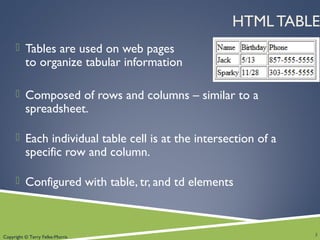
 Tables are used on web pages
to organize tabular information
 Composed of rows and columns – similar to a
spreadsheet.
 Each individual table cell is at the intersection of a
specific row and column.
 Configured with table, tr, and td elements
3
Copyright © Terry Felke-Morris
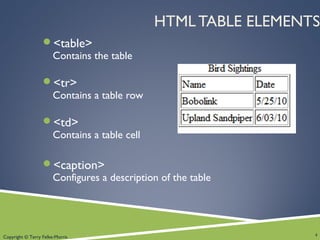
HTML TABLE ELEMENTS
<table>
Contains the table
<tr>
Contains a table row
<td>
Contains a table cell
<caption>
Configures a description of the table
4
Copyright © Terry Felke-Morris
HTML
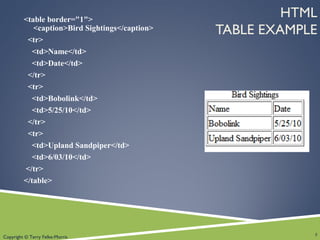
TABLE EXAMPLE
<table border="1">
<caption>Bird Sightings</caption>
<tr>
<td>Name</td>
<td>Date</td>
</tr>
<tr>
<td>Bobolink</td>
<td>5/25/10</td>
</tr>
<tr>
<td>Upland Sandpiper</td>
<td>6/03/10</td>
</tr>
</table>
5
Copyright © Terry Felke-Morris
HTML
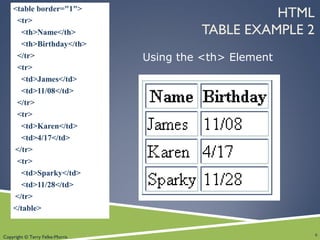
TABLE EXAMPLE 2
<table border="1">
<tr>
<th>Name</th>
<th>Birthday</th>
</tr>
<tr>
<td>James</td>
<td>11/08</td>
</tr>
<tr>
<td>Karen</td>
<td>4/17</td>
</tr>
<tr>
<td>Sparky</td>
<td>11/28</td>
</tr>
</table>
6
Using the <th> Element
Copyright © Terry Felke-Morris
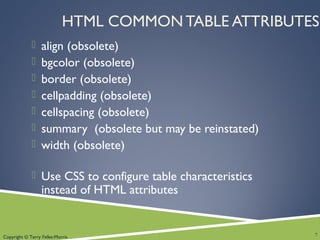
HTML COMMON TABLE ATTRIBUTES
 align (obsolete)
 bgcolor (obsolete)
 border (obsolete)
 cellpadding (obsolete)
 cellspacing (obsolete)
 summary (obsolete but may be reinstated)
 width (obsolete)
 Use CSS to configure table characteristics
instead of HTML attributes
7
Copyright © Terry Felke-Morris
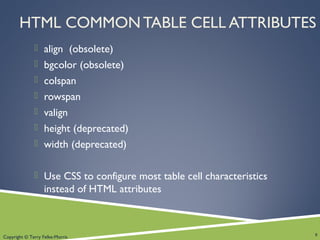
HTML COMMON TABLE CELL ATTRIBUTES
 align (obsolete)
 bgcolor (obsolete)
 colspan
 rowspan
 valign
 height (deprecated)
 width (deprecated)
 Use CSS to configure most table cell characteristics
instead of HTML attributes
8
Copyright © Terry Felke-Morris
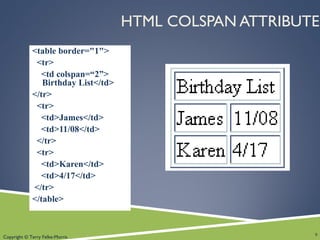
HTML COLSPAN ATTRIBUTE
<table border="1">
<tr>
<td colspan=“2”>
Birthday List</td>
</tr>
<tr>
<td>James</td>
<td>11/08</td>
</tr>
<tr>
<td>Karen</td>
<td>4/17</td>
</tr>
</table>
9
Copyright © Terry Felke-Morris
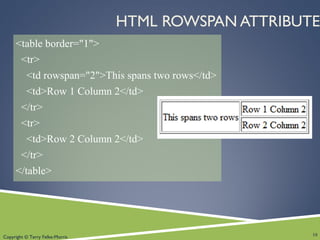
HTML ROWSPAN ATTRIBUTE
<table border="1">
<tr>
<td rowspan="2">This spans two rows</td>
<td>Row 1 Column 2</td>
</tr>
<tr>
<td>Row 2 Column 2</td>
</tr>
</table>
10
Copyright © Terry Felke-Morris
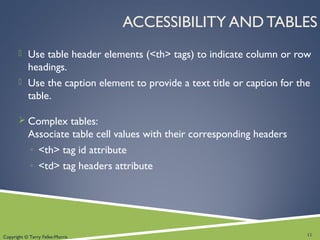
ACCESSIBILITY AND TABLES
 Use table header elements (<th> tags) to indicate column or row
headings.
 Use the caption element to provide a text title or caption for the
table.
 Complex tables:
Associate table cell values with their corresponding headers
◦ <th> tag id attribute
◦ <td> tag headers attribute
11
Copyright © Terry Felke-Morris
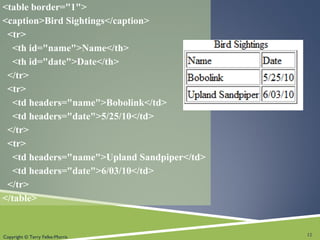
<table border="1">
<caption>Bird Sightings</caption>
<tr>
<th id="name">Name</th>
<th id="date">Date</th>
</tr>
<tr>
<td headers="name">Bobolink</td>
<td headers="date">5/25/10</td>
</tr>
<tr>
<td headers="name">Upland Sandpiper</td>
<td headers="date">6/03/10</td>
</tr>
</table>
12
Copyright © Terry Felke-Morris
CHECKPOINT
1. Describe the purpose of using a table on a web page.
2. Describe the difference between the cellpadding and
cellspacing table attributes.
3. Describe one coding technique that increases the
accessibility of an HTML table.
13
Copyright © Terry Felke-Morris
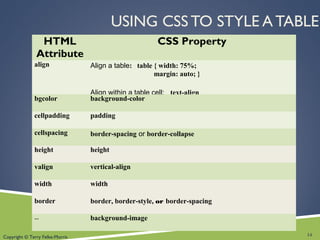
USING CSS TO STYLE A TABLE
HTML
Attribute
CSS Property
align Align a table: table { width: 75%;
margin: auto; }
Align within a table cell: text-align
bgcolor background-color
cellpadding padding
cellspacing border-spacing or border-collapse
height height
valign vertical-align
width width
border border, border-style, or border-spacing
-- background-image
14
Copyright © Terry Felke-Morris
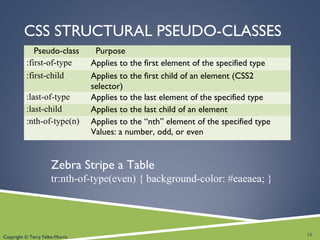
CSS STRUCTURAL PSEUDO-CLASSES
Pseudo-class Purpose
:first-of-type Applies to the first element of the specified type
:first-child Applies to the first child of an element (CSS2
selector)
:last-of-type Applies to the last element of the specified type
:last-child Applies to the last child of an element
:nth-of-type(n) Applies to the “nth” element of the specified type
Values: a number, odd, or even
15
Zebra Stripe a Table
tr:nth-of-type(even) { background-color: #eaeaea; }
Copyright © Terry Felke-Morris
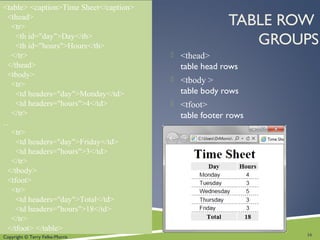
TABLE ROW
GROUPS
<table> <caption>Time Sheet</caption>
<thead>
<tr>
<th id="day">Day</th>
<th id="hours">Hours</th>
</tr>
</thead>
<tbody>
<tr>
<td headers="day">Monday</td>
<td headers="hours">4</td>
</tr>
…
<tr>
<td headers="day">Friday</td>
<td headers="hours">3</td>
</tr>
</tbody>
<tfoot>
<tr>
<td headers="day">Total</td>
<td headers="hours">18</td>
</tr>
</tfoot> </table>
 <thead>
table head rows
 <tbody >
table body rows
 <tfoot>
table footer rows
16
Copyright © Terry Felke-Morris
SUMMARY
 This chapter introduced the HTML and CSS
techniques used to create and configure
tables on web pages.
17

Chapter 8 - Web Design

  • 1.
    Copyright © TerryFelke-Morris WEB DEVELOPMENT & DESIGN FOUNDATIONS WITH HTML5 Chapter 8 Key Concepts 1Copyright © Terry Felke-Morris
  • 2.
    Copyright © TerryFelke-Morris LEARNING OUTCOMES  In this chapter, you will learn how to ...  Create a table on a web page  Apply attributes to format tables, table rows, and table cells  Increase the accessibility of a table  Style an HTML table with CSS 2
  • 3.
    Copyright © TerryFelke-Morris HTML TABLE  Tables are used on web pages to organize tabular information  Composed of rows and columns – similar to a spreadsheet.  Each individual table cell is at the intersection of a specific row and column.  Configured with table, tr, and td elements 3
  • 4.
    Copyright © TerryFelke-Morris HTML TABLE ELEMENTS <table> Contains the table <tr> Contains a table row <td> Contains a table cell <caption> Configures a description of the table 4
  • 5.
    Copyright © TerryFelke-Morris HTML TABLE EXAMPLE <table border="1"> <caption>Bird Sightings</caption> <tr> <td>Name</td> <td>Date</td> </tr> <tr> <td>Bobolink</td> <td>5/25/10</td> </tr> <tr> <td>Upland Sandpiper</td> <td>6/03/10</td> </tr> </table> 5
  • 6.
    Copyright © TerryFelke-Morris HTML TABLE EXAMPLE 2 <table border="1"> <tr> <th>Name</th> <th>Birthday</th> </tr> <tr> <td>James</td> <td>11/08</td> </tr> <tr> <td>Karen</td> <td>4/17</td> </tr> <tr> <td>Sparky</td> <td>11/28</td> </tr> </table> 6 Using the <th> Element
  • 7.
    Copyright © TerryFelke-Morris HTML COMMON TABLE ATTRIBUTES  align (obsolete)  bgcolor (obsolete)  border (obsolete)  cellpadding (obsolete)  cellspacing (obsolete)  summary (obsolete but may be reinstated)  width (obsolete)  Use CSS to configure table characteristics instead of HTML attributes 7
  • 8.
    Copyright © TerryFelke-Morris HTML COMMON TABLE CELL ATTRIBUTES  align (obsolete)  bgcolor (obsolete)  colspan  rowspan  valign  height (deprecated)  width (deprecated)  Use CSS to configure most table cell characteristics instead of HTML attributes 8
  • 9.
    Copyright © TerryFelke-Morris HTML COLSPAN ATTRIBUTE <table border="1"> <tr> <td colspan=“2”> Birthday List</td> </tr> <tr> <td>James</td> <td>11/08</td> </tr> <tr> <td>Karen</td> <td>4/17</td> </tr> </table> 9
  • 10.
    Copyright © TerryFelke-Morris HTML ROWSPAN ATTRIBUTE <table border="1"> <tr> <td rowspan="2">This spans two rows</td> <td>Row 1 Column 2</td> </tr> <tr> <td>Row 2 Column 2</td> </tr> </table> 10
  • 11.
    Copyright © TerryFelke-Morris ACCESSIBILITY AND TABLES  Use table header elements (<th> tags) to indicate column or row headings.  Use the caption element to provide a text title or caption for the table.  Complex tables: Associate table cell values with their corresponding headers ◦ <th> tag id attribute ◦ <td> tag headers attribute 11
  • 12.
    Copyright © TerryFelke-Morris <table border="1"> <caption>Bird Sightings</caption> <tr> <th id="name">Name</th> <th id="date">Date</th> </tr> <tr> <td headers="name">Bobolink</td> <td headers="date">5/25/10</td> </tr> <tr> <td headers="name">Upland Sandpiper</td> <td headers="date">6/03/10</td> </tr> </table> 12
  • 13.
    Copyright © TerryFelke-Morris CHECKPOINT 1. Describe the purpose of using a table on a web page. 2. Describe the difference between the cellpadding and cellspacing table attributes. 3. Describe one coding technique that increases the accessibility of an HTML table. 13
  • 14.
    Copyright © TerryFelke-Morris USING CSS TO STYLE A TABLE HTML Attribute CSS Property align Align a table: table { width: 75%; margin: auto; } Align within a table cell: text-align bgcolor background-color cellpadding padding cellspacing border-spacing or border-collapse height height valign vertical-align width width border border, border-style, or border-spacing -- background-image 14
  • 15.
    Copyright © TerryFelke-Morris CSS STRUCTURAL PSEUDO-CLASSES Pseudo-class Purpose :first-of-type Applies to the first element of the specified type :first-child Applies to the first child of an element (CSS2 selector) :last-of-type Applies to the last element of the specified type :last-child Applies to the last child of an element :nth-of-type(n) Applies to the “nth” element of the specified type Values: a number, odd, or even 15 Zebra Stripe a Table tr:nth-of-type(even) { background-color: #eaeaea; }
  • 16.
    Copyright © TerryFelke-Morris TABLE ROW GROUPS <table> <caption>Time Sheet</caption> <thead> <tr> <th id="day">Day</th> <th id="hours">Hours</th> </tr> </thead> <tbody> <tr> <td headers="day">Monday</td> <td headers="hours">4</td> </tr> … <tr> <td headers="day">Friday</td> <td headers="hours">3</td> </tr> </tbody> <tfoot> <tr> <td headers="day">Total</td> <td headers="hours">18</td> </tr> </tfoot> </table>  <thead> table head rows  <tbody > table body rows  <tfoot> table footer rows 16
  • 17.
    Copyright © TerryFelke-Morris SUMMARY  This chapter introduced the HTML and CSS techniques used to create and configure tables on web pages. 17