Twitter Account
Set up
Let’s set up a account on Twitter on the computer!
Go to www.Twitter.com

Twitter Lists are an easy way to organize
and categorize who you follow into
meaningful groups, and discover new
people to connect with.

To create a
new account,
enter you
name, email
and desired
password on
the home
screen
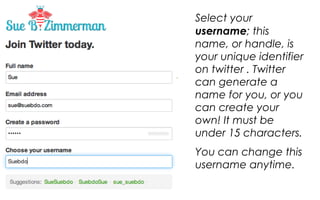
Select your username;
this name, or handle, is
your unique identifier on
twitter . Twitter can
generate a name for
you, or you can create
your own! It must be
under 15 characters.
You can change this
username anytime.
Once you have completed the form,
click CREATE AN ACCOUNT
Twitter will send you an email confirmation about the creation
of your account.
TIP: Your email can only be associated with one twitter
account.
Now that you have created an account it is time
to complete your profile on the twitter website

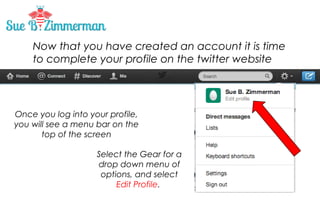
Once you log into your profile,
you will see a menu bar on the
top of the screen
Select the Gear for a
drop down menu of
options, and select
Edit Profile.
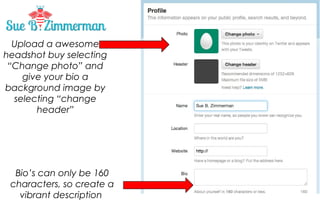
Upload a awesome
headshot by selecting
“Change photo” and
give your bio a
background image by
selecting “change
header”

Bio’s can only be 160
characters, so create a
vibrant description
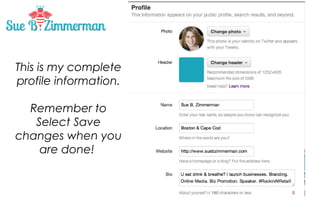
This is my complete
profile information.
Remember to
Select Save
changes when you
are done!
And this is what it looks like on my profile page!
You are all set to start exploring Twitter with a rock
star profile! #suebdoit
You are all set to start exploring Twitter with a rock
star profile! #suebdoit

How to set up a Twitter Profile

  • 1.
  • 2.
    Let’s set upa account on Twitter on the computer! Go to www.Twitter.com Twitter Lists are an easy way to organize and categorize who you follow into meaningful groups, and discover new people to connect with. To create a new account, enter you name, email and desired password on the home screen
  • 3.
    Select your username; thisname, or handle, is your unique identifier on twitter . Twitter can generate a name for you, or you can create your own! It must be under 15 characters. You can change this username anytime.
  • 4.
    Once you havecompleted the form, click CREATE AN ACCOUNT Twitter will send you an email confirmation about the creation of your account. TIP: Your email can only be associated with one twitter account.
  • 5.
    Now that youhave created an account it is time to complete your profile on the twitter website Once you log into your profile, you will see a menu bar on the top of the screen Select the Gear for a drop down menu of options, and select Edit Profile.
  • 6.
    Upload a awesome headshotby selecting “Change photo” and give your bio a background image by selecting “change header” Bio’s can only be 160 characters, so create a vibrant description
  • 7.
    This is mycomplete profile information. Remember to Select Save changes when you are done!
  • 8.
    And this iswhat it looks like on my profile page!
  • 9.
    You are allset to start exploring Twitter with a rock star profile! #suebdoit
  • 10.
    You are allset to start exploring Twitter with a rock star profile! #suebdoit