Getting started
                                                on -


Before you join
I’m a big fan of twitter but there are many who think twitter is a waste of time. Before you set up a
twitter account you might want to take a couple of moments to think about how twitter works and
who you might like to follow and why.


Why do people use twitter
This is a question that has generated quite a bit of conversation. Following is a list of examples
gathered from looking at discussions online, my own personal experience and from talking to others.

   •   Twitter can keep you informed about current technology issues
   •   It’s a resource for news and local grassroots activities
   •   You can follow people with similar interests – find out about recipes, healthcare, politics
   •   You can follow a variety of people really easily all at the same time – friends, experts,
       celebrities
   •   You can ask questions and receive answers quickly – if the people you are following on
       twitter don’t have the answer they often ask others on their network
   •   It’s a quick and easy way to get marketing messages out to interested people
   •   Quick and easy networking
   •   Connects you with people
   •   Great way to cross pollinate ideas and share then ideas across a broad cross section quickly
       and easily
   •   Good way to stay in touch with people and know what they are doing without being intrusive
   •   A source of rich links to information
   •   Quick way to get information out to followers
   •   Good resource for backchannel conversations at conferences and events
   •   A way to find resources
   •   Good for crowdsourcing and finding answers to questions.
   •   Twitter allows people to use their friend lists to propagate that information faster, and try to
       draw more direct help down to a problem.


                                                   1
Joining


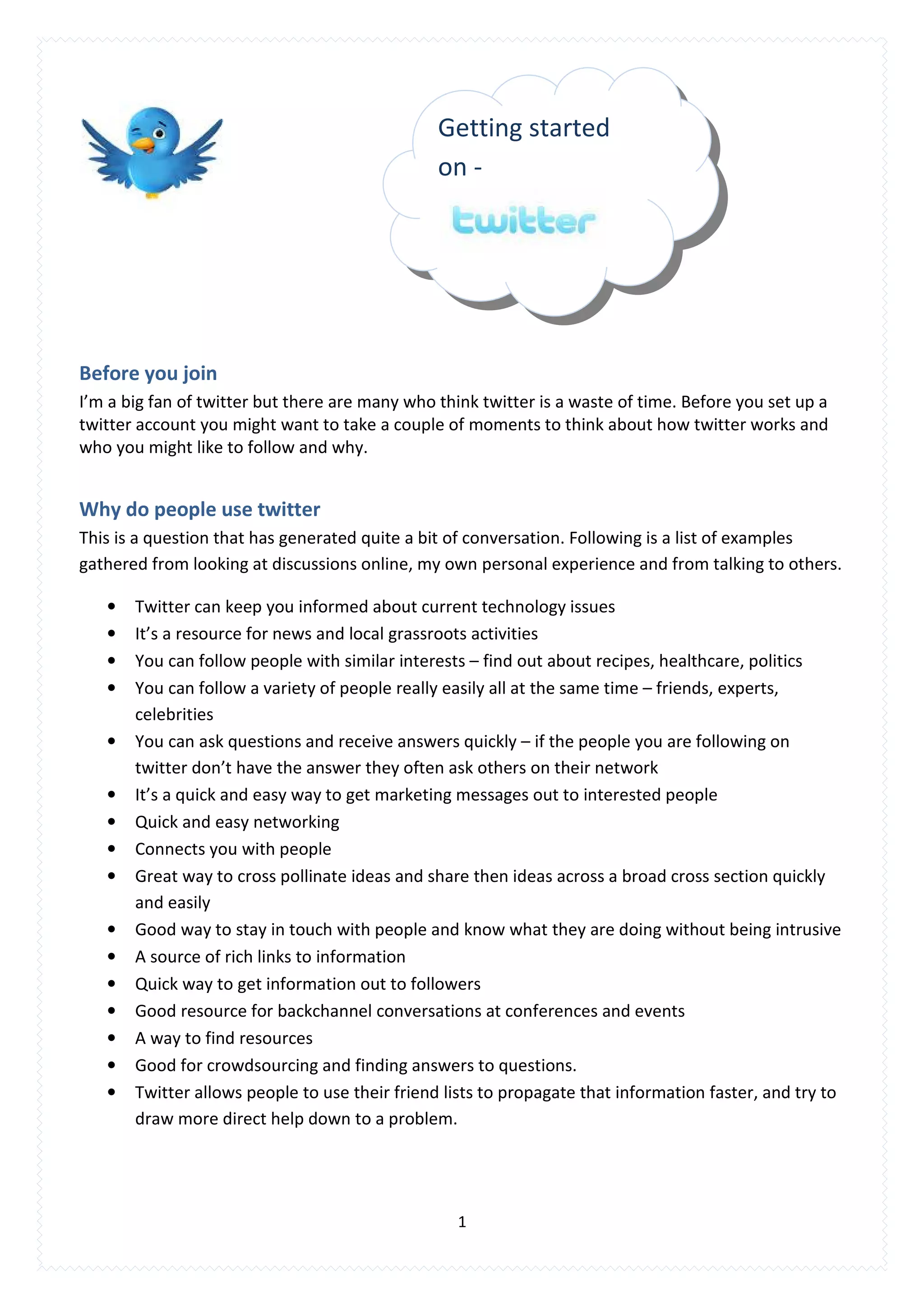
Go to www.twitter.com and select the green button – Get Started - at the bottom of the page. This
will take you to the twitter registration page


                                                        Username Tips

                                                        A twitter username needs to be short,
                                                        simple and easy to remember.

                                                        For personal username, try and get
                                                        your name. For a company, use the
                                                        company name.

                                                        You can change your username and
                                                        retain your followers - remember to tell
                                                        followers about a new username.


The registration page takes about 2 minutes to complete.
   1. Enter your full name in the Full Name field
   2. Choose a username - You have 20 characters to work with (Twitters limit).
       Why a username needs to be short, simple and easy to remember:
       • when replying to a tweet with a long name, a reply of 140 characters will be affected
       • a long or complicated username is difficult for mobile phones users.
   3. Password: Make you password as complex as possible. The best passwords are a collection of
       letters and numbers in no order.
   4. Email address: twitter uses this to notify you of new followers as well as service news update.
   5. When you’ve completed entering all of the information click the green button at the bottom
       of the page to create your account.


                                                 2
Branding – Inserting your picture or logo

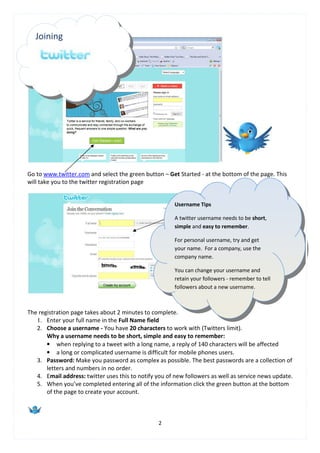
Go to Settings select the Picture option (grey tabs) select the image you want to upload as your
brand by clicking browse and selecting it from your hard drive.


     Tips
     Images should be no bigger than 700k (file size)
     For your logo use.jpg .gif & .png
     Leave a border around your logo / wording
     Square is the best ratio for your image


Click Save and your image will be uploaded. Twitter will tell you when it has been successful. DO
NOT click save again as this will delete the image.

Within Settings on your Accounts page you will also be able to provide information about yourself.
This includes:
    • Information about who you are and what you do – your bio.
    • Web address.


Your bio, web address information will display on your profile page.


                                                        3
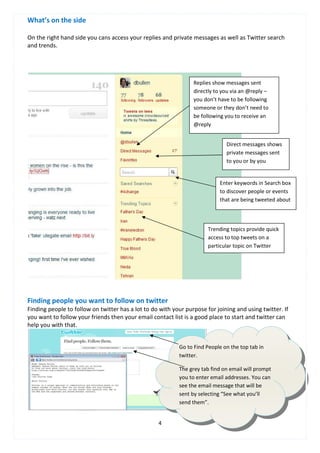
What’s on the side

On the right hand side you cans access your replies and private messages as well as Twitter search
and trends.


                                                                 Replies show messages sent
                                                                 directly to you via an @reply –
                                                                 you don’t have to be following
                                                                 someone or they don’t need to
                                                                 be following you to receive an
                                                                 @reply


                                                                              Direct messages shows
                                                                              private messages sent
                                                                              to you or by you


                                                                            Enter keywords in Search box
                                                                            to discover people or events
                                                                            that are being tweeted about


                                                                       Trending topics provide quick
                                                                       access to top tweets on a
                                                                       particular topic on Twitter


Finding people you want to follow on twitter
Finding people to follow on twitter has a lot to do with your purpose for joining and using twitter. If
you want to follow your friends then your email contact list is a good place to start and twitter can
help you with that.


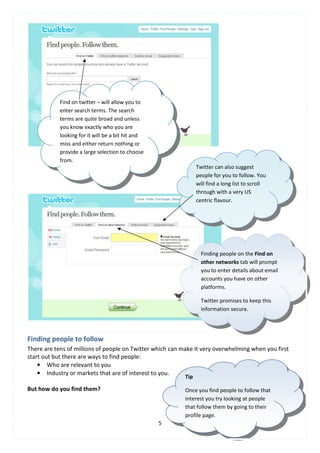
                                                           Go to Find People on the top tab in
                                                           twitter.

                                                           The grey tab find on email will prompt
                                                           you to enter email addresses. You can
                                                           see the email message that will be
                                                           sent by selecting “See what you’ll
                                                           send them”.


                                                   4
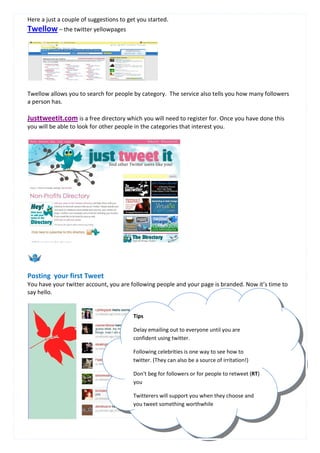
Find on twitter – will allow you to
            enter search terms. The search
            terms are quite broad and unless
            you know exactly who you are
            looking for it will be a bit hit and
            miss and either return nothing or
            provide a large selection to choose
            from.
                                                                 Twitter can also suggest
                                                                 people for you to follow. You
                                                                 will find a long list to scroll
                                                                 through with a very US
                                                                 centric flavour.


                                                                   Finding people on the Find on
                                                                   other networks tab will prompt
                                                                   you to enter details about email
                                                                   accounts you have on other
                                                                   platforms.

                                                                   Twitter promises to keep this
                                                                   information secure.


Finding people to follow
There are tens of millions of people on Twitter which can make it very overwhelming when you first
start out but there are ways to find people:
    • Who are relevant to you
    • Industry or markets that are of interest to you.
                                                           Tip

But how do you find them?                                  Once you find people to follow that
                                                           interest you try looking at people
                                                           that follow them by going to their
                                                           profile page.
                                                   5
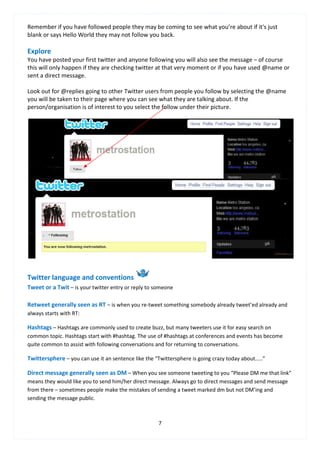
Here a just a couple of suggestions to get you started.
Twellow – the twitter yellowpages


Twellow allows you to search for people by category. The service also tells you how many followers
a person has.

Justtweetit.com is a free directory which you will need to register for. Once you have done this
you will be able to look for other people in the categories that interest you.


Posting your first Tweet
You have your twitter account, you are following people and your page is branded. Now it’s time to
say hello.


                                         Tips

                                         Delay emailing out to everyone until you are
                                         confident using twitter.

                                         Following celebrities is one way to see how to
                                         twitter. (They can also be a source of irritation!)

                                         Don't beg for followers or for people to retweet (RT)
                                         you

                                         Twitterers will support you when they choose and
                                         you tweet something worthwhile


                                                    6
Remember if you have followed people they may be coming to see what you’re about if it's just
blank or says Hello World they may not follow you back.

Explore
You have posted your first twitter and anyone following you will also see the message – of course
this will only happen if they are checking twitter at that very moment or if you have used @name or
sent a direct message.

Look out for @replies going to other Twitter users from people you follow by selecting the @name
you will be taken to their page where you can see what they are talking about. If the
person/organisation is of interest to you select the follow under their picture.


Twitter language and conventions
Tweet or a Twit – is your twitter entry or reply to someone

Retweet generally seen as RT – is when you re-tweet something somebody already tweet’ed already and
always starts with RT:

Hashtags – Hashtags are commonly used to create buzz, but many tweeters use it for easy search on
common topic. Hashtags start with #hashtag. The use of #hashtags at conferences and events has become
quite common to assist with following conversations and for returning to conversations.

Twittersphere – you can use it an sentence like the “Twittersphere is going crazy today about.....”

Direct message generally seen as DM – When you see someone tweeting to you “Please DM me that link”
means they would like you to send him/her direct message. Always go to direct messages and send message
from there – sometimes people make the mistakes of sending a tweet marked dm but not DM’ing and
sending the message public.


                                                      7
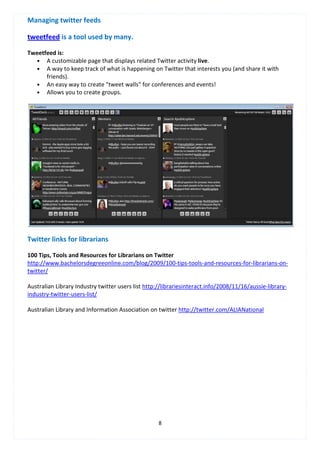
Managing twitter feeds

tweetfeed is a tool used by many.

Tweetfeed is:
   • A customizable page that displays related Twitter activity live.
   • A way to keep track of what is happening on Twitter that interests you (and share it with
      friends).
   • An easy way to create "tweet walls" for conferences and events!
   • Allows you to create groups.


Twitter links for librarians

100 Tips, Tools and Resources for Librarians on Twitter
http://www.bachelorsdegreeonline.com/blog/2009/100-tips-tools-and-resources-for-librarians-on-
twitter/

Australian Library Industry twitter users list http://librariesinteract.info/2008/11/16/aussie-library-
industry-twitter-users-list/

Australian Library and Information Association on twitter http://twitter.com/ALIANational


                                                    8

Twitter first flight

  • 1.
    Getting started on - Before you join I’m a big fan of twitter but there are many who think twitter is a waste of time. Before you set up a twitter account you might want to take a couple of moments to think about how twitter works and who you might like to follow and why. Why do people use twitter This is a question that has generated quite a bit of conversation. Following is a list of examples gathered from looking at discussions online, my own personal experience and from talking to others. • Twitter can keep you informed about current technology issues • It’s a resource for news and local grassroots activities • You can follow people with similar interests – find out about recipes, healthcare, politics • You can follow a variety of people really easily all at the same time – friends, experts, celebrities • You can ask questions and receive answers quickly – if the people you are following on twitter don’t have the answer they often ask others on their network • It’s a quick and easy way to get marketing messages out to interested people • Quick and easy networking • Connects you with people • Great way to cross pollinate ideas and share then ideas across a broad cross section quickly and easily • Good way to stay in touch with people and know what they are doing without being intrusive • A source of rich links to information • Quick way to get information out to followers • Good resource for backchannel conversations at conferences and events • A way to find resources • Good for crowdsourcing and finding answers to questions. • Twitter allows people to use their friend lists to propagate that information faster, and try to draw more direct help down to a problem. 1
  • 2.
    Joining Go to www.twitter.comand select the green button – Get Started - at the bottom of the page. This will take you to the twitter registration page Username Tips A twitter username needs to be short, simple and easy to remember. For personal username, try and get your name. For a company, use the company name. You can change your username and retain your followers - remember to tell followers about a new username. The registration page takes about 2 minutes to complete. 1. Enter your full name in the Full Name field 2. Choose a username - You have 20 characters to work with (Twitters limit). Why a username needs to be short, simple and easy to remember: • when replying to a tweet with a long name, a reply of 140 characters will be affected • a long or complicated username is difficult for mobile phones users. 3. Password: Make you password as complex as possible. The best passwords are a collection of letters and numbers in no order. 4. Email address: twitter uses this to notify you of new followers as well as service news update. 5. When you’ve completed entering all of the information click the green button at the bottom of the page to create your account. 2
  • 3.
    Branding – Insertingyour picture or logo Go to Settings select the Picture option (grey tabs) select the image you want to upload as your brand by clicking browse and selecting it from your hard drive. Tips Images should be no bigger than 700k (file size) For your logo use.jpg .gif & .png Leave a border around your logo / wording Square is the best ratio for your image Click Save and your image will be uploaded. Twitter will tell you when it has been successful. DO NOT click save again as this will delete the image. Within Settings on your Accounts page you will also be able to provide information about yourself. This includes: • Information about who you are and what you do – your bio. • Web address. Your bio, web address information will display on your profile page. 3
  • 4.
    What’s on theside On the right hand side you cans access your replies and private messages as well as Twitter search and trends. Replies show messages sent directly to you via an @reply – you don’t have to be following someone or they don’t need to be following you to receive an @reply Direct messages shows private messages sent to you or by you Enter keywords in Search box to discover people or events that are being tweeted about Trending topics provide quick access to top tweets on a particular topic on Twitter Finding people you want to follow on twitter Finding people to follow on twitter has a lot to do with your purpose for joining and using twitter. If you want to follow your friends then your email contact list is a good place to start and twitter can help you with that. Go to Find People on the top tab in twitter. The grey tab find on email will prompt you to enter email addresses. You can see the email message that will be sent by selecting “See what you’ll send them”. 4
  • 5.
    Find on twitter– will allow you to enter search terms. The search terms are quite broad and unless you know exactly who you are looking for it will be a bit hit and miss and either return nothing or provide a large selection to choose from. Twitter can also suggest people for you to follow. You will find a long list to scroll through with a very US centric flavour. Finding people on the Find on other networks tab will prompt you to enter details about email accounts you have on other platforms. Twitter promises to keep this information secure. Finding people to follow There are tens of millions of people on Twitter which can make it very overwhelming when you first start out but there are ways to find people: • Who are relevant to you • Industry or markets that are of interest to you. Tip But how do you find them? Once you find people to follow that interest you try looking at people that follow them by going to their profile page. 5
  • 6.
    Here a justa couple of suggestions to get you started. Twellow – the twitter yellowpages Twellow allows you to search for people by category. The service also tells you how many followers a person has. Justtweetit.com is a free directory which you will need to register for. Once you have done this you will be able to look for other people in the categories that interest you. Posting your first Tweet You have your twitter account, you are following people and your page is branded. Now it’s time to say hello. Tips Delay emailing out to everyone until you are confident using twitter. Following celebrities is one way to see how to twitter. (They can also be a source of irritation!) Don't beg for followers or for people to retweet (RT) you Twitterers will support you when they choose and you tweet something worthwhile 6
  • 7.
    Remember if youhave followed people they may be coming to see what you’re about if it's just blank or says Hello World they may not follow you back. Explore You have posted your first twitter and anyone following you will also see the message – of course this will only happen if they are checking twitter at that very moment or if you have used @name or sent a direct message. Look out for @replies going to other Twitter users from people you follow by selecting the @name you will be taken to their page where you can see what they are talking about. If the person/organisation is of interest to you select the follow under their picture. Twitter language and conventions Tweet or a Twit – is your twitter entry or reply to someone Retweet generally seen as RT – is when you re-tweet something somebody already tweet’ed already and always starts with RT: Hashtags – Hashtags are commonly used to create buzz, but many tweeters use it for easy search on common topic. Hashtags start with #hashtag. The use of #hashtags at conferences and events has become quite common to assist with following conversations and for returning to conversations. Twittersphere – you can use it an sentence like the “Twittersphere is going crazy today about.....” Direct message generally seen as DM – When you see someone tweeting to you “Please DM me that link” means they would like you to send him/her direct message. Always go to direct messages and send message from there – sometimes people make the mistakes of sending a tweet marked dm but not DM’ing and sending the message public. 7
  • 8.
    Managing twitter feeds tweetfeedis a tool used by many. Tweetfeed is: • A customizable page that displays related Twitter activity live. • A way to keep track of what is happening on Twitter that interests you (and share it with friends). • An easy way to create "tweet walls" for conferences and events! • Allows you to create groups. Twitter links for librarians 100 Tips, Tools and Resources for Librarians on Twitter http://www.bachelorsdegreeonline.com/blog/2009/100-tips-tools-and-resources-for-librarians-on- twitter/ Australian Library Industry twitter users list http://librariesinteract.info/2008/11/16/aussie-library- industry-twitter-users-list/ Australian Library and Information Association on twitter http://twitter.com/ALIANational 8