

INSTAGRAM HASHTAG
SHORTCUTS
W h a t ' s a h a s h t a g ?
Hashtag: when the "#" is placed before a
word or phrase, the word or phrase
becomes a searchable link
Hashtag Basics
#
Are you a #newbie? Cure your Hashtag
Headache and click here to learn more
Now it's time for a hashtag strategy! Lost
already? Check out my Hashtag Handbook for
industry specific hashtags
Hashtag Shortcut
When you establish which Hashtags you'll use for
your posts, you can streamline the process easily.
Think about what you're posting about.
Brainstorm some words that describe what you
do. Write them down, they'll come in handy
later!
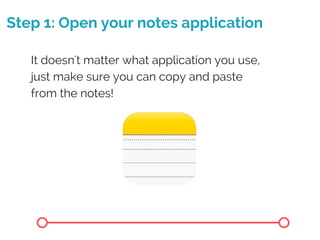
Step 1: Open your notes application
It doesn't matter what application you use,
just make sure you can copy and paste
from the notes!
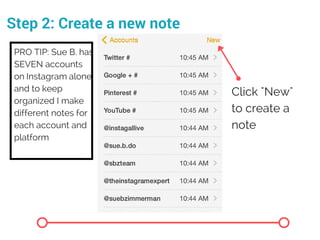
Step 2: Create a new note
Click "New"
to create a
note
PRO TIP: Sue B. has
SEVEN accounts
on Instagram alone,
and to keep
organized I make
different notes for
each account and
platform
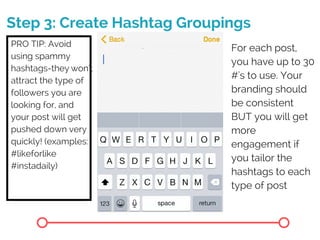
Step 3: Create Hashtag Groupings
For each post,
you have up to 30
#'s to use. Your
branding should
be consistent
BUT you will get
more
engagement if
you tailor the
hashtags to each
type of post
2. you'll be brought
to your photos, tap
the one you want
to use
PRO TIP: Avoid
using spammy
hashtags-they won't
attract the type of
followers you are
looking for, and
your post will get
pushed down very
quickly! (examples:
#likeforlike
#instadaily)
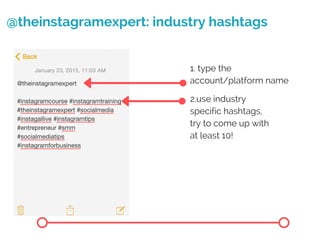
@theinstagramexpert: industry hashtags
2.use industry
specific hashtags,
try to come up with
at least 10!
1. type the
account/platform name
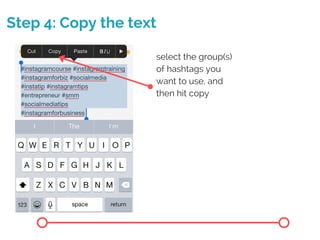
Step 4: Copy the text
select the group(s)
of hashtags you
want to use, and
then hit copy
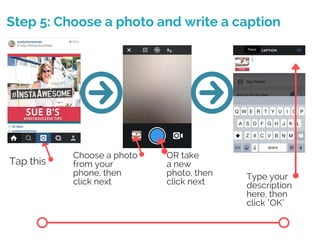
Step 5: Choose a photo and write a caption
Tap this
Choose a photo
from your
phone, then
click next
OR take
a new
photo, then
click next
Type your
description
here, then
click "OK"
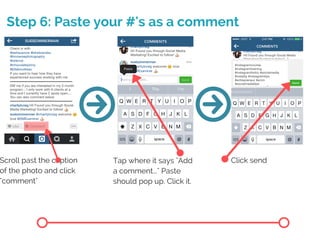
Step 6: Paste your #'s as a comment
Scroll past the caption
of the photo and click
"comment"
Tap where it says "Add
a comment..." Paste
should pop up. Click it.
Click send
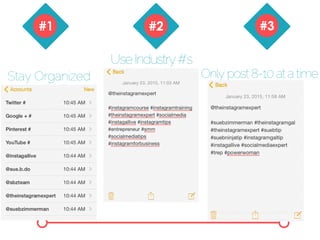
N o w j u s t r e m e m b e r
t h e s e t h r e e # r u l e s
You're done!
Stay Organized
UseIndustry#'s
Onlypost8-10atatime
S e e Y o u O n l i n e !

#Hashtag Shortcut

  • 1.
  • 2.
    W h at ' s a h a s h t a g ? Hashtag: when the "#" is placed before a word or phrase, the word or phrase becomes a searchable link
  • 3.
    Hashtag Basics # Are youa #newbie? Cure your Hashtag Headache and click here to learn more Now it's time for a hashtag strategy! Lost already? Check out my Hashtag Handbook for industry specific hashtags
  • 4.
    Hashtag Shortcut When youestablish which Hashtags you'll use for your posts, you can streamline the process easily. Think about what you're posting about. Brainstorm some words that describe what you do. Write them down, they'll come in handy later!
  • 5.
    Step 1: Openyour notes application It doesn't matter what application you use, just make sure you can copy and paste from the notes!
  • 6.
    Step 2: Createa new note Click "New" to create a note PRO TIP: Sue B. has SEVEN accounts on Instagram alone, and to keep organized I make different notes for each account and platform
  • 7.
    Step 3: CreateHashtag Groupings For each post, you have up to 30 #'s to use. Your branding should be consistent BUT you will get more engagement if you tailor the hashtags to each type of post 2. you'll be brought to your photos, tap the one you want to use PRO TIP: Avoid using spammy hashtags-they won't attract the type of followers you are looking for, and your post will get pushed down very quickly! (examples: #likeforlike #instadaily)
  • 8.
    @theinstagramexpert: industry hashtags 2.useindustry specific hashtags, try to come up with at least 10! 1. type the account/platform name
  • 9.
    Step 4: Copythe text select the group(s) of hashtags you want to use, and then hit copy
  • 10.
    Step 5: Choosea photo and write a caption Tap this Choose a photo from your phone, then click next OR take a new photo, then click next Type your description here, then click "OK"
  • 11.
    Step 6: Pasteyour #'s as a comment Scroll past the caption of the photo and click "comment" Tap where it says "Add a comment..." Paste should pop up. Click it. Click send
  • 12.
    N o wj u s t r e m e m b e r t h e s e t h r e e # r u l e s You're done!
  • 13.
  • 14.
    S e eY o u O n l i n e !