Microsoft ®  Office  PowerPoint ®  Training Hyperlink basics MorningStar Education presents:
In this presentation, you’ll learn… What hyperlinks are What hyperlinks do The different types of hyperlinks How to insert a hyperlink in a PowerPoint ®  presentation Overview: becoming familiar with hyperlinks
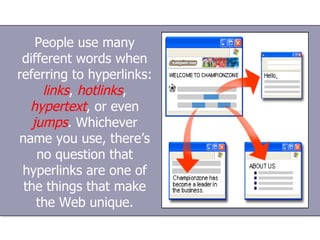
People use many different words when referring to hyperlinks:  links ,  hotlinks ,  hypertext , or even  jumps . Whichever name you use, there’s no question that hyperlinks are one of the things that make the Web unique.
“What is a hyperlink?” In computing, a  hyperlink  is a reference or navigation element in a document to another section of the same document or to another document that may be on or part of a (different) domain.
“Huh? English, please!” OK. Put simply, a hyperlink is an  icon ,  graphic , or  word  in a file that, when clicked on with the mouse,  automatically opens another file  for viewing. ?
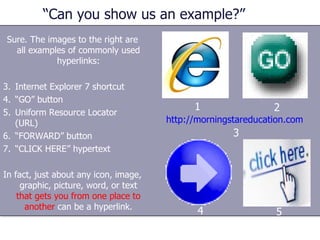
“Can you show us an example?” Sure. The images to the right are all examples of commonly used hyperlinks: Internet Explorer 7 shortcut “ GO” button Uniform Resource Locator (URL) “ FORWARD” button “ CLICK HERE” hypertext In fact, just about any icon, image, graphic, picture, word, or text  that gets you from one place to another  can be a hyperlink. http://morningstareducation.com 1 2 3 4 5
“That’s clear. What is  hypertext  ?” “ Hypertext” is the basis for the Web. When you surf the Web with your Web browser, the “http” that begins the URL displayed in your browser’s address bar or status bar stands for “Hypertext Transfer Protocol,” and HTML, the language used for creating Web pages, is “Hypertext Markup Language.”
“Why is hypertext useful?” The whole idea of hypertext is that you don’t have to read it page by page, like a book. It contains “hyperlinks” that, when clicked, instantly  transport  you somewhere else—another point in the same document or Web page or another document or Web page.
“How does that work?” This like turning from your current page in a book to the notes or index at the back of the book, or finding a page number in a table of contents and turning to that page, except that the process is automated and instant.
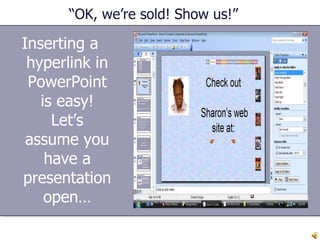
“OK, we’re sold! Show us!” Inserting a hyperlink in PowerPoint is easy! Let’s assume you have a presentation open…
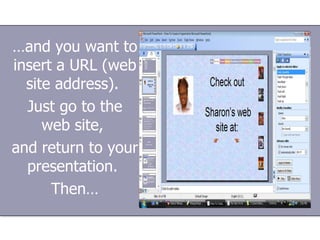
… and you want to insert a URL (web site address).  Just go to the web site,  and return to your presentation.  Then…
Right click in the area you want to insert the hyperlink…  then either click on “Insert  Hyperlink” on the toolbar or click on the little blue globe with the chain link underneath… Insert   Hyperlink
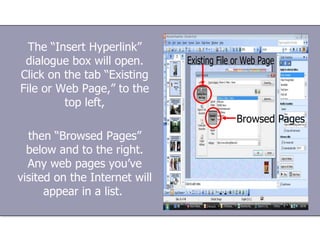
The “Insert Hyperlink” dialogue box will open. Click on the tab “Existing File or Web Page,” to the top left, then “Browsed Pages” below and to the right. Any web pages you’ve visited on the Internet will appear in a list.
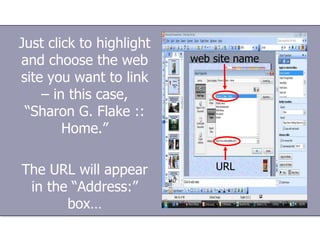
Just click to highlight and choose the web site you want to link – in this case, “Sharon G. Flake :: Home.” The URL will appear in the “Address:” box… web site name URL
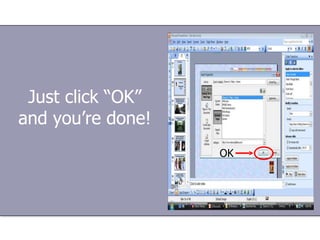
Just click “OK” and you’re done!
“Wow! That IS easy!” Would you like to see an actual example of a hyperlinked PowerPoint presentation?
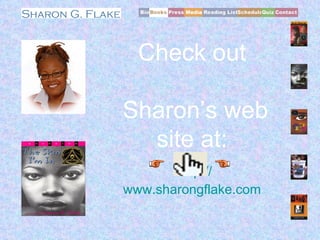
        1   2   3   4   5           Check out Sharon’s web site at: http:// www.sharongflake.com
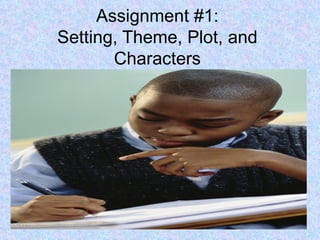
Assignment #1: Setting, Theme, Plot, and Characters
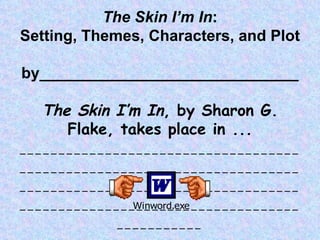
The Skin I’m In : Setting, Themes, Characters, and Plot by______________________________ The Skin I’m In , by Sharon G. Flake, takes place in ... ___________________________________________________________________________________________________________________________________________________________
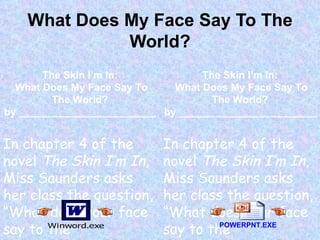
What Does My Face Say To The World? The Skin I’m In: What Does My Face Say To The World? by ________________________ In chapter 4 of the novel  The Skin I’m In , Miss Saunders asks her class the question, “What does your face say to the world?...”______________ __________________________________________ The Skin I’m In: What Does My Face Say To The World? by ________________________ In chapter 4 of the novel  The Skin I’m In , Miss Saunders asks her class the question, “What does your face say to the world?...”______________ __________________________________________ POWERPNT.EXE
That’s all, folks! MorningStar Education  ©2008

How To Create a Hyperlink in Microsoft Office PowerPoint

  • 1.
    Microsoft ® Office PowerPoint ® Training Hyperlink basics MorningStar Education presents:
  • 2.
    In this presentation,you’ll learn… What hyperlinks are What hyperlinks do The different types of hyperlinks How to insert a hyperlink in a PowerPoint ® presentation Overview: becoming familiar with hyperlinks
  • 3.
    People use manydifferent words when referring to hyperlinks: links , hotlinks , hypertext , or even jumps . Whichever name you use, there’s no question that hyperlinks are one of the things that make the Web unique.
  • 4.
    “What is ahyperlink?” In computing, a hyperlink is a reference or navigation element in a document to another section of the same document or to another document that may be on or part of a (different) domain.
  • 5.
    “Huh? English, please!”OK. Put simply, a hyperlink is an icon , graphic , or word in a file that, when clicked on with the mouse, automatically opens another file for viewing. ?
  • 6.
    “Can you showus an example?” Sure. The images to the right are all examples of commonly used hyperlinks: Internet Explorer 7 shortcut “ GO” button Uniform Resource Locator (URL) “ FORWARD” button “ CLICK HERE” hypertext In fact, just about any icon, image, graphic, picture, word, or text that gets you from one place to another can be a hyperlink. http://morningstareducation.com 1 2 3 4 5
  • 7.
    “That’s clear. Whatis hypertext ?” “ Hypertext” is the basis for the Web. When you surf the Web with your Web browser, the “http” that begins the URL displayed in your browser’s address bar or status bar stands for “Hypertext Transfer Protocol,” and HTML, the language used for creating Web pages, is “Hypertext Markup Language.”
  • 8.
    “Why is hypertextuseful?” The whole idea of hypertext is that you don’t have to read it page by page, like a book. It contains “hyperlinks” that, when clicked, instantly transport you somewhere else—another point in the same document or Web page or another document or Web page.
  • 9.
    “How does thatwork?” This like turning from your current page in a book to the notes or index at the back of the book, or finding a page number in a table of contents and turning to that page, except that the process is automated and instant.
  • 10.
    “OK, we’re sold!Show us!” Inserting a hyperlink in PowerPoint is easy! Let’s assume you have a presentation open…
  • 11.
    … and youwant to insert a URL (web site address). Just go to the web site, and return to your presentation. Then…
  • 12.
    Right click inthe area you want to insert the hyperlink… then either click on “Insert  Hyperlink” on the toolbar or click on the little blue globe with the chain link underneath… Insert  Hyperlink
  • 13.
    The “Insert Hyperlink”dialogue box will open. Click on the tab “Existing File or Web Page,” to the top left, then “Browsed Pages” below and to the right. Any web pages you’ve visited on the Internet will appear in a list.
  • 14.
    Just click tohighlight and choose the web site you want to link – in this case, “Sharon G. Flake :: Home.” The URL will appear in the “Address:” box… web site name URL
  • 15.
    Just click “OK”and you’re done!
  • 16.
    “Wow! That ISeasy!” Would you like to see an actual example of a hyperlinked PowerPoint presentation?
  • 17.
        1 2 3 4 5     Check out Sharon’s web site at: http:// www.sharongflake.com
  • 18.
    Assignment #1: Setting,Theme, Plot, and Characters
  • 19.
    The Skin I’mIn : Setting, Themes, Characters, and Plot by______________________________ The Skin I’m In , by Sharon G. Flake, takes place in ... ___________________________________________________________________________________________________________________________________________________________
  • 20.
    What Does MyFace Say To The World? The Skin I’m In: What Does My Face Say To The World? by ________________________ In chapter 4 of the novel The Skin I’m In , Miss Saunders asks her class the question, “What does your face say to the world?...”______________ __________________________________________ The Skin I’m In: What Does My Face Say To The World? by ________________________ In chapter 4 of the novel The Skin I’m In , Miss Saunders asks her class the question, “What does your face say to the world?...”______________ __________________________________________ POWERPNT.EXE
  • 21.
    That’s all, folks!MorningStar Education ©2008