1
SUBMITTED
TO:-
MR.SANJAY
SAPRA
SIR
(COMPUTER
TEAChER)
SUBMITTEDBY:-DEEPANShGOEL
10Th
B
15
<HTML>
HTML (Hypertext MarkUP
Language)
 HTML is the lingua franca for publishing
hypertext on the World Wide Web
 Define tags <html><body> <head>….etc
 Allow to embed other scripting languages to
manipulate design layout, text and graphics
 Platform independent
 Current version is 4.x and in February W3C
released the first draft of a test suite 4.01
2
HTML (Hypertext Markup
Language)
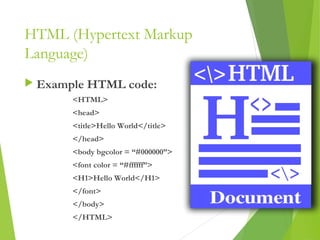
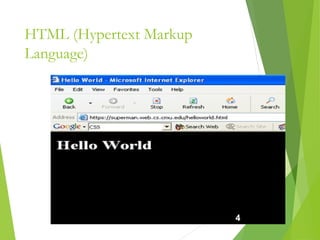
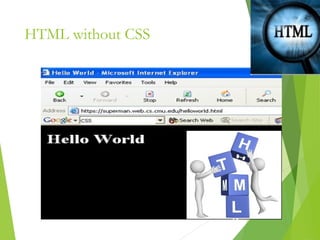
 Example HTML code:
<HTML>
<head>
<title>Hello World</title>
</head>
<body bgcolor = “#000000”>
<font color = “#ffffff”>
<H1>Hello World</H1>
</font>
</body>
</HTML> 3
HTML (Hypertext Markup
Language)
4
HTML (Hypertext Markup
Language)
 Common features
 Tables
 Frame
 Form
 Image map
 Character Set
 Meta tags
 Images, Hyperlink, etc…
5
HTML (Hypertext Markup
Language)
 File Extensions:
HTML, HTM
 Recent recommendation of W3C is
XHTML 1.0 combines the strength of
HTML 4 with the power of XML.
 XHTML 1.0 is the first major change
to HTML since HTML 4.0 was
released in 1997
6
CSS (Cascading Style Sheet)
 Simple mechanism for adding style to web page
 Code be embedded into the HTML file
 HTML tag:
<style type=“text/css”>CODE</style>
 Also be in a separate file FILENAME.css
 HTML tag:
<link rel=“stylesheet” href=“scs.css” type=“text/css”>
 Style types mainly include:
• Font
• Color
• Spacing
7
CSS (Cascading Style Sheet)
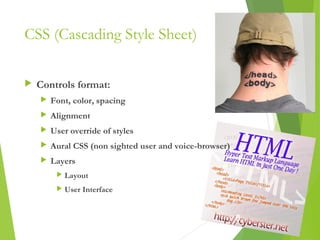
 Controls format:
 Font, color, spacing
 Alignment
 User override of styles
 Aural CSS (non sighted user and voice-browser)
 Layers
 Layout
 User Interface
8
CSS (Cascading Style Sheet)
 Client’s browser dependable
 Example code:
p,h1,h2 {
margin-top:0px;
margin-bottom:100px;padding:20px 40px 0px
40px;
}
9
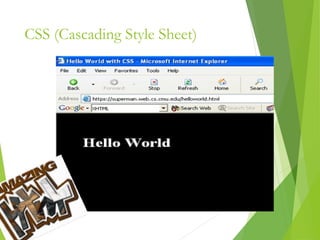
CSS (Cascading Style Sheet)
<HTML>
<head>
<title>Hello World</title>
<style type=“text/css”>
p,h1,h2 {
margin-top:0px;
margin-bottom:100px;padding:40px 40px 0px 40px;
}
</style>
</head>
<body bgcolor = “#000000”>
<font color = “#ffffff”>
<h1>Hello World<h1>
</font>
</body>
</HTML>
10
CSS (Cascading Style Sheet)
11
HTML without CSS
12
XML XSLT (Extensible Stylesheet
Language Transformations)
XSLT is designed for use as part
of XSL
Stylesheet language for XML
XSLT is also designed to be used
independently of XSL
Work under the umbrella of XML
13
14
THANKYOU

ppt on html And c++

  • 1.
  • 2.
    HTML (Hypertext MarkUP Language) HTML is the lingua franca for publishing hypertext on the World Wide Web  Define tags <html><body> <head>….etc  Allow to embed other scripting languages to manipulate design layout, text and graphics  Platform independent  Current version is 4.x and in February W3C released the first draft of a test suite 4.01 2
  • 3.
    HTML (Hypertext Markup Language) Example HTML code: <HTML> <head> <title>Hello World</title> </head> <body bgcolor = “#000000”> <font color = “#ffffff”> <H1>Hello World</H1> </font> </body> </HTML> 3
  • 4.
  • 5.
    HTML (Hypertext Markup Language) Common features  Tables  Frame  Form  Image map  Character Set  Meta tags  Images, Hyperlink, etc… 5
  • 6.
    HTML (Hypertext Markup Language) File Extensions: HTML, HTM  Recent recommendation of W3C is XHTML 1.0 combines the strength of HTML 4 with the power of XML.  XHTML 1.0 is the first major change to HTML since HTML 4.0 was released in 1997 6
  • 7.
    CSS (Cascading StyleSheet)  Simple mechanism for adding style to web page  Code be embedded into the HTML file  HTML tag: <style type=“text/css”>CODE</style>  Also be in a separate file FILENAME.css  HTML tag: <link rel=“stylesheet” href=“scs.css” type=“text/css”>  Style types mainly include: • Font • Color • Spacing 7
  • 8.
    CSS (Cascading StyleSheet)  Controls format:  Font, color, spacing  Alignment  User override of styles  Aural CSS (non sighted user and voice-browser)  Layers  Layout  User Interface 8
  • 9.
    CSS (Cascading StyleSheet)  Client’s browser dependable  Example code: p,h1,h2 { margin-top:0px; margin-bottom:100px;padding:20px 40px 0px 40px; } 9
  • 10.
    CSS (Cascading StyleSheet) <HTML> <head> <title>Hello World</title> <style type=“text/css”> p,h1,h2 { margin-top:0px; margin-bottom:100px;padding:40px 40px 0px 40px; } </style> </head> <body bgcolor = “#000000”> <font color = “#ffffff”> <h1>Hello World<h1> </font> </body> </HTML> 10
  • 11.
  • 12.
  • 13.
    XML XSLT (ExtensibleStylesheet Language Transformations) XSLT is designed for use as part of XSL Stylesheet language for XML XSLT is also designed to be used independently of XSL Work under the umbrella of XML 13
  • 14.