How to Build a
Change Control System
    in SharePoint


  Dux Raymond Sy, PMP


            Hyatt Regency Cambridge
            June 24, 2009
            10.30am – 11.45am
Have You Ever Experienced …
  Customers adding scope halfway through the project?

  Management cutting your project budget?

  Project resources performing unplanned project tasks
   because the customer says so?


             What Do You Do?
Session Objectives
  After completing this session, you will learn how to:
    Leverage the benefits of a change control system
    Create an automated change request process utilizing
     the Three-State Workflow
    Develop a sophisticated Change Control System with
     custom workflows in SharePoint Designer without coding
Dux Raymond Sy, PMP
                  Managing Partner, Innovative-E, Inc.

                  Author, “SharePoint for Project
                   Management” by O’Reilly Media

                  Contract Author & Instructor,
                   Learning Tree International

  For more information, connect with Dux

      E-Mail: dux.sy@innovative-e.com

      LinkedIn: meetdux.com/li

      Blog: meetdux.com

      Twitter: twitter.com/meetdux
Agenda
  What is a Change Control System?

  SharePoint Workflows

  Utilizing the Three-State Workflow

  Custom Workflows in SharePoint Designer

  Summary
Controlling Change
  Change control is a set of procedures that defines how
   changes would be addressed in a project

  Tracking change involves
    The number of requests
    The person or group requesting the change
    What needs to be changed
    Impact of the changed
    Approval or rejection


    The change-control procedure must force management
          to assess the total impact of a change and
     agree to the cost before ordering it to be implemented.
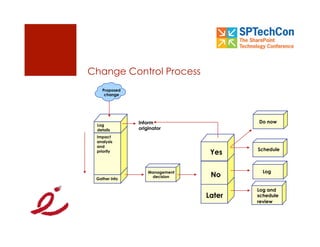
Change Control Process
    Proposed
     change


               Inform                   Do now
 Log
 details       originator
 Impact
 analysis
 and
                                        Schedule
 priority                        Yes

                   Management             Log
 Gather info
                    decision     No

                                        Log and
                                Later   schedule
                                        review
Agenda
  What is a Change Control System?

  SharePoint Workflows

  Utilizing the Three-State Workflow

  Custom Workflows in SharePoint Designer

  Summary
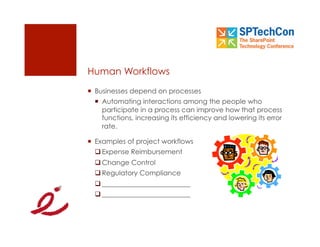
Human Workflows
  Businesses depend on processes
    Automating interactions among the people who
     participate in a process can improve how that process
     functions, increasing its efficiency and lowering its error
     rate.

  Examples of project workflows
   Expense Reimbursement
   Change Control
   Regulatory Compliance
   __________________________
   __________________________
SharePoint Workflows
  Supports the automation of human workflow
    Enables collaboration by automating the movement of
     document or list items through a specific sequence
     of actions

  Based on Windows Workflow Foundation
    WSS includes a predefined Three-State workflow
    MOSS provides other workflows
    SharePoint Designer and Visual Studio .NET
     can be used to create custom workflows
Agenda
  What is a Change Control System?

  SharePoint Workflows

  Utilizing the Three-State Workflow

  Custom Workflows in SharePoint Designer

  Summary
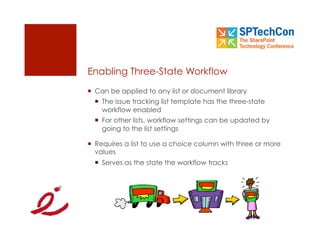
Enabling Three-State Workflow
  Can be applied to any list or document library
    The issue tracking list template has the three-state
     workflow enabled
    For other lists, workflow settings can be updated by
     going to the list settings

  Requires a list to use a choice column with three or more
   values
    Serves as the state the workflow tracks
Implementing Three-State Workflow
  Three-state workflow can be applied to any list or
   document library
    It requires at the most three states to enable the
     workflow
      For example: Initiate, Review, Approve

  Steps to implement a Three-state workflow:
  1.  Go to a specific list or library
  2.  Define Workflow Settings
  3.  Test the workflow
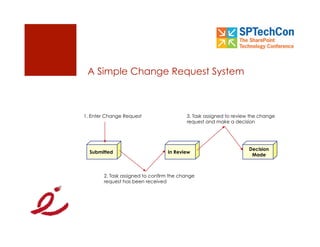
A Simple Change Request System


1. Enter Change Request                   3. Task assigned to review the change
                                          request and make a decision


                                                                    Decision
  Submitted                       In Review
                                                                     Made


        2. Task assigned to confirm the change
        request has been received
Interactive Demonstration


     Building a Change Control System with
               Three-State Workflow
Agenda
  What is a Change Control System?

  SharePoint Workflows

  Utilizing the Three-State Workflow

  Custom Workflows in SharePoint Designer

  Summary
Three State Workflow: Realistic?
  Out of the Box SharePoint Workflows are generic
    Almost always doesn’t support specific organizational
     processes

  Custom workflows can be developed
    SharePoint Designer
      No Programming required
    Visual Studio .NET
      Programming is required
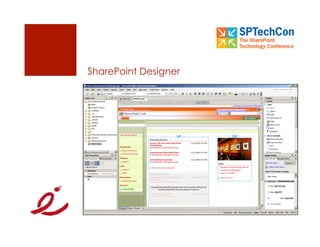
SharePoint Designer
  Creates and customizes SharePoint sites
    Provides professional tools for building interactive
     SharePoint solutions without writing code

  Key features
    Customize the look and feel of a SharePoint site
    Incorporate data from a wide variety of industry
     standard data sources
    Build custom workflow with built in Workflow Designer
SharePoint Designer
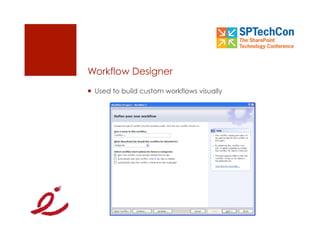
Workflow Designer
  Used to build custom workflows visually
Steps in Developing a Custom Workflow
1.  Specify the list or library where the workflow will be
    assigned to

2.  Define the condition

3.  Specify the action

4.  Add more conditions and actions as necessary

5.  Add further steps as necessary
Interactive Demonstration


     Building a Change Control System with
                SharePoint Designer
Agenda
  What is a Change Control System?

  SharePoint Workflows

  Utilizing the Three-State Workflow

  Custom Workflows in SharePoint Designer

  Summary
Questions?

             E-Mail: dux.sy@innovative-e.com

             LinkedIn: meetdux.com/li

             Blog: meetdux.com

             Twitter: twitter.com/meetdux
Summary
  You are now able to:
    Leverage the benefits of a change control system
    Create an automated change request process utilizing
     the Three-State Workflow
    Develop a sophisticated Change Control System with
     custom workflows in SharePoint Designer without coding
Thank You!

How To Build A Change Control System with SharePoint

  • 1.
    How to Builda Change Control System in SharePoint Dux Raymond Sy, PMP Hyatt Regency Cambridge June 24, 2009 10.30am – 11.45am
  • 2.
    Have You EverExperienced …   Customers adding scope halfway through the project?   Management cutting your project budget?   Project resources performing unplanned project tasks because the customer says so? What Do You Do?
  • 3.
    Session Objectives   Aftercompleting this session, you will learn how to:   Leverage the benefits of a change control system   Create an automated change request process utilizing the Three-State Workflow   Develop a sophisticated Change Control System with custom workflows in SharePoint Designer without coding
  • 4.
    Dux Raymond Sy,PMP   Managing Partner, Innovative-E, Inc.   Author, “SharePoint for Project Management” by O’Reilly Media   Contract Author & Instructor, Learning Tree International   For more information, connect with Dux   E-Mail: dux.sy@innovative-e.com   LinkedIn: meetdux.com/li   Blog: meetdux.com   Twitter: twitter.com/meetdux
  • 5.
    Agenda   What isa Change Control System?   SharePoint Workflows   Utilizing the Three-State Workflow   Custom Workflows in SharePoint Designer   Summary
  • 6.
    Controlling Change   Changecontrol is a set of procedures that defines how changes would be addressed in a project   Tracking change involves   The number of requests   The person or group requesting the change   What needs to be changed   Impact of the changed   Approval or rejection The change-control procedure must force management to assess the total impact of a change and agree to the cost before ordering it to be implemented.
  • 7.
    Change Control Process Proposed change Inform Do now Log details originator Impact analysis and Schedule priority Yes Management Log Gather info decision No Log and Later schedule review
  • 8.
    Agenda   What isa Change Control System?   SharePoint Workflows   Utilizing the Three-State Workflow   Custom Workflows in SharePoint Designer   Summary
  • 9.
    Human Workflows   Businessesdepend on processes   Automating interactions among the people who participate in a process can improve how that process functions, increasing its efficiency and lowering its error rate.   Examples of project workflows  Expense Reimbursement  Change Control  Regulatory Compliance  __________________________  __________________________
  • 10.
    SharePoint Workflows   Supportsthe automation of human workflow   Enables collaboration by automating the movement of document or list items through a specific sequence of actions   Based on Windows Workflow Foundation   WSS includes a predefined Three-State workflow   MOSS provides other workflows   SharePoint Designer and Visual Studio .NET can be used to create custom workflows
  • 11.
    Agenda   What isa Change Control System?   SharePoint Workflows   Utilizing the Three-State Workflow   Custom Workflows in SharePoint Designer   Summary
  • 12.
    Enabling Three-State Workflow  Can be applied to any list or document library   The issue tracking list template has the three-state workflow enabled   For other lists, workflow settings can be updated by going to the list settings   Requires a list to use a choice column with three or more values   Serves as the state the workflow tracks
  • 13.
    Implementing Three-State Workflow  Three-state workflow can be applied to any list or document library   It requires at the most three states to enable the workflow   For example: Initiate, Review, Approve   Steps to implement a Three-state workflow: 1.  Go to a specific list or library 2.  Define Workflow Settings 3.  Test the workflow
  • 14.
    A Simple ChangeRequest System 1. Enter Change Request 3. Task assigned to review the change request and make a decision Decision Submitted In Review Made 2. Task assigned to confirm the change request has been received
  • 15.
    Interactive Demonstration Building a Change Control System with Three-State Workflow
  • 16.
    Agenda   What isa Change Control System?   SharePoint Workflows   Utilizing the Three-State Workflow   Custom Workflows in SharePoint Designer   Summary
  • 17.
    Three State Workflow:Realistic?   Out of the Box SharePoint Workflows are generic   Almost always doesn’t support specific organizational processes   Custom workflows can be developed   SharePoint Designer   No Programming required   Visual Studio .NET   Programming is required
  • 18.
    SharePoint Designer   Createsand customizes SharePoint sites   Provides professional tools for building interactive SharePoint solutions without writing code   Key features   Customize the look and feel of a SharePoint site   Incorporate data from a wide variety of industry standard data sources   Build custom workflow with built in Workflow Designer
  • 19.
  • 20.
    Workflow Designer   Usedto build custom workflows visually
  • 21.
    Steps in Developinga Custom Workflow 1.  Specify the list or library where the workflow will be assigned to 2.  Define the condition 3.  Specify the action 4.  Add more conditions and actions as necessary 5.  Add further steps as necessary
  • 22.
    Interactive Demonstration Building a Change Control System with SharePoint Designer
  • 23.
    Agenda   What isa Change Control System?   SharePoint Workflows   Utilizing the Three-State Workflow   Custom Workflows in SharePoint Designer   Summary
  • 24.
    Questions? E-Mail: dux.sy@innovative-e.com LinkedIn: meetdux.com/li Blog: meetdux.com Twitter: twitter.com/meetdux
  • 25.
    Summary   You arenow able to:   Leverage the benefits of a change control system   Create an automated change request process utilizing the Three-State Workflow   Develop a sophisticated Change Control System with custom workflows in SharePoint Designer without coding
  • 26.