Neutron Network
Namespaces and
IPtables: Technical
deep dive
Damian Igbe
Technical Instructor & Consultant
© MIRANTIS 2013

PAGE 1
Presentation Outline

• Introduction to Neutron & Neutron Namespaces
• Deep Dive
• Conclusions

© MIRANTIS 2013

PAGE 2
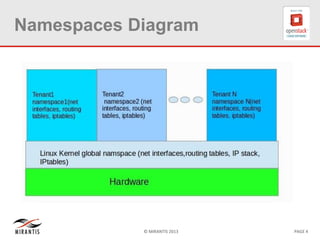
What are Namespaces
• Namespaces enables multiple instances of a
routing table to co-exist within the same Linux
box
• Network namespaces make it possible to
separate network domains (network interfaces,
routing tables, iptables) into completely
separate and independent domains.

© MIRANTIS 2013

PAGE 3
Namespaces Diagram

© MIRANTIS 2013

PAGE 4
Namespaces Advantages
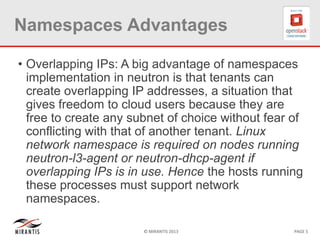
• Overlapping IPs: A big advantage of namespaces
implementation in neutron is that tenants can
create overlapping IP addresses, a situation that
gives freedom to cloud users because they are
free to create any subnet of choice without fear of
conflicting with that of another tenant. Linux
network namespace is required on nodes running
neutron-l3-agent or neutron-dhcp-agent if
overlapping IPs is in use. Hence the hosts running
these processes must support network
namespaces.
© MIRANTIS 2013

PAGE 5
Namespaces Advantages
L3 Agent: The neutron-l3-agent is designed to
use network namespaces to provide multiple
independent virtual routers per node, that do
not interfere with each other or with routing of
the compute node on which they are hosted

© MIRANTIS 2013

PAGE 6
What if Namespaces NOT supported?
If the kernel does not support namespaces, the following limitations should be
noted with Neutron:
• Neutron-l3-agent is limited to providing a single virtual router per compute
node. If namespaces is supported, a single deployed neutron-l3-agent should
be able to host multiple virtual routers.
• It is necessary to configure each neutron-l3-agent with the Universally Unique
ID (UUID) identifying the router instance that it hosts. This complicates
deployment, makes self-service provisioning of routers by tenants impractical.
If namespaces is supported, the configuration with the UUID(s) of the router(s)
it hosts is not required.
•If the host does not support namespaces then the neutron-l3-agent and
neutron-dhcp-agent should be run on different hosts. This is due to the fact that
there is no isolation between the IP addresses created by the L3 agent and by
the DHCP agent. A downside to this is that by manipulating the routing tables
the user can ensure that these networks have access to one another.

© MIRANTIS 2013

PAGE 7
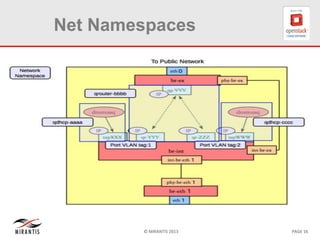
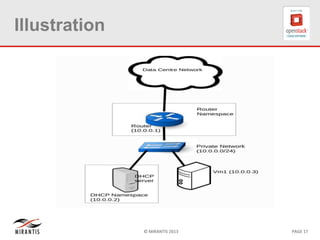
Recognizing Namespaces
• Every l2-agent/private network has an
associated dhcp namespace and
• Every l3-agent/router has an associated
router namespace.

© MIRANTIS 2013

PAGE 8
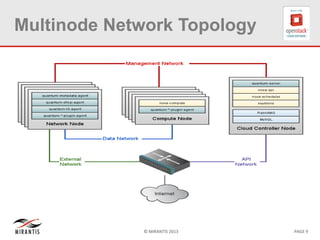
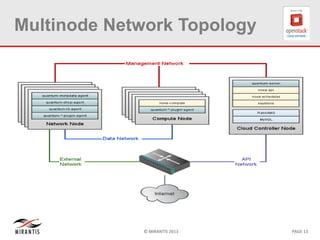
Multinode Network Topology

© MIRANTIS 2013

PAGE 9
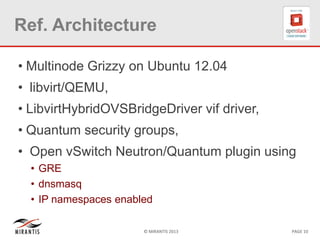
Ref. Architecture
• Multinode Grizzy on Ubuntu 12.04

• libvirt/QEMU,
• LibvirtHybridOVSBridgeDriver vif driver,
• Quantum security groups,
• Open vSwitch Neutron/Quantum plugin using
• GRE
• dnsmasq
• IP namespaces enabled
© MIRANTIS 2013

PAGE 10
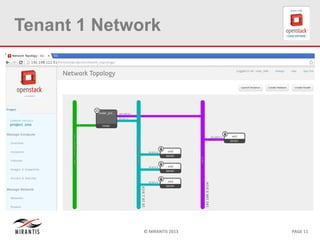
Tenant 1 Network

© MIRANTIS 2013

PAGE 11
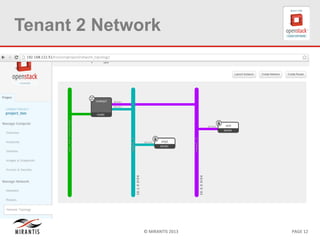
Tenant 2 Network

© MIRANTIS 2013

PAGE 12
Multinode Network Topology

© MIRANTIS 2013

PAGE 13
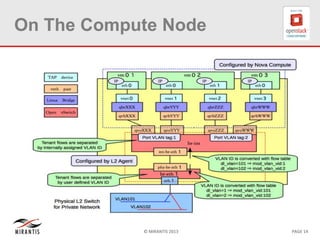
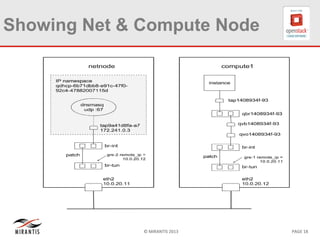
On The Compute Node

© MIRANTIS 2013

PAGE 14
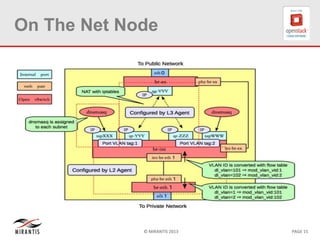
On The Net Node

© MIRANTIS 2013

PAGE 15
Net Namespaces

© MIRANTIS 2013

PAGE 16
Illustration

© MIRANTIS 2013

PAGE 17
Showing Net & Compute Node

© MIRANTIS 2013

PAGE 18
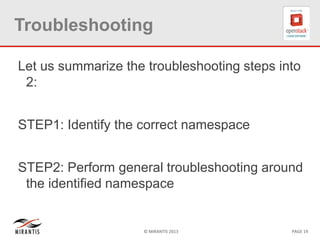
Troubleshooting
Let us summarize the troubleshooting steps into
2:
STEP1: Identify the correct namespace
STEP2: Perform general troubleshooting around
the identified namespace

© MIRANTIS 2013

PAGE 19
Problem

Have spin off an instance and it has an IP
address from Horizon but cannot ssh
(probabely because the interface has no
assigned IP) to it so can only view from VNC

© MIRANTIS 2013

PAGE 20
Detailed Troubleshooting
steps for this Problem
•Ensure that dnsmasq process is running:
# pgrep -fl dnsmasq ( restart the quantum-dhcp-agent if not).
• verify the IP address in the namespace, if dnsmasq is running:
# ip netns [list].
•Identify the qdhcp-network <networkUUID> namespace:
# ip netns exec qdhcp-<networkUUID> ip
From the output, ensure that the IP on the interface is present and matches the one
present for dnsmasq. To verify what the expected IP address is, use quantum-port-list
and quantum port-show <portUUID>.
•Determine the leases
# /var/lib/quantum/dhcp/<networkUUID>/host
Note:
•If the dnsmasq configuration is correct, but dnsmasq is not responding with
leases and the bridge/interface is created and running, pkill dnsmasq and restart
quantum-dhcp-agent.
•If dnsmasq does not include the correct leases, verify that quantum-server is
running correctly and that it can communicate with dhcp-agent. If it is running
correctly, and the bridge/interface is created and running, restart quantum-dhcpagent.
© MIRANTIS 2013
PAGE 21
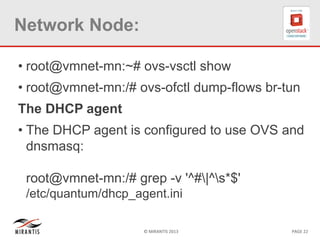
Network Node:
• root@vmnet-mn:~# ovs-vsctl show

• root@vmnet-mn:/# ovs-ofctl dump-flows br-tun
The DHCP agent
• The DHCP agent is configured to use OVS and
dnsmasq:
root@vmnet-mn:/# grep -v '^#|^s*$'
/etc/quantum/dhcp_agent.ini
© MIRANTIS 2013

PAGE 22
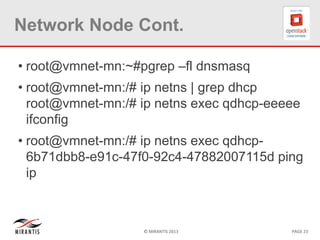
Network Node Cont.
• root@vmnet-mn:~#pgrep –fl dnsmasq

• root@vmnet-mn:/# ip netns | grep dhcp
root@vmnet-mn:/# ip netns exec qdhcp-eeeee
ifconfig
• root@vmnet-mn:/# ip netns exec qdhcp6b71dbb8-e91c-47f0-92c4-47882007115d ping
ip

© MIRANTIS 2013

PAGE 23
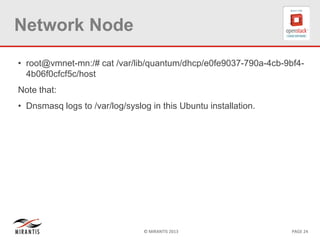
Network Node
• root@vmnet-mn:/# cat /var/lib/quantum/dhcp/e0fe9037-790a-4cb-9bf44b06f0cfcf5c/host
Note that:
• Dnsmasq logs to /var/log/syslog in this Ubuntu installation.

© MIRANTIS 2013

PAGE 24
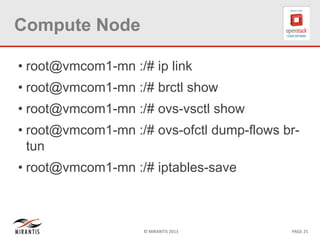
Compute Node
• root@vmcom1-mn :/# ip link

• root@vmcom1-mn :/# brctl show
• root@vmcom1-mn :/# ovs-vsctl show
• root@vmcom1-mn :/# ovs-ofctl dump-flows brtun
• root@vmcom1-mn :/# iptables-save

© MIRANTIS 2013

PAGE 25
Compute Node
• root@vmcom1-mn :/# tcpdump -n -i eth2

© MIRANTIS 2013

PAGE 26
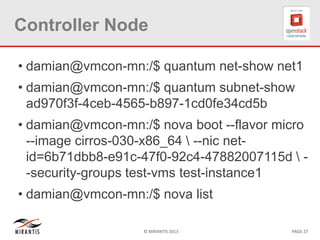
Controller Node
• damian@vmcon-mn:/$ quantum net-show net1

• damian@vmcon-mn:/$ quantum subnet-show
ad970f3f-4ceb-4565-b897-1cd0fe34cd5b
• damian@vmcon-mn:/$ nova boot --flavor micro
--image cirros-030-x86_64  --nic netid=6b71dbb8-e91c-47f0-92c4-47882007115d  -security-groups test-vms test-instance1

• damian@vmcon-mn:/$ nova list
© MIRANTIS 2013

PAGE 27
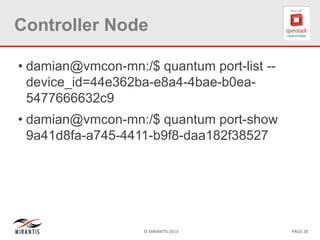
Controller Node
• damian@vmcon-mn:/$ quantum port-list -device_id=44e362ba-e8a4-4bae-b0ea5477666632c9
• damian@vmcon-mn:/$ quantum port-show
9a41d8fa-a745-4411-b9f8-daa182f38527

© MIRANTIS 2013

PAGE 28
CONCLUSIONS

QUESTIONS
AND

ANSWERS

© MIRANTIS 2013

PAGE 29
Note
• When a router or network is created, the
namespaces don’t get created immediately. For
network, the DHCP namespaces get created only
when a vm is attached and for router the
namespace is created when a gateway is set. It
means that an activity must take place before the
namespaces get created.
• When a router or network is deleted, the
associated namespaces are not deleted. They
need to be manually deleted.
© MIRANTIS 2013

PAGE 30

Neutron Network Namespaces and IPtables--A Technical Deep Dive

  • 1.
    Neutron Network Namespaces and IPtables:Technical deep dive Damian Igbe Technical Instructor & Consultant © MIRANTIS 2013 PAGE 1
  • 2.
    Presentation Outline • Introductionto Neutron & Neutron Namespaces • Deep Dive • Conclusions © MIRANTIS 2013 PAGE 2
  • 3.
    What are Namespaces •Namespaces enables multiple instances of a routing table to co-exist within the same Linux box • Network namespaces make it possible to separate network domains (network interfaces, routing tables, iptables) into completely separate and independent domains. © MIRANTIS 2013 PAGE 3
  • 4.
  • 5.
    Namespaces Advantages • OverlappingIPs: A big advantage of namespaces implementation in neutron is that tenants can create overlapping IP addresses, a situation that gives freedom to cloud users because they are free to create any subnet of choice without fear of conflicting with that of another tenant. Linux network namespace is required on nodes running neutron-l3-agent or neutron-dhcp-agent if overlapping IPs is in use. Hence the hosts running these processes must support network namespaces. © MIRANTIS 2013 PAGE 5
  • 6.
    Namespaces Advantages L3 Agent:The neutron-l3-agent is designed to use network namespaces to provide multiple independent virtual routers per node, that do not interfere with each other or with routing of the compute node on which they are hosted © MIRANTIS 2013 PAGE 6
  • 7.
    What if NamespacesNOT supported? If the kernel does not support namespaces, the following limitations should be noted with Neutron: • Neutron-l3-agent is limited to providing a single virtual router per compute node. If namespaces is supported, a single deployed neutron-l3-agent should be able to host multiple virtual routers. • It is necessary to configure each neutron-l3-agent with the Universally Unique ID (UUID) identifying the router instance that it hosts. This complicates deployment, makes self-service provisioning of routers by tenants impractical. If namespaces is supported, the configuration with the UUID(s) of the router(s) it hosts is not required. •If the host does not support namespaces then the neutron-l3-agent and neutron-dhcp-agent should be run on different hosts. This is due to the fact that there is no isolation between the IP addresses created by the L3 agent and by the DHCP agent. A downside to this is that by manipulating the routing tables the user can ensure that these networks have access to one another. © MIRANTIS 2013 PAGE 7
  • 8.
    Recognizing Namespaces • Everyl2-agent/private network has an associated dhcp namespace and • Every l3-agent/router has an associated router namespace. © MIRANTIS 2013 PAGE 8
  • 9.
    Multinode Network Topology ©MIRANTIS 2013 PAGE 9
  • 10.
    Ref. Architecture • MultinodeGrizzy on Ubuntu 12.04 • libvirt/QEMU, • LibvirtHybridOVSBridgeDriver vif driver, • Quantum security groups, • Open vSwitch Neutron/Quantum plugin using • GRE • dnsmasq • IP namespaces enabled © MIRANTIS 2013 PAGE 10
  • 11.
    Tenant 1 Network ©MIRANTIS 2013 PAGE 11
  • 12.
    Tenant 2 Network ©MIRANTIS 2013 PAGE 12
  • 13.
    Multinode Network Topology ©MIRANTIS 2013 PAGE 13
  • 14.
    On The ComputeNode © MIRANTIS 2013 PAGE 14
  • 15.
    On The NetNode © MIRANTIS 2013 PAGE 15
  • 16.
  • 17.
  • 18.
    Showing Net &Compute Node © MIRANTIS 2013 PAGE 18
  • 19.
    Troubleshooting Let us summarizethe troubleshooting steps into 2: STEP1: Identify the correct namespace STEP2: Perform general troubleshooting around the identified namespace © MIRANTIS 2013 PAGE 19
  • 20.
    Problem Have spin offan instance and it has an IP address from Horizon but cannot ssh (probabely because the interface has no assigned IP) to it so can only view from VNC © MIRANTIS 2013 PAGE 20
  • 21.
    Detailed Troubleshooting steps forthis Problem •Ensure that dnsmasq process is running: # pgrep -fl dnsmasq ( restart the quantum-dhcp-agent if not). • verify the IP address in the namespace, if dnsmasq is running: # ip netns [list]. •Identify the qdhcp-network <networkUUID> namespace: # ip netns exec qdhcp-<networkUUID> ip From the output, ensure that the IP on the interface is present and matches the one present for dnsmasq. To verify what the expected IP address is, use quantum-port-list and quantum port-show <portUUID>. •Determine the leases # /var/lib/quantum/dhcp/<networkUUID>/host Note: •If the dnsmasq configuration is correct, but dnsmasq is not responding with leases and the bridge/interface is created and running, pkill dnsmasq and restart quantum-dhcp-agent. •If dnsmasq does not include the correct leases, verify that quantum-server is running correctly and that it can communicate with dhcp-agent. If it is running correctly, and the bridge/interface is created and running, restart quantum-dhcpagent. © MIRANTIS 2013 PAGE 21
  • 22.
    Network Node: • root@vmnet-mn:~#ovs-vsctl show • root@vmnet-mn:/# ovs-ofctl dump-flows br-tun The DHCP agent • The DHCP agent is configured to use OVS and dnsmasq: root@vmnet-mn:/# grep -v '^#|^s*$' /etc/quantum/dhcp_agent.ini © MIRANTIS 2013 PAGE 22
  • 23.
    Network Node Cont. •root@vmnet-mn:~#pgrep –fl dnsmasq • root@vmnet-mn:/# ip netns | grep dhcp root@vmnet-mn:/# ip netns exec qdhcp-eeeee ifconfig • root@vmnet-mn:/# ip netns exec qdhcp6b71dbb8-e91c-47f0-92c4-47882007115d ping ip © MIRANTIS 2013 PAGE 23
  • 24.
    Network Node • root@vmnet-mn:/#cat /var/lib/quantum/dhcp/e0fe9037-790a-4cb-9bf44b06f0cfcf5c/host Note that: • Dnsmasq logs to /var/log/syslog in this Ubuntu installation. © MIRANTIS 2013 PAGE 24
  • 25.
    Compute Node • root@vmcom1-mn:/# ip link • root@vmcom1-mn :/# brctl show • root@vmcom1-mn :/# ovs-vsctl show • root@vmcom1-mn :/# ovs-ofctl dump-flows brtun • root@vmcom1-mn :/# iptables-save © MIRANTIS 2013 PAGE 25
  • 26.
    Compute Node • root@vmcom1-mn:/# tcpdump -n -i eth2 © MIRANTIS 2013 PAGE 26
  • 27.
    Controller Node • damian@vmcon-mn:/$quantum net-show net1 • damian@vmcon-mn:/$ quantum subnet-show ad970f3f-4ceb-4565-b897-1cd0fe34cd5b • damian@vmcon-mn:/$ nova boot --flavor micro --image cirros-030-x86_64 --nic netid=6b71dbb8-e91c-47f0-92c4-47882007115d -security-groups test-vms test-instance1 • damian@vmcon-mn:/$ nova list © MIRANTIS 2013 PAGE 27
  • 28.
    Controller Node • damian@vmcon-mn:/$quantum port-list -device_id=44e362ba-e8a4-4bae-b0ea5477666632c9 • damian@vmcon-mn:/$ quantum port-show 9a41d8fa-a745-4411-b9f8-daa182f38527 © MIRANTIS 2013 PAGE 28
  • 29.
  • 30.
    Note • When arouter or network is created, the namespaces don’t get created immediately. For network, the DHCP namespaces get created only when a vm is attached and for router the namespace is created when a gateway is set. It means that an activity must take place before the namespaces get created. • When a router or network is deleted, the associated namespaces are not deleted. They need to be manually deleted. © MIRANTIS 2013 PAGE 30