This document provides an introduction and overview of hierarchical linear modeling (HLM). It discusses how HLM can be used to account for nested data structures that are common in social science research. Examples are given of how HLM can be used to analyze educational achievement data with students nested within schools, and life satisfaction data from the World Values Survey with individuals nested within countries. The key steps of setting up and running an HLM analysis in statistical software are outlined.

![First, we need to get the data ready Step 1: prepare the file The World Values Survey is too big for the student version of HLM, so let’s take ~10% of the sample and save the file. Sort by nation [v2], save the file. Aggregate the data: “break variable” is nation [v2] and “aggregate variables” are life satisfaction [v81] and take advantage [v26], but sure to create a new data file](https://image.slidesharecdn.com/hlmpresentation-1211188428617643-9/85/Hierarchical-Linear-Modeling-7-320.jpg)
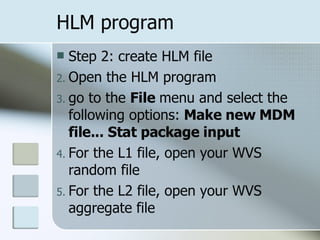
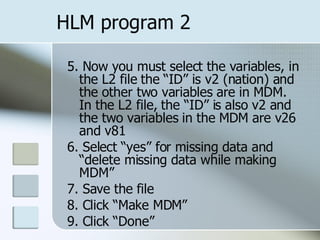

![HLM analysis – Means as Outcomes 9. Let’s start with specifying the L1 model. First we need to tell the program what our DV is, life satisfaction or [v81]. Click on v81 and select “outcome variable.” 10. Now we need to tell the program what our fixed and random effects are. V26 (trust) is a fixed effect, because we care about it. The intercept and slope are by default random effects. 11. Repeat for L2. 12. Click “Run analysis”](https://image.slidesharecdn.com/hlmpresentation-1211188428617643-9/85/Hierarchical-Linear-Modeling-11-320.jpg)
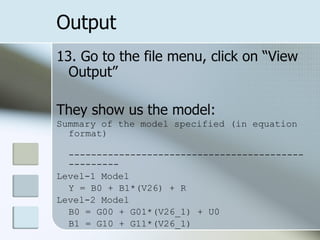
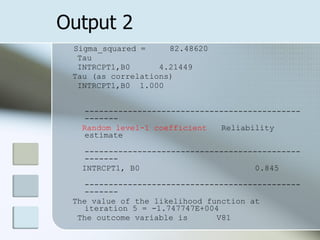
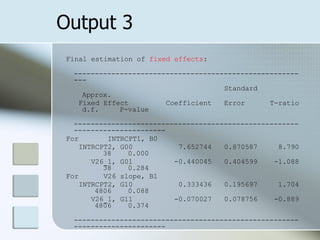
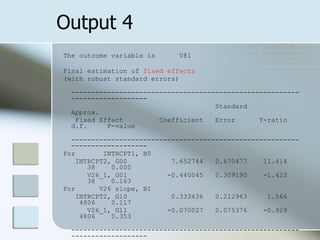
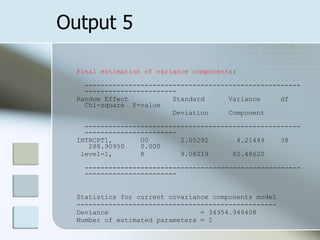
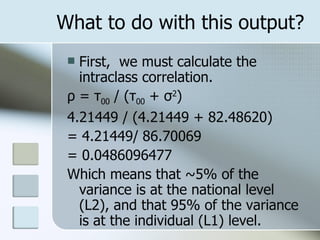
![Let’s try some different WVS examples Family important [v4] -> Work important [v8] ~6% of variance is at the national level. Democracy isn’t good [v171] -> Having army rule [v166] ~57% of the variance is at the national level.](https://image.slidesharecdn.com/hlmpresentation-1211188428617643-9/85/Hierarchical-Linear-Modeling-18-320.jpg)
![CRRC DI 3 countries (AM, AZ, and GE) are technically too small of groups to compare, but can compare regions First, Armenia only, sort by quadrant. What variables would differ by quadrant? English language knowledge level [e9_2] -> political cooperation with U.S. [p15_6] 3% of variance is at the quadrant level](https://image.slidesharecdn.com/hlmpresentation-1211188428617643-9/85/Hierarchical-Linear-Modeling-19-320.jpg)