
SAP India Payroll
Objective


   To understand the key business processes of the Indian
    Payroll component of mySAPHCM.
   To gain understanding of the key terms and definitions of
    the Indian Payroll component of mySAP HCM.
   To provide localization of Indian Payroll according to
    statutory compliance in India.
   This component enables the running of the payroll for all
    employees in line with Indian legal and business
    requirements.

                               2
Introduction
Payroll Coverage - Overview
Payroll Structure
Wage Structure
Payroll Related Infotypes
Payroll Coverage – Detailed
Payroll Reporting
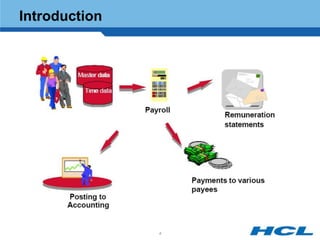
Introduction


               4
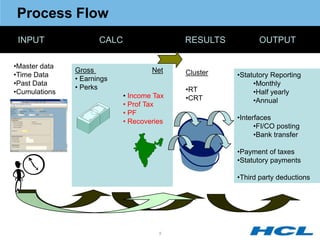
Process Flow
 INPUT                CALC                  RESULTS          OUTPUT

•Master data
               Gross                 Net    Cluster
•Time Data                                            •Statutory Reporting
               • Earnings
•Past Data                                                 •Monthly
               • Perks                      •RT
•Cumulations                                               •Half yearly
                             • Income Tax   •CRT           •Annual
                             • Prof Tax
                             • PF
                                                      •Interfaces
                             • Recoveries
                                                            •FI/CO posting
                                                            •Bank transfer

                                                      •Payment of taxes
                                                      •Statutory payments

                                                      •Third party deductions


                                       5
Introduction
Payroll Coverage - Overview
Payroll Structure
Wage Structure
Payroll Related Infotypes
Payroll Coverage – Detailed
Payroll Reporting


               6
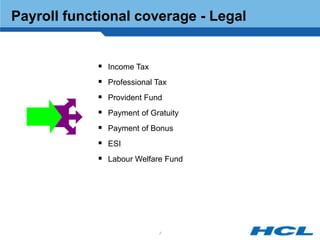
Payroll functional coverage - Legal


             Income Tax
             Professional Tax
             Provident Fund
             Payment of Gratuity
             Payment of Bonus
             ESI
             Labour Welfare Fund


                           7
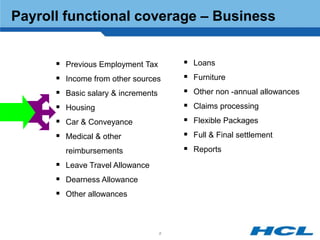
Payroll functional coverage – Business


       Previous Employment Tax          Loans
       Income from other sources        Furniture
       Basic salary & increments        Other non -annual allowances
       Housing                          Claims processing
       Car & Conveyance                 Flexible Packages
       Medical & other                  Full & Final settlement
        reimbursements                   Reports
       Leave Travel Allowance
       Dearness Allowance
       Other allowances


                                    8
Payroll India - Vital statistics


                 Modified International info types
                 12 India specific info types
                 60 Indian tables
                 Rules, schemas, Payroll Driver
                 4 Indian valuation methods


                              9
Introduction
Payroll Coverage - Overview
Payroll Structure
Wage Structure
Payroll Related Infotypes
Payroll Coverage – Detailed
Payroll Reporting


               10
Payroll Structure

 Payroll Structure consist of the
 following:

  Period Parameters

  Payroll Periods

  Payroll Area

  Control Record


                                    11
Period Parameters

  The period parameter determines whether payroll is run monthly,
   bi-monthly, weekly or for several weeks. Each period parameter
   used is assigned to a time unit. The values for the time units are
   defined (monthly, semi-monthly, weekly, bi-weekly, every four
   weeks, and annually.)


                                  12
Payroll Periods


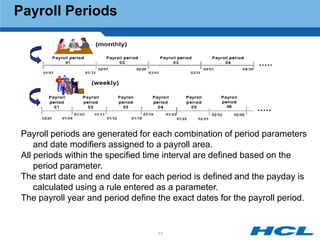
 Payroll periods are generated for each combination of period parameters
     and date modifiers assigned to a payroll area.
 All periods within the specified time interval are defined based on the
     period parameter.
 The start date and end date for each period is defined and the payday is
     calculated using a rule entered as a parameter.
 The payroll year and period define the exact dates for the payroll period.


                                    13
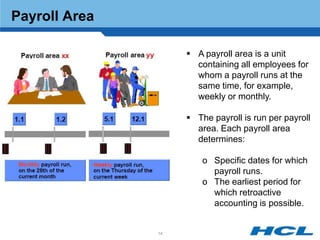
Payroll Area

                     A payroll area is a unit
                      containing all employees for
                      whom a payroll runs at the
                      same time, for example,
                      weekly or monthly.

                     The payroll is run per payroll
                      area. Each payroll area
                      determines:

                        o Specific dates for which
                          payroll runs.
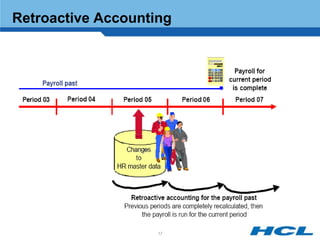
                        o The earliest period for
                          which retroactive
                          accounting is possible.


               14
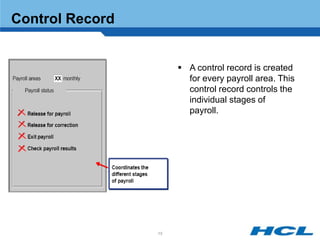
Control Record


                       A control record is created
                        for every payroll area. This
                        control record controls the
                        individual stages of
                        payroll.


                 15
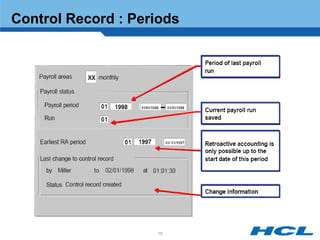
Control Record : Periods


                    16
Retroactive Accounting


                    17
Introduction
Payroll Coverage - Overview
Payroll Structure
Wage Structure
Payroll Related Infotypes
Payroll Coverage – Detailed
Payroll Reporting


               18
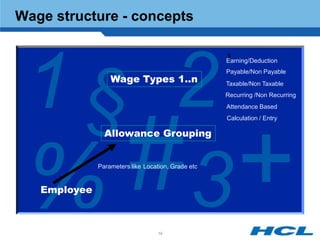
Wage structure - concepts


 1§ 2
                                                      $
                                                      Earning/Deduction
                                                      Payable/Non Payable
                  Wage Types 1..n                     Taxable/Non Taxable
                                                      Recurring /Non Recurring
                                                      Attendance Based
                                                      Calculation / Entry

                Allowance Grouping


 % 3
   Employee
              Parameters like Location, Grade etc..


                                   19
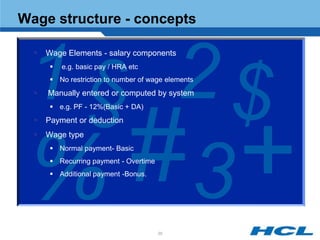
Wage structure - concepts


 1 § 2$
     Wage Elements - salary components
          e.g. basic pay / HRA etc
        No restriction to number of wage elements
     Manually entered or computed by system
        e.g. PF - 12%(Basic + DA)
     Payment or deduction
     Wage type


 % 3
        Normal payment- Basic
        Recurring payment - Overtime
        Additional payment -Bonus.


                                        20
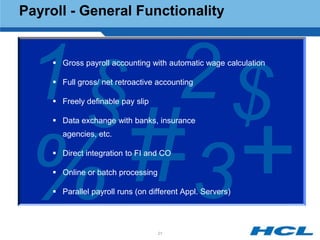
Payroll - General Functionality


 1 § 2$
      Gross payroll accounting with automatic wage calculation

      Full gross/ net retroactive accounting

      Freely definable pay slip

      Data exchange with banks, insurance
       agencies, etc.


 % 3  Direct integration to FI and CO

      Online or batch processing

      Parallel payroll runs (on different Appl. Servers)


                                    21
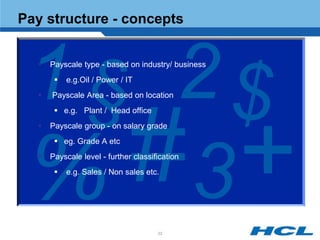
Pay structure - concepts


 1 § 2$
  


  


  
      Payscale type - based on industry/ business
          e.g.Oil / Power / IT
      Payscale Area - based on location
        e.g. Plant / Head office
      Payscale group - on salary grade


 % 3
        eg. Grade A etc
     Payscale level - further classification
          e.g. Sales / Non sales etc.


                                      22
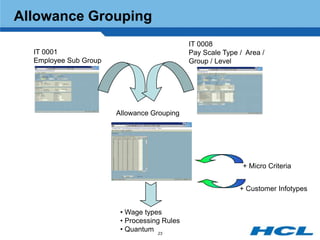
Allowance Grouping
                                             IT 0008
  IT 0001                                    Pay Scale Type / Area /
  Employee Sub Group                         Group / Level


                       Allowance Grouping


                                                             + Micro Criteria


                                                            + Customer Infotypes


                        • Wage types
                        • Processing Rules
                        • Quantum 23
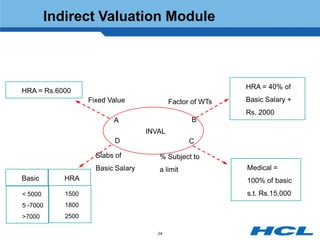
Indirect Valuation Module


                                                            HRA = 40% of
HRA = Rs.6000
                   Fixed Value              Factor of WTs   Basic Salary +
                                                            Rs. 2000
                          A                       B
                                    INVAL
                          D                       C

                     Slabs of          % Subject to
                     Basic Salary      a limit              Medical =
Basic       HRA                                             100% of basic
< 5000      1500                                            s.t. Rs.15,000
5 -7000     1800
>7000       2500

                                       24
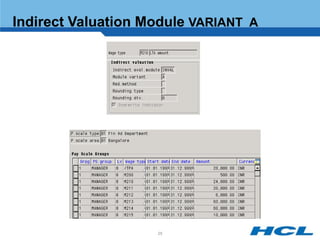
Indirect Valuation Module VARIANT A


                    25
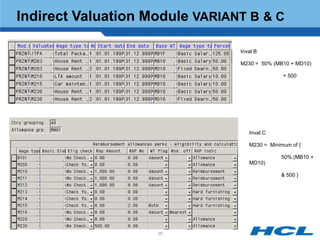
Indirect Valuation Module VARIANT B & C

                                Inval B

                                M230 = 50% (MB10 + MD10)

                                               + 500


                                   Inval C

                                   M230 = Minimum of {

                                              50% (MB10 +
                                   MD10)

                                              & 500 }


                    26
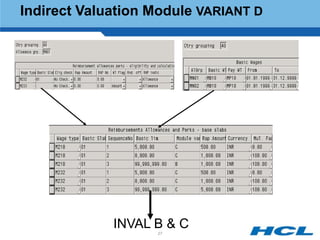
Indirect Valuation Module VARIANT D


             INVAL B & C
                   27
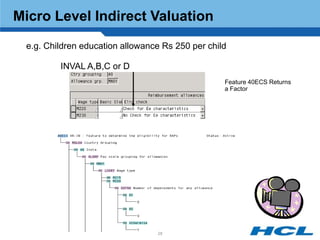
Micro Level Indirect Valuation
 e.g. Children education allowance Rs 250 per child

         INVAL A,B,C or D
                                                  Feature 40ECS Returns
                                                  a Factor


                                 28
Introduction
Payroll Coverage - Overview
Payroll Structure
Wage Structure
Payroll Related Infotypes
Payroll Coverage – Detailed
Payroll Reporting


               29
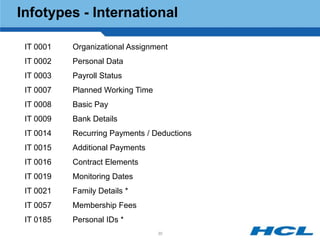
Infotypes - International

 IT 0001   Organizational Assignment
 IT 0002   Personal Data
 IT 0003   Payroll Status
 IT 0007   Planned Working Time
 IT 0008   Basic Pay
 IT 0009   Bank Details
 IT 0014   Recurring Payments / Deductions
 IT 0015   Additional Payments
 IT 0016   Contract Elements
 IT 0019   Monitoring Dates
 IT 0021   Family Details *
 IT 0057   Membership Fees
 IT 0185   Personal IDs *
                                  30
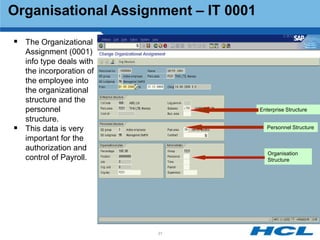
Organisational Assignment – IT 0001

 The Organizational
    Assignment (0001)
    info type deals with
    the incorporation of
    the employee into
    the organizational
    structure and the
    personnel                         Enterprise Structure
    structure.
   This data is very                    Personnel Structure

    important for the
    authorization and
                                         Organisation
    control of Payroll.                  Structure


                           31
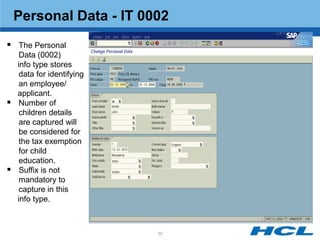
Personal Data - IT 0002
 The Personal
     Data (0002)
    info type stores
     data for identifying
     an employee/
    applicant.
    Number of
     children details
     are captured will
     be considered for
     the tax exemption
     for child
     education.
    Suffix is not
     mandatory to
     capture in this
    info type.


                            32
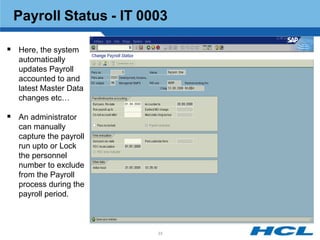
Payroll Status - IT 0003

 Here, the system
   automatically
   updates Payroll
   accounted to and
   latest Master Data
   changes etc…

 An administrator
   can manually
   capture the payroll
   run upto or Lock
   the personnel
   number to exclude
   from the Payroll
   process during the
   payroll period.


                         33
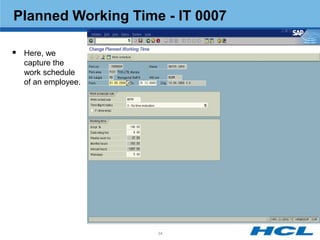
Planned Working Time - IT 0007

 Here, we
  capture the
  work schedule
  of an employee.


                    34
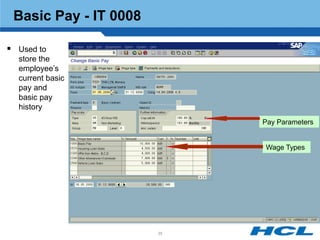
Basic Pay - IT 0008

 Used to
  store the
  employee‟s
  current basic
  pay and
  basic pay
  history
                            Pay Parameters


                            Wage Types


                       35
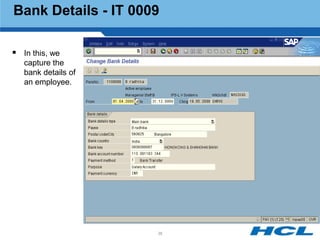
Bank Details - IT 0009

 In this, we
   capture the
   bank details of
   an employee.


                     36
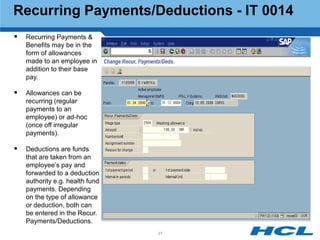
Recurring Payments/Deductions - IT 0014
   Recurring Payments &
    Benefits may be in the
    form of allowances
    made to an employee in
    addition to their base
    pay.

   Allowances can be
    recurring (regular
    payments to an
    employee) or ad-hoc
    (once off irregular
    payments).

   Deductions are funds
    that are taken from an
    employee‟s pay and
    forwarded to a deduction
    authority e.g. health fund
    payments. Depending
    on the type of allowance
    or deduction, both can
    be entered in the Recur.
    Payments/Deductions.
                                 37
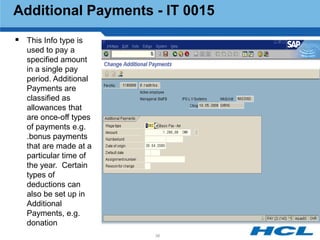
Additional Payments - IT 0015
 This Info type is
   used to pay a
   specified amount
   in a single pay
   period. Additional
   Payments are
   classified as
   allowances that
   are once-off types
   of payments e.g.
   .bonus payments
   that are made at a
   particular time of
   the year. Certain
   types of
   deductions can
   also be set up in
   Additional
   Payments, e.g.
   donation
                        38
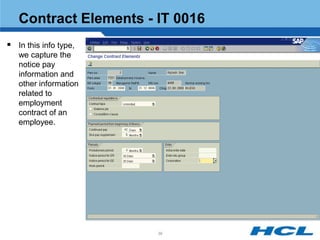
Contract Elements - IT 0016
 In this info type,
   we capture the
   notice pay
   information and
   other information
   related to
   employment
   contract of an
   employee.


                       39
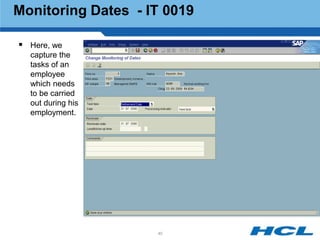
Monitoring Dates - IT 0019

 Here, we
  capture the
  tasks of an
  employee
  which needs
  to be carried
  out during his
  employment.


                    40
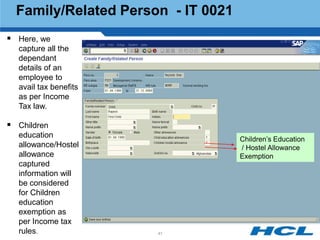
Family/Related Person - IT 0021
 Here, we
  capture all the
  dependant
  details of an
  employee to
  avail tax benefits
  as per Income
  Tax law.

 Children
  education                         Children‟s Education
  allowance/Hostel                  / Hostel Allowance
  allowance                         Exemption
  captured
  information will
  be considered
  for Children
  education
  exemption as
  per Income tax
  rules.               41
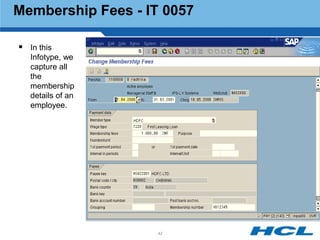
Membership Fees - IT 0057

 In this
   Infotype, we
   capture all
   the
   membership
   details of an
   employee.


                   42
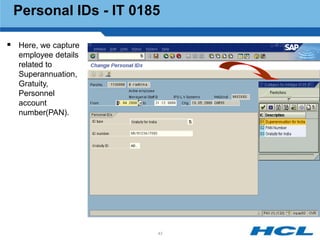
Personal IDs - IT 0185

 Here, we capture
  employee details
  related to
  Superannuation,
  Gratuity,
  Personnel
  account
  number(PAN).


                      43
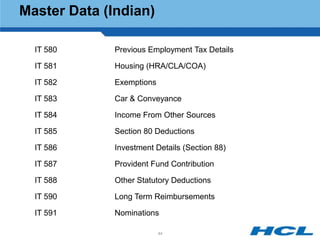
Master Data (Indian)

  IT 580      Previous Employment Tax Details

  IT 581      Housing (HRA/CLA/COA)

  IT 582      Exemptions

  IT 583      Car & Conveyance

  IT 584      Income From Other Sources

  IT 585      Section 80 Deductions

  IT 586      Investment Details (Section 88)

  IT 587      Provident Fund Contribution

  IT 588      Other Statutory Deductions

  IT 590      Long Term Reimbursements

  IT 591      Nominations

                           44
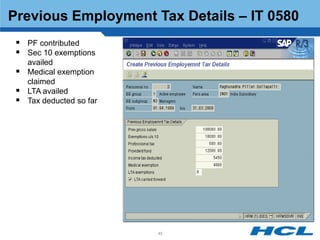
Previous Employment Tax Details – IT 0580
  PF contributed
  Sec 10 exemptions
   availed
  Medical exemption
   claimed
  LTA availed
  Tax deducted so far


                         45
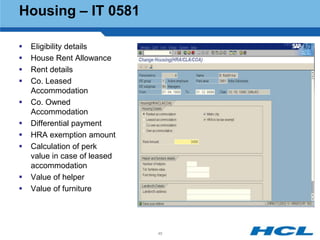
Housing – IT 0581

   Eligibility details
   House Rent Allowance
   Rent details
   Co. Leased
    Accommodation
   Co. Owned
    Accommodation
   Differential payment
   HRA exemption amount
   Calculation of perk
    value in case of leased
    accommodation
   Value of helper
   Value of furniture


                              46
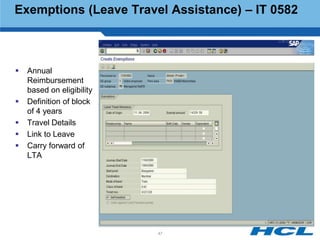
Exemptions (Leave Travel Assistance) – IT 0582


   Annual
    Reimbursement
    based on eligibility
   Definition of block
    of 4 years
   Travel Details
   Link to Leave
   Carry forward of
    LTA


                           47
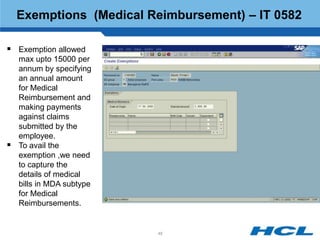
Exemptions (Medical Reimbursement) – IT 0582

 Exemption allowed
    max upto 15000 per
    annum by specifying
    an annual amount
    for Medical
    Reimbursement and
    making payments
    against claims
    submitted by the
    employee.
   To avail the
    exemption ,we need
    to capture the
    details of medical
    bills in MDA subtype
    for Medical
    Reimbursements.


                           48
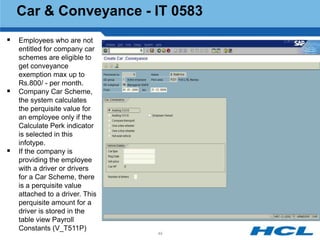
Car & Conveyance - IT 0583
 Employees who are not
    entitled for company car
    schemes are eligible to
    get conveyance
    exemption max up to
    Rs.800/ - per month.
   Company Car Scheme,
    the system calculates
    the perquisite value for
    an employee only if the
    Calculate Perk indicator
    is selected in this
    infotype.
   If the company is
    providing the employee
    with a driver or drivers
    for a Car Scheme, there
    is a perquisite value
    attached to a driver. This
    perquisite amount for a
    driver is stored in the
    table view Payroll
    Constants (V_T511P)
                                 49
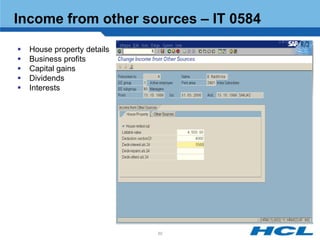
Income from other sources – IT 0584

   House property details
   Business profits
   Capital gains
   Dividends
   Interests


                             50
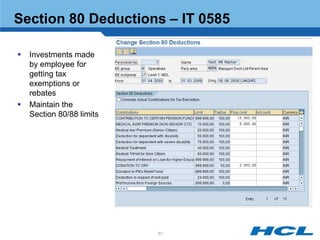
Section 80 Deductions – IT 0585

   Investments made
    by employee for
    getting tax
    exemptions or
    rebates
   Maintain the
    Section 80/88 limits


                           51
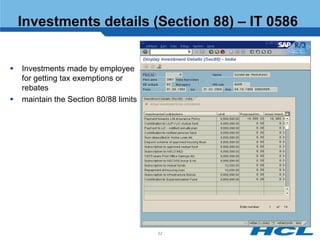
Investments details (Section 88) – IT 0586


   Investments made by employee
    for getting tax exemptions or
    rebates
   maintain the Section 80/88 limits


                                        52
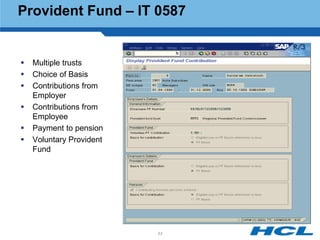
Provident Fund – IT 0587


   Multiple trusts
   Choice of Basis
   Contributions from
    Employer
   Contributions from
    Employee
   Payment to pension
   Voluntary Provident
    Fund


                          53
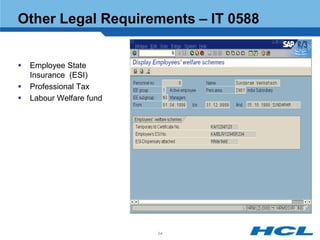
Other Legal Requirements – IT 0588


   Employee State
    Insurance (ESI)
   Professional Tax
   Labour Welfare fund


                          54
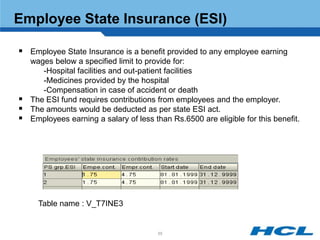
Employee State Insurance (ESI)

 Employee State Insurance is a benefit provided to any employee earning
    wages below a specified limit to provide for:
       -Hospital facilities and out-patient facilities
       -Medicines provided by the hospital
       -Compensation in case of accident or death
   The ESI fund requires contributions from employees and the employer.
   The amounts would be deducted as per state ESI act.
   Employees earning a salary of less than Rs.6500 are eligible for this benefit.


      Table name : V_T7INE3


                                        55
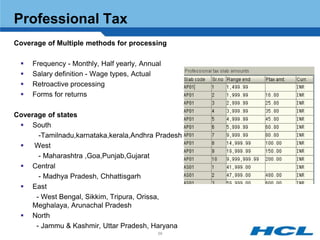
Professional Tax
Coverage of Multiple methods for processing

    Frequency - Monthly, Half yearly, Annual
    Salary definition - Wage types, Actual
    Retroactive processing
    Forms for returns

Coverage of states
  South
       -Tamilnadu,karnataka,kerala,Andhra Pradesh
    West
       - Maharashtra ,Goa,Punjab,Gujarat
  Central
       - Madhya Pradesh, Chhattisgarh
  East
      - West Bengal, Sikkim, Tripura, Orissa,
     Meghalaya, Arunachal Pradesh
  North
      - Jammu & Kashmir, Uttar Pradesh, Haryana
                                            56
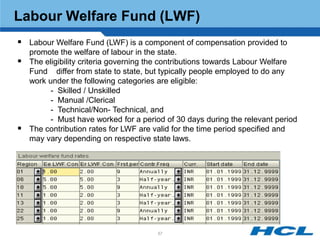
Labour Welfare Fund (LWF)
 Labour Welfare Fund (LWF) is a component of compensation provided to
    promote the welfare of labour in the state.
   The eligibility criteria governing the contributions towards Labour Welfare
    Fund differ from state to state, but typically people employed to do any
    work under the following categories are eligible:
          - Skilled / Unskilled
          - Manual /Clerical
          - Technical/Non- Technical, and
          - Must have worked for a period of 30 days during the relevant period
   The contribution rates for LWF are valid for the time period specified and
    may vary depending on respective state laws.


                                       57
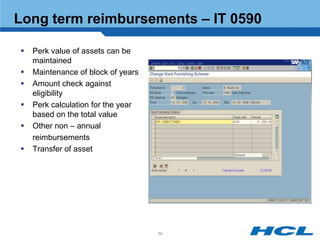
Long term reimbursements – IT 0590

   Perk value of assets can be
    maintained
   Maintenance of block of years
   Amount check against
    eligibility
   Perk calculation for the year
    based on the total value
   Other non – annual
    reimbursements
   Transfer of asset


                                    58
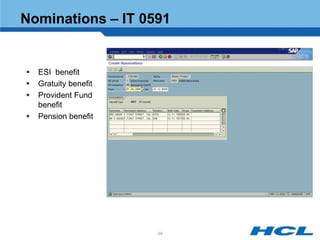
Nominations – IT 0591


   ESI benefit
   Gratuity benefit
   Provident Fund
    benefit
   Pension benefit


                       59
Income tax

   Income tax is deducted from all employee's gross salary as per the
    Income Tax Act of 1961.
   The laws for the calculation of taxes are subject to change with
    changes in the Income tax act.
   Calculation of the tax based on the investments made and the
    standard deduction
             User definable tax slabs and percentages
             Tax calculation based on “actual investment” or “ Proposed
               investment”


                                     60
Introduction
Payroll Coverage - Overview
Payroll Structure
Wage Structure
Payroll Related Infotypes
Payroll Coverage – Detailed
Payroll Reporting


               61
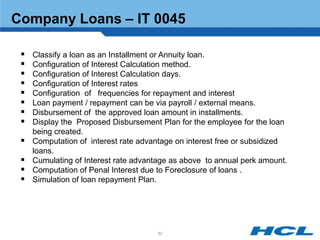
Company Loans – IT 0045

    Classify a loan as an Installment or Annuity loan.
    Configuration of Interest Calculation method.
    Configuration of Interest Calculation days.
    Configuration of Interest rates
    Configuration of frequencies for repayment and interest
    Loan payment / repayment can be via payroll / external means.
    Disbursement of the approved loan amount in installments.
    Display the Proposed Disbursement Plan for the employee for the loan
     being created.
    Computation of interest rate advantage on interest free or subsidized
     loans.
    Cumulating of Interest rate advantage as above to annual perk amount.
    Computation of Penal Interest due to Foreclosure of loans .
    Simulation of loan repayment Plan.


                                      62
Company Loans – IT 0045 cont…

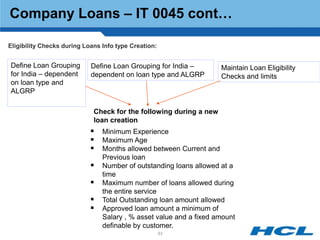
Eligibility Checks during Loans Info type Creation:


Define Loan Grouping        Define Loan Grouping for India –        Maintain Loan Eligibility
for India – dependent       dependent on loan type and ALGRP        Checks and limits
on loan type and
ALGRP

                             Check for the following during a new
                             loan creation
                             Minimum Experience
                             Maximum Age
                             Months allowed between Current and
                                Previous loan
                               Number of outstanding loans allowed at a
                                time
                               Maximum number of loans allowed during
                                the entire service
                               Total Outstanding loan amount allowed
                               Approved loan amount a minimum of
                                Salary , % asset value and a fixed amount
                                definable by customer.
                                                      63
Company Loans – IT 0045 cont…
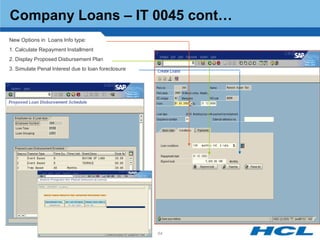
   New Options in Loans Info type:
   1. Calculate Repayment Installment
   2. Display Proposed Disbursement Plan
   3. Simulate Penal Interest due to loan foreclosure


                                                         64
Company Loans – IT 0045 cont…
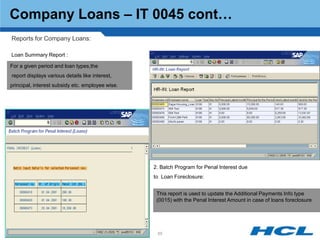
Reports for Company Loans:

Loan Summary Report :

For a given period and loan types,the
report displays various details like interest,
principal, interest subsidy etc. employee wise.


                                                  2. Batch Program for Penal Interest due
                                                  to Loan Foreclosure:


                                                   This report is used to update the Additional Payments Info type
                                                   (0015) with the Penal Interest Amount in case of loans foreclosure


                                                   65
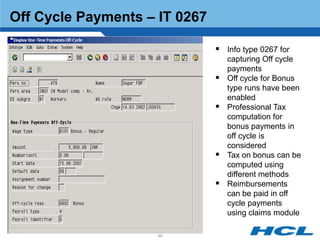
Off Cycle Payments – IT 0267

                                Info type 0267 for
                                   capturing Off cycle
                                   payments
                                  Off cycle for Bonus
                                   type runs have been
                                   enabled
                                  Professional Tax
                                   computation for
                                   bonus payments in
                                   off cycle is
                                   considered
                                  Tax on bonus can be
                                   computed using
                                   different methods
                                  Reimbursements
                                   can be paid in off
                                   cycle payments
                                   using claims module

                     66
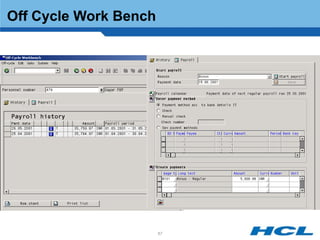
Off Cycle Work Bench


                       67
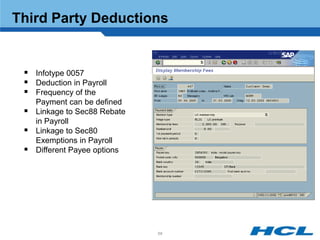
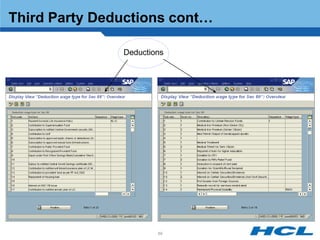
Third Party Deductions


  Infotype 0057
  Deduction in Payroll
  Frequency of the
     Payment can be defined
    Linkage to Sec88 Rebate
     in Payroll
    Linkage to Sec80
     Exemptions in Payroll
    Different Payee options


                               68
Third Party Deductions cont…

               Deductions


                       69
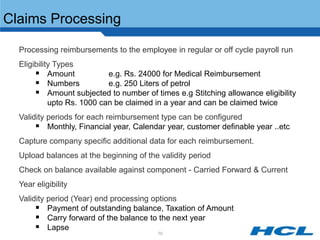
Claims Processing

 Processing reimbursements to the employee in regular or off cycle payroll run
 Eligibility Types
        Amount             e.g. Rs. 24000 for Medical Reimbursement
        Numbers            e.g. 250 Liters of petrol
        Amount subjected to number of times e.g Stitching allowance eligibility
            upto Rs. 1000 can be claimed in a year and can be claimed twice
 Validity periods for each reimbursement type can be configured
        Monthly, Financial year, Calendar year, customer definable year ..etc
 Capture company specific additional data for each reimbursement.
 Upload balances at the beginning of the validity period
 Check on balance available against component - Carried Forward & Current
 Year eligibility
 Validity period (Year) end processing options
        Payment of outstanding balance, Taxation of Amount
        Carry forward of the balance to the next year
        Lapse
                                          70
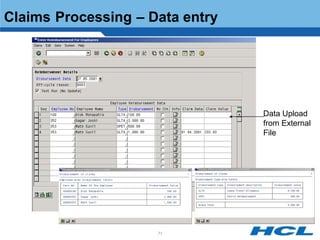
Claims Processing – Data entry


                                 Data Upload
                                 from External
                                 File


                     71
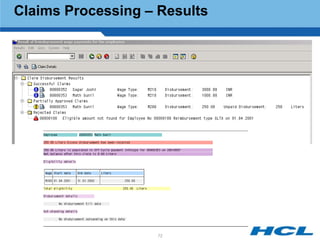
Claims Processing – Results


                    72
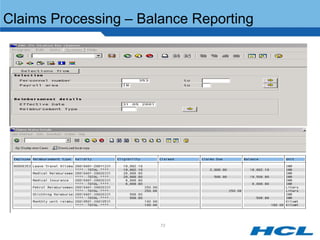
Claims Processing – Balance Reporting


       Claims Processing – Balance Reporting


                         73
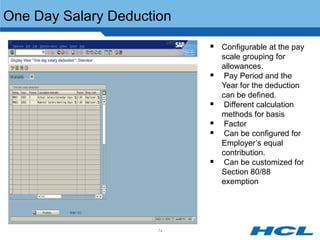
One Day Salary Deduction

                            Configurable at the pay
                               scale grouping for
                               allowances.
                               Pay Period and the
                               Year for the deduction
                               can be defined.
                               Different calculation
                               methods for basis
                               Factor
                               Can be configured for
                               Employer‟s equal
                               contribution.
                               Can be customized for
                               Section 80/88
                               exemption


                      74
Salary Packaging


 Companies switching from traditional pay structure to Flexible pay
 Total Package offering and Cost to the company
 Flexible arrangement for employees to choose from a range of
   benefits together with a cash salary and fixed set of components.
 Take home pay analysis for employee.
 Salary packaging combines data from all sources into a
   manageable central location and then updates data when process
   of Salary packaging is complete.
 Employee Self Service


                                      75
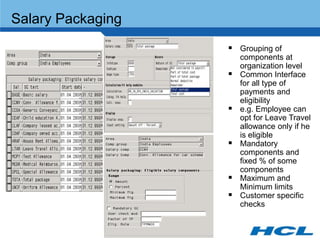
Salary Packaging
                    Grouping of
                       components at
                       organization level
                      Common Interface
                       for all type of
                       payments and
                       eligibility
                      e.g. Employee can
                       opt for Leave Travel
                       allowance only if he
                       is eligible
                      Mandatory
                       components and
                       fixed % of some
                       components
                      Maximum and
                       Minimum limits
                      Customer specific
                       checks
Salary Packaging cont…
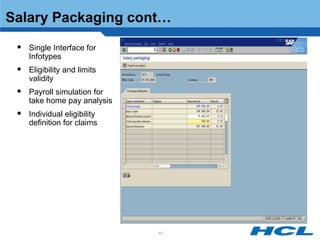
  Single Interface for
    Infotypes
  Eligibility and limits
    validity
  Payroll simulation for
    take home pay analysis
  Individual eligibility
    definition for claims


                             77
TDS on BONUS
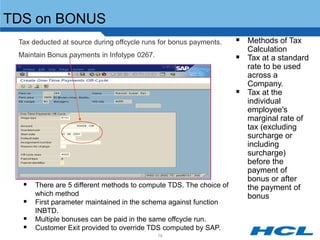
 Tax deducted at source during offcycle runs for bonus payments.    Methods of Tax
                                                                       Calculation
 Maintain Bonus payments in Infotype 0267.                            Tax at a standard
                                                                       rate to be used
                                                                       across a
                                                                       Company.
                                                                      Tax at the
                                                                       individual
                                                                       employee's
                                                                       marginal rate of
                                                                       tax (excluding
                                                                       surcharge or
                                                                       including
                                                                       surcharge)
                                                                       before the
                                                                       payment of
                                                                       bonus or after
   There are 5 different methods to compute TDS. The choice of        the payment of
      which method                                                     bonus
     First parameter maintained in the schema against function
      INBTD.
     Multiple bonuses can be paid in the same offcycle run.
     Customer Exit provided to override TDS computed by SAP.
                                             78
Rounding off net pay


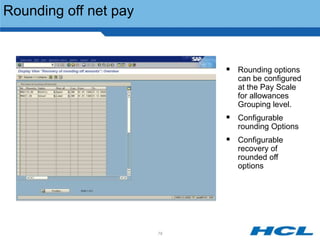
                             Rounding options
                              can be configured
                              at the Pay Scale
                              for allowances
                              Grouping level.
                             Configurable
                              rounding Options
                             Configurable
                              recovery of
                              rounded off
                              options


                       79
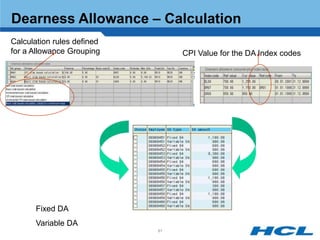
Dearness Allowance

    Fixed DA,Variable DA
    Configurable Index codes for various Consumer Price Indices.
    Methods of calculating DA

         - Non-Slab based calculation.
         - Basic slab based calculation.
         - Incremental basic slab based calculation.
         - CPI slab based calculation.
         - Incremental CPI slab based calculation.
         - Basic slab based calculation, subject to minimum value


    A report program generates a batch session, which will populate the
      Basic Pay Infotype (IT0008) with relevant wage type and amount for
      DA (both fixed and variable) by reading the configuration tables.


                                    80
Dearness Allowance – Calculation
Calculation rules defined
for a Allowance Grouping         CPI Value for the DA Index codes


       Fixed DA
       Variable DA
                            81
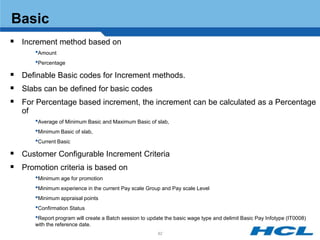
Basic
 Increment method based on
        •Amount
        •Percentage
 Definable Basic codes for Increment methods.
 Slabs can be defined for basic codes
 For Percentage based increment, the increment can be calculated as a Percentage
   of
        •Average of Minimum Basic and Maximum Basic of slab,
        •Minimum Basic of slab,
        •Current Basic
 Customer Configurable Increment Criteria
 Promotion criteria is based on
        •Minimum age for promotion
        •Minimum experience in the current Pay scale Group and Pay scale Level
        •Minimum appraisal points
        •Confirmation Status
        •Report program will create a Batch session to update the basic wage type and delimit Basic Pay Infotype (IT0008)
        with the reference date.
                                                           82
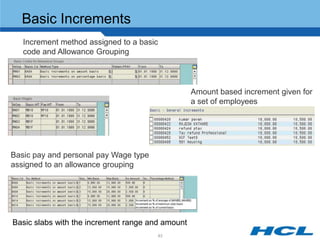
Basic Increments
   Increment method assigned to a basic
   code and Allowance Grouping


                                                  Amount based increment given for
                                                  a set of employees


Basic pay and personal pay Wage type
assigned to an allowance grouping


Basic slabs with the increment range and amount
                                       83
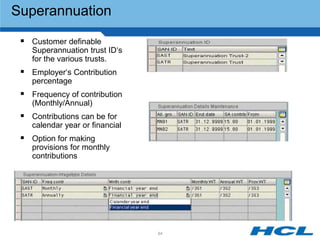
Superannuation

  Customer definable
    Superannuation trust ID„s
    for the various trusts.
  Employer„s Contribution
    percentage
  Frequency of contribution
    (Monthly/Annual)
  Contributions can be for
    calendar year or financial
  Option for making
    provisions for monthly
    contributions


                                 84
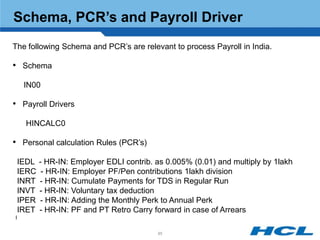
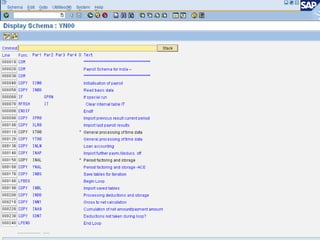
Schema, PCR’s and Payroll Driver
The following Schema and PCR‟s are relevant to process Payroll in India.

• Schema

     IN00

• Payroll Drivers
     HINCALC0

• Personal calculation Rules (PCR‟s)

    IEDL   - HR-IN: Employer EDLI contrib. as 0.005% (0.01) and multiply by 1lakh
    IERC    - HR-IN: Employer PF/Pen contributions 1lakh division
    INRT   - HR-IN: Cumulate Payments for TDS in Regular Run
    INVT   - HR-IN: Voluntary tax deduction
    IPER   - HR-IN: Adding the Monthly Perk to Annual Perk
    IRET   - HR-IN: PF and PT Retro Carry forward in case of Arrears
I

                                           85
86
Introduction
Payroll Coverage - Overview
Payroll Structure
Wage Structure
Payroll Related Infotypes
Payroll Coverage – Detailed
Payroll Reporting


               87
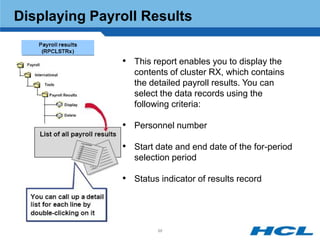
Displaying Payroll Results


               • This report enables you to display the
                  contents of cluster RX, which contains
                  the detailed payroll results. You can
                  select the data records using the
                  following criteria:

               • Personnel number

               • Start date and end date of the for-period
                  selection period

               • Status indicator of results record


                        88
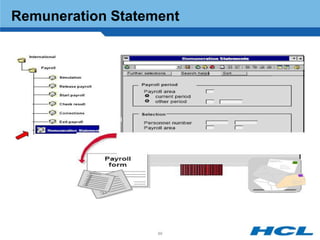
Remuneration Statement


                   89
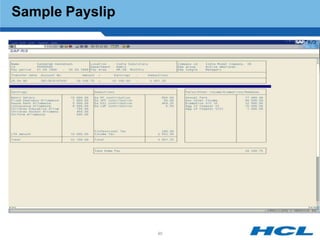
Sample Payslip


                 90
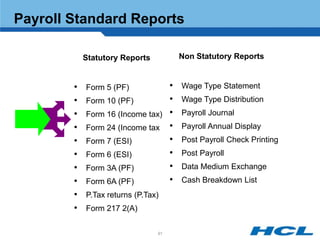
Payroll Standard Reports

            Statutory Reports        Non Statutory Reports


        •   Form 5 (PF)          •   Wage Type Statement
        •   Form 10 (PF)         •   Wage Type Distribution
        •   Form 16 (Income tax) •   Payroll Journal
        •   Form 24 (Income tax •    Payroll Annual Display
        •   Form 7 (ESI)         •   Post Payroll Check Printing
        •   Form 6 (ESI)         •   Post Payroll
        •   Form 3A (PF)         •   Data Medium Exchange
        •   Form 6A (PF)         •   Cash Breakdown List
        •   P.Tax returns (P.Tax)
        •   Form 217 2(A)

                                91
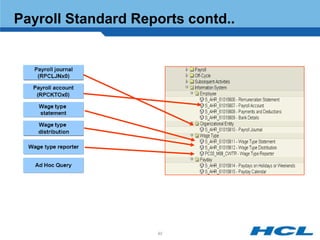
Payroll Standard Reports contd..


                    92
Bank Transfers & Cheque Payments


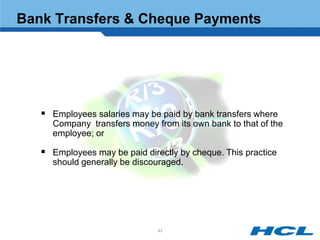
    Employees salaries may be paid by bank transfers where
     Company transfers money from its own bank to that of the
     employee; or

    Employees may be paid directly by cheque. This practice
     should generally be discouraged.


                               93
Any Questions ?


                  94
Thank you


       Thank you


            95

Hcl indian payroll_3

  • 1.
  • 2.
    Objective To understand the key business processes of the Indian Payroll component of mySAPHCM.  To gain understanding of the key terms and definitions of the Indian Payroll component of mySAP HCM.  To provide localization of Indian Payroll according to statutory compliance in India.  This component enables the running of the payroll for all employees in line with Indian legal and business requirements. 2
  • 3.
    Introduction Payroll Coverage -Overview Payroll Structure Wage Structure Payroll Related Infotypes Payroll Coverage – Detailed Payroll Reporting
  • 4.
  • 5.
    Process Flow INPUT CALC RESULTS OUTPUT •Master data Gross Net Cluster •Time Data •Statutory Reporting • Earnings •Past Data •Monthly • Perks •RT •Cumulations •Half yearly • Income Tax •CRT •Annual • Prof Tax • PF •Interfaces • Recoveries •FI/CO posting •Bank transfer •Payment of taxes •Statutory payments •Third party deductions 5
  • 6.
    Introduction Payroll Coverage -Overview Payroll Structure Wage Structure Payroll Related Infotypes Payroll Coverage – Detailed Payroll Reporting 6
  • 7.
    Payroll functional coverage- Legal  Income Tax  Professional Tax  Provident Fund  Payment of Gratuity  Payment of Bonus  ESI  Labour Welfare Fund 7
  • 8.
    Payroll functional coverage– Business  Previous Employment Tax  Loans  Income from other sources  Furniture  Basic salary & increments  Other non -annual allowances  Housing  Claims processing  Car & Conveyance  Flexible Packages  Medical & other  Full & Final settlement reimbursements  Reports  Leave Travel Allowance  Dearness Allowance  Other allowances 8
  • 9.
    Payroll India -Vital statistics  Modified International info types  12 India specific info types  60 Indian tables  Rules, schemas, Payroll Driver  4 Indian valuation methods 9
  • 10.
    Introduction Payroll Coverage -Overview Payroll Structure Wage Structure Payroll Related Infotypes Payroll Coverage – Detailed Payroll Reporting 10
  • 11.
    Payroll Structure PayrollStructure consist of the following:  Period Parameters  Payroll Periods  Payroll Area  Control Record 11
  • 12.
    Period Parameters The period parameter determines whether payroll is run monthly, bi-monthly, weekly or for several weeks. Each period parameter used is assigned to a time unit. The values for the time units are defined (monthly, semi-monthly, weekly, bi-weekly, every four weeks, and annually.) 12
  • 13.
    Payroll Periods Payrollperiods are generated for each combination of period parameters and date modifiers assigned to a payroll area. All periods within the specified time interval are defined based on the period parameter. The start date and end date for each period is defined and the payday is calculated using a rule entered as a parameter. The payroll year and period define the exact dates for the payroll period. 13
  • 14.
    Payroll Area  A payroll area is a unit containing all employees for whom a payroll runs at the same time, for example, weekly or monthly.  The payroll is run per payroll area. Each payroll area determines: o Specific dates for which payroll runs. o The earliest period for which retroactive accounting is possible. 14
  • 15.
    Control Record  A control record is created for every payroll area. This control record controls the individual stages of payroll. 15
  • 16.
    Control Record :Periods 16
  • 17.
  • 18.
    Introduction Payroll Coverage -Overview Payroll Structure Wage Structure Payroll Related Infotypes Payroll Coverage – Detailed Payroll Reporting 18
  • 19.
    Wage structure -concepts 1§ 2 $ Earning/Deduction Payable/Non Payable Wage Types 1..n Taxable/Non Taxable Recurring /Non Recurring Attendance Based Calculation / Entry Allowance Grouping % 3 Employee Parameters like Location, Grade etc.. 19
  • 20.
    Wage structure -concepts 1 § 2$  Wage Elements - salary components  e.g. basic pay / HRA etc  No restriction to number of wage elements  Manually entered or computed by system  e.g. PF - 12%(Basic + DA)  Payment or deduction  Wage type % 3  Normal payment- Basic  Recurring payment - Overtime  Additional payment -Bonus. 20
  • 21.
    Payroll - GeneralFunctionality 1 § 2$  Gross payroll accounting with automatic wage calculation  Full gross/ net retroactive accounting  Freely definable pay slip  Data exchange with banks, insurance agencies, etc. % 3  Direct integration to FI and CO  Online or batch processing  Parallel payroll runs (on different Appl. Servers) 21
  • 22.
    Pay structure -concepts 1 § 2$    Payscale type - based on industry/ business  e.g.Oil / Power / IT Payscale Area - based on location  e.g. Plant / Head office Payscale group - on salary grade % 3  eg. Grade A etc  Payscale level - further classification  e.g. Sales / Non sales etc. 22
  • 23.
    Allowance Grouping IT 0008 IT 0001 Pay Scale Type / Area / Employee Sub Group Group / Level Allowance Grouping + Micro Criteria + Customer Infotypes • Wage types • Processing Rules • Quantum 23
  • 24.
    Indirect Valuation Module HRA = 40% of HRA = Rs.6000 Fixed Value Factor of WTs Basic Salary + Rs. 2000 A B INVAL D C Slabs of % Subject to Basic Salary a limit Medical = Basic HRA 100% of basic < 5000 1500 s.t. Rs.15,000 5 -7000 1800 >7000 2500 24
  • 25.
  • 26.
    Indirect Valuation ModuleVARIANT B & C Inval B M230 = 50% (MB10 + MD10) + 500 Inval C M230 = Minimum of { 50% (MB10 + MD10) & 500 } 26
  • 27.
    Indirect Valuation ModuleVARIANT D INVAL B & C 27
  • 28.
    Micro Level IndirectValuation e.g. Children education allowance Rs 250 per child INVAL A,B,C or D Feature 40ECS Returns a Factor 28
  • 29.
    Introduction Payroll Coverage -Overview Payroll Structure Wage Structure Payroll Related Infotypes Payroll Coverage – Detailed Payroll Reporting 29
  • 30.
    Infotypes - International IT 0001 Organizational Assignment IT 0002 Personal Data IT 0003 Payroll Status IT 0007 Planned Working Time IT 0008 Basic Pay IT 0009 Bank Details IT 0014 Recurring Payments / Deductions IT 0015 Additional Payments IT 0016 Contract Elements IT 0019 Monitoring Dates IT 0021 Family Details * IT 0057 Membership Fees IT 0185 Personal IDs * 30
  • 31.
    Organisational Assignment –IT 0001  The Organizational Assignment (0001) info type deals with the incorporation of the employee into the organizational structure and the personnel Enterprise Structure structure.  This data is very Personnel Structure important for the authorization and Organisation control of Payroll. Structure 31
  • 32.
    Personal Data -IT 0002  The Personal Data (0002) info type stores data for identifying an employee/ applicant.  Number of children details are captured will be considered for the tax exemption for child education.  Suffix is not mandatory to capture in this info type. 32
  • 33.
    Payroll Status -IT 0003  Here, the system automatically updates Payroll accounted to and latest Master Data changes etc…  An administrator can manually capture the payroll run upto or Lock the personnel number to exclude from the Payroll process during the payroll period. 33
  • 34.
    Planned Working Time- IT 0007  Here, we capture the work schedule of an employee. 34
  • 35.
    Basic Pay -IT 0008  Used to store the employee‟s current basic pay and basic pay history Pay Parameters Wage Types 35
  • 36.
    Bank Details -IT 0009  In this, we capture the bank details of an employee. 36
  • 37.
    Recurring Payments/Deductions -IT 0014  Recurring Payments & Benefits may be in the form of allowances made to an employee in addition to their base pay.  Allowances can be recurring (regular payments to an employee) or ad-hoc (once off irregular payments).  Deductions are funds that are taken from an employee‟s pay and forwarded to a deduction authority e.g. health fund payments. Depending on the type of allowance or deduction, both can be entered in the Recur. Payments/Deductions. 37
  • 38.
    Additional Payments -IT 0015  This Info type is used to pay a specified amount in a single pay period. Additional Payments are classified as allowances that are once-off types of payments e.g. .bonus payments that are made at a particular time of the year. Certain types of deductions can also be set up in Additional Payments, e.g. donation 38
  • 39.
    Contract Elements -IT 0016  In this info type, we capture the notice pay information and other information related to employment contract of an employee. 39
  • 40.
    Monitoring Dates -IT 0019  Here, we capture the tasks of an employee which needs to be carried out during his employment. 40
  • 41.
    Family/Related Person -IT 0021  Here, we capture all the dependant details of an employee to avail tax benefits as per Income Tax law.  Children education Children‟s Education allowance/Hostel / Hostel Allowance allowance Exemption captured information will be considered for Children education exemption as per Income tax rules. 41
  • 42.
    Membership Fees -IT 0057  In this Infotype, we capture all the membership details of an employee. 42
  • 43.
    Personal IDs -IT 0185  Here, we capture employee details related to Superannuation, Gratuity, Personnel account number(PAN). 43
  • 44.
    Master Data (Indian) IT 580 Previous Employment Tax Details IT 581 Housing (HRA/CLA/COA) IT 582 Exemptions IT 583 Car & Conveyance IT 584 Income From Other Sources IT 585 Section 80 Deductions IT 586 Investment Details (Section 88) IT 587 Provident Fund Contribution IT 588 Other Statutory Deductions IT 590 Long Term Reimbursements IT 591 Nominations 44
  • 45.
    Previous Employment TaxDetails – IT 0580  PF contributed  Sec 10 exemptions availed  Medical exemption claimed  LTA availed  Tax deducted so far 45
  • 46.
    Housing – IT0581  Eligibility details  House Rent Allowance  Rent details  Co. Leased Accommodation  Co. Owned Accommodation  Differential payment  HRA exemption amount  Calculation of perk value in case of leased accommodation  Value of helper  Value of furniture 46
  • 47.
    Exemptions (Leave TravelAssistance) – IT 0582  Annual Reimbursement based on eligibility  Definition of block of 4 years  Travel Details  Link to Leave  Carry forward of LTA 47
  • 48.
    Exemptions (Medical Reimbursement)– IT 0582  Exemption allowed max upto 15000 per annum by specifying an annual amount for Medical Reimbursement and making payments against claims submitted by the employee.  To avail the exemption ,we need to capture the details of medical bills in MDA subtype for Medical Reimbursements. 48
  • 49.
    Car & Conveyance- IT 0583  Employees who are not entitled for company car schemes are eligible to get conveyance exemption max up to Rs.800/ - per month.  Company Car Scheme, the system calculates the perquisite value for an employee only if the Calculate Perk indicator is selected in this infotype.  If the company is providing the employee with a driver or drivers for a Car Scheme, there is a perquisite value attached to a driver. This perquisite amount for a driver is stored in the table view Payroll Constants (V_T511P) 49
  • 50.
    Income from othersources – IT 0584  House property details  Business profits  Capital gains  Dividends  Interests 50
  • 51.
    Section 80 Deductions– IT 0585  Investments made by employee for getting tax exemptions or rebates  Maintain the Section 80/88 limits 51
  • 52.
    Investments details (Section88) – IT 0586  Investments made by employee for getting tax exemptions or rebates  maintain the Section 80/88 limits 52
  • 53.
    Provident Fund –IT 0587  Multiple trusts  Choice of Basis  Contributions from Employer  Contributions from Employee  Payment to pension  Voluntary Provident Fund 53
  • 54.
    Other Legal Requirements– IT 0588  Employee State Insurance (ESI)  Professional Tax  Labour Welfare fund 54
  • 55.
    Employee State Insurance(ESI)  Employee State Insurance is a benefit provided to any employee earning wages below a specified limit to provide for: -Hospital facilities and out-patient facilities -Medicines provided by the hospital -Compensation in case of accident or death  The ESI fund requires contributions from employees and the employer.  The amounts would be deducted as per state ESI act.  Employees earning a salary of less than Rs.6500 are eligible for this benefit. Table name : V_T7INE3 55
  • 56.
    Professional Tax Coverage ofMultiple methods for processing  Frequency - Monthly, Half yearly, Annual  Salary definition - Wage types, Actual  Retroactive processing  Forms for returns Coverage of states  South -Tamilnadu,karnataka,kerala,Andhra Pradesh  West - Maharashtra ,Goa,Punjab,Gujarat  Central - Madhya Pradesh, Chhattisgarh  East - West Bengal, Sikkim, Tripura, Orissa, Meghalaya, Arunachal Pradesh  North - Jammu & Kashmir, Uttar Pradesh, Haryana 56
  • 57.
    Labour Welfare Fund(LWF)  Labour Welfare Fund (LWF) is a component of compensation provided to promote the welfare of labour in the state.  The eligibility criteria governing the contributions towards Labour Welfare Fund differ from state to state, but typically people employed to do any work under the following categories are eligible: - Skilled / Unskilled - Manual /Clerical - Technical/Non- Technical, and - Must have worked for a period of 30 days during the relevant period  The contribution rates for LWF are valid for the time period specified and may vary depending on respective state laws. 57
  • 58.
    Long term reimbursements– IT 0590  Perk value of assets can be maintained  Maintenance of block of years  Amount check against eligibility  Perk calculation for the year based on the total value  Other non – annual reimbursements  Transfer of asset 58
  • 59.
    Nominations – IT0591  ESI benefit  Gratuity benefit  Provident Fund benefit  Pension benefit 59
  • 60.
    Income tax  Income tax is deducted from all employee's gross salary as per the Income Tax Act of 1961.  The laws for the calculation of taxes are subject to change with changes in the Income tax act.  Calculation of the tax based on the investments made and the standard deduction  User definable tax slabs and percentages  Tax calculation based on “actual investment” or “ Proposed investment” 60
  • 61.
    Introduction Payroll Coverage -Overview Payroll Structure Wage Structure Payroll Related Infotypes Payroll Coverage – Detailed Payroll Reporting 61
  • 62.
    Company Loans –IT 0045  Classify a loan as an Installment or Annuity loan.  Configuration of Interest Calculation method.  Configuration of Interest Calculation days.  Configuration of Interest rates  Configuration of frequencies for repayment and interest  Loan payment / repayment can be via payroll / external means.  Disbursement of the approved loan amount in installments.  Display the Proposed Disbursement Plan for the employee for the loan being created.  Computation of interest rate advantage on interest free or subsidized loans.  Cumulating of Interest rate advantage as above to annual perk amount.  Computation of Penal Interest due to Foreclosure of loans .  Simulation of loan repayment Plan. 62
  • 63.
    Company Loans –IT 0045 cont… Eligibility Checks during Loans Info type Creation: Define Loan Grouping Define Loan Grouping for India – Maintain Loan Eligibility for India – dependent dependent on loan type and ALGRP Checks and limits on loan type and ALGRP Check for the following during a new loan creation  Minimum Experience  Maximum Age  Months allowed between Current and Previous loan  Number of outstanding loans allowed at a time  Maximum number of loans allowed during the entire service  Total Outstanding loan amount allowed  Approved loan amount a minimum of Salary , % asset value and a fixed amount definable by customer. 63
  • 64.
    Company Loans –IT 0045 cont…  New Options in Loans Info type:  1. Calculate Repayment Installment  2. Display Proposed Disbursement Plan  3. Simulate Penal Interest due to loan foreclosure 64
  • 65.
    Company Loans –IT 0045 cont… Reports for Company Loans: Loan Summary Report : For a given period and loan types,the report displays various details like interest, principal, interest subsidy etc. employee wise. 2. Batch Program for Penal Interest due to Loan Foreclosure: This report is used to update the Additional Payments Info type (0015) with the Penal Interest Amount in case of loans foreclosure 65
  • 66.
    Off Cycle Payments– IT 0267  Info type 0267 for capturing Off cycle payments  Off cycle for Bonus type runs have been enabled  Professional Tax computation for bonus payments in off cycle is considered  Tax on bonus can be computed using different methods  Reimbursements can be paid in off cycle payments using claims module 66
  • 67.
  • 68.
    Third Party Deductions  Infotype 0057  Deduction in Payroll  Frequency of the Payment can be defined  Linkage to Sec88 Rebate in Payroll  Linkage to Sec80 Exemptions in Payroll  Different Payee options 68
  • 69.
    Third Party Deductionscont… Deductions 69
  • 70.
    Claims Processing Processingreimbursements to the employee in regular or off cycle payroll run Eligibility Types  Amount e.g. Rs. 24000 for Medical Reimbursement  Numbers e.g. 250 Liters of petrol  Amount subjected to number of times e.g Stitching allowance eligibility upto Rs. 1000 can be claimed in a year and can be claimed twice Validity periods for each reimbursement type can be configured  Monthly, Financial year, Calendar year, customer definable year ..etc Capture company specific additional data for each reimbursement. Upload balances at the beginning of the validity period Check on balance available against component - Carried Forward & Current Year eligibility Validity period (Year) end processing options  Payment of outstanding balance, Taxation of Amount  Carry forward of the balance to the next year  Lapse 70
  • 71.
    Claims Processing –Data entry Data Upload from External File 71
  • 72.
  • 73.
    Claims Processing –Balance Reporting Claims Processing – Balance Reporting 73
  • 74.
    One Day SalaryDeduction  Configurable at the pay scale grouping for allowances.  Pay Period and the Year for the deduction can be defined.  Different calculation methods for basis  Factor  Can be configured for Employer‟s equal contribution.  Can be customized for Section 80/88 exemption 74
  • 75.
    Salary Packaging  Companiesswitching from traditional pay structure to Flexible pay  Total Package offering and Cost to the company  Flexible arrangement for employees to choose from a range of benefits together with a cash salary and fixed set of components.  Take home pay analysis for employee.  Salary packaging combines data from all sources into a manageable central location and then updates data when process of Salary packaging is complete.  Employee Self Service 75
  • 76.
    Salary Packaging  Grouping of components at organization level  Common Interface for all type of payments and eligibility  e.g. Employee can opt for Leave Travel allowance only if he is eligible  Mandatory components and fixed % of some components  Maximum and Minimum limits  Customer specific checks
  • 77.
    Salary Packaging cont…  Single Interface for Infotypes  Eligibility and limits validity  Payroll simulation for take home pay analysis  Individual eligibility definition for claims 77
  • 78.
    TDS on BONUS Tax deducted at source during offcycle runs for bonus payments.  Methods of Tax Calculation Maintain Bonus payments in Infotype 0267.  Tax at a standard rate to be used across a Company.  Tax at the individual employee's marginal rate of tax (excluding surcharge or including surcharge) before the payment of bonus or after  There are 5 different methods to compute TDS. The choice of the payment of which method bonus  First parameter maintained in the schema against function INBTD.  Multiple bonuses can be paid in the same offcycle run.  Customer Exit provided to override TDS computed by SAP. 78
  • 79.
    Rounding off netpay  Rounding options can be configured at the Pay Scale for allowances Grouping level.  Configurable rounding Options  Configurable recovery of rounded off options 79
  • 80.
    Dearness Allowance  Fixed DA,Variable DA  Configurable Index codes for various Consumer Price Indices.  Methods of calculating DA - Non-Slab based calculation. - Basic slab based calculation. - Incremental basic slab based calculation. - CPI slab based calculation. - Incremental CPI slab based calculation. - Basic slab based calculation, subject to minimum value  A report program generates a batch session, which will populate the Basic Pay Infotype (IT0008) with relevant wage type and amount for DA (both fixed and variable) by reading the configuration tables. 80
  • 81.
    Dearness Allowance –Calculation Calculation rules defined for a Allowance Grouping CPI Value for the DA Index codes Fixed DA Variable DA 81
  • 82.
    Basic  Increment methodbased on •Amount •Percentage  Definable Basic codes for Increment methods.  Slabs can be defined for basic codes  For Percentage based increment, the increment can be calculated as a Percentage of •Average of Minimum Basic and Maximum Basic of slab, •Minimum Basic of slab, •Current Basic  Customer Configurable Increment Criteria  Promotion criteria is based on •Minimum age for promotion •Minimum experience in the current Pay scale Group and Pay scale Level •Minimum appraisal points •Confirmation Status •Report program will create a Batch session to update the basic wage type and delimit Basic Pay Infotype (IT0008) with the reference date. 82
  • 83.
    Basic Increments Increment method assigned to a basic code and Allowance Grouping Amount based increment given for a set of employees Basic pay and personal pay Wage type assigned to an allowance grouping Basic slabs with the increment range and amount 83
  • 84.
    Superannuation  Customerdefinable Superannuation trust ID„s for the various trusts.  Employer„s Contribution percentage  Frequency of contribution (Monthly/Annual)  Contributions can be for calendar year or financial  Option for making provisions for monthly contributions 84
  • 85.
    Schema, PCR’s andPayroll Driver The following Schema and PCR‟s are relevant to process Payroll in India. • Schema IN00 • Payroll Drivers HINCALC0 • Personal calculation Rules (PCR‟s) IEDL - HR-IN: Employer EDLI contrib. as 0.005% (0.01) and multiply by 1lakh IERC - HR-IN: Employer PF/Pen contributions 1lakh division INRT - HR-IN: Cumulate Payments for TDS in Regular Run INVT - HR-IN: Voluntary tax deduction IPER - HR-IN: Adding the Monthly Perk to Annual Perk IRET - HR-IN: PF and PT Retro Carry forward in case of Arrears I 85
  • 86.
  • 87.
    Introduction Payroll Coverage -Overview Payroll Structure Wage Structure Payroll Related Infotypes Payroll Coverage – Detailed Payroll Reporting 87
  • 88.
    Displaying Payroll Results • This report enables you to display the contents of cluster RX, which contains the detailed payroll results. You can select the data records using the following criteria: • Personnel number • Start date and end date of the for-period selection period • Status indicator of results record 88
  • 89.
  • 90.
  • 91.
    Payroll Standard Reports Statutory Reports Non Statutory Reports • Form 5 (PF) • Wage Type Statement • Form 10 (PF) • Wage Type Distribution • Form 16 (Income tax) • Payroll Journal • Form 24 (Income tax • Payroll Annual Display • Form 7 (ESI) • Post Payroll Check Printing • Form 6 (ESI) • Post Payroll • Form 3A (PF) • Data Medium Exchange • Form 6A (PF) • Cash Breakdown List • P.Tax returns (P.Tax) • Form 217 2(A) 91
  • 92.
  • 93.
    Bank Transfers &Cheque Payments  Employees salaries may be paid by bank transfers where Company transfers money from its own bank to that of the employee; or  Employees may be paid directly by cheque. This practice should generally be discouraged. 93
  • 94.
  • 95.
    Thank you Thank you 95