
Court Orders
What are Court Orders ?


 A court order is the decision of a Judge, Registrar Magistrate as entered in
   the records of the court.
 In Scotland, it is the decision of a Judge or Sheriff
 In SAP HR administration, Court Orders for each employee are maintained
   via the Court Orders - GB (Infotype 0070).


                                        2
Subtypes of Court Orders (SAP)


   The Court Orders/Student Loans GB
    (0070) infotype is subdivided into various
    court order types.
   Each of these is represented by an infotype
    subtype in table V_T5G16.
   SAP delivers all the necessary subtypes
    for processing court orders in your
    company .


                                                  3
Priorities of Court Orders


Deduction Priority
   A further feature of the Court Order Indicator table (V_T5G16) is the setting of deduction
    priority against each court order type. Court order deductions are either marked as priority (1),
    or non priority (99).
   Those with a setting of 1 have the highest priority and enable the claiming of any arrears in
    deductions due to insufficient pay. This does not apply to priority 99 court orders.
   In addition, the setting in the last column 'Relevant backlog', means that it is possible to carry
    over both protected earnings and deductions for outstanding amounts from previous payroll
    periods.


                                                  4
Infotype 0070


   Infotype 0070 record is to be created
    when Employer receives a court order
    pertaining to an Employee.
    Object ID : It is used to make a
    distinction between data records with
    the same infotype, subtype, lock
    indicator, start date, and end date. It is
    generated automatically by the
    system, and is used by the Payroll
    Results report to differentiate between
    the payments for different court
    orders.


                                                 5
Infotype 0070 (Court Orders)

Monetary values
These details are also given on the court order. The information is used by the payroll to make the court order
deductions from the employee’s pay.
The payroll takes protected earnings into account and automatically keeps a total of arrears and arrears of
protected earnings. For this reason, no retro calculation is required for court order processing.


   Standard Payment : Standard amount that will be deducted from the employee's monetary earnings (/141
    – Arrestable Earnings).
   Protected Earnings: Sum that the court has declared the debtor may retain before any deductions can be
    made.
   Total Sum: Total amount an employee should pay for this specific court order. Payments will cease once
    this total sum has been reached. A total sum should not be specified for a maintenance charge, for example,
    since this is a standard payment that should continue indefinitely.


Depending on the court order type, entries need to be made in some or in all of these three fields.


                                                          6
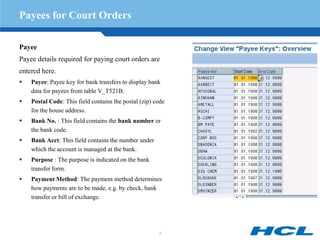
Payees for Court Orders

Payee
Payee details required for paying court orders are
entered here.
   Payee: Payee key for bank transfers to display bank
    data for payees from table V_T521B.
   Postal Code: This field contains the postal (zip) code
    for the house address.
   Bank No. : This field contains the bank number or
    the bank code.
   Bank Acct: This field contains the number under
    which the account is managed at the bank.
   Purpose : The purpose is indicated on the bank
    transfer form.
   Payment Method: The payment method determines
    how payments are to be made, e.g. by check, bank
    transfer or bill of exchange.


                                                       7
Setting Deduction Periods for Court Orders


Payment Periods/Dates
Specifies when the court order payments are to be made, and the frequency of such payments.
    1st Payment Period/ 1st Payment Date: Enter the payroll period in which the first payment should be
     made.
    Interval in periods: Enter the number of periods that should lie between two consecutive payments.
     If you choose to determine your payment schedule via payroll period, you must also enter the number of
     periods that should lie between two consecutive payments using the interval in periods field. If you make
     no entry in the interval in periods field, a repayment occurs in every period from the first payment period
    Interval/ Unit : If Payment date is chosen to determine Payment schedule, then specify the interval
     between each payment, using the interval and time unit fields.


Payment history
The Payment History option displays a payment history for the court order concerned. It shows the total
deductions made for this specific court order since it became effective, the deduction arrears, protected earnings
arrears, and accounting status (last payroll pay date).


                                                          8
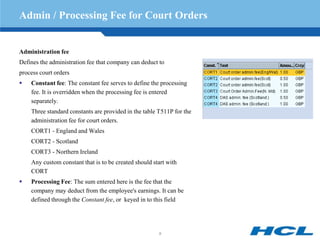
Admin / Processing Fee for Court Orders


Administration fee
Defines the administration fee that company can deduct to
process court orders
   Constant fee: The constant fee serves to define the processing
    fee. It is overridden when the processing fee is entered
    separately.
    Three standard constants are provided in the table T511P for the
    administration fee for court orders.
    CORT1 - England and Wales
    CORT2 - Scotland
    CORT3 - Northern Ireland
    Any custom constant that is to be created should start with
    CORT
   Processing Fee: The sum entered here is the fee that the
    company may deduct from the employee's earnings. It can be
    defined through the Constant fee, or keyed in to this field


                                                       9
Table Driven Court Order Deductions


Annual Changes and Deductions

Depending on the type of Court Order, there are
predefined percentage deductions in the table
V_T5G15.


These are updated according to government guidelines
and determine the amount to be deducted.


This is applicable for Court Order types EWC, EWF,
EWT, SCA1, SCA2, SCA3, SCEA, SCMA, SEA


For these types any value in Standard Payment field is
overwritten by value from the table


                                                         10
Attachable Earnings


   Attachable earnings are defined by the legislation relevant to the particular order.
   AEOs can only be applied to certain categories of earnings, referred to as attachable earnings.
   The 1971 Act defines ‘earnings’ as:
    - wages and salary (including bonuses, fees, overtime and commission)
    - pension (for past service and compensation for loss of employment)
    - statutory sick pay
    - holiday pay or other pay advances
   Basically, only monetary components are treated as Attachable earnings.
but excludes
    - armed forces pay, a tax credit, wages payable to a person as a seaman, disability pension, statutory
    maternity pay, statutory adoption pay, statutory paternity pay, guaranteed minimum pension (as provided
    by the Pension Scheme Act 1993), statutory redundancy pay, sums payable by any Public Department of
    the Government of Northern Ireland or of a territory outside the UK.


                                                        11
Attachable Earnings Contd..


Deduction to be made from what is left from the attachable earnings (as defined by the 1971 Act)
after you have deducted:
   Income tax (PAYE)
   National Insurance contributions
   Superannuation or pension contributions (excluding free standing additional voluntary
    contributions and contributions to stakeholder pension schemes).


                                               12
Normal Deduction and Protected Earnings


Normal deduction
The NDR is the amount that the court calculates is reasonable to pay employee’s debt(s). In the case of an
order for payment of maintenance, it is the amount that the court considers necessary and reasonable for the
maintenance of a child or spouse. (Ref: Standard Payment field in IT0070)
The NDR is usually expressed in an order as a weekly or monthly rate. This amount can be adjusted
proportionally if earnings are paid at unusual intervals


Protected earnings
The PER/PEP is the amount that the court calculates is necessary for your employee’s family and household
bills. You should set aside the protected earnings before making a deduction.
(Ref: Protected Earnings field in IT0070)
Protected earnings are usually expressed in an order as a weekly or monthly rate. This amount can be adjusted
proportionally if earnings are paid at unusual intervals


                                                           13
Calculating Deductions: Priority and Non-priority orders


The orders referred to in this section fall into two categories:
• Priority AEO : AEOs for maintenance or fines
• Non- Priority AEO: AEOs for civil debts


Major Difference between Priority & Non Priority Orders
-    In Priority Orders, any shortfall in the normal deduction or the protected earnings is carried forward from
     pay day to pay day until it is cleared.
-    Whereas in Non Priority orders any shortfall is not carried forward.


Note: When an employer takes up to £1.00 for administration costs, it can reduce the employee’s earnings
     below the protected earnings rate.


                                                          14
Calculations for Non-priority AEOs


Normal procedure for each pay-day
   As per the Court Order, PER = £151.15 & NDR = £25
   Calculate your employee’s attachable earnings, e.g. £191.27
   Set aside his protected earnings £151.15
   This leaves £40.12
   Take off the normal deduction £25
   This leaves £15.27
Now:
   Send the £25 normal deduction to the court
   Deduct £1, Admin Charge from the remainder for making the deduction
   Pay employee his protected earnings (£151) and the remainder (£14.27), i.e. £165.27 in total


                                                      15
Calculations for Non-priority AEOs Contd…


Attachable earnings too low to allow full deduction
If employee earns less than usual, even then his protected earnings must be set aside even if that does not leave
enough for the normal deduction.
   As per the court order, PER = £151.15 & NDR = £25
   Calculate your employee’s attachable earnings, e.g. £171.27
   Set aside his protected earnings £151.15 which leaves £20.12 i.e., only £20.12 of the normal deduction can
    be met
Now:
   Send £20.12 to the court
   Deduct £1, Admin Charge from employee’s protected earnings for making a deduction (even if this reduces
    your employee’s income below the protected earnings rate)
   This leaves £150.15 to be paid to the employee.
   The deduction is £4.88 short of the normal deduction of £25, but do not carry this deficit forward to the next
    pay-day. The normal deduction rate for a non-priority order should never be exceeded.


                                                        16
Calculations for Non-priority AEOs Contd…


Attachable earnings below protected earnings
If employee’s attachable earnings are less than his protected earnings, pay him the full attachable earnings. Do
not carry forward the shortfall in the protected earnings or the normal deduction to the next pay-day.
   As per the court order, PER = £151.15 & NDR = £25
   Calculate employee’s attachable earnings, e.g. £141.27
   As the protected earnings rate is £151.15, you cannot
    - make the normal deduction (£25) or
    - take £1 from the sum paid to employee as you have made no deduction
Now:
   Pay employee £141.27
   Do not carry forward the £9.88 balance of protected earnings or the £25 unpaid normal deduction. Either of

    the deductions should not be taken into account at the next pay-day.


                                                        17
Calculations for Priority AEOs


Normal procedure for each pay-day
   As per the court order , PER = £151.15 & NDR = £25
   Calculate employee’s attachable earnings, e.g. £191.27
   Set aside his protected earnings £151.15, which leaves £40.12
   Take off the normal deduction £25, which leaves £15.12
Now:
   Send the £25 normal deduction to the court or Agency
   Deduct £1, Admin fee from the remainder for making the deduction
   Pay employee his protected earnings (£151.15) and the remainder (£14.12), i.e. £165.27 in total


                                                      18
Calculations for Priority AEOs Contd…

Attachable earnings too low to allow full normal deduction


If employee earns less than usual, even then his protected earnings must be set aside even if that does not leave
enough for the normal deduction. This deduction needs to be recovered at the earliest
   As per the court order , PER= £151.15 & NDR = £25
First pay-day
   Calculate your employee’s attachable earnings, e.g. £171.27
   Set aside his protected earnings £151.15 which leaves £20.12, i.e., only £20.12 of the normal deduction can
    be met.
   Send £20.12 to the court or Agency, and carry forward the £4.88 deficit in the normal deduction to the
    following pay-day
   Deduct £1, admin fee from your employee’s protected earnings for making a deduction
   This leaves £150.15 to be paid the employee.


                                                                                                        Contd..


                                                        19
Calculations for Priority AEOs Contd…


Second pay-day
   Calculate employee’s attachable earnings, e.g. £191.53
   Set aside his protected earnings £151.15 which leaves £40.38
Now:
   Send £29.88 to the court or Agency (£25 normal deduction + £4.88 deficit carried forward from the
    previous pay-day)
   Deduct £1, Admin fee from the remainder for making the deduction
   Pay employee his protected earnings (£151.15) and the remainder (£9.50), i.e. £160.65 in total


                                                      20
Calculations for Priority AEOs Contd…


Attachable earnings below protected earnings
If employee does not earn enough to cover even his protected earnings in one wage period, then both the
shortfall in his protected earnings and the whole normal deduction should be carried forward to the next pay day
   As per the court order, PER = £151.15 & NDR = £25
First pay-day
   Calculate employee’s attachable earnings, e.g. £143.27
   As the protected earnings rate is £151.15, you cannot:
    - make the normal deduction (£25) or
    - deduct £1 from the sum paid to employee as you have made no deduction
Now:
   Carry forward £25 normal deduction to the following pay-day
   Carry forward £7.88 deficit in protected earnings to the following pay-day
   Pay employee £143.27
                                                                                                      Contd…


                                                        21
Calculations for Priority AEOs Contd…


Second pay-day
   Calculate employee’s attachable earnings, e.g. £191.57
   Set aside his protected earnings (£151.15 + £7.88 deficit) £159.03
   This leaves £32.54
   The total deduction due is £25 (from the previous pay-day)+ £25 (from this pay-day) = £50
Now:
   Send £32.54 to the court or Agency, and carry forward £17.46 deficit to the following pay-day
   Deduct £1, admin fee from employee’s protected earnings for making a deduction
   Pay employee £158.03


                                                      22
Student Loans


   Students start repaying their loan once they've left higher education and their income is more than a certain
    amount - the threshold. If their income is high enough, their repayments start in the April after they leave
    higher education.


   Infotype 0070, used with the Collection of Student Loans subtype (CSL), allows you to record and deduct
    student loan repayments as specified by the Inland Revenue.


   The system calculates the student loan deduction for an employee with reference to the current earnings
    thresholds and percentage deduction rates set by the Inland Revenue.


   The income threshold for starting to make repayments is £15,000 a year (£1,250 a month or £288 a week).
    Once an employee's income goes over the threshold, you deduct 9 per cent of their income that's over the
    threshold towards repaying their loan.


   Collection of Student Loans (CSL) deductions are shown on the employee's payslip. Employers are
    required to pass the CSL to the Collector of Taxes, together with tax and NIC remittance.


                                                       23
Student Loans Start Notice


Start Identification


   Notif. Source – Select one of the
    following start identifier for
    commencement of CSL deduction of an
    employee:
    - P45 (with 'Y' in the Student Loan
    deductions to continue box 5)
    - Start Notice (SL1)
    - P46 Form (without a form P45 with a
    tick in box D (Student Loans) )
    - RTL2 – Select this option for
    recommencement of CSL deduction.


                                            24
Student Loans Start Notice


   Issued / Received Date – Enter the issue or receive date of the CSL deduction notification. The date
    entered in this field is used to determine the priority sequence to be applied when there is more than one
    court order/student loan for an employee.
    When you electronically upload new or amended Collection of Student Loan data for an employee from the
    Inland Revenue, the relevant Infotype 0070 record is delimited from the date that the new data is received,
    and a new Infotype 0070 record is automatically created with the new CSL details.


   Process ID : This field is used to track such automatic changes made to an employee’s CSL Infotype
    record.
    The new (or amended) Infotype 0070 record, updated electronically via the e-Filing Incoming process, now
    contains a unique XML identifier code in the Process ID field. With this identification code, you can cross-
    check any changes to this Infotype record with records of all CSL changes received from the Inland
    Revenue during e-Filing Incoming processing.


                                                       25
Student Loans Stop Notice


Stop Identification
   Notification Source – Either of the following:
    - Stop Notice (SL2)
    - RTL1 Form – Select this option to stop the CSL deductions temporarily.


   Issue / Recd – Enter a date with respect to RTL1 form, to notify the date on which this stop
    identifier was issued or received. The system stops Student Loan deduction from the payroll
    period in which this date falls.


   Process ID - If e-Filing for Great Britain is implemented and this Infotype record has been
    automatically updated when a SL2 stop notice is received, the field Process ID will be filled
    with a unique identification number, allowing you to trace the source of this change to your
    Infotype data.


                                                26
Function GCRTO (G000 Schema)


   The function is necessary when calculating the court order deductions to be paid by an employee during a
    particular pay period.
   It makes use of the Court Orders infotype P0070 as well as the working net pay amount.
   It will fill the wage types /Cxy, where:
     - 'x' is the type of court order e.g. Council Tax. This directly corresponds to the subtype field in the P0070
    record.
    - 'y' is the number to identify the value held in the wage type
            1 = This period deduction amount
            2 = Total arrears of deductions
            3 = Total arrears of protected earnings
            4 = Deduction of admin, costs for period


                                                        27
E Wage Types


   E wage types are adjustment wage types. Each statutory wage type has a corresponding E wage type, for
    example /101 (Total Gross) has the corresponding wage type E101 (total gross adjustment).
   They enable adjustment of statutory cumulative totals that will be reported on at end of year. They are
    processed by the personnel calculation rule GEOY.
   They can be used as positive or negative values and are available for use on Infotype 15 (Additional
    Payments).
   Whenever E wage types are used, warning exception messages will be generated by the payroll driver.


Note: E wage types are not recommended for general use and should only be used in exceptional circumstances.


                                                       28
E Wage Types Contd..


Integration
   When E wage types are used, the RESULTS (RT) table as well as the CUMULATIVE RESULTS (CRT)
    table are affected.
   There are two reasons for this:
    - This allows correct auditing of the results
    - In the payroll driver, the CRT is only ever filled from the RT with the function ADDCU, so the value has
       to be on the RT to feed the CRT.
   The personnel calculation rule GEOY is situated at the end of the subschema GNTO, so that only wage
    types already in the RT are affected. This means that use of adjustment wage types can only directly affect
    the corresponding technical wage type and not indirectly any other wage types.
Note: Using E101 will adjust /101 only, and will not adjust any other wage types such as /121.


                                                       29
Reporting

RPLCORG0
   Transaction Code – PC00_M08_CCRT
   RPLCORG0 provides a summary of the court orders processed in a given time frame, based on either
    consolidated results or individual periods that have been processed and paid in payroll during the selected
    Timeframe.
   Consolidated report - displays a summary of each court order deduction type processed in the selected
    timeframe.
   Individual period report- lists each court order deduction individually for all the payroll periods in the
    selected time frame.
The advantages of running the Consolidated report, as opposed to the Individual period report, are:
   Considerably faster processing time.
   The ability to delimit court orders that have been paid off, thereby automatically delimiting the infotype
    Court Orders GB (0070) record.
   The ability to automatically update infotype Court Orders GB (0070) records.
Note: The court order report does not list the court orders that have the court order type Collection of Student
    Loan (CSL).

                                                        30
Reporting Contd…


RPCSCOG0
   Transaction Code - PC00_M08_CSCO
   This report displays Scottish court orders details for any employee(s) selected
   The output displays in detail, the information relating to the employee and all relevant court orders in the
    chosen time frame, including employee name and number, arrestable earnings, court order effective date,
    type, pay frequency and reference number.


                                                        31

Court orders

  • 1.
  • 2.
    What are CourtOrders ?  A court order is the decision of a Judge, Registrar Magistrate as entered in the records of the court.  In Scotland, it is the decision of a Judge or Sheriff  In SAP HR administration, Court Orders for each employee are maintained via the Court Orders - GB (Infotype 0070). 2
  • 3.
    Subtypes of CourtOrders (SAP)  The Court Orders/Student Loans GB (0070) infotype is subdivided into various court order types.  Each of these is represented by an infotype subtype in table V_T5G16.  SAP delivers all the necessary subtypes for processing court orders in your company . 3
  • 4.
    Priorities of CourtOrders Deduction Priority  A further feature of the Court Order Indicator table (V_T5G16) is the setting of deduction priority against each court order type. Court order deductions are either marked as priority (1), or non priority (99).  Those with a setting of 1 have the highest priority and enable the claiming of any arrears in deductions due to insufficient pay. This does not apply to priority 99 court orders.  In addition, the setting in the last column 'Relevant backlog', means that it is possible to carry over both protected earnings and deductions for outstanding amounts from previous payroll periods. 4
  • 5.
    Infotype 0070  Infotype 0070 record is to be created when Employer receives a court order pertaining to an Employee. Object ID : It is used to make a distinction between data records with the same infotype, subtype, lock indicator, start date, and end date. It is generated automatically by the system, and is used by the Payroll Results report to differentiate between the payments for different court orders. 5
  • 6.
    Infotype 0070 (CourtOrders) Monetary values These details are also given on the court order. The information is used by the payroll to make the court order deductions from the employee’s pay. The payroll takes protected earnings into account and automatically keeps a total of arrears and arrears of protected earnings. For this reason, no retro calculation is required for court order processing.  Standard Payment : Standard amount that will be deducted from the employee's monetary earnings (/141 – Arrestable Earnings).  Protected Earnings: Sum that the court has declared the debtor may retain before any deductions can be made.  Total Sum: Total amount an employee should pay for this specific court order. Payments will cease once this total sum has been reached. A total sum should not be specified for a maintenance charge, for example, since this is a standard payment that should continue indefinitely. Depending on the court order type, entries need to be made in some or in all of these three fields. 6
  • 7.
    Payees for CourtOrders Payee Payee details required for paying court orders are entered here.  Payee: Payee key for bank transfers to display bank data for payees from table V_T521B.  Postal Code: This field contains the postal (zip) code for the house address.  Bank No. : This field contains the bank number or the bank code.  Bank Acct: This field contains the number under which the account is managed at the bank.  Purpose : The purpose is indicated on the bank transfer form.  Payment Method: The payment method determines how payments are to be made, e.g. by check, bank transfer or bill of exchange. 7
  • 8.
    Setting Deduction Periodsfor Court Orders Payment Periods/Dates Specifies when the court order payments are to be made, and the frequency of such payments.  1st Payment Period/ 1st Payment Date: Enter the payroll period in which the first payment should be made.  Interval in periods: Enter the number of periods that should lie between two consecutive payments. If you choose to determine your payment schedule via payroll period, you must also enter the number of periods that should lie between two consecutive payments using the interval in periods field. If you make no entry in the interval in periods field, a repayment occurs in every period from the first payment period  Interval/ Unit : If Payment date is chosen to determine Payment schedule, then specify the interval between each payment, using the interval and time unit fields. Payment history The Payment History option displays a payment history for the court order concerned. It shows the total deductions made for this specific court order since it became effective, the deduction arrears, protected earnings arrears, and accounting status (last payroll pay date). 8
  • 9.
    Admin / ProcessingFee for Court Orders Administration fee Defines the administration fee that company can deduct to process court orders  Constant fee: The constant fee serves to define the processing fee. It is overridden when the processing fee is entered separately. Three standard constants are provided in the table T511P for the administration fee for court orders. CORT1 - England and Wales CORT2 - Scotland CORT3 - Northern Ireland Any custom constant that is to be created should start with CORT  Processing Fee: The sum entered here is the fee that the company may deduct from the employee's earnings. It can be defined through the Constant fee, or keyed in to this field 9
  • 10.
    Table Driven CourtOrder Deductions Annual Changes and Deductions Depending on the type of Court Order, there are predefined percentage deductions in the table V_T5G15. These are updated according to government guidelines and determine the amount to be deducted. This is applicable for Court Order types EWC, EWF, EWT, SCA1, SCA2, SCA3, SCEA, SCMA, SEA For these types any value in Standard Payment field is overwritten by value from the table 10
  • 11.
    Attachable Earnings  Attachable earnings are defined by the legislation relevant to the particular order.  AEOs can only be applied to certain categories of earnings, referred to as attachable earnings.  The 1971 Act defines ‘earnings’ as: - wages and salary (including bonuses, fees, overtime and commission) - pension (for past service and compensation for loss of employment) - statutory sick pay - holiday pay or other pay advances  Basically, only monetary components are treated as Attachable earnings. but excludes - armed forces pay, a tax credit, wages payable to a person as a seaman, disability pension, statutory maternity pay, statutory adoption pay, statutory paternity pay, guaranteed minimum pension (as provided by the Pension Scheme Act 1993), statutory redundancy pay, sums payable by any Public Department of the Government of Northern Ireland or of a territory outside the UK. 11
  • 12.
    Attachable Earnings Contd.. Deductionto be made from what is left from the attachable earnings (as defined by the 1971 Act) after you have deducted:  Income tax (PAYE)  National Insurance contributions  Superannuation or pension contributions (excluding free standing additional voluntary contributions and contributions to stakeholder pension schemes). 12
  • 13.
    Normal Deduction andProtected Earnings Normal deduction The NDR is the amount that the court calculates is reasonable to pay employee’s debt(s). In the case of an order for payment of maintenance, it is the amount that the court considers necessary and reasonable for the maintenance of a child or spouse. (Ref: Standard Payment field in IT0070) The NDR is usually expressed in an order as a weekly or monthly rate. This amount can be adjusted proportionally if earnings are paid at unusual intervals Protected earnings The PER/PEP is the amount that the court calculates is necessary for your employee’s family and household bills. You should set aside the protected earnings before making a deduction. (Ref: Protected Earnings field in IT0070) Protected earnings are usually expressed in an order as a weekly or monthly rate. This amount can be adjusted proportionally if earnings are paid at unusual intervals 13
  • 14.
    Calculating Deductions: Priorityand Non-priority orders The orders referred to in this section fall into two categories: • Priority AEO : AEOs for maintenance or fines • Non- Priority AEO: AEOs for civil debts Major Difference between Priority & Non Priority Orders - In Priority Orders, any shortfall in the normal deduction or the protected earnings is carried forward from pay day to pay day until it is cleared. - Whereas in Non Priority orders any shortfall is not carried forward. Note: When an employer takes up to £1.00 for administration costs, it can reduce the employee’s earnings below the protected earnings rate. 14
  • 15.
    Calculations for Non-priorityAEOs Normal procedure for each pay-day  As per the Court Order, PER = £151.15 & NDR = £25  Calculate your employee’s attachable earnings, e.g. £191.27  Set aside his protected earnings £151.15  This leaves £40.12  Take off the normal deduction £25  This leaves £15.27 Now:  Send the £25 normal deduction to the court  Deduct £1, Admin Charge from the remainder for making the deduction  Pay employee his protected earnings (£151) and the remainder (£14.27), i.e. £165.27 in total 15
  • 16.
    Calculations for Non-priorityAEOs Contd… Attachable earnings too low to allow full deduction If employee earns less than usual, even then his protected earnings must be set aside even if that does not leave enough for the normal deduction.  As per the court order, PER = £151.15 & NDR = £25  Calculate your employee’s attachable earnings, e.g. £171.27  Set aside his protected earnings £151.15 which leaves £20.12 i.e., only £20.12 of the normal deduction can be met Now:  Send £20.12 to the court  Deduct £1, Admin Charge from employee’s protected earnings for making a deduction (even if this reduces your employee’s income below the protected earnings rate)  This leaves £150.15 to be paid to the employee.  The deduction is £4.88 short of the normal deduction of £25, but do not carry this deficit forward to the next pay-day. The normal deduction rate for a non-priority order should never be exceeded. 16
  • 17.
    Calculations for Non-priorityAEOs Contd… Attachable earnings below protected earnings If employee’s attachable earnings are less than his protected earnings, pay him the full attachable earnings. Do not carry forward the shortfall in the protected earnings or the normal deduction to the next pay-day.  As per the court order, PER = £151.15 & NDR = £25  Calculate employee’s attachable earnings, e.g. £141.27  As the protected earnings rate is £151.15, you cannot - make the normal deduction (£25) or - take £1 from the sum paid to employee as you have made no deduction Now:  Pay employee £141.27  Do not carry forward the £9.88 balance of protected earnings or the £25 unpaid normal deduction. Either of the deductions should not be taken into account at the next pay-day. 17
  • 18.
    Calculations for PriorityAEOs Normal procedure for each pay-day  As per the court order , PER = £151.15 & NDR = £25  Calculate employee’s attachable earnings, e.g. £191.27  Set aside his protected earnings £151.15, which leaves £40.12  Take off the normal deduction £25, which leaves £15.12 Now:  Send the £25 normal deduction to the court or Agency  Deduct £1, Admin fee from the remainder for making the deduction  Pay employee his protected earnings (£151.15) and the remainder (£14.12), i.e. £165.27 in total 18
  • 19.
    Calculations for PriorityAEOs Contd… Attachable earnings too low to allow full normal deduction If employee earns less than usual, even then his protected earnings must be set aside even if that does not leave enough for the normal deduction. This deduction needs to be recovered at the earliest  As per the court order , PER= £151.15 & NDR = £25 First pay-day  Calculate your employee’s attachable earnings, e.g. £171.27  Set aside his protected earnings £151.15 which leaves £20.12, i.e., only £20.12 of the normal deduction can be met.  Send £20.12 to the court or Agency, and carry forward the £4.88 deficit in the normal deduction to the following pay-day  Deduct £1, admin fee from your employee’s protected earnings for making a deduction  This leaves £150.15 to be paid the employee. Contd.. 19
  • 20.
    Calculations for PriorityAEOs Contd… Second pay-day  Calculate employee’s attachable earnings, e.g. £191.53  Set aside his protected earnings £151.15 which leaves £40.38 Now:  Send £29.88 to the court or Agency (£25 normal deduction + £4.88 deficit carried forward from the previous pay-day)  Deduct £1, Admin fee from the remainder for making the deduction  Pay employee his protected earnings (£151.15) and the remainder (£9.50), i.e. £160.65 in total 20
  • 21.
    Calculations for PriorityAEOs Contd… Attachable earnings below protected earnings If employee does not earn enough to cover even his protected earnings in one wage period, then both the shortfall in his protected earnings and the whole normal deduction should be carried forward to the next pay day  As per the court order, PER = £151.15 & NDR = £25 First pay-day  Calculate employee’s attachable earnings, e.g. £143.27  As the protected earnings rate is £151.15, you cannot: - make the normal deduction (£25) or - deduct £1 from the sum paid to employee as you have made no deduction Now:  Carry forward £25 normal deduction to the following pay-day  Carry forward £7.88 deficit in protected earnings to the following pay-day  Pay employee £143.27 Contd… 21
  • 22.
    Calculations for PriorityAEOs Contd… Second pay-day  Calculate employee’s attachable earnings, e.g. £191.57  Set aside his protected earnings (£151.15 + £7.88 deficit) £159.03  This leaves £32.54  The total deduction due is £25 (from the previous pay-day)+ £25 (from this pay-day) = £50 Now:  Send £32.54 to the court or Agency, and carry forward £17.46 deficit to the following pay-day  Deduct £1, admin fee from employee’s protected earnings for making a deduction  Pay employee £158.03 22
  • 23.
    Student Loans  Students start repaying their loan once they've left higher education and their income is more than a certain amount - the threshold. If their income is high enough, their repayments start in the April after they leave higher education.  Infotype 0070, used with the Collection of Student Loans subtype (CSL), allows you to record and deduct student loan repayments as specified by the Inland Revenue.  The system calculates the student loan deduction for an employee with reference to the current earnings thresholds and percentage deduction rates set by the Inland Revenue.  The income threshold for starting to make repayments is £15,000 a year (£1,250 a month or £288 a week). Once an employee's income goes over the threshold, you deduct 9 per cent of their income that's over the threshold towards repaying their loan.  Collection of Student Loans (CSL) deductions are shown on the employee's payslip. Employers are required to pass the CSL to the Collector of Taxes, together with tax and NIC remittance. 23
  • 24.
    Student Loans StartNotice Start Identification  Notif. Source – Select one of the following start identifier for commencement of CSL deduction of an employee: - P45 (with 'Y' in the Student Loan deductions to continue box 5) - Start Notice (SL1) - P46 Form (without a form P45 with a tick in box D (Student Loans) ) - RTL2 – Select this option for recommencement of CSL deduction. 24
  • 25.
    Student Loans StartNotice  Issued / Received Date – Enter the issue or receive date of the CSL deduction notification. The date entered in this field is used to determine the priority sequence to be applied when there is more than one court order/student loan for an employee. When you electronically upload new or amended Collection of Student Loan data for an employee from the Inland Revenue, the relevant Infotype 0070 record is delimited from the date that the new data is received, and a new Infotype 0070 record is automatically created with the new CSL details.  Process ID : This field is used to track such automatic changes made to an employee’s CSL Infotype record. The new (or amended) Infotype 0070 record, updated electronically via the e-Filing Incoming process, now contains a unique XML identifier code in the Process ID field. With this identification code, you can cross- check any changes to this Infotype record with records of all CSL changes received from the Inland Revenue during e-Filing Incoming processing. 25
  • 26.
    Student Loans StopNotice Stop Identification  Notification Source – Either of the following: - Stop Notice (SL2) - RTL1 Form – Select this option to stop the CSL deductions temporarily.  Issue / Recd – Enter a date with respect to RTL1 form, to notify the date on which this stop identifier was issued or received. The system stops Student Loan deduction from the payroll period in which this date falls.  Process ID - If e-Filing for Great Britain is implemented and this Infotype record has been automatically updated when a SL2 stop notice is received, the field Process ID will be filled with a unique identification number, allowing you to trace the source of this change to your Infotype data. 26
  • 27.
    Function GCRTO (G000Schema)  The function is necessary when calculating the court order deductions to be paid by an employee during a particular pay period.  It makes use of the Court Orders infotype P0070 as well as the working net pay amount.  It will fill the wage types /Cxy, where: - 'x' is the type of court order e.g. Council Tax. This directly corresponds to the subtype field in the P0070 record. - 'y' is the number to identify the value held in the wage type 1 = This period deduction amount 2 = Total arrears of deductions 3 = Total arrears of protected earnings 4 = Deduction of admin, costs for period 27
  • 28.
    E Wage Types  E wage types are adjustment wage types. Each statutory wage type has a corresponding E wage type, for example /101 (Total Gross) has the corresponding wage type E101 (total gross adjustment).  They enable adjustment of statutory cumulative totals that will be reported on at end of year. They are processed by the personnel calculation rule GEOY.  They can be used as positive or negative values and are available for use on Infotype 15 (Additional Payments).  Whenever E wage types are used, warning exception messages will be generated by the payroll driver. Note: E wage types are not recommended for general use and should only be used in exceptional circumstances. 28
  • 29.
    E Wage TypesContd.. Integration  When E wage types are used, the RESULTS (RT) table as well as the CUMULATIVE RESULTS (CRT) table are affected.  There are two reasons for this: - This allows correct auditing of the results - In the payroll driver, the CRT is only ever filled from the RT with the function ADDCU, so the value has to be on the RT to feed the CRT.  The personnel calculation rule GEOY is situated at the end of the subschema GNTO, so that only wage types already in the RT are affected. This means that use of adjustment wage types can only directly affect the corresponding technical wage type and not indirectly any other wage types. Note: Using E101 will adjust /101 only, and will not adjust any other wage types such as /121. 29
  • 30.
    Reporting RPLCORG0  Transaction Code – PC00_M08_CCRT  RPLCORG0 provides a summary of the court orders processed in a given time frame, based on either consolidated results or individual periods that have been processed and paid in payroll during the selected Timeframe.  Consolidated report - displays a summary of each court order deduction type processed in the selected timeframe.  Individual period report- lists each court order deduction individually for all the payroll periods in the selected time frame. The advantages of running the Consolidated report, as opposed to the Individual period report, are:  Considerably faster processing time.  The ability to delimit court orders that have been paid off, thereby automatically delimiting the infotype Court Orders GB (0070) record.  The ability to automatically update infotype Court Orders GB (0070) records. Note: The court order report does not list the court orders that have the court order type Collection of Student Loan (CSL). 30
  • 31.
    Reporting Contd… RPCSCOG0  Transaction Code - PC00_M08_CSCO  This report displays Scottish court orders details for any employee(s) selected  The output displays in detail, the information relating to the employee and all relevant court orders in the chosen time frame, including employee name and number, arrestable earnings, court order effective date, type, pay frequency and reference number. 31