Data-flow Diagrams
Chapter 17
Elements of data-flow diagrams
   There are four basic elements of data flow diagrams:
       Data Transforms: where data is filtered, formatted or
        synthesized.
       Information sources and sinks: essentially inputs and
        outputs to the system.
       Information stores: where information is kept for the
        duration of system activity.
       Information Flows: data that is passed into and out of
        transforms, information stores.
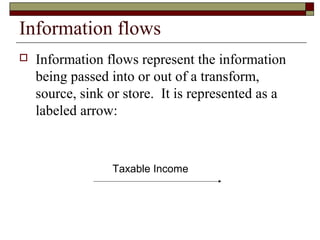
Information flows
   Information flows represent the information
    being passed into or out of a transform,
    source, sink or store. It is represented as a
    labeled arrow:


                 Taxable Income
Data transforms
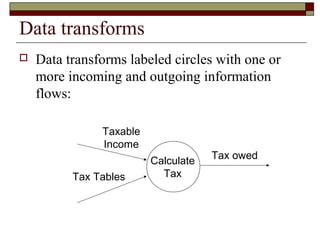
   Data transforms labeled circles with one or
    more incoming and outgoing information
    flows:

               Taxable
               Income
                         Calculate   Tax owed

          Tax Tables       Tax
Information sources and sinks
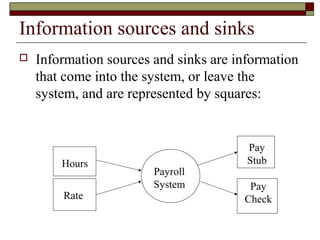
   Information sources and sinks are information
    that come into the system, or leave the
    system, and are represented by squares:


                                        Pay
        Hours                           Stub
                        Payroll
                        System          Pay
        Rate                           Check
Information stores
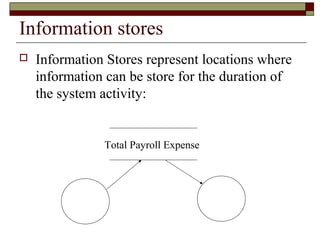
   Information Stores represent locations where
    information can be store for the duration of
    the system activity:


               Total Payroll Expense
Refining DFDs
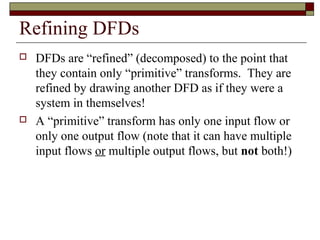
   DFDs are “refined” (decomposed) to the point that
    they contain only “primitive” transforms. They are
    refined by drawing another DFD as if they were a
    system in themselves!
   A “primitive” transform has only one input flow or
    only one output flow (note that it can have multiple
    input flows or multiple output flows, but not both!)
Heritage numbers
   Refinement of DFDs leads to a problem in larger
    systems: we have a large number of diagrams!
    When we look at a diagram by itself the only way
    we can tell what it represents is by looking at the
    parent diagram.
   Heritage numbers allow this. A data transform
    numbered 2.4.3 is the child of DFD number 2.4
    which is the child of DFD 2 in the level 1 DFD
    diagram.
The data dictionary
   As the data is defined in the DFD (the flows),
    definitions should be entered in the ‘data dictionary’.
   The ‘data dictionary’ is a reference that allows us to
    determine the type of the named data (int, float,
    struct, whatever.)
   This will be essential during the programming phase,
    when knowing what variable names to use.
Checking DFDs - CASE tools
   Since DFDs are a formal method, tools have
    been developed that allow automated drawing
    of the DFDs, and management of refined
    DFDs.
   Since this can be automated, checking DFDs
    can also be automated (such as ‘Process
    Analyst’).
Structure charts
   Translation of a DFD to a ‘structure’ chart is a
    mechanical procedure (see the book.)
   The procedure involves ‘isolating’ the central
    transform area, which is independent of the format
    transforms and the validation transforms.
   Structure charts also provide a schematic showing
    the flow of the data in a control diagram!
   Now we have a complete picture: DFDs show how
    the data flows, and structure charts show how
    control is passed!
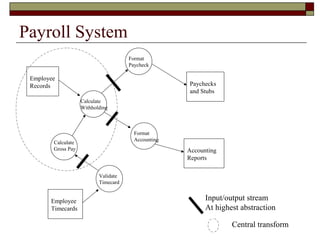
Payroll System
                                      Format
                                      Paycheck

 Employee
 Records                                             Paychecks
                                                     and Stubs
                    Calculate
                    Withholding


                                        Format
                                        Accounting
        Calculate
        Gross Pay                                    Accounting
                                                     Reports

                           Validate
                           Timecard


       Employee                                            Input/output stream
       Timecards                                           At highest abstraction

                                                                   Central transform
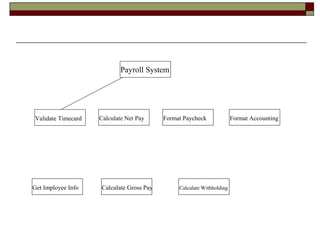
Payroll System


Validate Timecard   Calculate Net Pay     Format Paycheck              Format Accounting


Get Imployee Info   Calculate Gross Pay        Calculate Withholding
Implementing a DFD
   Once we have a structure chart, the actual
    implementation also becomes mechanical.
    An essential pre-defined form becomes
    apparent for implementing structure charts.
    An example using C is available in the book.

Chapter17

  • 1.
  • 2.
    Elements of data-flowdiagrams  There are four basic elements of data flow diagrams:  Data Transforms: where data is filtered, formatted or synthesized.  Information sources and sinks: essentially inputs and outputs to the system.  Information stores: where information is kept for the duration of system activity.  Information Flows: data that is passed into and out of transforms, information stores.
  • 3.
    Information flows  Information flows represent the information being passed into or out of a transform, source, sink or store. It is represented as a labeled arrow: Taxable Income
  • 4.
    Data transforms  Data transforms labeled circles with one or more incoming and outgoing information flows: Taxable Income Calculate Tax owed Tax Tables Tax
  • 5.
    Information sources andsinks  Information sources and sinks are information that come into the system, or leave the system, and are represented by squares: Pay Hours Stub Payroll System Pay Rate Check
  • 6.
    Information stores  Information Stores represent locations where information can be store for the duration of the system activity: Total Payroll Expense
  • 7.
    Refining DFDs  DFDs are “refined” (decomposed) to the point that they contain only “primitive” transforms. They are refined by drawing another DFD as if they were a system in themselves!  A “primitive” transform has only one input flow or only one output flow (note that it can have multiple input flows or multiple output flows, but not both!)
  • 8.
    Heritage numbers  Refinement of DFDs leads to a problem in larger systems: we have a large number of diagrams! When we look at a diagram by itself the only way we can tell what it represents is by looking at the parent diagram.  Heritage numbers allow this. A data transform numbered 2.4.3 is the child of DFD number 2.4 which is the child of DFD 2 in the level 1 DFD diagram.
  • 9.
    The data dictionary  As the data is defined in the DFD (the flows), definitions should be entered in the ‘data dictionary’.  The ‘data dictionary’ is a reference that allows us to determine the type of the named data (int, float, struct, whatever.)  This will be essential during the programming phase, when knowing what variable names to use.
  • 10.
    Checking DFDs -CASE tools  Since DFDs are a formal method, tools have been developed that allow automated drawing of the DFDs, and management of refined DFDs.  Since this can be automated, checking DFDs can also be automated (such as ‘Process Analyst’).
  • 11.
    Structure charts  Translation of a DFD to a ‘structure’ chart is a mechanical procedure (see the book.)  The procedure involves ‘isolating’ the central transform area, which is independent of the format transforms and the validation transforms.  Structure charts also provide a schematic showing the flow of the data in a control diagram!  Now we have a complete picture: DFDs show how the data flows, and structure charts show how control is passed!
  • 12.
    Payroll System Format Paycheck Employee Records Paychecks and Stubs Calculate Withholding Format Accounting Calculate Gross Pay Accounting Reports Validate Timecard Employee Input/output stream Timecards At highest abstraction Central transform
  • 13.
    Payroll System Validate Timecard Calculate Net Pay Format Paycheck Format Accounting Get Imployee Info Calculate Gross Pay Calculate Withholding
  • 14.
    Implementing a DFD  Once we have a structure chart, the actual implementation also becomes mechanical. An essential pre-defined form becomes apparent for implementing structure charts. An example using C is available in the book.