Statutory Forms & e-Filing


                         - LAKSHMI
Statutory Activities – Phases


Statutory Reporting & Processing in GB can be categorized into 3 phases


           Start of year           In Year                 End of year


           P9(X)                   P45                     P14


           P9(T)                   P46                     P35


                                   P46(PEN)                P60


                                   P6                      P11D


                                   P7                      P9D


                                                      2
Start-of-Year Process


P9 (X) Form – Generic Tax Code Changes
   Notice received from HMRC in the beginning of the tax year stating the tax year specific information which
    is with effect from 6th April of the year.
   Specifies the income tax slabs and the rates
   Specifies the Threshold for tax calculation
   Specifies the change to be made to the employee tax codes tax codes
http://www.hmrc.gov.uk/helpsheets/p9x.pdf


P9 (T) – Individual Tax Code Changes
   Form received from HMRC for individual employees.
   Individual tax code details are received in case of any adjustments required for the respective employee.
http://www.hmrc.gov.uk/employers/e11-p3.pdf
In-Year Process


   In –year process can be based on the employee life – cycle with the organization which can be broadly
    categorized into 3 phases


              Joining                     Leaving                     Retirement
              P45 (Starter)               P45 (Leaver)                P46 (PEN)


              P46


              P46 (EXPAT)
In-Year Process


P45 – Details of Employee leaving work
   P45 is issued when an employee leaves the organisation.
   It is a statement of Employee’s Earnings and the Tax deducted from Earnings till that period in the tax year.
   A P45 has four parts - Part 1, Part 1A, Part 2 and Part 3.
   Employer submits part 1 to HMRC and issues other three parts to employee
   Part 1 – Also known as P45 (Leaver) form. Submitted to HMRC by Employer
   Part 1A - Issued to Employee for his records
   Part 2 – Issued to Employee. Employee submits it to new employer
   Part 3 - Also known as P45(Starter) form. It is issued to Employee. Employee submits it to new employer
    who in turn submits it to HMRC with all the details.
http://www.hmrc.gov.uk/forms/p45.pdf
In-Year Process


P46 – Starter Notification
   Employee submits P46, in case of
    - First job
    - P45 is not received from previous employer
   Details provided on this form enables to identify the appropriate tax code for the employee
http://www.hmrc.gov.uk/forms/p46.pdf


P46 (EXPAT) – Starter Notification
   For foreign nationals who are seconded to work in UK while remaining employed by an overseas employer
http://www.hmrc.gov.uk/ebu/p46-expat.pdf


P46 (PEN)– Pension Starter Notification
   To notify HMRC about starting pension payments for an Employee
http://www.hmrc.gov.uk/ebu/p46-pension.pdf
In-Year Process - Other notifications


P6 – Individual Tax code Changes
   Notice received from HMRC in case of tax code changes for employee during the tax year
Ex: Employee declares some additional income to HMRC
http://www.hmrc.gov.uk/employers/e13_page31_p6.pdf


P7 – Tax code Changes following the budget
   Specifies the tax code changes, if any, following the Budget
http://www.hmrc.gov.uk/forms/p7x.pdf
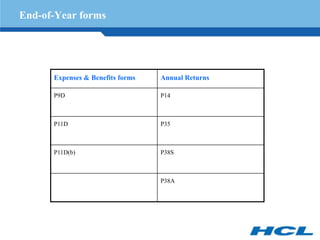
End-of-Year forms


      Expenses & Benefits forms   Annual Returns

      P9D                         P14


      P11D                        P35


      P11D(b)                     P38S


                                  P38A
EOY - Expenses and benefits forms


   Employer needs to file Expenses and benefits forms for each employee who have received them during the
    tax year
   These forms must be submitted to HMRC by 6 July.
   Depending on Employee’s earnings, on of the these forms need to be filed.
    P9D – Employees earning less than £8500
    P11D - Employees earning £8500 or more


Threshold £8,500
   Includes only the value of the expenses and benefits employee receive from employer
   Threshold operates on pro rata basis if the employee works only for part of the year.
Ex: If an employee only works for 6 months of the year then P11D is used if their earnings in that period are
    £4,250 or more.

http://www.hmrc.gov.uk/forms/p9d.pdf
http://www.hmrc.gov.uk/forms/p11d.pdf
EOY - Expenses and benefits forms


P11D(b)
   It must be filed by Employers in the following cases:
    - Having P11Ds to submit to HMRC at the end of the tax year
    - Received a form P11D(b) from HMRC
   P11D(b) need not be submitted if it is indicated in Employer’s Annual Return (P35) that forms P11D and
    P11D(b) are not due.
http://www.hmrc.gov.uk/forms/p11db.pdf
EOY – Employer Annual Returns


   Employer Annual Return is due by 19 May following the end of the tax year.
   The Employer Annual Return comprises:
    - Form P14
    - Form P35
    - Form P38A


P14 – End of the Year Summary
   The P14 form is a record of individual Employee Earnings, Tax, NIC, SMP, SSP, Student Loan and
    Pension contributions, which are sent to the tax office as part of the employer's return.
   The two copies of P14 sent in with the returns; one for HMRC, the other sent on to the NI office.
http://www.hmrc.gov.uk/ebu/p14-p60-man-2010.pdf
EOY – Employer Annual Returns


P35 – Employer’s Annual Return
Summary of the end-of-year payroll totals for all of the employees.
http://www.hmrc.gov.uk/ebu/p35.pdf


P38(S) – Student Employees
   To indicate that Employee is a student who only worked during their holidays
   If employee is a full-time student with a holiday job, then they need not pay Tax. NI is to be paid if their
    income is above £110 a week or £476 a month
http://www.hmrc.gov.uk/forms/p38s.pdf


Form P38A - Employer Supplementary Return
   Form P38A need to be submitted to HMRC in case of
    - Employees for whom P14 is not submitted
    - Employees for whom P38(S) is not completed during the year
http://www.hmrc.gov.uk/forms/p38a.pdf
EOY – Employer Annual Returns


P60: End of Year Certificate
   Employee’s copy of the summary of his earnings and tax paid for the tax year.
   P60 would be required for an individual
    - to claim any overpaid tax amounts
    - to apply for tax credits
   It acts as a proof of your income while applying for a loan or a mortgage
   It confirms an employee's final tax code, year's total Tax deductions and National Insurance contributions
    and shows their total pension and/or earnings for the year
http://www.hmrc.gov.uk/forms/p60.pdf
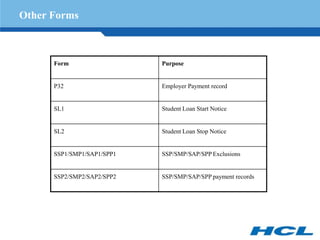
Other Forms


      Form                  Purpose


      P32                   Employer Payment record


      SL1                   Student Loan Start Notice


      SL2                   Student Loan Stop Notice


      SSP1/SMP1/SAP1/SPP1   SSP/SMP/SAP/SPP Exclusions


      SSP2/SMP2/SAP2/SPP2   SSP/SMP/SAP/SPP payment records
e-Filing


   e-Filing refers to the process in which individuals and businesses can communicate electronically with
    government.
   The e-Filing for Great Britain component enables Employer to submit specific electronic forms to the
    Government from SAP system and also retrieve certain forms vice versa electronically via a new
    centralized Government Gateway.
   The e-Filing for Great Britain component is divided into two distinct processes:
     •      e-Filing Incoming
     •      e-Filing Outgoing
   e-Filing Incoming refers to the processing retrieve statutory forms from a Government Department or
    agency via the Government Gateway, store them in SAP system. The information on these forms is updated
    to colleague’s infotype data.
   e-Filing Outgoing refers to the processing to submit statutory forms to the appropriate Government
    department or agency, from SAP system, using the Government Gateway.


                                                       15
e-Filing Incoming Process


The e-filing Incoming process comprises of following steps:
   Communication: XML Documents are retrieved by communicating with the Government Gateway, using the
    report RPUEFI_START_POLL.
   Parsing : The imported XML Document are parsed (converted) into SAP understandable format and stored in
    data structures in SAP.
   Matching: This data is matched to an employee in your SAP system based on the information provided on
    each of the forms.
   Updating: Using Update Manager, data at the employee level is updated to their infotypes


Relevant Infotypes:
e-Filing incoming process updates two infotype records based on the forms received
      •   Infotype Tax Data GB (0065)
      •   Infotype Court Orders/Student Loans (0070) (Subtype CSL)


                                                      16
e-Filing Outgoing Process


   The E - Filing component is integrated with the End-of-Year (EOY) reporting functions available in the
    Payroll Great Britain functionality, allowing to submit EOY data electronically within e-Filing Outgoing
    functionality.
   Following forms can be send using the e-Filing Outgoing for Great Britain component:
     •      P35 - The standard program RPC35CG0 is used to generate and transfer P35. Report RPC35CG0
            electronically fills Parts 3 and 5 of the P35 Form and then EOY report RPCEOYG0 is run to
            electronically submit EOY data to HMRC
     •      P14 - EOY standard report, RPCEOYG0 is executed that electronically submits EOY data to the
            Inland Revenue.
Standard Reports


Report              Purpose


RPUEFO_STARTER      Starter notification


RPCP45GN            Leaver notification


RPUEFO_P46PEN       Pension Starter notification


RPUEFI_START_POLL   Poll Notifications from Govt Gateway


RPCEOYG0            EOY Report
Thank You

Hcm trg uk_py_statutory_forms__e-filing

  • 1.
    Statutory Forms &e-Filing - LAKSHMI
  • 2.
    Statutory Activities –Phases Statutory Reporting & Processing in GB can be categorized into 3 phases Start of year In Year End of year P9(X) P45 P14 P9(T) P46 P35 P46(PEN) P60 P6 P11D P7 P9D 2
  • 3.
    Start-of-Year Process P9 (X)Form – Generic Tax Code Changes  Notice received from HMRC in the beginning of the tax year stating the tax year specific information which is with effect from 6th April of the year.  Specifies the income tax slabs and the rates  Specifies the Threshold for tax calculation  Specifies the change to be made to the employee tax codes tax codes http://www.hmrc.gov.uk/helpsheets/p9x.pdf P9 (T) – Individual Tax Code Changes  Form received from HMRC for individual employees.  Individual tax code details are received in case of any adjustments required for the respective employee. http://www.hmrc.gov.uk/employers/e11-p3.pdf
  • 4.
    In-Year Process  In –year process can be based on the employee life – cycle with the organization which can be broadly categorized into 3 phases Joining Leaving Retirement P45 (Starter) P45 (Leaver) P46 (PEN) P46 P46 (EXPAT)
  • 5.
    In-Year Process P45 –Details of Employee leaving work  P45 is issued when an employee leaves the organisation.  It is a statement of Employee’s Earnings and the Tax deducted from Earnings till that period in the tax year.  A P45 has four parts - Part 1, Part 1A, Part 2 and Part 3.  Employer submits part 1 to HMRC and issues other three parts to employee  Part 1 – Also known as P45 (Leaver) form. Submitted to HMRC by Employer  Part 1A - Issued to Employee for his records  Part 2 – Issued to Employee. Employee submits it to new employer  Part 3 - Also known as P45(Starter) form. It is issued to Employee. Employee submits it to new employer who in turn submits it to HMRC with all the details. http://www.hmrc.gov.uk/forms/p45.pdf
  • 6.
    In-Year Process P46 –Starter Notification  Employee submits P46, in case of - First job - P45 is not received from previous employer  Details provided on this form enables to identify the appropriate tax code for the employee http://www.hmrc.gov.uk/forms/p46.pdf P46 (EXPAT) – Starter Notification  For foreign nationals who are seconded to work in UK while remaining employed by an overseas employer http://www.hmrc.gov.uk/ebu/p46-expat.pdf P46 (PEN)– Pension Starter Notification  To notify HMRC about starting pension payments for an Employee http://www.hmrc.gov.uk/ebu/p46-pension.pdf
  • 7.
    In-Year Process -Other notifications P6 – Individual Tax code Changes  Notice received from HMRC in case of tax code changes for employee during the tax year Ex: Employee declares some additional income to HMRC http://www.hmrc.gov.uk/employers/e13_page31_p6.pdf P7 – Tax code Changes following the budget  Specifies the tax code changes, if any, following the Budget http://www.hmrc.gov.uk/forms/p7x.pdf
  • 8.
    End-of-Year forms Expenses & Benefits forms Annual Returns P9D P14 P11D P35 P11D(b) P38S P38A
  • 9.
    EOY - Expensesand benefits forms  Employer needs to file Expenses and benefits forms for each employee who have received them during the tax year  These forms must be submitted to HMRC by 6 July.  Depending on Employee’s earnings, on of the these forms need to be filed. P9D – Employees earning less than £8500 P11D - Employees earning £8500 or more Threshold £8,500  Includes only the value of the expenses and benefits employee receive from employer  Threshold operates on pro rata basis if the employee works only for part of the year. Ex: If an employee only works for 6 months of the year then P11D is used if their earnings in that period are £4,250 or more. http://www.hmrc.gov.uk/forms/p9d.pdf http://www.hmrc.gov.uk/forms/p11d.pdf
  • 10.
    EOY - Expensesand benefits forms P11D(b)  It must be filed by Employers in the following cases: - Having P11Ds to submit to HMRC at the end of the tax year - Received a form P11D(b) from HMRC  P11D(b) need not be submitted if it is indicated in Employer’s Annual Return (P35) that forms P11D and P11D(b) are not due. http://www.hmrc.gov.uk/forms/p11db.pdf
  • 11.
    EOY – EmployerAnnual Returns  Employer Annual Return is due by 19 May following the end of the tax year.  The Employer Annual Return comprises: - Form P14 - Form P35 - Form P38A P14 – End of the Year Summary  The P14 form is a record of individual Employee Earnings, Tax, NIC, SMP, SSP, Student Loan and Pension contributions, which are sent to the tax office as part of the employer's return.  The two copies of P14 sent in with the returns; one for HMRC, the other sent on to the NI office. http://www.hmrc.gov.uk/ebu/p14-p60-man-2010.pdf
  • 12.
    EOY – EmployerAnnual Returns P35 – Employer’s Annual Return Summary of the end-of-year payroll totals for all of the employees. http://www.hmrc.gov.uk/ebu/p35.pdf P38(S) – Student Employees  To indicate that Employee is a student who only worked during their holidays  If employee is a full-time student with a holiday job, then they need not pay Tax. NI is to be paid if their income is above £110 a week or £476 a month http://www.hmrc.gov.uk/forms/p38s.pdf Form P38A - Employer Supplementary Return  Form P38A need to be submitted to HMRC in case of - Employees for whom P14 is not submitted - Employees for whom P38(S) is not completed during the year http://www.hmrc.gov.uk/forms/p38a.pdf
  • 13.
    EOY – EmployerAnnual Returns P60: End of Year Certificate  Employee’s copy of the summary of his earnings and tax paid for the tax year.  P60 would be required for an individual - to claim any overpaid tax amounts - to apply for tax credits  It acts as a proof of your income while applying for a loan or a mortgage  It confirms an employee's final tax code, year's total Tax deductions and National Insurance contributions and shows their total pension and/or earnings for the year http://www.hmrc.gov.uk/forms/p60.pdf
  • 14.
    Other Forms Form Purpose P32 Employer Payment record SL1 Student Loan Start Notice SL2 Student Loan Stop Notice SSP1/SMP1/SAP1/SPP1 SSP/SMP/SAP/SPP Exclusions SSP2/SMP2/SAP2/SPP2 SSP/SMP/SAP/SPP payment records
  • 15.
    e-Filing  e-Filing refers to the process in which individuals and businesses can communicate electronically with government.  The e-Filing for Great Britain component enables Employer to submit specific electronic forms to the Government from SAP system and also retrieve certain forms vice versa electronically via a new centralized Government Gateway.  The e-Filing for Great Britain component is divided into two distinct processes: • e-Filing Incoming • e-Filing Outgoing  e-Filing Incoming refers to the processing retrieve statutory forms from a Government Department or agency via the Government Gateway, store them in SAP system. The information on these forms is updated to colleague’s infotype data.  e-Filing Outgoing refers to the processing to submit statutory forms to the appropriate Government department or agency, from SAP system, using the Government Gateway. 15
  • 16.
    e-Filing Incoming Process Thee-filing Incoming process comprises of following steps:  Communication: XML Documents are retrieved by communicating with the Government Gateway, using the report RPUEFI_START_POLL.  Parsing : The imported XML Document are parsed (converted) into SAP understandable format and stored in data structures in SAP.  Matching: This data is matched to an employee in your SAP system based on the information provided on each of the forms.  Updating: Using Update Manager, data at the employee level is updated to their infotypes Relevant Infotypes: e-Filing incoming process updates two infotype records based on the forms received • Infotype Tax Data GB (0065) • Infotype Court Orders/Student Loans (0070) (Subtype CSL) 16
  • 17.
    e-Filing Outgoing Process  The E - Filing component is integrated with the End-of-Year (EOY) reporting functions available in the Payroll Great Britain functionality, allowing to submit EOY data electronically within e-Filing Outgoing functionality.  Following forms can be send using the e-Filing Outgoing for Great Britain component: • P35 - The standard program RPC35CG0 is used to generate and transfer P35. Report RPC35CG0 electronically fills Parts 3 and 5 of the P35 Form and then EOY report RPCEOYG0 is run to electronically submit EOY data to HMRC • P14 - EOY standard report, RPCEOYG0 is executed that electronically submits EOY data to the Inland Revenue.
  • 18.
    Standard Reports Report Purpose RPUEFO_STARTER Starter notification RPCP45GN Leaver notification RPUEFO_P46PEN Pension Starter notification RPUEFI_START_POLL Poll Notifications from Govt Gateway RPCEOYG0 EOY Report
  • 19.