How to Tweet
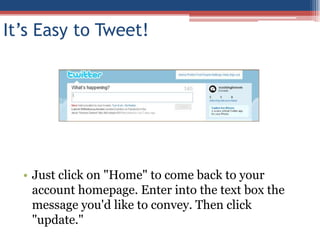
It’s Easy to Tweet!Just click on "Home" to come back to your account homepage. Enter into the text box the message you'd like to convey. Then click “Tweet."
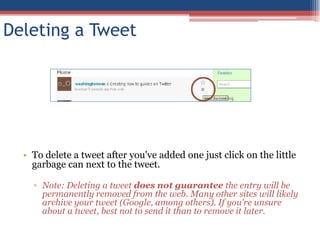
Deleting a TweetTo delete a tweet after you've added one just scroll over it and a “delete” with a garbage will appear. Click on it to delete.
Note: Deleting a tweet does not guarantee the entry will be permanently removed from the web. Many other sites will likely archive your tweet (Google, among others). If you're unsure about a tweet, best not to send it than to remove it later.Twitter Vocabulary: RT or RetweetRT stands for "Retweet" which allows you to copy what someone else said. You simply type "RT @" + [the user you are retweeting] + [the comment you are retweeting].
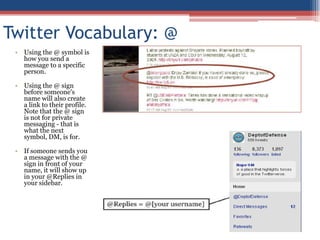
You can also click on “Retweet” to do it automatically.Twitter Vocabulary: @Using the @ symbol is how you send a message to a specific person.
Using the @ sign before someone's name will also create a link to their profile. Note that the @ sign is not for private messaging - that is what the next symbol, DM, is for.
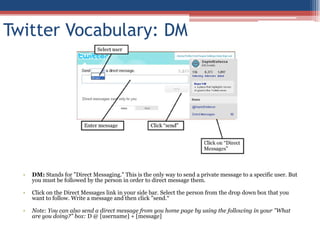
If someone sends you a message with the @ sign in front of your name, it will show up in your @Replies in your sidebar.Twitter Vocabulary: DMDM: Stands for "Direct Messaging." This is the only way to send a private message to a specific user. But you must be followed by the person in order to direct message them.
Click on the Direct Messages link in your side bar. Select the person from the drop down box that you want to follow. Write a message and then click "send.“
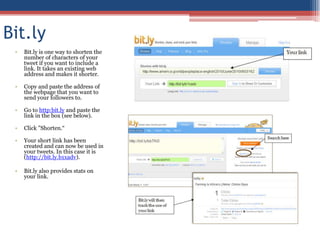
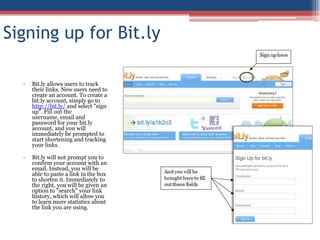
Note: You can also send a direct message from you home page by using the following in your "What are you doing?" box: D @ [username] + [message]Bit.ly and Go.USA.govBit.ly is one way to shorten the number of characters of your tweet if you want to include a link. It takes an existing web address and makes it shorter.
Go.USA.gov is another URL shortener, but it requires the long URL to be a .gov or .mil domain.
Copy and paste the address of the webpage that you want to send your followers to.
Go to bit.ly or Go.USA.gov and paste the link in the box.
Click "Shorten.”

How To Tweet

  • 1.
  • 2.
    It’s Easy toTweet!Just click on "Home" to come back to your account homepage. Enter into the text box the message you'd like to convey. Then click “Tweet."
  • 3.
    Deleting a TweetTodelete a tweet after you've added one just scroll over it and a “delete” with a garbage will appear. Click on it to delete.
  • 4.
    Note: Deleting atweet does not guarantee the entry will be permanently removed from the web. Many other sites will likely archive your tweet (Google, among others). If you're unsure about a tweet, best not to send it than to remove it later.Twitter Vocabulary: RT or RetweetRT stands for "Retweet" which allows you to copy what someone else said. You simply type "RT @" + [the user you are retweeting] + [the comment you are retweeting].
  • 5.
    You can alsoclick on “Retweet” to do it automatically.Twitter Vocabulary: @Using the @ symbol is how you send a message to a specific person.
  • 6.
    Using the @sign before someone's name will also create a link to their profile. Note that the @ sign is not for private messaging - that is what the next symbol, DM, is for.
  • 7.
    If someone sendsyou a message with the @ sign in front of your name, it will show up in your @Replies in your sidebar.Twitter Vocabulary: DMDM: Stands for "Direct Messaging." This is the only way to send a private message to a specific user. But you must be followed by the person in order to direct message them.
  • 8.
    Click on theDirect Messages link in your side bar. Select the person from the drop down box that you want to follow. Write a message and then click "send.“
  • 9.
    Note: You canalso send a direct message from you home page by using the following in your "What are you doing?" box: D @ [username] + [message]Bit.ly and Go.USA.govBit.ly is one way to shorten the number of characters of your tweet if you want to include a link. It takes an existing web address and makes it shorter.
  • 10.
    Go.USA.gov is anotherURL shortener, but it requires the long URL to be a .gov or .mil domain.
  • 11.
    Copy and pastethe address of the webpage that you want to send your followers to.
  • 12.
    Go to bit.lyor Go.USA.gov and paste the link in the box.
  • 13.