Hadoop


    Rahul Jain
    Software Engineer
    http://www.linkedin.com/in/rahuldausa


                                      1
Agenda
• Hadoop
   –   Introduction
   –   Hadoop (Why)
   –   Hadoop History
   –   Uses of Hadoop
   –   High Level Architecture
   –   Map-Reduce
• HDFS
   – GFS (Google File System)
   – HDFS Architecture
• Installation/Configuration
• Examples

                                     2
Introduction
 An open source software framework
 Supports Data intensive Distributed Applications.
 Enables Application to work thousand of computational
  independent computers and petabytes of data.
 Derived from Google’s Map-Reduce and Google File System
  papers.
 Written in the Java Programming Language.
 Started by Doug Cutting, who named it after his son’s toy
  elephant to support distribution for the Nutch ( A sub-project
  of Lucene)


                                                                   3
Hadoop (Why)
• Need to process huge datasets on large no. of computers.
• It is expensive to build reliability into each application.
• Nodes fails everyday
        - Failure is expected, rather than exceptional.
- Need common infrastructure
   - Efficient, reliable, easy to use.
   - Open sourced , Apache License


                                                                4
Hadoop History
•   Dec 2004 – Google GFS paper published
•   July 2005 – Nutch uses Map-Reduce
•   Jan 2006 – Doug Cutting joins Yahoo!
•   Feb 2006 – Become Lucene Subproject
•   Apr 2007 – Yahoo! On 1000 node cluster
•   Jan 2008 – An Apache Top Level Project
•   Feb 2008 – Yahoo Production search index

                                               5
What is Hadoop Used for ?
•   Searching (Yahoo)
•   Log Processing
•   Recommendation Systems (Facebook, LinkedIn, eBay, Amazon)
•   Analytics(Facebook, LinkedIn)
•   Video and Image Analysis (NASA)
•   Data Retention


                                                            6
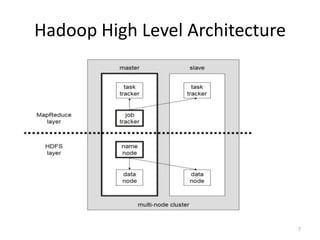
Hadoop High Level Architecture


                                 7
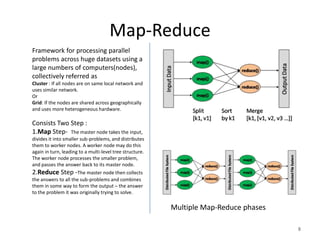
Map-Reduce
Framework for processing parallel
problems across huge datasets using a
large numbers of computers(nodes),
collectively referred as
Cluster : If all nodes are on same local network and
uses similar network.
Or
Grid: If the nodes are shared across geographically
and uses more heterogeneous hardware.

Consists Two Step :
1.Map Step- The master node takes the input,
divides it into smaller sub-problems, and distributes
them to worker nodes. A worker node may do this
again in turn, leading to a multi-level tree structure.
The worker node processes the smaller problem,
and passes the answer back to its master node.
2.Reduce Step -The master node then collects
the answers to all the sub-problems and combines
them in some way to form the output – the answer
to the problem it was originally trying to solve.

                                                          Multiple Map-Reduce phases

                                                                                       8
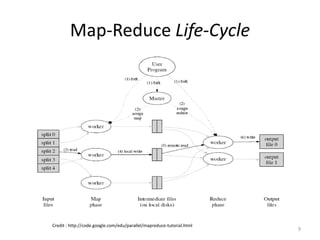
Map-Reduce Life-Cycle


Credit : http://code.google.com/edu/parallel/mapreduce-tutorial.html
                                                                       9
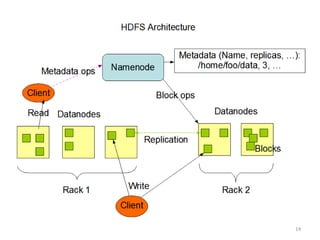
HDFS
Hadoop Distributed File System


                                 10
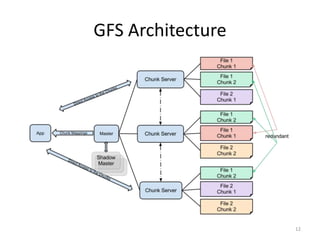
Lets Understand GFS first …
               Google File System


                                    11
GFS Architecture


                   12
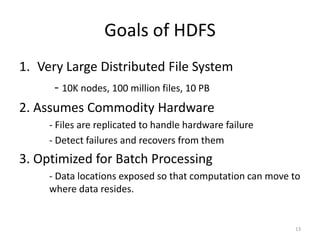
Goals of HDFS
1. Very Large Distributed File System
      - 10K nodes, 100 million files, 10 PB
2. Assumes Commodity Hardware
      - Files are replicated to handle hardware failure
      - Detect failures and recovers from them
3. Optimized for Batch Processing
      - Data locations exposed so that computation can move to
      where data resides.


                                                            13
14
Installation/ Configuration
  [rjain@10.1.110.12 hadoop-1.0.3]$ vi conf/hdfs-site.xml     [rjain@10.1.110.12 hadoop-1.0.3]$ pwd
  <configuration>                                             /home/rjain/hadoop-1.0.3
  <property>
       <name>dfs.replication</name>
                                                              [rjain@10.1.110.12 hadoop-1.0.3]$ bin/start-all.sh
       <value>1</value>
      </property>                                             [rjain@10.1.110.12 hadoop-1.0.3]$ bin/start-mapred.sh
   <property>
      <name>dfs.permissions</name>
                                                              [rjain@10.1.110.12 hadoop-1.0.3]$ bin/start-dfs.sh
      <value>true</value>
      </property>                                             [rjain@10.1.110.12 hadoop-1.0.3]$ bin/hadoop fs
  <property>                                                  Usage: java FsShell
     <name>dfs.data.dir</name>                                      [-ls <path>]
     <value>/home/rjain/rahul/hdfs/data</value>                     [-lsr <path>] : Recursive version of ls. Similar to Unix ls -R.
    </property>                                                     [-du <path>] : Displays aggregate length of files contained in the directory or the length of a file.
    <property>                                                      [-dus <path>] : Displays a summary of file lengths.
     <name>dfs.name.dir</name>                                      [-count[-q] <path>]
     <value>/home/rjain/rahul/hdfs/name</value>                     [-mv <src> <dst>]
    </property>                                                     [-cp <src> <dst>]
  </configuration>                                                  [-rm [-skipTrash] <path>]
                                                                    [-rmr [-skipTrash] <path>] : Recursive version of delete(rm).
  [rjain@10.1.110.12 hadoop-1.0.3]$ vi conf/mapred-site.xml         [-expunge] : Empty the Trash
  <configuration>                                                   [-put <localsrc> ... <dst>] : Copy single src, or multiple srcs from local file system to the
      <property>                                              destination filesystem
           <name>mapred.job.tracker</name>                          [-copyFromLocal <localsrc> ... <dst>]
           <value>localhost:9001</value>                            [-moveFromLocal <localsrc> ... <dst>]
      </property>                                                   [-get [-ignoreCrc] [-crc] <src> <localdst>]
  </configuration>                                                  [-getmerge <src> <localdst> [addnl]]
                                                                    [-cat <src>]
  [rjain@10.1.110.12 hadoop-1.0.3]$ vi conf/core-site.xml           [-text <src>] : Takes a source file and outputs the file in text format. The allowed formats are zip
  <configuration>                                             and TextRecordInputStream.
      <property>                                                    [-copyToLocal [-ignoreCrc] [-crc] <src> <localdst>]
           <name>fs.default.name</name>                             [-moveToLocal [-crc] <src> <localdst>]
            <value>hdfs://localhost:9000</value>                    [-mkdir <path>]
      </property>                                                   [-setrep [-R] [-w] <rep> <path/file>] : Changes the replication factor of a file
  </configuration>                                                  [-touchz <path>] : Create a file of zero length.
                                                                    [-test -[ezd] <path>] : -e check to see if the file exists. Return 0 if true. -z check to see if the file is
[rjain@10.1.110.12 hadoop-1.0.3]$ jps                         zero length. Return 0 if true. -d check to see if the path is directory. Return 0 if true.
29756 SecondaryNameNode                                             [-stat [format] <path>] : Returns the stat information on the path like created time of dir
19847 TaskTracker                                                   [-tail [-f] <file>] : Displays last kilobyte of the file to stdout
18756 Jps                                                           [-chmod [-R] <MODE[,MODE]... | OCTALMODE> PATH...]
29483 NameNode                                                      [-chown [-R] [OWNER][:[GROUP]] PATH...]
29619 DataNode                                                      [-chgrp [-R] GROUP PATH...]                                                                       15
19711 JobTracker                                                    [-help [cmd]]
HDFS- Read/Write Example
Configuration conf = new Configuration();
FileSystem fs = FileSystem.get(conf);

Given an input/output file name as string, we construct inFile/outFile Path objects.
Most of the FileSystem APIs accepts Path objects.

Path inFile = new Path(argv[0]);
Path outFile = new Path(argv[1]);

Validate the input/output paths before reading/writing.

if (!fs.exists(inFile))
  printAndExit("Input file not found");
if (!fs.isFile(inFile))
  printAndExit("Input should be a file");
if (fs.exists(outFile))
  printAndExit("Output already exists");

Open inFile for reading.

FSDataInputStream in = fs.open(inFile);

Open outFile for writing.

FSDataOutputStream out = fs.create(outFile);

Read from input stream and write to output stream until EOF.

while ((bytesRead = in.read(buffer)) > 0) {
  out.write(buffer, 0, bytesRead);
}

Close the streams when done.

in.close();
out.close();
                                                                                       16
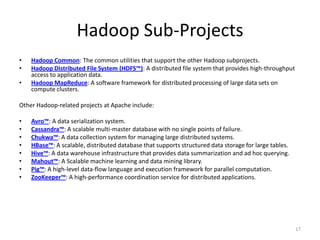
Hadoop Sub-Projects
•   Hadoop Common: The common utilities that support the other Hadoop subprojects.
•   Hadoop Distributed File System (HDFS™): A distributed file system that provides high-throughput
    access to application data.
•   Hadoop MapReduce: A software framework for distributed processing of large data sets on
    compute clusters.

Other Hadoop-related projects at Apache include:

•   Avro™: A data serialization system.
•   Cassandra™: A scalable multi-master database with no single points of failure.
•   Chukwa™: A data collection system for managing large distributed systems.
•   HBase™: A scalable, distributed database that supports structured data storage for large tables.
•   Hive™: A data warehouse infrastructure that provides data summarization and ad hoc querying.
•   Mahout™: A Scalable machine learning and data mining library.
•   Pig™: A high-level data-flow language and execution framework for parallel computation.
•   ZooKeeper™: A high-performance coordination service for distributed applications.


                                                                                                       17
Questions ?


              18

Hadoop & HDFS for Beginners

  • 1.
    Hadoop Rahul Jain Software Engineer http://www.linkedin.com/in/rahuldausa 1
  • 2.
    Agenda • Hadoop – Introduction – Hadoop (Why) – Hadoop History – Uses of Hadoop – High Level Architecture – Map-Reduce • HDFS – GFS (Google File System) – HDFS Architecture • Installation/Configuration • Examples 2
  • 3.
    Introduction  An opensource software framework  Supports Data intensive Distributed Applications.  Enables Application to work thousand of computational independent computers and petabytes of data.  Derived from Google’s Map-Reduce and Google File System papers.  Written in the Java Programming Language.  Started by Doug Cutting, who named it after his son’s toy elephant to support distribution for the Nutch ( A sub-project of Lucene) 3
  • 4.
    Hadoop (Why) • Needto process huge datasets on large no. of computers. • It is expensive to build reliability into each application. • Nodes fails everyday - Failure is expected, rather than exceptional. - Need common infrastructure - Efficient, reliable, easy to use. - Open sourced , Apache License 4
  • 5.
    Hadoop History • Dec 2004 – Google GFS paper published • July 2005 – Nutch uses Map-Reduce • Jan 2006 – Doug Cutting joins Yahoo! • Feb 2006 – Become Lucene Subproject • Apr 2007 – Yahoo! On 1000 node cluster • Jan 2008 – An Apache Top Level Project • Feb 2008 – Yahoo Production search index 5
  • 6.
    What is HadoopUsed for ? • Searching (Yahoo) • Log Processing • Recommendation Systems (Facebook, LinkedIn, eBay, Amazon) • Analytics(Facebook, LinkedIn) • Video and Image Analysis (NASA) • Data Retention 6
  • 7.
    Hadoop High LevelArchitecture 7
  • 8.
    Map-Reduce Framework for processingparallel problems across huge datasets using a large numbers of computers(nodes), collectively referred as Cluster : If all nodes are on same local network and uses similar network. Or Grid: If the nodes are shared across geographically and uses more heterogeneous hardware. Consists Two Step : 1.Map Step- The master node takes the input, divides it into smaller sub-problems, and distributes them to worker nodes. A worker node may do this again in turn, leading to a multi-level tree structure. The worker node processes the smaller problem, and passes the answer back to its master node. 2.Reduce Step -The master node then collects the answers to all the sub-problems and combines them in some way to form the output – the answer to the problem it was originally trying to solve. Multiple Map-Reduce phases 8
  • 9.
    Map-Reduce Life-Cycle Credit :http://code.google.com/edu/parallel/mapreduce-tutorial.html 9
  • 10.
  • 11.
    Lets Understand GFSfirst … Google File System 11
  • 12.
  • 13.
    Goals of HDFS 1.Very Large Distributed File System - 10K nodes, 100 million files, 10 PB 2. Assumes Commodity Hardware - Files are replicated to handle hardware failure - Detect failures and recovers from them 3. Optimized for Batch Processing - Data locations exposed so that computation can move to where data resides. 13
  • 14.
  • 15.
    Installation/ Configuration [rjain@10.1.110.12 hadoop-1.0.3]$ vi conf/hdfs-site.xml [rjain@10.1.110.12 hadoop-1.0.3]$ pwd <configuration> /home/rjain/hadoop-1.0.3 <property> <name>dfs.replication</name> [rjain@10.1.110.12 hadoop-1.0.3]$ bin/start-all.sh <value>1</value> </property> [rjain@10.1.110.12 hadoop-1.0.3]$ bin/start-mapred.sh <property> <name>dfs.permissions</name> [rjain@10.1.110.12 hadoop-1.0.3]$ bin/start-dfs.sh <value>true</value> </property> [rjain@10.1.110.12 hadoop-1.0.3]$ bin/hadoop fs <property> Usage: java FsShell <name>dfs.data.dir</name> [-ls <path>] <value>/home/rjain/rahul/hdfs/data</value> [-lsr <path>] : Recursive version of ls. Similar to Unix ls -R. </property> [-du <path>] : Displays aggregate length of files contained in the directory or the length of a file. <property> [-dus <path>] : Displays a summary of file lengths. <name>dfs.name.dir</name> [-count[-q] <path>] <value>/home/rjain/rahul/hdfs/name</value> [-mv <src> <dst>] </property> [-cp <src> <dst>] </configuration> [-rm [-skipTrash] <path>] [-rmr [-skipTrash] <path>] : Recursive version of delete(rm). [rjain@10.1.110.12 hadoop-1.0.3]$ vi conf/mapred-site.xml [-expunge] : Empty the Trash <configuration> [-put <localsrc> ... <dst>] : Copy single src, or multiple srcs from local file system to the <property> destination filesystem <name>mapred.job.tracker</name> [-copyFromLocal <localsrc> ... <dst>] <value>localhost:9001</value> [-moveFromLocal <localsrc> ... <dst>] </property> [-get [-ignoreCrc] [-crc] <src> <localdst>] </configuration> [-getmerge <src> <localdst> [addnl]] [-cat <src>] [rjain@10.1.110.12 hadoop-1.0.3]$ vi conf/core-site.xml [-text <src>] : Takes a source file and outputs the file in text format. The allowed formats are zip <configuration> and TextRecordInputStream. <property> [-copyToLocal [-ignoreCrc] [-crc] <src> <localdst>] <name>fs.default.name</name> [-moveToLocal [-crc] <src> <localdst>] <value>hdfs://localhost:9000</value> [-mkdir <path>] </property> [-setrep [-R] [-w] <rep> <path/file>] : Changes the replication factor of a file </configuration> [-touchz <path>] : Create a file of zero length. [-test -[ezd] <path>] : -e check to see if the file exists. Return 0 if true. -z check to see if the file is [rjain@10.1.110.12 hadoop-1.0.3]$ jps zero length. Return 0 if true. -d check to see if the path is directory. Return 0 if true. 29756 SecondaryNameNode [-stat [format] <path>] : Returns the stat information on the path like created time of dir 19847 TaskTracker [-tail [-f] <file>] : Displays last kilobyte of the file to stdout 18756 Jps [-chmod [-R] <MODE[,MODE]... | OCTALMODE> PATH...] 29483 NameNode [-chown [-R] [OWNER][:[GROUP]] PATH...] 29619 DataNode [-chgrp [-R] GROUP PATH...] 15 19711 JobTracker [-help [cmd]]
  • 16.
    HDFS- Read/Write Example Configurationconf = new Configuration(); FileSystem fs = FileSystem.get(conf); Given an input/output file name as string, we construct inFile/outFile Path objects. Most of the FileSystem APIs accepts Path objects. Path inFile = new Path(argv[0]); Path outFile = new Path(argv[1]); Validate the input/output paths before reading/writing. if (!fs.exists(inFile)) printAndExit("Input file not found"); if (!fs.isFile(inFile)) printAndExit("Input should be a file"); if (fs.exists(outFile)) printAndExit("Output already exists"); Open inFile for reading. FSDataInputStream in = fs.open(inFile); Open outFile for writing. FSDataOutputStream out = fs.create(outFile); Read from input stream and write to output stream until EOF. while ((bytesRead = in.read(buffer)) > 0) { out.write(buffer, 0, bytesRead); } Close the streams when done. in.close(); out.close(); 16
  • 17.
    Hadoop Sub-Projects • Hadoop Common: The common utilities that support the other Hadoop subprojects. • Hadoop Distributed File System (HDFS™): A distributed file system that provides high-throughput access to application data. • Hadoop MapReduce: A software framework for distributed processing of large data sets on compute clusters. Other Hadoop-related projects at Apache include: • Avro™: A data serialization system. • Cassandra™: A scalable multi-master database with no single points of failure. • Chukwa™: A data collection system for managing large distributed systems. • HBase™: A scalable, distributed database that supports structured data storage for large tables. • Hive™: A data warehouse infrastructure that provides data summarization and ad hoc querying. • Mahout™: A Scalable machine learning and data mining library. • Pig™: A high-level data-flow language and execution framework for parallel computation. • ZooKeeper™: A high-performance coordination service for distributed applications. 17
  • 18.