
IAIK
iOS Encryption Systems
SECRYPT 2013
Peter Teufl, Thomas Zefferer,
Christof Stromberger, Christoph Hechenblaikner
IAIK
TOC
Analysis
iOS Encryption Systems:
Device encryption (file-system)
Data Protection (files, credentials)
Backup (iTunes plain, iTunes encrypted, iCloud)
Workflow
IAIK
Encryption on Smartphones
Why do we need it?
Data protection (application files and credentials)
Remote Wiping: without encryption not feasible (takes too much time)
Where to place the encryption system?
Operating system: iOS, Windows Phone, QNX, Android
Smartphone applications: container applications, BYOD!
IAIK
Encryption support: iOS, Blackberry OS, Android (>= 3.x), Windows Phone
Every platform supports it... Done?
IAIK
There is More Than Marketing
Purpose: What’s the purpose of the encryption system?
Encryption scope: Which data is encrypted, and how many keys are used?
Key details: Where is the key, and how is it derived?
Locked state: How does the encryption system behave when the phone is locked?
How does the system handle incoming data?
Implementation: Hardware? Software?
Attacks: How can the system be attacked? Where are the weak points?
MDM: Mobile Device Management: enforce encryption, manage its PINs
Security: Complex systems, many mistakes can be made, key escrow???
IAIK
Analysis Scope
Security officer’s perspective
Deploying the iOS platform in a security-critical environment
Main threat: theft (targeted attack)
MDM rules, selected applications
BYOD?
Criteria: developer, configuration, key derivation
Workflow for the security officer
IAIK
iOS - Encryption
Two encryption systems:
Device encryption (file-system):
Introduced with IOS 3 and the iPhone 3GS, based on a chip
Data protection (individual files and credentials):
Introduced with IOS 4, is an addition to the first one, improved in IOS 5
(new classes, better keychain protection)
Backup:
iTunes, iCloud: Encrypting backups and its consequences
IAIK
iOS - Encryption
Secure
Element
AES Key
Filesystem
Key
File system
Operating
system
Application
1
File 1
JailBreak
Remote Wipe
PIN/Passcode
File 2
Application
2
Application
3
File 3
File 4 File 5
Data
protection
class keys
File system encryption
Not dependent on
PIN/Passcode
Data Protection
Per-file, dependent on PIN/Passcode and
Secure Element key
Key Derivation
Developer's Choice!!!
file system encryption
Data Protection system
Details
IAIK
iOS - Device Encryption
First system: file-system encryption
File-system encryption keys protected via key that is stored on hardware
chip
PIN/Passcode is NOT used for key derivation
When the phone is stolen: apply jailbreak to circumvent PIN protection,
system decrypts the data for you
Thus: Only makes sense for fast remote wiping
Details
IAIK
iOS - Device Encryption - Attacks
Developer, Configuration:
no Influence, system is always active
Key Derivation:
not tied to the screen lock passcode
(only protected via key in hardware element)
Jailbreaking allows direct access to file-system
Attacks
IAIK
iOS - Encryption
Secure
Element
AES Key
Filesystem
Key
File system
Operating
system
Application
1
File 1
JailBreak
Remote Wipe
PIN/Passcode
File 2
Application
2
Application
3
File 3
File 4 File 5
Data
protection
class keys
File system encryption
Not dependent on
PIN/Passcode
Data Protection
Per-file, dependent on PIN/Passcode and
Secure Element key
Key Derivation
Developer's Choice!!!
file system encryption
Data Protection system
Details
IAIK
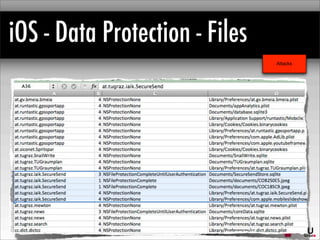
iOS - Data Protection - Files
Second system: Data Protection
In addition to device encryption
Protecting specific application files
(e.g. emails, the PDF files within a PDF reader application etc.)
Unique file keys, stored encrypted in the extended attributes of the file
Different protection classes defined by the developer (!)
Details
IAIK
iOS - Data Protection - Files
Protection classes:
NSProtection{None}: File encryption keys protected with “Device
Encryption keys”, thus no real protection
For all the others: File encryption keys encrypted with a key that is derived
from the UID key and from the PIN/passcode
NSProtection: {Complete, UntilFirstUserAuthentication, UnlessOpen}
Details
IAIK
iOS - Data Protection - Files
Problem:
Protection class defined by the developer.
The user/admin does not know which apps encrypt their data
Consider:
Getting an email with a PDF (email app uses data protection), and
opening the email in an PDF reader that does not encrypt the data...
Details
IAIK
iOS - Data Protection - Files
Developer
needs to chose correct protection class (better than NONE!)
Configuration:
strength of passcode (MDM rule)
admin/user do not know which application files are protected correctly!
Attacks
IAIK
iOS - Data Protection - Files
Attacks
Data Protection analysis tool
Analyzes iOS backups and extracts the protection classes
Allows an administrator/user to determine whether the application uses the Data
Protection system
Available at:
https://github.com/ciso/ios-dataprotection/
++++ easy to use, protection classes can be extracted
- - - - only those files that are in the backup are analyzed
IAIK
iOS - Data Protection - Files
Attacks
IAIK
iOS - Data Protection - Files
Attacks
Key Derivation:
tied to the screen lock passcode and the
hardware element
on-device brute-force attack
(after jailbreaking - if possible...)
for files protected with NONE: same security
level as file-system only
Data encryption
key
Key
derivation
Derived key
Hardware
element
Passcode Salt
IAIK
iOS - Data Protection - FilesLock-Screen
Type Length Chars
Number of
passcodes
Brute-Force
Days
Numerical 4 10 10000 0.0
5 10 100000 0.1
6 10 1000000 0.9
7 10 10000000 9.3
8 10 100000000 92.6
10 10 10000000000 9,259.3
Alphanum 4 36 1679616 1.6
5 36 60466176 56.0
10/26 letters 6 36 2176782336 2,015.5
7 36 78364164096 72,559.4
8 36 2.82111E+12 2,612,138.8
9 36 1.0156E+14 94,036,996.9
Alphanum 4 62 14776336 13.7
5 62 916132832 848.3
10/52 letters 6 62 56800235584 52,592.8
7 62 3.52161E+12 3,260,754.3
8 62 2.1834E+14 202,166,764.4
9 62 1.35371E+16 12,534,339,394.7
Complex 4 107 131079601 121.4
5 107 14025517307 12,986.6
6 107 1.50073E+12 1,389,565.1
7 107 1.60578E+14 148,683,470.0
8 107 1.71819E+16 15,909,131,294.7
Attacks
Data encryption
key
Key
derivation
Derived key
Hardware
element
Passcode Salt
80 ms per
derivation
IAIK
iOS - Data Protection - Keychain
Keychain: used to store credentials
(passwords, private keys, certificates etc.)
Protection Classes:
Always (!) (similar to NONE for files)
AfterFirstUnlock (UntilFirstUserAuthentication)
WhenUnlocked (Complete)
also in a “ThisDeviceOnly” version (not included in backups)
IOS 4: only the secret was protected, not the usernames etc.
since IOS 5: every aspect is encrypted
Details
IAIK
iOS - Data Protection - Keychain
Developer
needs to chose correct protection class (better than NONE!)
needs to consider whether credential should be transferable to another device
(more on that later)
Configuration:
strength of passcode (MDM rule)
admin/user do not know which application credentials are protected correctly!
Key derivation:
same considerations as for files
Attacks
IAIK
iOS - Backups
ITunes
encrypted backups, plain backups
iCloud
somehow encrypted...
How to mark a file for Backup?
Default is “yes”
Marked files are transferred to iTunes, iCloud backups when activated
How to mark a credential for backup?
Protection class
Details
IAIK
iTunes - Plain Backups
Files stored in plain
Credentials are also
stored encrypted!
Encryption key is stored on the iOS device
Thus: Credentials in plain backups cannot be restored on other devices
As a result: credentials are better protected in unencrypted iTunes backups
than in encrypted ones!
Files
Credentials
Encryption Key
Plain iTunes BackupiOS Device
Files
Credentials
marked for backup
Details
IAIK
iTunes - Plain Backups
Developer
files: needs to choose whether files are in backup
Keychain entries: needs to chose right protection class
Configuration:
Backup device security!
Key derivation:
Does not apply to files
Keychain entries cannot be decrypted without iOS device
Attacks
IAIK
iTunes - Encrypted Backups
User passcode (no MDM
influence), derived key
Files and credentials protected
via the derived key
Credentials can be restored on other iOS devices (protection class!)
Problem:
Brute-force attack on weak passwords, when backup is stolen
Protection for keys is acutally weaker than in plain iTunes Backups (!!!)
Files
Credentials
Plain iTunes BackupiOS Device
Files
Credentials
marked for backup
Backup
Encryption Key
User
Password
Derived
Encryption Key
KDF
Details
IAIK
iTunes - Encrypted Backups
Developer
files: needs to choose whether files are in backup
Keychain entries: needs to chose right protection class
Configuration:
Backup device security!
Can be enforced, but no influence on backup passcode!
Key derivation:
Off-device brute-force attack on backup passcode
Files AND Keychain entries can be decrypted
Attacks
IAIK
iCloud - Backups
iCloud backups and iCloud sync
Protection via passcode selected by the user (no MDM influence, except for
deactivating iCloud backups and sync)
If attacker gains access to this account, the backup can be restored
Details about the iCloud encryption process are not known
Data on iCloud: similar to security considerations required as for other cloud
providers (DropBox etc.)
Details
IAIK
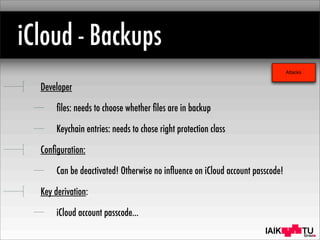
iCloud - Backups
Developer
files: needs to choose whether files are in backup
Keychain entries: needs to chose right protection class
Configuration:
Can be deactivated! Otherwise no influence on iCloud account passcode!
Key derivation:
iCloud account passcode...
Attacks
IAIK
Workflow
Application
File protection
class analysis
KeyChain
protection
class analysis
Files with class
NsFileProtectionNone
Files with other
classes
Passcode
circumvention via
Jailbreaking/
Rooting
KeyChain entries with
Always/
AlwaysDeviceOnly
Passcode
circumvention via
Jailbreaking/
Rooting
On-device
brute-force attack
No-off device
attacks possible
KeyChain entries
with safe classes
On-device
brute-force attack
File backup
state analysis
Files in backupNo files in backup
No-off device
attacks possible
KeyChain
backup state
analysis
All credentials with
thisDeviceOnly
classes
Credentials with
transferable classes
ApplicationApplication
System
Security
Analysis
Passcode selection
based on brute-
force times
Passcode selection
based on brute-
force times
Minor risk
Medium risk
High risk
Analysis/Tool
IAIK
Workflow
Files in backup
iCloud
account
security
Standard
iTunes
backup?
iCloud
backup?
Encrypted
iTunes
backup?
Critical data
at cloud
provider
Off-device
brute-force
attack
Direct file
access on
backup
device
IAIK
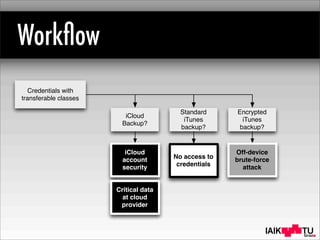
Workflow
Credentials with
transferable classes
iCloud
account
security
Standard
iTunes
backup?
iCloud
Backup?
Encrypted
iTunes
backup?
Off-device
brute-force
attack
Critical data
at cloud
provider
No access to
credentials
IAIK
IAIKpeter.teufl@iaik.tugraz.at
IAIK
Android - Device Encryption
Filesystem
Key
File system
Operating
system
Application
1
File 1
Remote Wipe
PIN/Passcode
File 2
Application
2
Application
3
File 3
File 4 File 5
File system
encryption
Key
Derivation
Differences to iOS file-system encryption:
PIN/passcode during boot process
But no hardware chip is involved
IAIK
iOS
standard
iOS
data protection
Android
> 3.x
Blackberry Windows Phone
Purpose? remote wipe data, credentials prot. data, cred. pr. data cred. pr. ?
Scope? filesystem files filesystem ? WP7: files WP8: file-system
Key storage? SE, RAM SE, RAM disk, RAM disk, RAM (?) ? (no)
Encrytion keys
available during lock?
yes no yes no ?
Key derivation? SE SE, PIN PIN PIN (?) ?
Brute-Force? - on device off device off device ?
Activated by? always developer/user (PIN) user (settings) policies, user developer ?
User/admin? - no yes yes ?
Issues
jailbreak danger
only for remote
wipe
developer decides!
user does not know state
manual
activation
keys remain in
RAM
no classes
? ?
Encryption Overview
IAIK
IOS - Data Protection

IOS Encryption Systems

  • 1.
    IAIK iOS Encryption Systems SECRYPT2013 Peter Teufl, Thomas Zefferer, Christof Stromberger, Christoph Hechenblaikner
  • 2.
    IAIK TOC Analysis iOS Encryption Systems: Deviceencryption (file-system) Data Protection (files, credentials) Backup (iTunes plain, iTunes encrypted, iCloud) Workflow
  • 3.
    IAIK Encryption on Smartphones Whydo we need it? Data protection (application files and credentials) Remote Wiping: without encryption not feasible (takes too much time) Where to place the encryption system? Operating system: iOS, Windows Phone, QNX, Android Smartphone applications: container applications, BYOD!
  • 4.
    IAIK Encryption support: iOS,Blackberry OS, Android (>= 3.x), Windows Phone Every platform supports it... Done?
  • 5.
    IAIK There is MoreThan Marketing Purpose: What’s the purpose of the encryption system? Encryption scope: Which data is encrypted, and how many keys are used? Key details: Where is the key, and how is it derived? Locked state: How does the encryption system behave when the phone is locked? How does the system handle incoming data? Implementation: Hardware? Software? Attacks: How can the system be attacked? Where are the weak points? MDM: Mobile Device Management: enforce encryption, manage its PINs Security: Complex systems, many mistakes can be made, key escrow???
  • 6.
    IAIK Analysis Scope Security officer’sperspective Deploying the iOS platform in a security-critical environment Main threat: theft (targeted attack) MDM rules, selected applications BYOD? Criteria: developer, configuration, key derivation Workflow for the security officer
  • 7.
    IAIK iOS - Encryption Twoencryption systems: Device encryption (file-system): Introduced with IOS 3 and the iPhone 3GS, based on a chip Data protection (individual files and credentials): Introduced with IOS 4, is an addition to the first one, improved in IOS 5 (new classes, better keychain protection) Backup: iTunes, iCloud: Encrypting backups and its consequences
  • 8.
    IAIK iOS - Encryption Secure Element AESKey Filesystem Key File system Operating system Application 1 File 1 JailBreak Remote Wipe PIN/Passcode File 2 Application 2 Application 3 File 3 File 4 File 5 Data protection class keys File system encryption Not dependent on PIN/Passcode Data Protection Per-file, dependent on PIN/Passcode and Secure Element key Key Derivation Developer's Choice!!! file system encryption Data Protection system Details
  • 9.
    IAIK iOS - DeviceEncryption First system: file-system encryption File-system encryption keys protected via key that is stored on hardware chip PIN/Passcode is NOT used for key derivation When the phone is stolen: apply jailbreak to circumvent PIN protection, system decrypts the data for you Thus: Only makes sense for fast remote wiping Details
  • 10.
    IAIK iOS - DeviceEncryption - Attacks Developer, Configuration: no Influence, system is always active Key Derivation: not tied to the screen lock passcode (only protected via key in hardware element) Jailbreaking allows direct access to file-system Attacks
  • 11.
    IAIK iOS - Encryption Secure Element AESKey Filesystem Key File system Operating system Application 1 File 1 JailBreak Remote Wipe PIN/Passcode File 2 Application 2 Application 3 File 3 File 4 File 5 Data protection class keys File system encryption Not dependent on PIN/Passcode Data Protection Per-file, dependent on PIN/Passcode and Secure Element key Key Derivation Developer's Choice!!! file system encryption Data Protection system Details
  • 12.
    IAIK iOS - DataProtection - Files Second system: Data Protection In addition to device encryption Protecting specific application files (e.g. emails, the PDF files within a PDF reader application etc.) Unique file keys, stored encrypted in the extended attributes of the file Different protection classes defined by the developer (!) Details
  • 13.
    IAIK iOS - DataProtection - Files Protection classes: NSProtection{None}: File encryption keys protected with “Device Encryption keys”, thus no real protection For all the others: File encryption keys encrypted with a key that is derived from the UID key and from the PIN/passcode NSProtection: {Complete, UntilFirstUserAuthentication, UnlessOpen} Details
  • 14.
    IAIK iOS - DataProtection - Files Problem: Protection class defined by the developer. The user/admin does not know which apps encrypt their data Consider: Getting an email with a PDF (email app uses data protection), and opening the email in an PDF reader that does not encrypt the data... Details
  • 15.
    IAIK iOS - DataProtection - Files Developer needs to chose correct protection class (better than NONE!) Configuration: strength of passcode (MDM rule) admin/user do not know which application files are protected correctly! Attacks
  • 16.
    IAIK iOS - DataProtection - Files Attacks Data Protection analysis tool Analyzes iOS backups and extracts the protection classes Allows an administrator/user to determine whether the application uses the Data Protection system Available at: https://github.com/ciso/ios-dataprotection/ ++++ easy to use, protection classes can be extracted - - - - only those files that are in the backup are analyzed
  • 17.
    IAIK iOS - DataProtection - Files Attacks
  • 18.
    IAIK iOS - DataProtection - Files Attacks Key Derivation: tied to the screen lock passcode and the hardware element on-device brute-force attack (after jailbreaking - if possible...) for files protected with NONE: same security level as file-system only Data encryption key Key derivation Derived key Hardware element Passcode Salt
  • 19.
    IAIK iOS - DataProtection - FilesLock-Screen Type Length Chars Number of passcodes Brute-Force Days Numerical 4 10 10000 0.0 5 10 100000 0.1 6 10 1000000 0.9 7 10 10000000 9.3 8 10 100000000 92.6 10 10 10000000000 9,259.3 Alphanum 4 36 1679616 1.6 5 36 60466176 56.0 10/26 letters 6 36 2176782336 2,015.5 7 36 78364164096 72,559.4 8 36 2.82111E+12 2,612,138.8 9 36 1.0156E+14 94,036,996.9 Alphanum 4 62 14776336 13.7 5 62 916132832 848.3 10/52 letters 6 62 56800235584 52,592.8 7 62 3.52161E+12 3,260,754.3 8 62 2.1834E+14 202,166,764.4 9 62 1.35371E+16 12,534,339,394.7 Complex 4 107 131079601 121.4 5 107 14025517307 12,986.6 6 107 1.50073E+12 1,389,565.1 7 107 1.60578E+14 148,683,470.0 8 107 1.71819E+16 15,909,131,294.7 Attacks Data encryption key Key derivation Derived key Hardware element Passcode Salt 80 ms per derivation
  • 20.
    IAIK iOS - DataProtection - Keychain Keychain: used to store credentials (passwords, private keys, certificates etc.) Protection Classes: Always (!) (similar to NONE for files) AfterFirstUnlock (UntilFirstUserAuthentication) WhenUnlocked (Complete) also in a “ThisDeviceOnly” version (not included in backups) IOS 4: only the secret was protected, not the usernames etc. since IOS 5: every aspect is encrypted Details
  • 21.
    IAIK iOS - DataProtection - Keychain Developer needs to chose correct protection class (better than NONE!) needs to consider whether credential should be transferable to another device (more on that later) Configuration: strength of passcode (MDM rule) admin/user do not know which application credentials are protected correctly! Key derivation: same considerations as for files Attacks
  • 22.
    IAIK iOS - Backups ITunes encryptedbackups, plain backups iCloud somehow encrypted... How to mark a file for Backup? Default is “yes” Marked files are transferred to iTunes, iCloud backups when activated How to mark a credential for backup? Protection class Details
  • 23.
    IAIK iTunes - PlainBackups Files stored in plain Credentials are also stored encrypted! Encryption key is stored on the iOS device Thus: Credentials in plain backups cannot be restored on other devices As a result: credentials are better protected in unencrypted iTunes backups than in encrypted ones! Files Credentials Encryption Key Plain iTunes BackupiOS Device Files Credentials marked for backup Details
  • 24.
    IAIK iTunes - PlainBackups Developer files: needs to choose whether files are in backup Keychain entries: needs to chose right protection class Configuration: Backup device security! Key derivation: Does not apply to files Keychain entries cannot be decrypted without iOS device Attacks
  • 25.
    IAIK iTunes - EncryptedBackups User passcode (no MDM influence), derived key Files and credentials protected via the derived key Credentials can be restored on other iOS devices (protection class!) Problem: Brute-force attack on weak passwords, when backup is stolen Protection for keys is acutally weaker than in plain iTunes Backups (!!!) Files Credentials Plain iTunes BackupiOS Device Files Credentials marked for backup Backup Encryption Key User Password Derived Encryption Key KDF Details
  • 26.
    IAIK iTunes - EncryptedBackups Developer files: needs to choose whether files are in backup Keychain entries: needs to chose right protection class Configuration: Backup device security! Can be enforced, but no influence on backup passcode! Key derivation: Off-device brute-force attack on backup passcode Files AND Keychain entries can be decrypted Attacks
  • 27.
    IAIK iCloud - Backups iCloudbackups and iCloud sync Protection via passcode selected by the user (no MDM influence, except for deactivating iCloud backups and sync) If attacker gains access to this account, the backup can be restored Details about the iCloud encryption process are not known Data on iCloud: similar to security considerations required as for other cloud providers (DropBox etc.) Details
  • 28.
    IAIK iCloud - Backups Developer files:needs to choose whether files are in backup Keychain entries: needs to chose right protection class Configuration: Can be deactivated! Otherwise no influence on iCloud account passcode! Key derivation: iCloud account passcode... Attacks
  • 29.
    IAIK Workflow Application File protection class analysis KeyChain protection classanalysis Files with class NsFileProtectionNone Files with other classes Passcode circumvention via Jailbreaking/ Rooting KeyChain entries with Always/ AlwaysDeviceOnly Passcode circumvention via Jailbreaking/ Rooting On-device brute-force attack No-off device attacks possible KeyChain entries with safe classes On-device brute-force attack File backup state analysis Files in backupNo files in backup No-off device attacks possible KeyChain backup state analysis All credentials with thisDeviceOnly classes Credentials with transferable classes ApplicationApplication System Security Analysis Passcode selection based on brute- force times Passcode selection based on brute- force times Minor risk Medium risk High risk Analysis/Tool
  • 30.
    IAIK Workflow Files in backup iCloud account security Standard iTunes backup? iCloud backup? Encrypted iTunes backup? Criticaldata at cloud provider Off-device brute-force attack Direct file access on backup device
  • 31.
  • 32.
  • 33.
  • 34.
    IAIK Android - DeviceEncryption Filesystem Key File system Operating system Application 1 File 1 Remote Wipe PIN/Passcode File 2 Application 2 Application 3 File 3 File 4 File 5 File system encryption Key Derivation Differences to iOS file-system encryption: PIN/passcode during boot process But no hardware chip is involved
  • 35.
    IAIK iOS standard iOS data protection Android > 3.x BlackberryWindows Phone Purpose? remote wipe data, credentials prot. data, cred. pr. data cred. pr. ? Scope? filesystem files filesystem ? WP7: files WP8: file-system Key storage? SE, RAM SE, RAM disk, RAM disk, RAM (?) ? (no) Encrytion keys available during lock? yes no yes no ? Key derivation? SE SE, PIN PIN PIN (?) ? Brute-Force? - on device off device off device ? Activated by? always developer/user (PIN) user (settings) policies, user developer ? User/admin? - no yes yes ? Issues jailbreak danger only for remote wipe developer decides! user does not know state manual activation keys remain in RAM no classes ? ? Encryption Overview
  • 36.
    IAIK IOS - DataProtection