Julie Dirksen – Usable Learning
First, Let’s talk about the
               audience…
• Largely female
• K-12 teachers
• Varying knowledge of e-learning
• Requested “down-to-earth” training, fun colors,
  lots of examples
• Prefer a video guide
• May access on an iPad
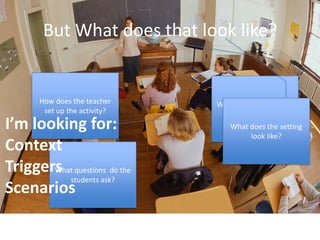
But What does that look like?


      How does the teacher    What examples do they
       set up the activity?           use?
I’m looking for:                 What does the setting
                                      look like?
Context
Triggers questions do the
       What
          students ask?
Scenarios
Next, we look at objectives
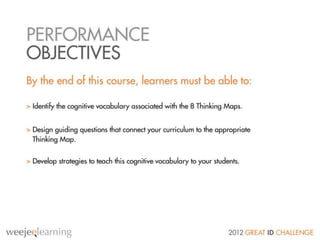
Identify the cognitive vocabulary associated
with the 8 Thinking Maps
Design guiding questions that connect your
curriculum to the appropriate Thinking Map
Develop strategies to teach cognitive
vocabulary to your students
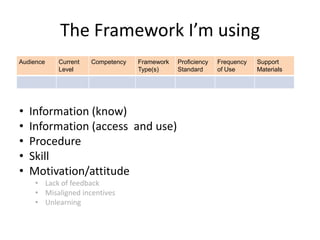
The Framework I’m using
Audience   Current   Competency   Framework   Proficiency   Frequency   Support
           Level                  Type(s)     Standard      of Use      Materials


•   Information (know)
•   Information (access and use)
•   Procedure
•   Skill
•   Motivation/attitude
     • Lack of feedback
     • Misaligned incentives
     • Unlearning
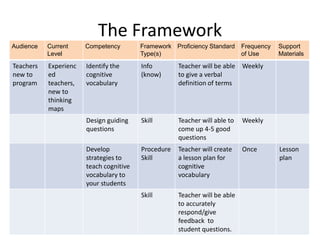
The Framework
Audience   Current     Competency        Framework Proficiency Standard     Frequency   Support
           Level                         Type(s)                            of Use      Materials
Teachers   Experienc   Identify the      Info        Teacher will be able Weekly
new to     ed          cognitive         (know)      to give a verbal
program    teachers,   vocabulary                    definition of terms
           new to
           thinking
           maps
                       Design guiding    Skill       Teacher will able to   Weekly
                       questions                     come up 4-5 good
                                                     questions
                       Develop           Procedure   Teacher will create    Once        Lesson
                       strategies to     Skill       a lesson plan for                  plan
                       teach cognitive               cognitive
                       vocabulary to                 vocabulary
                       your students
                                         Skill       Teacher will be able
                                                     to accurately
                                                     respond/give
                                                     feedback to
                                                     student questions.
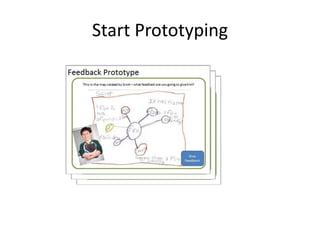
Start Prototyping
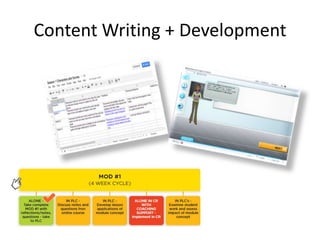
Content Writing + Development
User Testing


Watch them use it.
Assessment


Guerilla
Assessment
Michael McKenzie Grant, MFA
Analysis approach
• Data Collection - from Thinking Maps website and analyzed the
  PPT file provided by client to determine performance need
  (K/S/A).

• Learner Analysis - Interviewed (3) different teachers to analyze
  some common beliefs/attributes of teachers and their open-
  mindedness and perceptions pertaining to these maps and their
  description of the contextual analysis involved (i.e. factors to
  consider in the classroom, school administration guidelines,
  standardized requirements/regulations).

• Conducted interview with client – Goal was to gain a
  description of what successful implementation does and does
  not “look like.”
Identified challenges
• Teachers are using inconsistent methods and strategies for
  Thinking Maps implementation.

• Lack of ongoing support and coaching for enhancing learner
  (teacher) retention of Thinking Maps for transfer on the job (in
  classroom).

• Not designing a “traditional eLearning course” and thinking out of
  the box with the learner experience.

• Gaining teacher buy-in and common perceptions of graphic
  organizers/learning aids.

• Learning goal impacts all (3) trainable areas: knowledge, skill, and
  attitude.
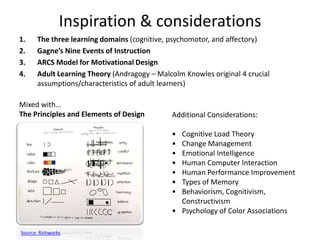
Inspiration & considerations
1.     The three learning domains (cognitive, psychomotor, and affectory)
2.     Gagne’s Nine Events of Instruction
3.     ARCS Model for Motivational Design
4.     Adult Learning Theory (Andragogy – Malcolm Knowles original 4 crucial
       assumptions/characteristics of adult learners)

Mixed with…
The Principles and Elements of Design          Additional Considerations:

                                               • Cognitive Load Theory
                                               • Change Management
                                               • Emotional Intelligence
                                               • Human Computer Interaction
                                               • Human Performance Improvement
                                               • Types of Memory
                                               • Behaviorism, Cognitivism,
                                                 Constructivism
                                               • Psychology of Color Associations

Source: Richworks
Proposed solution
•   Certification Credential in TM - Required activities to renew their certification (i.e. providing
    mentoring sessions to teachers that need assistance with ideas/approaches for TM implementation
    and delivery, attendance of webcasts on TM sponsored by TM staff).

•   Pre-Instructional Flash Video (5 minute duration) – Integrate statistics/positive results of Thinking
    Maps on student impact, testimonials, action shots, background music. Tap the emotional resonance
    of these educators – gain their buy-in for the credibility, legitimacy, and value added results these
    maps are proven to offer students and educators.
    Note: To be shown during faculty meeting by curriculum resource teacher or school administrator for
    proactive change management.

•   eLearning Module (30 minutes)
    New navigation approach: (Thumbs up / Thumbs Down) if you understand the concept and are ready
    to move forward, then click the thumbs up button, if you don’t understand, simply click the thumbs
    down and a screen appears providing more guidance as well as a “kid coach” (teacher assistant) that
    demonstrates two more examples.
    Each thinking map lesson begins with a video demonstration from an expert teacher certified in TM.
    Three sections in each of the map lessons:
    Purpose, Guiding Questions, Cognitive Keywords
Development tools & Resources
Project Development Tools
• Graphics - Photoshop, Fireworks, Gimp, SumoPaint.com
• Interactive Development – Flash and XML

Resource Tips
• Flash-template-design.com (user interface inspiration)
• Flashkit.com
• Actionscript.org
• iStockPhoto.com (search for graphics, e.g. “motorcycle cut out” for
   white bkgnd)
• Tin Can API
• TheeLearningCoach.com (Connie offers great tips, demos)
• TowardsMaturity.org (L&D White Papers/Case Studies)
• Section508.gov
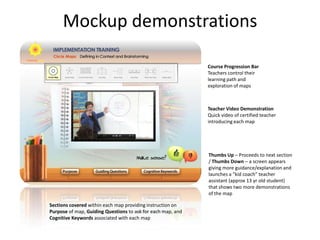
Mockup demonstrations

                                                             Course Progression Bar
                                                             Teachers control their
                                                             learning path and
                                                             exploration of maps


                                                             Teacher Video Demonstration
                                                             Quick video of certified teacher
                                                             introducing each map


                                                             Thumbs Up – Proceeds to next section
                                                             / Thumbs Down – a screen appears
                                                             giving more guidance/explanation and
                                                             launches a “kid coach” teacher
                                                             assistant (approx 13 yr old student)
                                                             that shows two more demonstrations
                                                             of the map

Sections covered within each map providing instruction on
Purpose of map, Guiding Questions to ask for each map, and
Cognitive Keywords associated with each map
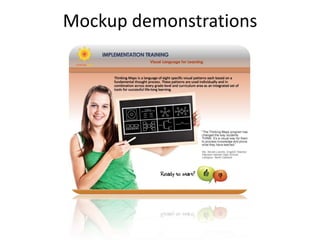
Mockup demonstrations


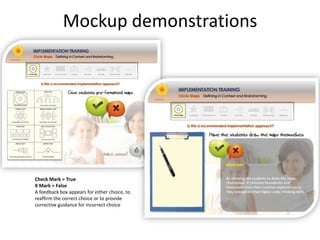
Check Mark = True
X Mark = False
A feedback box appears for either choice, to
reaffirm the correct choice or to provide
corrective guidance for incorrect choice
Performance support
• Implementation Journals by Teachers (pre-formatted Word or PPT
  template) Monthly submission to the Thinking Maps
  implementation manager, includes photos of student maps along
  with notes captured offering success stories and challenges
  experienced by students and teachers.

• Post-Instructional Events (1 hour synchronous webinar conducted
  by implementation manager bi-monthly).

• Ning.com private online/social community where teachers log in
  and share TM implementation success/challenges/strategies,
  photos of student work, tips, etc.
Conclusion
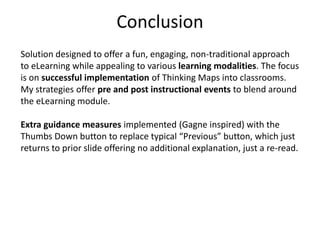
Solution designed to offer a fun, engaging, non-traditional approach
to eLearning while appealing to various learning modalities. The focus
is on successful implementation of Thinking Maps into classrooms.
My strategies offer pre and post instructional events to blend around
the eLearning module.

Extra guidance measures implemented (Gagne inspired) with the
Thumbs Down button to replace typical “Previous” button, which just
returns to prior slide offering no additional explanation, just a re-read.
Nancy Hammond
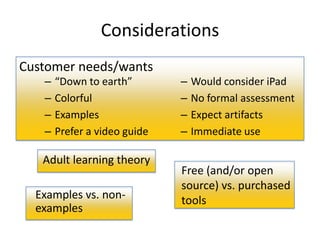
Considerations
Customer needs/wants
   –   “Down to earth”        –   Would consider iPad
   –   Colorful               –   No formal assessment
   –   Examples               –   Expect artifacts
   –   Prefer a video guide   –   Immediate use

   Adult learning theory
                              Free (and/or open
                              source) vs. purchased
  Examples vs. non-           tools
  examples
Roles involved: Program
                   assumptionsManager, Instructional
                              Designer, Developer,
Delivery: Learners have iPads Quality Assurance

Best Practices employed:       4-day turnaround on
   – Budget/timeline based     Subject Matter Expert
     on size of work           reviews
     products
   – Quality Assurance              Instructional Designer
     reviews all work               & Developer versed in
     products                       iBooks Author
   – Document, track, and
     verify review comments   Unlimited access to at
   – Configuration
     Management               least one SME
Understanding by design               ®


Begin with the end in mind

    What essential questions will be considered?

        What understandings are desired?

            What knowledge and skills will be acquired?

               What evidence will show understanding?
Proposed solution
iPad-based course
Delivered through iBookstore
iBooks Author app
Video, on-screen interactions, audio
Pause/thinking questions (non-assessment)
Real-life completed examples
Learner-created examples and non-examples
Reflection based on successes and difficulties
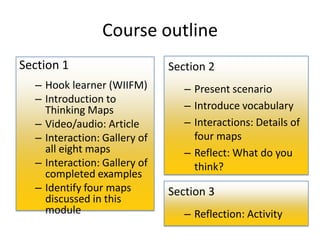
Course outline
Section 1                     Section 2
  – Hook learner (WIIFM)         – Present scenario
  – Introduction to
    Thinking Maps                – Introduce vocabulary
  – Video/audio: Article         – Interactions: Details of
  – Interaction: Gallery of        four maps
    all eight maps               – Reflect: What do you
  – Interaction: Gallery of        think?
    completed examples
  – Identify four maps        Section 3
    discussed in this
    module                       – Reflection: Activity
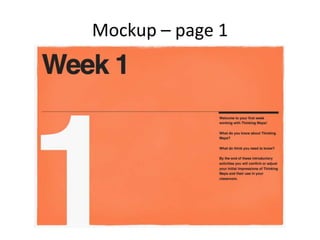
Mockup – page 1
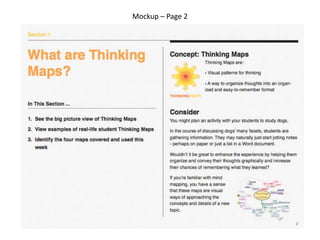
Mockup – Page 2
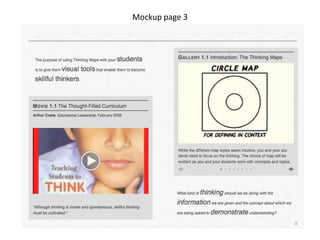
Mockup page 3
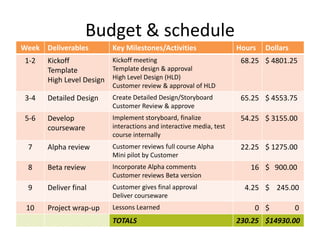
Budget & schedule
Week Deliverables         Key Milestones/Activities                  Hours   Dollars
 1-2   Kickoff           Kickoff meeting                              68.25 $ 4801.25
       Template          Template design & approval
       High Level Design High Level Design (HLD)
                          Customer review & approval of HLD
 3-4   Detailed Design    Create Detailed Design/Storyboard           65.25 $ 4553.75
                          Customer Review & approve
 5-6   Develop            Implement storyboard, finalize              54.25 $ 3155.00
       courseware         interactions and interactive media, test
                          course internally
 7     Alpha review       Customer reviews full course Alpha          22.25 $ 1275.00
                          Mini pilot by Customer
 8     Beta review        Incorporate Alpha comments                    16 $ 900.00
                          Customer reviews Beta version
 9     Deliver final      Customer gives final approval                4.25 $ 245.00
                          Deliver courseware
 10    Project wrap-up    Lessons Learned                                0 $           0
                          TOTALS                                     230.25 $14930.00
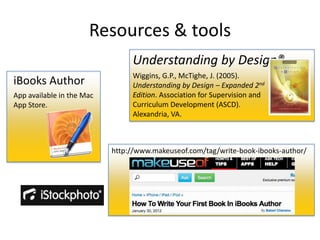
Resources & tools
                                Understanding by Design®
                                Wiggins, G.P., McTighe, J. (2005).
iBooks Author                   Understanding by Design – Expanded 2nd
App available in the Mac        Edition. Association for Supervision and
App Store.                      Curriculum Development (ASCD).
                                Alexandria, VA.


                           http://www.makeuseof.com/tag/write-book-ibooks-author/
Great ID Challenge
Great ID Challenge

Great ID Challenge

  • 14.
    Julie Dirksen –Usable Learning
  • 15.
    First, Let’s talkabout the audience… • Largely female • K-12 teachers • Varying knowledge of e-learning • Requested “down-to-earth” training, fun colors, lots of examples • Prefer a video guide • May access on an iPad
  • 16.
    But What doesthat look like? How does the teacher What examples do they set up the activity? use? I’m looking for: What does the setting look like? Context Triggers questions do the What students ask? Scenarios
  • 17.
    Next, we lookat objectives Identify the cognitive vocabulary associated with the 8 Thinking Maps Design guiding questions that connect your curriculum to the appropriate Thinking Map Develop strategies to teach cognitive vocabulary to your students
  • 18.
    The Framework I’musing Audience Current Competency Framework Proficiency Frequency Support Level Type(s) Standard of Use Materials • Information (know) • Information (access and use) • Procedure • Skill • Motivation/attitude • Lack of feedback • Misaligned incentives • Unlearning
  • 19.
    The Framework Audience Current Competency Framework Proficiency Standard Frequency Support Level Type(s) of Use Materials Teachers Experienc Identify the Info Teacher will be able Weekly new to ed cognitive (know) to give a verbal program teachers, vocabulary definition of terms new to thinking maps Design guiding Skill Teacher will able to Weekly questions come up 4-5 good questions Develop Procedure Teacher will create Once Lesson strategies to Skill a lesson plan for plan teach cognitive cognitive vocabulary to vocabulary your students Skill Teacher will be able to accurately respond/give feedback to student questions.
  • 20.
  • 21.
    Content Writing +Development
  • 22.
  • 23.
  • 24.
  • 25.
    Analysis approach • DataCollection - from Thinking Maps website and analyzed the PPT file provided by client to determine performance need (K/S/A). • Learner Analysis - Interviewed (3) different teachers to analyze some common beliefs/attributes of teachers and their open- mindedness and perceptions pertaining to these maps and their description of the contextual analysis involved (i.e. factors to consider in the classroom, school administration guidelines, standardized requirements/regulations). • Conducted interview with client – Goal was to gain a description of what successful implementation does and does not “look like.”
  • 26.
    Identified challenges • Teachersare using inconsistent methods and strategies for Thinking Maps implementation. • Lack of ongoing support and coaching for enhancing learner (teacher) retention of Thinking Maps for transfer on the job (in classroom). • Not designing a “traditional eLearning course” and thinking out of the box with the learner experience. • Gaining teacher buy-in and common perceptions of graphic organizers/learning aids. • Learning goal impacts all (3) trainable areas: knowledge, skill, and attitude.
  • 27.
    Inspiration & considerations 1. The three learning domains (cognitive, psychomotor, and affectory) 2. Gagne’s Nine Events of Instruction 3. ARCS Model for Motivational Design 4. Adult Learning Theory (Andragogy – Malcolm Knowles original 4 crucial assumptions/characteristics of adult learners) Mixed with… The Principles and Elements of Design Additional Considerations: • Cognitive Load Theory • Change Management • Emotional Intelligence • Human Computer Interaction • Human Performance Improvement • Types of Memory • Behaviorism, Cognitivism, Constructivism • Psychology of Color Associations Source: Richworks
  • 28.
    Proposed solution • Certification Credential in TM - Required activities to renew their certification (i.e. providing mentoring sessions to teachers that need assistance with ideas/approaches for TM implementation and delivery, attendance of webcasts on TM sponsored by TM staff). • Pre-Instructional Flash Video (5 minute duration) – Integrate statistics/positive results of Thinking Maps on student impact, testimonials, action shots, background music. Tap the emotional resonance of these educators – gain their buy-in for the credibility, legitimacy, and value added results these maps are proven to offer students and educators. Note: To be shown during faculty meeting by curriculum resource teacher or school administrator for proactive change management. • eLearning Module (30 minutes) New navigation approach: (Thumbs up / Thumbs Down) if you understand the concept and are ready to move forward, then click the thumbs up button, if you don’t understand, simply click the thumbs down and a screen appears providing more guidance as well as a “kid coach” (teacher assistant) that demonstrates two more examples. Each thinking map lesson begins with a video demonstration from an expert teacher certified in TM. Three sections in each of the map lessons: Purpose, Guiding Questions, Cognitive Keywords
  • 29.
    Development tools &Resources Project Development Tools • Graphics - Photoshop, Fireworks, Gimp, SumoPaint.com • Interactive Development – Flash and XML Resource Tips • Flash-template-design.com (user interface inspiration) • Flashkit.com • Actionscript.org • iStockPhoto.com (search for graphics, e.g. “motorcycle cut out” for white bkgnd) • Tin Can API • TheeLearningCoach.com (Connie offers great tips, demos) • TowardsMaturity.org (L&D White Papers/Case Studies) • Section508.gov
  • 30.
    Mockup demonstrations Course Progression Bar Teachers control their learning path and exploration of maps Teacher Video Demonstration Quick video of certified teacher introducing each map Thumbs Up – Proceeds to next section / Thumbs Down – a screen appears giving more guidance/explanation and launches a “kid coach” teacher assistant (approx 13 yr old student) that shows two more demonstrations of the map Sections covered within each map providing instruction on Purpose of map, Guiding Questions to ask for each map, and Cognitive Keywords associated with each map
  • 31.
  • 32.
    Mockup demonstrations Check Mark= True X Mark = False A feedback box appears for either choice, to reaffirm the correct choice or to provide corrective guidance for incorrect choice
  • 33.
    Performance support • ImplementationJournals by Teachers (pre-formatted Word or PPT template) Monthly submission to the Thinking Maps implementation manager, includes photos of student maps along with notes captured offering success stories and challenges experienced by students and teachers. • Post-Instructional Events (1 hour synchronous webinar conducted by implementation manager bi-monthly). • Ning.com private online/social community where teachers log in and share TM implementation success/challenges/strategies, photos of student work, tips, etc.
  • 34.
    Conclusion Solution designed tooffer a fun, engaging, non-traditional approach to eLearning while appealing to various learning modalities. The focus is on successful implementation of Thinking Maps into classrooms. My strategies offer pre and post instructional events to blend around the eLearning module. Extra guidance measures implemented (Gagne inspired) with the Thumbs Down button to replace typical “Previous” button, which just returns to prior slide offering no additional explanation, just a re-read.
  • 35.
  • 36.
    Considerations Customer needs/wants – “Down to earth” – Would consider iPad – Colorful – No formal assessment – Examples – Expect artifacts – Prefer a video guide – Immediate use Adult learning theory Free (and/or open source) vs. purchased Examples vs. non- tools examples
  • 37.
    Roles involved: Program assumptionsManager, Instructional Designer, Developer, Delivery: Learners have iPads Quality Assurance Best Practices employed: 4-day turnaround on – Budget/timeline based Subject Matter Expert on size of work reviews products – Quality Assurance Instructional Designer reviews all work & Developer versed in products iBooks Author – Document, track, and verify review comments Unlimited access to at – Configuration Management least one SME
  • 38.
    Understanding by design ® Begin with the end in mind What essential questions will be considered? What understandings are desired? What knowledge and skills will be acquired? What evidence will show understanding?
  • 39.
    Proposed solution iPad-based course Deliveredthrough iBookstore iBooks Author app Video, on-screen interactions, audio Pause/thinking questions (non-assessment) Real-life completed examples Learner-created examples and non-examples Reflection based on successes and difficulties
  • 40.
    Course outline Section 1 Section 2 – Hook learner (WIIFM) – Present scenario – Introduction to Thinking Maps – Introduce vocabulary – Video/audio: Article – Interactions: Details of – Interaction: Gallery of four maps all eight maps – Reflect: What do you – Interaction: Gallery of think? completed examples – Identify four maps Section 3 discussed in this module – Reflection: Activity
  • 41.
  • 42.
  • 43.
  • 44.
    Budget & schedule WeekDeliverables Key Milestones/Activities Hours Dollars 1-2 Kickoff Kickoff meeting 68.25 $ 4801.25 Template Template design & approval High Level Design High Level Design (HLD) Customer review & approval of HLD 3-4 Detailed Design Create Detailed Design/Storyboard 65.25 $ 4553.75 Customer Review & approve 5-6 Develop Implement storyboard, finalize 54.25 $ 3155.00 courseware interactions and interactive media, test course internally 7 Alpha review Customer reviews full course Alpha 22.25 $ 1275.00 Mini pilot by Customer 8 Beta review Incorporate Alpha comments 16 $ 900.00 Customer reviews Beta version 9 Deliver final Customer gives final approval 4.25 $ 245.00 Deliver courseware 10 Project wrap-up Lessons Learned 0 $ 0 TOTALS 230.25 $14930.00
  • 45.
    Resources & tools Understanding by Design® Wiggins, G.P., McTighe, J. (2005). iBooks Author Understanding by Design – Expanded 2nd App available in the Mac Edition. Association for Supervision and App Store. Curriculum Development (ASCD). Alexandria, VA. http://www.makeuseof.com/tag/write-book-ibooks-author/