TREND TP
Learning and Media
Learning and ICT
                                            Where is                                       Empower
Deep


                                           embedded?
                  ??
                                                                                           Learners take
                                                                                         Evaluation
                                                                                             control of
                                                                          Extend              learning
                                                                     Significantly alter     Use ICT to

                                                     Enhance
                                                                       Synthesis research and
                                                                        the way that
                                                                        teaching and       manage own
learning


                                                Deeper and flexible                           learning
                                                                       learning takes
                                   Enrich       learning Analysis
                                                         though the
                              whiteboards used use of ICT and          place using ICT
                              interactively and     community
               Exchange
            Exchange OHPs
                                            Application
                              with wider range       resources
                                 of teaching
                for data        resources and
               projectors, Comprehension
                               methodologies
                 using                                            Edutainment?
Shallow


            whiteboards as                                         m-learning?
           projection screens                          Deep/active content based software?
              Knowledge                                         Computer games?


             Passive                     learner engagement                                 Active
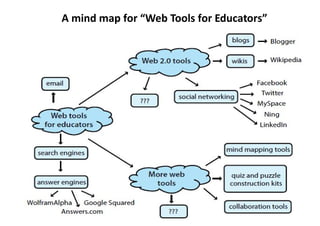
A mind map for “Web Tools for Educators”
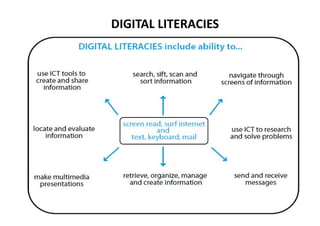
DIGITAL LITERACIES
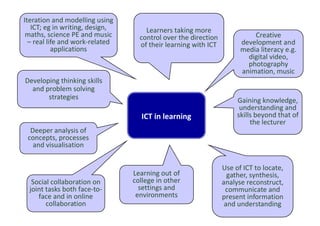
Iteration and modelling using
   ICT; eg in writing, design,       Learners taking more
 maths, science PE and music       control over the direction             Creative
  – real life and work-related     of their learning with ICT         development and
           applications                                               media literacy e.g.
                                                                        digital video,
                                                                        photography
                                                                      animation, music
Developing thinking skills
  and problem solving
       strategies                                                    Gaining knowledge,
                                                                      understanding and
                                   ICT in learning                   skills beyond that of
                                                                          the lecturer
  Deeper analysis of
 concepts, processes
   and visualisation


                                                                Use of ICT to locate,
                                 Learning out of                  gather, synthesis,
  Social collaboration on        college in other               analyse reconstruct,
 joint tasks both face-to-         settings and                  communicate and
    face and in online            environments                  present information
       collaboration                                             and understanding
KOMPETENSI GURU
Permen 16 th 2007 ada 24 butir kompetensi
Butir 5: Memanfaatkan teknologi informasi dan
  komunikasi untuk kepentingan penyelenggaraan
  kegiatan pengembangan yang mendidik.

Butir 24: Memanfaatkan teknologi informasi dan
  komunikasi untuk berkomunikasi dan
  mengembangkan diri.

Ada kompetensi untuk Guru TIK

Bagaimana yang bukan guru TIK?
REFORMASI PENDIDIKAN GURU

• Bagaimana trend Kurikulum pendidikan guru
  (pre-service) terkait kompetensi yang
  dibutuhkan?
• Sertifikasi bisakah menyatu dengan pre-
  service?
• Seperti apa pola pendidikan guru yang
  terbaik? Berasrama? Berikatan dinas?
• Bagaimanakah trend diklat guru? Pusat
  Sumber Belajar?
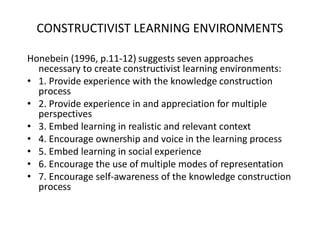
CONSTRUCTIVIST LEARNING ENVIRONMENTS

Honebein (1996, p.11-12) suggests seven approaches
  necessary to create constructivist learning environments:
• 1. Provide experience with the knowledge construction
  process
• 2. Provide experience in and appreciation for multiple
  perspectives
• 3. Embed learning in realistic and relevant context
• 4. Encourage ownership and voice in the learning process
• 5. Embed learning in social experience
• 6. Encourage the use of multiple modes of representation
• 7. Encourage self-awareness of the knowledge construction
  process
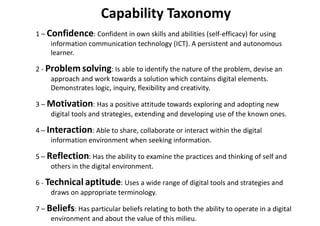
Capability Taxonomy
1 – Confidence: Confident in own skills and abilities (self-efficacy) for using
     information communication technology (ICT). A persistent and autonomous
     learner.

2 - Problem solving: Is able to identify the nature of the problem, devise an
     approach and work towards a solution which contains digital elements.
     Demonstrates logic, inquiry, flexibility and creativity.

3 – Motivation: Has a positive attitude towards exploring and adopting new
    digital tools and strategies, extending and developing use of the known ones.

4 – Interaction: Able to share, collaborate or interact within the digital
     information environment when seeking information.

5 – Reflection: Has the ability to examine the practices and thinking of self and
     others in the digital environment.

6 - Technical aptitude: Uses a wide range of digital tools and strategies and
     draws on appropriate terminology.

7 – Beliefs: Has particular beliefs relating to both the ability to operate in a digital
     environment and about the value of this milieu.
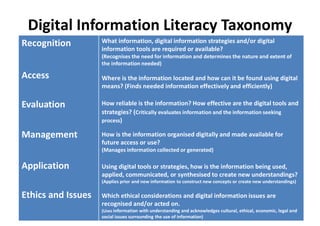
Digital Information Literacy Taxonomy
Recognition         What information, digital information strategies and/or digital
                    information tools are required or available?
                    (Recognises the need for information and determines the nature and extent of
                    the information needed)

Access              Where is the information located and how can it be found using digital
                    means? (Finds needed information effectively and efficiently)

Evaluation          How reliable is the information? How effective are the digital tools and
                    strategies? (Critically evaluates information and the information seeking
                    process)

Management          How is the information organised digitally and made available for
                    future access or use?
                    (Manages information collected or generated)

Application         Using digital tools or strategies, how is the information being used,
                    applied, communicated, or synthesised to create new understandings?
                    (Applies prior and new information to construct new concepts or create new understandings)

Ethics and Issues   Which ethical considerations and digital information issues are
                    recognised and/or acted on.
                    (Uses information with understanding and acknowledges cultural, ethical, economic, legal and
                    social issues surrounding the use of information)
How can digital technologies enhance the teaching mission of our university?
•   Technology can help our students connect their academic work with the rest of
    their lives.

•   Technology can help our students practice integrative learning, connecting their
    learning across the courses they take.

•   Technology can help our students find authentic audiences for their work,
    increasing their motivation to learn deeply.

•   Technology can help our students move from consumers of information to
    producers of knowledge.

•   Technology can help our students be more engaged and learn more actively in the
    classroom.

•   Technology can help us make “thin slices” of student learning (to use Randy Bass’
    term) more visible, which in turn helps us better understand our students and be
    more responsive to their learning needs.
MODEL PEMBELAJARAN

     Dr. Purwanto
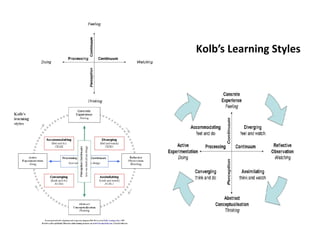
Kolb’s Learning Styles
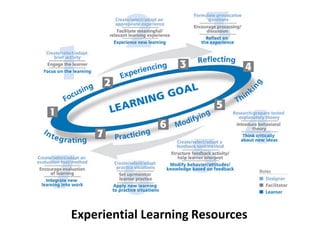
Experiential Learning Resources
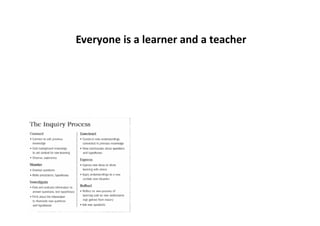
Everyone is a learner and a teacher
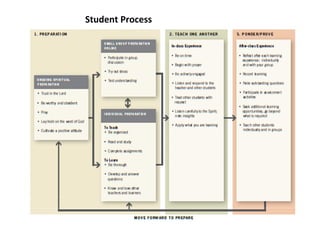
Student Process
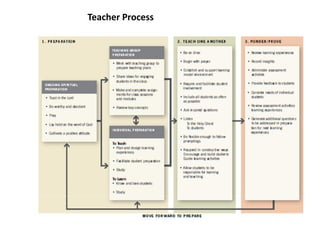
Teacher Process
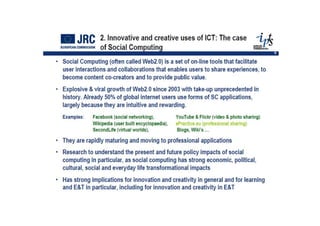
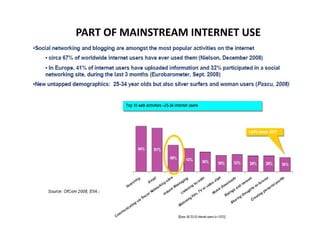
PART OF MAINSTREAM INTERNET USE
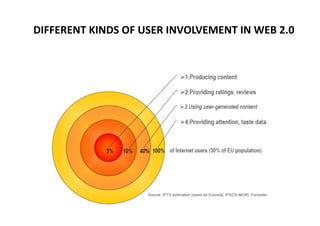
DIFFERENT KINDS OF USER INVOLVEMENT IN WEB 2.0
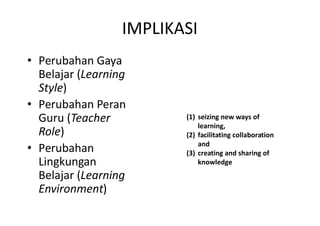
IMPLIKASI
• Perubahan Gaya
  Belajar (Learning
  Style)
• Perubahan Peran
  Guru (Teacher          (1) seizing new ways of
                             learning,
  Role)                  (2) facilitating collaboration
                             and
• Perubahan              (3) creating and sharing of
  Lingkungan                 knowledge
  Belajar (Learning
  Environment)
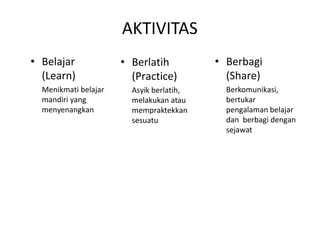
AKTIVITAS
• Belajar             • Berlatih          • Berbagi
  (Learn)               (Practice)          (Share)
  Menikmati belajar     Asyik berlatih,     Berkomunikasi,
  mandiri yang          melakukan atau      bertukar
  menyenangkan          mempraktekkan       pengalaman belajar
                        sesuatu             dan berbagi dengan
                                            sejawat
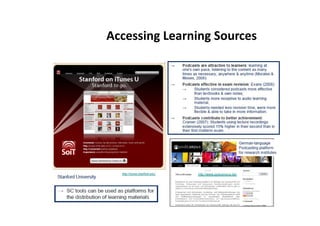
Accessing Learning Sources

Trend Teknologi Pembelajaran

  • 1.
  • 2.
  • 4.
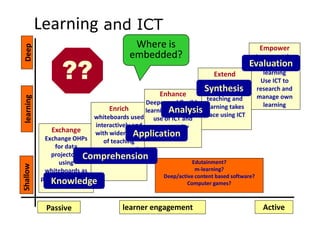
    Learning and ICT Where is Empower Deep embedded? ?? Learners take Evaluation control of Extend learning Significantly alter Use ICT to Enhance Synthesis research and the way that teaching and manage own learning Deeper and flexible learning learning takes Enrich learning Analysis though the whiteboards used use of ICT and place using ICT interactively and community Exchange Exchange OHPs Application with wider range resources of teaching for data resources and projectors, Comprehension methodologies using Edutainment? Shallow whiteboards as m-learning? projection screens Deep/active content based software? Knowledge Computer games? Passive learner engagement Active
  • 5.
    A mind mapfor “Web Tools for Educators”
  • 6.
  • 7.
    Iteration and modellingusing ICT; eg in writing, design, Learners taking more maths, science PE and music control over the direction Creative – real life and work-related of their learning with ICT development and applications media literacy e.g. digital video, photography animation, music Developing thinking skills and problem solving strategies Gaining knowledge, understanding and ICT in learning skills beyond that of the lecturer Deeper analysis of concepts, processes and visualisation Use of ICT to locate, Learning out of gather, synthesis, Social collaboration on college in other analyse reconstruct, joint tasks both face-to- settings and communicate and face and in online environments present information collaboration and understanding
  • 11.
    KOMPETENSI GURU Permen 16th 2007 ada 24 butir kompetensi Butir 5: Memanfaatkan teknologi informasi dan komunikasi untuk kepentingan penyelenggaraan kegiatan pengembangan yang mendidik. Butir 24: Memanfaatkan teknologi informasi dan komunikasi untuk berkomunikasi dan mengembangkan diri. Ada kompetensi untuk Guru TIK Bagaimana yang bukan guru TIK?
  • 12.
    REFORMASI PENDIDIKAN GURU •Bagaimana trend Kurikulum pendidikan guru (pre-service) terkait kompetensi yang dibutuhkan? • Sertifikasi bisakah menyatu dengan pre- service? • Seperti apa pola pendidikan guru yang terbaik? Berasrama? Berikatan dinas? • Bagaimanakah trend diklat guru? Pusat Sumber Belajar?
  • 13.
    CONSTRUCTIVIST LEARNING ENVIRONMENTS Honebein(1996, p.11-12) suggests seven approaches necessary to create constructivist learning environments: • 1. Provide experience with the knowledge construction process • 2. Provide experience in and appreciation for multiple perspectives • 3. Embed learning in realistic and relevant context • 4. Encourage ownership and voice in the learning process • 5. Embed learning in social experience • 6. Encourage the use of multiple modes of representation • 7. Encourage self-awareness of the knowledge construction process
  • 14.
    Capability Taxonomy 1 –Confidence: Confident in own skills and abilities (self-efficacy) for using information communication technology (ICT). A persistent and autonomous learner. 2 - Problem solving: Is able to identify the nature of the problem, devise an approach and work towards a solution which contains digital elements. Demonstrates logic, inquiry, flexibility and creativity. 3 – Motivation: Has a positive attitude towards exploring and adopting new digital tools and strategies, extending and developing use of the known ones. 4 – Interaction: Able to share, collaborate or interact within the digital information environment when seeking information. 5 – Reflection: Has the ability to examine the practices and thinking of self and others in the digital environment. 6 - Technical aptitude: Uses a wide range of digital tools and strategies and draws on appropriate terminology. 7 – Beliefs: Has particular beliefs relating to both the ability to operate in a digital environment and about the value of this milieu.
  • 16.
    Digital Information LiteracyTaxonomy Recognition What information, digital information strategies and/or digital information tools are required or available? (Recognises the need for information and determines the nature and extent of the information needed) Access Where is the information located and how can it be found using digital means? (Finds needed information effectively and efficiently) Evaluation How reliable is the information? How effective are the digital tools and strategies? (Critically evaluates information and the information seeking process) Management How is the information organised digitally and made available for future access or use? (Manages information collected or generated) Application Using digital tools or strategies, how is the information being used, applied, communicated, or synthesised to create new understandings? (Applies prior and new information to construct new concepts or create new understandings) Ethics and Issues Which ethical considerations and digital information issues are recognised and/or acted on. (Uses information with understanding and acknowledges cultural, ethical, economic, legal and social issues surrounding the use of information)
  • 23.
    How can digitaltechnologies enhance the teaching mission of our university? • Technology can help our students connect their academic work with the rest of their lives. • Technology can help our students practice integrative learning, connecting their learning across the courses they take. • Technology can help our students find authentic audiences for their work, increasing their motivation to learn deeply. • Technology can help our students move from consumers of information to producers of knowledge. • Technology can help our students be more engaged and learn more actively in the classroom. • Technology can help us make “thin slices” of student learning (to use Randy Bass’ term) more visible, which in turn helps us better understand our students and be more responsive to their learning needs.
  • 28.
    MODEL PEMBELAJARAN Dr. Purwanto
  • 31.
  • 35.
  • 37.
    Everyone is alearner and a teacher
  • 38.
  • 39.
  • 44.
    PART OF MAINSTREAMINTERNET USE
  • 45.
    DIFFERENT KINDS OFUSER INVOLVEMENT IN WEB 2.0
  • 46.
    IMPLIKASI • Perubahan Gaya Belajar (Learning Style) • Perubahan Peran Guru (Teacher (1) seizing new ways of learning, Role) (2) facilitating collaboration and • Perubahan (3) creating and sharing of Lingkungan knowledge Belajar (Learning Environment)
  • 47.
    AKTIVITAS • Belajar • Berlatih • Berbagi (Learn) (Practice) (Share) Menikmati belajar Asyik berlatih, Berkomunikasi, mandiri yang melakukan atau bertukar menyenangkan mempraktekkan pengalaman belajar sesuatu dan berbagi dengan sejawat
  • 48.