Google Analytics
       Concepts


aspgems.com      marzo de 2.010
Introduction
With Google Analytics we can:
●   make informed site and content decisions
●   increase conversions
●   measure keyword and ad performance
●   track a wide variety of metrics


                                               2
How Does GA Work?
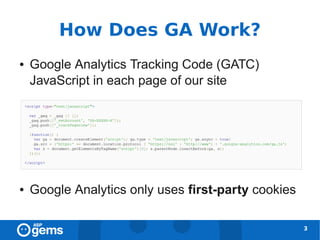
●   Google Analytics Tracking Code (GATC)
    JavaScript in each page of our site


●   Google Analytics only uses first-party cookies

                                                     3
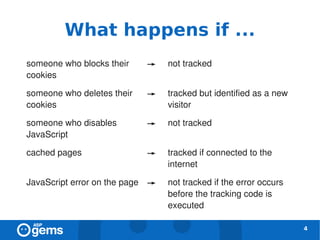
What happens if ...
someone who blocks their    →    not tracked
cookies

someone who deletes their   →    tracked but identified as a new
cookies                          visitor

someone who disables        →    not tracked
JavaScript

cached pages                →    tracked if connected to the
                                 internet

JavaScript error on the page →   not tracked if the error occurs
                                 before the tracking code is
                                 executed

                                                                   4
GA Tracking Code
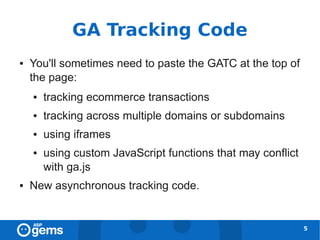
●   You'll sometimes need to paste the GATC at the top of
    the page:
    ●   tracking ecommerce transactions
    ●   tracking across multiple domains or subdomains
    ●   using iframes
    ●   using custom JavaScript functions that may conflict
        with ga.js
●   New asynchronous tracking code.


                                                              5
Interpreting Reports
●   Create context
    ●   compare with other metrics
    ●   look for trends
●   Data driven decision making


                                     6
Pageviews, Visits and
         Visitors [1]
pageview: is counted every time a page on your
 site loads
visit (session): period of interaction between a
  browser and a website. Closing the browser or
  staying inactive for 30 minutes ends the visit.
visitor: is uniquely identified by a Google
  Analytics cookie


                                                    7
Pageviews, Visits and
         Visitors [2]
unique pageview: number of visits during which
 page was viewed
absolute unique visitor: each visitor is counted
 only once during the selected date range
new and returning visitor


                                                   8
Pageviews, Visits and
    Visitors [3]


                        9
Time Metrics [1]
time on page (n) = timestamp (n+1) –
  timestamp (n)
The time on page of the last page on a visit is
 always 0, because there's not timestamp GA
 can use to calculate the time.
time on site = sum(time on page) for a visit


                                                  10
Time Metrics [2]
avg. time on page = time on site / (pageviews –
 exits)
pages with time on page 0 are excluded from the calculation

avg. time on site = sum(time on site) for all visits
 / visits
pages with time on page 0 are not excluded from the calculation


                                                                  11
Traffic Sources
●   where the traffic is coming from on the internet?
●   which source is sending the best quality traffic?
    ●   e.g. small bounce rate


                                                        12
Traffic Sources
direct traffic: bookmark or URL typed directly
  into the browser
referral traffic: via a link in any web site
search engine traffic: click in a search results
 link in a search engine
  organic: non-paid
  paid: ads


                                                   13
Keywords
●   What were visitors expecting to find on your
    site?
●   You fail to meet their expectation:
    ●   high bounce rate
    ●   low goal conversion rate
    ●   e-commerce per visit value
●   Which landing pages are being used for a
    keyword?

                                                   14
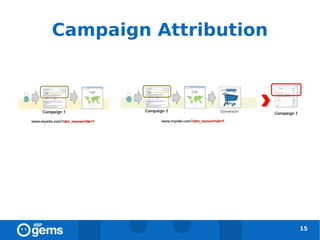
Campaign Attribution


                       15
GA Accounts [1]
●   One Google username:
    ●   up to 25 GA accounts
    ●   can be added as an administrator to an unlimited
        number of GA accounts
●   Administrators can:
    ●   create filters, profiles, goals
    ●   add users


                                                           16
GA Accounts [2]
●   Users:
    ●   read-only access to reports
    ●   can be restricted to specific profiles


                                                 17
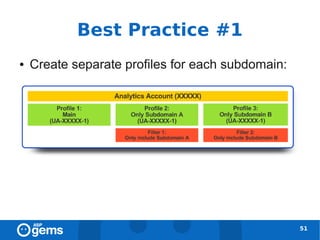
Profiles [1]
●   Profile: set of rules that define what data is to
    be included in the reports
●   Examples:
    ●   subdomains
    ●   sections of a site
    ●   filtered data (access control)


                                                        18
Profiles [2]
●   The settings of a profile include:
    ●   user access
    ●   goals
    ●   filters


Each domain has a unique tracking code number (property number)


                                                                  19
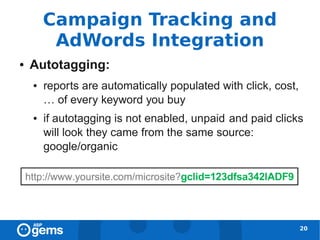
Campaign Tracking and
         AdWords Integration
●   Autotagging:
    ●   reports are automatically populated with click, cost,
        … of every keyword you buy
    ●   if autotagging is not enabled, unpaid and paid clicks
        will look they came from the same source:
        google/organic


                                                                20
AdWords Data
●   Clicks
●   Cost
●   CTR (Click-through Rate) = ( clicks / impressions ) * 100
●   CPC (Cost per Click)
●   RPC (Revenue per Click)
●   ROI (Return on Investment) = ( E-commerce Revenue +
    Total Goal Value - Cost) / Cost


                                                                21
Data Discrepancies
●   Clicks (AdWords) vs. Visits (GA)
●   Browser preferences (JavaScript, cookies)
●   Unable to load GATC or GATC missing
●   AdWords filtering
●   Report data sync
●   Destination URLs not tagged
●   Redirects

                                                22
Tracking Online Marketing
●   You can add tags with campaign identifying to
    your destination URLs in paid links:
    ●   keyword links
    ●   banners
    ●   links inside emails
●   Manual URL tagging => query string


                                                    23
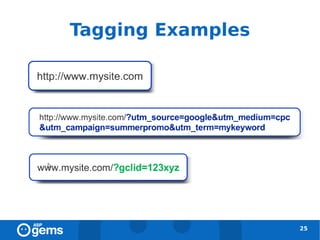
Tags
●   Always:
    ●   utm_source: advertiser (google, yahoo, …)
    ●   utm_medium: marketing medium (cpc, banner,
        email, …)
    ●   utm_campaign: campaign name
●   Optional:
    ●   utm_term: paid search keyword
    ●   utm_content: ad version


                                                     24
Tagging Examples


                   25
Goals [1]
●   Goal: website objetive
●   Types:
    ●   URL destination goal
        –   head match (/offer1/)
        –   exact match (/offer1/signup.html)
        –   regexp match (/.*/signup.html)
    ●   Time on Site goal
    ●   Pages/Visit goal


                                                26
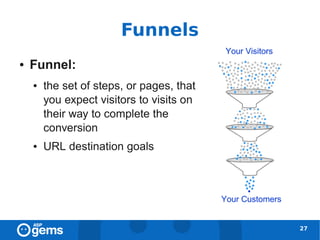
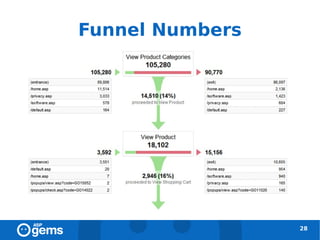
Funnels
●   Funnel:
    ●   the set of steps, or pages, that
        you expect visitors to visits on
        their way to complete the
        conversion
    ●   URL destination goals


                                           27
Funnel Numbers


                 28
Goals [2]
●   Goal Value (optional): assign monetary value to
    non-ecommerce goals
●   During a visit:
    ●   goal conversions => once
    ●   e-commerce transactions => multiple times


                                                    29
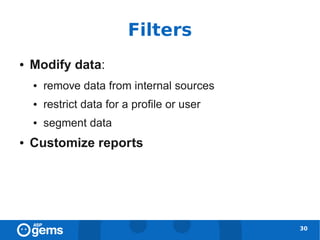
Filters
●   Modify data:
    ●   remove data from internal sources
    ●   restrict data for a profile or user
    ●   segment data
●   Customize reports


                                              30
Filters and Profiles [1]
●   Filters are applied to profiles
●   It is recommended to maintain an unfiltered
    profile


                                                  31
Filters and Profiles [2]


                           32
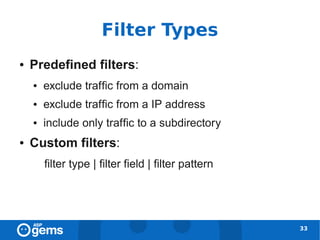
Filter Types
●   Predefined filters:
    ●   exclude traffic from a domain
    ●   exclude traffic from a IP address
    ●   include only traffic to a subdirectory
●   Custom filters:
        filter type | filter field | filter pattern


                                                      33
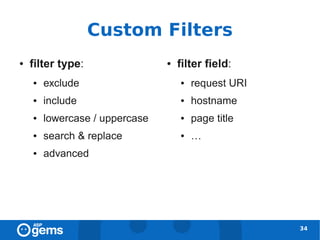
Custom Filters
●   filter type:                ●   filter field:
    ●   exclude                     ●   request URI
    ●   include                     ●   hostname
    ●   lowercase / uppercase       ●   page title
    ●   search & replace            ●   …
    ●   advanced


                                                      34
Cookies [1]
●   Cookies are text files that describe a small
    piece of information about a visitor or the
    visitor's computer.
●   Google Analytics:
    ●   first-party cookies
    ●   your site can uniquely but anonymously identify
        individual visitors


                                                          35
Cookies [2]


              36
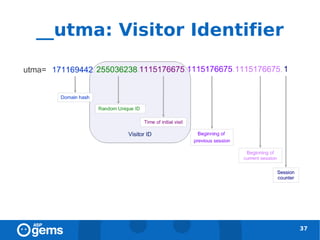
__utma: Visitor Identifier


                             37
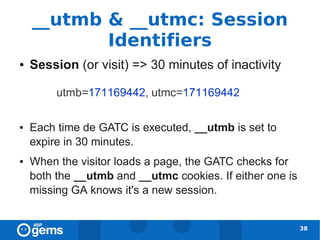
__utmb & __utmc: Session
           Identifiers
●   Session (or visit) => 30 minutes of inactivity


●   Each time de GATC is executed, __utmb is set to
    expire in 30 minutes.
●   When the visitor loads a page, the GATC checks for
    both the __utmb and __utmc cookies. If either one is
    missing GA knows it's a new session.


                                                           38
__utmz: Campaign Values [1]


●   The session number increments for every session during
    which the campaign cookie gets overwritten.
●   The campaign number increments every time you arrive at the
    site by a different campaign or organic search, even if it is within
    the same session.

                                                                       39
__utmz: Campaign Values [2]


                          40
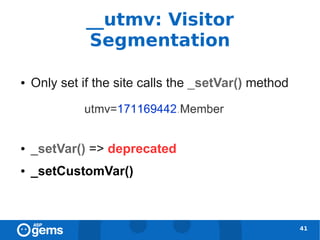
__utmv: Visitor
              Segmentation

●   Only set if the site calls the _setVar() method


●   _setVar() => deprecated
●   _setCustomVar()


                                                      41
E-commerce Tracking [1]
●   Enable e-commerce reporting in your website
    profile
●   Add the GATC
●   Add some additional code to track each
    transaction


                                                  42
E-commerce Tracking [2]


                          43
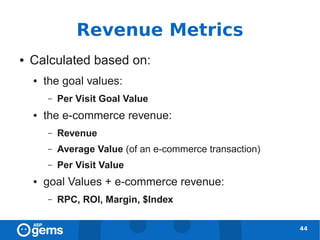
Revenue Metrics
●   Calculated based on:
    ●   the goal values:
        –   Per Visit Goal Value
    ●   the e-commerce revenue:
        –   Revenue
        –   Average Value (of an e-commerce transaction)
        –   Per Visit Value
    ●   goal Values + e-commerce revenue:
        –   RPC, ROI, Margin, $Index

                                                           44
$Index
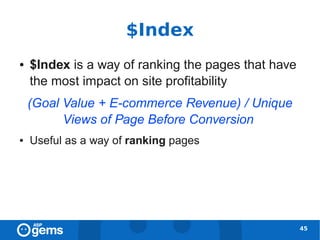
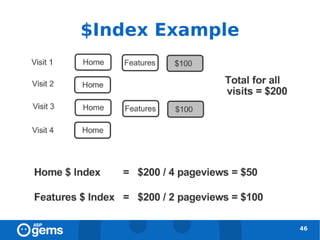
●   $Index is a way of ranking the pages that have
    the most impact on site profitability
    (Goal Value + E-commerce Revenue) / Unique
          Views of Page Before Conversion
●   Useful as a way of ranking pages


                                                     45
$Index Example


                 46
Tracking across Domains [1]
●   Add the following lines to the GATC on all
    pages of both domains:


                                                 47
Tracking across Domains [2]
●   Add _link() to all links between domains:


                                                48
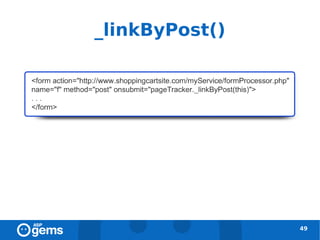
_linkByPost()


                49
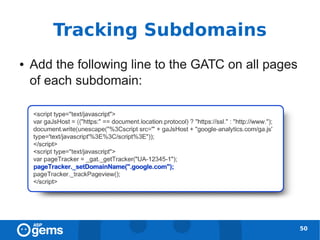
Tracking Subdomains
●   Add the following line to the GATC on all pages
    of each subdomain:


                                                      50
Best Practice #1
●   Create separate profiles for each subdomain:


                                                   51
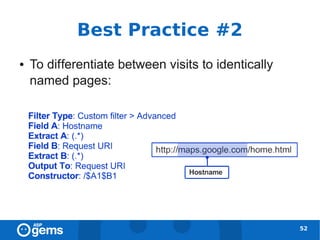
Best Practice #2
●   To differentiate between visits to identically
    named pages:


                                                     52
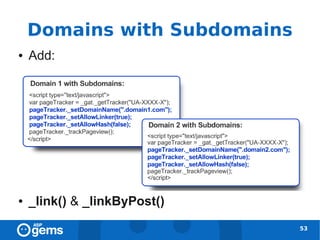
Domains with Subdomains
●   Add:


●   _link() & _linkByPost()
                              53
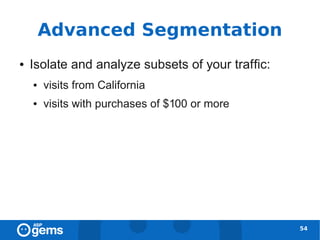
Advanced Segmentation
●   Isolate and analyze subsets of your traffic:
    ●   visits from California
    ●   visits with purchases of $100 or more


                                                   54
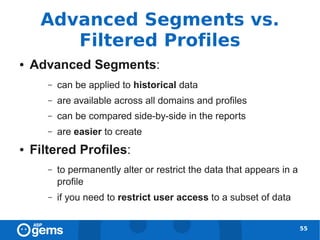
Advanced Segments vs.
        Filtered Profiles
●   Advanced Segments:
       –   can be applied to historical data
       –   are available across all domains and profiles
       –   can be compared side-by-side in the reports
       –   are easier to create
●   Filtered Profiles:
       –   to permanently alter or restrict the data that appears in a
           profile
       –   if you need to restrict user access to a subset of data


                                                                         55
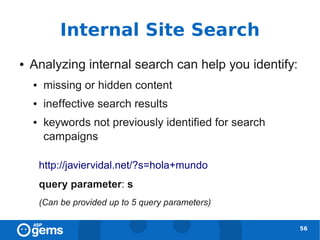
Internal Site Search
●   Analyzing internal search can help you identify:
    ●    missing or hidden content
    ●    ineffective search results
    ●    keywords not previously identified for search
         campaigns

        http://javiervidal.net/?s=hola+mundo
        query parameter: s
        (Can be provided up to 5 query parameters)

                                                         56
Site Search Reports [1]
●   Site Search Usage: compares performance of users
    who use site search versus those who do not
●   Site Search Terms: only includes visits where a
    search is performed
       –   can compare metrics between internal search
           queries
       –   useful for identifying new keywords
       –   can be combined with segmentation
●   Search Refinement: View the keywords visitors used
    to refine their original searches
                                                         57
Site Search Reports [2]
●   Search Navigation: See where visitors who search on
    a specific keyword go after viewing the search results
    page
●   Start Pages: Shows you where visitors begin using
    the search function (useful to assess the effectiveness
    of landing pages)
●   Destination Pages
●   Trending


                                                          58
Goal Conversion and Site
            Search
●   Goal conversions in the Site Search reports are
    based on visits that include at least one
    search


                                                  59
Event Tracking & Virtual
               Pageviews
●   Cases where a pageview is not generated:
    ●   Flash
    ●   AJAX
    ●   file downloads


                                               60
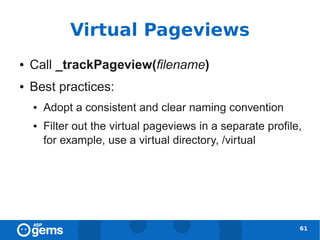
Virtual Pageviews
●   Call _trackPageview(filename)
●   Best practices:
    ●   Adopt a consistent and clear naming convention
    ●   Filter out the virtual pageviews in a separate profile,
        for example, use a virtual directory, /virtual


                                                              61
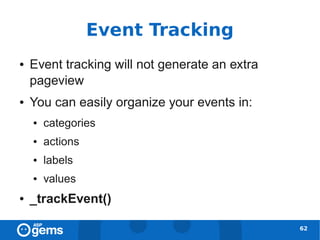
Event Tracking
●   Event tracking will not generate an extra
    pageview
●   You can easily organize your events in:
    ●   categories
    ●   actions
    ●   labels
    ●   values
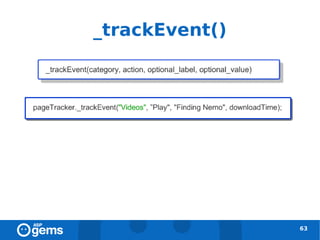
●   _trackEvent()

                                                62
_trackEvent()


                63
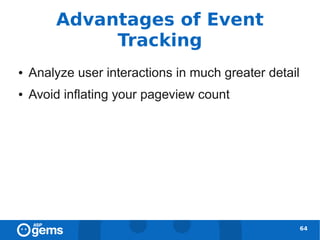
Advantages of Event
             Tracking
●   Analyze user interactions in much greater detail
●   Avoid inflating your pageview count


                                                       64
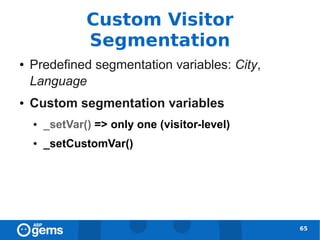
Custom Visitor
                Segmentation
●   Predefined segmentation variables: City,
    Language
●   Custom segmentation variables
    ●   _setVar() => only one (visitor-level)
    ●   _setCustomVar()


                                                65
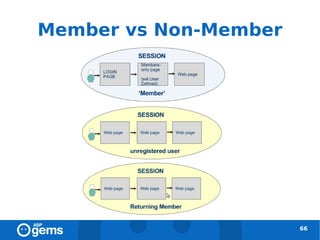
Member vs Non-Member


                       66
_setVar() [deprecated]
●   __utmv cookie


                               67
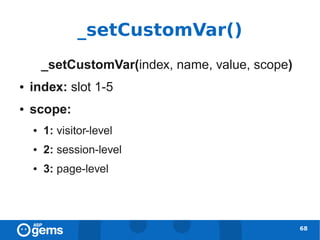
_setCustomVar()
        _setCustomVar(index, name, value, scope)
●   index: slot 1-5
●   scope:
    ●   1: visitor-level
    ●   2: session-level
    ●   3: page-level


                                                   68
Interesting URLs
http://www.google.com/support/conversionuniversity/?hl=en
http://www.seorabbit.com/google-analytics-individual-qualification-test-notes
http://dl.dropbox.com/u/915172/GAIQ_examples.zip


                                                                                69
¡gracias!

Google Analytics Concepts

  • 1.
    Google Analytics Concepts aspgems.com marzo de 2.010
  • 2.
    Introduction With Google Analyticswe can: ● make informed site and content decisions ● increase conversions ● measure keyword and ad performance ● track a wide variety of metrics 2
  • 3.
    How Does GAWork? ● Google Analytics Tracking Code (GATC) JavaScript in each page of our site ● Google Analytics only uses first-party cookies 3
  • 4.
    What happens if... someone who blocks their → not tracked cookies someone who deletes their → tracked but identified as a new cookies visitor someone who disables → not tracked JavaScript cached pages → tracked if connected to the internet JavaScript error on the page → not tracked if the error occurs before the tracking code is executed 4
  • 5.
    GA Tracking Code ● You'll sometimes need to paste the GATC at the top of the page: ● tracking ecommerce transactions ● tracking across multiple domains or subdomains ● using iframes ● using custom JavaScript functions that may conflict with ga.js ● New asynchronous tracking code. 5
  • 6.
    Interpreting Reports ● Create context ● compare with other metrics ● look for trends ● Data driven decision making 6
  • 7.
    Pageviews, Visits and Visitors [1] pageview: is counted every time a page on your site loads visit (session): period of interaction between a browser and a website. Closing the browser or staying inactive for 30 minutes ends the visit. visitor: is uniquely identified by a Google Analytics cookie 7
  • 8.
    Pageviews, Visits and Visitors [2] unique pageview: number of visits during which page was viewed absolute unique visitor: each visitor is counted only once during the selected date range new and returning visitor 8
  • 9.
    Pageviews, Visits and Visitors [3] 9
  • 10.
    Time Metrics [1] timeon page (n) = timestamp (n+1) – timestamp (n) The time on page of the last page on a visit is always 0, because there's not timestamp GA can use to calculate the time. time on site = sum(time on page) for a visit 10
  • 11.
    Time Metrics [2] avg.time on page = time on site / (pageviews – exits) pages with time on page 0 are excluded from the calculation avg. time on site = sum(time on site) for all visits / visits pages with time on page 0 are not excluded from the calculation 11
  • 12.
    Traffic Sources ● where the traffic is coming from on the internet? ● which source is sending the best quality traffic? ● e.g. small bounce rate 12
  • 13.
    Traffic Sources direct traffic:bookmark or URL typed directly into the browser referral traffic: via a link in any web site search engine traffic: click in a search results link in a search engine organic: non-paid paid: ads 13
  • 14.
    Keywords ● What were visitors expecting to find on your site? ● You fail to meet their expectation: ● high bounce rate ● low goal conversion rate ● e-commerce per visit value ● Which landing pages are being used for a keyword? 14
  • 15.
  • 16.
    GA Accounts [1] ● One Google username: ● up to 25 GA accounts ● can be added as an administrator to an unlimited number of GA accounts ● Administrators can: ● create filters, profiles, goals ● add users 16
  • 17.
    GA Accounts [2] ● Users: ● read-only access to reports ● can be restricted to specific profiles 17
  • 18.
    Profiles [1] ● Profile: set of rules that define what data is to be included in the reports ● Examples: ● subdomains ● sections of a site ● filtered data (access control) 18
  • 19.
    Profiles [2] ● The settings of a profile include: ● user access ● goals ● filters Each domain has a unique tracking code number (property number) 19
  • 20.
    Campaign Tracking and AdWords Integration ● Autotagging: ● reports are automatically populated with click, cost, … of every keyword you buy ● if autotagging is not enabled, unpaid and paid clicks will look they came from the same source: google/organic 20
  • 21.
    AdWords Data ● Clicks ● Cost ● CTR (Click-through Rate) = ( clicks / impressions ) * 100 ● CPC (Cost per Click) ● RPC (Revenue per Click) ● ROI (Return on Investment) = ( E-commerce Revenue + Total Goal Value - Cost) / Cost 21
  • 22.
    Data Discrepancies ● Clicks (AdWords) vs. Visits (GA) ● Browser preferences (JavaScript, cookies) ● Unable to load GATC or GATC missing ● AdWords filtering ● Report data sync ● Destination URLs not tagged ● Redirects 22
  • 23.
    Tracking Online Marketing ● You can add tags with campaign identifying to your destination URLs in paid links: ● keyword links ● banners ● links inside emails ● Manual URL tagging => query string 23
  • 24.
    Tags ● Always: ● utm_source: advertiser (google, yahoo, …) ● utm_medium: marketing medium (cpc, banner, email, …) ● utm_campaign: campaign name ● Optional: ● utm_term: paid search keyword ● utm_content: ad version 24
  • 25.
  • 26.
    Goals [1] ● Goal: website objetive ● Types: ● URL destination goal – head match (/offer1/) – exact match (/offer1/signup.html) – regexp match (/.*/signup.html) ● Time on Site goal ● Pages/Visit goal 26
  • 27.
    Funnels ● Funnel: ● the set of steps, or pages, that you expect visitors to visits on their way to complete the conversion ● URL destination goals 27
  • 28.
  • 29.
    Goals [2] ● Goal Value (optional): assign monetary value to non-ecommerce goals ● During a visit: ● goal conversions => once ● e-commerce transactions => multiple times 29
  • 30.
    Filters ● Modify data: ● remove data from internal sources ● restrict data for a profile or user ● segment data ● Customize reports 30
  • 31.
    Filters and Profiles[1] ● Filters are applied to profiles ● It is recommended to maintain an unfiltered profile 31
  • 32.
  • 33.
    Filter Types ● Predefined filters: ● exclude traffic from a domain ● exclude traffic from a IP address ● include only traffic to a subdirectory ● Custom filters: filter type | filter field | filter pattern 33
  • 34.
    Custom Filters ● filter type: ● filter field: ● exclude ● request URI ● include ● hostname ● lowercase / uppercase ● page title ● search & replace ● … ● advanced 34
  • 35.
    Cookies [1] ● Cookies are text files that describe a small piece of information about a visitor or the visitor's computer. ● Google Analytics: ● first-party cookies ● your site can uniquely but anonymously identify individual visitors 35
  • 36.
  • 37.
  • 38.
    __utmb & __utmc:Session Identifiers ● Session (or visit) => 30 minutes of inactivity ● Each time de GATC is executed, __utmb is set to expire in 30 minutes. ● When the visitor loads a page, the GATC checks for both the __utmb and __utmc cookies. If either one is missing GA knows it's a new session. 38
  • 39.
    __utmz: Campaign Values[1] ● The session number increments for every session during which the campaign cookie gets overwritten. ● The campaign number increments every time you arrive at the site by a different campaign or organic search, even if it is within the same session. 39
  • 40.
  • 41.
    __utmv: Visitor Segmentation ● Only set if the site calls the _setVar() method ● _setVar() => deprecated ● _setCustomVar() 41
  • 42.
    E-commerce Tracking [1] ● Enable e-commerce reporting in your website profile ● Add the GATC ● Add some additional code to track each transaction 42
  • 43.
  • 44.
    Revenue Metrics ● Calculated based on: ● the goal values: – Per Visit Goal Value ● the e-commerce revenue: – Revenue – Average Value (of an e-commerce transaction) – Per Visit Value ● goal Values + e-commerce revenue: – RPC, ROI, Margin, $Index 44
  • 45.
    $Index ● $Index is a way of ranking the pages that have the most impact on site profitability (Goal Value + E-commerce Revenue) / Unique Views of Page Before Conversion ● Useful as a way of ranking pages 45
  • 46.
  • 47.
    Tracking across Domains[1] ● Add the following lines to the GATC on all pages of both domains: 47
  • 48.
    Tracking across Domains[2] ● Add _link() to all links between domains: 48
  • 49.
  • 50.
    Tracking Subdomains ● Add the following line to the GATC on all pages of each subdomain: 50
  • 51.
    Best Practice #1 ● Create separate profiles for each subdomain: 51
  • 52.
    Best Practice #2 ● To differentiate between visits to identically named pages: 52
  • 53.
    Domains with Subdomains ● Add: ● _link() & _linkByPost() 53
  • 54.
    Advanced Segmentation ● Isolate and analyze subsets of your traffic: ● visits from California ● visits with purchases of $100 or more 54
  • 55.
    Advanced Segments vs. Filtered Profiles ● Advanced Segments: – can be applied to historical data – are available across all domains and profiles – can be compared side-by-side in the reports – are easier to create ● Filtered Profiles: – to permanently alter or restrict the data that appears in a profile – if you need to restrict user access to a subset of data 55
  • 56.
    Internal Site Search ● Analyzing internal search can help you identify: ● missing or hidden content ● ineffective search results ● keywords not previously identified for search campaigns http://javiervidal.net/?s=hola+mundo query parameter: s (Can be provided up to 5 query parameters) 56
  • 57.
    Site Search Reports[1] ● Site Search Usage: compares performance of users who use site search versus those who do not ● Site Search Terms: only includes visits where a search is performed – can compare metrics between internal search queries – useful for identifying new keywords – can be combined with segmentation ● Search Refinement: View the keywords visitors used to refine their original searches 57
  • 58.
    Site Search Reports[2] ● Search Navigation: See where visitors who search on a specific keyword go after viewing the search results page ● Start Pages: Shows you where visitors begin using the search function (useful to assess the effectiveness of landing pages) ● Destination Pages ● Trending 58
  • 59.
    Goal Conversion andSite Search ● Goal conversions in the Site Search reports are based on visits that include at least one search 59
  • 60.
    Event Tracking &Virtual Pageviews ● Cases where a pageview is not generated: ● Flash ● AJAX ● file downloads 60
  • 61.
    Virtual Pageviews ● Call _trackPageview(filename) ● Best practices: ● Adopt a consistent and clear naming convention ● Filter out the virtual pageviews in a separate profile, for example, use a virtual directory, /virtual 61
  • 62.
    Event Tracking ● Event tracking will not generate an extra pageview ● You can easily organize your events in: ● categories ● actions ● labels ● values ● _trackEvent() 62
  • 63.
  • 64.
    Advantages of Event Tracking ● Analyze user interactions in much greater detail ● Avoid inflating your pageview count 64
  • 65.
    Custom Visitor Segmentation ● Predefined segmentation variables: City, Language ● Custom segmentation variables ● _setVar() => only one (visitor-level) ● _setCustomVar() 65
  • 66.
  • 67.
  • 68.
    _setCustomVar() _setCustomVar(index, name, value, scope) ● index: slot 1-5 ● scope: ● 1: visitor-level ● 2: session-level ● 3: page-level 68
  • 69.
  • 70.