Google Analytics
              Joanne Casey
              Head of Search and Analytics
              Omnicom Media Group


Slide  1
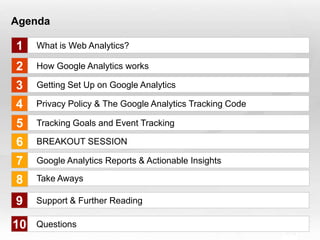
Agenda

  1         What is Web Analytics?

  2         How Google Analytics works

  3         Getting Set Up on Google Analytics

  4         Privacy Policy & The Google Analytics Tracking Code

  5         Tracking Goals and Event Tracking

  6         BREAKOUT SESSION

  7         Google Analytics Reports & Actionable Insights

  8         Take Aways

  9         Support & Further Reading

10
Slide  2
            Questions
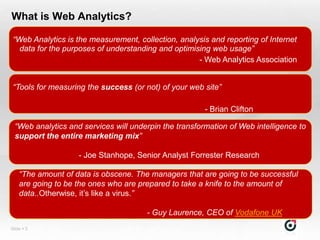
What is Web Analytics?

 “Web Analytics is the measurement, collection, analysis and reporting of Internet
   data for the purposes of understanding and optimising web usage”
                                                     - Web Analytics Association


 “Tools for measuring the success (or not) of your web site”

                                                        - Brian Clifton

  “Web analytics and services will underpin the transformation of Web intelligence to
  support the entire marketing mix”

                    - Joe Stanhope, Senior Analyst Forrester Research

    “The amount of data is obscene. The managers that are going to be successful
    are going to be the ones who are prepared to take a knife to the amount of
    data..Otherwise, it‟s like a virus.”

                                       - Guy Laurence, CEO of Vodafone UK
Slide  3
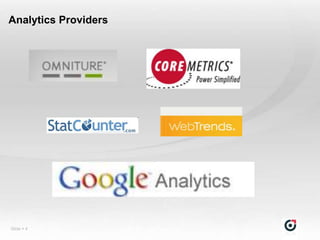
Analytics Providers


Slide  4
Why Google Analytics?

                         Free!

                   Sufficient to most


                 Easy to Set up & Use


               Its allows integration and
            measurement of other marketing
Slide  5               activities
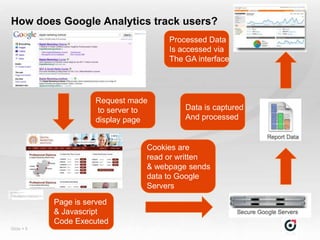
How does Google Analytics track users?
                                      Processed Data
                                      Is accessed via
                                      The GA interface


                      Request made
                      to server to        Data is captured
                      display page        And processed


                                 Cookies are
                                 read or written
                                 & webpage sends
                                 data to Google
                                 Servers

            Page is served
            & Javascript
            Code Executed
Slide  6
Tracking Issues


       Visitors with cookies or Javascript disabled
       will not be tracked

       Visitors who delete cookies will show up as a
       new visitor each time they visit rather than a
       returning visitor

       A Visitor who visits the site from a different
       web browser or computer will be see as a new
       visitor


Slide  7
Tracking Issues


     Don’t let it get to you

     No analytics package is 100% accurate

     Data discrepancy is normal

     Look for trends in data


Slide  8
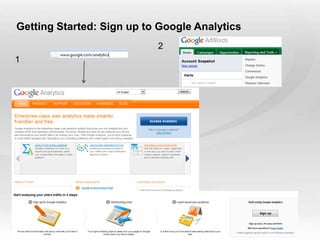
Getting Started: Sign up to Google Analytics
                             2
  1


Slide  9
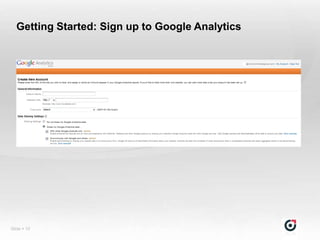
Getting Started: Sign up to Google Analytics


Slide  10
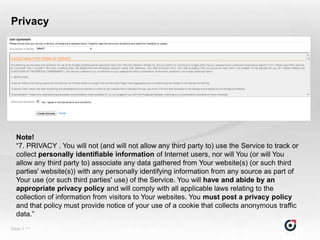
Privacy


  Note!
  “7. PRIVACY . You will not (and will not allow any third party to) use the Service to track or
  collect personally identifiable information of Internet users, nor will You (or will You
  allow any third party to) associate any data gathered from Your website(s) (or such third
  parties' website(s)) with any personally identifying information from any source as part of
  Your use (or such third parties' use) of the Service. You will have and abide by an
  appropriate privacy policy and will comply with all applicable laws relating to the
  collection of information from visitors to Your websites. You must post a privacy policy
  and that policy must provide notice of your use of a cookie that collects anonymous traffic
  data.”
Slide  11
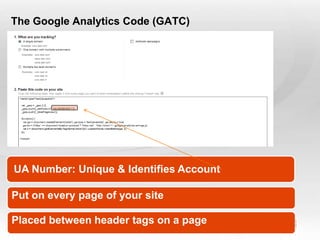
The Google Analytics Code (GATC)


 UA Number: Unique & Identifies Account

Put on every page of your site

Placed between header tags on a page
Slide  12
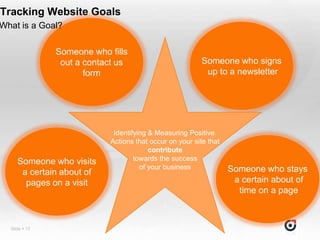
Tracking Website Goals
What is a Goal?

               Someone who fills
                out a contact us                         Someone who signs
                      form                                up to a newsletter


                            Identifying & Measuring Positive
                           Actions that occur on your site that
                                        contribute
     Someone who visits            towards the success
                                     of your business             Someone who stays
      a certain about of
       pages on a visit                                            a certain about of
                                                                    time on a page


  Slide  13
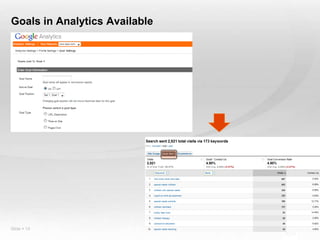
Goals in Analytics Available


Slide  14
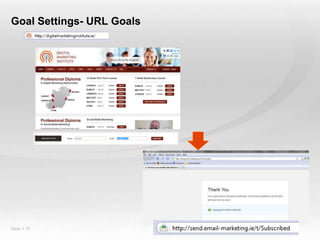
Goal Settings- URL Goals


Slide  15
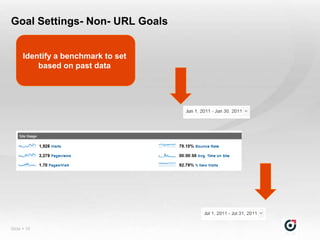
Goal Settings- Non- URL Goals


      Identify a benchmark to set
          based on past data


Slide  16
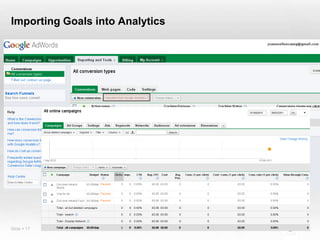
Importing Goals into Analytics


Slide  17
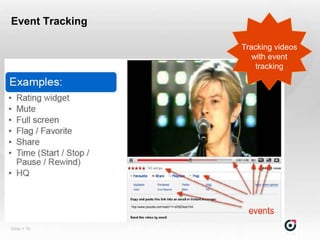
Event Tracking

 Elements such as clicks on links to a Facebook page or
 Twitter page are generally not track-able with the regular
 code implementation as clicks on a link take the visitor
 elsewhere that‟s got no GA code
<a href="http://www.facebook.com/Test" target="_blank" onClick="_gaq.push(['_trackEvent',
  'Outbound Link', 'Onclick', 'Facebook']);">


<a href="http://twitter.com/test" target="_blank“ onClick="_gaq.push(['_trackEvent', 'Outbound Link',
  'Onclick', ‘Twitter']);">


                                                                     Apply these codes to
                                                                     onclick event buttons
Event Tracking

                 Tracking videos
                    with event
                     tracking


Slide  19
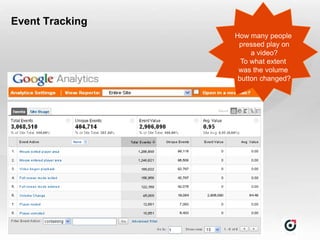
Event Tracking
                 How many people
                  pressed play on
                      a video?
                   To what extent
                  was the volume
                  button changed?


Slide  20
Breakout Session!
    - Investigate the below sites
    - Decide on KPIs for each site
    - Based on these KPIs, determine if you would set up:
        • URL goals
        • Engagement goals (Time on Site, Pages per Visit)
        • Event tracking

1                2                3                4


Slide  21
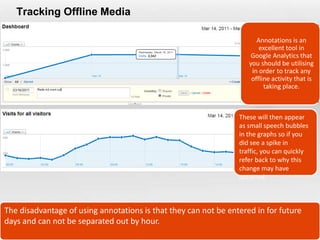
Tracking Offline Media

                                                                       Annotations is an
                                                                        excellent tool in
                                                                     Google Analytics that
                                                                    you should be utilising
                                                                     in order to track any
                                                                     offline activity that is
                                                                          taking place.


                                                                 These will then appear
                                                                 as small speech bubbles
                                                                 in the graphs so if you
                                                                 did see a spike in
                                                                 traffic, you can quickly
                                                                 refer back to why this
                                                                 change may have
                                                                 occurred.


The disadvantage of using annotations is that they can not be entered in for future
days and can not be separated out by hour.
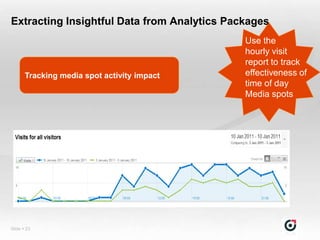
Extracting Insightful Data from Analytics Packages
                                             Use the
                                             hourly visit
                                             report to track
       Tracking media spot activity impact   effectiveness of
                                             time of day
                                             Media spots


Slide  23
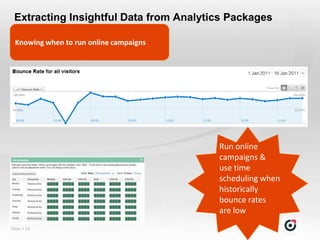
Extracting Insightful Data from Analytics Packages

  Knowing when to run online campaigns


                                         Run online
                                         campaigns &
                                         use time
                                         scheduling when
                                         historically
                                         bounce rates
                                         are low
Slide  24
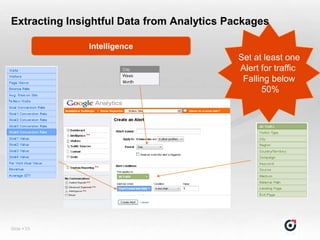
Extracting Insightful Data from Analytics Packages

               Intelligence
                                            Set at least one
                                            Alert for traffic
                                             Falling below
                                                  50%


Slide  25
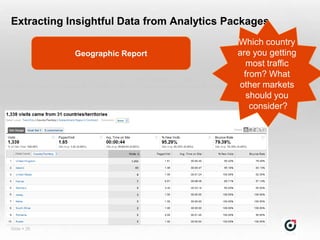
Extracting Insightful Data from Analytics Packages
                                           Which country
             Geographic Report             are you getting
                                             most traffic
                                            from? What
                                           other markets
                                             should you
                                              consider?


Slide  26
Extracting Insightful Data from Analytics Packages

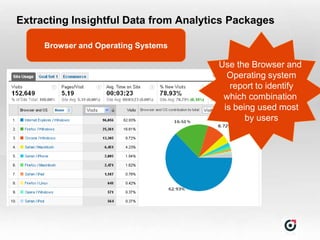
     Browser and Operating Systems

                                       Use the Browser and
                                         Operating system
                                          report to identify
                                        which combination
                                        is being used most
                                              by users
Extracting Insightful Data from Analytics Packages


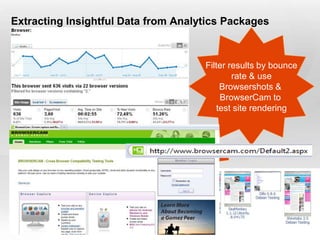
                                     Filter results by bounce
                                             rate & use
                                         Browsershots &
                                         BrowserCam to
                                        test site rendering
Extracting Insightful Data from Analytics Packages
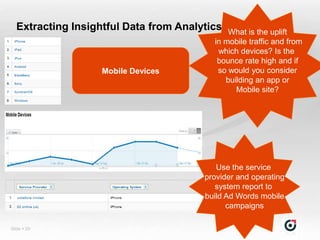
                                            What is the uplift
                                              in mobile traffic and from
                                               which devices? Is the
                                               bounce rate high and if
                    Mobile Devices             so would you consider
                                                 building an app or
                                                    Mobile site?


                                              Use the service
                                           provider and operating
                                              system report to
                                           build Ad Words mobile
                                                 campaigns

Slide  29
Extracting Insightful Data from Analytics Packages
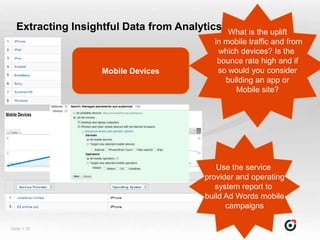
                                            What is the uplift
                                              in mobile traffic and from
                                               which devices? Is the
                                               bounce rate high and if
                    Mobile Devices             so would you consider
                                                 building an app or
                                                    Mobile site?


                                              Use the service
                                           provider and operating
                                              system report to
                                           build Ad Words mobile
                                                 campaigns

Slide  30
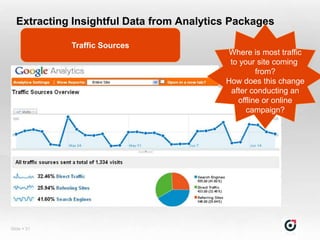
Extracting Insightful Data from Analytics Packages

             Traffic Sources
                                          Where is most traffic
                                           to your site coming
                                                   from?
                                          How does this change
                                           after conducting an
                                             offline or online
                                                campaign?


Slide  31
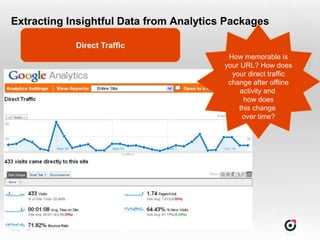
Extracting Insightful Data from Analytics Packages

             Direct Traffic
                                          How memorable is
                                         your URL? How does
                                           your direct traffic
                                          change after offline
                                              activity and
                                               how does
                                             this change
                                               over time?


Slide  32
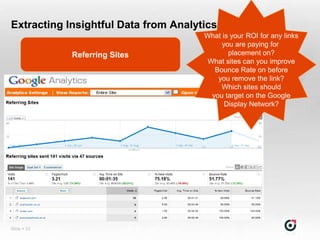
Extracting Insightful Data from Analytics
                                      What is your ROI for any links
                                           you are paying for
             Referring Sites                 placement on?
                                       What sites can you improve
                                         Bounce Rate on before
                                          you remove the link?
                                           Which sites should
                                        you target on the Google
                                            Display Network?


Slide  33
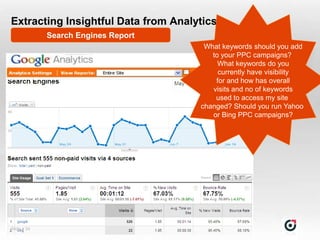
Extracting Insightful Data from Analytics
             Search Engines Report
                                      What keywords should you add
                                        to your PPC campaigns?
                                          What keywords do you
                                          currently have visibility
                                         for and how has overall
                                        visits and no of keywords
                                         used to access my site
                                     changed? Should you run Yahoo
                                        or Bing PPC campaigns?


Slide  34
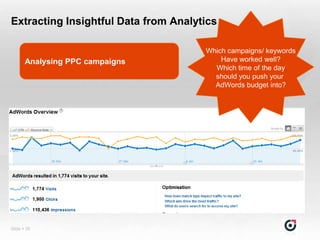
Extracting Insightful Data from Analytics

                                      Which campaigns/ keywords
       Analysing PPC campaigns            Have worked well?
                                        Which time of the day
                                        should you push your
                                        AdWords budget into?


Slide  35
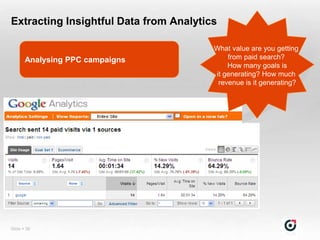
Extracting Insightful Data from Analytics

                                        What value are you getting
       Analysing PPC campaigns              from paid search?
                                            How many goals is
                                        it generating? How much
                                         revenue is it generating?


Slide  36
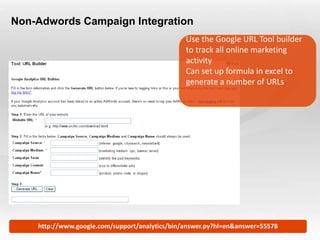
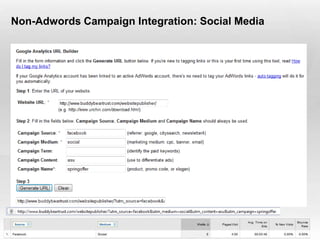
Non-Adwords Campaign Integration
                                                         Use the Google URL Tool builder
                                                         to track all online marketing
                                                         activity
                                                         Can set up formula in excel to
                                                         generate a number of URLs


Slide  37   http://www.google.com/support/analytics/bin/answer.py?hl=en&answer=55578
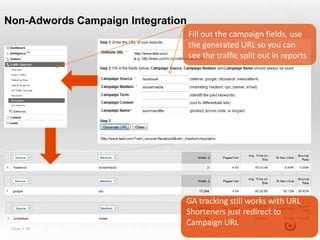
Non-Adwords Campaign Integration
                                   Fill out the campaign fields, use
                                   the generated URL so you can
                                   see the traffic split out in reports


                               GA tracking still works with URL
                               Shorteners just redirect to
                               Campaign URL
 Slide  38
Non-Adwords Campaign Integration: Social Media


Slide  39
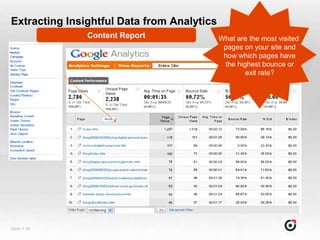
Extracting Insightful Data from Analytics
               Content Report               What are the most visited
                                             pages on your site and
                                             how which pages have
                                             the highest bounce or
                                                    exit rate?


Slide  40
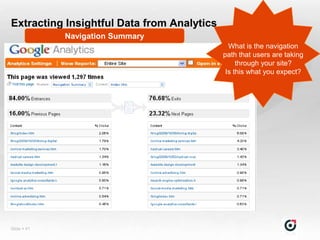
Extracting Insightful Data from Analytics
             Navigation Summary
                                              What is the navigation
                                            path that users are taking
                                                 through your site?
                                             Is this what you expect?


Slide  41
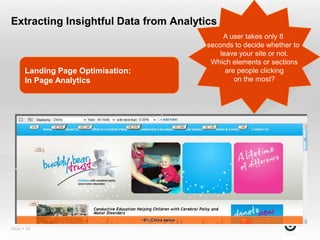
Extracting Insightful Data from Analytics
                                            A user takes only 8
                                       seconds to decide whether to
                                           leave your site or not.
                                        Which elements or sections
       Landing Page Optimisation:            are people clicking
       In Page Analytics                        on the most?


Slide  42
Extracting Insightful Data from Analytics
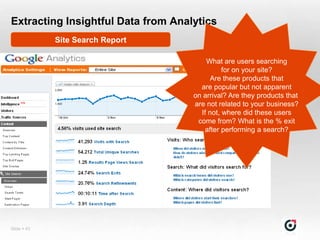
             Site Search Report

                                        What are users searching
                                              for on your site?
                                          Are these products that
                                      are popular but not apparent
                                    on arrival? Are they products that
                                    are not related to your business?
                                      If not, where did these users
                                     come from? What is the % exit
                                       after performing a search?


Slide  43
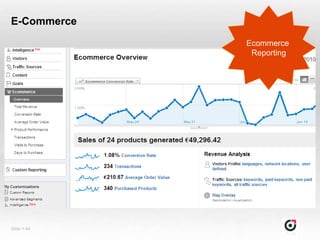
E-Commerce
             Ecommerce
              Reporting


Slide  44
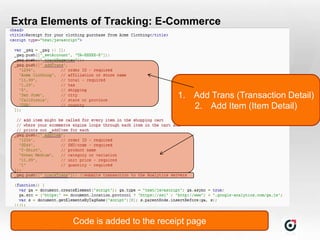
Extra Elements of Tracking: E-Commerce


                                      1. Add Trans (Transaction Detail)
                                         2. Add Item (Item Detail)


             Code is added to the receipt page
Slide  45
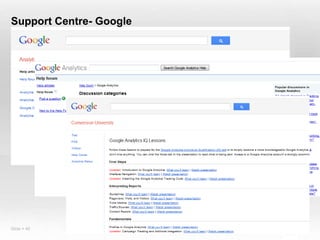
Support Centre- Google


Slide  46
Don’t Forget!

  1. Ensure the Google Analytics code is on every page
  2. Check you meet the privacy terms
  3. Identify and set up goals for your website
  4. Link your AdWords and Analytics
  5. Use Annotations to measure offline activity
  6. Identify reports that are important to your business
  7. Continuously analyse data
  8. Keep asking yourself „So What‟ until you get an
  actionable insight
  9. Use actionable insights to improve business
  performance
   10. Never stop testing!
Slide  47
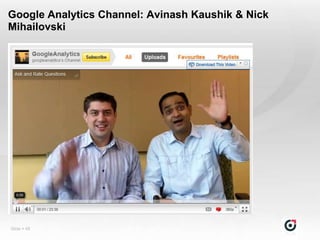
Google Analytics Channel: Avinash Kaushik & Nick
Mihailovski


Slide  48
Recommended Reading


Slide  49
Questions?

   Email: joanne.casey@omnicommediagroup.com

   LinkedIn: http://ie.linkedin.com/in/joanneellencasey

   Twitter: @joannecasey


Slide  50

Google analytics 2011_joanne-casey

  • 1.
    Google Analytics Joanne Casey Head of Search and Analytics Omnicom Media Group Slide  1
  • 2.
    Agenda 1 What is Web Analytics? 2 How Google Analytics works 3 Getting Set Up on Google Analytics 4 Privacy Policy & The Google Analytics Tracking Code 5 Tracking Goals and Event Tracking 6 BREAKOUT SESSION 7 Google Analytics Reports & Actionable Insights 8 Take Aways 9 Support & Further Reading 10 Slide  2 Questions
  • 3.
    What is WebAnalytics? “Web Analytics is the measurement, collection, analysis and reporting of Internet data for the purposes of understanding and optimising web usage” - Web Analytics Association “Tools for measuring the success (or not) of your web site” - Brian Clifton “Web analytics and services will underpin the transformation of Web intelligence to support the entire marketing mix” - Joe Stanhope, Senior Analyst Forrester Research “The amount of data is obscene. The managers that are going to be successful are going to be the ones who are prepared to take a knife to the amount of data..Otherwise, it‟s like a virus.” - Guy Laurence, CEO of Vodafone UK Slide  3
  • 4.
  • 5.
    Why Google Analytics? Free! Sufficient to most Easy to Set up & Use Its allows integration and measurement of other marketing Slide  5 activities
  • 6.
    How does GoogleAnalytics track users? Processed Data Is accessed via The GA interface Request made to server to Data is captured display page And processed Cookies are read or written & webpage sends data to Google Servers Page is served & Javascript Code Executed Slide  6
  • 7.
    Tracking Issues Visitors with cookies or Javascript disabled will not be tracked Visitors who delete cookies will show up as a new visitor each time they visit rather than a returning visitor A Visitor who visits the site from a different web browser or computer will be see as a new visitor Slide  7
  • 8.
    Tracking Issues Don’t let it get to you No analytics package is 100% accurate Data discrepancy is normal Look for trends in data Slide  8
  • 9.
    Getting Started: Signup to Google Analytics 2 1 Slide  9
  • 10.
    Getting Started: Signup to Google Analytics Slide  10
  • 11.
    Privacy Note! “7. PRIVACY . You will not (and will not allow any third party to) use the Service to track or collect personally identifiable information of Internet users, nor will You (or will You allow any third party to) associate any data gathered from Your website(s) (or such third parties' website(s)) with any personally identifying information from any source as part of Your use (or such third parties' use) of the Service. You will have and abide by an appropriate privacy policy and will comply with all applicable laws relating to the collection of information from visitors to Your websites. You must post a privacy policy and that policy must provide notice of your use of a cookie that collects anonymous traffic data.” Slide  11
  • 12.
    The Google AnalyticsCode (GATC) UA Number: Unique & Identifies Account Put on every page of your site Placed between header tags on a page Slide  12
  • 13.
    Tracking Website Goals Whatis a Goal? Someone who fills out a contact us Someone who signs form up to a newsletter Identifying & Measuring Positive Actions that occur on your site that contribute Someone who visits towards the success of your business Someone who stays a certain about of pages on a visit a certain about of time on a page Slide  13
  • 14.
    Goals in AnalyticsAvailable Slide  14
  • 15.
    Goal Settings- URLGoals Slide  15
  • 16.
    Goal Settings- Non-URL Goals Identify a benchmark to set based on past data Slide  16
  • 17.
    Importing Goals intoAnalytics Slide  17
  • 18.
    Event Tracking Elementssuch as clicks on links to a Facebook page or Twitter page are generally not track-able with the regular code implementation as clicks on a link take the visitor elsewhere that‟s got no GA code <a href="http://www.facebook.com/Test" target="_blank" onClick="_gaq.push(['_trackEvent', 'Outbound Link', 'Onclick', 'Facebook']);"> <a href="http://twitter.com/test" target="_blank“ onClick="_gaq.push(['_trackEvent', 'Outbound Link', 'Onclick', ‘Twitter']);"> Apply these codes to onclick event buttons
  • 19.
    Event Tracking Tracking videos with event tracking Slide  19
  • 20.
    Event Tracking How many people pressed play on a video? To what extent was the volume button changed? Slide  20
  • 21.
    Breakout Session! - Investigate the below sites - Decide on KPIs for each site - Based on these KPIs, determine if you would set up: • URL goals • Engagement goals (Time on Site, Pages per Visit) • Event tracking 1 2 3 4 Slide  21
  • 22.
    Tracking Offline Media Annotations is an excellent tool in Google Analytics that you should be utilising in order to track any offline activity that is taking place. These will then appear as small speech bubbles in the graphs so if you did see a spike in traffic, you can quickly refer back to why this change may have occurred. The disadvantage of using annotations is that they can not be entered in for future days and can not be separated out by hour.
  • 23.
    Extracting Insightful Datafrom Analytics Packages Use the hourly visit report to track Tracking media spot activity impact effectiveness of time of day Media spots Slide  23
  • 24.
    Extracting Insightful Datafrom Analytics Packages Knowing when to run online campaigns Run online campaigns & use time scheduling when historically bounce rates are low Slide  24
  • 25.
    Extracting Insightful Datafrom Analytics Packages Intelligence Set at least one Alert for traffic Falling below 50% Slide  25
  • 26.
    Extracting Insightful Datafrom Analytics Packages Which country Geographic Report are you getting most traffic from? What other markets should you consider? Slide  26
  • 27.
    Extracting Insightful Datafrom Analytics Packages Browser and Operating Systems Use the Browser and Operating system report to identify which combination is being used most by users
  • 28.
    Extracting Insightful Datafrom Analytics Packages Filter results by bounce rate & use Browsershots & BrowserCam to test site rendering
  • 29.
    Extracting Insightful Datafrom Analytics Packages What is the uplift in mobile traffic and from which devices? Is the bounce rate high and if Mobile Devices so would you consider building an app or Mobile site? Use the service provider and operating system report to build Ad Words mobile campaigns Slide  29
  • 30.
    Extracting Insightful Datafrom Analytics Packages What is the uplift in mobile traffic and from which devices? Is the bounce rate high and if Mobile Devices so would you consider building an app or Mobile site? Use the service provider and operating system report to build Ad Words mobile campaigns Slide  30
  • 31.
    Extracting Insightful Datafrom Analytics Packages Traffic Sources Where is most traffic to your site coming from? How does this change after conducting an offline or online campaign? Slide  31
  • 32.
    Extracting Insightful Datafrom Analytics Packages Direct Traffic How memorable is your URL? How does your direct traffic change after offline activity and how does this change over time? Slide  32
  • 33.
    Extracting Insightful Datafrom Analytics What is your ROI for any links you are paying for Referring Sites placement on? What sites can you improve Bounce Rate on before you remove the link? Which sites should you target on the Google Display Network? Slide  33
  • 34.
    Extracting Insightful Datafrom Analytics Search Engines Report What keywords should you add to your PPC campaigns? What keywords do you currently have visibility for and how has overall visits and no of keywords used to access my site changed? Should you run Yahoo or Bing PPC campaigns? Slide  34
  • 35.
    Extracting Insightful Datafrom Analytics Which campaigns/ keywords Analysing PPC campaigns Have worked well? Which time of the day should you push your AdWords budget into? Slide  35
  • 36.
    Extracting Insightful Datafrom Analytics What value are you getting Analysing PPC campaigns from paid search? How many goals is it generating? How much revenue is it generating? Slide  36
  • 37.
    Non-Adwords Campaign Integration Use the Google URL Tool builder to track all online marketing activity Can set up formula in excel to generate a number of URLs Slide  37 http://www.google.com/support/analytics/bin/answer.py?hl=en&answer=55578
  • 38.
    Non-Adwords Campaign Integration Fill out the campaign fields, use the generated URL so you can see the traffic split out in reports GA tracking still works with URL Shorteners just redirect to Campaign URL Slide  38
  • 39.
    Non-Adwords Campaign Integration:Social Media Slide  39
  • 40.
    Extracting Insightful Datafrom Analytics Content Report What are the most visited pages on your site and how which pages have the highest bounce or exit rate? Slide  40
  • 41.
    Extracting Insightful Datafrom Analytics Navigation Summary What is the navigation path that users are taking through your site? Is this what you expect? Slide  41
  • 42.
    Extracting Insightful Datafrom Analytics A user takes only 8 seconds to decide whether to leave your site or not. Which elements or sections Landing Page Optimisation: are people clicking In Page Analytics on the most? Slide  42
  • 43.
    Extracting Insightful Datafrom Analytics Site Search Report What are users searching for on your site? Are these products that are popular but not apparent on arrival? Are they products that are not related to your business? If not, where did these users come from? What is the % exit after performing a search? Slide  43
  • 44.
    E-Commerce Ecommerce Reporting Slide  44
  • 45.
    Extra Elements ofTracking: E-Commerce 1. Add Trans (Transaction Detail) 2. Add Item (Item Detail) Code is added to the receipt page Slide  45
  • 46.
  • 47.
    Don’t Forget! 1. Ensure the Google Analytics code is on every page 2. Check you meet the privacy terms 3. Identify and set up goals for your website 4. Link your AdWords and Analytics 5. Use Annotations to measure offline activity 6. Identify reports that are important to your business 7. Continuously analyse data 8. Keep asking yourself „So What‟ until you get an actionable insight 9. Use actionable insights to improve business performance 10. Never stop testing! Slide  47
  • 48.
    Google Analytics Channel:Avinash Kaushik & Nick Mihailovski Slide  48
  • 49.
  • 50.
    Questions? Email: joanne.casey@omnicommediagroup.com LinkedIn: http://ie.linkedin.com/in/joanneellencasey Twitter: @joannecasey Slide  50