IJRET: International Journal of Research in Engineering and Technology ISSN: 2319-1163
__________________________________________________________________________________________
Volume: 02 Issue: 05 | May-2013, Available @ http://www.ijret.org 896
GESTURE CONTROL ALGORITHM FOR PERSONAL COMPUTERS
Sahib Singh1
, Vijay Kumar Banga2
1
Student, 2
HOD &Professor, Department of Electronics and Communication Engineering,
ACET, Amritsar, Punjab, India,
dhillon_sahib85@yahoo.com, vijaykumar.banga@gmail.com2
Abstract
As our dependency on computers is increasing every day, these intelligent machines are making inroads in our daily life and society.
This requires more friendly methods for interaction between humans and computers (HCI) than the conventionally used interaction
devices (mouse & keyboard) because they are unnatural and cumbersome to use at times (by disabled people). Gesture Recognition
can be useful under such conditions and provides intuitive interaction. Gestures are natural and intuitive means of communication
and mostly occur from hands or face of human beings.
This work introduces a hand gesture recognition system to recognize real time gestures of the user (finger movements) in unstrained
environments. This is an effort to adapt computers to our natural means of communication: Speech and Hand Movements. All the
work has been done using Matlab 2011b and in a real time environment which provides a robust technique for feature extraction and
speech processing. A USB 2.0 camera continuously tracks the movement of user’s finger which is covered with red marker by filtering
out green and blue colors from the RGB color space. Java based commands are used to implement the mouse movement through
moving finger and GUI keyboard. Then a microphone is used to make use of the speech processing and instruct the system to click on
a particular icon or folder throughout the screen of the system. So it is possible to take control of the whole computer system.
Experimental results show that proposed method has high accuracy and outperforms Sub-gesture Modeling based methods [5]
Keywords: Hand Gesture Recognition (HGR), Human-Computer Interaction (HCI), Intuitive Interaction
--------------------------------------------------------------------***--------------------------------------------------------------------------
1. INTRODUCTION
With the ever-increasing diffusion of computers into the
society, it is widely believed that present popular mode of
interactions with computers (mouse and keyboard) will become
a bottleneck in the effective utilization of information flow
between the computers and the human. Vision based Gesture
recognition has the potential to be a natural and powerful tool
supporting efficient and intuitive interaction between the
human and the computer [4]. Body language forms a crucial
component of face-to-face conversation. However, it has been
conspicuously missing from interactions in networked virtual
environments. While voice communication is quickly gaining
popularity in virtual worlds, non-verbal communication is
usually performed with manual keyboard control or not at all.
Automatic generation of body language for avatars in virtual
Worlds would make nonverbal communication a natural part of
Social interaction in these environments [6]. Gesture
recognition is a topic in computer science and language
technology with the goal of interpreting human gestures via
mathematical algorithms. Gestures can originate from any
bodily motion or state but commonly originate from the hand.
Many approaches have been made using cameras and computer
vision algorithms to interpret sign language. Using the concept
of gesture recognition, it is possible to point a finger at the
computer screen so that the cursor will move accordingly. This
could potentially make conventional input devices such as
mouse, keyboards and even touch-screens redundant [1].
Interpretation of human gestures by a computer is used for
human-machine interaction in the area of computer vision. The
main purpose of gesture recognition research is to identify a
particular human gesture and convey information to the user
pertaining to individual gesture. From the corpus of gestures,
specific gesture of interest can be identified, and on the basis of
that, specific command for execution of action can be given to
the machine. Overall aim is to make the computer to
understand human body language, thereby bridging the gap
between machine and human. Hand gesture recognition can be
used to enhance human computer interaction without
depending on traditional input devices such as keyboard and
mouse [10]. There is one more application, which uses motion
detection as its first step, and then does some interesting
routines with the detected object hands gesture recognition.
Let‟s suppose there is a camera which monitors an area. When
somebody gets into the area and makes some hands gestures in
front of the camera, the application should detect the type of
the gesture, and raise an event, for example. When a hands
gesture is detected, the application could perform different
actions depending on the type of the gesture. For example, a
gesture recognition application could control some sort of
device, or another application sending different commands to it
depending on the recognized gesture [11].
IJRET: International Journal of Research in Engineering and Technology ISSN: 2319-1163
__________________________________________________________________________________________
Volume: 02 Issue: 05 | May-2013, Available @ http://www.ijret.org 897
Many techniques have been developed to bridge the gap
between humans and computers. Some of the popularly used
methods include Vision based, Instrument Glove based,
Colored Marker based and 3-D model based techniques [9][8]
which implement the use of Hand Gesture Recognition through
Skin Color Based Hand Detection (SCHD) or Background
Subtraction Based Hand Detection (BSHD) methods. Apart
from these techniquesthe use of Hidden Markov Models [2]
and Neural Network based approach [3][7] is also very popular
in Gesture Recognition. These techniques are modeled through
continuous learning and training of the system and enable the
system to recognise a set of selected gestures for which it has
been trained.
In this paper we propose a Hand Gesture Recognition method
which tracks the movement of user‟s hand by tracking the
movement of user‟s finger that is covered with a red color
marker. The mouse movement is then controlled through the
finger movement. This is done with the help of a USB 2.0
camera by capturing at least 15 frames/second so that it is easy
to calculate inter frame difference(IFD). These frames will be
scanned in real time and algorithm extracts the position of the
finger so that further it generates the JAVA based signals as the
real hardware of keyboard and mouse does. Once the mouse
movement is synchronized with the moving finger, speech
processing will be used to instruct the system to click on a
desired location just like it is done with the help of a mouse.
The On-Screen keyboard will be used by the user to perform
the alphanumeric typing operations and some other useful
controls. The whole algorithm has been designed in Matlab
2011b. This is a robust method with high accuracy and allows
the user to take control of the whole system through image
processing and speech processing.
2. PROPOSED METHODOLOGY
The objective of proposed method is to take control of personal
computer without using the conventional input devices (mouse
& keyboard) through the hand gestures (finger movement) of
the user. The proposed method is computationally fast and
simple.
No
Yes
No
Yes
Figure 1: Flow chart of methodology
2.1 Algorithm
Step 1 -Initialization of USB 2.0 camera:In order to capture
the moving finger of the user which is covered with a red color
marker a USB 2.0 camera is used though image acquisition
Start
Initialize the camera by using image
acquisition toolbox in Matlab
From the RGB colour space, filter out the green and
blue colour intensities so that red is extracted, as the
user will use a red colour marker on his finger as a
pointer
Start capturing user‟s finger movement which is
covered with red marker
Is the cursor
moving w.r.t. the
user‟s hand
movement?
Take the cursor to a particular icon that you
want to open
Use a microphone arrangement to make use
of speech processing
Say „click‟ and that particular icon or folder
will be clicked or opened
Is the folder
clicked or
opened?
Repeat the same procedure to take
control of whole system
End
IJRET: International Journal of Research in Engineering and Technology ISSN: 2319-1163
__________________________________________________________________________________________
Volume: 02 Issue: 05 | May-2013, Available @ http://www.ijret.org 898
toolbox. The capture rate of the camera must be 15
frames/second at least.
Step 2 – Co-relating the Resolution of Camera Window and
Screen: It is necessary to co-relate the resolution of system
screen with resolution of camera window used because as the
user‟s finger will move in the camera window the cursor will
move throughout the screen. So it becomes necessary to find
out that if the user moves by 1 pixel in the camera window then
how many pixels are moved in actual screen. This is required to
cover the whole screen size by the user‟s finger which is being
captured by camera. The resolution of screen can be calculated
by using the commands
screensize = get(0,‟screensize‟) ; this command will calculate
the screen size of system
screen_col=screensize(1,3) ;this command will assign the
column resolution to screen_col
screen_row=screensize(1,4) ;this command will assign the row
resolution to screen_row
If col and row denote the resolution of camera window
columns and rows respectively, then co-related resolution can
be given as:
c_dum = screen_col/col
r_dum = screen_row/row
Where c_dum and r_dum are two variables that contain the co-
related resolution values.
Step 3 –Extraction of Red color intensity: The next task is to
filter out red color from the RGB color space as the user will be
wearing a red color marker on one of his fingers. So in order to
synchronize the pointer movement with the marker covered
finger it is necessary to filter out red color from the RGB color
space. A threshold value is set for Red color so that mouse
pointer only picks a red which is more than that value. Firstly
the incoming image is separated by means of Red image, Green
image and Blue image. Then each of them is reshaped from a
2Dx2D matrix to 1Dx1D matrix. This is done because it makes
the speed of code very fast as it is easy to work with 1Dx1D as
compared to 2Dx2D matrix. Then mean of Green and Blue
colors is calculated and subtracted from Red color intensity. By
doing so red color will be extracted and this will also eliminate
white color which is present in all the three colors.
If, Img_r is the matrix for red component of the captured image
Img_g is the matrix for green component of the captured image
Img_b is the matrix for blue component of the captured image
Img_gb is the mean matrix of green and blue components of
the captured image
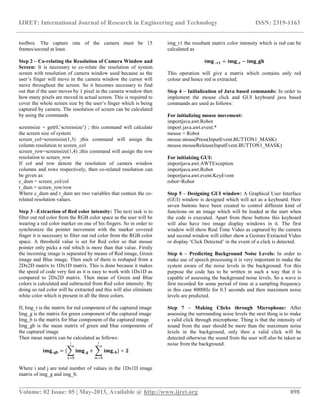
Then mean matrix can be calculated as follows:
𝐢𝐦𝐠_ 𝐠𝐛 = { 𝐢𝐦𝐠_𝐠
𝑖
𝑛=0
+ 𝐢𝐦𝐠_ 𝐛
𝑗
𝑚=0
} ÷ 𝟐
Where i and j are total number of values in the 1Dx1D image
matrix of img_g and img_b.
img_r1 the resultant matrix color intensity which is red can be
calculated as
𝐢𝐦𝐠−𝐫𝟏 = 𝐢𝐦𝐠_ 𝐫 − 𝐢𝐦𝐠_𝐠𝐛
This operation will give a matrix which contains only red
colour and hence red is extracted.
Step 4 – Initialization of Java based commands: In order to
implement the mouse click and GUI keyboard java based
commands are used as follows:
For initializing mouse movement:
importjava.awt.Robot
import java.awt.event.*
mouse = Robot
mouse.mousePress(InputEvent.BUTTON1_MASK)
mouse.mouseRelease(InputEvent.BUTTON1_MASK)
For initialzing GUI:
importjava.awt.AWTException
importjava.awt.Robot
importjava.awt.event.KeyEvent
robot=Robot
Step 5 – Designing GUI window: A Graphical User Interface
(GUI) window is designed which will act as a keyboard. Here
seven buttons have been created to control different kind of
functions on an image which will be loaded at the start when
the code is executed. Apart from these buttons this keyboard
will also have two image display windows in it. The first
window will show Real Time Video as captured by the camera
and second window will either show a Gesture Extracted Video
or display „Click Detected‟ in the event of a click is detected.
Step 6 – Predicting Background Noise Levels: In order to
make use of speech processing it is very important to make the
system aware of the noise levels in the background. For this
purpose the code has to be written in such a way that it is
capable of assessing the background noise levels. So a wave is
first recorded for some period of time at a sampling frequency
in this case 8000Hz for 0.3 seconds and then maximum noise
levels are predicted.
Step 7 – Making Clicks through Microphone: After
assessing the surrounding noise levels the next thing is to make
a valid click through microphone. Thing is that the intensity of
sound from the user should be more than the maximum noise
levels in the background, only then a valid click will be
detected otherwise the sound from the user will also be taken as
noise from the background.
IJRET: International Journal of Research in Engineering and Technology ISSN: 2319-1163
__________________________________________________________________________________________
Volume: 02 Issue: 05 | May-2013, Available @ http://www.ijret.org 899
3. RESULTS
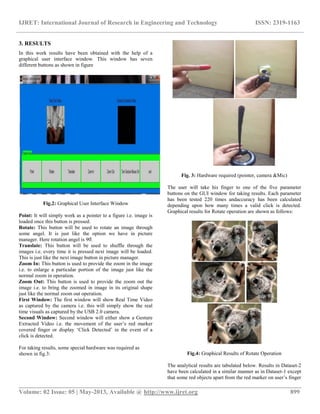
In this work results have been obtained with the help of a
graphical user interface window. This window has seven
different buttons as shown in figure
Fig.2: Graphical User Interface Window
Point: It will simply work as a pointer to a figure i.e. image is
loaded once this button is pressed.
Rotate: This button will be used to rotate an image through
some angel. It is just like the option we have in picture
manager. Here rotation angel is 90̊.
Translate: This button will be used to shuffle through the
images i.e. every time it is pressed next image will be loaded.
This is just like the next image button in picture manager.
Zoom In: This button is used to provide the zoom in the image
i.e. to enlarge a particular portion of the image just like the
normal zoom in operation.
Zoom Out: This button is used to provide the zoom out the
image i.e. to bring the zoomed in image in its original shape
just like the normal zoom out operation.
First Window: The first window will show Real Time Video
as captured by the camera i.e. this will simply show the real
time visuals as captured by the USB 2.0 camera.
Second Window: Second window will either show a Gesture
Extracted Video i.e. the movement of the user‟s red marker
covered finger or display „Click Detected‟ in the event of a
click is detected.
For taking results, some special hardware was required as
shown in fig.3:
Fig. 3: Hardware required (pointer, camera &Mic)
The user will take his finger to one of the five parameter
buttons on the GUI window for taking results. Each parameter
has been tested 220 times andaccuracy has been calculated
depending upon how many times a valid click is detected.
Graphical results for Rotate operation are shown as follows:
Fig.4: Graphical Results of Rotate Operation
The analytical results are tabulated below. Results in Dataset-2
have been calculated in a similar manner as in Dataset-1 except
that some red objects apart from the red marker on user‟s finger
IJRET: International Journal of Research in Engineering and Technology ISSN: 2319-1163
__________________________________________________________________________________________
Volume: 02 Issue: 05 | May-2013, Available @ http://www.ijret.org 900
have been intentionally placed in the background to confuse the
system.As expected % accuracy decreases in Dataset-2.
Table 1 Combined Accuracy results (% Detection Rate)
averaged over all folds
CONCLUSIONS
We have developed a gesture recognition system that robust as
the results show. The system is self-adaptableand it works in
real-time. It has the ability to operate successfully in moderate
noise levels. The advantage of the system lies in the ease of its
use. The user simply needs to wear a red finger pointer and a
microphone and moreover there is no need to train the system
for the recognition of limited set of gestures. Hence it to
possible to take full control rather than partial control (as in
most previous methods). It is possible to take control of the
whole PC using this method.
ACKNOWLEDGEMENTS
I would like to place on record my deep sense of gratitude to
Thesis Guide, Dr.Vijay Kumar Banga, Department of
Electronics and Communication Engineering, ACET, Amritsar,
Punjab (India) for his generous guidance, help and useful
suggestions. I also wish to extend my thanks to Er. Sanjeev
Kumar, Er. Guneet Kaur, Er. Narinder Sharma and other
faculty members for their insightful comments and constructive
suggestions to improve the quality of this research work.
REFERENCES
[1] en.wikipedia.org/wiki/Gesture_recognition
[2] Nguyen Dang Binh et al. “Real-Time Hand Tracking and
Gesture Recognition System.” GVIP 05 Conference, 19-21
December 2005, CICC, Cairo, Egypt
[3] Tin HninnHninnMaung “Real-Time Hand Tracking and
Gesture Recognition System Using Neural Networks”World
Academy of Science, Engineering and Technology 2009
[4] G. R. S. Murthy & R. S. Jadon “A Review of Vision Based
Hand Gestures Recognition”International Journal of
Information Technology and Knowledge Management July-
December 2009, Volume 2, No. 2, pp. 405-410
[5]Manavender R. Malgireddy,Jason J. Corso “A Framework
for Hand Gesture Recognition and Spotting UsingSub-gesture
Modeling” IEEE 20th
Int. Conf. On Pattern Recognition ,
Istanbul , Turkey , pp 3780-3783 , 23-26 August 2010
[6] Sergey Levineet al “Gesture Controllers”Stanford
University 2010
[7] Shweta K. Yewale et al. “ARTIFICIAL NEURAL
NETWORK APPROACH FOR HAND GESTURE
RECOGNITION” International Journal of Engineering Science
and Technology (IJEST)Volume 3, Issue 4, April 2011
[8] AbdelkaderBellarbi et al. “Hand Gesture Interaction Using
Color-Based Method for Tabletop Interfaces” IEEE 7th
International Symposium on Intelligence Signal Processing,
Algiers, Algeria, pp 1-6 , 19-21 Sep 2011
[9] Noor Adnan Ibraheem et al.“Survey on Various Gesture
Recognition Technologies and Techniques”International
Journal of Computer ApplicationsVolume 50, Issue 7, July
2012
[10] www.intechopen.com
[11]http://www.codeproject.com/Articles/26280/Hands-
Gesture-Recognition
BIOGRAPHIES:
Sahib Singh received B. Tech. from
Punjab Technical University and is
currently pursuing M.Tech in Electronics
& Communication Engg. from Punjab
Technical University.
Vijay Kumar Banga received B.E from
Punjabi University, Patiala, and M. Tech.
from Punjab University, Chandigarh and
Ph.D. from Thapar University, Patiala. He
has 14 years of academic experience & his
Area of Specialization includes Soft
Computing, Image Processing and Autonomous Robots.

Gesture control algorithm for personal computers

  • 1.
    IJRET: International Journalof Research in Engineering and Technology ISSN: 2319-1163 __________________________________________________________________________________________ Volume: 02 Issue: 05 | May-2013, Available @ http://www.ijret.org 896 GESTURE CONTROL ALGORITHM FOR PERSONAL COMPUTERS Sahib Singh1 , Vijay Kumar Banga2 1 Student, 2 HOD &Professor, Department of Electronics and Communication Engineering, ACET, Amritsar, Punjab, India, dhillon_sahib85@yahoo.com, vijaykumar.banga@gmail.com2 Abstract As our dependency on computers is increasing every day, these intelligent machines are making inroads in our daily life and society. This requires more friendly methods for interaction between humans and computers (HCI) than the conventionally used interaction devices (mouse & keyboard) because they are unnatural and cumbersome to use at times (by disabled people). Gesture Recognition can be useful under such conditions and provides intuitive interaction. Gestures are natural and intuitive means of communication and mostly occur from hands or face of human beings. This work introduces a hand gesture recognition system to recognize real time gestures of the user (finger movements) in unstrained environments. This is an effort to adapt computers to our natural means of communication: Speech and Hand Movements. All the work has been done using Matlab 2011b and in a real time environment which provides a robust technique for feature extraction and speech processing. A USB 2.0 camera continuously tracks the movement of user’s finger which is covered with red marker by filtering out green and blue colors from the RGB color space. Java based commands are used to implement the mouse movement through moving finger and GUI keyboard. Then a microphone is used to make use of the speech processing and instruct the system to click on a particular icon or folder throughout the screen of the system. So it is possible to take control of the whole computer system. Experimental results show that proposed method has high accuracy and outperforms Sub-gesture Modeling based methods [5] Keywords: Hand Gesture Recognition (HGR), Human-Computer Interaction (HCI), Intuitive Interaction --------------------------------------------------------------------***-------------------------------------------------------------------------- 1. INTRODUCTION With the ever-increasing diffusion of computers into the society, it is widely believed that present popular mode of interactions with computers (mouse and keyboard) will become a bottleneck in the effective utilization of information flow between the computers and the human. Vision based Gesture recognition has the potential to be a natural and powerful tool supporting efficient and intuitive interaction between the human and the computer [4]. Body language forms a crucial component of face-to-face conversation. However, it has been conspicuously missing from interactions in networked virtual environments. While voice communication is quickly gaining popularity in virtual worlds, non-verbal communication is usually performed with manual keyboard control or not at all. Automatic generation of body language for avatars in virtual Worlds would make nonverbal communication a natural part of Social interaction in these environments [6]. Gesture recognition is a topic in computer science and language technology with the goal of interpreting human gestures via mathematical algorithms. Gestures can originate from any bodily motion or state but commonly originate from the hand. Many approaches have been made using cameras and computer vision algorithms to interpret sign language. Using the concept of gesture recognition, it is possible to point a finger at the computer screen so that the cursor will move accordingly. This could potentially make conventional input devices such as mouse, keyboards and even touch-screens redundant [1]. Interpretation of human gestures by a computer is used for human-machine interaction in the area of computer vision. The main purpose of gesture recognition research is to identify a particular human gesture and convey information to the user pertaining to individual gesture. From the corpus of gestures, specific gesture of interest can be identified, and on the basis of that, specific command for execution of action can be given to the machine. Overall aim is to make the computer to understand human body language, thereby bridging the gap between machine and human. Hand gesture recognition can be used to enhance human computer interaction without depending on traditional input devices such as keyboard and mouse [10]. There is one more application, which uses motion detection as its first step, and then does some interesting routines with the detected object hands gesture recognition. Let‟s suppose there is a camera which monitors an area. When somebody gets into the area and makes some hands gestures in front of the camera, the application should detect the type of the gesture, and raise an event, for example. When a hands gesture is detected, the application could perform different actions depending on the type of the gesture. For example, a gesture recognition application could control some sort of device, or another application sending different commands to it depending on the recognized gesture [11].
  • 2.
    IJRET: International Journalof Research in Engineering and Technology ISSN: 2319-1163 __________________________________________________________________________________________ Volume: 02 Issue: 05 | May-2013, Available @ http://www.ijret.org 897 Many techniques have been developed to bridge the gap between humans and computers. Some of the popularly used methods include Vision based, Instrument Glove based, Colored Marker based and 3-D model based techniques [9][8] which implement the use of Hand Gesture Recognition through Skin Color Based Hand Detection (SCHD) or Background Subtraction Based Hand Detection (BSHD) methods. Apart from these techniquesthe use of Hidden Markov Models [2] and Neural Network based approach [3][7] is also very popular in Gesture Recognition. These techniques are modeled through continuous learning and training of the system and enable the system to recognise a set of selected gestures for which it has been trained. In this paper we propose a Hand Gesture Recognition method which tracks the movement of user‟s hand by tracking the movement of user‟s finger that is covered with a red color marker. The mouse movement is then controlled through the finger movement. This is done with the help of a USB 2.0 camera by capturing at least 15 frames/second so that it is easy to calculate inter frame difference(IFD). These frames will be scanned in real time and algorithm extracts the position of the finger so that further it generates the JAVA based signals as the real hardware of keyboard and mouse does. Once the mouse movement is synchronized with the moving finger, speech processing will be used to instruct the system to click on a desired location just like it is done with the help of a mouse. The On-Screen keyboard will be used by the user to perform the alphanumeric typing operations and some other useful controls. The whole algorithm has been designed in Matlab 2011b. This is a robust method with high accuracy and allows the user to take control of the whole system through image processing and speech processing. 2. PROPOSED METHODOLOGY The objective of proposed method is to take control of personal computer without using the conventional input devices (mouse & keyboard) through the hand gestures (finger movement) of the user. The proposed method is computationally fast and simple. No Yes No Yes Figure 1: Flow chart of methodology 2.1 Algorithm Step 1 -Initialization of USB 2.0 camera:In order to capture the moving finger of the user which is covered with a red color marker a USB 2.0 camera is used though image acquisition Start Initialize the camera by using image acquisition toolbox in Matlab From the RGB colour space, filter out the green and blue colour intensities so that red is extracted, as the user will use a red colour marker on his finger as a pointer Start capturing user‟s finger movement which is covered with red marker Is the cursor moving w.r.t. the user‟s hand movement? Take the cursor to a particular icon that you want to open Use a microphone arrangement to make use of speech processing Say „click‟ and that particular icon or folder will be clicked or opened Is the folder clicked or opened? Repeat the same procedure to take control of whole system End
  • 3.
    IJRET: International Journalof Research in Engineering and Technology ISSN: 2319-1163 __________________________________________________________________________________________ Volume: 02 Issue: 05 | May-2013, Available @ http://www.ijret.org 898 toolbox. The capture rate of the camera must be 15 frames/second at least. Step 2 – Co-relating the Resolution of Camera Window and Screen: It is necessary to co-relate the resolution of system screen with resolution of camera window used because as the user‟s finger will move in the camera window the cursor will move throughout the screen. So it becomes necessary to find out that if the user moves by 1 pixel in the camera window then how many pixels are moved in actual screen. This is required to cover the whole screen size by the user‟s finger which is being captured by camera. The resolution of screen can be calculated by using the commands screensize = get(0,‟screensize‟) ; this command will calculate the screen size of system screen_col=screensize(1,3) ;this command will assign the column resolution to screen_col screen_row=screensize(1,4) ;this command will assign the row resolution to screen_row If col and row denote the resolution of camera window columns and rows respectively, then co-related resolution can be given as: c_dum = screen_col/col r_dum = screen_row/row Where c_dum and r_dum are two variables that contain the co- related resolution values. Step 3 –Extraction of Red color intensity: The next task is to filter out red color from the RGB color space as the user will be wearing a red color marker on one of his fingers. So in order to synchronize the pointer movement with the marker covered finger it is necessary to filter out red color from the RGB color space. A threshold value is set for Red color so that mouse pointer only picks a red which is more than that value. Firstly the incoming image is separated by means of Red image, Green image and Blue image. Then each of them is reshaped from a 2Dx2D matrix to 1Dx1D matrix. This is done because it makes the speed of code very fast as it is easy to work with 1Dx1D as compared to 2Dx2D matrix. Then mean of Green and Blue colors is calculated and subtracted from Red color intensity. By doing so red color will be extracted and this will also eliminate white color which is present in all the three colors. If, Img_r is the matrix for red component of the captured image Img_g is the matrix for green component of the captured image Img_b is the matrix for blue component of the captured image Img_gb is the mean matrix of green and blue components of the captured image Then mean matrix can be calculated as follows: 𝐢𝐦𝐠_ 𝐠𝐛 = { 𝐢𝐦𝐠_𝐠 𝑖 𝑛=0 + 𝐢𝐦𝐠_ 𝐛 𝑗 𝑚=0 } ÷ 𝟐 Where i and j are total number of values in the 1Dx1D image matrix of img_g and img_b. img_r1 the resultant matrix color intensity which is red can be calculated as 𝐢𝐦𝐠−𝐫𝟏 = 𝐢𝐦𝐠_ 𝐫 − 𝐢𝐦𝐠_𝐠𝐛 This operation will give a matrix which contains only red colour and hence red is extracted. Step 4 – Initialization of Java based commands: In order to implement the mouse click and GUI keyboard java based commands are used as follows: For initializing mouse movement: importjava.awt.Robot import java.awt.event.* mouse = Robot mouse.mousePress(InputEvent.BUTTON1_MASK) mouse.mouseRelease(InputEvent.BUTTON1_MASK) For initialzing GUI: importjava.awt.AWTException importjava.awt.Robot importjava.awt.event.KeyEvent robot=Robot Step 5 – Designing GUI window: A Graphical User Interface (GUI) window is designed which will act as a keyboard. Here seven buttons have been created to control different kind of functions on an image which will be loaded at the start when the code is executed. Apart from these buttons this keyboard will also have two image display windows in it. The first window will show Real Time Video as captured by the camera and second window will either show a Gesture Extracted Video or display „Click Detected‟ in the event of a click is detected. Step 6 – Predicting Background Noise Levels: In order to make use of speech processing it is very important to make the system aware of the noise levels in the background. For this purpose the code has to be written in such a way that it is capable of assessing the background noise levels. So a wave is first recorded for some period of time at a sampling frequency in this case 8000Hz for 0.3 seconds and then maximum noise levels are predicted. Step 7 – Making Clicks through Microphone: After assessing the surrounding noise levels the next thing is to make a valid click through microphone. Thing is that the intensity of sound from the user should be more than the maximum noise levels in the background, only then a valid click will be detected otherwise the sound from the user will also be taken as noise from the background.
  • 4.
    IJRET: International Journalof Research in Engineering and Technology ISSN: 2319-1163 __________________________________________________________________________________________ Volume: 02 Issue: 05 | May-2013, Available @ http://www.ijret.org 899 3. RESULTS In this work results have been obtained with the help of a graphical user interface window. This window has seven different buttons as shown in figure Fig.2: Graphical User Interface Window Point: It will simply work as a pointer to a figure i.e. image is loaded once this button is pressed. Rotate: This button will be used to rotate an image through some angel. It is just like the option we have in picture manager. Here rotation angel is 90̊. Translate: This button will be used to shuffle through the images i.e. every time it is pressed next image will be loaded. This is just like the next image button in picture manager. Zoom In: This button is used to provide the zoom in the image i.e. to enlarge a particular portion of the image just like the normal zoom in operation. Zoom Out: This button is used to provide the zoom out the image i.e. to bring the zoomed in image in its original shape just like the normal zoom out operation. First Window: The first window will show Real Time Video as captured by the camera i.e. this will simply show the real time visuals as captured by the USB 2.0 camera. Second Window: Second window will either show a Gesture Extracted Video i.e. the movement of the user‟s red marker covered finger or display „Click Detected‟ in the event of a click is detected. For taking results, some special hardware was required as shown in fig.3: Fig. 3: Hardware required (pointer, camera &Mic) The user will take his finger to one of the five parameter buttons on the GUI window for taking results. Each parameter has been tested 220 times andaccuracy has been calculated depending upon how many times a valid click is detected. Graphical results for Rotate operation are shown as follows: Fig.4: Graphical Results of Rotate Operation The analytical results are tabulated below. Results in Dataset-2 have been calculated in a similar manner as in Dataset-1 except that some red objects apart from the red marker on user‟s finger
  • 5.
    IJRET: International Journalof Research in Engineering and Technology ISSN: 2319-1163 __________________________________________________________________________________________ Volume: 02 Issue: 05 | May-2013, Available @ http://www.ijret.org 900 have been intentionally placed in the background to confuse the system.As expected % accuracy decreases in Dataset-2. Table 1 Combined Accuracy results (% Detection Rate) averaged over all folds CONCLUSIONS We have developed a gesture recognition system that robust as the results show. The system is self-adaptableand it works in real-time. It has the ability to operate successfully in moderate noise levels. The advantage of the system lies in the ease of its use. The user simply needs to wear a red finger pointer and a microphone and moreover there is no need to train the system for the recognition of limited set of gestures. Hence it to possible to take full control rather than partial control (as in most previous methods). It is possible to take control of the whole PC using this method. ACKNOWLEDGEMENTS I would like to place on record my deep sense of gratitude to Thesis Guide, Dr.Vijay Kumar Banga, Department of Electronics and Communication Engineering, ACET, Amritsar, Punjab (India) for his generous guidance, help and useful suggestions. I also wish to extend my thanks to Er. Sanjeev Kumar, Er. Guneet Kaur, Er. Narinder Sharma and other faculty members for their insightful comments and constructive suggestions to improve the quality of this research work. REFERENCES [1] en.wikipedia.org/wiki/Gesture_recognition [2] Nguyen Dang Binh et al. “Real-Time Hand Tracking and Gesture Recognition System.” GVIP 05 Conference, 19-21 December 2005, CICC, Cairo, Egypt [3] Tin HninnHninnMaung “Real-Time Hand Tracking and Gesture Recognition System Using Neural Networks”World Academy of Science, Engineering and Technology 2009 [4] G. R. S. Murthy & R. S. Jadon “A Review of Vision Based Hand Gestures Recognition”International Journal of Information Technology and Knowledge Management July- December 2009, Volume 2, No. 2, pp. 405-410 [5]Manavender R. Malgireddy,Jason J. Corso “A Framework for Hand Gesture Recognition and Spotting UsingSub-gesture Modeling” IEEE 20th Int. Conf. On Pattern Recognition , Istanbul , Turkey , pp 3780-3783 , 23-26 August 2010 [6] Sergey Levineet al “Gesture Controllers”Stanford University 2010 [7] Shweta K. Yewale et al. “ARTIFICIAL NEURAL NETWORK APPROACH FOR HAND GESTURE RECOGNITION” International Journal of Engineering Science and Technology (IJEST)Volume 3, Issue 4, April 2011 [8] AbdelkaderBellarbi et al. “Hand Gesture Interaction Using Color-Based Method for Tabletop Interfaces” IEEE 7th International Symposium on Intelligence Signal Processing, Algiers, Algeria, pp 1-6 , 19-21 Sep 2011 [9] Noor Adnan Ibraheem et al.“Survey on Various Gesture Recognition Technologies and Techniques”International Journal of Computer ApplicationsVolume 50, Issue 7, July 2012 [10] www.intechopen.com [11]http://www.codeproject.com/Articles/26280/Hands- Gesture-Recognition BIOGRAPHIES: Sahib Singh received B. Tech. from Punjab Technical University and is currently pursuing M.Tech in Electronics & Communication Engg. from Punjab Technical University. Vijay Kumar Banga received B.E from Punjabi University, Patiala, and M. Tech. from Punjab University, Chandigarh and Ph.D. from Thapar University, Patiala. He has 14 years of academic experience & his Area of Specialization includes Soft Computing, Image Processing and Autonomous Robots.