CURSOR
MOVEMENT BY
HAND GESTURE
INTRODUCTION
Human Computer Interaction
today greatly emphasizes on
developing more spontaneous
and natural interfaces.
In the present day scenario most of
the mobile phones are using touch
screen technology to interact with the
user. But this technology is still not
cheap to be used in desktops and
laptops.
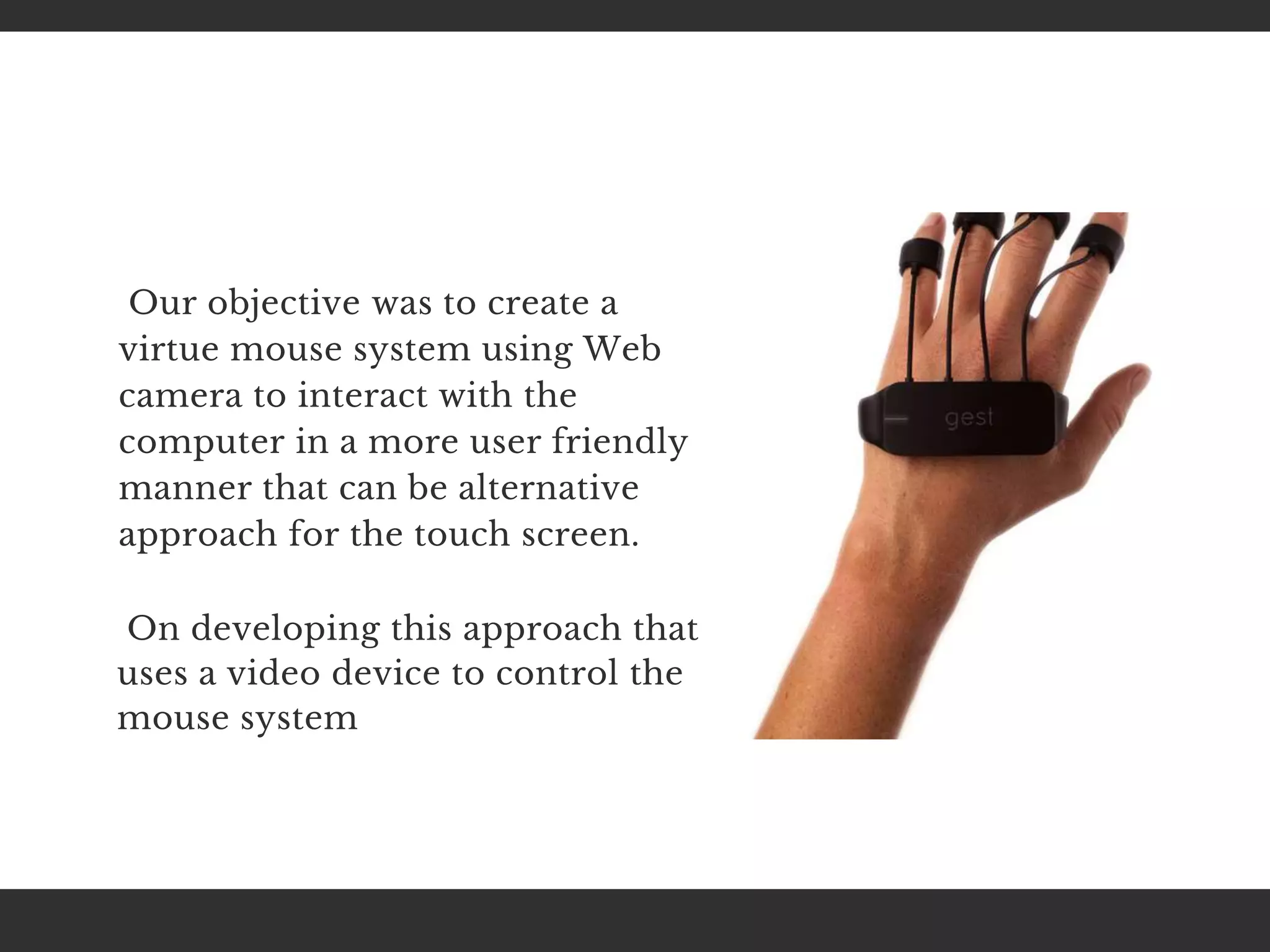
Our objective was to create a
virtue mouse system using Web
camera to interact with the
computer in a more user friendly
manner that can be alternative
approach for the touch screen.
On developing this approach that
uses a video device to control the
mouse system
Computer technology has tremendously grown over the
past decade and has become a necessary part of everyday
live. The primary computer accessory for Human
Computer Interaction (HCI) is the mouse. We all wonder
it would have been so comfortable if we could control
cursor through the use of hand gestures
These gaming technologies provide a more natural and
interactive means of playing videogames. Motion controls
is the future of gaming and it have tremendously boosted
the sales of video games, such as the Nintendo
ABSTRACT
Several new interfaces provide
possibilities for the realization of
human-computer interaction
including the controlling systems
based on human movement. The
human - computer interaction is able
to detect the cognitive actions, the
human and computer can have much
more than an interaction (HCI).
On the basis of the results of the
mouse cursor movement analysis
differences were shown in the course
of controlling performed by a
conventional mouse, and hand
gesture detection.
Here we propose to change the
hardware design. Most of the
existing technologies mainly
depend on changing the
mouse parts features like
changing the position of tracking
ball and adding more buttons.
We use a camera, image
comparison
technology and motion detection
technology to control mouse
movement and implement its
functions.
The applications of real time hand gesture recognition in the
real world are numerous, due to the fact that it can be used
almost anywhere where we interact with computers. Hand
gesture depend upon camera based color detection
technique.
Current methods involve changing mouse parts such as
adding more buttons or changing the position of the tracking
ball. Instead, our method is to use a camera and computer
vision technology, such as image segmentation and gesture
recognition, to control mouse tasks (left and right clicking,
double-clicking, and scrolling) and we show how it can
perform everything as current mouse devices can.
DESIGN AND
IMPLEMENTAION
Color detection involves detecting the color
pixels of the tapes bearing on the finger tip in
an image. It is a fundamental step. A wide range
of image processing applications such as face
detection, hand tracking and hand gesture
recognition
The assumption was made that the hand contour is
the largest contour therefore ignoring all the noise
contours in the image. This assumption can be
void, if the face contour is larger than the hand
contour. To solve this problem, the face region
must be eliminated from the frame.
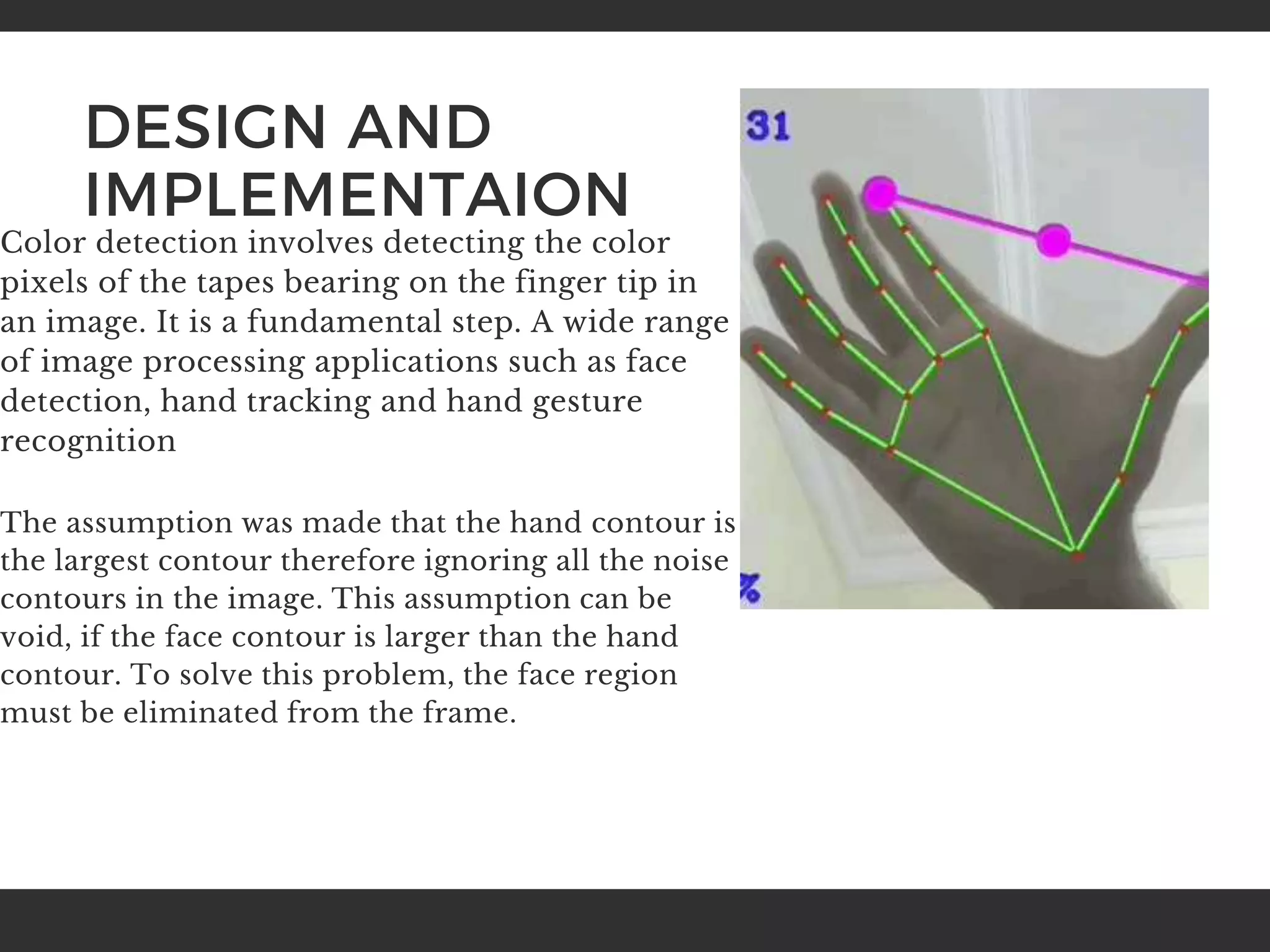
In the contour extraction process, we are
interested in extracting the hand contour so that
shape analysis can be done on it to determine the
hand gesture. The movement of the cursor was
controlled by the tip of the index finger. In order
to identify the tip of the index finger, the centre of
the palm must first be found.
The gesture recognition method used in the
proposed design is a combination of two methods,
the method proposed by Yeo and method
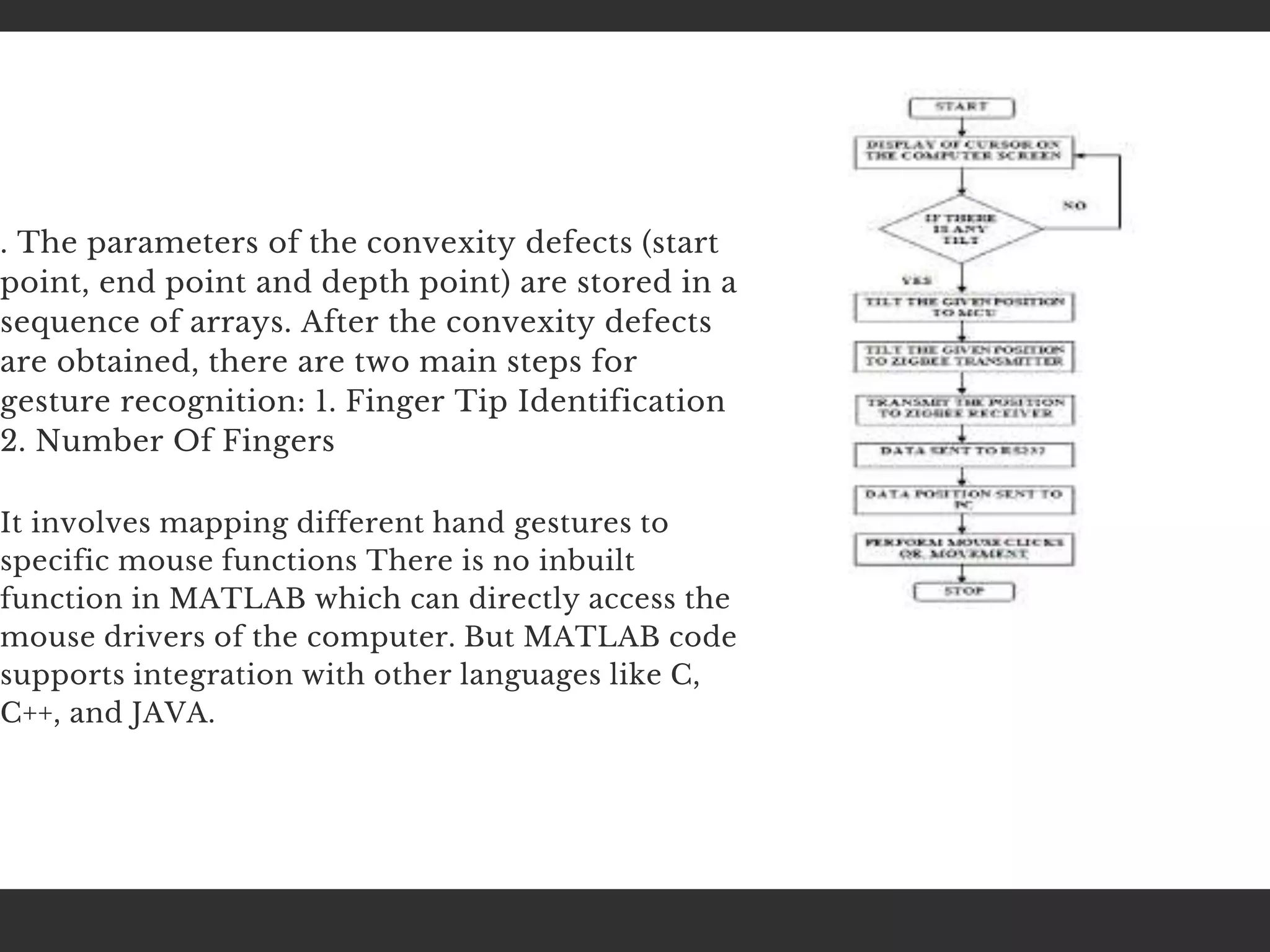
proposed by Balazs. The algorithm for the
proposed gesture recognition method is described
in the flow chart that cab be shown below. It can be
seen that the convexity defects for the hand
contour must firstly be calculated
. The parameters of the convexity defects (start
point, end point and depth point) are stored in a
sequence of arrays. After the convexity defects
are obtained, there are two main steps for
gesture recognition: 1. Finger Tip Identification
2. Number Of Fingers
It involves mapping different hand gestures to
specific mouse functions There is no inbuilt
function in MATLAB which can directly access the
mouse drivers of the computer. But MATLAB code
supports integration with other languages like C,
C++, and JAVA.
LITERATURE REVIEW
In 2013, Ashwini M. Patil, Focuses on the
development of machine-user interface which
implements hand gesture recognition using simple
computer vision and multimedia techniques.
Before actual implementing gesture comparison
algorithms, skin pixel detection and hand
segmentation from stored frames need to be done.
There are traditional approaches for virtual
keyboard and mouse systems which are usually
based on eye gestures. Our literature review
focuses on the research works on virtual keyboard
and virtual mouse which were published in
Elsevier, Springer, ACM Digital Library, IEEE
Digital Library etc. We discussed about few related
works on virtual keyboard and virtual mouse in
the following two subsections.
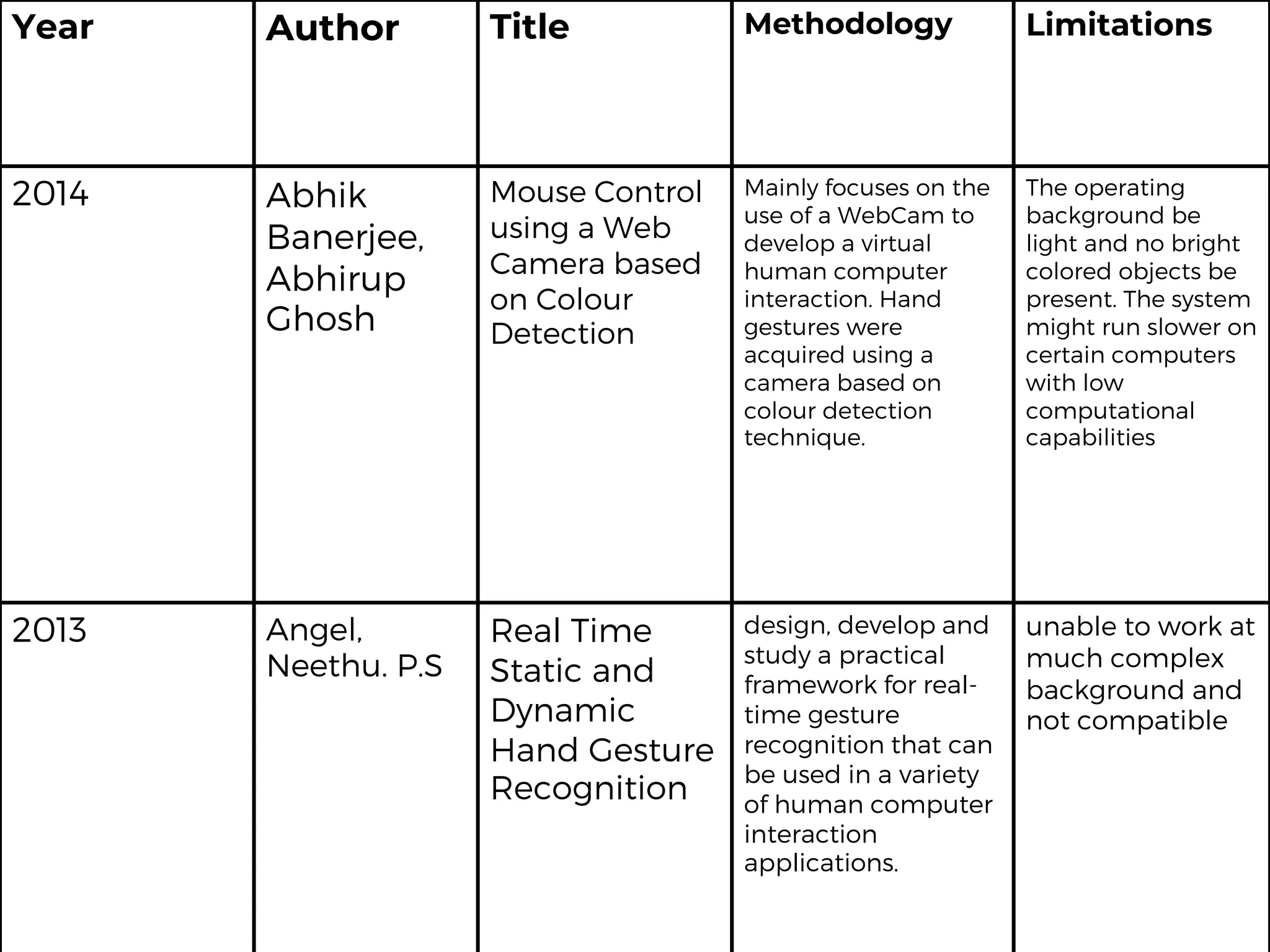
Year Author Title Methodology Limitations
2014 Abhik
Banerjee,
Abhirup
Ghosh
Mouse Control
using a Web
Camera based
on Colour
Detection
Mainly focuses on the
use of a WebCam to
develop a virtual
human computer
interaction. Hand
gestures were
acquired using a
camera based on
colour detection
technique.
The operating
background be
light and no bright
colored objects be
present. The system
might run slower on
certain computers
with low
computational
capabilities
2013 Angel,
Neethu. P.S
Real Time
Static and
Dynamic
Hand Gesture
Recognition
design, develop and
study a practical
framework for real-
time gesture
recognition that can
be used in a variety
of human computer
interaction
applications.
unable to work at
much complex
background and
not compatible
Year Author Title Methodology Limitations
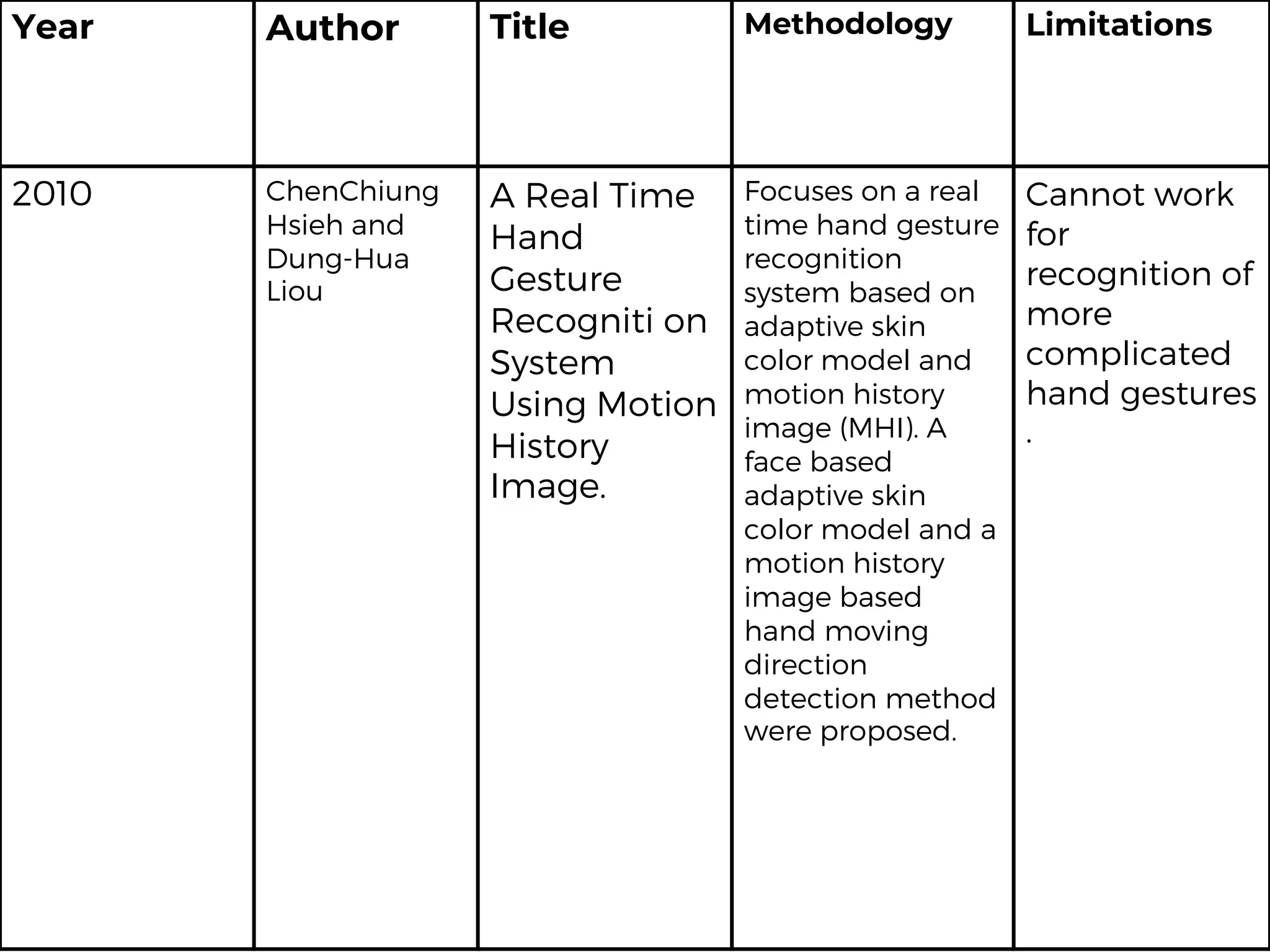
2010 ChenChiung
Hsieh and
Dung-Hua
Liou
A Real Time
Hand
Gesture
Recogniti on
System
Using Motion
History
Image.
Focuses on a real
time hand gesture
recognition
system based on
adaptive skin
color model and
motion history
image (MHI). A
face based
adaptive skin
color model and a
motion history
image based
hand moving
direction
detection method
were proposed.
Cannot work
for
recognition of
more
complicated
hand gestures
.
CONCLUSION
Mouse actually form an integral
part of the computer system. Our
system architecture can facilitate
the use of computer for the
paralyzed people. We have
developed a virtual system
where people can communicate
with the computer without using
any physical keyboard and
mouse.
This could lead to a new age of
Human Computer Interaction
in which physical contact with
the computer would not be
necessary at all.
The system control the mouse
pointer and implement its
operation using a real time
camera. The goal of this project
is to form a system which will
acknowledge the hand
gestures and control the
computer/laptop in line with
those gestures. The project will
profit the mobile systems
where using pointing devices
like mouse is tough.
The project is additionally
developed in such the way that
the user, new to the system
can simply have to install the
set up and not run the full
project
THANKS FOR
LISTENING!

Cursor movement by hand gesture.pptx

  • 1.
  • 2.
    INTRODUCTION Human Computer Interaction todaygreatly emphasizes on developing more spontaneous and natural interfaces. In the present day scenario most of the mobile phones are using touch screen technology to interact with the user. But this technology is still not cheap to be used in desktops and laptops.
  • 3.
    Our objective wasto create a virtue mouse system using Web camera to interact with the computer in a more user friendly manner that can be alternative approach for the touch screen. On developing this approach that uses a video device to control the mouse system
  • 4.
    Computer technology hastremendously grown over the past decade and has become a necessary part of everyday live. The primary computer accessory for Human Computer Interaction (HCI) is the mouse. We all wonder it would have been so comfortable if we could control cursor through the use of hand gestures These gaming technologies provide a more natural and interactive means of playing videogames. Motion controls is the future of gaming and it have tremendously boosted the sales of video games, such as the Nintendo
  • 5.
    ABSTRACT Several new interfacesprovide possibilities for the realization of human-computer interaction including the controlling systems based on human movement. The human - computer interaction is able to detect the cognitive actions, the human and computer can have much more than an interaction (HCI). On the basis of the results of the mouse cursor movement analysis differences were shown in the course of controlling performed by a conventional mouse, and hand gesture detection.
  • 6.
    Here we proposeto change the hardware design. Most of the existing technologies mainly depend on changing the mouse parts features like changing the position of tracking ball and adding more buttons. We use a camera, image comparison technology and motion detection technology to control mouse movement and implement its functions.
  • 7.
    The applications ofreal time hand gesture recognition in the real world are numerous, due to the fact that it can be used almost anywhere where we interact with computers. Hand gesture depend upon camera based color detection technique. Current methods involve changing mouse parts such as adding more buttons or changing the position of the tracking ball. Instead, our method is to use a camera and computer vision technology, such as image segmentation and gesture recognition, to control mouse tasks (left and right clicking, double-clicking, and scrolling) and we show how it can perform everything as current mouse devices can.
  • 8.
    DESIGN AND IMPLEMENTAION Color detectioninvolves detecting the color pixels of the tapes bearing on the finger tip in an image. It is a fundamental step. A wide range of image processing applications such as face detection, hand tracking and hand gesture recognition The assumption was made that the hand contour is the largest contour therefore ignoring all the noise contours in the image. This assumption can be void, if the face contour is larger than the hand contour. To solve this problem, the face region must be eliminated from the frame.
  • 9.
    In the contourextraction process, we are interested in extracting the hand contour so that shape analysis can be done on it to determine the hand gesture. The movement of the cursor was controlled by the tip of the index finger. In order to identify the tip of the index finger, the centre of the palm must first be found. The gesture recognition method used in the proposed design is a combination of two methods, the method proposed by Yeo and method proposed by Balazs. The algorithm for the proposed gesture recognition method is described in the flow chart that cab be shown below. It can be seen that the convexity defects for the hand contour must firstly be calculated
  • 10.
    . The parametersof the convexity defects (start point, end point and depth point) are stored in a sequence of arrays. After the convexity defects are obtained, there are two main steps for gesture recognition: 1. Finger Tip Identification 2. Number Of Fingers It involves mapping different hand gestures to specific mouse functions There is no inbuilt function in MATLAB which can directly access the mouse drivers of the computer. But MATLAB code supports integration with other languages like C, C++, and JAVA.
  • 11.
    LITERATURE REVIEW In 2013,Ashwini M. Patil, Focuses on the development of machine-user interface which implements hand gesture recognition using simple computer vision and multimedia techniques. Before actual implementing gesture comparison algorithms, skin pixel detection and hand segmentation from stored frames need to be done. There are traditional approaches for virtual keyboard and mouse systems which are usually based on eye gestures. Our literature review focuses on the research works on virtual keyboard and virtual mouse which were published in Elsevier, Springer, ACM Digital Library, IEEE Digital Library etc. We discussed about few related works on virtual keyboard and virtual mouse in the following two subsections.
  • 12.
    Year Author TitleMethodology Limitations 2014 Abhik Banerjee, Abhirup Ghosh Mouse Control using a Web Camera based on Colour Detection Mainly focuses on the use of a WebCam to develop a virtual human computer interaction. Hand gestures were acquired using a camera based on colour detection technique. The operating background be light and no bright colored objects be present. The system might run slower on certain computers with low computational capabilities 2013 Angel, Neethu. P.S Real Time Static and Dynamic Hand Gesture Recognition design, develop and study a practical framework for real- time gesture recognition that can be used in a variety of human computer interaction applications. unable to work at much complex background and not compatible
  • 13.
    Year Author TitleMethodology Limitations 2010 ChenChiung Hsieh and Dung-Hua Liou A Real Time Hand Gesture Recogniti on System Using Motion History Image. Focuses on a real time hand gesture recognition system based on adaptive skin color model and motion history image (MHI). A face based adaptive skin color model and a motion history image based hand moving direction detection method were proposed. Cannot work for recognition of more complicated hand gestures .
  • 14.
    CONCLUSION Mouse actually forman integral part of the computer system. Our system architecture can facilitate the use of computer for the paralyzed people. We have developed a virtual system where people can communicate with the computer without using any physical keyboard and mouse. This could lead to a new age of Human Computer Interaction in which physical contact with the computer would not be necessary at all.
  • 15.
    The system controlthe mouse pointer and implement its operation using a real time camera. The goal of this project is to form a system which will acknowledge the hand gestures and control the computer/laptop in line with those gestures. The project will profit the mobile systems where using pointing devices like mouse is tough. The project is additionally developed in such the way that the user, new to the system can simply have to install the set up and not run the full project
  • 16.