COMPUTERISED MACHINES AND SYSTEMS


     G and M
     Programming
     for CNC
     Milling Machines


       Denford Limited
       Birds Royd
       Brighouse
       West Yorkshire
       England
       HD6 1NB
       Tel: +44 (0) 1484 712264
G AND MFax: +44FOR(0) 1484 M722160 1
        PROGRAMMING CNC MILLING ACHINES -
       Email: education@denford.co.uk
NOTES.


2 - G AND M PROGRAMMING FOR CNC MILLING MACHINES
CONTENTS.   TITLE                  Table of Contents                  PAGE NO.
            Introduction ..................................................6
            What is CNC? ...............................................7

            BASIC PROGRAMMING.
            Composition of a Part Program ........................ 9
            Main Program Structure ................................. 10
            Sub Program Structure .................................. 12
            Sub Program Commands - General Notes ......... 13
            Sub Program Repeat Command .......................14
            Billet Definition ............................................. 15
            Program Numbering and Saving ...................... 16
            Program Block Numbering .............................. 17
            Block Configuration ....................................... 18
            G Codes (Preparatory Functions) ..................... 18
            Tool Movement ............................................. 19
            Feed Function ...............................................21
            M Codes (Miscellaneous Functions) .................21
            Spindle Speed Function (Cutting Speed) ...........22
            Tool Function ................................................ 23
            Tool Compensation (Tool Offset) ...................... 24
            Absolute and Incremental Co-ordinates ............ 25
            Optional Block Skip ....................................... 26
            Tutorials and Comments ................................. 26


                                         G AND M PROGRAMMING FOR CNC MILLING MACHINES - 3
CONTENTS.                                  TITLE                                                 PAGE NO.
                                           G CODES - PREPARATORY FUNCTIONS.
                                           G Codes - Introduction ................................... 27
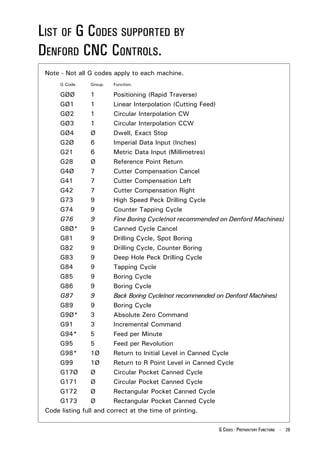
                                           List of G Codes supported by
                                           Denford CNC Controls ................................... 29
                                           GØØ (Rapid Positioning/Traverse) ..................... 30
                                           GØ1 (Linear Interpolation) .............................. 32
                                           GØ2 & GØ3 (Circular Interpolation) ................. 34
                                           GØ4 (Dwell) ................................................. 40
                                           G2Ø & G21 (Imperial /Metric Data Input) .......... 41
                                           G28 (Reference Point Return) ......................... 42
                                           G4Ø, G41 & G42 (Cutter Compensation) .......... 45
                                           G73-G89 (Canned Cycles) .............................. 49
                                           G73 (High SpeedPeck Drilling) ........................ 54
                                           G74 (Counter Tapping) ................................... 55
                                           G76 (Fine Boring) .......................................... 56
                                           G8Ø (Canned Cycle, Cancel) ........................... 57
                                           G81 (Drilling - Spot Boring) ............................. 58
                                           G82 (Drilling - Counter Boring) ........................ 59
                                           G83 (Deep Hole Peck Drilling) ......................... 60
                                           G84 (Tapping) ............................................... 61
                                           G85 (Boring) ................................................. 62
                                           G86 (Boring) ................................................. 63
                                           G87 (Back Boring) ......................................... 64
                                           G89 (Boring) ................................................. 65
                                           G Codes - Program Example Using Canned Cycles ... 66
                                           G9Ø (Absolute Zero Command) ...................... 67
                                           G91 (Incremental Command) .......................... 67
                                           G94 (Feed per Minute) ................................... 67
                                           G95 (Feed per Revolution) .............................. 68
                                           G98 (Return to Initial Level) ............................ 68
                                           G99 (Return to R Point Level) .......................... 68
                                           G17Ø-G173 (Circular/Rectangular Pocket) ........ 69
                                           G17Ø & G171 (Circular Pocket Example A) ....... 70
                                           G17Ø & G171 (Circular Pocket Example B) ....... 72
                                           G17Ø & G171 (Circular Pocket Example C) ....... 74
                                           G172 & G173 (Rectangular Pocket Example A) ... 76
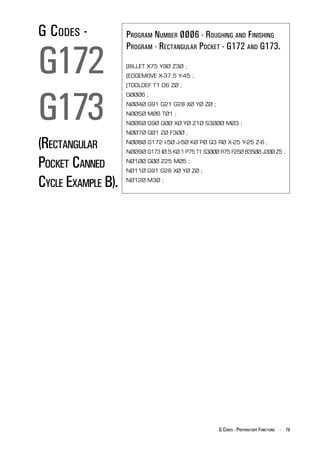
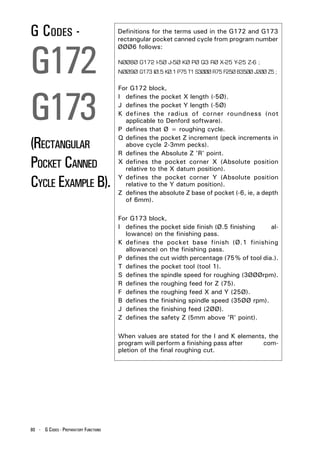
                                           G172 & G173 (Rectangular Pocket Example B) ... 79
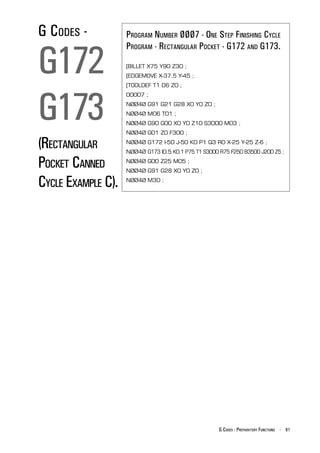
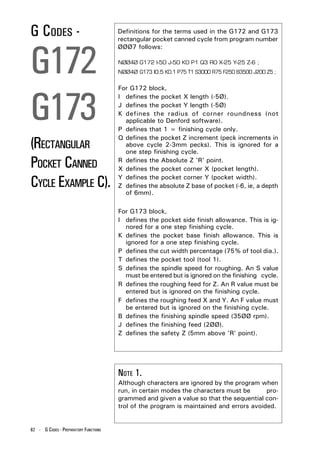
                                           G172 & G173 (Rectangular Pocket Example C) ... 81

4 - G AND M PROGRAMMING FOR CNC MILLING MACHINES
CONTENTS.   TITLE                                                   PAGE NO.
            M CODES - MISCELLANEOUS FUNCTIONS.
            M Codes - Introduction ...................................83
            List of M Codes Supported by
            Denford CNC Controls ...................................84
            MØØ (Program Stop) ..................................... 86
            MØ1 (Optional Stop) ......................................86
            MØ2 (Program Reset) .................................... 86
            MØ3 (Spindle Forward) .................................. 87
            MØ4 (Spindle Reverse) ...................................87
            MØ5 (Spindle Stop) ....................................... 87
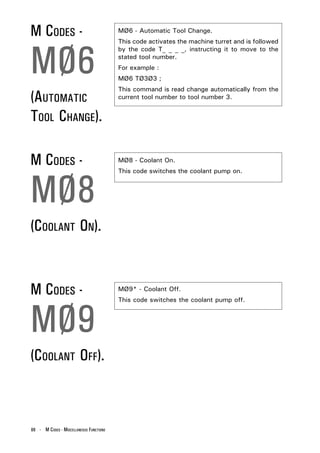
            MØ6 (Automatic Tool Change) ........................ 88
            MØ8 (Coolant On) .........................................88
            MØ9 (Coolant Off) .........................................88
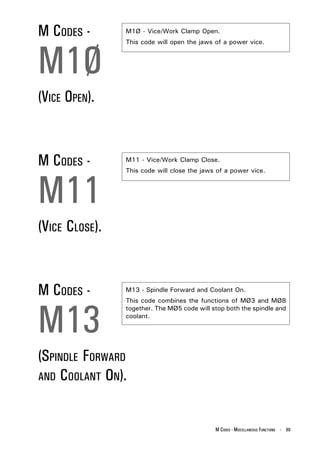
            M1Ø (Vice Open) .......................................... 89
            M11 (Vice Close) ........................................... 89
            M13 (Spindle Forward and Coolant On) ............ 89
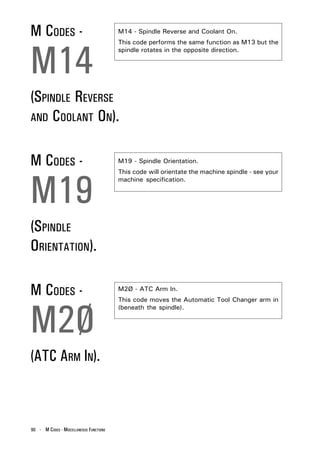
            M14 (Spindle Reverse and Coolant On) ............. 90
            M2Ø (ATC Arm In) .........................................90
            M19 (Spindle Orientation) .............................. 90
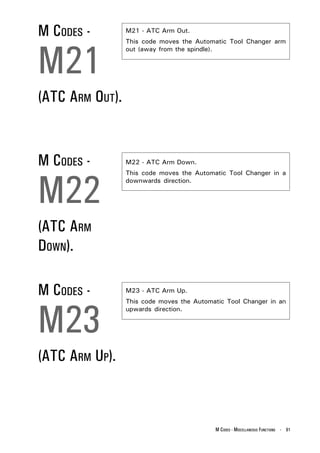
            M21 (ATC Arm Out) ....................................... 91
            M22 (ATC Arm Down) .................................... 91
            M23 (ATC Arm Up) ........................................ 91
            M24 (ATC Drawbar Unclamp) ......................... 92
            M27 (Reset Carousel to Pocket One) ................ 92
            M25 (ATC Drawbar Clamp) .............................92
            M3Ø (Program Reset and Rewind) ................... 93
            M32 (Carousel CW) ....................................... 93
            M33 (Carousel CCW) ..................................... 93
            M38 (Door Open) .......................................... 94
            M39 (Door Close) .......................................... 94
            M62, M63, M64, M65, M66, M67,
            M76 & M77 (Auxiliary Output Functions) ......... 95
            M7Ø (Mirror in X On) ..................................... 96
            M71 (Mirror in Y On) ......................................96
            M8Ø (Mirror in X Off) .................................... 96
            M81 (Mirror in Y Off) ..................................... 97
            M98 (Sub Program Call) ................................. 97
            M99 (Sub Program End and Return) .................97

                                       G AND M PROGRAMMING FOR CNC MILLING MACHINES - 5
INTRODUCTION.                              The Denford CNC (Computer Numerical Control) unit
                                           fitted to Denfords range of machine tools is a FANUC
                                           compatible system which uses ISO code format.


                                           This manual covers the stages involved in producing
                                           the coded instructions, used by the CNC unit to make
                                           the component. These coded instructions are called
                                           the part program.


                                           Each part program contains a number of different codes,
                                           the most important being the collection of G and M
                                           codes. Essentially, these form the basic language used
                                           to describe how a component will be manufactured,
                                           the order in which to carry out machining tasks, when
                                           to change tools, how far to cut into the material etc.....


                                           The front sections of this manual cover the basics of
                                           part programming, including guidelines for general
                                           layout and commands. Each section builds
                                           progressively, using plain, easy to follow text, to cover
                                           the most common aspects of programming. At the end
                                           of this stage, the operator should be confident enough
                                           to tackle basic part programming.


                                           Naturally, this manual cannot "teach" the operator
                                           everything there is to know about programming. The
                                           subject is simply too vast to include it all. The content
                                           of this manual does, however, form a good basis from
                                           which to start learning and hopefully inspires
                                           confidence in using more technically structured
                                           documents.


                                           The G Codes and M Codes sections contain
                                           information which are more specific to certain
                                           commands and functions - these sections are intended
                                           more as a reference guide, once the operator is
                                           confident with the basics of programming.


6 - G AND M PROGRAMMING FOR CNC MILLING MACHINES
WHAT IS CNC?   CNC (Computer Numerical Control) is the general term
               used for a system which controls the functions of a
               machine tool using coded instructions processed by a
               computer.


               EXAMPLE CNC MANUFACTURING PROCESS.

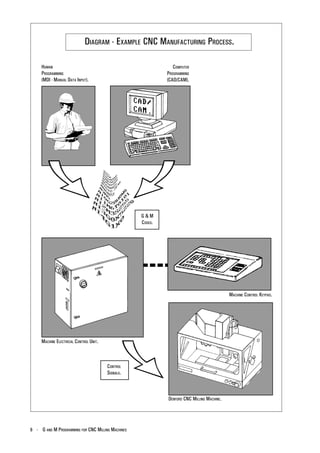
               The diagram on page 8 shows the main stages involved
               in producing a component on a CNC system.
               1) A part program is written, using G and M codes.
               This describes the sequence of operations that the
               machine must perform in order to manufacture the
               component.
               This program can be produced off-line, ie, away from
               the machine, either manually or with the aid of a CAD/
               CAM system.
               2) The part program is loaded into the machines
               computer, called the controller. At this stage, the
               program can still be edited or simulated using the
               machine controller keypad/input device.
               3) The machine controller processes the part program
               and sends signals to the machine components
               directing the machine through the required sequence
               of operations necessary to manufacture the
               component.


               The application of CNC to a manual machine allows its
               operation to become fully automated.
               Combining this with the use of a part program
               enhances the ability of the machine to perform repeat
               tasks with high degrees of accuracy.


                                     G AND M PROGRAMMING FOR CNC MILLING MACHINES - 7
DIAGRAM - EXAMPLE CNC MANUFACTURING PROCESS.

     HUMAN                                                     COMPUTER
     PROGRAMMING                                            PROGRAMMING
     (MDI - MANUAL DATA INPUT).                             (CAD/CAM).


                                                   G&M
                                                   CODES.


                                                                                           MACHINE CONTROL KEYPAD.


     MACHINE ELECTRICAL CONTROL UNIT.


                                        CONTROL
                                        SIGNALS.


                                                            DENFORD CNC MILLING MACHINE.


8 - G AND M PROGRAMMING FOR CNC MILLING MACHINES
COMPOSITION                A Part Program is a list of coded instructions
                           which describes how the designed component,
OF A PART                  or part, will be manufactured.
                           These coded instructions are called data - a
PROGRAM.                   series of letters and numbers. The part
                           gram includes all the geometrical and
                                                                     pro-
                                                                    tech-
                           nological data to perform the required machine
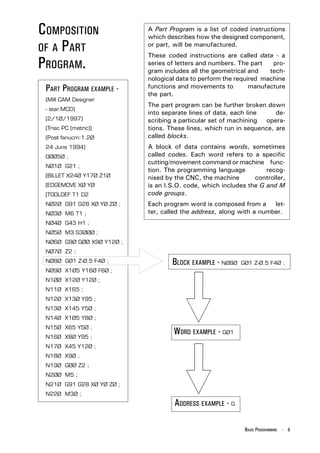
 PART PROGRAM EXAMPLE -    functions and movements to         manufacture
                           the part.
 (Mill CAM Designer
                           The part program can be further broken down
 - star.MCD)
                           into separate lines of data, each line     de-
 (2/1Ø/1997)               scribing a particular set of machining opera-
 (Triac PC (metric))       tions. These lines, which run in sequence, are
 (Post fanucm:1.2Ø         called blocks.
 24 June 1994)             A block of data contains words, sometimes
 OØØ5Ø ;                   called codes. Each word refers to a specific
                           cutting/movement command or machine func-
 NØ1Ø G21 ;
                           tion. The programming language          recog-
 [BILLET X24Ø Y17Ø Z1Ø     nised by the CNC, the machine       controller,
 [EDGEMOVE XØ YØ           is an I.S.O. code, which includes the G and M
 [TOOLDEF T1 D2            code groups.
 NØ2Ø G91 G28 XØ YØ ZØ ;   Each program word is composed from a let-
 NØ3Ø M6 T1 ;              ter, called the address, along with a number.
 NØ4Ø G43 H1 ;
 NØ5Ø M3 S3ØØØ ;
 NØ6Ø G9Ø GØØ X9Ø Y12Ø ;
 NØ7Ø Z2 ;
 NØ8Ø GØ1 Z-Ø.5 F4Ø ;              BLOCK EXAMPLE - NØ8Ø   GØ1 Z-Ø.5 F4Ø ;
 NØ9Ø X1Ø5 Y16Ø F6Ø ;
 N1ØØ X12Ø Y12Ø ;
 N11Ø X165 ;
 N12Ø X13Ø Y95 ;
 N13Ø X145 Y5Ø ;
 N14Ø X1Ø5 Y8Ø ;
 N15Ø X65 Y5Ø ;
 N16Ø X8Ø Y95 ;
                                   WORD EXAMPLE - GØ1
 N17Ø X45 Y12Ø ;
 N18Ø X9Ø ;
 N19Ø GØØ Z2 ;
 N2ØØ M5 ;
 N21Ø G91 G28 XØ YØ ZØ ;
 N22Ø M3Ø ;
                                    ADDRESS EXAMPLE - G

                                                            BASIC PROGRAMMING - 9
MAIN PROGRAM                       The part program can contain a number of separate
                                   programs, which together describe all the operations

STRUCTURE.
                                   required to manufacture the part.
                                   The Main Program is the controlling program, ie, the
                                   program first read, or accessed, when the entire part
                                   program sequence is run. This controlling program can
                                   then call a number of smaller programs into operation.
                                   These smaller programs, called Sub Programs, are
                                   generally used to perform repeat tasks, before
                                   returning control back to the main program.
                                   Normally, the controller operates according to one
                                   program. In this case the main program is also the part
                                   program.
                                   Main Programs are written using I.S.O. address codes
                                   listed below.


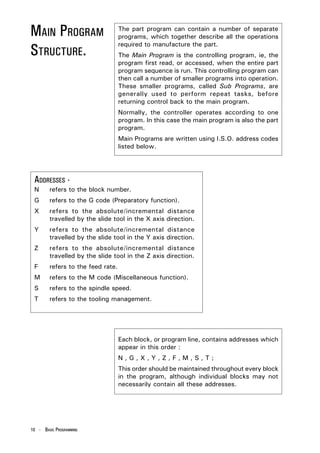
 ADDRESSES -
 N      refers to the block number.
 G      refers to the G code (Preparatory function).
 X      refers to the absolute/incremental distance
        travelled by the slide tool in the X axis direction.
 Y      refers to the absolute/incremental distance
        travelled by the slide tool in the Y axis direction.
 Z      refers to the absolute/incremental distance
        travelled by the slide tool in the Z axis direction.
 F      refers to the feed rate.
 M      refers to the M code (Miscellaneous function).
 S      refers to the spindle speed.
 T      refers to the tooling management.


                                   Each block, or program line, contains addresses which
                                   appear in this order :
                                   N,G,X,Y,Z,F,M,S,T;
                                   This order should be maintained throughout every block
                                   in the program, although individual blocks may not
                                   necessarily contain all these addresses.


10 - BASIC PROGRAMMING
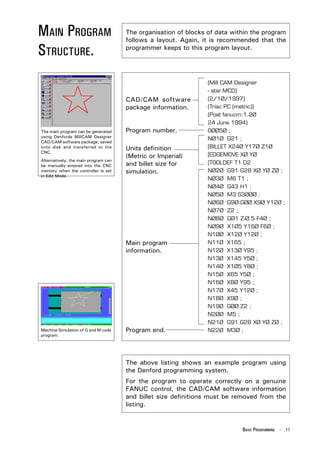
MAIN PROGRAM                          The organisation of blocks of data within the program
                                      follows a layout. Again, it is recommended that the

STRUCTURE.                            programmer keeps to this program layout.


                                                                 (Mill CAM Designer
                                                                 - star.MCD)
                                      CAD/CAM software           (2/1Ø/1997)
                                      package information.       (Triac PC (metric))
                                                                 (Post fanucm:1.2Ø
                                                                 24 June 1994)
The main program can be generated     Program number.            OØØ5Ø ;
using Denfords MillCAM Designer
                                                                 NØ1Ø G21 ;
CAD/CAM software package, saved
onto disk and transferred to the      Units definition           [BILLET X24Ø Y17Ø Z1Ø
CNC.
                                      (Metric or Imperial)       [EDGEMOVE XØ YØ
Alternatively, the main program can
be manually entered into the CNC      and billet size for        [TOOLDEF T1 D2
memory when the controller is set     simulation.                NØ2Ø G91 G28 XØ YØ ZØ ;
in Edit Mode.
                                                                 NØ3Ø M6 T1 ;
                                                                 NØ4Ø G43 H1 ;
                                                                 NØ5Ø M3 S3ØØØ ;
                                                                 NØ6Ø G9Ø GØØ X9Ø Y12Ø ;
                                                                 NØ7Ø Z2 ;
                                                                 NØ8Ø GØ1 Z-Ø.5 F4Ø ;
                                                                 NØ9Ø X1Ø5 Y16Ø F6Ø ;
                                                                 N1ØØ X12Ø Y12Ø ;
                                      Main program               N11Ø X165 ;
                                      information.               N12Ø X13Ø Y95 ;
                                                                 N13Ø X145 Y5Ø ;
                                                                 N14Ø X1Ø5 Y8Ø ;
                                                                 N15Ø X65 Y5Ø ;
                                                                 N16Ø X8Ø Y95 ;
                                                                 N17Ø X45 Y12Ø ;
                                                                 N18Ø X9Ø ;
                                                                 N19Ø GØØ Z2 ;
                                                                 N2ØØ M5 ;
                                                                 N21Ø G91 G28 XØ YØ ZØ ;
Machine Simulation of G and M code    Program end.               N22Ø M3Ø ;
program.


                                      The above listing shows an example program using
                                      the Denford programming system.
                                      For the program to operate correctly on a genuine
                                      FANUC control, the CAD/CAM software information
                                      and billet size definitions must be removed from the
                                      listing.


                                                                            BASIC PROGRAMMING - 11
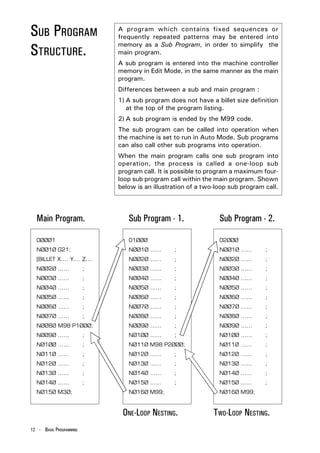
SUB PROGRAM                   A program which contains fixed sequences or
                              frequently repeated patterns may be entered into

STRUCTURE.
                              memory as a Sub Program, in order to simplify the
                              main program.
                              A sub program is entered into the machine controller
                              memory in Edit Mode, in the same manner as the main
                              program.
                              Differences between a sub and main program :
                              1) A sub program does not have a billet size definition
                                 at the top of the program listing.
                              2) A sub program is ended by the M99 code.
                              The sub program can be called into operation when
                              the machine is set to run in Auto Mode. Sub programs
                              can also call other sub programs into operation.
                              When the main program calls one sub program into
                              operation, the process is called a one-loop sub
                              program call. It is possible to program a maximum four-
                              loop sub program call within the main program. Shown
                              below is an illustration of a two-loop sub program call.


  Main Program.                  Sub Program - 1.                Sub Program - 2.

  OØØØ1                          O1ØØØ                           O2ØØØ
  NØØ1Ø G21;                     NØØ1Ø ......    ;               NØØ1Ø ......    ;
  [BILLET X.... Y.... Z....      NØØ2Ø ......    ;               NØØ2Ø ......    ;
  NØØ2Ø ......           ;       NØØ3Ø ......    ;               NØØ3Ø ......    ;
  NØØ3Ø ......           ;       NØØ4Ø ......    ;               NØØ4Ø ......    ;
  NØØ4Ø ......           ;       NØØ5Ø ......    ;               NØØ5Ø ......    ;
  NØØ5Ø ......           ;       NØØ6Ø ......    ;               NØØ6Ø ......    ;
  NØØ6Ø ......           ;       NØØ7Ø ......    ;               NØØ7Ø ......    ;
  NØØ7Ø ......           ;       NØØ8Ø ......    ;               NØØ8Ø ......    ;
  NØØ8Ø M98 P1ØØØ;               NØØ9Ø ......    ;               NØØ9Ø ......    ;
  NØØ9Ø ......           ;       NØ1ØØ ......    ;               NØ1ØØ ......    ;
  NØ1ØØ ......           ;       NØ11Ø M98 P2ØØØ;                NØ11Ø ......    ;
  NØ11Ø ......           ;       NØ12Ø ......    ;               NØ12Ø ......    ;
  NØ12Ø ......           ;       NØ13Ø ......    ;               NØ13Ø ......    ;
  NØ13Ø ......           ;       NØ14Ø ......    ;               NØ14Ø ......    ;
  NØ14Ø ......           ;       NØ15Ø ......    ;               NØ15Ø ......    ;
  NØ15Ø M3Ø;                     NØ16Ø M99;                      NØ16Ø M99;


                               ONE-LOOP NESTING.               TWO-LOOP NESTING.
12 - BASIC PROGRAMMING
SUB PROGRAM      NOTE 1.
                 A sub program must be saved to memory using a four
COMMANDS -       digit number.


GENERAL NOTES.   NOTE 2.
                 If cutter compensation is required on a tool and the
                 co-ordinates for the tool are within the sub program,
                 the cutter compensation must be applied and cancelled
                 within the sub program.


                 NOTE 3.
                 To call a sub program the M98 code is used followed
                 by PØØØØ (the number of the sub program required).
                 For example,
                 M98 P2ØØØ
                 This command is read call program number 2ØØØ.


                 NOTE 4.
                 A sub program call command (M98 PØØØØ) can be
                 specified along with a move command in the same
                 block.
                 For example,
                 GØ1 X42.5 M98 P1ØØØ;


                 NOTE 5.
                 At the end of a sub program, the M99 code is entered.
                 This returns control to the main program.
                 The M99 code will return control to the next block
                 after the M98 sub program call block in the main
                 program.
                 If the code M99 PØØØØ is entered, control will pass
                 to the main program at a block with the N number
                 equal to that of the P number stated after the M99
                 code.
                 For example,
                 M99 PØ16Ø
                 This command is read return to the main program at
                 block number NØ16Ø.


                                                       BASIC PROGRAMMING - 13
SUB PROGRAM              A call command can be set to call a sub program
                         repeatedly. This call can specify upto 999 repetitions

REPEAT                   of a sub program.
                         A sub program repeat command has the following

COMMAND.
                         format :
                                      M98 PØØØ ØØØØ
                              Call                           Sub program
                           command.      Number of times       number.
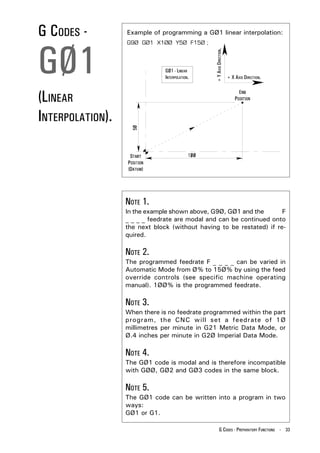
                                         the sub program
                                        is to be repeated.


                         When the repetition is omitted, the sub program will
                         be called once only.
                         For example,
                         M98 P1ØØØØ1
                         This command is read call the sub program number
                         ØØØ1 ten times.


14 - BASIC PROGRAMMING
BILLET        The Billet Definition is a feature which is only used in
              the Denford programming system.

DEFINITION.   It defines the size of the workpiece billet for use in the
              simulation sections of the Denford machine software.
              The billet definition command has no outcome on the
              actual machining of the part.
              The billet definition command is written at the start of
              the main program. The previous block usually states
              the units of measurement to be applied to the billet
              dimensions, ie, G21 (Metric data input) or G2Ø
              (Imperial data input).


              For example,
              NØØ1Ø G21;
              [BILLET X1ØØ Y15Ø Z2Ø;
              These two commands are read.
              - program line number 1Ø states that all units are to be
              measured in Metric,
              - the billet is a rectangular piece of material, measuring
              1ØØmm x 2ØØmm, with a thickness of 2Ømm.


              NOTE 1.
              A program that has been written on a Denford control
              (or using Denford CAD/CAM post processor software)
              will not operate directly on a genuine FANUC machine.
              The simulation sections of the program are
              incompatible with the FANUC control.
              For the program to run successfully, lines referring to
              the CAD/CAM software (at the beginning of the
              program) and the billet definition block must be
              deleted.


                                                        BASIC PROGRAMMING - 15
PROGRAM                  The Denford system of program numbering relies on
                         the programmer saving the program to disk or

NUMBERING                computer hard drive at the time of writing.
                         When saving a program using the Denford Desktop

AND SAVING.
                         Tutor keypad, the program number can range from 1
                         to 99999999.
                         Writing the program on an offline system with a qwerty
                         keyboard allows the programmer to save the program
                         using letters and/or numbers.


                         NOTE 1.
                         Sub program numbers must be saved between the
                         ranges ØØØ1 to 9999, ie, using a four digit number. It
                         is recommended that all programs saved have filenames
                         also between these numbers.

                         NOTE 2.
                         Before saving a program to disk or hard drive, check
                         that the program name you wish to use has not been
                         used on another file. If the program is saved using a
                         name identical to an old program file, the old program
                         file will be overwritten.

                         NOTE 3.
                         Programs that need to be used at a later date on
                         genuine FANUC controls must have their program
                         number stated on the first program block. The format
                         for inserting a FANUC compatible program number line
                         is as follows :
                                     O ØØØØ


                          Address code O.        Four digit program number.


16 - BASIC PROGRAMMING
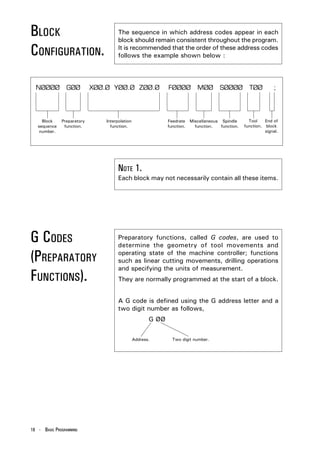
PROGRAM BLOCK   A program is composed of several commands, each
                command instructing the machine to carry out a

NUMBERING.
                particular operation. Each command is a separate line
                of data within the program, called a Block.
                One block is separated from another block using an
                end of block code, ie, effectively signifying the end of
                a program line. The Denford programming system uses
                a semicolon ( ; ) as the end of block code.
                A four digit sequence number can be specified (ØØØ1
                - 9999) following the address code N, at the start of
                each block. The order of these block numbers is
                arbitrary and need not be consecutive. Block numbers
                can be specified for every program line, or just on
                program lines requiring them.


                NOTE 1.
                The block number must be written at the start of a
                program line when used.


                NOTE 2.
                It is recommended that all blocks are numbered using
                a four digit number which rises between each block in
                steps of 1Ø. This allows the program to be edited at a
                later date, ie, new blocks can be inserted or deleted as
                required.
                For example :
                N ØØ1Ø ....
                N ØØ2Ø ....
                N ØØ3Ø ....
                N ØØ4Ø ....
                etc....


                NOTE 3.
                Even when block numbering is not a priority, it is
                useful to insert block numbers at important points in
                the program, such as tool change commands. This will
                help if a program search is used in the future.


                                                        BASIC PROGRAMMING - 17
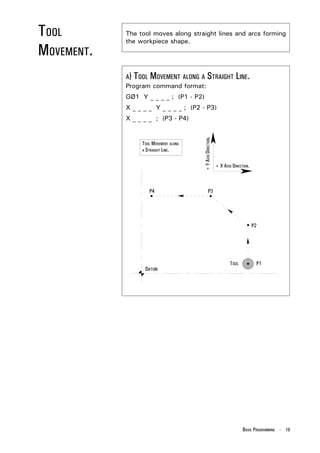
BLOCK                                 The sequence in which address codes appear in each
                                      block should remain consistent throughout the program.

CONFIGURATION.                        It is recommended that the order of these address codes
                                      follows the example shown below :


  NØØØØ         GØØ         XØØ.Ø YØØ.Ø ZØØ.Ø                 FØØØØ          MØØ        SØØØØ         TØØ         ;


     Block    Preparatory       Interpolation                 Feedrate    Miscellaneous Spindle       Tool    End of
   sequence    function.          function.                   function.     function.   function.   function. block
    number.                                                                                                   signal.


                                      NOTE 1.
                                      Each block may not necessarily contain all these items.


G CODES                               Preparatory functions, called G codes, are used to
                                      determine the geometry of tool movements and

(PREPARATORY                          operating state of the machine controller; functions
                                      such as linear cutting movements, drilling operations
                                      and specifying the units of measurement.
FUNCTIONS).                           They are normally programmed at the start of a block.


                                      A G code is defined using the G address letter and a
                                      two digit number as follows,
                                                       G ØØ


                                                Address.        Two digit number.


18 - BASIC PROGRAMMING
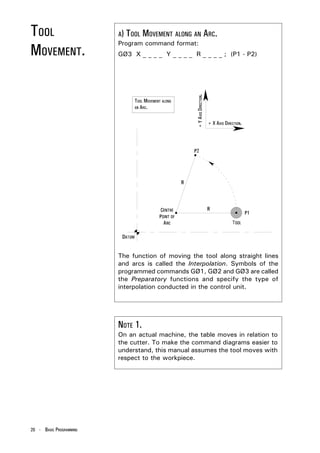
TOOL        The tool moves along straight lines and arcs forming
            the workpiece shape.
MOVEMENT.
            A) TOOL MOVEMENT ALONG A STRAIGHT LINE.
            Program command format:
            GØ1 Y _ _ _ _ ; (P1 - P2)
            X _ _ _ _ Y _ _ _ _ ; (P2 - P3)
            X _ _ _ _ ; (P3 - P4)


                                       + Y AXIS DIRECTION.
                 TOOL MOVEMENT ALONG
                 A STRAIGHT LINE.


                                                             + X AXIS DIRECTION.


                                                                            BASIC PROGRAMMING - 19
TOOL                     A) TOOL MOVEMENT ALONG AN                    ARC.
                         Program command format:
MOVEMENT.                GØ3 X _ _ _ _ Y _ _ _ _ R _ _ _ _ ; (P1 - P2)


                                                    + Y AXIS DIRECTION.
                              TOOL MOVEMENT ALONG
                              AN ARC.


                                                                          + X AXIS DIRECTION.


                         The function of moving the tool along straight lines
                         and arcs is called the Interpolation. Symbols of the
                         programmed commands GØ1, GØ2 and GØ3 are called
                         the Preparatory functions and specify the type of
                         interpolation conducted in the control unit.


                         NOTE 1.
                         On an actual machine, the table moves in relation to
                         the cutter. To make the command diagrams easier to
                         understand, this manual assumes the tool moves with
                         respect to the workpiece.


20 - BASIC PROGRAMMING
FEED             The movement of the tool at a specified speed for
                 cutting is called the Feedrate.

FUNCTION.        The feedrate is defined using the F address lettter
                 followed by a numerical value.
                 Using the G2Ø code, the feedrate is defined in Inches
                 per minute.
                 Using the G21 code, the feedrate is defined in
                 Millimetres per minute.


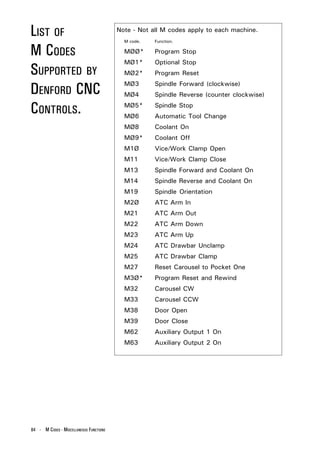
M CODES          Miscellaneous functions, called M codes, are used by
                 the CNC to command on/off signals to the machine

(MISCELLANEOUS   functions. ie, MØ3 - spindle forward (CW), MØ5 - spin-
                 dle stop, etc.....

FUNCTIONS).      The functions allocated to lower M code numbers are
                 constant in most CNC controls, although the higher M
                 code number functions can vary from one make of
                 controller to the next.


                 An M code is defined using the M address letter and a
                 two digit number as follows,
                            M ØØ


                     Address.      Two digit number.


                                                        BASIC PROGRAMMING - 21
SPINDLE SPEED            The rotational speed of the tool, with respect to the
                         workpiece being cut, is called the spindle (or cutting)

FUNCTION                 speed.
                         The spindle speed is defined using the S address letter,

(CUTTING SPEED).
                         followed by a numerical value, signifying the spindle
                         RPM (revolutions per minute).
                         The spindle speed value specified must fall between
                         the machine tool RPM range for the command to be
                         effective.


                         NOTE 1.
                         When a move command and an S code are specified
                         in the same block, a simultaneous execution of the
                         commands is performed.

                         NOTE 2.
                         Only one S code is allowed in each program block.


22 - BASIC PROGRAMMING
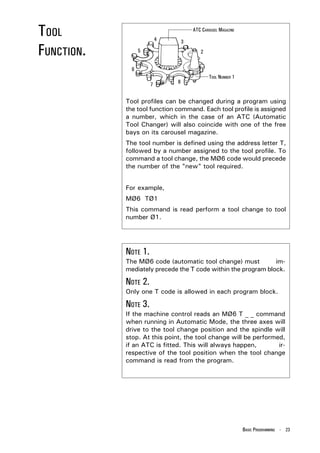
TOOL                      4       3
                                      ATC CAROUSEL MAGAZINE


FUNCTION.         5                      2


              6
                                              TOOL NUMBER 1
                      7       8


            Tool profiles can be changed during a program using
            the tool function command. Each tool profile is assigned
            a number, which in the case of an ATC (Automatic
            Tool Changer) will also coincide with one of the free
            bays on its carousel magazine.
            The tool number is defined using the address letter T,
            followed by a number assigned to the tool profile. To
            command a tool change, the MØ6 code would precede
            the number of the "new" tool required.


            For example,
            MØ6 TØ1
            This command is read perform a tool change to tool
            number Ø1.


            NOTE 1.
            The MØ6 code (automatic tool change) must          im-
            mediately precede the T code within the program block.

            NOTE 2.
            Only one T code is allowed in each program block.

            NOTE 3.
            If the machine control reads an MØ6 T _ _ command
            when running in Automatic Mode, the three axes will
            drive to the tool change position and the spindle will
            stop. At this point, the tool change will be performed,
            if an ATC is fitted. This will always happen,        ir-
            respective of the tool position when the tool change
            command is read from the program.


                                                              BASIC PROGRAMMING - 23
TOOL                     Generally, several different tool profiles are required
                         to machine a workpiece, all of different diameters and

COMPENSATION             lengths.
                         It would be very difficult to write a program that allowed

(TOOL OFFSET).           for this difference in size between all the various tools.
                         To account for this, the difference in diameter and
                         length is measured, in advance, for all the tools that
                         will be used. Essentially, this means that the cutting
                         paths for all the tools now coincide. The values are
                         entered into the offset file.
                         This tool offset is also called tool compensation.


                         NOTE 1.
                         When a T code is read by the CNC, it will load the
                         offset length for that particular tool. The code G41 or
                         G42 (Tool Compensation Left or Right) must be pro-
                         grammed for the radius offset to used.


24 - BASIC PROGRAMMING
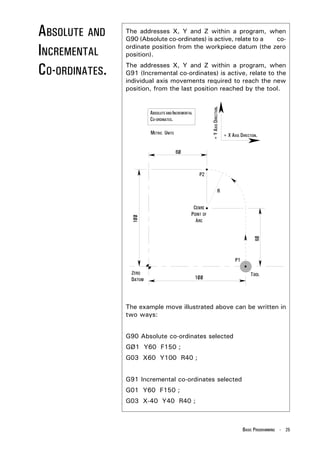
ABSOLUTE AND    The addresses X, Y and Z within a program, when
                G90 (Absolute co-ordinates) is active, relate to a co-

INCREMENTAL     ordinate position from the workpiece datum (the zero
                position).

CO-ORDINATES.   The addresses X, Y and Z within a program, when
                G91 (Incremental co-ordinates) is active, relate to the
                individual axis movements required to reach the new
                position, from the last position reached by the tool.


                                                   + Y AXIS DIRECTION.
                        ABSOLUTE AND INCREMENTAL
                        CO-ORDINATES.

                        METRIC UNITS                                     + X AXIS DIRECTION.


                The example move illustrated above can be written in
                two ways:


                G90 Absolute co-ordinates selected
                GØ1 Y60 F150 ;
                G03 X60 Y100 R40 ;


                G91 Incremental co-ordinates selected
                G01 Y60 F150 ;
                G03 X-40 Y40 R40 ;


                                                                                   BASIC PROGRAMMING - 25
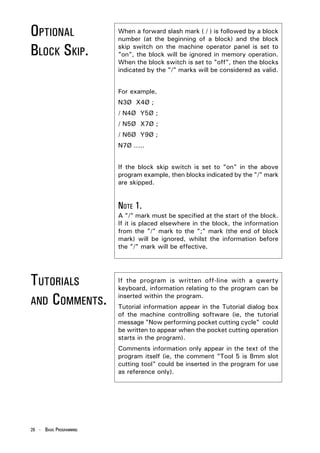
OPTIONAL                 When a forward slash mark ( / ) is followed by a block
                         number (at the beginning of a block) and the block

BLOCK SKIP.              skip switch on the machine operator panel is set to
                         "on", the block will be ignored in memory operation.
                         When the block switch is set to "off", then the blocks
                         indicated by the "/" marks will be considered as valid.


                         For example,
                         N3Ø X4Ø ;
                         / N4Ø Y5Ø ;
                         / N5Ø X7Ø ;
                         / N6Ø Y9Ø ;
                         N7Ø .....


                         If the block skip switch is set to "on" in the above
                         program example, then blocks indicated by the "/" mark
                         are skipped.


                         NOTE 1.
                         A "/" mark must be specified at the start of the block.
                         If it is placed elsewhere in the block, the information
                         from the "/" mark to the ";" mark (the end of block
                         mark) will be ignored, whilst the information before
                         the "/" mark will be effective.


TUTORIALS                If the program is written off-line with a qwerty
                         keyboard, information relating to the program can be

AND COMMENTS.
                         inserted within the program.
                         Tutorial information appear in the Tutorial dialog box
                         of the machine controlling software (ie, the tutorial
                         message "Now performing pocket cutting cycle" could
                         be written to appear when the pocket cutting operation
                         starts in the program).
                         Comments information only appear in the text of the
                         program itself (ie, the comment "Tool 5 is 8mm slot
                         cutting tool" could be inserted in the program for use
                         as reference only).


26 - BASIC PROGRAMMING
G CODES         Preparatory functions, called G codes, are used to
                determine the geometry of tool movements and

(PREPARATORY    operating state of the machine controller; functions
                such as linear cutting movements, drilling operations
                and specifying the units of measurement.
FUNCTIONS) -    They are normally programmed at the start of a block.

INTRODUCTION.   A G code is made from the G address letter and a two
                digit number as follows,
                            G ØØ


                     Address.       Two digit number.


                MODAL AND NON-MODAL G CODES.
                Additionally, G codes are split into two categories -


                1)   Modal (retained) G codes.
                     A modal G code, once programmed into a block,
                     will affect any subsequent blocks of the program
                     without having to be restated.
                     Additionally, modal G codes are further split into
                     groups according to their task and function. A
                     modal G code will remain active until another G
                     code from the same group is programmed into a
                     block, or it is cancelled.
                     For example,
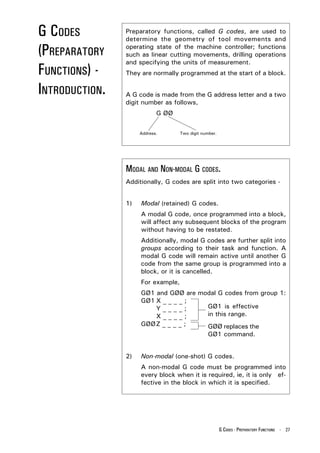
                     GØ1 and GØØ are modal G codes from group 1:
                     GØ1 X _ _ _ _ ;
                         Y____;        GØ1 is effective
                         X____;        in this range.
                     GØØ Z _ _ _ _ ;   GØØ replaces the
                                       GØ1 command.


                2)   Non-modal (one-shot) G codes.
                     A non-modal G code must be programmed into
                     every block when it is required, ie, it is only ef-
                     fective in the block in which it is specified.


                                                        G CODES - PREPARATORY FUNCTIONS - 27
G CODES                                NOTE 1.
                                       Remember there are two types of G code.
(PREPARATORY                           A modal G code is retained in memory - it is effective
                                       until another G code from the same modal group is

FUNCTIONS) -                           commanded.
                                       A non-modal G code is one-shot - it is effective only
                                       within the block in which it is specified.
INTRODUCTION                           NOTE 2.
NOTES.                                 It is not necessary to enter a modal G code in
                                       repetitive blocks within a program.
                                       For example :
                                       If all movements are GØ1 (linear cutting command)
                                       then GØ1 is entered on the first block and omitted
                                       from all subsequent blocks. This G code will remain
                                       active until an interpolation change is commanded
                                       (using GØØ, GØ2 or GØ3).

                                       NOTE 3.
                                       The machine controller has the ability to interpret a
                                       maximum of four G codes in one single block of data.
                                       However, these G codes must be from separate modal
                                       groups. When two or more G codes from the same
                                       group are specified in the same block, the CNC will
                                       only make the last stated G code from that modal group
                                       effective.


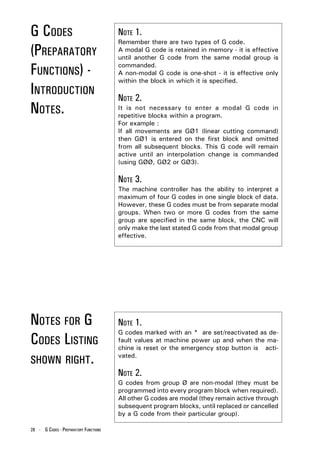
NOTES FOR G                            NOTE 1.
                                       G codes marked with an * are set/reactivated as de-
CODES LISTING                          fault values at machine power up and when the ma-
                                       chine is reset or the emergency stop button is acti-

SHOWN RIGHT.
                                       vated.

                                       NOTE 2.
                                       G codes from group Ø are non-modal (they must be
                                       programmed into every program block when required).
                                       All other G codes are modal (they remain active through
                                       subsequent program blocks, until replaced or cancelled
                                       by a G code from their particular group).

28 - G CODES - PREPARATORY FUNCTIONS
LIST OF G CODES SUPPORTED BY
DENFORD CNC CONTROLS.
 Note - Not all G codes apply to each machine.
     G Code.   Group.   Function.

     GØØ         1       Positioning (Rapid Traverse)
     GØ1         1       Linear Interpolation (Cutting Feed)
     GØ2         1       Circular Interpolation CW
     GØ3         1       Circular Interpolation CCW
     GØ4         Ø       Dwell, Exact Stop
     G2Ø         6       Imperial Data Input (Inches)
     G21         6       Metric Data Input (Millimetres)
     G28         Ø       Reference Point Return
     G4Ø         7       Cutter Compensation Cancel
     G41         7       Cutter Compensation Left
     G42         7       Cutter Compensation Right
     G73         9       High Speed Peck Drilling Cycle
     G74         9       Counter Tapping Cycle
     G76         9       Fine Boring Cycle(not recommended on Denford Machines)
     G8Ø*        9       Canned Cycle Cancel
     G81         9       Drilling Cycle, Spot Boring
     G82         9       Drilling Cycle, Counter Boring
     G83         9       Deep Hole Peck Drilling Cycle
     G84         9       Tapping Cycle
     G85         9       Boring Cycle
     G86         9       Boring Cycle
     G87         9       Back Boring Cycle(not recommended on Denford Machines)
     G89         9       Boring Cycle
     G9Ø*        3       Absolute Zero Command
     G91         3       Incremental Command
     G94*        5       Feed per Minute
     G95         5       Feed per Revolution
     G98*        1Ø      Return to Initial Level in Canned Cycle
     G99         1Ø      Return to R Point Level in Canned Cycle
     G17Ø        Ø       Circular Pocket Canned Cycle
     G171        Ø       Circular Pocket Canned Cycle
     G172        Ø       Rectangular Pocket Canned Cycle
     G173        Ø       Rectangular Pocket Canned Cycle
 Code listing full and correct at the time of printing.

                                                         G CODES - PREPARATORY FUNCTIONS - 29
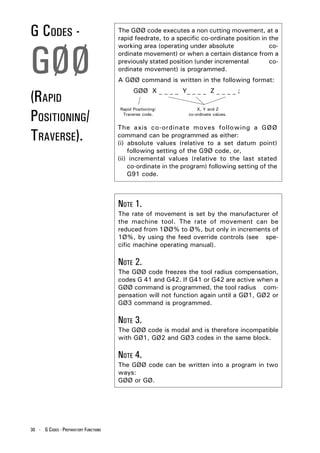
G CODES -                              The GØØ code executes a non cutting movement, at a
                                       rapid feedrate, to a specific co-ordinate position in the


GØØ
                                       working area (operating under absolute                co-
                                       ordinate movement) or when a certain distance from a
                                       previously stated position (under incremental         co-
                                       ordinate movement) is programmed.
                                       A GØØ command is written in the following format:


(RAPID
                                             GØØ X _ _ _ _ Y_ _ _ _ Z _ _ _ _ ;


POSITIONING/
                                       Rapid Positioning/           X, Y and Z
                                        Traverse code.          co-ordinate values.


                                       The axis co-ordinate moves following a GØØ
TRAVERSE).                             command can be programmed as either:
                                       (i) absolute values (relative to a set datum point)
                                           following setting of the G9Ø code, or,
                                       (ii) incremental values (relative to the last stated
                                           co-ordinate in the program) following setting of the
                                           G91 code.


                                       NOTE 1.
                                       The rate of movement is set by the manufacturer of
                                       the machine tool. The rate of movement can be
                                       reduced from 1ØØ% to Ø%, but only in increments of
                                       1Ø%, by using the feed override controls (see spe-
                                       cific machine operating manual).

                                       NOTE 2.
                                       The GØØ code freezes the tool radius compensation,
                                       codes G 41 and G42. If G41 or G42 are active when a
                                       GØØ command is programmed, the tool radius com-
                                       pensation will not function again until a GØ1, GØ2 or
                                       GØ3 command is programmed.

                                       NOTE 3.
                                       The GØØ code is modal and is therefore incompatible
                                       with GØ1, GØ2 and GØ3 codes in the same block.

                                       NOTE 4.
                                       The GØØ code can be written into a program in two
                                       ways:
                                       GØØ or GØ.


30 - G CODES - PREPARATORY FUNCTIONS
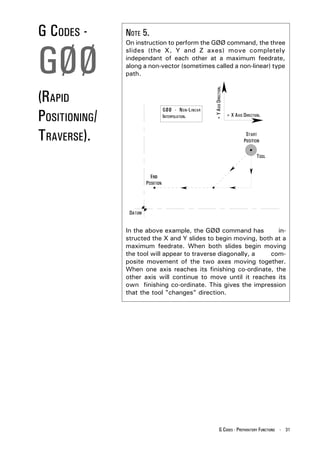
G CODES -      NOTE 5.


GØØ
               On instruction to perform the GØØ command, the three
               slides (the X, Y and Z axes) move completely
               independant of each other at a maximum feedrate,
               along a non-vector (sometimes called a non-linear) type
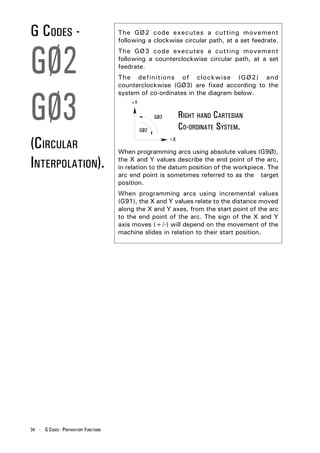
               path.


                                                 + Y AXIS DIRECTION.
(RAPID
POSITIONING/
                           GØØ - N ON -L INEAR
                           INTERPOLATION.                              + X AXIS DIRECTION.


TRAVERSE).


               In the above example, the GØØ command has          in-
               structed the X and Y slides to begin moving, both at a
               maximum feedrate. When both slides begin moving
               the tool will appear to traverse diagonally, a  com-
               posite movement of the two axes moving together.
               When one axis reaches its finishing co-ordinate, the
               other axis will continue to move until it reaches its
               own finishing co-ordinate. This gives the impression
               that the tool "changes" direction.


                                                           G CODES - PREPARATORY FUNCTIONS - 31
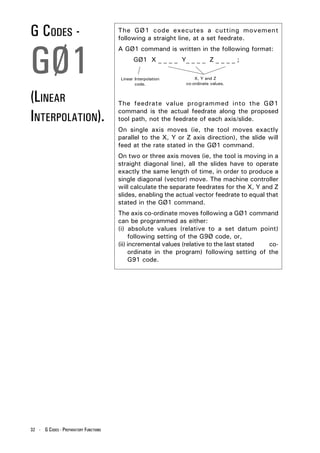
G CODES -                              The GØ1 code executes a cutting movement
                                       following a straight line, at a set feedrate.


GØ1
                                       A GØ1 command is written in the following format:
                                              GØ1 X _ _ _ _ Y_ _ _ _ Z _ _ _ _ ;

                                        Linear Interpolation       X, Y and Z
                                               code.           co-ordinate values.


(LINEAR                                The feedrate value programmed into the GØ1

INTERPOLATION).                        command is the actual feedrate along the proposed
                                       tool path, not the feedrate of each axis/slide.
                                       On single axis moves (ie, the tool moves exactly
                                       parallel to the X, Y or Z axis direction), the slide will
                                       feed at the rate stated in the GØ1 command.
                                       On two or three axis moves (ie, the tool is moving in a
                                       straight diagonal line), all the slides have to operate
                                       exactly the same length of time, in order to produce a
                                       single diagonal (vector) move. The machine controller
                                       will calculate the separate feedrates for the X, Y and Z
                                       slides, enabling the actual vector feedrate to equal that
                                       stated in the GØ1 command.
                                       The axis co-ordinate moves following a GØ1 command
                                       can be programmed as either:
                                       (i) absolute values (relative to a set datum point)
                                            following setting of the G9Ø code, or,
                                       (ii) incremental values (relative to the last stated co-
                                            ordinate in the program) following setting of the
                                            G91 code.


32 - G CODES - PREPARATORY FUNCTIONS
G CODES -         Example of programming a GØ1 linear interpolation:


GØ1
                  G9Ø GØ1 X1ØØ Y5Ø F15Ø ;


                                                + Y AXIS DIRECTION.
                               GØ1 - LINEAR
                               INTERPOLATION.                         + X AXIS DIRECTION.


(LINEAR
INTERPOLATION).


                  NOTE 1.
                  In the example shown above, G9Ø, GØ1 and the        F
                  _ _ _ _ feedrate are modal and can be continued onto
                  the next block (without having to be restated) if re-
                  quired.

                  NOTE 2.
                  The programmed feedrate F _ _ _ _ can be varied in
                  Automatic Mode from Ø% to 15Ø% by using the feed
                  override controls (see specific machine operating
                  manual). 1ØØ% is the programmed feedrate.

                  NOTE 3.
                  When there is no feedrate programmed within the part
                  program, the CNC will set a feedrate of 1Ø
                  millimetres per minute in G21 Metric Data Mode, or
                  Ø.4 inches per minute in G2Ø Imperial Data Mode.

                  NOTE 4.
                  The GØ1 code is modal and is therefore incompatible
                  with GØØ, GØ2 and GØ3 codes in the same block.

                  NOTE 5.
                  The GØ1 code can be written into a program in two
                  ways:
                  GØ1 or G1.

                                                        G CODES - PREPARATORY FUNCTIONS - 33
G CODES -                              The GØ2 code executes a cutting movement
                                       following a clockwise circular path, at a set feedrate.


GØ2
                                       The GØ3 code executes a cutting movement
                                       following a counterclockwise circular path, at a set
                                       feedrate.
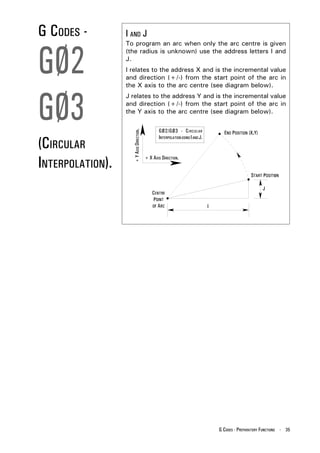
                                       The definitions of clockwise (GØ2) and
                                       counterclockwise (GØ3) are fixed according to the


GØ3
                                       system of co-ordinates in the diagram below.
                                           +Y

                                                      GØ3        RIGHT HAND CARTESIAN
                                                GØ2              CO-ORDINATE SYSTEM.
(CIRCULAR                                                   +X

                                       When programming arcs using absolute values (G9Ø),

INTERPOLATION).                        the X and Y values describe the end point of the arc,
                                       in relation to the datum position of the workpiece. The
                                       arc end point is sometimes referred to as the target
                                       position.
                                       When programming arcs using incremental values
                                       (G91), the X and Y values relate to the distance moved
                                       along the X and Y axes, from the start point of the arc
                                       to the end point of the arc. The sign of the X and Y
                                       axis moves (+/-) will depend on the movement of the
                                       machine slides in relation to their start position.


34 - G CODES - PREPARATORY FUNCTIONS
G CODES -         I AND J


GØ2
                  To program an arc when only the arc centre is given
                  (the radius is unknown) use the address letters I and
                  J.
                  I relates to the address X and is the incremental value
                  and direction (+/-) from the start point of the arc in
                  the X axis to the arc centre (see diagram below).


GØ3
                  J relates to the address Y and is the incremental value
                  and direction (+/-) from the start point of the arc in
                  the Y axis to the arc centre (see diagram below).

                                                 GØ2/GØ3 - C IRCULAR
                    + Y AXIS DIRECTION.
(CIRCULAR
                                                 INTERPOLATION USING I AND J.


INTERPOLATION).
                                          + X AXIS DIRECTION.


                                                                                G CODES - PREPARATORY FUNCTIONS - 35
G CODES -                              The format to program a circular interpolation in
                                       Cartesian co-ordinates is written as follows :


GØ2
                                       There are four ways to program a clockwise circular
                                       path using the GØ2 code:
                                       G9Ø GØ2 X _ _ _ _ Y _ _ _ _ R _ _ _ F _ _ _ ;
                                       G9Ø GØ2 X _ _ _ _ Y _ _ _ _ I _ _ _ J _ _ _ F _ _ _ ;
                                       G91 GØ2 X _ _ _ _ Y _ _ _ _ R _ _ _ _ F _ _ _ _ ;


GØ3
                                       G91 GØ2 X _ _ _ _ Y _ _ _ _ I _ _ _ J _ _ _ F _ _ _ ;
                                       There are four ways to program an anticlockwise
                                       circular path using the GØ3 code:
                                       G9Ø GØ3 X _ _ _ _ Y _ _ _ _ R _ _ _ F _ _ _ ;
                                       G9Ø GØ3 X _ _ _ _ Y _ _ _ _ I _ _ _ J _ _ _ F _ _ _ ;
                                       G91 GØ3 X _ _ _ _ Y _ _ _ _ R _ _ _ _ F _ _ _ _ ;

(CIRCULAR                              G91 GØ3 X _ _ _ _ Y _ _ _ _ I _ _ _ J _ _ _ F _ _ _ ;

                                       where,
INTERPOLATION).                        GØ2 defines the clockwise direction circular
                                       interpolation.
                                       GØ3 defines the counterclockwise direction circular
                                       interpolation.
                                       G9Ø X _ _ _ _ Y _ _ _ _ defines the arc end point in the
                                       work co-ordinate system.
                                       G91 X _ _ _ _ Y _ _ _ _ defines the signed distance of
                                       the arc end point from the arc start point.
                                       I _ _ _ J _ _ _ defines the signed distance of the arc
                                       start point from the centre point of the arc.
                                       R _ _ _ defines the length of the arc radius.
                                       F _ _ _ defines the feedrate along the arc.


36 - G CODES - PREPARATORY FUNCTIONS
G CODES -         For example:
                                                                               GØ2/GØ3 - CIRCULAR


GØ2


                                         + Y AXIS DIRECTION.
                                                                               INTERPOLATION EXAMPLE.


                                                               + X AXIS DIRECTION.


GØ3
(CIRCULAR
INTERPOLATION).
                  The above tool path can be programmed as follows (In
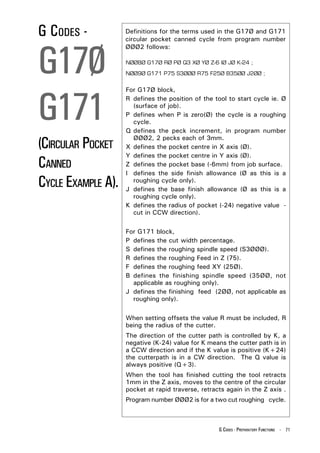
                  absolute mode, G9Ø):
                  GØ1 X1ØØ Y4Ø F125 ;
                  GØ3 X8Ø Y6Ø I-2Ø ;
                  GØ1 X6Ø ;
                  GØ2 X4Ø Y4Ø I-2Ø ;
                  or,
                  GØ1 X1ØØ Y4Ø F125 ;
                  GØ3 X8Ø Y6Ø R2Ø ;
                  GØ1 X6Ø ;
                  GØ2 X4Ø Y4Ø R2Ø ;


                  The above tool path can be programmed as follows (In
                  incremental mode, G91):
                  GØ3 X-2Ø Y2Ø I-2Ø ;
                  GØ1 X-2Ø ;
                  GØ2 X-2Ø Y-2Ø I-2Ø ;
                  or,
                  GØ3 X-2Ø Y2Ø R2Ø ;
                  GØ1 X-2Ø ;
                  GØ2 X-2Ø Y-2Ø R2Ø ;


                                                                        G CODES - PREPARATORY FUNCTIONS - 37
G CODES -                              When using the address R _ _ _ _ , two types of arcs
                                       can be considered. One arc is less than 18Ø degrees,


GØ2
                                       whilst the other arc is greater than 18Ø degrees. When
                                       an arc exceeding 18Ø degrees is commanded, the
                                       radius value (R _ _ _ _) must be specified as a negative
                                       signed (-) value.


                                                                          + Y AXIS DIRECTION.
GØ3
                                       For example:


                                                                                                + X AXIS DIRECTION.


                                                                                                GØ2/GØ3 - CIRCULAR


(CIRCULAR
                                                                                                 INTERPOLATION ARC
                                                                                                     DEFINITON.


INTERPOLATION).


                                       The above tool path for an arc less than 18Ø degrees
                                       (circle A) can be programmed as follows (In absolute
                                       mode, G9Ø):
                                       GØ2 X8Ø Y4Ø R5Ø F125 ;


                                       The above tool path for an arc greater than 18Ø
                                       degrees (circle B) can be programmed as follows (In
                                       absolute mode, G9Ø):
                                       GØ2 X8Ø Y4Ø R-5Ø F125 ;


38 - G CODES - PREPARATORY FUNCTIONS
G CODES -         NOTE 1.


GØ2
                  When programming arcs using the address R (arc
                  radius), the value of R must be equal to, or greater
                  than half the longest distance travelled by either axis.

                  NOTE 2.
                  IØ and JØ can be omitted from program lines.


GØ3               NOTE 3.
                  When X or Y are omitted from program lines, the arc
                  end point is located at the same position as the arc
                  start point and the arc centre is commanded by I or J,
                  an arc of 36Ø degrees (ie, a complete circle) is  as-
(CIRCULAR         sumed. When R is used, an arc of Ø degrees is as-
                  sumed and the cutter does not move.

INTERPOLATION).   NOTE 4.
                  When I, J and R addresses are specified
                  simultaneously in the same program line, the address
                  R takes precedence and the other addresses are
                  ignored.

                  NOTE 5.
                  A GØ2     code can be written into a program in two
                  ways.
                  GØ2 or    G2.
                  A GØ3     code can be written into a program in two
                  ways.
                  GØ3 or    G3.


                                                  G CODES - PREPARATORY FUNCTIONS - 39
G CODES -                              The GØ4 code is used to enter a set time delay into
                                       the program (called a "dwell").


GØ4
                                       A GØ4 command is written in the following format:
                                            GØ4 X _ _ _ _ ;
                                       or   GØ4 P _ _ _ _ ;
                                       where the dwell value is programmed using the
                                       address letters X (time in seconds) or P (time in 1/
(DWELL).                               1ØØØ seconds), followed by a number indicating this
                                       dwell value.
                                       For example :
                                       GØ4 X1.5 ;
                                       This command is read perform a dwell of 1.5 seconds
                                       duration.
                                       GØ4 P25ØØ ;
                                       This command is read perform a dwell of 2.5 seconds
                                       duration.


                                       NOTE 1.
                                       A decimal point cannot be used with the address P.

                                       NOTE 2.
                                       The dwell is performed at the start of the block in
                                       which it is programmed.

                                       NOTE 3.
                                       The dwell begins when the commanded feedrate of
                                       the previous block reaches zero.

                                       NOTE 4.
                                       The maximum value of a dwell time is 999 seconds.

                                       NOTE 5.
                                       GØ4 is a non-modal G code. It is only active in the
                                       block in which it is programmed.

                                       NOTE 6.
                                       A GØ4 code can be written into a program in two
                                       ways.
                                       GØ4 or G4.


40 - G CODES - PREPARATORY FUNCTIONS
G CODES -      The machine controller can be programmed in either
               Imperial (inch) unit input (G2Ø) or Metric (millimetre)


G2Ø
               unit input (G21). The standard format for a CNC part
               program is to write the G2Ø or G21 code in the first
               block of the program.
               G code.   Type.      Units.         Lowest input value.
               G2Ø       Imperial   Inch           Ø.ØØØ1 inch


G21
               G21       Metric     Millimetre     Ø.ØØ1 mm


               The unit systems of the following items are changed
               depending on whether G2Ø or G21 is set.
               1) Positioning commands (X, Y and Z).

(IMPERIAL      2) Incremental movement distances.
               3) Feedrates commanded by the F code.

/METRIC        4) Offset values.


DATA INPUT).
               NOTE 1.
               The status of G2Ø or G21 in the machine controller is
               dependant on the option that is saved to the disc.

               NOTE 2.
               A G2Ø code must not be changed for a G21 code (or
               vice versa) during the program.

               NOTE 3.
               When switching between G2Ø and G21, the offsets
               must be set according to the units of measurement
               being used.

               NOTE 4.
               G 2Ø and G21 are both modal G codes within the
               same modal group.


                                                 G CODES - PREPARATORY FUNCTIONS - 41
G CODES -                              The reference point is a fixed position on the machine,
                                       to which the tool can be moved.


G28
                                       On machines fitted with Denford milling software, this
                                       point is also used as the Home position, the point used
                                       by the machine to set the limits of movement for the
                                       X, Y and Z slides.
                                       A G28 code instructs the tool to automatically move

(REFERENCE
                                       to this reference point.


POINT RETURN).                         A G28 command is written in the following format :
                                            G9Ø G28 X _ _ _ _ Y _ _ _ _ Z _ _ _ _ ;
                                       or   G91 G28 X _ _ _ _ Y _ _ _ _ Z _ _ _ _ ;


                                       where X, Y and Z can be used to indicate an     in-
                                       termediate point, through which the tool will pass,
                                       before continuing to the reference point.
                                       This intermediate point allows the tool to be
                                       programmed to follow a more "predictable" path,
                                       keeping it sufficiently clear from any part of the
                                       machine or billet it could hit when moving to the
                                       reference point.
                                       The move to any intermediate point and the reference
                                       point are performed at a rapid traverse rate, using a
                                       non-vector (non-linear) type path, ie, the tool may
                                       appear to "change" direction due to the non-vector
                                       type positioning being used.


42 - G CODES - PREPARATORY FUNCTIONS
G CODES -        NOTE 1.


G28
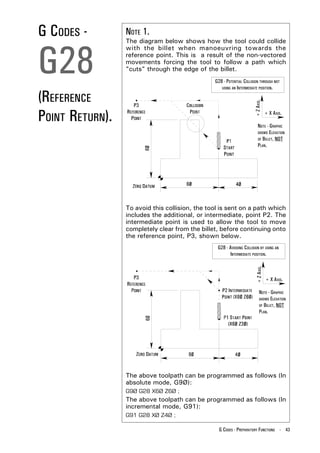
                 The diagram below shows how the tool could collide
                 with the billet when manoeuvring towards the
                 reference point. This is a result of the non-vectored
                 movements forcing the tool to follow a path which
                 "cuts" through the edge of the billet.
                                                G28 - POTENTIAL COLLISION THROUGH NOT
                                                   USING AN INTERMEDIATE POSITION.


(REFERENCE


                                                                      + Z AXIS.
POINT RETURN).                                                                     + X AXIS.

                                                                          NOTE - GRAPHIC
                                                                          SHOWS ELEVATION
                                                                          OF BILLET, NOT
                                                                          PLAN.


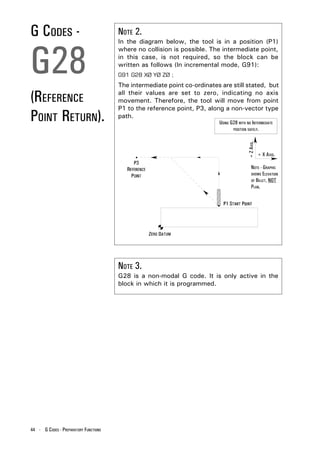
                 To avoid this collision, the tool is sent on a path which
                 includes the additional, or intermediate, point P2. The
                 intermediate point is used to allow the tool to move
                 completely clear from the billet, before continuing onto
                 the reference point, P3, shown below.
                                                 G28 - AVOIDING COLLISION BY USING AN
                                                       INTERMEDIATE POSITION.
                                                                       + Z AXIS.


                                                                                   + X AXIS.

                                                                           NOTE - GRAPHIC
                                                                           SHOWS ELEVATION
                                                                           OF BILLET, NOT
                                                                           PLAN.


                 The above toolpath can be programmed as follows (In
                 absolute mode, G9Ø):
                 G9Ø G28 X6Ø Z6Ø ;
                 The above toolpath can be programmed as follows (In
                 incremental mode, G91):
                 G91 G28 XØ Z4Ø ;

                                                  G CODES - PREPARATORY FUNCTIONS - 43
G CODES -                              NOTE 2.


G28
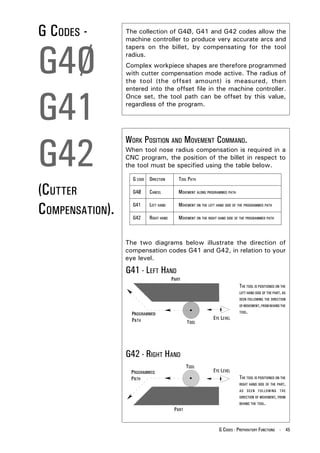
                                       In the diagram below, the tool is in a position (P1)
                                       where no collision is possible. The intermediate point,
                                       in this case, is not required, so the block can be
                                       written as follows (In incremental mode, G91):
                                       G91 G28 XØ YØ ZØ ;
                                       The intermediate point co-ordinates are still stated, but

(REFERENCE                             all their values are set to zero, indicating no axis
                                       movement. Therefore, the tool will move from point
                                       P1 to the reference point, P3, along a non-vector type
POINT RETURN).                         path.
                                                                          USING G28 WITH NO INTERMEDIATE
                                                                                 POSITION SAFELY.


                                                                                          + Z AXIS.
                                                                                                      + X AXIS.

                                                                                              NOTE - GRAPHIC
                                                                                              SHOWS ELEVATION
                                                                                              OF BILLET, NOT
                                                                                              PLAN.


                                       NOTE 3.
                                       G28 is a non-modal G code. It is only active in the
                                       block in which it is programmed.


44 - G CODES - PREPARATORY FUNCTIONS
G CODES -        The collection of G4Ø, G41 and G42 codes allow the
                 machine controller to produce very accurate arcs and


G4Ø
                 tapers on the billet, by compensating for the tool
                 radius.
                 Complex workpiece shapes are therefore programmed
                 with cutter compensation mode active. The radius of
                 the tool (the offset amount) is measured, then


G41
                 entered into the offset file in the machine controller.
                 Once set, the tool path can be offset by this value,
                 regardless of the program.


G42
                 WORK POSITION AND MOVEMENT COMMAND.
                 When tool nose radius compensation is required in a
                 CNC program, the position of the billet in respect to
                 the tool must be specified using the table below.

                   G CODE DIRECTION     TOOL PATH

(CUTTER            G4Ø     CANCEL       MOVEMENT ALONG PROGRAMMED PATH


COMPENSATION).     G41

                   G42
                           LEFT HAND

                           RIGHT HAND
                                        MOVEMENT ON THE LEFT HAND SIDE OF THE PROGRAMMED PATH

                                        MOVEMENT ON THE RIGHT HAND SIDE OF THE PROGRAMMED PATH


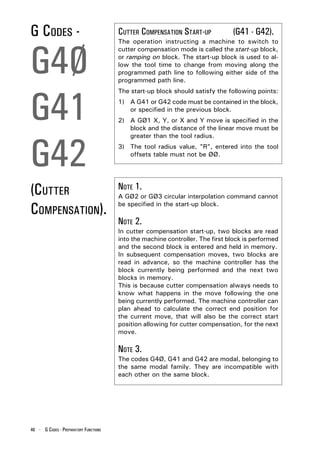
                 The two diagrams below illustrate the direction of
                 compensation codes G41 and G42, in relation to your
                 eye level.

                 G41 - LEFT HAND
                                                                          THE TOOL IS POSITIONED ON THE
                                                                          LEFT HAND SIDE OF THE PART, AS
                                                                          SEEN FOLLOWING THE DIRECTION
                                                                          OF MOVEMENT, FROM BEHIND THE
                                                                          TOOL.


                 G42 - RIGHT HAND

                                                                          THE TOOL IS POSITIONED ON THE
                                                                          RIGHT HAND SIDE OF THE PART,
                                                                          AS SEEN FOLLOWING THE
                                                                          DIRECTION OF MOVEMENT, FROM
                                                                          BEHIND THE TOOL.


                                                              G CODES - PREPARATORY FUNCTIONS - 45
G CODES -                              CUTTER COMPENSATION START-UP            (G41 - G42).


G4Ø
                                       The operation instructing a machine to switch to
                                       cutter compensation mode is called the start-up block,
                                       or ramping on block. The start-up block is used to al-
                                       low the tool time to change from moving along the
                                       programmed path line to following either side of the
                                       programmed path line.


G41
                                       The start-up block should satisfy the following points:
                                       1) A G41 or G42 code must be contained in the block,
                                          or specified in the previous block.
                                       2) A GØ1 X, Y, or X and Y move is specified in the
                                          block and the distance of the linear move must be


G42
                                          greater than the tool radius.
                                       3) The tool radius value, "R", entered into the tool
                                          offsets table must not be ØØ.


(CUTTER                                NOTE 1.
                                       A GØ2 or GØ3 circular interpolation command cannot

COMPENSATION).                         be specified in the start-up block.

                                       NOTE 2.
                                       In cutter compensation start-up, two blocks are read
                                       into the machine controller. The first block is performed
                                       and the second block is entered and held in memory.
                                       In subsequent compensation moves, two blocks are
                                       read in advance, so the machine controller has the
                                       block currently being performed and the next two
                                       blocks in memory.
                                       This is because cutter compensation always needs to
                                       know what happens in the move following the one
                                       being currently performed. The machine controller can
                                       plan ahead to calculate the correct end position for
                                       the current move, that will also be the correct start
                                       position allowing for cutter compensation, for the next
                                       move.

                                       NOTE 3.
                                       The codes G4Ø, G41 and G42 are modal, belonging to
                                       the same modal family. They are incompatible with
                                       each other on the same block.


46 - G CODES - PREPARATORY FUNCTIONS
G CODES -        CANCELLATION OF CUTTER COMPENSATION


G4Ø
                 (G4Ø).
                 The G4Ø code is used to cancel cutter compensation.
                 A G4Ø command can only be performed in a block in
                 which a linear move (ie, GØØ, GØ1, G28) is
                 programmed.


G41              NOTE 1.
                 Following the machining of an internal pocket, it is
                 recommended that the Z axis is withdrawn by using


G42
                 the GØ1 command, to a position clear of the
                 workpiece, before the cutter compensation mode is
                 cancelled.


                 NOTE 2.
(CUTTER          The machine controller enters compensation cancel
                 mode automatically when :
                 1) the machine power is first switched on.
COMPENSATION).   2) the reset button on the CRT/MDI controller panel
                    is pressed.
                 3) a program is forced to end by performing an MØ2
                    or M3Ø command.


                                               G CODES - PREPARATORY FUNCTIONS - 47
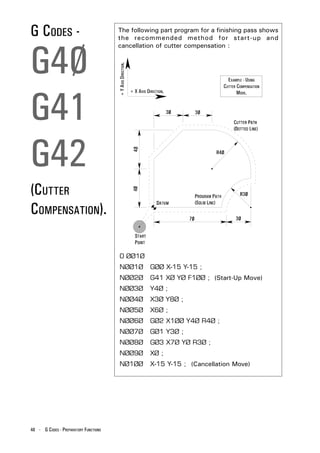
G CODES -                              The following part program for a finishing pass shows
                                       the recommended method for start-up and


G4Ø
                                       cancellation of cutter compensation :


                                       + Y AXIS DIRECTION.
                                                                                                EXAMPLE - USING
                                                                                              CUTTER COMPENSATION


G41
                                                             + X AXIS DIRECTION.                     MODE.


G42
(CUTTER
COMPENSATION).

                                         O ØØ1Ø
                                         NØØ1Ø                          GØØ X-15 Y-15 ;
                                         NØØ2Ø                          G41 XØ YØ F1ØØ ; (Start-Up Move)
                                         NØØ3Ø                          Y4Ø ;
                                         NØØ4Ø                          X3Ø Y8Ø ;
                                         NØØ5Ø                          X6Ø ;
                                         NØØ6Ø                          GØ2 X1ØØ Y4Ø R4Ø ;
                                         NØØ7Ø                          GØ1 Y3Ø ;
                                         NØØ8Ø                          GØ3 X7Ø YØ R3Ø ;
                                         NØØ9Ø                          XØ ;
                                         NØ1ØØ                          X-15 Y-15 ; (Cancellation Move)


48 - G CODES - PREPARATORY FUNCTIONS
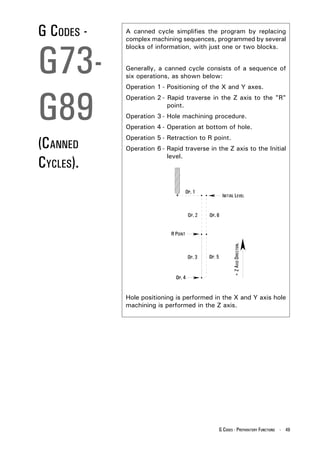
G CODES -   A canned cycle simplifies the program by replacing
            complex machining sequences, programmed by several


G73-
            blocks of information, with just one or two blocks.


            Generally, a canned cycle consists of a sequence of
            six operations, as shown below:
            Operation 1 - Positioning of the X and Y axes.


G89
            Operation 2 - Rapid traverse in the Z axis to the "R"
                          point.
            Operation 3 - Hole machining procedure.
            Operation 4 - Operation at bottom of hole.

(CANNED
            Operation 5 - Retraction to R point.
            Operation 6 - Rapid traverse in the Z axis to the Initial
                          level.
CYCLES).


                                                    + Z AXIS DIRECTION.


            Hole positioning is performed in the X and Y axis hole
            machining is performed in the Z axis.


                                             G CODES - PREPARATORY FUNCTIONS - 49
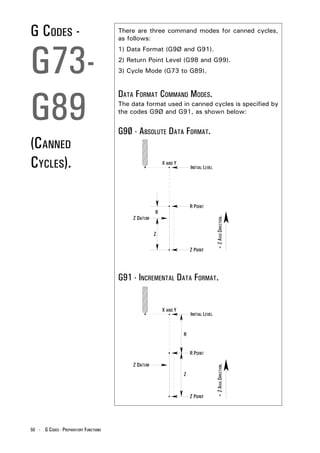
G CODES -                              There are three command modes for canned cycles,
                                       as follows:


G73-
                                       1) Data Format (G9Ø and G91).
                                       2) Return Point Level (G98 and G99).
                                       3) Cycle Mode (G73 to G89).


G89
                                       DATA FORMAT COMMAND MODES.
                                       The data format used in canned cycles is specified by
                                       the codes G9Ø and G91, as shown below:


                                       G9Ø - ABSOLUTE DATA FORMAT.
(CANNED
CYCLES).


                                                                       + Z AXIS DIRECTION.


                                       G91 - INCREMENTAL DATA FORMAT.
                                                                       + Z AXIS DIRECTION.


50 - G CODES - PREPARATORY FUNCTIONS
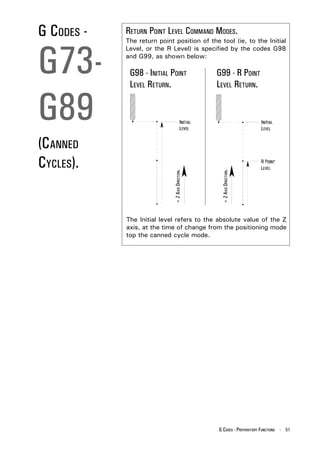
G CODES -   RETURN POINT LEVEL COMMAND MODES.


G73-
            The return point position of the tool (ie, to the Initial
            Level, or the R Level) is specified by the codes G98
            and G99, as shown below:

             G98 - INITIAL POINT                   G99 - R POINT
             LEVEL RETURN.                         LEVEL RETURN.


G89
(CANNED
CYCLES).
                             + Z AXIS DIRECTION.


                                                    + Z AXIS DIRECTION.
            The Initial level refers to the absolute value of the Z
            axis, at the time of change from the positioning mode
            top the canned cycle mode.


                                                   G CODES - PREPARATORY FUNCTIONS - 51
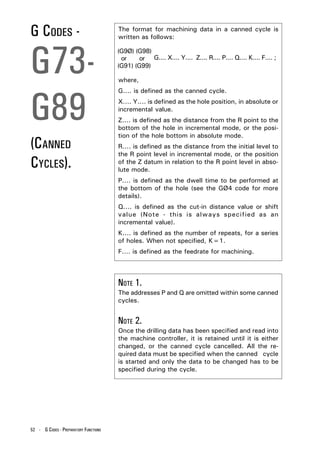
G CODES -                              The format for machining data in a canned cycle is
                                       written as follows:


G73-
                                       (G9Ø) (G98)
                                        or     or G.... X.... Y.... Z.... R.... P.... Q.... K.... F.... ;
                                       (G91) (G99)

                                       where,


G89
                                       G.... is defined as the canned cycle.
                                       X.... Y.... is defined as the hole position, in absolute or
                                       incremental value.
                                       Z.... is defined as the distance from the R point to the
                                       bottom of the hole in incremental mode, or the posi-
                                       tion of the hole bottom in absolute mode.
(CANNED                                R.... is defined as the distance from the initial level to
                                       the R point level in incremental mode, or the position
CYCLES).                               of the Z datum in relation to the R point level in abso-
                                       lute mode.
                                       P.... is defined as the dwell time to be performed at
                                       the bottom of the hole (see the GØ4 code for more
                                       details).
                                       Q.... is defined as the cut-in distance value or shift
                                       value (Note - this is always specified as an
                                       incremental value).
                                       K.... is defined as the number of repeats, for a series
                                       of holes. When not specified, K=1.
                                       F.... is defined as the feedrate for machining.


                                       NOTE 1.
                                       The addresses P and Q are omitted within some canned
                                       cycles.


                                       NOTE 2.
                                       Once the drilling data has been specified and read into
                                       the machine controller, it is retained until it is either
                                       changed, or the canned cycle cancelled. All the re-
                                       quired data must be specified when the canned cycle
                                       is started and only the data to be changed has to be
                                       specified during the cycle.


52 - G CODES - PREPARATORY FUNCTIONS
G CODES -   The following example shows a canned cycle for
            drilling 4 holes, where the third hole is to be machined


G73-
            1Ømm deeper:
            G9Ø G99 G81 X1Ø Y1Ø Z-15 R2 F1ØØ ;
            X2Ø ; (X axis move)

            X3Ø Z-25 ; (X and Z change)


G89
            X4Ø Z-15 ; (X and Z change)

            G8Ø ; (Cancel)


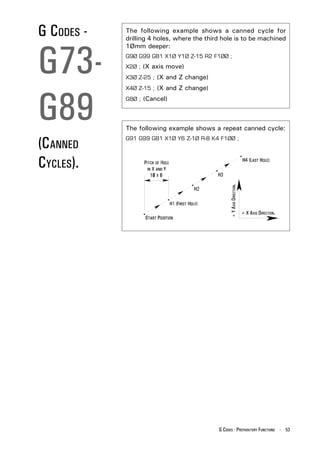
            The following example shows a repeat canned cycle:

(CANNED     G91 G99 G81 X1Ø Y6 Z-1Ø R-8 K4 F1ØØ ;


CYCLES).


                                                 + Y AXIS DIRECTION.
                                                                       + X AXIS DIRECTION.


                                            G CODES - PREPARATORY FUNCTIONS - 53
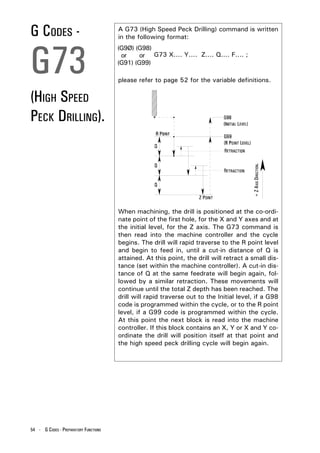
G CODES -                              A G73 (High Speed Peck Drilling) command is written
                                       in the following format:


G73
                                       (G9Ø) (G98)
                                        or     or G73 X.... Y.... Z.... Q.... F.... ;
                                       (G91) (G99)

                                       please refer to page 52 for the variable definitions.


(HIGH SPEED
PECK DRILLING).


                                                                                         + Z AXIS DIRECTION.
                                       When machining, the drill is positioned at the co-ordi-
                                       nate point of the first hole, for the X and Y axes and at
                                       the initial level, for the Z axis. The G73 command is
                                       then read into the machine controller and the cycle
                                       begins. The drill will rapid traverse to the R point level
                                       and begin to feed in, until a cut-in distance of Q is
                                       attained. At this point, the drill will retract a small dis-
                                       tance (set within the machine controller). A cut-in dis-
                                       tance of Q at the same feedrate will begin again, fol-
                                       lowed by a similar retraction. These movements will
                                       continue until the total Z depth has been reached. The
                                       drill will rapid traverse out to the Initial level, if a G98
                                       code is programmed within the cycle, or to the R point
                                       level, if a G99 code is programmed within the cycle.
                                       At this point the next block is read into the machine
                                       controller. If this block contains an X, Y or X and Y co-
                                       ordinate the drill will position itself at that point and
                                       the high speed peck drilling cycle will begin again.


54 - G CODES - PREPARATORY FUNCTIONS
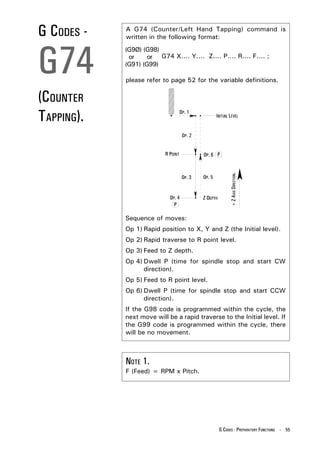
G CODES -   A G74 (Counter/Left Hand Tapping) command is
            written in the following format:


G74
            (G9Ø) (G98)
             or     or G74 X.... Y.... Z.... P.... R.... F.... ;
            (G91) (G99)

            please refer to page 52 for the variable definitions.


(COUNTER
TAPPING).


                                                   + Z AXIS DIRECTION.
            Sequence of moves:
            Op 1) Rapid position to X, Y and Z (the Initial level).
            Op 2) Rapid traverse to R point level.
            Op 3) Feed to Z depth.
            Op 4) Dwell P (time for spindle stop and start CW
                  direction).
            Op 5) Feed to R point level.
            Op 6) Dwell P (time for spindle stop and start CCW
                  direction).
            If the G98 code is programmed within the cycle, the
            next move will be a rapid traverse to the Initial level. If
            the G99 code is programmed within the cycle, there
            will be no movement.


            NOTE 1.
            F (Feed) = RPM x Pitch.


                                              G CODES - PREPARATORY FUNCTIONS - 55
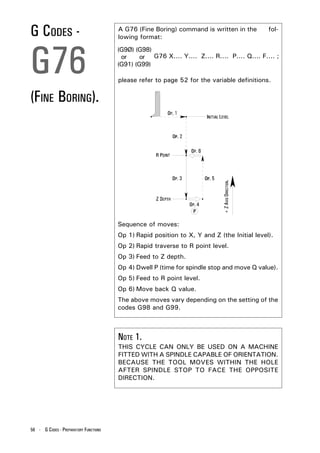
G CODES -                              A G76 (Fine Boring) command is written in the
                                       lowing format:
                                                                                                  fol-


G76
                                       (G9Ø) (G98)
                                        or     or G76 X.... Y.... Z.... R.... P.... Q.... F.... ;
                                       (G91) (G99)

                                       please refer to page 52 for the variable definitions.


(FINE BORING).


                                       Sequence of moves:                   + Z AXIS DIRECTION.
                                       Op 1) Rapid position to X, Y and Z (the Initial level).
                                       Op 2) Rapid traverse to R point level.
                                       Op 3) Feed to Z depth.
                                       Op 4) Dwell P (time for spindle stop and move Q value).
                                       Op 5) Feed to R point level.
                                       Op 6) Move back Q value.
                                       The above moves vary depending on the setting of the
                                       codes G98 and G99.


                                       NOTE 1.
                                       THIS CYCLE CAN ONLY BE USED ON A MACHINE
                                       FITTED WITH A SPINDLE CAPABLE OF ORIENTATION.
                                       BECAUSE THE TOOL MOVES WITHIN THE HOLE
                                       AFTER SPINDLE STOP TO FACE THE OPPOSITE
                                       DIRECTION.


56 - G CODES - PREPARATORY FUNCTIONS
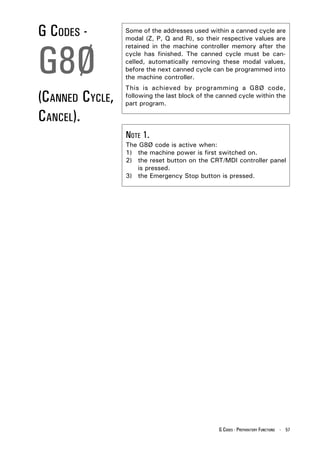
G CODES -        Some of the addresses used within a canned cycle are
                 modal (Z, P, Q and R), so their respective values are


G8Ø
                 retained in the machine controller memory after the
                 cycle has finished. The canned cycle must be can-
                 celled, automatically removing these modal values,
                 before the next canned cycle can be programmed into
                 the machine controller.
                 This is achieved by programming a G8Ø code,
(CANNED CYCLE,   following the last block of the canned cycle within the
                 part program.

CANCEL).
                 NOTE 1.
                 The G8Ø code is active when:
                 1) the machine power is first switched on.
                 2) the reset button on the CRT/MDI controller panel
                    is pressed.
                 3) the Emergency Stop button is pressed.


                                                 G CODES - PREPARATORY FUNCTIONS - 57
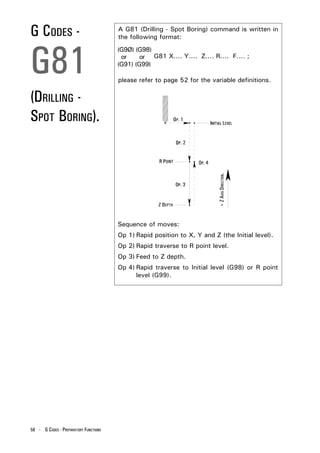
G CODES -                              A G81 (Drilling - Spot Boring) command is written in
                                       the following format:


G81
                                       (G9Ø) (G98)
                                        or     or G81 X.... Y.... Z.... R.... F.... ;
                                       (G91) (G99)

                                       please refer to page 52 for the variable definitions.


(DRILLING -
SPOT BORING).


                                       Sequence of moves:                 + Z AXIS DIRECTION.

                                       Op 1) Rapid position to X, Y and Z (the Initial level).
                                       Op 2) Rapid traverse to R point level.
                                       Op 3) Feed to Z depth.
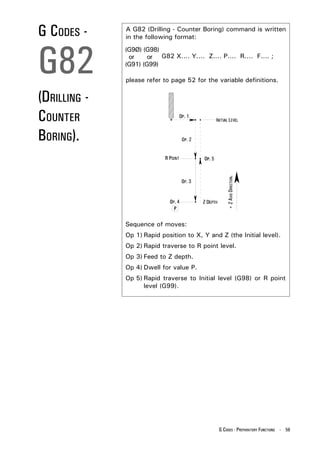
                                       Op 4) Rapid traverse to Initial level (G98) or R point
                                             level (G99).


58 - G CODES - PREPARATORY FUNCTIONS
G CODES -     A G82 (Drilling - Counter Boring) command is written
              in the following format:


G82
              (G9Ø) (G98)
               or     or G82 X.... Y.... Z.... P.... R.... F.... ;
              (G91) (G99)

              please refer to page 52 for the variable definitions.


(DRILLING -
COUNTER
BORING).


                                                   + Z AXIS DIRECTION.
              Sequence of moves:
              Op 1) Rapid position to X, Y and Z (the Initial level).
              Op 2) Rapid traverse to R point level.
              Op 3) Feed to Z depth.
              Op 4) Dwell for value P.
              Op 5) Rapid traverse to Initial level (G98) or R point
                    level (G99).


                                               G CODES - PREPARATORY FUNCTIONS - 59
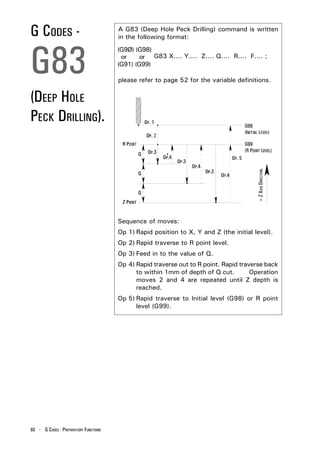
G CODES -                              A G83 (Deep Hole Peck Drilling) command is written
                                       in the following format:


G83
                                       (G9Ø) (G98)
                                        or     or G83 X.... Y.... Z.... Q.... R.... F.... ;
                                       (G91) (G99)

                                       please refer to page 52 for the variable definitions.


(DEEP HOLE
PECK DRILLING).


                                                                                        + Z AXIS DIRECTION.
                                       Sequence of moves:
                                       Op 1) Rapid position to X, Y and Z (the initial level).
                                       Op 2) Rapid traverse to R point level.
                                       Op 3) Feed in to the value of Q.
                                       Op 4) Rapid traverse out to R point. Rapid traverse back
                                             to within 1mm of depth of Q cut.         Operation
                                             moves 2 and 4 are repeated until Z depth is
                                             reached.
                                       Op 5) Rapid traverse to Initial level (G98) or R point
                                             level (G99).


60 - G CODES - PREPARATORY FUNCTIONS
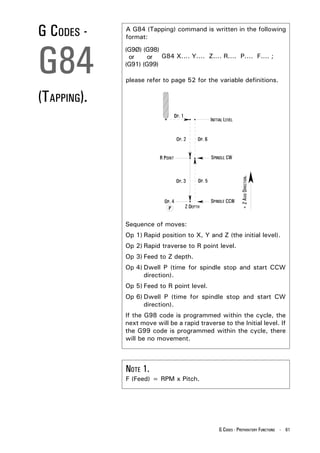
G CODES -    A G84 (Tapping) command is written in the following
             format:


G84
             (G9Ø) (G98)
              or     or G84 X.... Y.... Z.... R.... P.... F.... ;
             (G91) (G99)

             please refer to page 52 for the variable definitions.


(TAPPING).


                                                          + Z AXIS DIRECTION.
             Sequence of moves:
             Op 1) Rapid position to X, Y and Z (the initial level).
             Op 2) Rapid traverse to R point level.
             Op 3) Feed to Z depth.
             Op 4) Dwell P (time for spindle stop and start CCW
                   direction).
             Op 5) Feed to R point level.
             Op 6) Dwell P (time for spindle stop and start CW
                   direction).
             If the G98 code is programmed within the cycle, the
             next move will be a rapid traverse to the Initial level. If
             the G99 code is programmed within the cycle, there
             will be no movement.


             NOTE 1.
             F (Feed) = RPM x Pitch.


                                               G CODES - PREPARATORY FUNCTIONS - 61
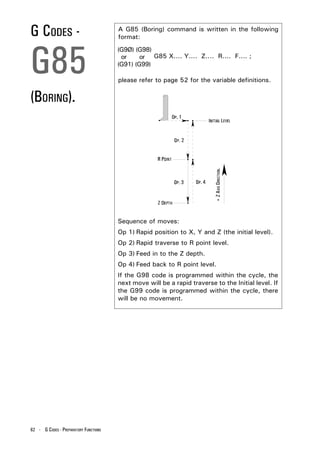
G CODES -                              A G85 (Boring) command is written in the following
                                       format:


G85
                                       (G9Ø) (G98)
                                        or     or G85 X.... Y.... Z.... R.... F.... ;
                                       (G91) (G99)

                                       please refer to page 52 for the variable definitions.


(BORING).


                                                                          + Z AXIS DIRECTION.
                                       Sequence of moves:
                                       Op 1) Rapid position to X, Y and Z (the initial level).
                                       Op 2) Rapid traverse to R point level.
                                       Op 3) Feed in to the Z depth.
                                       Op 4) Feed back to R point level.
                                       If the G98 code is programmed within the cycle, the
                                       next move will be a rapid traverse to the Initial level. If
                                       the G99 code is programmed within the cycle, there
                                       will be no movement.


62 - G CODES - PREPARATORY FUNCTIONS
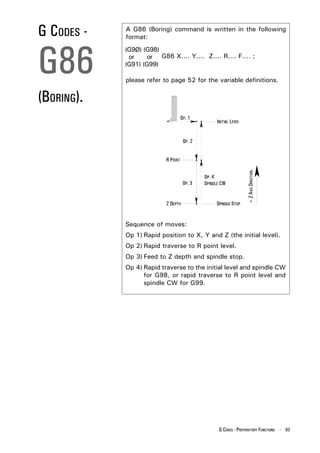
G CODES -   A G86 (Boring) command is written in the following
            format:


G86
            (G9Ø) (G98)
             or     or G86 X.... Y.... Z.... R.... F.... ;
            (G91) (G99)

            please refer to page 52 for the variable definitions.


(BORING).


                                                           + Z AXIS DIRECTION.
            Sequence of moves:
            Op 1) Rapid position to X, Y and Z (the initial level).
            Op 2) Rapid traverse to R point level.
            Op 3) Feed to Z depth and spindle stop.
            Op 4) Rapid traverse to the initial level and spindle CW
                  for G98, or rapid traverse to R point level and
                  spindle CW for G99.


                                             G CODES - PREPARATORY FUNCTIONS - 63
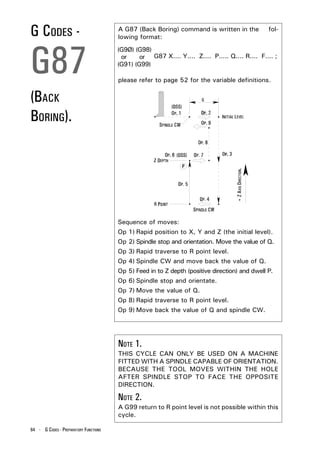
G CODES -                              A G87 (Back Boring) command is written in the
                                       lowing format:
                                                                                                         fol-


G87
                                       (G9Ø) (G98)
                                        or     or G87 X.... Y.... Z.... P..... Q.... R.... F.... ;
                                       (G91) (G99)

                                       please refer to page 52 for the variable definitions.


(BACK
BORING).


                                                                                   + Z AXIS DIRECTION.
                                       Sequence of moves:
                                       Op 1) Rapid position to X, Y and Z (the initial level).
                                       Op 2) Spindle stop and orientation. Move the value of Q.
                                       Op 3) Rapid traverse to R point level.
                                       Op 4) Spindle CW and move back the value of Q.
                                       Op 5) Feed in to Z depth (positive direction) and dwell P.
                                       Op 6) Spindle stop and orientate.
                                       Op 7) Move the value of Q.
                                       Op 8) Rapid traverse to R point level.
                                       Op 9) Move back the value of Q and spindle CW.


                                       NOTE 1.
                                       THIS CYCLE CAN ONLY BE USED ON A MACHINE
                                       FITTED WITH A SPINDLE CAPABLE OF ORIENTATION.
                                       BECAUSE THE TOOL MOVES WITHIN THE HOLE
                                       AFTER SPINDLE STOP TO FACE THE OPPOSITE
                                       DIRECTION.

                                       NOTE 2.
                                       A G99 return to R point level is not possible within this
                                       cycle.

64 - G CODES - PREPARATORY FUNCTIONS
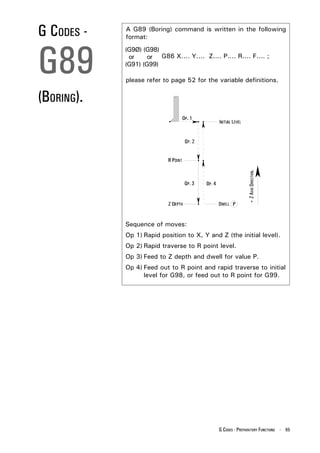
G CODES -   A G89 (Boring) command is written in the following
            format:


G89
            (G9Ø) (G98)
             or     or G86 X.... Y.... Z.... P.... R.... F.... ;
            (G91) (G99)

            please refer to page 52 for the variable definitions.


(BORING).


                                                           + Z AXIS DIRECTION.
            Sequence of moves:
            Op 1) Rapid position to X, Y and Z (the initial level).
            Op 2) Rapid traverse to R point level.
            Op 3) Feed to Z depth and dwell for value P.
            Op 4) Feed out to R point and rapid traverse to initial
                  level for G98, or feed out to R point for G99.


                                             G CODES - PREPARATORY FUNCTIONS - 65
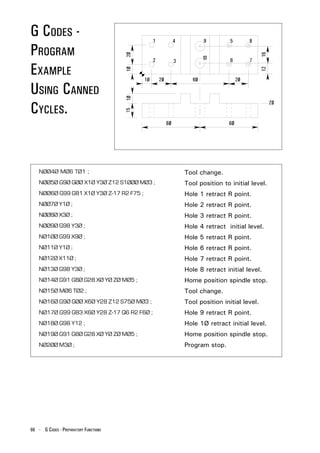
G CODES -
PROGRAM
EXAMPLE
USING CANNED
CYCLES.


    NØØ4Ø MØ6 TØ1 ;                          Tool change.
    NØØ5Ø G9Ø GØØ X1Ø Y3Ø Z12 S1ØØØ MØ3 ;    Tool position to initial level.
    NØØ6Ø G99 G81 X1Ø Y3Ø Z-17 R2 F75 ;      Hole 1 retract R point.
    NØØ7Ø Y1Ø ;                              Hole 2 retract R point.
    NØØ8Ø X3Ø ;                              Hole 3 retract R point.
    NØØ9Ø G98 Y3Ø ;                          Hole 4 retract initial level.
    NØ1ØØ G99 X9Ø ;                          Hole 5 retract R point.
    NØ11Ø Y1Ø ;                              Hole 6 retract R point.
    NØ12Ø X11Ø ;                             Hole 7 retract R point.
    NØ13Ø G98 Y3Ø ;                          Hole 8 retract initial level.
    NØ14Ø G91 G8Ø G28 XØ YØ ZØ MØ5 ;         Home position spindle stop.
    NØ15Ø MØ6 TØ2 ;                          Tool change.
    NØ16Ø G9Ø GØØ X6Ø Y28 Z12 S75Ø MØ3 ;     Tool position initial level.
    NØ17Ø G99 G83 X6Ø Y28 Z-17 Q6 R2 F6Ø ;   Hole 9 retract R point.
    NØ18Ø G98 Y12 ;                          Hole 1Ø retract initial level.
    NØ19Ø G91 G8Ø G28 XØ YØ ZØ MØ5 ;         Home position spindle stop.
    NØ2ØØ M3Ø ;                              Program stop.


66 - G CODES - PREPARATORY FUNCTIONS
G CODES -        When G9Ø is active, all co-ordinates are relative to
                 the workpiece datum (the zero position).


G9Ø              NOTE 1.
                 The G9Ø code is active when:

(ABSOLUTE        1) the machine power is first switched on.
                 2) the reset button on the CRT/MDI controller panel
                    is pressed.
ZERO COMMAND).   3) the Emergency Stop button is pressed.


G CODES -        When G91 is active, all movement command values


G91
                 are distance moved (including the +/- sign) from last
                 known programmed position.


(INCREMENTAL
COMMAND).


G CODES -        When G94 is active, all feedrates stated within the


G94
                 program are defined in either millimetres per minute
                 when operating in G21 Metric Mode, or inches per
                 minute when operating in G2Ø Imperial Mode.
                 For example:
                 (G2Ø) F6 = 6 in/min.
                 (G21) F15Ø = 15Ø mm/min.
(FEED PER
MINUTE).
                                               G CODES - PREPARATORY FUNCTIONS - 67
G CODES -                              When G95 is active, all feedrates stated within the
                                       program are defined in either millimetres per


G95
                                       revolution when operating in G21 Metric Mode, or
                                       inches per revolution when operating in G2Ø Imperial
                                       Mode.


(FEED PER                              NOTE 1.
                                       THE G95 CODE IS ONLY AVAILABLE WHEN THE

REVOLUTION).                           MACHINE IS FITTED WITH A SPINDLE ENCODER. SEE
                                       YOUR MACHINE SPECIFICATION.


G CODES -                              A G98 code, when used within a canned cycle, will


G98
                                       return the drill or boring bar back to the initial level
                                       after machining a hole.


(RETURN TO
INITIAL LEVEL).


G CODES -                              A G99 code, when used within a canned cycle, will


G99
                                       return the drill or boring bar back to the R point level
                                       after machining a hole.


(RETURN TO R
POINT LEVEL).
68 - G CODES - PREPARATORY FUNCTIONS
G CODES -       The following canned cycles, when programmed
                correctly, will machine either a circular pocket to any


G17Ø-
                diameter and depth, or a rectangular pocket to any
                side length and depth.
                Both canned cycles require two blocks of information
                each, with each block having its own G code:
                G17Ø


G173
                           Circular pocket.
                G171
                G172
                           Rectangular pocket.
                G173


(CIRCULAR/      NOTE 1.
                Great care must be taken when using these canned
RECTANGULAR     cycles, since each canned cycle can be written three
                different ways.

POCKET CANNED   This is achieved according to the values assigned
                following the addresses P, I and J in canned cycle
                G17Ø-171 and the values assigned following the
CYCLES).        addresses P, I and K in canned cycle G172-173. By
                adding these values, the cutter will move in a
                different path when machining.


                The following pages show six programs for these
                canned cycles....
                Programs ØØØ2, ØØØ3 and ØØØ4 are for circular
                pockets.
                Programs ØØØ5, ØØØ6 and ØØØ7 are for
                rectangular pockets.


                                               G CODES - PREPARATORY FUNCTIONS - 69
G CODES -

G17Ø
G171
(CIRCULAR POCKET
CANNED                                  NOTE 1.
CYCLE EXAMPLE A).                       The absolute zero datum position is set in the offset
                                        file.


    PROGRAM NUMBER ØØØ2 - ROUGHING PROGRAM - CIRCULAR POCKET - G17Ø AND G171.
    [BILLET X75 Y9Ø Z3Ø ; ............................................. Billet size.

    [EDGEMOVE X-37.5 Y-45 ; .......................................... Position of datum from the
                                                                         bottom LH corner of billet.
    [TOOLDEF T1 D6 ZØ ; ................................................ Tool no. dia. and position.

    O ØØØ2 ; ................................................................. Program no.

    NØØ4Ø G91 G28 XØ YØ ZØ ; ..................................... Metric, reference point.

    NØØ5Ø MØ6 TØ1 ; ................................................... Tool no.

    NØØ6Ø G9Ø GØØ XØ YØ Z1Ø S3ØØØ MØ3 ; ................ Absolute, rapid, tool 1Ømm
                                                                         above surface, spindle speed
                                                                         and start.
    NØØ7Ø GØ1 ZØ F3ØØ ; ............................................. Tool to surface of job, feed set.

    NØØ8Ø G17Ø RØ PØ Q3 XØ YØ Z-6 IØ JØ K-24 ; .......... Circular pocket canned cycle.

    NØØ9Ø G171 P75 S3ØØØ R75 F25Ø B35ØØ J2ØØ ; ... Circular pocket canned cycle.

    NØ1ØØ GØØ Z25 MØ5 ; ............................................ Rapid, tool to 25mm above
                                                                         surface, spindle stop.
    NØ11Ø G91 G28 XØ YØ ZØ ; ..................................... Incremental,              return    to
                                                                         reference point.
    NØ12Ø M3Ø ; .......................................................... Program reset.


70 - G CODES - PREPARATORY FUNCTIONS
G CODES -           Definitions for the terms used in the G17Ø and G171
                    circular pocket canned cycle from program number


G17Ø
                    ØØØ2 follows:

                    NØØ8Ø G17Ø RØ PØ Q3 XØ YØ Z-6 IØ JØ K-24 ;

                    NØØ9Ø G171 P75 S3ØØØ R75 F25Ø B35ØØ J2ØØ ;


G171
                    For G17Ø block,
                    R defines the position of the tool to start cycle ie. Ø
                      (surface of job).
                    P defines when P is zero(Ø) the cycle is a roughing
                      cycle.
                    Q defines the peck increment, in program number

(CIRCULAR POCKET
                      ØØØ2, 2 pecks each of 3mm.
                    X defines the pocket centre in X axis (Ø).
                    Y defines the pocket centre in Y axis (Ø).
CANNED              Z defines the pocket base (-6mm) from job surface.
                    I defines the side finish allowance (Ø as this is a
CYCLE EXAMPLE A).     roughing cycle only).
                    J defines the base finish allowance (Ø as this is a
                      roughing cycle only).
                    K defines the radius of pocket (-24) negative value -
                      cut in CCW direction).

                    For G171 block,
                    P defines the cut width percentage.
                    S defines the roughing spindle speed (S3ØØØ).
                    R defines the roughing Feed in Z (75).
                    F defines the roughing feed XY (25Ø).
                    B defines the finishing spindle speed (35ØØ, not
                      applicable as roughing only).
                    J defines the finishing feed (2ØØ, not applicable as
                      roughing only).

                    When setting offsets the value R must be included, R
                    being the radius of the cutter.
                    The direction of the cutter path is controlled by K, a
                    negative (K-24) value for K means the cutter path is in
                    a CCW direction and if the K value is positive (K+24)
                    the cutterpath is in a CW direction. The Q value is
                    always positive (Q+3).
                    When the tool has finished cutting the tool retracts
                    1mm in the Z axis, moves to the centre of the circular
                    pocket at rapid traverse, retracts again in the Z axis .
                    Program number ØØØ2 is for a two cut roughing cycle.


                                                    G CODES - PREPARATORY FUNCTIONS - 71
G CODES -                              PROGRAM NUMBER ØØØ3 - ROUGHING AND FINISHING


G17Ø
                                       PROGRAM - CIRCULAR POCKET - G17Ø AND G171.
                                       The difference between program numbers ØØØ2 and
                                       ØØØ3 is that program ØØØ3 leaves a finishing
                                       allowance on the diameter of the pocket and on the
                                       base.


G171
                                       [BILLET X75 Y9Ø Z3Ø ;
                                       [EDGEMOVE X-37.5 Y-45 ;
                                       [TOOLDEF T1 D6 ZØ ;
                                       OØØØ3 ;
                                       NØØ4Ø G91 G21 G28 XØ YØ ZØ ;

(CIRCULAR POCKET                       NØØ5Ø MØ6 TØ1 ;
                                       NØØ6Ø G9Ø GØØ XØ YØ Z1Ø S3ØØØ MØ3 ;


CANNED                                 NØØ7Ø GØ1 ZØ F3ØØ ;
                                       NØØ8Ø G17Ø RØ PØ Q3 XØ YØ Z-6 IØ.5 JØ.1 K-24 ;


CYCLE EXAMPLE B).                      NØØ9Ø G171 P75 S3ØØØ R75 F25Ø B35ØØ J2ØØ ;
                                       NØ1ØØ GØØ Z25 MØ5 ;
                                       NØ11Ø G91 G28 XØ YØ ZØ ;
                                       NØ12Ø M3Ø ;


72 - G CODES - PREPARATORY FUNCTIONS
G CODES -           Definitions for the terms used in the G17Ø and G171
                    circular pocket canned cycle from program number


G17Ø
                    ØØØ3 follows:

                    NØØ8Ø G17Ø RØ PØ Q3 XØ YØ Z-6 IØ.5 JØ.1 K-24 ;
                    NØØ9Ø G171 P75 S3ØØØ R75 F25Ø B35ØØ J2ØØ ;


G171
                    For G17Ø block,
                    R defines the position of the tool to start cycle ie. Ø
                      (surface of job).
                    P defines when P is zero(Ø) the cycle is a roughing
                      cycle.
                    Q defines the peck increment, in program number

(CIRCULAR POCKET
                      ØØØ3, 2 pecks each of 3mm.
                    X defines the pocket centre in X axis (Ø).
                    Y defines the pocket centre in Y axis (Ø).
CANNED              Z defines the pocket base (-6mm) from job surface.
                    I defines the side finish allowance (leaves a finishing
CYCLE EXAMPLE B).     allowance of Ø.5).
                    J defines the base finish allowance (leaves a
                      finishing allowance of Ø.1).
                    K defines the radius of pocket (-24) negative value -
                      cut in CCW direction).

                    For G171 block,
                    P defines the cut width percentage.
                    S defines the roughing spindle speed (S3ØØØ).
                    R defines the roughing Feed in Z (75).
                    F defines the roughing feed XY (25Ø).
                    B defines the finishing spindle speed (35ØØ).
                    J defines the finishing feed (2ØØ).


                                                   G CODES - PREPARATORY FUNCTIONS - 73
G CODES -                              PROGRAM NUMBER ØØØ4 - ONE STEP FINISHING CYCLE


G17Ø
                                       PROGRAM - CIRCULAR POCKET - G17Ø AND G171.
                                       The difference between program numbers ØØØ3 and
                                       ØØØ4 is that in program ØØØ4 the tool moves      di-
                                       rectly to the finish depth and executes a final fin-
                                       ishing pass only.


G171
                                       [BILLET X75 Y9Ø Z3Ø ;
                                       [EDGEMOVE X-37.5 Y-45 ;
                                       [TOOLDEF T1 D6 ZØ ;
                                       OØØØ4 ;
                                       NØØ4Ø G91 G21 G28 XØ YØ ZØ ;


(CIRCULAR POCKET
                                       NØØ4Ø MØ6 TØ1 ;
                                       NØØ4Ø G9Ø GØØ XØ YØ Z1Ø S3ØØØ MØ3 ;


CANNED
                                       NØØ4Ø GØ1 ZØ F3ØØ ;
                                       NØØ4Ø G17Ø RØ P1 Q3 XØ YØ Z-6 IØ.5 JØ.1 K-24 ;


CYCLE EXAMPLE C).
                                       NØØ4Ø G171 P75 S3ØØØ R75 F25Ø B35ØØ J2ØØ ;
                                       NØØ4Ø GØØ Z25 MØ5 ;
                                       NØØ4Ø G91 G28 XØ YØ ZØ ;
                                       NØØ4Ø M3Ø ;


74 - G CODES - PREPARATORY FUNCTIONS
G CODES -           Definitions for the terms used in the G17Ø and G171
                    circular pocket canned cycle from program number


G17Ø
                    ØØØ4 follows:

                    NØØ4Ø G17Ø RØ P1 Q3 XØ YØ Z-6 IØ.5 JØ.1 K-24 ;
                    NØØ4Ø G171 P75 S3ØØØ R75 F25Ø B35ØØ J2ØØ ;


G171
                    For G17Ø block,
                    R defines the position of the tool to start cycle ie. Ø
                      (surface of job).
                    P defines when P is 1 (P1) the cycle is a finishing
                      cycle only.
                    Q is ignored when P=1.

(CIRCULAR POCKET    X defines the pocket centre in X axis (Ø).
                    Y defines the pocket centre in Y axis (Ø).

CANNED
                    Z defines the pocket base (-6mm) from job surface.
                    I is ignored when P=1.
                    J is ignored when P=1.
CYCLE EXAMPLE C).   K defines the radius of pocket (-24) negative value -
                      cut in CCW direction).

                    For G171 block,
                    P defines the cut width percentage.
                    S defines the roughing spindle speed (S3ØØØ). An S
                      value must be entered but is ignored on the      fin-
                      ishing cycle.
                    R defines the roughing Feed in Z (75). An R value must
                      be entered but is ignored on the finishing cycle.
                    F defines the roughing feed XY (25Ø). An F value must
                      be entered but is ignored on the finishing cycle.
                    B defines the finishing spindle speed.
                    J defines the finishing feed.


                    NOTE 1.
                    Although characters are ignored by the program when
                    run, in certain modes the characters must be      pro-
                    grammed and given a value so that the sequential con-
                    trol of the program is maintained and errors avoided.


                                                   G CODES - PREPARATORY FUNCTIONS - 75
G CODES -

G172
G173
(RECTANGULAR
POCKET CANNED                              NOTE 1.
CYCLE EXAMPLE A).                          The absolute zero datum position is set in the offset
                                           file.


   PROGRAM NUMBER ØØØ5 - ROUGHING PROGRAM - RECTANGULAR POCKET - G172 AND G173.
 [BILLET X75 Y9Ø Z3Ø ; ...................................................          Billet size.
 [EDGEMOVE X-37.5 Y-45 ; ................................................           Position of datum from the
                                                                                    bottom LH corner of billet.
 [TOOLDEF T1 D6 ZØ ; ......................................................         Tool no. dia. and position.
 O ØØØ5 ; .......................................................................   Program no.
 NØØ4Ø G91 G21 G28 XØ YØ ZØ ; ....................................                  Metric, reference point.
 NØØ5Ø MØ6 TØ1 ; .........................................................          Tool no.
 NØØ6Ø GØØ XØ YØ Z1Ø S3ØØØ MØ3 ; .............................                      Absolute, rapid, tool 1Ømm
                                                                                    above surface, spindle
                                                                                    speed and start.
 NØØ7Ø GØ1 ZØ F3ØØ ; ...................................................            Tool to surface of job, feed
                                                                                    set.
 NØØ8Ø G172 I-5Ø KØ PØ Q3 RØ X-25 Y-25 Z-6 ; ...............                        Rectangular pocket cycle.
 NØØ9Ø G173 IØ KØ P75 T1 S3ØØ R75 F25Ø B35ØØ J2ØØ Z5 ;                              Rectangular pocket cycle.
 NØ1ØØ GØØ Z25 MØ5 ; ..................................................             Rapid, tool to 25mm above
                                                                                    surface, spindle stop.
 NØ11Ø G91 G28 XØ YØ ZØ ; ...........................................               Incremental, return to
                                                                                    reference point.
 NØ12Ø M3Ø ; ................................................................       Program reset.

76 - G CODES - PREPARATORY FUNCTIONS
G CODES -           Definitions for the terms used in the G172 and G173
                    rectangular pocket canned cycle from program number


G172
                    ØØØ5 follows:

                    NØØ8Ø G172 I-5Ø KØ PØ Q3 RØ X-25 Y-25 Z-6 ;

                    NØØ9Ø G173 IØ KØ P75 T1 S3ØØ R75 F25Ø B35ØØ J2ØØ Z5 ;


G173
                    For G172 block,
                    I defines the pocket X length (-5Ø).
                    J defines the pocket Y length (-5Ø)
                    K defines the radius of corner roundness (not
                      applicable to Denford software).
                    P defines that Ø = roughing cycle.

(RECTANGULAR
                    Q defines the pocket Z increment (peck increments in
                      above cycle 2-3mm pecks).
                    R defines the Absolute Z 'R' point.
POCKET CANNED       X defines the pocket corner X (Absolute position
                      relative to the X datum position).

CYCLE EXAMPLE A).   Y defines the pocket corner Y (Absolute position
                      relative to the Y datum position).
                    Z defines the absolute Z base of pocket (-6, ie, a depth
                      of 6mm).

                    For G173 block,
                    I defines the pocket side finish (Ø as this is a
                      roughing cycle).
                    K defines the pocket base finish (Ø as this is a rough-
                      ing cycle).
                    P defines the cut width percentage (75% of tool dia.).
                    T defines the pocket tool (tool 1).
                    S defines the spindle speed for roughing (3ØØØrpm).
                    R defines the roughing feed for Z (75).
                    F defines the roughing feed X and Y (25Ø).
                    B defines the finishing spindle speed (35ØØ rpm).
                    J defines the finishing feed (2ØØ).
                    Z defines the safety Z (5mm above 'R' point).

                    Program number ØØØ5 is for a two cut roughing
                    cycle.


                                                    G CODES - PREPARATORY FUNCTIONS - 77
G CODES -                              For G172 block:


G172
                                       - The I and J are signed according to the direction of
                                         travel +/positive being CW and -/negative being
                                         CCW.
                                       - K must be programmed as Ø (zero). For Denford
                                         software, the corner radius is the cutter radius.
                                       - X and Y relate to an absolute zero on the


G173
                                         workpiece, ie, the centre of the workpiece. In
                                         program number ØØØ5, the zero is set in the
                                         centre of the workpiece so the distance to the
                                         bottom LH corner is Y -25 and X -25, as shown
                                         below.


(RECTANGULAR
POCKET CANNED
CYCLE EXAMPLE A).


                                       For G173 block:
                                       - If I and K are set to zero (Ø), the program will per-
                                         form the two roughing cuts only (as in the circular
                                         pocket canned cycle).
                                       - The tool number (T1) must be programmed.


78 - G CODES - PREPARATORY FUNCTIONS
G CODES -           PROGRAM NUMBER ØØØ6 - ROUGHING AND FINISHING


G172
                    PROGRAM - RECTANGULAR POCKET - G172 AND G173.
                    [BILLET X75 Y9Ø Z3Ø ;
                    [EDGEMOVE X-37.5 Y-45 ;
                    [TOOLDEF T1 D6 ZØ ;


G173
                    OØØØ6 ;
                    NØØ4Ø G91 G21 G28 XØ YØ ZØ ;
                    NØØ5Ø MØ6 TØ1 ;
                    NØØ6Ø G9Ø GØØ XØ YØ Z1Ø S3ØØØ MØ3 ;
                    NØØ7Ø GØ1 ZØ F3ØØ ;

(RECTANGULAR        NØØ8Ø G172 I-5Ø J-5Ø KØ PØ Q3 RØ X-25 Y-25 Z-6 ;
                    NØØ9Ø G173 IØ.5 KØ.1 P75 T1 S3ØØØ R75 F25Ø B35ØØ J2ØØ Z5 ;

POCKET CANNED       NØ1ØØ GØØ Z25 MØ5 ;
                    NØ11Ø G91 G28 XØ YØ ZØ ;

CYCLE EXAMPLE B).   NØ12Ø M3Ø ;


                                                     G CODES - PREPARATORY FUNCTIONS - 79
G CODES -                              Definitions for the terms used in the G172 and G173
                                       rectangular pocket canned cycle from program number


G172
                                       ØØØ6 follows:

                                       NØØ8Ø G172 I-5Ø J-5Ø KØ PØ Q3 RØ X-25 Y-25 Z-6 ;
                                       NØØ9Ø G173 IØ.5 KØ.1 P75 T1 S3ØØØ R75 F25Ø B35ØØ J2ØØ Z5 ;


G173
                                       For G172 block,
                                       I defines the pocket X length (-5Ø).
                                       J defines the pocket Y length (-5Ø)
                                       K defines the radius of corner roundness (not
                                         applicable to Denford software).
                                       P defines that Ø = roughing cycle.

(RECTANGULAR
                                       Q defines the pocket Z increment (peck increments in
                                         above cycle 2-3mm pecks).
                                       R defines the Absolute Z 'R' point.
POCKET CANNED                          X defines the pocket corner X (Absolute position
                                         relative to the X datum position).

CYCLE EXAMPLE B).                      Y defines the pocket corner Y (Absolute position
                                         relative to the Y datum position).
                                       Z defines the absolute Z base of pocket (-6, ie, a depth
                                         of 6mm).

                                       For G173 block,
                                       I defines the pocket side finish (Ø.5 finishing    al-
                                         lowance) on the finishing pass.
                                       K defines the pocket base finish (Ø.1 finishing
                                         allowance) on the finishing pass.
                                       P defines the cut width percentage (75% of tool dia.).
                                       T defines the pocket tool (tool 1).
                                       S defines the spindle speed for roughing (3ØØØrpm).
                                       R defines the roughing feed for Z (75).
                                       F defines the roughing feed X and Y (25Ø).
                                       B defines the finishing spindle speed (35ØØ rpm).
                                       J defines the finishing feed (2ØØ).
                                       Z defines the safety Z (5mm above 'R' point).

                                       When values are stated for the I and K elements, the
                                       program will perform a finishing pass after    com-
                                       pletion of the final roughing cut.


80 - G CODES - PREPARATORY FUNCTIONS
G CODES -           PROGRAM NUMBER ØØØ7 - ONE STEP FINISHING CYCLE


G172
                    PROGRAM - RECTANGULAR POCKET - G172 AND G173.
                    [BILLET X75 Y90 Z30 ;
                    [EDGEMOVE X-37.5 Y-45 ;
                    [TOOLDEF T1 D6 Z0 ;


G173
                    O0007 ;
                    NØØ4Ø G91 G21 G28 X0 Y0 Z0 ;
                    NØØ4Ø M06 T01 ;
                    NØØ4Ø G90 G00 X0 Y0 Z10 S3000 M03 ;
                    NØØ4Ø G01 Z0 F300 ;

(RECTANGULAR        NØØ4Ø G172 I-50 J-50 K0 P1 Q3 R0 X-25 Y-25 Z-6 ;
                    NØØ4Ø G173 I0.5 K0.1 P75 T1 S3000 R75 F250 B3500 J200 Z5 ;

POCKET CANNED       NØØ4Ø G00 Z25 M05 ;
                    NØØ4Ø G91 G28 X0 Y0 Z0 ;

CYCLE EXAMPLE C).   NØØ4Ø M30 ;


                                                      G CODES - PREPARATORY FUNCTIONS - 81
G CODES -                              Definitions for the terms used in the G172 and G173
                                       rectangular pocket canned cycle from program number


G172
                                       ØØØ7 follows:

                                       NØØ4Ø G172 I-50 J-50 K0 P1 Q3 R0 X-25 Y-25 Z-6 ;
                                       NØØ4Ø G173 I0.5 K0.1 P75 T1 S3000 R75 F250 B3500 J200 Z5 ;


G173
                                       For G172 block,
                                       I defines the pocket X length (-5Ø).
                                       J defines the pocket Y length (-5Ø)
                                       K defines the radius of corner roundness (not
                                         applicable to Denford software).
                                       P defines that 1 = finishing cycle only.

(RECTANGULAR
                                       Q defines the pocket Z increment (peck increments in
                                         above cycle 2-3mm pecks). This is ignored for a
                                         one step finishing cycle.

POCKET CANNED                          R defines the Absolute Z 'R' point.
                                       X defines the pocket corner X (pocket length).

CYCLE EXAMPLE C).                      Y defines the pocket corner Y (pocket width).
                                       Z defines the absolute Z base of pocket (-6, ie, a depth
                                         of 6mm).

                                       For G173 block,
                                       I defines the pocket side finish allowance. This is ig-
                                         nored for a one step finishing cycle.
                                       K defines the pocket base finish allowance. This is
                                         ignored for a one step finishing cycle.
                                       P defines the cut width percentage (75% of tool dia.).
                                       T defines the pocket tool (tool 1).
                                       S defines the spindle speed for roughing. An S value
                                         must be entered but is ignored on the finishing cycle.
                                       R defines the roughing feed for Z. An R value must be
                                         entered but is ignored on the finishing cycle.
                                       F defines the roughing feed X and Y. An F value must
                                         be entered but is ignored on the finishing cycle.
                                       B defines the finishing spindle speed (35ØØ rpm).
                                       J defines the finishing feed (2ØØ).
                                       Z defines the safety Z (5mm above 'R' point).


                                       NOTE 1.
                                       Although characters are ignored by the program when
                                       run, in certain modes the characters must be      pro-
                                       grammed and given a value so that the sequential con-
                                       trol of the program is maintained and errors avoided.


82 - G CODES - PREPARATORY FUNCTIONS
M CODES          Miscellaneous functions, called M codes, are used by
                 the CNC to command on/off signals to the machine

(MISCELLANEOUS   functions. ie, MØ3 - spindle forward (CW), MØ5 -
                 spindle stop, etc.....

FUNCTIONS) -     The functions allocated to lower M code numbers are
                 constant in most CNC controls, although the higher
                 M code number functions can vary from one make of
INTRODUCTION.    controller to the next.


                 An M code is defined using the M address letter and a
                 two digit number as follows,
                            M ØØ


                     Address.      Two digit number.


                                                   M CODES - MISCELLANEOUS FUNCTIONS - 83
LIST OF                                  Note - Not all M codes apply to each machine.
                                           M code.   Function.

M CODES                                    MØØ*      Program Stop
                                           MØ1*      Optional Stop
SUPPORTED BY                               MØ2*      Program Reset

DENFORD CNC                                MØ3       Spindle Forward (clockwise)
                                           MØ4       Spindle Reverse (counter clockwise)

CONTROLS.                                  MØ5*
                                           MØ6
                                                     Spindle Stop
                                                     Automatic Tool Change
                                           MØ8       Coolant On
                                           MØ9*      Coolant Off
                                           M1Ø       Vice/Work Clamp Open
                                           M11       Vice/Work Clamp Close
                                           M13       Spindle Forward and Coolant On
                                           M14       Spindle Reverse and Coolant On
                                           M19       Spindle Orientation
                                           M2Ø       ATC Arm In
                                           M21       ATC Arm Out
                                           M22       ATC Arm Down
                                           M23       ATC Arm Up
                                           M24       ATC Drawbar Unclamp
                                           M25       ATC Drawbar Clamp
                                           M27       Reset Carousel to Pocket One
                                           M3Ø*      Program Reset and Rewind
                                           M32       Carousel CW
                                           M33       Carousel CCW
                                           M38       Door Open
                                           M39       Door Close
                                           M62       Auxiliary Output 1 On
                                           M63       Auxiliary Output 2 On


84 - M CODES - MISCELLANEOUS FUNCTIONS
LIST OF         continued....
                  M code.    Function.

M CODES           M64        Auxiliary Output 1 Off
                  M65        Auxiliary Output 2 Off
SUPPORTED BY      M66*       Wait for Auxiliary Output 1 On

DENFORD CNC       M67*
                  M7Ø
                             Wait for Auxiliary Output 2 On
                             Mirror in X On

CONTROLS.         M71
                  M76
                             Mirror in Y On
                             Wait for Auxiliary Output 1 Off
                  M77        Wait for Auxiliary Output 2 Off
                  M8Ø        Mirror in X Off
                  M81        Mirror in Y Off
                  M98        Sub Program Call
                  M99        Sub Program End and Return
                Code listing full and correct at the time of printing.


NOTES FOR M     NOTE 1.
                M codes marked with an * are executed at the end of
CODES LISTING   a block, ie, after axis movement.


SHOWN LEFT.     NOTE 2.
                Only one M code can be programmed within each
                block. If more than one M code is programmed, the
                machine controller will only perform the last stated M
                code.


                NOTE 3.
                The M codes listed between M19 to M27 inclusive
                and M32 to M33 inclusive are used for maintenance
                only. They are entered through the MDI panel on the
                machine tool and do not appear in a CNC part
                program.


                                               M CODES - MISCELLANEOUS FUNCTIONS - 85
M CODES -                                MØØ* - Program Stop.


MØØ
                                         When the machine controller reads the code MØØ
                                         within a block, it halts the program. The [CYCLE
                                         START] key must be pressed to allow the program to
                                         continue.


(PROGRAM STOP).


M CODES -                                MØ1* - Optional Stop.


MØ1
                                         The MØ1 code performs the same function as the MØØ
                                         code, except the machine controller only recognises
                                         the signal to halt the program if the optional [STOP]
                                         input key is activated.


(OPTIONAL STOP).


M CODES -                                MØ2* - Program Reset.


MØ2
                                         This code indicates the end of a program and
                                         performs a general reset function on the machine
                                         controller, ie, the CNC reverts to its initial state. The
                                         code also acts as an MØ5.


(PROGRAM RESET).


86 - M CODES - MISCELLANEOUS FUNCTIONS
M CODES -            MØ3 - Spindle Forward (Clockwise).


MØ3
                     The clockwise direction of the spindle is determined
                     by viewing from the back of the machine headstock,
                     along the Z axis towards the tailstock.
                     The spindle start command is activated at the
                     beginning of the block in which it is programmed, ie,
                     before any axis movement occurs.

(SPINDLE FORWARD).


M CODES -            MØ4 - Spindle Reverse (Counter Clockwise).


MØ4
                     An MØ4 code acts in the same way as an MØ3 code,
                     only the spindle rotates in the opposite direction.


(SPINDLE REVERSE).


M CODES -            MØ5* - Spindle Stop.


MØ5
                     The MØ5 code, to stop the spindle rotating, is
                     activated at the end of the block in which it is
                     programmed, ie , after any axis movement.


(SPINDLE STOP).


                                                  M CODES - MISCELLANEOUS FUNCTIONS - 87
M CODES -                                MØ6 - Automatic Tool Change.


MØ6
                                         This code activates the machine turret and is followed
                                         by the code T_ _ _ _, instructing it to move to the
                                         stated tool number.
                                         For example :
                                         MØ6 TØ3Ø3 ;
                                         This command is read change automatically from the
(AUTOMATIC                               current tool number to tool number 3.


TOOL CHANGE).

M CODES -                                MØ8 - Coolant On.


MØ8
                                         This code switches the coolant pump on.


(COOLANT ON).


M CODES -                                MØ9* - Coolant Off.


MØ9
                                         This code switches the coolant pump off.


(COOLANT OFF).


88 - M CODES - MISCELLANEOUS FUNCTIONS
M CODES -       M1Ø - Vice/Work Clamp Open.


M1Ø
                This code will open the jaws of a power vice.


(VICE OPEN).


M CODES -       M11 - Vice/Work Clamp Close.


M11
                This code will close the jaws of a power vice.


(VICE CLOSE).


M CODES -       M13 - Spindle Forward and Coolant On.


M13
                This code combines the functions of MØ3 and MØ8
                together. The MØ5 code will stop both the spindle and
                coolant.


(SPINDLE FORWARD
AND COOLANT ON).


                                             M CODES - MISCELLANEOUS FUNCTIONS - 89
M CODES -                                M14 - Spindle Reverse and Coolant On.


M14
                                         This code performs the same function as M13 but the
                                         spindle rotates in the opposite direction.


(SPINDLE REVERSE
AND COOLANT ON).


M CODES -                                M19 - Spindle Orientation.


M19
                                         This code will orientate the machine spindle - see your
                                         machine specification.


(SPINDLE
ORIENTATION).

M CODES -                                M2Ø - ATC Arm In.
                                         This code moves the Automatic Tool Changer arm in


M2Ø
                                         (beneath the spindle).


(ATC ARM IN).


90 - M CODES - MISCELLANEOUS FUNCTIONS
M CODES -        M21 - ATC Arm Out.


M21
                 This code moves the Automatic Tool Changer arm
                 out (away from the spindle).


(ATC ARM OUT).


M CODES -        M22 - ATC Arm Down.


M22
                 This code moves the Automatic Tool Changer in a
                 downwards direction.


(ATC ARM
DOWN).

M CODES -        M23 - ATC Arm Up.


M23
                 This code moves the Automatic Tool Changer in an
                 upwards direction.


(ATC ARM UP).


                                           M CODES - MISCELLANEOUS FUNCTIONS - 91
M CODES -                                M24 - ATC Drawbar Unclamp.


M24
                                         This code unclamps the tool collet currently held in the
                                         spindle.


(ATC DRAWBAR
UNCLAMP).

M CODES -                                M24 - ATC Drawbar Clamp.


M25
                                         This code clamps a tool collet in the spindle.


(ATC DRAWBAR
CLAMP).

M CODES -                                M27 - Reset to Carousel Pocket One.


M27
                                         This code is used to reset the carousel back to
                                         position one.


(RESET CAROUSEL
TO POCKET ONE).


92 - M CODES - MISCELLANEOUS FUNCTIONS
M CODES -        M3Ø* - Program Stop and Rewind.
                 This code stops the program running, ie, it signals the


M3Ø
                 end of the program. Control is then reset back to the
                 beginning of this program.
                 If the M3Ø code is followed by a block number, the
                 program will be reset back to the stated block number.
                 For example :

(PROGRAM RESET   M3Ø PØ14Ø ;
                 This command is read stop the program running and
AND REWIND).     reset it back to block number 18Ø.
                 The M3Ø code also acts as an MØ5 and MØ9.


M CODES -        M32 - Carousel CW.


M32
                 This code is used to rotate the carousel in a clockwise
                 direction (viewed in plan view).


(CAROUSEL CW).


M CODES -        M33 - Carousel CCW.


M33
                 This code is used to rotate the carousel in a counter
                 clockwise direction (viewed in plan view).


(CAROUSEL CCW).


                                               M CODES - MISCELLANEOUS FUNCTIONS - 93
M CODES -                                M38 - Door Open.
                                         This code opens the machine door.


M38
(DOOR OPEN).


M CODES -                                M39 - Door Close.


M39
                                         This code closes the machine door.


(DOOR CLOSE).


94 - M CODES - MISCELLANEOUS FUNCTIONS
M CODES -       M62 - Auxiliary Output 1 On.


M62
                M63 - Auxiliary Output 2 On.
                M64 - Auxiliary Output 1 Off.
                M65 - Auxiliary Output 2 Off.
                M66* - Wait for Auxiliary Output 1 On.


M63
                M67* - Wait for Auxiliary Output 2 On.
                M76 - Wait for Auxiliary Output 1 Off.
                M77 - Wait for Auxiliary Output 2 Off.


M64
                These codes allow a signal to be sent from the
                machine controller to a different device, such as a
                robot, then wait for a return signal instructing that
                the device has completed its function.


M65
M66
M67
M76
M77
(AUXILIARY OUTPUT
FUNCTIONS).

                                               M CODES - MISCELLANEOUS FUNCTIONS - 95
M CODES -                                M7Ø - Mirror in X On.


M7Ø
                                         This code changes the sign of X within a program
                                         around the datum.
                                         For example:
                                         GØ1 X25.5 ;
                                         M7Ø
                                         GØ1 X25.5 ; (Tool would move to X-25.5).
(MIRROR IN
X ON).

M CODES -                                M71 - Mirror in Y On.


M71
                                         This code performs the same function as G7Ø, but
                                         affects the Y axis.


(MIRROR IN
Y ON).

M CODES -                                M8Ø - Mirror in X Off.


M8Ø
                                         This code cancels the mirror image in the X axis.


(MIRROR IN
X OFF).


96 - M CODES - MISCELLANEOUS FUNCTIONS
M CODES -      M81 - Mirror in Y Off.


M81
               This code cancels the mirror image in the Y axis.


(MIRROR IN Y
OFF).

M CODES -      M98 - Sub Program Call.


M98
               This code will cause the machine controller to jump
               across from the main program to read a different
               program in its memeory (called a sub program).


(SUB PROGRAM
CALL).

M CODES -      M99 - Sub Program End and Return.


M99
               On the last line of a sub program, the code M99 is
               entered. This reverts control back to the main
               program.

               If an M99 code is programmed at the end of a main
               program, a continuous loop will be established.
               If an M99 code is followed by a block number,
(SUB PROGRAM   P_ _ _ _ , control will return to the program line with
               the same number as stated in P_ _ _ _.

END AND
RETURN).
                                             M CODES - MISCELLANEOUS FUNCTIONS - 97
98 - M CODES - MISCELLANEOUS FUNCTIONS

G and m_programming_for_mills_manual

  • 1.
    COMPUTERISED MACHINES ANDSYSTEMS G and M Programming for CNC Milling Machines Denford Limited Birds Royd Brighouse West Yorkshire England HD6 1NB Tel: +44 (0) 1484 712264 G AND MFax: +44FOR(0) 1484 M722160 1 PROGRAMMING CNC MILLING ACHINES - Email: education@denford.co.uk
  • 2.
    NOTES. 2 - GAND M PROGRAMMING FOR CNC MILLING MACHINES
  • 3.
    CONTENTS. TITLE Table of Contents PAGE NO. Introduction ..................................................6 What is CNC? ...............................................7 BASIC PROGRAMMING. Composition of a Part Program ........................ 9 Main Program Structure ................................. 10 Sub Program Structure .................................. 12 Sub Program Commands - General Notes ......... 13 Sub Program Repeat Command .......................14 Billet Definition ............................................. 15 Program Numbering and Saving ...................... 16 Program Block Numbering .............................. 17 Block Configuration ....................................... 18 G Codes (Preparatory Functions) ..................... 18 Tool Movement ............................................. 19 Feed Function ...............................................21 M Codes (Miscellaneous Functions) .................21 Spindle Speed Function (Cutting Speed) ...........22 Tool Function ................................................ 23 Tool Compensation (Tool Offset) ...................... 24 Absolute and Incremental Co-ordinates ............ 25 Optional Block Skip ....................................... 26 Tutorials and Comments ................................. 26 G AND M PROGRAMMING FOR CNC MILLING MACHINES - 3
  • 4.
    CONTENTS. TITLE PAGE NO. G CODES - PREPARATORY FUNCTIONS. G Codes - Introduction ................................... 27 List of G Codes supported by Denford CNC Controls ................................... 29 GØØ (Rapid Positioning/Traverse) ..................... 30 GØ1 (Linear Interpolation) .............................. 32 GØ2 & GØ3 (Circular Interpolation) ................. 34 GØ4 (Dwell) ................................................. 40 G2Ø & G21 (Imperial /Metric Data Input) .......... 41 G28 (Reference Point Return) ......................... 42 G4Ø, G41 & G42 (Cutter Compensation) .......... 45 G73-G89 (Canned Cycles) .............................. 49 G73 (High SpeedPeck Drilling) ........................ 54 G74 (Counter Tapping) ................................... 55 G76 (Fine Boring) .......................................... 56 G8Ø (Canned Cycle, Cancel) ........................... 57 G81 (Drilling - Spot Boring) ............................. 58 G82 (Drilling - Counter Boring) ........................ 59 G83 (Deep Hole Peck Drilling) ......................... 60 G84 (Tapping) ............................................... 61 G85 (Boring) ................................................. 62 G86 (Boring) ................................................. 63 G87 (Back Boring) ......................................... 64 G89 (Boring) ................................................. 65 G Codes - Program Example Using Canned Cycles ... 66 G9Ø (Absolute Zero Command) ...................... 67 G91 (Incremental Command) .......................... 67 G94 (Feed per Minute) ................................... 67 G95 (Feed per Revolution) .............................. 68 G98 (Return to Initial Level) ............................ 68 G99 (Return to R Point Level) .......................... 68 G17Ø-G173 (Circular/Rectangular Pocket) ........ 69 G17Ø & G171 (Circular Pocket Example A) ....... 70 G17Ø & G171 (Circular Pocket Example B) ....... 72 G17Ø & G171 (Circular Pocket Example C) ....... 74 G172 & G173 (Rectangular Pocket Example A) ... 76 G172 & G173 (Rectangular Pocket Example B) ... 79 G172 & G173 (Rectangular Pocket Example C) ... 81 4 - G AND M PROGRAMMING FOR CNC MILLING MACHINES
  • 5.
    CONTENTS. TITLE PAGE NO. M CODES - MISCELLANEOUS FUNCTIONS. M Codes - Introduction ...................................83 List of M Codes Supported by Denford CNC Controls ...................................84 MØØ (Program Stop) ..................................... 86 MØ1 (Optional Stop) ......................................86 MØ2 (Program Reset) .................................... 86 MØ3 (Spindle Forward) .................................. 87 MØ4 (Spindle Reverse) ...................................87 MØ5 (Spindle Stop) ....................................... 87 MØ6 (Automatic Tool Change) ........................ 88 MØ8 (Coolant On) .........................................88 MØ9 (Coolant Off) .........................................88 M1Ø (Vice Open) .......................................... 89 M11 (Vice Close) ........................................... 89 M13 (Spindle Forward and Coolant On) ............ 89 M14 (Spindle Reverse and Coolant On) ............. 90 M2Ø (ATC Arm In) .........................................90 M19 (Spindle Orientation) .............................. 90 M21 (ATC Arm Out) ....................................... 91 M22 (ATC Arm Down) .................................... 91 M23 (ATC Arm Up) ........................................ 91 M24 (ATC Drawbar Unclamp) ......................... 92 M27 (Reset Carousel to Pocket One) ................ 92 M25 (ATC Drawbar Clamp) .............................92 M3Ø (Program Reset and Rewind) ................... 93 M32 (Carousel CW) ....................................... 93 M33 (Carousel CCW) ..................................... 93 M38 (Door Open) .......................................... 94 M39 (Door Close) .......................................... 94 M62, M63, M64, M65, M66, M67, M76 & M77 (Auxiliary Output Functions) ......... 95 M7Ø (Mirror in X On) ..................................... 96 M71 (Mirror in Y On) ......................................96 M8Ø (Mirror in X Off) .................................... 96 M81 (Mirror in Y Off) ..................................... 97 M98 (Sub Program Call) ................................. 97 M99 (Sub Program End and Return) .................97 G AND M PROGRAMMING FOR CNC MILLING MACHINES - 5
  • 6.
    INTRODUCTION. The Denford CNC (Computer Numerical Control) unit fitted to Denfords range of machine tools is a FANUC compatible system which uses ISO code format. This manual covers the stages involved in producing the coded instructions, used by the CNC unit to make the component. These coded instructions are called the part program. Each part program contains a number of different codes, the most important being the collection of G and M codes. Essentially, these form the basic language used to describe how a component will be manufactured, the order in which to carry out machining tasks, when to change tools, how far to cut into the material etc..... The front sections of this manual cover the basics of part programming, including guidelines for general layout and commands. Each section builds progressively, using plain, easy to follow text, to cover the most common aspects of programming. At the end of this stage, the operator should be confident enough to tackle basic part programming. Naturally, this manual cannot "teach" the operator everything there is to know about programming. The subject is simply too vast to include it all. The content of this manual does, however, form a good basis from which to start learning and hopefully inspires confidence in using more technically structured documents. The G Codes and M Codes sections contain information which are more specific to certain commands and functions - these sections are intended more as a reference guide, once the operator is confident with the basics of programming. 6 - G AND M PROGRAMMING FOR CNC MILLING MACHINES
  • 7.
    WHAT IS CNC? CNC (Computer Numerical Control) is the general term used for a system which controls the functions of a machine tool using coded instructions processed by a computer. EXAMPLE CNC MANUFACTURING PROCESS. The diagram on page 8 shows the main stages involved in producing a component on a CNC system. 1) A part program is written, using G and M codes. This describes the sequence of operations that the machine must perform in order to manufacture the component. This program can be produced off-line, ie, away from the machine, either manually or with the aid of a CAD/ CAM system. 2) The part program is loaded into the machines computer, called the controller. At this stage, the program can still be edited or simulated using the machine controller keypad/input device. 3) The machine controller processes the part program and sends signals to the machine components directing the machine through the required sequence of operations necessary to manufacture the component. The application of CNC to a manual machine allows its operation to become fully automated. Combining this with the use of a part program enhances the ability of the machine to perform repeat tasks with high degrees of accuracy. G AND M PROGRAMMING FOR CNC MILLING MACHINES - 7
  • 8.
    DIAGRAM - EXAMPLECNC MANUFACTURING PROCESS. HUMAN COMPUTER PROGRAMMING PROGRAMMING (MDI - MANUAL DATA INPUT). (CAD/CAM). G&M CODES. MACHINE CONTROL KEYPAD. MACHINE ELECTRICAL CONTROL UNIT. CONTROL SIGNALS. DENFORD CNC MILLING MACHINE. 8 - G AND M PROGRAMMING FOR CNC MILLING MACHINES
  • 9.
    COMPOSITION A Part Program is a list of coded instructions which describes how the designed component, OF A PART or part, will be manufactured. These coded instructions are called data - a PROGRAM. series of letters and numbers. The part gram includes all the geometrical and pro- tech- nological data to perform the required machine PART PROGRAM EXAMPLE - functions and movements to manufacture the part. (Mill CAM Designer The part program can be further broken down - star.MCD) into separate lines of data, each line de- (2/1Ø/1997) scribing a particular set of machining opera- (Triac PC (metric)) tions. These lines, which run in sequence, are (Post fanucm:1.2Ø called blocks. 24 June 1994) A block of data contains words, sometimes OØØ5Ø ; called codes. Each word refers to a specific cutting/movement command or machine func- NØ1Ø G21 ; tion. The programming language recog- [BILLET X24Ø Y17Ø Z1Ø nised by the CNC, the machine controller, [EDGEMOVE XØ YØ is an I.S.O. code, which includes the G and M [TOOLDEF T1 D2 code groups. NØ2Ø G91 G28 XØ YØ ZØ ; Each program word is composed from a let- NØ3Ø M6 T1 ; ter, called the address, along with a number. NØ4Ø G43 H1 ; NØ5Ø M3 S3ØØØ ; NØ6Ø G9Ø GØØ X9Ø Y12Ø ; NØ7Ø Z2 ; NØ8Ø GØ1 Z-Ø.5 F4Ø ; BLOCK EXAMPLE - NØ8Ø GØ1 Z-Ø.5 F4Ø ; NØ9Ø X1Ø5 Y16Ø F6Ø ; N1ØØ X12Ø Y12Ø ; N11Ø X165 ; N12Ø X13Ø Y95 ; N13Ø X145 Y5Ø ; N14Ø X1Ø5 Y8Ø ; N15Ø X65 Y5Ø ; N16Ø X8Ø Y95 ; WORD EXAMPLE - GØ1 N17Ø X45 Y12Ø ; N18Ø X9Ø ; N19Ø GØØ Z2 ; N2ØØ M5 ; N21Ø G91 G28 XØ YØ ZØ ; N22Ø M3Ø ; ADDRESS EXAMPLE - G BASIC PROGRAMMING - 9
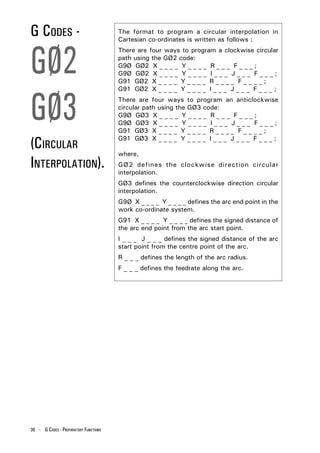
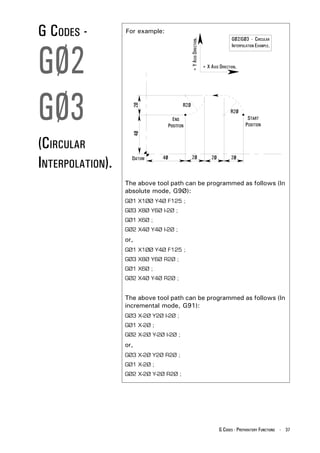
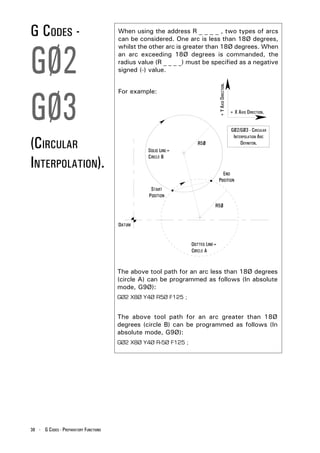
  • 10.
    MAIN PROGRAM The part program can contain a number of separate programs, which together describe all the operations STRUCTURE. required to manufacture the part. The Main Program is the controlling program, ie, the program first read, or accessed, when the entire part program sequence is run. This controlling program can then call a number of smaller programs into operation. These smaller programs, called Sub Programs, are generally used to perform repeat tasks, before returning control back to the main program. Normally, the controller operates according to one program. In this case the main program is also the part program. Main Programs are written using I.S.O. address codes listed below. ADDRESSES - N refers to the block number. G refers to the G code (Preparatory function). X refers to the absolute/incremental distance travelled by the slide tool in the X axis direction. Y refers to the absolute/incremental distance travelled by the slide tool in the Y axis direction. Z refers to the absolute/incremental distance travelled by the slide tool in the Z axis direction. F refers to the feed rate. M refers to the M code (Miscellaneous function). S refers to the spindle speed. T refers to the tooling management. Each block, or program line, contains addresses which appear in this order : N,G,X,Y,Z,F,M,S,T; This order should be maintained throughout every block in the program, although individual blocks may not necessarily contain all these addresses. 10 - BASIC PROGRAMMING
  • 11.
    MAIN PROGRAM The organisation of blocks of data within the program follows a layout. Again, it is recommended that the STRUCTURE. programmer keeps to this program layout. (Mill CAM Designer - star.MCD) CAD/CAM software (2/1Ø/1997) package information. (Triac PC (metric)) (Post fanucm:1.2Ø 24 June 1994) The main program can be generated Program number. OØØ5Ø ; using Denfords MillCAM Designer NØ1Ø G21 ; CAD/CAM software package, saved onto disk and transferred to the Units definition [BILLET X24Ø Y17Ø Z1Ø CNC. (Metric or Imperial) [EDGEMOVE XØ YØ Alternatively, the main program can be manually entered into the CNC and billet size for [TOOLDEF T1 D2 memory when the controller is set simulation. NØ2Ø G91 G28 XØ YØ ZØ ; in Edit Mode. NØ3Ø M6 T1 ; NØ4Ø G43 H1 ; NØ5Ø M3 S3ØØØ ; NØ6Ø G9Ø GØØ X9Ø Y12Ø ; NØ7Ø Z2 ; NØ8Ø GØ1 Z-Ø.5 F4Ø ; NØ9Ø X1Ø5 Y16Ø F6Ø ; N1ØØ X12Ø Y12Ø ; Main program N11Ø X165 ; information. N12Ø X13Ø Y95 ; N13Ø X145 Y5Ø ; N14Ø X1Ø5 Y8Ø ; N15Ø X65 Y5Ø ; N16Ø X8Ø Y95 ; N17Ø X45 Y12Ø ; N18Ø X9Ø ; N19Ø GØØ Z2 ; N2ØØ M5 ; N21Ø G91 G28 XØ YØ ZØ ; Machine Simulation of G and M code Program end. N22Ø M3Ø ; program. The above listing shows an example program using the Denford programming system. For the program to operate correctly on a genuine FANUC control, the CAD/CAM software information and billet size definitions must be removed from the listing. BASIC PROGRAMMING - 11
  • 12.
    SUB PROGRAM A program which contains fixed sequences or frequently repeated patterns may be entered into STRUCTURE. memory as a Sub Program, in order to simplify the main program. A sub program is entered into the machine controller memory in Edit Mode, in the same manner as the main program. Differences between a sub and main program : 1) A sub program does not have a billet size definition at the top of the program listing. 2) A sub program is ended by the M99 code. The sub program can be called into operation when the machine is set to run in Auto Mode. Sub programs can also call other sub programs into operation. When the main program calls one sub program into operation, the process is called a one-loop sub program call. It is possible to program a maximum four- loop sub program call within the main program. Shown below is an illustration of a two-loop sub program call. Main Program. Sub Program - 1. Sub Program - 2. OØØØ1 O1ØØØ O2ØØØ NØØ1Ø G21; NØØ1Ø ...... ; NØØ1Ø ...... ; [BILLET X.... Y.... Z.... NØØ2Ø ...... ; NØØ2Ø ...... ; NØØ2Ø ...... ; NØØ3Ø ...... ; NØØ3Ø ...... ; NØØ3Ø ...... ; NØØ4Ø ...... ; NØØ4Ø ...... ; NØØ4Ø ...... ; NØØ5Ø ...... ; NØØ5Ø ...... ; NØØ5Ø ...... ; NØØ6Ø ...... ; NØØ6Ø ...... ; NØØ6Ø ...... ; NØØ7Ø ...... ; NØØ7Ø ...... ; NØØ7Ø ...... ; NØØ8Ø ...... ; NØØ8Ø ...... ; NØØ8Ø M98 P1ØØØ; NØØ9Ø ...... ; NØØ9Ø ...... ; NØØ9Ø ...... ; NØ1ØØ ...... ; NØ1ØØ ...... ; NØ1ØØ ...... ; NØ11Ø M98 P2ØØØ; NØ11Ø ...... ; NØ11Ø ...... ; NØ12Ø ...... ; NØ12Ø ...... ; NØ12Ø ...... ; NØ13Ø ...... ; NØ13Ø ...... ; NØ13Ø ...... ; NØ14Ø ...... ; NØ14Ø ...... ; NØ14Ø ...... ; NØ15Ø ...... ; NØ15Ø ...... ; NØ15Ø M3Ø; NØ16Ø M99; NØ16Ø M99; ONE-LOOP NESTING. TWO-LOOP NESTING. 12 - BASIC PROGRAMMING
  • 13.
    SUB PROGRAM NOTE 1. A sub program must be saved to memory using a four COMMANDS - digit number. GENERAL NOTES. NOTE 2. If cutter compensation is required on a tool and the co-ordinates for the tool are within the sub program, the cutter compensation must be applied and cancelled within the sub program. NOTE 3. To call a sub program the M98 code is used followed by PØØØØ (the number of the sub program required). For example, M98 P2ØØØ This command is read call program number 2ØØØ. NOTE 4. A sub program call command (M98 PØØØØ) can be specified along with a move command in the same block. For example, GØ1 X42.5 M98 P1ØØØ; NOTE 5. At the end of a sub program, the M99 code is entered. This returns control to the main program. The M99 code will return control to the next block after the M98 sub program call block in the main program. If the code M99 PØØØØ is entered, control will pass to the main program at a block with the N number equal to that of the P number stated after the M99 code. For example, M99 PØ16Ø This command is read return to the main program at block number NØ16Ø. BASIC PROGRAMMING - 13
  • 14.
    SUB PROGRAM A call command can be set to call a sub program repeatedly. This call can specify upto 999 repetitions REPEAT of a sub program. A sub program repeat command has the following COMMAND. format : M98 PØØØ ØØØØ Call Sub program command. Number of times number. the sub program is to be repeated. When the repetition is omitted, the sub program will be called once only. For example, M98 P1ØØØØ1 This command is read call the sub program number ØØØ1 ten times. 14 - BASIC PROGRAMMING
  • 15.
    BILLET The Billet Definition is a feature which is only used in the Denford programming system. DEFINITION. It defines the size of the workpiece billet for use in the simulation sections of the Denford machine software. The billet definition command has no outcome on the actual machining of the part. The billet definition command is written at the start of the main program. The previous block usually states the units of measurement to be applied to the billet dimensions, ie, G21 (Metric data input) or G2Ø (Imperial data input). For example, NØØ1Ø G21; [BILLET X1ØØ Y15Ø Z2Ø; These two commands are read. - program line number 1Ø states that all units are to be measured in Metric, - the billet is a rectangular piece of material, measuring 1ØØmm x 2ØØmm, with a thickness of 2Ømm. NOTE 1. A program that has been written on a Denford control (or using Denford CAD/CAM post processor software) will not operate directly on a genuine FANUC machine. The simulation sections of the program are incompatible with the FANUC control. For the program to run successfully, lines referring to the CAD/CAM software (at the beginning of the program) and the billet definition block must be deleted. BASIC PROGRAMMING - 15
  • 16.
    PROGRAM The Denford system of program numbering relies on the programmer saving the program to disk or NUMBERING computer hard drive at the time of writing. When saving a program using the Denford Desktop AND SAVING. Tutor keypad, the program number can range from 1 to 99999999. Writing the program on an offline system with a qwerty keyboard allows the programmer to save the program using letters and/or numbers. NOTE 1. Sub program numbers must be saved between the ranges ØØØ1 to 9999, ie, using a four digit number. It is recommended that all programs saved have filenames also between these numbers. NOTE 2. Before saving a program to disk or hard drive, check that the program name you wish to use has not been used on another file. If the program is saved using a name identical to an old program file, the old program file will be overwritten. NOTE 3. Programs that need to be used at a later date on genuine FANUC controls must have their program number stated on the first program block. The format for inserting a FANUC compatible program number line is as follows : O ØØØØ Address code O. Four digit program number. 16 - BASIC PROGRAMMING
  • 17.
    PROGRAM BLOCK A program is composed of several commands, each command instructing the machine to carry out a NUMBERING. particular operation. Each command is a separate line of data within the program, called a Block. One block is separated from another block using an end of block code, ie, effectively signifying the end of a program line. The Denford programming system uses a semicolon ( ; ) as the end of block code. A four digit sequence number can be specified (ØØØ1 - 9999) following the address code N, at the start of each block. The order of these block numbers is arbitrary and need not be consecutive. Block numbers can be specified for every program line, or just on program lines requiring them. NOTE 1. The block number must be written at the start of a program line when used. NOTE 2. It is recommended that all blocks are numbered using a four digit number which rises between each block in steps of 1Ø. This allows the program to be edited at a later date, ie, new blocks can be inserted or deleted as required. For example : N ØØ1Ø .... N ØØ2Ø .... N ØØ3Ø .... N ØØ4Ø .... etc.... NOTE 3. Even when block numbering is not a priority, it is useful to insert block numbers at important points in the program, such as tool change commands. This will help if a program search is used in the future. BASIC PROGRAMMING - 17
  • 18.
    BLOCK The sequence in which address codes appear in each block should remain consistent throughout the program. CONFIGURATION. It is recommended that the order of these address codes follows the example shown below : NØØØØ GØØ XØØ.Ø YØØ.Ø ZØØ.Ø FØØØØ MØØ SØØØØ TØØ ; Block Preparatory Interpolation Feedrate Miscellaneous Spindle Tool End of sequence function. function. function. function. function. function. block number. signal. NOTE 1. Each block may not necessarily contain all these items. G CODES Preparatory functions, called G codes, are used to determine the geometry of tool movements and (PREPARATORY operating state of the machine controller; functions such as linear cutting movements, drilling operations and specifying the units of measurement. FUNCTIONS). They are normally programmed at the start of a block. A G code is defined using the G address letter and a two digit number as follows, G ØØ Address. Two digit number. 18 - BASIC PROGRAMMING
  • 19.
    TOOL The tool moves along straight lines and arcs forming the workpiece shape. MOVEMENT. A) TOOL MOVEMENT ALONG A STRAIGHT LINE. Program command format: GØ1 Y _ _ _ _ ; (P1 - P2) X _ _ _ _ Y _ _ _ _ ; (P2 - P3) X _ _ _ _ ; (P3 - P4) + Y AXIS DIRECTION. TOOL MOVEMENT ALONG A STRAIGHT LINE. + X AXIS DIRECTION. BASIC PROGRAMMING - 19
  • 20.
    TOOL A) TOOL MOVEMENT ALONG AN ARC. Program command format: MOVEMENT. GØ3 X _ _ _ _ Y _ _ _ _ R _ _ _ _ ; (P1 - P2) + Y AXIS DIRECTION. TOOL MOVEMENT ALONG AN ARC. + X AXIS DIRECTION. The function of moving the tool along straight lines and arcs is called the Interpolation. Symbols of the programmed commands GØ1, GØ2 and GØ3 are called the Preparatory functions and specify the type of interpolation conducted in the control unit. NOTE 1. On an actual machine, the table moves in relation to the cutter. To make the command diagrams easier to understand, this manual assumes the tool moves with respect to the workpiece. 20 - BASIC PROGRAMMING
  • 21.
    FEED The movement of the tool at a specified speed for cutting is called the Feedrate. FUNCTION. The feedrate is defined using the F address lettter followed by a numerical value. Using the G2Ø code, the feedrate is defined in Inches per minute. Using the G21 code, the feedrate is defined in Millimetres per minute. M CODES Miscellaneous functions, called M codes, are used by the CNC to command on/off signals to the machine (MISCELLANEOUS functions. ie, MØ3 - spindle forward (CW), MØ5 - spin- dle stop, etc..... FUNCTIONS). The functions allocated to lower M code numbers are constant in most CNC controls, although the higher M code number functions can vary from one make of controller to the next. An M code is defined using the M address letter and a two digit number as follows, M ØØ Address. Two digit number. BASIC PROGRAMMING - 21
  • 22.
    SPINDLE SPEED The rotational speed of the tool, with respect to the workpiece being cut, is called the spindle (or cutting) FUNCTION speed. The spindle speed is defined using the S address letter, (CUTTING SPEED). followed by a numerical value, signifying the spindle RPM (revolutions per minute). The spindle speed value specified must fall between the machine tool RPM range for the command to be effective. NOTE 1. When a move command and an S code are specified in the same block, a simultaneous execution of the commands is performed. NOTE 2. Only one S code is allowed in each program block. 22 - BASIC PROGRAMMING
  • 23.
    TOOL 4 3 ATC CAROUSEL MAGAZINE FUNCTION. 5 2 6 TOOL NUMBER 1 7 8 Tool profiles can be changed during a program using the tool function command. Each tool profile is assigned a number, which in the case of an ATC (Automatic Tool Changer) will also coincide with one of the free bays on its carousel magazine. The tool number is defined using the address letter T, followed by a number assigned to the tool profile. To command a tool change, the MØ6 code would precede the number of the "new" tool required. For example, MØ6 TØ1 This command is read perform a tool change to tool number Ø1. NOTE 1. The MØ6 code (automatic tool change) must im- mediately precede the T code within the program block. NOTE 2. Only one T code is allowed in each program block. NOTE 3. If the machine control reads an MØ6 T _ _ command when running in Automatic Mode, the three axes will drive to the tool change position and the spindle will stop. At this point, the tool change will be performed, if an ATC is fitted. This will always happen, ir- respective of the tool position when the tool change command is read from the program. BASIC PROGRAMMING - 23
  • 24.
    TOOL Generally, several different tool profiles are required to machine a workpiece, all of different diameters and COMPENSATION lengths. It would be very difficult to write a program that allowed (TOOL OFFSET). for this difference in size between all the various tools. To account for this, the difference in diameter and length is measured, in advance, for all the tools that will be used. Essentially, this means that the cutting paths for all the tools now coincide. The values are entered into the offset file. This tool offset is also called tool compensation. NOTE 1. When a T code is read by the CNC, it will load the offset length for that particular tool. The code G41 or G42 (Tool Compensation Left or Right) must be pro- grammed for the radius offset to used. 24 - BASIC PROGRAMMING
  • 25.
    ABSOLUTE AND The addresses X, Y and Z within a program, when G90 (Absolute co-ordinates) is active, relate to a co- INCREMENTAL ordinate position from the workpiece datum (the zero position). CO-ORDINATES. The addresses X, Y and Z within a program, when G91 (Incremental co-ordinates) is active, relate to the individual axis movements required to reach the new position, from the last position reached by the tool. + Y AXIS DIRECTION. ABSOLUTE AND INCREMENTAL CO-ORDINATES. METRIC UNITS + X AXIS DIRECTION. The example move illustrated above can be written in two ways: G90 Absolute co-ordinates selected GØ1 Y60 F150 ; G03 X60 Y100 R40 ; G91 Incremental co-ordinates selected G01 Y60 F150 ; G03 X-40 Y40 R40 ; BASIC PROGRAMMING - 25
  • 26.
    OPTIONAL When a forward slash mark ( / ) is followed by a block number (at the beginning of a block) and the block BLOCK SKIP. skip switch on the machine operator panel is set to "on", the block will be ignored in memory operation. When the block switch is set to "off", then the blocks indicated by the "/" marks will be considered as valid. For example, N3Ø X4Ø ; / N4Ø Y5Ø ; / N5Ø X7Ø ; / N6Ø Y9Ø ; N7Ø ..... If the block skip switch is set to "on" in the above program example, then blocks indicated by the "/" mark are skipped. NOTE 1. A "/" mark must be specified at the start of the block. If it is placed elsewhere in the block, the information from the "/" mark to the ";" mark (the end of block mark) will be ignored, whilst the information before the "/" mark will be effective. TUTORIALS If the program is written off-line with a qwerty keyboard, information relating to the program can be AND COMMENTS. inserted within the program. Tutorial information appear in the Tutorial dialog box of the machine controlling software (ie, the tutorial message "Now performing pocket cutting cycle" could be written to appear when the pocket cutting operation starts in the program). Comments information only appear in the text of the program itself (ie, the comment "Tool 5 is 8mm slot cutting tool" could be inserted in the program for use as reference only). 26 - BASIC PROGRAMMING
  • 27.
    G CODES Preparatory functions, called G codes, are used to determine the geometry of tool movements and (PREPARATORY operating state of the machine controller; functions such as linear cutting movements, drilling operations and specifying the units of measurement. FUNCTIONS) - They are normally programmed at the start of a block. INTRODUCTION. A G code is made from the G address letter and a two digit number as follows, G ØØ Address. Two digit number. MODAL AND NON-MODAL G CODES. Additionally, G codes are split into two categories - 1) Modal (retained) G codes. A modal G code, once programmed into a block, will affect any subsequent blocks of the program without having to be restated. Additionally, modal G codes are further split into groups according to their task and function. A modal G code will remain active until another G code from the same group is programmed into a block, or it is cancelled. For example, GØ1 and GØØ are modal G codes from group 1: GØ1 X _ _ _ _ ; Y____; GØ1 is effective X____; in this range. GØØ Z _ _ _ _ ; GØØ replaces the GØ1 command. 2) Non-modal (one-shot) G codes. A non-modal G code must be programmed into every block when it is required, ie, it is only ef- fective in the block in which it is specified. G CODES - PREPARATORY FUNCTIONS - 27
  • 28.
    G CODES NOTE 1. Remember there are two types of G code. (PREPARATORY A modal G code is retained in memory - it is effective until another G code from the same modal group is FUNCTIONS) - commanded. A non-modal G code is one-shot - it is effective only within the block in which it is specified. INTRODUCTION NOTE 2. NOTES. It is not necessary to enter a modal G code in repetitive blocks within a program. For example : If all movements are GØ1 (linear cutting command) then GØ1 is entered on the first block and omitted from all subsequent blocks. This G code will remain active until an interpolation change is commanded (using GØØ, GØ2 or GØ3). NOTE 3. The machine controller has the ability to interpret a maximum of four G codes in one single block of data. However, these G codes must be from separate modal groups. When two or more G codes from the same group are specified in the same block, the CNC will only make the last stated G code from that modal group effective. NOTES FOR G NOTE 1. G codes marked with an * are set/reactivated as de- CODES LISTING fault values at machine power up and when the ma- chine is reset or the emergency stop button is acti- SHOWN RIGHT. vated. NOTE 2. G codes from group Ø are non-modal (they must be programmed into every program block when required). All other G codes are modal (they remain active through subsequent program blocks, until replaced or cancelled by a G code from their particular group). 28 - G CODES - PREPARATORY FUNCTIONS
  • 29.
    LIST OF GCODES SUPPORTED BY DENFORD CNC CONTROLS. Note - Not all G codes apply to each machine. G Code. Group. Function. GØØ 1 Positioning (Rapid Traverse) GØ1 1 Linear Interpolation (Cutting Feed) GØ2 1 Circular Interpolation CW GØ3 1 Circular Interpolation CCW GØ4 Ø Dwell, Exact Stop G2Ø 6 Imperial Data Input (Inches) G21 6 Metric Data Input (Millimetres) G28 Ø Reference Point Return G4Ø 7 Cutter Compensation Cancel G41 7 Cutter Compensation Left G42 7 Cutter Compensation Right G73 9 High Speed Peck Drilling Cycle G74 9 Counter Tapping Cycle G76 9 Fine Boring Cycle(not recommended on Denford Machines) G8Ø* 9 Canned Cycle Cancel G81 9 Drilling Cycle, Spot Boring G82 9 Drilling Cycle, Counter Boring G83 9 Deep Hole Peck Drilling Cycle G84 9 Tapping Cycle G85 9 Boring Cycle G86 9 Boring Cycle G87 9 Back Boring Cycle(not recommended on Denford Machines) G89 9 Boring Cycle G9Ø* 3 Absolute Zero Command G91 3 Incremental Command G94* 5 Feed per Minute G95 5 Feed per Revolution G98* 1Ø Return to Initial Level in Canned Cycle G99 1Ø Return to R Point Level in Canned Cycle G17Ø Ø Circular Pocket Canned Cycle G171 Ø Circular Pocket Canned Cycle G172 Ø Rectangular Pocket Canned Cycle G173 Ø Rectangular Pocket Canned Cycle Code listing full and correct at the time of printing. G CODES - PREPARATORY FUNCTIONS - 29
  • 30.
    G CODES - The GØØ code executes a non cutting movement, at a rapid feedrate, to a specific co-ordinate position in the GØØ working area (operating under absolute co- ordinate movement) or when a certain distance from a previously stated position (under incremental co- ordinate movement) is programmed. A GØØ command is written in the following format: (RAPID GØØ X _ _ _ _ Y_ _ _ _ Z _ _ _ _ ; POSITIONING/ Rapid Positioning/ X, Y and Z Traverse code. co-ordinate values. The axis co-ordinate moves following a GØØ TRAVERSE). command can be programmed as either: (i) absolute values (relative to a set datum point) following setting of the G9Ø code, or, (ii) incremental values (relative to the last stated co-ordinate in the program) following setting of the G91 code. NOTE 1. The rate of movement is set by the manufacturer of the machine tool. The rate of movement can be reduced from 1ØØ% to Ø%, but only in increments of 1Ø%, by using the feed override controls (see spe- cific machine operating manual). NOTE 2. The GØØ code freezes the tool radius compensation, codes G 41 and G42. If G41 or G42 are active when a GØØ command is programmed, the tool radius com- pensation will not function again until a GØ1, GØ2 or GØ3 command is programmed. NOTE 3. The GØØ code is modal and is therefore incompatible with GØ1, GØ2 and GØ3 codes in the same block. NOTE 4. The GØØ code can be written into a program in two ways: GØØ or GØ. 30 - G CODES - PREPARATORY FUNCTIONS
  • 31.
    G CODES - NOTE 5. GØØ On instruction to perform the GØØ command, the three slides (the X, Y and Z axes) move completely independant of each other at a maximum feedrate, along a non-vector (sometimes called a non-linear) type path. + Y AXIS DIRECTION. (RAPID POSITIONING/ GØØ - N ON -L INEAR INTERPOLATION. + X AXIS DIRECTION. TRAVERSE). In the above example, the GØØ command has in- structed the X and Y slides to begin moving, both at a maximum feedrate. When both slides begin moving the tool will appear to traverse diagonally, a com- posite movement of the two axes moving together. When one axis reaches its finishing co-ordinate, the other axis will continue to move until it reaches its own finishing co-ordinate. This gives the impression that the tool "changes" direction. G CODES - PREPARATORY FUNCTIONS - 31
  • 32.
    G CODES - The GØ1 code executes a cutting movement following a straight line, at a set feedrate. GØ1 A GØ1 command is written in the following format: GØ1 X _ _ _ _ Y_ _ _ _ Z _ _ _ _ ; Linear Interpolation X, Y and Z code. co-ordinate values. (LINEAR The feedrate value programmed into the GØ1 INTERPOLATION). command is the actual feedrate along the proposed tool path, not the feedrate of each axis/slide. On single axis moves (ie, the tool moves exactly parallel to the X, Y or Z axis direction), the slide will feed at the rate stated in the GØ1 command. On two or three axis moves (ie, the tool is moving in a straight diagonal line), all the slides have to operate exactly the same length of time, in order to produce a single diagonal (vector) move. The machine controller will calculate the separate feedrates for the X, Y and Z slides, enabling the actual vector feedrate to equal that stated in the GØ1 command. The axis co-ordinate moves following a GØ1 command can be programmed as either: (i) absolute values (relative to a set datum point) following setting of the G9Ø code, or, (ii) incremental values (relative to the last stated co- ordinate in the program) following setting of the G91 code. 32 - G CODES - PREPARATORY FUNCTIONS
  • 33.
    G CODES - Example of programming a GØ1 linear interpolation: GØ1 G9Ø GØ1 X1ØØ Y5Ø F15Ø ; + Y AXIS DIRECTION. GØ1 - LINEAR INTERPOLATION. + X AXIS DIRECTION. (LINEAR INTERPOLATION). NOTE 1. In the example shown above, G9Ø, GØ1 and the F _ _ _ _ feedrate are modal and can be continued onto the next block (without having to be restated) if re- quired. NOTE 2. The programmed feedrate F _ _ _ _ can be varied in Automatic Mode from Ø% to 15Ø% by using the feed override controls (see specific machine operating manual). 1ØØ% is the programmed feedrate. NOTE 3. When there is no feedrate programmed within the part program, the CNC will set a feedrate of 1Ø millimetres per minute in G21 Metric Data Mode, or Ø.4 inches per minute in G2Ø Imperial Data Mode. NOTE 4. The GØ1 code is modal and is therefore incompatible with GØØ, GØ2 and GØ3 codes in the same block. NOTE 5. The GØ1 code can be written into a program in two ways: GØ1 or G1. G CODES - PREPARATORY FUNCTIONS - 33
  • 34.
    G CODES - The GØ2 code executes a cutting movement following a clockwise circular path, at a set feedrate. GØ2 The GØ3 code executes a cutting movement following a counterclockwise circular path, at a set feedrate. The definitions of clockwise (GØ2) and counterclockwise (GØ3) are fixed according to the GØ3 system of co-ordinates in the diagram below. +Y GØ3 RIGHT HAND CARTESIAN GØ2 CO-ORDINATE SYSTEM. (CIRCULAR +X When programming arcs using absolute values (G9Ø), INTERPOLATION). the X and Y values describe the end point of the arc, in relation to the datum position of the workpiece. The arc end point is sometimes referred to as the target position. When programming arcs using incremental values (G91), the X and Y values relate to the distance moved along the X and Y axes, from the start point of the arc to the end point of the arc. The sign of the X and Y axis moves (+/-) will depend on the movement of the machine slides in relation to their start position. 34 - G CODES - PREPARATORY FUNCTIONS
  • 35.
    G CODES - I AND J GØ2 To program an arc when only the arc centre is given (the radius is unknown) use the address letters I and J. I relates to the address X and is the incremental value and direction (+/-) from the start point of the arc in the X axis to the arc centre (see diagram below). GØ3 J relates to the address Y and is the incremental value and direction (+/-) from the start point of the arc in the Y axis to the arc centre (see diagram below). GØ2/GØ3 - C IRCULAR + Y AXIS DIRECTION. (CIRCULAR INTERPOLATION USING I AND J. INTERPOLATION). + X AXIS DIRECTION. G CODES - PREPARATORY FUNCTIONS - 35
  • 36.
    G CODES - The format to program a circular interpolation in Cartesian co-ordinates is written as follows : GØ2 There are four ways to program a clockwise circular path using the GØ2 code: G9Ø GØ2 X _ _ _ _ Y _ _ _ _ R _ _ _ F _ _ _ ; G9Ø GØ2 X _ _ _ _ Y _ _ _ _ I _ _ _ J _ _ _ F _ _ _ ; G91 GØ2 X _ _ _ _ Y _ _ _ _ R _ _ _ _ F _ _ _ _ ; GØ3 G91 GØ2 X _ _ _ _ Y _ _ _ _ I _ _ _ J _ _ _ F _ _ _ ; There are four ways to program an anticlockwise circular path using the GØ3 code: G9Ø GØ3 X _ _ _ _ Y _ _ _ _ R _ _ _ F _ _ _ ; G9Ø GØ3 X _ _ _ _ Y _ _ _ _ I _ _ _ J _ _ _ F _ _ _ ; G91 GØ3 X _ _ _ _ Y _ _ _ _ R _ _ _ _ F _ _ _ _ ; (CIRCULAR G91 GØ3 X _ _ _ _ Y _ _ _ _ I _ _ _ J _ _ _ F _ _ _ ; where, INTERPOLATION). GØ2 defines the clockwise direction circular interpolation. GØ3 defines the counterclockwise direction circular interpolation. G9Ø X _ _ _ _ Y _ _ _ _ defines the arc end point in the work co-ordinate system. G91 X _ _ _ _ Y _ _ _ _ defines the signed distance of the arc end point from the arc start point. I _ _ _ J _ _ _ defines the signed distance of the arc start point from the centre point of the arc. R _ _ _ defines the length of the arc radius. F _ _ _ defines the feedrate along the arc. 36 - G CODES - PREPARATORY FUNCTIONS
  • 37.
    G CODES - For example: GØ2/GØ3 - CIRCULAR GØ2 + Y AXIS DIRECTION. INTERPOLATION EXAMPLE. + X AXIS DIRECTION. GØ3 (CIRCULAR INTERPOLATION). The above tool path can be programmed as follows (In absolute mode, G9Ø): GØ1 X1ØØ Y4Ø F125 ; GØ3 X8Ø Y6Ø I-2Ø ; GØ1 X6Ø ; GØ2 X4Ø Y4Ø I-2Ø ; or, GØ1 X1ØØ Y4Ø F125 ; GØ3 X8Ø Y6Ø R2Ø ; GØ1 X6Ø ; GØ2 X4Ø Y4Ø R2Ø ; The above tool path can be programmed as follows (In incremental mode, G91): GØ3 X-2Ø Y2Ø I-2Ø ; GØ1 X-2Ø ; GØ2 X-2Ø Y-2Ø I-2Ø ; or, GØ3 X-2Ø Y2Ø R2Ø ; GØ1 X-2Ø ; GØ2 X-2Ø Y-2Ø R2Ø ; G CODES - PREPARATORY FUNCTIONS - 37
  • 38.
    G CODES - When using the address R _ _ _ _ , two types of arcs can be considered. One arc is less than 18Ø degrees, GØ2 whilst the other arc is greater than 18Ø degrees. When an arc exceeding 18Ø degrees is commanded, the radius value (R _ _ _ _) must be specified as a negative signed (-) value. + Y AXIS DIRECTION. GØ3 For example: + X AXIS DIRECTION. GØ2/GØ3 - CIRCULAR (CIRCULAR INTERPOLATION ARC DEFINITON. INTERPOLATION). The above tool path for an arc less than 18Ø degrees (circle A) can be programmed as follows (In absolute mode, G9Ø): GØ2 X8Ø Y4Ø R5Ø F125 ; The above tool path for an arc greater than 18Ø degrees (circle B) can be programmed as follows (In absolute mode, G9Ø): GØ2 X8Ø Y4Ø R-5Ø F125 ; 38 - G CODES - PREPARATORY FUNCTIONS
  • 39.
    G CODES - NOTE 1. GØ2 When programming arcs using the address R (arc radius), the value of R must be equal to, or greater than half the longest distance travelled by either axis. NOTE 2. IØ and JØ can be omitted from program lines. GØ3 NOTE 3. When X or Y are omitted from program lines, the arc end point is located at the same position as the arc start point and the arc centre is commanded by I or J, an arc of 36Ø degrees (ie, a complete circle) is as- (CIRCULAR sumed. When R is used, an arc of Ø degrees is as- sumed and the cutter does not move. INTERPOLATION). NOTE 4. When I, J and R addresses are specified simultaneously in the same program line, the address R takes precedence and the other addresses are ignored. NOTE 5. A GØ2 code can be written into a program in two ways. GØ2 or G2. A GØ3 code can be written into a program in two ways. GØ3 or G3. G CODES - PREPARATORY FUNCTIONS - 39
  • 40.
    G CODES - The GØ4 code is used to enter a set time delay into the program (called a "dwell"). GØ4 A GØ4 command is written in the following format: GØ4 X _ _ _ _ ; or GØ4 P _ _ _ _ ; where the dwell value is programmed using the address letters X (time in seconds) or P (time in 1/ (DWELL). 1ØØØ seconds), followed by a number indicating this dwell value. For example : GØ4 X1.5 ; This command is read perform a dwell of 1.5 seconds duration. GØ4 P25ØØ ; This command is read perform a dwell of 2.5 seconds duration. NOTE 1. A decimal point cannot be used with the address P. NOTE 2. The dwell is performed at the start of the block in which it is programmed. NOTE 3. The dwell begins when the commanded feedrate of the previous block reaches zero. NOTE 4. The maximum value of a dwell time is 999 seconds. NOTE 5. GØ4 is a non-modal G code. It is only active in the block in which it is programmed. NOTE 6. A GØ4 code can be written into a program in two ways. GØ4 or G4. 40 - G CODES - PREPARATORY FUNCTIONS
  • 41.
    G CODES - The machine controller can be programmed in either Imperial (inch) unit input (G2Ø) or Metric (millimetre) G2Ø unit input (G21). The standard format for a CNC part program is to write the G2Ø or G21 code in the first block of the program. G code. Type. Units. Lowest input value. G2Ø Imperial Inch Ø.ØØØ1 inch G21 G21 Metric Millimetre Ø.ØØ1 mm The unit systems of the following items are changed depending on whether G2Ø or G21 is set. 1) Positioning commands (X, Y and Z). (IMPERIAL 2) Incremental movement distances. 3) Feedrates commanded by the F code. /METRIC 4) Offset values. DATA INPUT). NOTE 1. The status of G2Ø or G21 in the machine controller is dependant on the option that is saved to the disc. NOTE 2. A G2Ø code must not be changed for a G21 code (or vice versa) during the program. NOTE 3. When switching between G2Ø and G21, the offsets must be set according to the units of measurement being used. NOTE 4. G 2Ø and G21 are both modal G codes within the same modal group. G CODES - PREPARATORY FUNCTIONS - 41
  • 42.
    G CODES - The reference point is a fixed position on the machine, to which the tool can be moved. G28 On machines fitted with Denford milling software, this point is also used as the Home position, the point used by the machine to set the limits of movement for the X, Y and Z slides. A G28 code instructs the tool to automatically move (REFERENCE to this reference point. POINT RETURN). A G28 command is written in the following format : G9Ø G28 X _ _ _ _ Y _ _ _ _ Z _ _ _ _ ; or G91 G28 X _ _ _ _ Y _ _ _ _ Z _ _ _ _ ; where X, Y and Z can be used to indicate an in- termediate point, through which the tool will pass, before continuing to the reference point. This intermediate point allows the tool to be programmed to follow a more "predictable" path, keeping it sufficiently clear from any part of the machine or billet it could hit when moving to the reference point. The move to any intermediate point and the reference point are performed at a rapid traverse rate, using a non-vector (non-linear) type path, ie, the tool may appear to "change" direction due to the non-vector type positioning being used. 42 - G CODES - PREPARATORY FUNCTIONS
  • 43.
    G CODES - NOTE 1. G28 The diagram below shows how the tool could collide with the billet when manoeuvring towards the reference point. This is a result of the non-vectored movements forcing the tool to follow a path which "cuts" through the edge of the billet. G28 - POTENTIAL COLLISION THROUGH NOT USING AN INTERMEDIATE POSITION. (REFERENCE + Z AXIS. POINT RETURN). + X AXIS. NOTE - GRAPHIC SHOWS ELEVATION OF BILLET, NOT PLAN. To avoid this collision, the tool is sent on a path which includes the additional, or intermediate, point P2. The intermediate point is used to allow the tool to move completely clear from the billet, before continuing onto the reference point, P3, shown below. G28 - AVOIDING COLLISION BY USING AN INTERMEDIATE POSITION. + Z AXIS. + X AXIS. NOTE - GRAPHIC SHOWS ELEVATION OF BILLET, NOT PLAN. The above toolpath can be programmed as follows (In absolute mode, G9Ø): G9Ø G28 X6Ø Z6Ø ; The above toolpath can be programmed as follows (In incremental mode, G91): G91 G28 XØ Z4Ø ; G CODES - PREPARATORY FUNCTIONS - 43
  • 44.
    G CODES - NOTE 2. G28 In the diagram below, the tool is in a position (P1) where no collision is possible. The intermediate point, in this case, is not required, so the block can be written as follows (In incremental mode, G91): G91 G28 XØ YØ ZØ ; The intermediate point co-ordinates are still stated, but (REFERENCE all their values are set to zero, indicating no axis movement. Therefore, the tool will move from point P1 to the reference point, P3, along a non-vector type POINT RETURN). path. USING G28 WITH NO INTERMEDIATE POSITION SAFELY. + Z AXIS. + X AXIS. NOTE - GRAPHIC SHOWS ELEVATION OF BILLET, NOT PLAN. NOTE 3. G28 is a non-modal G code. It is only active in the block in which it is programmed. 44 - G CODES - PREPARATORY FUNCTIONS
  • 45.
    G CODES - The collection of G4Ø, G41 and G42 codes allow the machine controller to produce very accurate arcs and G4Ø tapers on the billet, by compensating for the tool radius. Complex workpiece shapes are therefore programmed with cutter compensation mode active. The radius of the tool (the offset amount) is measured, then G41 entered into the offset file in the machine controller. Once set, the tool path can be offset by this value, regardless of the program. G42 WORK POSITION AND MOVEMENT COMMAND. When tool nose radius compensation is required in a CNC program, the position of the billet in respect to the tool must be specified using the table below. G CODE DIRECTION TOOL PATH (CUTTER G4Ø CANCEL MOVEMENT ALONG PROGRAMMED PATH COMPENSATION). G41 G42 LEFT HAND RIGHT HAND MOVEMENT ON THE LEFT HAND SIDE OF THE PROGRAMMED PATH MOVEMENT ON THE RIGHT HAND SIDE OF THE PROGRAMMED PATH The two diagrams below illustrate the direction of compensation codes G41 and G42, in relation to your eye level. G41 - LEFT HAND THE TOOL IS POSITIONED ON THE LEFT HAND SIDE OF THE PART, AS SEEN FOLLOWING THE DIRECTION OF MOVEMENT, FROM BEHIND THE TOOL. G42 - RIGHT HAND THE TOOL IS POSITIONED ON THE RIGHT HAND SIDE OF THE PART, AS SEEN FOLLOWING THE DIRECTION OF MOVEMENT, FROM BEHIND THE TOOL. G CODES - PREPARATORY FUNCTIONS - 45
  • 46.
    G CODES - CUTTER COMPENSATION START-UP (G41 - G42). G4Ø The operation instructing a machine to switch to cutter compensation mode is called the start-up block, or ramping on block. The start-up block is used to al- low the tool time to change from moving along the programmed path line to following either side of the programmed path line. G41 The start-up block should satisfy the following points: 1) A G41 or G42 code must be contained in the block, or specified in the previous block. 2) A GØ1 X, Y, or X and Y move is specified in the block and the distance of the linear move must be G42 greater than the tool radius. 3) The tool radius value, "R", entered into the tool offsets table must not be ØØ. (CUTTER NOTE 1. A GØ2 or GØ3 circular interpolation command cannot COMPENSATION). be specified in the start-up block. NOTE 2. In cutter compensation start-up, two blocks are read into the machine controller. The first block is performed and the second block is entered and held in memory. In subsequent compensation moves, two blocks are read in advance, so the machine controller has the block currently being performed and the next two blocks in memory. This is because cutter compensation always needs to know what happens in the move following the one being currently performed. The machine controller can plan ahead to calculate the correct end position for the current move, that will also be the correct start position allowing for cutter compensation, for the next move. NOTE 3. The codes G4Ø, G41 and G42 are modal, belonging to the same modal family. They are incompatible with each other on the same block. 46 - G CODES - PREPARATORY FUNCTIONS
  • 47.
    G CODES - CANCELLATION OF CUTTER COMPENSATION G4Ø (G4Ø). The G4Ø code is used to cancel cutter compensation. A G4Ø command can only be performed in a block in which a linear move (ie, GØØ, GØ1, G28) is programmed. G41 NOTE 1. Following the machining of an internal pocket, it is recommended that the Z axis is withdrawn by using G42 the GØ1 command, to a position clear of the workpiece, before the cutter compensation mode is cancelled. NOTE 2. (CUTTER The machine controller enters compensation cancel mode automatically when : 1) the machine power is first switched on. COMPENSATION). 2) the reset button on the CRT/MDI controller panel is pressed. 3) a program is forced to end by performing an MØ2 or M3Ø command. G CODES - PREPARATORY FUNCTIONS - 47
  • 48.
    G CODES - The following part program for a finishing pass shows the recommended method for start-up and G4Ø cancellation of cutter compensation : + Y AXIS DIRECTION. EXAMPLE - USING CUTTER COMPENSATION G41 + X AXIS DIRECTION. MODE. G42 (CUTTER COMPENSATION). O ØØ1Ø NØØ1Ø GØØ X-15 Y-15 ; NØØ2Ø G41 XØ YØ F1ØØ ; (Start-Up Move) NØØ3Ø Y4Ø ; NØØ4Ø X3Ø Y8Ø ; NØØ5Ø X6Ø ; NØØ6Ø GØ2 X1ØØ Y4Ø R4Ø ; NØØ7Ø GØ1 Y3Ø ; NØØ8Ø GØ3 X7Ø YØ R3Ø ; NØØ9Ø XØ ; NØ1ØØ X-15 Y-15 ; (Cancellation Move) 48 - G CODES - PREPARATORY FUNCTIONS
  • 49.
    G CODES - A canned cycle simplifies the program by replacing complex machining sequences, programmed by several G73- blocks of information, with just one or two blocks. Generally, a canned cycle consists of a sequence of six operations, as shown below: Operation 1 - Positioning of the X and Y axes. G89 Operation 2 - Rapid traverse in the Z axis to the "R" point. Operation 3 - Hole machining procedure. Operation 4 - Operation at bottom of hole. (CANNED Operation 5 - Retraction to R point. Operation 6 - Rapid traverse in the Z axis to the Initial level. CYCLES). + Z AXIS DIRECTION. Hole positioning is performed in the X and Y axis hole machining is performed in the Z axis. G CODES - PREPARATORY FUNCTIONS - 49
  • 50.
    G CODES - There are three command modes for canned cycles, as follows: G73- 1) Data Format (G9Ø and G91). 2) Return Point Level (G98 and G99). 3) Cycle Mode (G73 to G89). G89 DATA FORMAT COMMAND MODES. The data format used in canned cycles is specified by the codes G9Ø and G91, as shown below: G9Ø - ABSOLUTE DATA FORMAT. (CANNED CYCLES). + Z AXIS DIRECTION. G91 - INCREMENTAL DATA FORMAT. + Z AXIS DIRECTION. 50 - G CODES - PREPARATORY FUNCTIONS
  • 51.
    G CODES - RETURN POINT LEVEL COMMAND MODES. G73- The return point position of the tool (ie, to the Initial Level, or the R Level) is specified by the codes G98 and G99, as shown below: G98 - INITIAL POINT G99 - R POINT LEVEL RETURN. LEVEL RETURN. G89 (CANNED CYCLES). + Z AXIS DIRECTION. + Z AXIS DIRECTION. The Initial level refers to the absolute value of the Z axis, at the time of change from the positioning mode top the canned cycle mode. G CODES - PREPARATORY FUNCTIONS - 51
  • 52.
    G CODES - The format for machining data in a canned cycle is written as follows: G73- (G9Ø) (G98) or or G.... X.... Y.... Z.... R.... P.... Q.... K.... F.... ; (G91) (G99) where, G89 G.... is defined as the canned cycle. X.... Y.... is defined as the hole position, in absolute or incremental value. Z.... is defined as the distance from the R point to the bottom of the hole in incremental mode, or the posi- tion of the hole bottom in absolute mode. (CANNED R.... is defined as the distance from the initial level to the R point level in incremental mode, or the position CYCLES). of the Z datum in relation to the R point level in abso- lute mode. P.... is defined as the dwell time to be performed at the bottom of the hole (see the GØ4 code for more details). Q.... is defined as the cut-in distance value or shift value (Note - this is always specified as an incremental value). K.... is defined as the number of repeats, for a series of holes. When not specified, K=1. F.... is defined as the feedrate for machining. NOTE 1. The addresses P and Q are omitted within some canned cycles. NOTE 2. Once the drilling data has been specified and read into the machine controller, it is retained until it is either changed, or the canned cycle cancelled. All the re- quired data must be specified when the canned cycle is started and only the data to be changed has to be specified during the cycle. 52 - G CODES - PREPARATORY FUNCTIONS
  • 53.
    G CODES - The following example shows a canned cycle for drilling 4 holes, where the third hole is to be machined G73- 1Ømm deeper: G9Ø G99 G81 X1Ø Y1Ø Z-15 R2 F1ØØ ; X2Ø ; (X axis move) X3Ø Z-25 ; (X and Z change) G89 X4Ø Z-15 ; (X and Z change) G8Ø ; (Cancel) The following example shows a repeat canned cycle: (CANNED G91 G99 G81 X1Ø Y6 Z-1Ø R-8 K4 F1ØØ ; CYCLES). + Y AXIS DIRECTION. + X AXIS DIRECTION. G CODES - PREPARATORY FUNCTIONS - 53
  • 54.
    G CODES - A G73 (High Speed Peck Drilling) command is written in the following format: G73 (G9Ø) (G98) or or G73 X.... Y.... Z.... Q.... F.... ; (G91) (G99) please refer to page 52 for the variable definitions. (HIGH SPEED PECK DRILLING). + Z AXIS DIRECTION. When machining, the drill is positioned at the co-ordi- nate point of the first hole, for the X and Y axes and at the initial level, for the Z axis. The G73 command is then read into the machine controller and the cycle begins. The drill will rapid traverse to the R point level and begin to feed in, until a cut-in distance of Q is attained. At this point, the drill will retract a small dis- tance (set within the machine controller). A cut-in dis- tance of Q at the same feedrate will begin again, fol- lowed by a similar retraction. These movements will continue until the total Z depth has been reached. The drill will rapid traverse out to the Initial level, if a G98 code is programmed within the cycle, or to the R point level, if a G99 code is programmed within the cycle. At this point the next block is read into the machine controller. If this block contains an X, Y or X and Y co- ordinate the drill will position itself at that point and the high speed peck drilling cycle will begin again. 54 - G CODES - PREPARATORY FUNCTIONS
  • 55.
    G CODES - A G74 (Counter/Left Hand Tapping) command is written in the following format: G74 (G9Ø) (G98) or or G74 X.... Y.... Z.... P.... R.... F.... ; (G91) (G99) please refer to page 52 for the variable definitions. (COUNTER TAPPING). + Z AXIS DIRECTION. Sequence of moves: Op 1) Rapid position to X, Y and Z (the Initial level). Op 2) Rapid traverse to R point level. Op 3) Feed to Z depth. Op 4) Dwell P (time for spindle stop and start CW direction). Op 5) Feed to R point level. Op 6) Dwell P (time for spindle stop and start CCW direction). If the G98 code is programmed within the cycle, the next move will be a rapid traverse to the Initial level. If the G99 code is programmed within the cycle, there will be no movement. NOTE 1. F (Feed) = RPM x Pitch. G CODES - PREPARATORY FUNCTIONS - 55
  • 56.
    G CODES - A G76 (Fine Boring) command is written in the lowing format: fol- G76 (G9Ø) (G98) or or G76 X.... Y.... Z.... R.... P.... Q.... F.... ; (G91) (G99) please refer to page 52 for the variable definitions. (FINE BORING). Sequence of moves: + Z AXIS DIRECTION. Op 1) Rapid position to X, Y and Z (the Initial level). Op 2) Rapid traverse to R point level. Op 3) Feed to Z depth. Op 4) Dwell P (time for spindle stop and move Q value). Op 5) Feed to R point level. Op 6) Move back Q value. The above moves vary depending on the setting of the codes G98 and G99. NOTE 1. THIS CYCLE CAN ONLY BE USED ON A MACHINE FITTED WITH A SPINDLE CAPABLE OF ORIENTATION. BECAUSE THE TOOL MOVES WITHIN THE HOLE AFTER SPINDLE STOP TO FACE THE OPPOSITE DIRECTION. 56 - G CODES - PREPARATORY FUNCTIONS
  • 57.
    G CODES - Some of the addresses used within a canned cycle are modal (Z, P, Q and R), so their respective values are G8Ø retained in the machine controller memory after the cycle has finished. The canned cycle must be can- celled, automatically removing these modal values, before the next canned cycle can be programmed into the machine controller. This is achieved by programming a G8Ø code, (CANNED CYCLE, following the last block of the canned cycle within the part program. CANCEL). NOTE 1. The G8Ø code is active when: 1) the machine power is first switched on. 2) the reset button on the CRT/MDI controller panel is pressed. 3) the Emergency Stop button is pressed. G CODES - PREPARATORY FUNCTIONS - 57
  • 58.
    G CODES - A G81 (Drilling - Spot Boring) command is written in the following format: G81 (G9Ø) (G98) or or G81 X.... Y.... Z.... R.... F.... ; (G91) (G99) please refer to page 52 for the variable definitions. (DRILLING - SPOT BORING). Sequence of moves: + Z AXIS DIRECTION. Op 1) Rapid position to X, Y and Z (the Initial level). Op 2) Rapid traverse to R point level. Op 3) Feed to Z depth. Op 4) Rapid traverse to Initial level (G98) or R point level (G99). 58 - G CODES - PREPARATORY FUNCTIONS
  • 59.
    G CODES - A G82 (Drilling - Counter Boring) command is written in the following format: G82 (G9Ø) (G98) or or G82 X.... Y.... Z.... P.... R.... F.... ; (G91) (G99) please refer to page 52 for the variable definitions. (DRILLING - COUNTER BORING). + Z AXIS DIRECTION. Sequence of moves: Op 1) Rapid position to X, Y and Z (the Initial level). Op 2) Rapid traverse to R point level. Op 3) Feed to Z depth. Op 4) Dwell for value P. Op 5) Rapid traverse to Initial level (G98) or R point level (G99). G CODES - PREPARATORY FUNCTIONS - 59
  • 60.
    G CODES - A G83 (Deep Hole Peck Drilling) command is written in the following format: G83 (G9Ø) (G98) or or G83 X.... Y.... Z.... Q.... R.... F.... ; (G91) (G99) please refer to page 52 for the variable definitions. (DEEP HOLE PECK DRILLING). + Z AXIS DIRECTION. Sequence of moves: Op 1) Rapid position to X, Y and Z (the initial level). Op 2) Rapid traverse to R point level. Op 3) Feed in to the value of Q. Op 4) Rapid traverse out to R point. Rapid traverse back to within 1mm of depth of Q cut. Operation moves 2 and 4 are repeated until Z depth is reached. Op 5) Rapid traverse to Initial level (G98) or R point level (G99). 60 - G CODES - PREPARATORY FUNCTIONS
  • 61.
    G CODES - A G84 (Tapping) command is written in the following format: G84 (G9Ø) (G98) or or G84 X.... Y.... Z.... R.... P.... F.... ; (G91) (G99) please refer to page 52 for the variable definitions. (TAPPING). + Z AXIS DIRECTION. Sequence of moves: Op 1) Rapid position to X, Y and Z (the initial level). Op 2) Rapid traverse to R point level. Op 3) Feed to Z depth. Op 4) Dwell P (time for spindle stop and start CCW direction). Op 5) Feed to R point level. Op 6) Dwell P (time for spindle stop and start CW direction). If the G98 code is programmed within the cycle, the next move will be a rapid traverse to the Initial level. If the G99 code is programmed within the cycle, there will be no movement. NOTE 1. F (Feed) = RPM x Pitch. G CODES - PREPARATORY FUNCTIONS - 61
  • 62.
    G CODES - A G85 (Boring) command is written in the following format: G85 (G9Ø) (G98) or or G85 X.... Y.... Z.... R.... F.... ; (G91) (G99) please refer to page 52 for the variable definitions. (BORING). + Z AXIS DIRECTION. Sequence of moves: Op 1) Rapid position to X, Y and Z (the initial level). Op 2) Rapid traverse to R point level. Op 3) Feed in to the Z depth. Op 4) Feed back to R point level. If the G98 code is programmed within the cycle, the next move will be a rapid traverse to the Initial level. If the G99 code is programmed within the cycle, there will be no movement. 62 - G CODES - PREPARATORY FUNCTIONS
  • 63.
    G CODES - A G86 (Boring) command is written in the following format: G86 (G9Ø) (G98) or or G86 X.... Y.... Z.... R.... F.... ; (G91) (G99) please refer to page 52 for the variable definitions. (BORING). + Z AXIS DIRECTION. Sequence of moves: Op 1) Rapid position to X, Y and Z (the initial level). Op 2) Rapid traverse to R point level. Op 3) Feed to Z depth and spindle stop. Op 4) Rapid traverse to the initial level and spindle CW for G98, or rapid traverse to R point level and spindle CW for G99. G CODES - PREPARATORY FUNCTIONS - 63
  • 64.
    G CODES - A G87 (Back Boring) command is written in the lowing format: fol- G87 (G9Ø) (G98) or or G87 X.... Y.... Z.... P..... Q.... R.... F.... ; (G91) (G99) please refer to page 52 for the variable definitions. (BACK BORING). + Z AXIS DIRECTION. Sequence of moves: Op 1) Rapid position to X, Y and Z (the initial level). Op 2) Spindle stop and orientation. Move the value of Q. Op 3) Rapid traverse to R point level. Op 4) Spindle CW and move back the value of Q. Op 5) Feed in to Z depth (positive direction) and dwell P. Op 6) Spindle stop and orientate. Op 7) Move the value of Q. Op 8) Rapid traverse to R point level. Op 9) Move back the value of Q and spindle CW. NOTE 1. THIS CYCLE CAN ONLY BE USED ON A MACHINE FITTED WITH A SPINDLE CAPABLE OF ORIENTATION. BECAUSE THE TOOL MOVES WITHIN THE HOLE AFTER SPINDLE STOP TO FACE THE OPPOSITE DIRECTION. NOTE 2. A G99 return to R point level is not possible within this cycle. 64 - G CODES - PREPARATORY FUNCTIONS
  • 65.
    G CODES - A G89 (Boring) command is written in the following format: G89 (G9Ø) (G98) or or G86 X.... Y.... Z.... P.... R.... F.... ; (G91) (G99) please refer to page 52 for the variable definitions. (BORING). + Z AXIS DIRECTION. Sequence of moves: Op 1) Rapid position to X, Y and Z (the initial level). Op 2) Rapid traverse to R point level. Op 3) Feed to Z depth and dwell for value P. Op 4) Feed out to R point and rapid traverse to initial level for G98, or feed out to R point for G99. G CODES - PREPARATORY FUNCTIONS - 65
  • 66.
    G CODES - PROGRAM EXAMPLE USINGCANNED CYCLES. NØØ4Ø MØ6 TØ1 ; Tool change. NØØ5Ø G9Ø GØØ X1Ø Y3Ø Z12 S1ØØØ MØ3 ; Tool position to initial level. NØØ6Ø G99 G81 X1Ø Y3Ø Z-17 R2 F75 ; Hole 1 retract R point. NØØ7Ø Y1Ø ; Hole 2 retract R point. NØØ8Ø X3Ø ; Hole 3 retract R point. NØØ9Ø G98 Y3Ø ; Hole 4 retract initial level. NØ1ØØ G99 X9Ø ; Hole 5 retract R point. NØ11Ø Y1Ø ; Hole 6 retract R point. NØ12Ø X11Ø ; Hole 7 retract R point. NØ13Ø G98 Y3Ø ; Hole 8 retract initial level. NØ14Ø G91 G8Ø G28 XØ YØ ZØ MØ5 ; Home position spindle stop. NØ15Ø MØ6 TØ2 ; Tool change. NØ16Ø G9Ø GØØ X6Ø Y28 Z12 S75Ø MØ3 ; Tool position initial level. NØ17Ø G99 G83 X6Ø Y28 Z-17 Q6 R2 F6Ø ; Hole 9 retract R point. NØ18Ø G98 Y12 ; Hole 1Ø retract initial level. NØ19Ø G91 G8Ø G28 XØ YØ ZØ MØ5 ; Home position spindle stop. NØ2ØØ M3Ø ; Program stop. 66 - G CODES - PREPARATORY FUNCTIONS
  • 67.
    G CODES - When G9Ø is active, all co-ordinates are relative to the workpiece datum (the zero position). G9Ø NOTE 1. The G9Ø code is active when: (ABSOLUTE 1) the machine power is first switched on. 2) the reset button on the CRT/MDI controller panel is pressed. ZERO COMMAND). 3) the Emergency Stop button is pressed. G CODES - When G91 is active, all movement command values G91 are distance moved (including the +/- sign) from last known programmed position. (INCREMENTAL COMMAND). G CODES - When G94 is active, all feedrates stated within the G94 program are defined in either millimetres per minute when operating in G21 Metric Mode, or inches per minute when operating in G2Ø Imperial Mode. For example: (G2Ø) F6 = 6 in/min. (G21) F15Ø = 15Ø mm/min. (FEED PER MINUTE). G CODES - PREPARATORY FUNCTIONS - 67
  • 68.
    G CODES - When G95 is active, all feedrates stated within the program are defined in either millimetres per G95 revolution when operating in G21 Metric Mode, or inches per revolution when operating in G2Ø Imperial Mode. (FEED PER NOTE 1. THE G95 CODE IS ONLY AVAILABLE WHEN THE REVOLUTION). MACHINE IS FITTED WITH A SPINDLE ENCODER. SEE YOUR MACHINE SPECIFICATION. G CODES - A G98 code, when used within a canned cycle, will G98 return the drill or boring bar back to the initial level after machining a hole. (RETURN TO INITIAL LEVEL). G CODES - A G99 code, when used within a canned cycle, will G99 return the drill or boring bar back to the R point level after machining a hole. (RETURN TO R POINT LEVEL). 68 - G CODES - PREPARATORY FUNCTIONS
  • 69.
    G CODES - The following canned cycles, when programmed correctly, will machine either a circular pocket to any G17Ø- diameter and depth, or a rectangular pocket to any side length and depth. Both canned cycles require two blocks of information each, with each block having its own G code: G17Ø G173 Circular pocket. G171 G172 Rectangular pocket. G173 (CIRCULAR/ NOTE 1. Great care must be taken when using these canned RECTANGULAR cycles, since each canned cycle can be written three different ways. POCKET CANNED This is achieved according to the values assigned following the addresses P, I and J in canned cycle G17Ø-171 and the values assigned following the CYCLES). addresses P, I and K in canned cycle G172-173. By adding these values, the cutter will move in a different path when machining. The following pages show six programs for these canned cycles.... Programs ØØØ2, ØØØ3 and ØØØ4 are for circular pockets. Programs ØØØ5, ØØØ6 and ØØØ7 are for rectangular pockets. G CODES - PREPARATORY FUNCTIONS - 69
  • 70.
    G CODES - G17Ø G171 (CIRCULARPOCKET CANNED NOTE 1. CYCLE EXAMPLE A). The absolute zero datum position is set in the offset file. PROGRAM NUMBER ØØØ2 - ROUGHING PROGRAM - CIRCULAR POCKET - G17Ø AND G171. [BILLET X75 Y9Ø Z3Ø ; ............................................. Billet size. [EDGEMOVE X-37.5 Y-45 ; .......................................... Position of datum from the bottom LH corner of billet. [TOOLDEF T1 D6 ZØ ; ................................................ Tool no. dia. and position. O ØØØ2 ; ................................................................. Program no. NØØ4Ø G91 G28 XØ YØ ZØ ; ..................................... Metric, reference point. NØØ5Ø MØ6 TØ1 ; ................................................... Tool no. NØØ6Ø G9Ø GØØ XØ YØ Z1Ø S3ØØØ MØ3 ; ................ Absolute, rapid, tool 1Ømm above surface, spindle speed and start. NØØ7Ø GØ1 ZØ F3ØØ ; ............................................. Tool to surface of job, feed set. NØØ8Ø G17Ø RØ PØ Q3 XØ YØ Z-6 IØ JØ K-24 ; .......... Circular pocket canned cycle. NØØ9Ø G171 P75 S3ØØØ R75 F25Ø B35ØØ J2ØØ ; ... Circular pocket canned cycle. NØ1ØØ GØØ Z25 MØ5 ; ............................................ Rapid, tool to 25mm above surface, spindle stop. NØ11Ø G91 G28 XØ YØ ZØ ; ..................................... Incremental, return to reference point. NØ12Ø M3Ø ; .......................................................... Program reset. 70 - G CODES - PREPARATORY FUNCTIONS
  • 71.
    G CODES - Definitions for the terms used in the G17Ø and G171 circular pocket canned cycle from program number G17Ø ØØØ2 follows: NØØ8Ø G17Ø RØ PØ Q3 XØ YØ Z-6 IØ JØ K-24 ; NØØ9Ø G171 P75 S3ØØØ R75 F25Ø B35ØØ J2ØØ ; G171 For G17Ø block, R defines the position of the tool to start cycle ie. Ø (surface of job). P defines when P is zero(Ø) the cycle is a roughing cycle. Q defines the peck increment, in program number (CIRCULAR POCKET ØØØ2, 2 pecks each of 3mm. X defines the pocket centre in X axis (Ø). Y defines the pocket centre in Y axis (Ø). CANNED Z defines the pocket base (-6mm) from job surface. I defines the side finish allowance (Ø as this is a CYCLE EXAMPLE A). roughing cycle only). J defines the base finish allowance (Ø as this is a roughing cycle only). K defines the radius of pocket (-24) negative value - cut in CCW direction). For G171 block, P defines the cut width percentage. S defines the roughing spindle speed (S3ØØØ). R defines the roughing Feed in Z (75). F defines the roughing feed XY (25Ø). B defines the finishing spindle speed (35ØØ, not applicable as roughing only). J defines the finishing feed (2ØØ, not applicable as roughing only). When setting offsets the value R must be included, R being the radius of the cutter. The direction of the cutter path is controlled by K, a negative (K-24) value for K means the cutter path is in a CCW direction and if the K value is positive (K+24) the cutterpath is in a CW direction. The Q value is always positive (Q+3). When the tool has finished cutting the tool retracts 1mm in the Z axis, moves to the centre of the circular pocket at rapid traverse, retracts again in the Z axis . Program number ØØØ2 is for a two cut roughing cycle. G CODES - PREPARATORY FUNCTIONS - 71
  • 72.
    G CODES - PROGRAM NUMBER ØØØ3 - ROUGHING AND FINISHING G17Ø PROGRAM - CIRCULAR POCKET - G17Ø AND G171. The difference between program numbers ØØØ2 and ØØØ3 is that program ØØØ3 leaves a finishing allowance on the diameter of the pocket and on the base. G171 [BILLET X75 Y9Ø Z3Ø ; [EDGEMOVE X-37.5 Y-45 ; [TOOLDEF T1 D6 ZØ ; OØØØ3 ; NØØ4Ø G91 G21 G28 XØ YØ ZØ ; (CIRCULAR POCKET NØØ5Ø MØ6 TØ1 ; NØØ6Ø G9Ø GØØ XØ YØ Z1Ø S3ØØØ MØ3 ; CANNED NØØ7Ø GØ1 ZØ F3ØØ ; NØØ8Ø G17Ø RØ PØ Q3 XØ YØ Z-6 IØ.5 JØ.1 K-24 ; CYCLE EXAMPLE B). NØØ9Ø G171 P75 S3ØØØ R75 F25Ø B35ØØ J2ØØ ; NØ1ØØ GØØ Z25 MØ5 ; NØ11Ø G91 G28 XØ YØ ZØ ; NØ12Ø M3Ø ; 72 - G CODES - PREPARATORY FUNCTIONS
  • 73.
    G CODES - Definitions for the terms used in the G17Ø and G171 circular pocket canned cycle from program number G17Ø ØØØ3 follows: NØØ8Ø G17Ø RØ PØ Q3 XØ YØ Z-6 IØ.5 JØ.1 K-24 ; NØØ9Ø G171 P75 S3ØØØ R75 F25Ø B35ØØ J2ØØ ; G171 For G17Ø block, R defines the position of the tool to start cycle ie. Ø (surface of job). P defines when P is zero(Ø) the cycle is a roughing cycle. Q defines the peck increment, in program number (CIRCULAR POCKET ØØØ3, 2 pecks each of 3mm. X defines the pocket centre in X axis (Ø). Y defines the pocket centre in Y axis (Ø). CANNED Z defines the pocket base (-6mm) from job surface. I defines the side finish allowance (leaves a finishing CYCLE EXAMPLE B). allowance of Ø.5). J defines the base finish allowance (leaves a finishing allowance of Ø.1). K defines the radius of pocket (-24) negative value - cut in CCW direction). For G171 block, P defines the cut width percentage. S defines the roughing spindle speed (S3ØØØ). R defines the roughing Feed in Z (75). F defines the roughing feed XY (25Ø). B defines the finishing spindle speed (35ØØ). J defines the finishing feed (2ØØ). G CODES - PREPARATORY FUNCTIONS - 73
  • 74.
    G CODES - PROGRAM NUMBER ØØØ4 - ONE STEP FINISHING CYCLE G17Ø PROGRAM - CIRCULAR POCKET - G17Ø AND G171. The difference between program numbers ØØØ3 and ØØØ4 is that in program ØØØ4 the tool moves di- rectly to the finish depth and executes a final fin- ishing pass only. G171 [BILLET X75 Y9Ø Z3Ø ; [EDGEMOVE X-37.5 Y-45 ; [TOOLDEF T1 D6 ZØ ; OØØØ4 ; NØØ4Ø G91 G21 G28 XØ YØ ZØ ; (CIRCULAR POCKET NØØ4Ø MØ6 TØ1 ; NØØ4Ø G9Ø GØØ XØ YØ Z1Ø S3ØØØ MØ3 ; CANNED NØØ4Ø GØ1 ZØ F3ØØ ; NØØ4Ø G17Ø RØ P1 Q3 XØ YØ Z-6 IØ.5 JØ.1 K-24 ; CYCLE EXAMPLE C). NØØ4Ø G171 P75 S3ØØØ R75 F25Ø B35ØØ J2ØØ ; NØØ4Ø GØØ Z25 MØ5 ; NØØ4Ø G91 G28 XØ YØ ZØ ; NØØ4Ø M3Ø ; 74 - G CODES - PREPARATORY FUNCTIONS
  • 75.
    G CODES - Definitions for the terms used in the G17Ø and G171 circular pocket canned cycle from program number G17Ø ØØØ4 follows: NØØ4Ø G17Ø RØ P1 Q3 XØ YØ Z-6 IØ.5 JØ.1 K-24 ; NØØ4Ø G171 P75 S3ØØØ R75 F25Ø B35ØØ J2ØØ ; G171 For G17Ø block, R defines the position of the tool to start cycle ie. Ø (surface of job). P defines when P is 1 (P1) the cycle is a finishing cycle only. Q is ignored when P=1. (CIRCULAR POCKET X defines the pocket centre in X axis (Ø). Y defines the pocket centre in Y axis (Ø). CANNED Z defines the pocket base (-6mm) from job surface. I is ignored when P=1. J is ignored when P=1. CYCLE EXAMPLE C). K defines the radius of pocket (-24) negative value - cut in CCW direction). For G171 block, P defines the cut width percentage. S defines the roughing spindle speed (S3ØØØ). An S value must be entered but is ignored on the fin- ishing cycle. R defines the roughing Feed in Z (75). An R value must be entered but is ignored on the finishing cycle. F defines the roughing feed XY (25Ø). An F value must be entered but is ignored on the finishing cycle. B defines the finishing spindle speed. J defines the finishing feed. NOTE 1. Although characters are ignored by the program when run, in certain modes the characters must be pro- grammed and given a value so that the sequential con- trol of the program is maintained and errors avoided. G CODES - PREPARATORY FUNCTIONS - 75
  • 76.
    G CODES - G172 G173 (RECTANGULAR POCKETCANNED NOTE 1. CYCLE EXAMPLE A). The absolute zero datum position is set in the offset file. PROGRAM NUMBER ØØØ5 - ROUGHING PROGRAM - RECTANGULAR POCKET - G172 AND G173. [BILLET X75 Y9Ø Z3Ø ; ................................................... Billet size. [EDGEMOVE X-37.5 Y-45 ; ................................................ Position of datum from the bottom LH corner of billet. [TOOLDEF T1 D6 ZØ ; ...................................................... Tool no. dia. and position. O ØØØ5 ; ....................................................................... Program no. NØØ4Ø G91 G21 G28 XØ YØ ZØ ; .................................... Metric, reference point. NØØ5Ø MØ6 TØ1 ; ......................................................... Tool no. NØØ6Ø GØØ XØ YØ Z1Ø S3ØØØ MØ3 ; ............................. Absolute, rapid, tool 1Ømm above surface, spindle speed and start. NØØ7Ø GØ1 ZØ F3ØØ ; ................................................... Tool to surface of job, feed set. NØØ8Ø G172 I-5Ø KØ PØ Q3 RØ X-25 Y-25 Z-6 ; ............... Rectangular pocket cycle. NØØ9Ø G173 IØ KØ P75 T1 S3ØØ R75 F25Ø B35ØØ J2ØØ Z5 ; Rectangular pocket cycle. NØ1ØØ GØØ Z25 MØ5 ; .................................................. Rapid, tool to 25mm above surface, spindle stop. NØ11Ø G91 G28 XØ YØ ZØ ; ........................................... Incremental, return to reference point. NØ12Ø M3Ø ; ................................................................ Program reset. 76 - G CODES - PREPARATORY FUNCTIONS
  • 77.
    G CODES - Definitions for the terms used in the G172 and G173 rectangular pocket canned cycle from program number G172 ØØØ5 follows: NØØ8Ø G172 I-5Ø KØ PØ Q3 RØ X-25 Y-25 Z-6 ; NØØ9Ø G173 IØ KØ P75 T1 S3ØØ R75 F25Ø B35ØØ J2ØØ Z5 ; G173 For G172 block, I defines the pocket X length (-5Ø). J defines the pocket Y length (-5Ø) K defines the radius of corner roundness (not applicable to Denford software). P defines that Ø = roughing cycle. (RECTANGULAR Q defines the pocket Z increment (peck increments in above cycle 2-3mm pecks). R defines the Absolute Z 'R' point. POCKET CANNED X defines the pocket corner X (Absolute position relative to the X datum position). CYCLE EXAMPLE A). Y defines the pocket corner Y (Absolute position relative to the Y datum position). Z defines the absolute Z base of pocket (-6, ie, a depth of 6mm). For G173 block, I defines the pocket side finish (Ø as this is a roughing cycle). K defines the pocket base finish (Ø as this is a rough- ing cycle). P defines the cut width percentage (75% of tool dia.). T defines the pocket tool (tool 1). S defines the spindle speed for roughing (3ØØØrpm). R defines the roughing feed for Z (75). F defines the roughing feed X and Y (25Ø). B defines the finishing spindle speed (35ØØ rpm). J defines the finishing feed (2ØØ). Z defines the safety Z (5mm above 'R' point). Program number ØØØ5 is for a two cut roughing cycle. G CODES - PREPARATORY FUNCTIONS - 77
  • 78.
    G CODES - For G172 block: G172 - The I and J are signed according to the direction of travel +/positive being CW and -/negative being CCW. - K must be programmed as Ø (zero). For Denford software, the corner radius is the cutter radius. - X and Y relate to an absolute zero on the G173 workpiece, ie, the centre of the workpiece. In program number ØØØ5, the zero is set in the centre of the workpiece so the distance to the bottom LH corner is Y -25 and X -25, as shown below. (RECTANGULAR POCKET CANNED CYCLE EXAMPLE A). For G173 block: - If I and K are set to zero (Ø), the program will per- form the two roughing cuts only (as in the circular pocket canned cycle). - The tool number (T1) must be programmed. 78 - G CODES - PREPARATORY FUNCTIONS
  • 79.
    G CODES - PROGRAM NUMBER ØØØ6 - ROUGHING AND FINISHING G172 PROGRAM - RECTANGULAR POCKET - G172 AND G173. [BILLET X75 Y9Ø Z3Ø ; [EDGEMOVE X-37.5 Y-45 ; [TOOLDEF T1 D6 ZØ ; G173 OØØØ6 ; NØØ4Ø G91 G21 G28 XØ YØ ZØ ; NØØ5Ø MØ6 TØ1 ; NØØ6Ø G9Ø GØØ XØ YØ Z1Ø S3ØØØ MØ3 ; NØØ7Ø GØ1 ZØ F3ØØ ; (RECTANGULAR NØØ8Ø G172 I-5Ø J-5Ø KØ PØ Q3 RØ X-25 Y-25 Z-6 ; NØØ9Ø G173 IØ.5 KØ.1 P75 T1 S3ØØØ R75 F25Ø B35ØØ J2ØØ Z5 ; POCKET CANNED NØ1ØØ GØØ Z25 MØ5 ; NØ11Ø G91 G28 XØ YØ ZØ ; CYCLE EXAMPLE B). NØ12Ø M3Ø ; G CODES - PREPARATORY FUNCTIONS - 79
  • 80.
    G CODES - Definitions for the terms used in the G172 and G173 rectangular pocket canned cycle from program number G172 ØØØ6 follows: NØØ8Ø G172 I-5Ø J-5Ø KØ PØ Q3 RØ X-25 Y-25 Z-6 ; NØØ9Ø G173 IØ.5 KØ.1 P75 T1 S3ØØØ R75 F25Ø B35ØØ J2ØØ Z5 ; G173 For G172 block, I defines the pocket X length (-5Ø). J defines the pocket Y length (-5Ø) K defines the radius of corner roundness (not applicable to Denford software). P defines that Ø = roughing cycle. (RECTANGULAR Q defines the pocket Z increment (peck increments in above cycle 2-3mm pecks). R defines the Absolute Z 'R' point. POCKET CANNED X defines the pocket corner X (Absolute position relative to the X datum position). CYCLE EXAMPLE B). Y defines the pocket corner Y (Absolute position relative to the Y datum position). Z defines the absolute Z base of pocket (-6, ie, a depth of 6mm). For G173 block, I defines the pocket side finish (Ø.5 finishing al- lowance) on the finishing pass. K defines the pocket base finish (Ø.1 finishing allowance) on the finishing pass. P defines the cut width percentage (75% of tool dia.). T defines the pocket tool (tool 1). S defines the spindle speed for roughing (3ØØØrpm). R defines the roughing feed for Z (75). F defines the roughing feed X and Y (25Ø). B defines the finishing spindle speed (35ØØ rpm). J defines the finishing feed (2ØØ). Z defines the safety Z (5mm above 'R' point). When values are stated for the I and K elements, the program will perform a finishing pass after com- pletion of the final roughing cut. 80 - G CODES - PREPARATORY FUNCTIONS
  • 81.
    G CODES - PROGRAM NUMBER ØØØ7 - ONE STEP FINISHING CYCLE G172 PROGRAM - RECTANGULAR POCKET - G172 AND G173. [BILLET X75 Y90 Z30 ; [EDGEMOVE X-37.5 Y-45 ; [TOOLDEF T1 D6 Z0 ; G173 O0007 ; NØØ4Ø G91 G21 G28 X0 Y0 Z0 ; NØØ4Ø M06 T01 ; NØØ4Ø G90 G00 X0 Y0 Z10 S3000 M03 ; NØØ4Ø G01 Z0 F300 ; (RECTANGULAR NØØ4Ø G172 I-50 J-50 K0 P1 Q3 R0 X-25 Y-25 Z-6 ; NØØ4Ø G173 I0.5 K0.1 P75 T1 S3000 R75 F250 B3500 J200 Z5 ; POCKET CANNED NØØ4Ø G00 Z25 M05 ; NØØ4Ø G91 G28 X0 Y0 Z0 ; CYCLE EXAMPLE C). NØØ4Ø M30 ; G CODES - PREPARATORY FUNCTIONS - 81
  • 82.
    G CODES - Definitions for the terms used in the G172 and G173 rectangular pocket canned cycle from program number G172 ØØØ7 follows: NØØ4Ø G172 I-50 J-50 K0 P1 Q3 R0 X-25 Y-25 Z-6 ; NØØ4Ø G173 I0.5 K0.1 P75 T1 S3000 R75 F250 B3500 J200 Z5 ; G173 For G172 block, I defines the pocket X length (-5Ø). J defines the pocket Y length (-5Ø) K defines the radius of corner roundness (not applicable to Denford software). P defines that 1 = finishing cycle only. (RECTANGULAR Q defines the pocket Z increment (peck increments in above cycle 2-3mm pecks). This is ignored for a one step finishing cycle. POCKET CANNED R defines the Absolute Z 'R' point. X defines the pocket corner X (pocket length). CYCLE EXAMPLE C). Y defines the pocket corner Y (pocket width). Z defines the absolute Z base of pocket (-6, ie, a depth of 6mm). For G173 block, I defines the pocket side finish allowance. This is ig- nored for a one step finishing cycle. K defines the pocket base finish allowance. This is ignored for a one step finishing cycle. P defines the cut width percentage (75% of tool dia.). T defines the pocket tool (tool 1). S defines the spindle speed for roughing. An S value must be entered but is ignored on the finishing cycle. R defines the roughing feed for Z. An R value must be entered but is ignored on the finishing cycle. F defines the roughing feed X and Y. An F value must be entered but is ignored on the finishing cycle. B defines the finishing spindle speed (35ØØ rpm). J defines the finishing feed (2ØØ). Z defines the safety Z (5mm above 'R' point). NOTE 1. Although characters are ignored by the program when run, in certain modes the characters must be pro- grammed and given a value so that the sequential con- trol of the program is maintained and errors avoided. 82 - G CODES - PREPARATORY FUNCTIONS
  • 83.
    M CODES Miscellaneous functions, called M codes, are used by the CNC to command on/off signals to the machine (MISCELLANEOUS functions. ie, MØ3 - spindle forward (CW), MØ5 - spindle stop, etc..... FUNCTIONS) - The functions allocated to lower M code numbers are constant in most CNC controls, although the higher M code number functions can vary from one make of INTRODUCTION. controller to the next. An M code is defined using the M address letter and a two digit number as follows, M ØØ Address. Two digit number. M CODES - MISCELLANEOUS FUNCTIONS - 83
  • 84.
    LIST OF Note - Not all M codes apply to each machine. M code. Function. M CODES MØØ* Program Stop MØ1* Optional Stop SUPPORTED BY MØ2* Program Reset DENFORD CNC MØ3 Spindle Forward (clockwise) MØ4 Spindle Reverse (counter clockwise) CONTROLS. MØ5* MØ6 Spindle Stop Automatic Tool Change MØ8 Coolant On MØ9* Coolant Off M1Ø Vice/Work Clamp Open M11 Vice/Work Clamp Close M13 Spindle Forward and Coolant On M14 Spindle Reverse and Coolant On M19 Spindle Orientation M2Ø ATC Arm In M21 ATC Arm Out M22 ATC Arm Down M23 ATC Arm Up M24 ATC Drawbar Unclamp M25 ATC Drawbar Clamp M27 Reset Carousel to Pocket One M3Ø* Program Reset and Rewind M32 Carousel CW M33 Carousel CCW M38 Door Open M39 Door Close M62 Auxiliary Output 1 On M63 Auxiliary Output 2 On 84 - M CODES - MISCELLANEOUS FUNCTIONS
  • 85.
    LIST OF continued.... M code. Function. M CODES M64 Auxiliary Output 1 Off M65 Auxiliary Output 2 Off SUPPORTED BY M66* Wait for Auxiliary Output 1 On DENFORD CNC M67* M7Ø Wait for Auxiliary Output 2 On Mirror in X On CONTROLS. M71 M76 Mirror in Y On Wait for Auxiliary Output 1 Off M77 Wait for Auxiliary Output 2 Off M8Ø Mirror in X Off M81 Mirror in Y Off M98 Sub Program Call M99 Sub Program End and Return Code listing full and correct at the time of printing. NOTES FOR M NOTE 1. M codes marked with an * are executed at the end of CODES LISTING a block, ie, after axis movement. SHOWN LEFT. NOTE 2. Only one M code can be programmed within each block. If more than one M code is programmed, the machine controller will only perform the last stated M code. NOTE 3. The M codes listed between M19 to M27 inclusive and M32 to M33 inclusive are used for maintenance only. They are entered through the MDI panel on the machine tool and do not appear in a CNC part program. M CODES - MISCELLANEOUS FUNCTIONS - 85
  • 86.
    M CODES - MØØ* - Program Stop. MØØ When the machine controller reads the code MØØ within a block, it halts the program. The [CYCLE START] key must be pressed to allow the program to continue. (PROGRAM STOP). M CODES - MØ1* - Optional Stop. MØ1 The MØ1 code performs the same function as the MØØ code, except the machine controller only recognises the signal to halt the program if the optional [STOP] input key is activated. (OPTIONAL STOP). M CODES - MØ2* - Program Reset. MØ2 This code indicates the end of a program and performs a general reset function on the machine controller, ie, the CNC reverts to its initial state. The code also acts as an MØ5. (PROGRAM RESET). 86 - M CODES - MISCELLANEOUS FUNCTIONS
  • 87.
    M CODES - MØ3 - Spindle Forward (Clockwise). MØ3 The clockwise direction of the spindle is determined by viewing from the back of the machine headstock, along the Z axis towards the tailstock. The spindle start command is activated at the beginning of the block in which it is programmed, ie, before any axis movement occurs. (SPINDLE FORWARD). M CODES - MØ4 - Spindle Reverse (Counter Clockwise). MØ4 An MØ4 code acts in the same way as an MØ3 code, only the spindle rotates in the opposite direction. (SPINDLE REVERSE). M CODES - MØ5* - Spindle Stop. MØ5 The MØ5 code, to stop the spindle rotating, is activated at the end of the block in which it is programmed, ie , after any axis movement. (SPINDLE STOP). M CODES - MISCELLANEOUS FUNCTIONS - 87
  • 88.
    M CODES - MØ6 - Automatic Tool Change. MØ6 This code activates the machine turret and is followed by the code T_ _ _ _, instructing it to move to the stated tool number. For example : MØ6 TØ3Ø3 ; This command is read change automatically from the (AUTOMATIC current tool number to tool number 3. TOOL CHANGE). M CODES - MØ8 - Coolant On. MØ8 This code switches the coolant pump on. (COOLANT ON). M CODES - MØ9* - Coolant Off. MØ9 This code switches the coolant pump off. (COOLANT OFF). 88 - M CODES - MISCELLANEOUS FUNCTIONS
  • 89.
    M CODES - M1Ø - Vice/Work Clamp Open. M1Ø This code will open the jaws of a power vice. (VICE OPEN). M CODES - M11 - Vice/Work Clamp Close. M11 This code will close the jaws of a power vice. (VICE CLOSE). M CODES - M13 - Spindle Forward and Coolant On. M13 This code combines the functions of MØ3 and MØ8 together. The MØ5 code will stop both the spindle and coolant. (SPINDLE FORWARD AND COOLANT ON). M CODES - MISCELLANEOUS FUNCTIONS - 89
  • 90.
    M CODES - M14 - Spindle Reverse and Coolant On. M14 This code performs the same function as M13 but the spindle rotates in the opposite direction. (SPINDLE REVERSE AND COOLANT ON). M CODES - M19 - Spindle Orientation. M19 This code will orientate the machine spindle - see your machine specification. (SPINDLE ORIENTATION). M CODES - M2Ø - ATC Arm In. This code moves the Automatic Tool Changer arm in M2Ø (beneath the spindle). (ATC ARM IN). 90 - M CODES - MISCELLANEOUS FUNCTIONS
  • 91.
    M CODES - M21 - ATC Arm Out. M21 This code moves the Automatic Tool Changer arm out (away from the spindle). (ATC ARM OUT). M CODES - M22 - ATC Arm Down. M22 This code moves the Automatic Tool Changer in a downwards direction. (ATC ARM DOWN). M CODES - M23 - ATC Arm Up. M23 This code moves the Automatic Tool Changer in an upwards direction. (ATC ARM UP). M CODES - MISCELLANEOUS FUNCTIONS - 91
  • 92.
    M CODES - M24 - ATC Drawbar Unclamp. M24 This code unclamps the tool collet currently held in the spindle. (ATC DRAWBAR UNCLAMP). M CODES - M24 - ATC Drawbar Clamp. M25 This code clamps a tool collet in the spindle. (ATC DRAWBAR CLAMP). M CODES - M27 - Reset to Carousel Pocket One. M27 This code is used to reset the carousel back to position one. (RESET CAROUSEL TO POCKET ONE). 92 - M CODES - MISCELLANEOUS FUNCTIONS
  • 93.
    M CODES - M3Ø* - Program Stop and Rewind. This code stops the program running, ie, it signals the M3Ø end of the program. Control is then reset back to the beginning of this program. If the M3Ø code is followed by a block number, the program will be reset back to the stated block number. For example : (PROGRAM RESET M3Ø PØ14Ø ; This command is read stop the program running and AND REWIND). reset it back to block number 18Ø. The M3Ø code also acts as an MØ5 and MØ9. M CODES - M32 - Carousel CW. M32 This code is used to rotate the carousel in a clockwise direction (viewed in plan view). (CAROUSEL CW). M CODES - M33 - Carousel CCW. M33 This code is used to rotate the carousel in a counter clockwise direction (viewed in plan view). (CAROUSEL CCW). M CODES - MISCELLANEOUS FUNCTIONS - 93
  • 94.
    M CODES - M38 - Door Open. This code opens the machine door. M38 (DOOR OPEN). M CODES - M39 - Door Close. M39 This code closes the machine door. (DOOR CLOSE). 94 - M CODES - MISCELLANEOUS FUNCTIONS
  • 95.
    M CODES - M62 - Auxiliary Output 1 On. M62 M63 - Auxiliary Output 2 On. M64 - Auxiliary Output 1 Off. M65 - Auxiliary Output 2 Off. M66* - Wait for Auxiliary Output 1 On. M63 M67* - Wait for Auxiliary Output 2 On. M76 - Wait for Auxiliary Output 1 Off. M77 - Wait for Auxiliary Output 2 Off. M64 These codes allow a signal to be sent from the machine controller to a different device, such as a robot, then wait for a return signal instructing that the device has completed its function. M65 M66 M67 M76 M77 (AUXILIARY OUTPUT FUNCTIONS). M CODES - MISCELLANEOUS FUNCTIONS - 95
  • 96.
    M CODES - M7Ø - Mirror in X On. M7Ø This code changes the sign of X within a program around the datum. For example: GØ1 X25.5 ; M7Ø GØ1 X25.5 ; (Tool would move to X-25.5). (MIRROR IN X ON). M CODES - M71 - Mirror in Y On. M71 This code performs the same function as G7Ø, but affects the Y axis. (MIRROR IN Y ON). M CODES - M8Ø - Mirror in X Off. M8Ø This code cancels the mirror image in the X axis. (MIRROR IN X OFF). 96 - M CODES - MISCELLANEOUS FUNCTIONS
  • 97.
    M CODES - M81 - Mirror in Y Off. M81 This code cancels the mirror image in the Y axis. (MIRROR IN Y OFF). M CODES - M98 - Sub Program Call. M98 This code will cause the machine controller to jump across from the main program to read a different program in its memeory (called a sub program). (SUB PROGRAM CALL). M CODES - M99 - Sub Program End and Return. M99 On the last line of a sub program, the code M99 is entered. This reverts control back to the main program. If an M99 code is programmed at the end of a main program, a continuous loop will be established. If an M99 code is followed by a block number, (SUB PROGRAM P_ _ _ _ , control will return to the program line with the same number as stated in P_ _ _ _. END AND RETURN). M CODES - MISCELLANEOUS FUNCTIONS - 97
  • 98.
    98 - MCODES - MISCELLANEOUS FUNCTIONS