Forms	
  as	
  Structured	
  Content	
  
 dotCMS	
  version	
  1.9	
  introduces	
  the	
  ability	
  to	
  
store	
  form	
  submissions	
  as	
  structured	
  content	
  

 We	
  hope	
  you	
  enjoy	
  our	
  presenta>on	
  of	
  this	
  
                powerful	
  new	
  feature!	
  

                         Welcome!	
  
I	
  don’t	
  like	
  change!	
  
What	
  was	
  wrong	
  with	
  the	
  old	
  way?	
  
•  Email	
  harves>ng	
  from	
  forms	
  
•  Spam	
  aGacks	
  
•  No	
  server	
  side	
  form	
  valida>on	
  
•  Limited	
  form	
  repor>ng	
  
•  Inability	
  to	
  dynamically	
  interact	
  with	
  form	
  
   submissions	
  
•  Form	
  code	
  exposed	
  on	
  webpage	
  
•  Higher	
  barrier	
  of	
  entry	
  to	
  crea>ng	
  forms	
  
1.9	
  Supported	
  Form	
  Building	
  Methods	
  
What	
  got	
  added?	
                     Legacy	
  Support?	
  

    Form	
  structure	
  type	
                Legacy	
  Form	
  Builder	
  
    Add	
  form	
  content	
  on	
             Legacy	
  Form	
  Handling	
  
     any	
  page	
                              Legacy	
  Form	
  Repor>ng	
  
    HTML	
  free	
  form	
  building	
  
    De-­‐coupling	
  form	
  code	
  
     from	
  the	
  page	
  
    Dynamic	
  form	
  repor>ng	
  
Why	
  is	
  it	
  Cool?	
  
Why	
  is	
  it	
  Cool?	
  

• Create	
  custom	
  forms	
  with	
  no	
  HTML/Velocity	
  
• Make	
  complex	
  forms	
  with	
  ease	
  
• Simple,	
  re-­‐usable	
  forms	
  
• Create	
  dynamic	
  pages	
  that	
  react	
  to	
  form	
  
submiGed	
  content	
  
• Dynamic,	
  customizable	
  form	
  repor>ng	
  
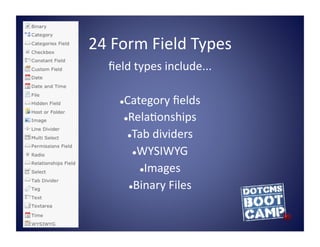
24	
  Form	
  Field	
  Types	
  
    field	
  types	
  include...	
  

        Category	
  fields	
  
        

         Rela>onships	
  

          Tab	
  dividers	
  

            WYSIWYG	
  

              Images	
  

           Binary	
  Files	
  
I	
  fear	
  this	
  has	
  become	
  complicated	
  
How	
  do	
  I	
  create	
  a	
  new	
  form?	
  
     1.  Make	
  a	
  “ Thank	
  You”	
  page	
  
     2.  Create	
  a	
  form	
  structure	
  
     3.  Fill	
  in	
  required	
  hidden	
  form	
  
         fields	
  
     4.  Add	
  the	
  desired	
  form	
  fields	
  
     5.  Add	
  the	
  form	
  to	
  a	
  webpage	
  
Placing	
  a	
  Form	
  on	
  an	
  HTML	
  Page	
  
     • Forms	
  can	
  now	
  be	
  added	
  to	
  all	
  content	
  
                          containers	
  
 • Content	
  Editors	
  can	
  now	
  search	
  for	
  and	
  place	
  
  forms	
  on	
  webpages	
  without	
  having	
  access	
  to	
  
                          form	
  code	
  
• Permissions	
  control	
  which	
  forms	
  users	
  can	
  see	
  
                           and	
  use	
  
Form	
  Crea>on	
  Made	
  Easy!	


   • Let's	
  Create	
  a	
  Sample	
  Form!	
  
Don't	
  Panic!	
  
You	
  are	
  NOT	
  boxed	
  in	
  by	
  default	
  styling	
  
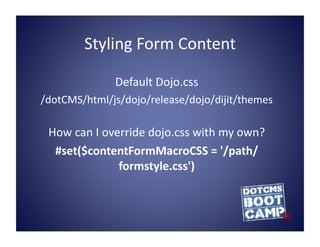
Styling	
  Form	
  Content	
  

                    Default	
  Dojo.css	
  
/dotCMS/html/js/dojo/release/dojo/dijit/themes	
  

 How	
  can	
  I	
  override	
  dojo.css	
  with	
  my	
  own?	
  
  #set($contentFormMacroCSS	
  =	
  '/path/
                       formstyle.css')	
  
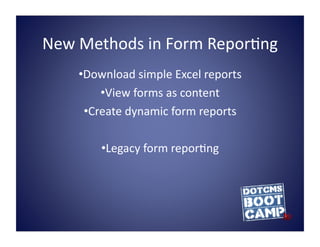
New	
  Methods	
  in	
  Form	
  Repor>ng	
  
      • Download	
  simple	
  Excel	
  reports	
  
            • View	
  forms	
  as	
  content	
  
        • Create	
  dynamic	
  form	
  reports	
  

            • Legacy	
  form	
  repor>ng	
  
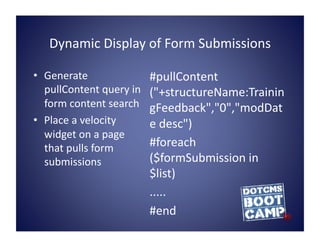
Dynamic	
  Display	
  of	
  Form	
  Submissions	
  

•  Generate	
                       #pullContent
   pullContent	
  query	
  in	
     ("+structureName:Trainin
   form	
  content	
  search	
      gFeedback","0","modDat
•  Place	
  a	
  velocity	
         e	
  desc")	
  
   widget	
  on	
  a	
  page	
  
   that	
  pulls	
  form	
          #foreach
   submissions	
                    ($formSubmission	
  in	
  
                                    $list)	
  
                                    .....	
  
                                    #end	
  
Review	
  of	
  New	
  Form	
  Handling	
  Concepts	
  
   Three	
  supported	
  methods	
  for	
  crea>ng	
  forms	
  
(legacy	
  form	
  builder,	
  legacy	
  form	
  fields,	
  forms	
  as	
  
                      structured	
  content)	
  
                 Powerful	
  new	
  form	
  fields	
  

                    Stop	
  Email	
  harves>ng	
  

     Form	
  submissions	
  now	
  stored/retrieved	
  as	
  

                              content	
  
   HTML	
  pages	
  can	
  now	
  pull	
  content	
  from	
  form	
  

                          submissions	
  
                    Simple	
  form	
  crea>on	
  
Penny	
  for	
  your	
  thoughts	
  

   • What	
  do	
  you	
  like	
  about	
  the	
  changes?	
  
     • How	
  can	
  this	
  tooling	
  be	
  leveraged?	
  
                   • Possible	
  use	
  cases?	
  
• What	
  is	
  your	
  ini>al	
  reac>on	
  to	
  this	
  feature?	
  

Forms as Structured Content

  • 1.
    Forms  as  Structured  Content   dotCMS  version  1.9  introduces  the  ability  to   store  form  submissions  as  structured  content   We  hope  you  enjoy  our  presenta>on  of  this   powerful  new  feature!   Welcome!  
  • 2.
    I  don’t  like  change!  
  • 3.
    What  was  wrong  with  the  old  way?   •  Email  harves>ng  from  forms   •  Spam  aGacks   •  No  server  side  form  valida>on   •  Limited  form  repor>ng   •  Inability  to  dynamically  interact  with  form   submissions   •  Form  code  exposed  on  webpage   •  Higher  barrier  of  entry  to  crea>ng  forms  
  • 4.
    1.9  Supported  Form  Building  Methods   What  got  added?   Legacy  Support?     Form  structure  type     Legacy  Form  Builder     Add  form  content  on     Legacy  Form  Handling   any  page     Legacy  Form  Repor>ng     HTML  free  form  building     De-­‐coupling  form  code   from  the  page     Dynamic  form  repor>ng  
  • 5.
    Why  is  it  Cool?  
  • 6.
    Why  is  it  Cool?   • Create  custom  forms  with  no  HTML/Velocity   • Make  complex  forms  with  ease   • Simple,  re-­‐usable  forms   • Create  dynamic  pages  that  react  to  form   submiGed  content   • Dynamic,  customizable  form  repor>ng  
  • 7.
    24  Form  Field  Types   field  types  include...   Category  fields      Rela>onships    Tab  dividers    WYSIWYG    Images    Binary  Files  
  • 8.
    I  fear  this  has  become  complicated  
  • 9.
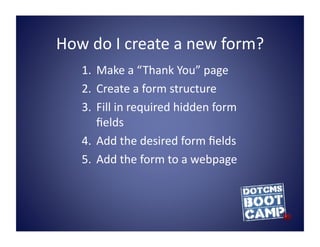
    How  do  I  create  a  new  form?   1.  Make  a  “ Thank  You”  page   2.  Create  a  form  structure   3.  Fill  in  required  hidden  form   fields   4.  Add  the  desired  form  fields   5.  Add  the  form  to  a  webpage  
  • 10.
    Placing  a  Form  on  an  HTML  Page   • Forms  can  now  be  added  to  all  content   containers   • Content  Editors  can  now  search  for  and  place   forms  on  webpages  without  having  access  to   form  code   • Permissions  control  which  forms  users  can  see   and  use  
  • 11.
    Form  Crea>on  Made  Easy!   • Let's  Create  a  Sample  Form!  
  • 12.
    Don't  Panic!   You  are  NOT  boxed  in  by  default  styling  
  • 13.
    Styling  Form  Content   Default  Dojo.css   /dotCMS/html/js/dojo/release/dojo/dijit/themes   How  can  I  override  dojo.css  with  my  own?   #set($contentFormMacroCSS  =  '/path/ formstyle.css')  
  • 14.
    New  Methods  in  Form  Repor>ng   • Download  simple  Excel  reports   • View  forms  as  content   • Create  dynamic  form  reports   • Legacy  form  repor>ng  
  • 15.
    Dynamic  Display  of  Form  Submissions   •  Generate   #pullContent pullContent  query  in   ("+structureName:Trainin form  content  search   gFeedback","0","modDat •  Place  a  velocity   e  desc")   widget  on  a  page   that  pulls  form   #foreach submissions   ($formSubmission  in   $list)   .....   #end  
  • 16.
    Review  of  New  Form  Handling  Concepts    Three  supported  methods  for  crea>ng  forms   (legacy  form  builder,  legacy  form  fields,  forms  as   structured  content)    Powerful  new  form  fields    Stop  Email  harves>ng    Form  submissions  now  stored/retrieved  as   content    HTML  pages  can  now  pull  content  from  form   submissions    Simple  form  crea>on  
  • 17.
    Penny  for  your  thoughts   • What  do  you  like  about  the  changes?   • How  can  this  tooling  be  leveraged?   • Possible  use  cases?   • What  is  your  ini>al  reac>on  to  this  feature?