Open Source Content
Management Systems

     Karen A. Coombs
     Amanda Hollister
What is Open Source
     Software
• “free” software
• source code is available for you to examine
• Source code can be modified
• Modifications can be redistributed
• Typically developed in a collaborative
  fashion by many people
What is a CMS

• Content Management System
• System for creating, organizing and publishing
  web content
• Create web content without knowing any code
• Content stored in database back-end and edited/
  create with web-programming language
Why use a CMS
• Can focus on site organization not content
  management
• Can give others ability to update their own
  content
• One install can manage 10,000,000 html
  pages
• Easy off-site access
What are some OSS
        CMS?
• Wordpress
• Joomla
• Drupal
• ModX
• Concrete5
• Plone
What will we cover?

• Joomla
• Wordpress
• Drupal
Wordpress as CMS
• PHP and MySQL Backend
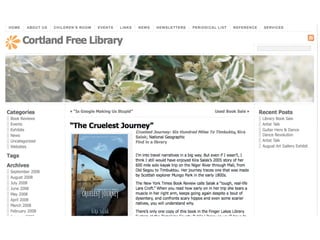
• Used by many libraries for blogging
• Some libraries are using it for some CMS
  functions:
 • Atchison Public Library, California State
    University East Bay, Dartmouth Public
    Libraries, Millsaps College Library, Park
    County Library, Patagonia Public Library,
    Stevens Memorial Library
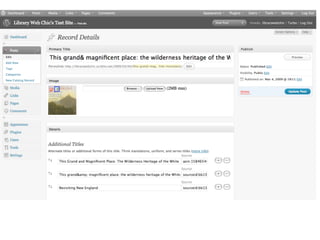
Wordpress Pages
• Outside the normal “sequence” of blog
• Typically, content input via a WYSIWYG
  editor
• Can be hierarchical
• Can use different templates
• Page order
Making a Page Your
    Homepage
• Settings
 • Reading
   • Front page displays
• Choose the page you want to be your
  homepage from the drop down
• Make another page your “news” page
Themes
•   In choosing a theme you should consider the
    following:
    •   what kind of banner do you want?

    •   where do you want your site navigation to appear?

    •   what kinds of layouts do you want to use, one column, two column,
        three column?

    •   do you want a fixed or scalable layout?


•   Sources for Themes
        •   http://wordpress.org/extend/themes/

        •   http://www.templatesbrowser.com/wordpress-themes/
Basic Theme Structure
• index.php
• style.css
• header.php
• footer.php
• sidebar.php
• comments.php
• comments-popup.php
Customizing Your
        Theme

• Widgets
• Template Tags
• Conditional Tags
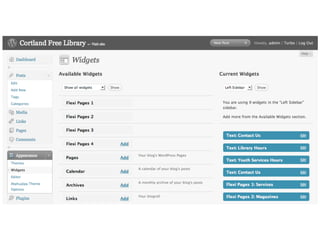
Widgets

• What is a widget?
• Default Widgets
 •   Archives, Calendar, Categories, Links, Meta,
     Pages, Recent Comments, Recent Posts, RSS,
     Search, Tag Cloud, and Text
Widgets

• Where to get other widgets
 •   http://wordpress.org/extend/plugins/tags/widget

• Other widgets to consider
 •   Flexi Pages Widget, Category Posts Widget
Key Template Tags
•   wp_list_pages()

•   Post tags - need to sit in the Loop

    •   the_title()

    •   the_content()

    •   the_meta()

    •   the_category()

    •   the_tags()

•   wp_list_bookmarks()
Helpful Conditional
            Tags
•   is_front_page()

•   is_page()

    •   can include or exclude pages

•   no conditional tag to test for subpages

•   is_page_template()

    •   can check to see if a specific page template is
        being used

•   is_home() - posts page, which is typically the site
    home
Custom Fields
• Allows you to add additional fields to pages
  or posts
• Key - Value pairs
• Stored as text in database
• Can be displayed using
  <?php the_meta(); ?>
• Better way is to code to display each field
  <?php $key="mykey"; echo get_post_meta($post->ID, $key, true); ?>
Useful Plugins
• Blogroll Links
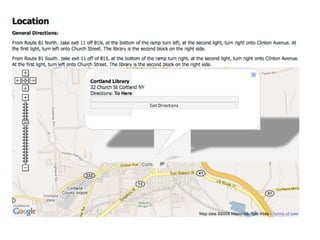
• Google Maps for Wordpress
• Inline Feed
• OpenBook Book Data
• Widget Logic
• Event Calendar 3
Advanced Techniques
           and Tricks

• MeeboMe in your sidebar
• Creating a Photo Gallery
  •   NexGen Gallery plugin

• Scriblio plugin
Scriblio

• Plugin for Wordpress
• Import MARC records
• Use as NextGen Catalog
• Catalog digital library objects
Wordpress Strengths

• Easy to use
• Lots of plugins available
• Easy to create new themes of modify
  existing themes
• Large user base
Wordpress Issues
• Can’t easily create custom content types
 • Contact Info
• Lacks flexibility to deal with complex types
  of objects with different types of fields out
  of the box
• Customizing display of group of page/posts
  requires knowledge of PHP
Drupal as CMS
• PHP and MySQL backend
 • Strongly recommend using PHP5
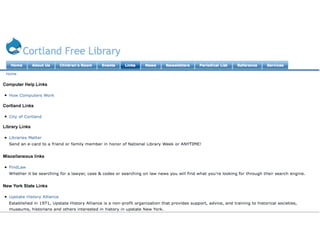
• Used by a variety of libraries including
 • Darien Public Library, Athens County
    Public Library, McMasters University
    Library, University of Prince Edward
    Island
Making a Page Your
      Homepage
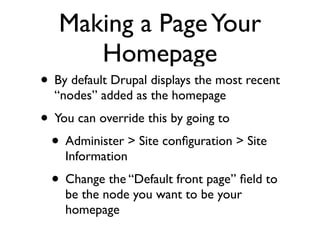
• By default Drupal displays the most recent
  “nodes” added as the homepage
• You can override this by going to
 • Administer > Site configuration > Site
    Information
  • Change the “Default front page” field to
    be the node you want to be your
    homepage
Themes

• http://drupal.org/project/Themes
• http://drupal2u.com
• http://mydrupal.com/downloads
Modules to Add

• FCKEditor
• IMCE
• Image
• Event
Modules to Add
• CCK
 • Date, URL, Email
• Contact Form
• MultiBlock
• Token
• Views
• View Reference
Content Types

• Pages
• Stories
• Image
Blocks

• Default Blocks
• Can be made to display on certain page
 • include
 • exclude
 • PHP
Blocks

• Custom Blocks
 • HTML
 • PHP code
• Views
Menus

• Primary Links
• Secondary Links
• Navigation
• Menus you create
Taxonomies
• Used to organize content on your site
 • Categories
 • Tags
• Can be hierarchical, or free-form
• Different taxonomies can be used for
  different content types
Feed Aggregator

• Does more than aggregate feeds
• Creates a block for every feed
• Allows you to embed feed in a node
• Need to give Anonymous user permission
  to access feeds
Image gallery


• Create Galleries
• Uploaded Images can be associated with a
  gallery
CCK
• Add new fields to any Content Type
• Control the type of field added
 • Text, Number
 • Date, Email, URL
• CCK fields can be used in views
• Remember to give Anonymous user
  permission to access fields you create
Create Your Own
     Content Type
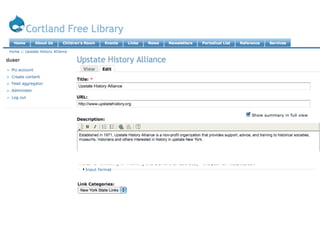
• Links
 • URL field
• Staff
 • Email field
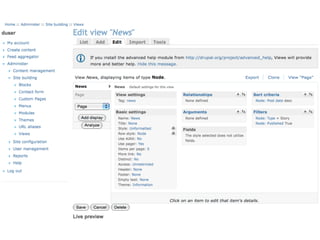
Views
• Types
 • Page
 • Block
 • Feed
• Display
 • Node or Fields
• Limit criteria
• Sort Criteria
Filters

• Default filters
• Other filters often classified as “Modules”
 • insert_view
Drupal Strengths
• Exceptional Flexibility
• Easy to create new content types
• Substantial user base particularly in libraries
 • Drupal4Lib
 • SOPAC
 • Drupal + Fedora
 • Drupal for Digital Libraries - McMasters
Drupal Issues
• Some modules are buggy and problematic
• High learning curve
• Not as many modules and filters developed
  as one would like
 • library-related modules in particular
    missing in some areas
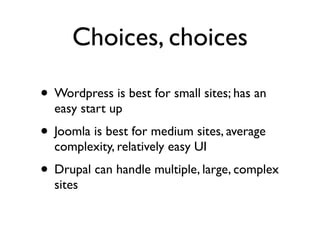
Choices, choices

• Wordpress is best for small sites; has an
  easy start up
• Joomla is best for medium sites, average
  complexity, relatively easy UI
• Drupal can handle multiple, large, complex
  sites
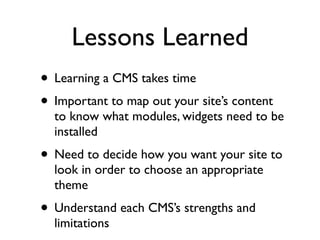
Lessons Learned
• Learning a CMS takes time
• Important to map out your site’s content
  to know what modules, widgets need to be
  installed
• Need to decide how you want your site to
  look in order to choose an appropriate
  theme
• Understand each CMS’s strengths and
  limitations

Open Source CMS Playroom

  • 1.
    Open Source Content ManagementSystems Karen A. Coombs Amanda Hollister
  • 2.
    What is OpenSource Software • “free” software • source code is available for you to examine • Source code can be modified • Modifications can be redistributed • Typically developed in a collaborative fashion by many people
  • 3.
    What is aCMS • Content Management System • System for creating, organizing and publishing web content • Create web content without knowing any code • Content stored in database back-end and edited/ create with web-programming language
  • 4.
    Why use aCMS • Can focus on site organization not content management • Can give others ability to update their own content • One install can manage 10,000,000 html pages • Easy off-site access
  • 5.
    What are someOSS CMS? • Wordpress • Joomla • Drupal • ModX • Concrete5 • Plone
  • 6.
    What will wecover? • Joomla • Wordpress • Drupal
  • 7.
    Wordpress as CMS •PHP and MySQL Backend • Used by many libraries for blogging • Some libraries are using it for some CMS functions: • Atchison Public Library, California State University East Bay, Dartmouth Public Libraries, Millsaps College Library, Park County Library, Patagonia Public Library, Stevens Memorial Library
  • 8.
    Wordpress Pages • Outsidethe normal “sequence” of blog • Typically, content input via a WYSIWYG editor • Can be hierarchical • Can use different templates • Page order
  • 9.
    Making a PageYour Homepage • Settings • Reading • Front page displays • Choose the page you want to be your homepage from the drop down • Make another page your “news” page
  • 11.
    Themes • In choosing a theme you should consider the following: • what kind of banner do you want? • where do you want your site navigation to appear? • what kinds of layouts do you want to use, one column, two column, three column? • do you want a fixed or scalable layout? • Sources for Themes • http://wordpress.org/extend/themes/ • http://www.templatesbrowser.com/wordpress-themes/
  • 12.
    Basic Theme Structure •index.php • style.css • header.php • footer.php • sidebar.php • comments.php • comments-popup.php
  • 13.
    Customizing Your Theme • Widgets • Template Tags • Conditional Tags
  • 14.
    Widgets • What isa widget? • Default Widgets • Archives, Calendar, Categories, Links, Meta, Pages, Recent Comments, Recent Posts, RSS, Search, Tag Cloud, and Text
  • 18.
    Widgets • Where toget other widgets • http://wordpress.org/extend/plugins/tags/widget • Other widgets to consider • Flexi Pages Widget, Category Posts Widget
  • 20.
    Key Template Tags • wp_list_pages() • Post tags - need to sit in the Loop • the_title() • the_content() • the_meta() • the_category() • the_tags() • wp_list_bookmarks()
  • 21.
    Helpful Conditional Tags • is_front_page() • is_page() • can include or exclude pages • no conditional tag to test for subpages • is_page_template() • can check to see if a specific page template is being used • is_home() - posts page, which is typically the site home
  • 22.
    Custom Fields • Allowsyou to add additional fields to pages or posts • Key - Value pairs • Stored as text in database • Can be displayed using <?php the_meta(); ?> • Better way is to code to display each field <?php $key="mykey"; echo get_post_meta($post->ID, $key, true); ?>
  • 23.
    Useful Plugins • BlogrollLinks • Google Maps for Wordpress • Inline Feed • OpenBook Book Data • Widget Logic • Event Calendar 3
  • 36.
    Advanced Techniques and Tricks • MeeboMe in your sidebar • Creating a Photo Gallery • NexGen Gallery plugin • Scriblio plugin
  • 43.
    Scriblio • Plugin forWordpress • Import MARC records • Use as NextGen Catalog • Catalog digital library objects
  • 46.
    Wordpress Strengths • Easyto use • Lots of plugins available • Easy to create new themes of modify existing themes • Large user base
  • 47.
    Wordpress Issues • Can’teasily create custom content types • Contact Info • Lacks flexibility to deal with complex types of objects with different types of fields out of the box • Customizing display of group of page/posts requires knowledge of PHP
  • 48.
    Drupal as CMS •PHP and MySQL backend • Strongly recommend using PHP5 • Used by a variety of libraries including • Darien Public Library, Athens County Public Library, McMasters University Library, University of Prince Edward Island
  • 49.
    Making a PageYour Homepage • By default Drupal displays the most recent “nodes” added as the homepage • You can override this by going to • Administer > Site configuration > Site Information • Change the “Default front page” field to be the node you want to be your homepage
  • 51.
  • 52.
    Modules to Add •FCKEditor • IMCE • Image • Event
  • 53.
    Modules to Add •CCK • Date, URL, Email • Contact Form • MultiBlock • Token • Views • View Reference
  • 54.
    Content Types • Pages •Stories • Image
  • 56.
    Blocks • Default Blocks •Can be made to display on certain page • include • exclude • PHP
  • 57.
    Blocks • Custom Blocks • HTML • PHP code • Views
  • 59.
    Menus • Primary Links •Secondary Links • Navigation • Menus you create
  • 60.
    Taxonomies • Used toorganize content on your site • Categories • Tags • Can be hierarchical, or free-form • Different taxonomies can be used for different content types
  • 61.
    Feed Aggregator • Doesmore than aggregate feeds • Creates a block for every feed • Allows you to embed feed in a node • Need to give Anonymous user permission to access feeds
  • 63.
    Image gallery • CreateGalleries • Uploaded Images can be associated with a gallery
  • 66.
    CCK • Add newfields to any Content Type • Control the type of field added • Text, Number • Date, Email, URL • CCK fields can be used in views • Remember to give Anonymous user permission to access fields you create
  • 67.
    Create Your Own Content Type • Links • URL field • Staff • Email field
  • 70.
    Views • Types •Page • Block • Feed • Display • Node or Fields • Limit criteria • Sort Criteria
  • 73.
    Filters • Default filters •Other filters often classified as “Modules” • insert_view
  • 74.
    Drupal Strengths • ExceptionalFlexibility • Easy to create new content types • Substantial user base particularly in libraries • Drupal4Lib • SOPAC • Drupal + Fedora • Drupal for Digital Libraries - McMasters
  • 75.
    Drupal Issues • Somemodules are buggy and problematic • High learning curve • Not as many modules and filters developed as one would like • library-related modules in particular missing in some areas
  • 76.
    Choices, choices • Wordpressis best for small sites; has an easy start up • Joomla is best for medium sites, average complexity, relatively easy UI • Drupal can handle multiple, large, complex sites
  • 77.
    Lessons Learned • Learninga CMS takes time • Important to map out your site’s content to know what modules, widgets need to be installed • Need to decide how you want your site to look in order to choose an appropriate theme • Understand each CMS’s strengths and limitations