Super	
  Widgets…	
  
         (planning	
  for	
  flexible	
  and	
  reusable	
  
                              pulls)	


Arnaud	
  Romary	
  
Maria	
  Bouza	
  
Quick	
  Overview	
  
•    Purpose	
  
•    Common	
  Uses	
  
•    Widget	
  vs.	
  ApplicaBon	
  Widget	
  
•    Macro	
  Widget:	
  Photo	
  Carrousel	
  
•    Super	
  Widget:	
  News	
  LisBng	
  
•    QuesBons	
  
Widgets:	
  The	
  Basics	
  
–  Purpose:	
  	
  
     •  Minimize	
  redundant	
  code	
  
     •  Facilitate	
  creaBon	
  of	
  pulls	
  for	
  content	
  editors	
  UI	
  
     •  Permissioning	
  	
  (widgets	
  vs.	
  web	
  page	
  content)	


–  Common	
  Uses	
  (default	
  widgets)	
  
     •    Content	
  LisBngs	
  
     •    Detail	
  pages	
  
     •    Random	
  pulls	
  
     •    Macros	
  UI	
  
Widgets:	
  The	
  Basics	
   	
                     cont.


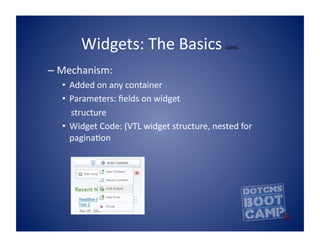
–  Mechanism:	
  	
  
    •  Added	
  on	
  any	
  container	
  
    •  Parameters:	
  fields	
  on	
  widget	


  structure	
  
    •  Widget	
  Code:	
  (VTL	
  widget	
  structure,	
  nested	
  for	
  
                 paginaBon	
  
Types	
  of	
  Widgets	
  	
  
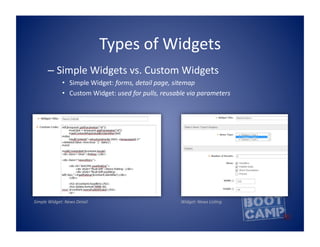
                             –  Simple	
  Widgets	
  vs.	
  Custom	
  Widgets	
  
                                                             •  Simple	
  Widget:	
  forms,	
  detail	
  page,	
  sitemap	
  
                                                             •  Custom	
  Widget:	
  used	
  for	
  pulls,	
  reusable	
  via	
  parameters	


Simple	
  Widget:	
  News	
  Detail	


  Widget:	
  News	
  LisAng	
  
When	
  to	
  create	
  a	
  widget	
  
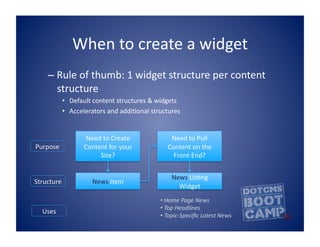
      –  Rule	
  of	
  thumb:	
  1	
  widget	
  structure	
  per	
  content	
  
         structure	
  
              •  Default	
  content	
  structures	
  &	
  widgets	
  
              •  Accelerators	
  and	
  addiBonal	
  structures	


                        Need	
  to	
  Create	
                  Need	
  to	
  Pull	
  
Purpose	
              Content	
  for	
  your	
                Content	
  on	
  the	
  
                            Site?	
                              Front-­‐End?	


                                                                 News	
  LisBng	
  
Structure	
                News	
  Item	
  
                                                                   Widget	
  
                                                           • 	
  Home	
  Page	
  News	
  
                                                           • 	
  Top	
  Headlines	
  	
  
   Uses	
  
                                                           • 	
  Topic-­‐Specific	
  Latest	
  News	
  
When	
  to	
  create	
  a	
  widget	
  
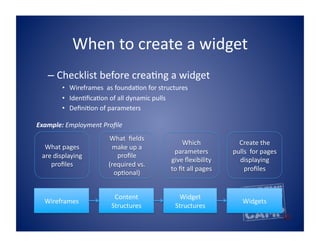
    –  Checklist	
  before	
  creaBng	
  a	
  widget	
  
            •  Wireframes	
  	
  as	
  foundaBon	
  for	
  structures	
  
            •  IdenBficaBon	
  of	
  all	
  dynamic	
  pulls	
  
            •  DefiniBon	
  of	
  parameters	
  

Example:	
  Employment	
  Profile	
  
                                  What	
  	
  fields	
  
                                                                       Which	
                   Create	
  the	
  
   What	
  pages	
                 make	
  up	
  a	
  
                                                                 parameters	
                  pulls	
  	
  for	
  pages	
  
  are	
  displaying	
                profile	
  
                                                                give	
  flexibility	
             displaying	
  
     profiles	
  	
                (required	
  vs.	
  
                                                                to	
  fit	
  all	
  pages	
         profiles	
  
                                    opBonal)	


                                    Content	
                      Widget	
  
   Wireframes	
                                                                                      Widgets	
  
                                   Structures	
                   Structures	
  
Example	
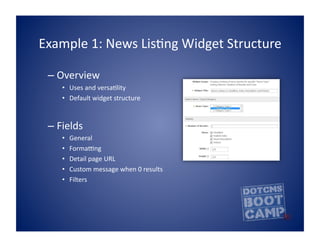
  1:	
  News	
  LisBng	
  Widget	
  Structure	
  

  –  Overview	
  
      •  Uses	
  and	
  versaBlity	
  
      •  Default	
  widget	
  structure	


  –  Fields	
  
      •    General	
  
      •    Forma[ng	
  
      •    Detail	
  page	
  URL	
  
      •    Custom	
  message	
  when	
  0	
  results	
  
      •    Filters	
  
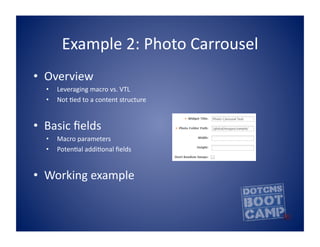
Example	
  2:	
  Photo	
  Carrousel	
  	
  
•  Overview	
  
   •    Leveraging	
  macro	
  vs.	
  VTL	
  
   •    Not	
  Bed	
  to	
  a	
  content	
  structure	


•  Basic	
  fields	
  
   •    Macro	
  parameters	
  
   •    PotenBal	
  addiBonal	
  fields	


•  Working	
  example	
  
Recap	
  
•  Purpose	
  and	
  advantages	
  of	
  using	
  widgets	
  
•  Common	
  uses	
  for	
  widgets	
  
•  Differences	
  between	
  simple	
  and	
  custom	
  
   widget	
  structures	
  
•  Super	
  Widget:	
  News	
  LisBng	
  
•  Macro	
  Widget:	
  Photo	
  Carrousel	
  

Super widget

  • 1.
    Super  Widgets…   (planning  for  flexible  and  reusable   pulls)   Arnaud  Romary   Maria  Bouza  
  • 2.
    Quick  Overview   •  Purpose   •  Common  Uses   •  Widget  vs.  ApplicaBon  Widget   •  Macro  Widget:  Photo  Carrousel   •  Super  Widget:  News  LisBng   •  QuesBons  
  • 3.
    Widgets:  The  Basics   –  Purpose:     •  Minimize  redundant  code   •  Facilitate  creaBon  of  pulls  for  content  editors  UI   •  Permissioning    (widgets  vs.  web  page  content)   –  Common  Uses  (default  widgets)   •  Content  LisBngs   •  Detail  pages   •  Random  pulls   •  Macros  UI  
  • 4.
    Widgets:  The  Basics     cont. –  Mechanism:     •  Added  on  any  container   •  Parameters:  fields  on  widget          structure   •  Widget  Code:  (VTL  widget  structure,  nested  for   paginaBon  
  • 5.
    Types  of  Widgets     –  Simple  Widgets  vs.  Custom  Widgets   •  Simple  Widget:  forms,  detail  page,  sitemap   •  Custom  Widget:  used  for  pulls,  reusable  via  parameters   Simple  Widget:  News  Detail                                                                                                                                                                            Widget:  News  LisAng  
  • 6.
    When  to  create  a  widget   –  Rule  of  thumb:  1  widget  structure  per  content   structure   •  Default  content  structures  &  widgets   •  Accelerators  and  addiBonal  structures   Need  to  Create   Need  to  Pull   Purpose   Content  for  your   Content  on  the   Site?   Front-­‐End?   News  LisBng   Structure   News  Item   Widget   •   Home  Page  News   •   Top  Headlines     Uses   •   Topic-­‐Specific  Latest  News  
  • 7.
    When  to  create  a  widget   –  Checklist  before  creaBng  a  widget   •  Wireframes    as  foundaBon  for  structures   •  IdenBficaBon  of  all  dynamic  pulls   •  DefiniBon  of  parameters   Example:  Employment  Profile   What    fields   Which   Create  the   What  pages   make  up  a   parameters   pulls    for  pages   are  displaying   profile   give  flexibility   displaying   profiles     (required  vs.   to  fit  all  pages   profiles   opBonal)   Content   Widget   Wireframes   Widgets   Structures   Structures  
  • 8.
    Example  1:  News  LisBng  Widget  Structure   –  Overview   •  Uses  and  versaBlity   •  Default  widget  structure   –  Fields   •  General   •  Forma[ng   •  Detail  page  URL   •  Custom  message  when  0  results   •  Filters  
  • 9.
    Example  2:  Photo  Carrousel     •  Overview   •  Leveraging  macro  vs.  VTL   •  Not  Bed  to  a  content  structure   •  Basic  fields   •  Macro  parameters   •  PotenBal  addiBonal  fields   •  Working  example  
  • 10.
    Recap   •  Purpose  and  advantages  of  using  widgets   •  Common  uses  for  widgets   •  Differences  between  simple  and  custom   widget  structures   •  Super  Widget:  News  LisBng   •  Macro  Widget:  Photo  Carrousel