Presentation on: 
HTML version 4.0 and 
4.01 
5th revision of the HTML 
standard
Presenters: 
 Md. Arif Ibne Ali – BIT0308 
 Nadia Nahar – BIT0327 
 Ahmad Tahmid – BIT0332
Why are we here ? 
 For Analyzing HTML4 and HTML5 Forms 
 Finding the Better One 
 Show the Reasons
HTML5 Better than HTML4
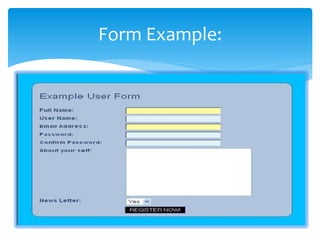
HTML Form 
 HTML forms are used to pass data to a server. 
 Allows a user to enter data. 
 Use submission method GET or POST 
GET - Requests data from a specified resource 
POST - Submits data to be processed to a specified 
resource
Form Example:
HTML4 Form Elements 
 <input> - Form input 
 <textarea> - Multi-line text input 
 <button> – Button 
 <select> - Option selector 
 <optgroup> - Option group 
 <option> - Menu option 
 <fieldset> - Form control group 
 <legend> - Fieldset caption 
 <label> - Form field label
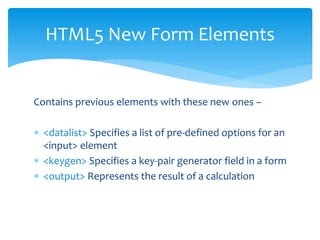
HTML5 New Form Elements 
Contains previous elements with these new ones – 
 <datalist> Specifies a list of pre-defined options for an 
<input> element 
 <keygen> Specifies a key-pair generator field in a form 
 <output> Represents the result of a calculation
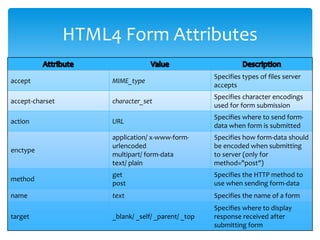
HTML4 Form Attributes 
accept MIME_type 
Specifies types of files server 
accepts 
accept-charset character_set 
Specifies character encodings 
used for form submission 
action URL 
Specifies where to send form-data 
when form is submitted 
enctype 
application/ x-www-form-urlencoded 
multipart/ form-data 
text/ plain 
Specifies how form-data should 
be encoded when submitting 
to server (only for 
method="post") 
method 
get 
post 
Specifies the HTTP method to 
use when sending form-data 
name text Specifies the name of a form 
target _blank/ _self/ _parent/ _top 
Specifies where to display 
response received after 
submitting form
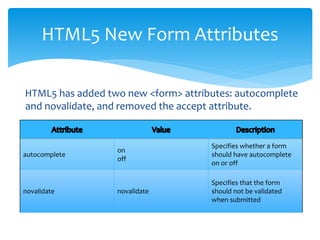
HTML5 New Form Attributes 
HTML5 has added two new <form> attributes: autocomplete 
and novalidate, and removed the accept attribute. 
autocomplete 
on 
off 
Specifies whether a form 
should have autocomplete 
on or off 
novalidate novalidate 
Specifies that the form 
should not be validated 
when submitted
HTML5 New Form Attributes 
New attributes for <input>: 
 autocomplete 
 autofocus 
 form 
 formaction 
 formenctype 
 formmethod 
 formnovalidate 
 formtarget 
 height and width 
 list 
 min and max 
 multiple 
 pattern (regexp) 
 placeholder 
 required 
 step
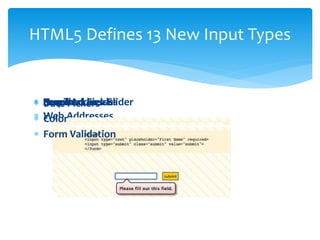
HTML5 Defines 13 New Input Types 
 Email Addresses 
 RSDNeauaqtmeruc biPhreiecrdks eFarises ald Sslider 
  Web Color 
Addresses 
 Form Validation

Html5

  • 2.
    Presentation on: HTMLversion 4.0 and 4.01 5th revision of the HTML standard
  • 3.
    Presenters:  Md.Arif Ibne Ali – BIT0308  Nadia Nahar – BIT0327  Ahmad Tahmid – BIT0332
  • 4.
    Why are wehere ?  For Analyzing HTML4 and HTML5 Forms  Finding the Better One  Show the Reasons
  • 5.
  • 6.
    HTML Form HTML forms are used to pass data to a server.  Allows a user to enter data.  Use submission method GET or POST GET - Requests data from a specified resource POST - Submits data to be processed to a specified resource
  • 7.
  • 8.
    HTML4 Form Elements  <input> - Form input  <textarea> - Multi-line text input  <button> – Button  <select> - Option selector  <optgroup> - Option group  <option> - Menu option  <fieldset> - Form control group  <legend> - Fieldset caption  <label> - Form field label
  • 9.
    HTML5 New FormElements Contains previous elements with these new ones –  <datalist> Specifies a list of pre-defined options for an <input> element  <keygen> Specifies a key-pair generator field in a form  <output> Represents the result of a calculation
  • 10.
    HTML4 Form Attributes accept MIME_type Specifies types of files server accepts accept-charset character_set Specifies character encodings used for form submission action URL Specifies where to send form-data when form is submitted enctype application/ x-www-form-urlencoded multipart/ form-data text/ plain Specifies how form-data should be encoded when submitting to server (only for method="post") method get post Specifies the HTTP method to use when sending form-data name text Specifies the name of a form target _blank/ _self/ _parent/ _top Specifies where to display response received after submitting form
  • 11.
    HTML5 New FormAttributes HTML5 has added two new <form> attributes: autocomplete and novalidate, and removed the accept attribute. autocomplete on off Specifies whether a form should have autocomplete on or off novalidate novalidate Specifies that the form should not be validated when submitted
  • 12.
    HTML5 New FormAttributes New attributes for <input>:  autocomplete  autofocus  form  formaction  formenctype  formmethod  formnovalidate  formtarget  height and width  list  min and max  multiple  pattern (regexp)  placeholder  required  step
  • 13.
    HTML5 Defines 13New Input Types  Email Addresses  RSDNeauaqtmeruc biPhreiecrdks eFarises ald Sslider   Web Color Addresses  Form Validation