Best Practices for Building Sites
           in dotCMS
 Presenters:
 Click to edit Master subtitle style
 Michael Fienen – Pittsburg State University, nuCloud LLC, .eduGuru
 Maria Bouza – dotCMS


  @fienen - google.com/profiles/fienen
What we're looking at...
1)Container Must-haves
2)Template vs. Containers
3)Using VTL Files, when and where
4)Widgets
5)URLMap for Detail Pages
6)Custom Forward Pages
7)Valid HTML and 508 Compliance
Container Must-haves
•
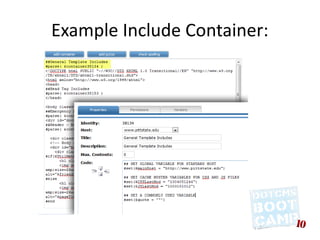
    Functional Template Include
    –
        Inserted at the top of templates to include data
        and information
    –
        Loads before <html> tag
    –
        No visual elements included
    –
        Good for:
         •   Global Variables
         •   Macro testing
         •   Timestamps for CSS/JS cachebusters
Example Include Container:
Container Must-haves
•
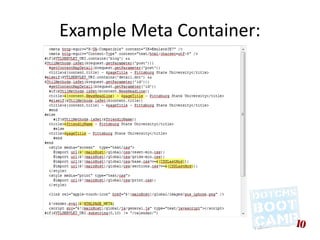
    Meta Container
    –
        Page Title, Friendly Name and Title for Page details
    –
        HTML Page Meta tags: $!HTMLPAGE_META
          – Good for meta keywords, descriptions, or
            other things you need in the <head> per page 
    –
        Include all common CSS Files
    –
        Include all common JS files
    –
        Lives inside the <head>...</head> tags
Example Meta Container:
Container Must-haves
•
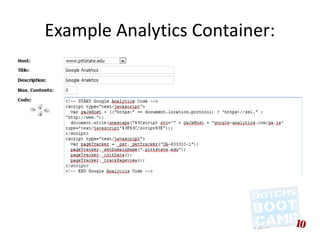
    Statistics Container
    –
        Create one container that holds your Statistics
        code, such as Google Analytics
    –
        Container will normally be included at the end of
        all templates
    –
        If multiple hosts, use Host Property to hold
        Account ID
Example Analytics Container:
Template vs. Containers
•
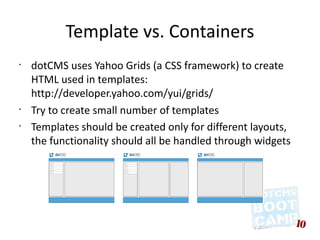
    dotCMS uses Yahoo Grids (a CSS framework) to create
    HTML used in templates:
    http://developer.yahoo.com/yui/grids/
•
    Try to create small number of templates
•
    Templates should be created only for different layouts,
    the functionality should all be handled through widgets
Template vs. Containers
•
    All reusable sections of the HTML should be
    created as Containers (max contents 0)
•
    All sections of the site that are editable should
    be created as Containers (max contents > 0)
•
    Doctype should be added to template
•
    Head section (<head>) should be created in
    the template to allow to have specific JS and
    CSS files on each template
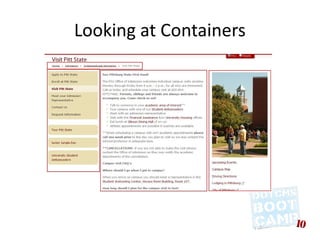
Looking at Containers
Using VTL files, when and where
•
    Limit use of VTL files only to Simple Widgets
•
    Should not be used as “widgets” parsed from
    containers, content or templates
•
    Should be saved to a central location on the
    site (/application/velocity)
•
    Limit to “application” like functionality
•
    Good as building blocks of complex widgets
•
    Used for source code in some macros
•
    Don’t abuse them!
Widgets
•
    Simple Widgets:
    –
        Use them for dynamic code that does’t need parameters
    –
        Good for generic, dynamic tools (listings, detail page bodies,
        etc...)
•
    Structured Widgets (Widgets that receive
    parameters)
    –
        When the widget needs to be reused on different sections of the
        site
    –
        When we need to send parameters to the widget
    –
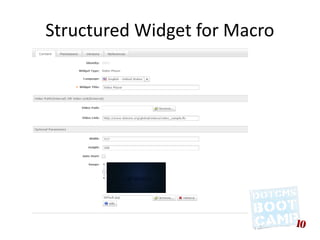
        As a front end for macro setup
Structured Widget for Macro
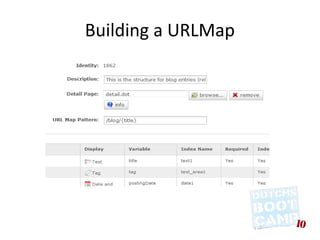
URLMaps for Detail Pages
•
    Create URLMaps for structures (1.9)
•
    Better for SEO purposes (human-readable):
    http://yoursite.com/news/some-unique-field
•
    Easier to print and share
•
    Make sure your structure has at least one
    unique field to tie to.
•
    Example:
    http://1.9.demo.dotcms.org/news/dotcms-launches-1.9
Building a URLMap
Set Up Custom Forward Pages
●   You already do this for your home page when
    you set up the /cmsHomePage virtual link
    (Vanity URL in 1.9)
●   You can also do this with typical error pages
    with:
    /cms###Page
    ●   Works with 400, 401, 402, 403, and 404
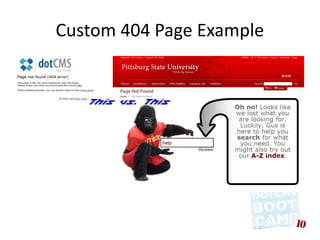
Custom 404 Page Example
Valid HTML and 508 Compliance
•
    Garbage in – garbage out. Validate templates before
    loading them in.
      ●
        HTML Validation
        http://validator.w3.org/
     ●
         508 Compliance
         http://www.contentquality.com/
•
    TinyMCE won't do your job for you (even if it wants
    to try)
•
    Microsoft Word hates the internet
Thanks Boys and Girls!


            Questions?
          Hunt me down:
 http://google.com/profiles/fienen

         dotCMS Cheatsheet:
http://tinyurl.com/dotcmscheatsheet

Best Practices for Building Sites in dotCMS

  • 1.
    Best Practices forBuilding Sites in dotCMS Presenters: Click to edit Master subtitle style Michael Fienen – Pittsburg State University, nuCloud LLC, .eduGuru Maria Bouza – dotCMS @fienen - google.com/profiles/fienen
  • 2.
    What we're lookingat... 1)Container Must-haves 2)Template vs. Containers 3)Using VTL Files, when and where 4)Widgets 5)URLMap for Detail Pages 6)Custom Forward Pages 7)Valid HTML and 508 Compliance
  • 3.
    Container Must-haves • Functional Template Include – Inserted at the top of templates to include data and information – Loads before <html> tag – No visual elements included – Good for: • Global Variables • Macro testing • Timestamps for CSS/JS cachebusters
  • 4.
  • 5.
    Container Must-haves • Meta Container – Page Title, Friendly Name and Title for Page details – HTML Page Meta tags: $!HTMLPAGE_META – Good for meta keywords, descriptions, or other things you need in the <head> per page  – Include all common CSS Files – Include all common JS files – Lives inside the <head>...</head> tags
  • 6.
  • 7.
    Container Must-haves • Statistics Container – Create one container that holds your Statistics code, such as Google Analytics – Container will normally be included at the end of all templates – If multiple hosts, use Host Property to hold Account ID
  • 8.
  • 9.
    Template vs. Containers • dotCMS uses Yahoo Grids (a CSS framework) to create HTML used in templates: http://developer.yahoo.com/yui/grids/ • Try to create small number of templates • Templates should be created only for different layouts, the functionality should all be handled through widgets
  • 10.
    Template vs. Containers • All reusable sections of the HTML should be created as Containers (max contents 0) • All sections of the site that are editable should be created as Containers (max contents > 0) • Doctype should be added to template • Head section (<head>) should be created in the template to allow to have specific JS and CSS files on each template
  • 11.
  • 12.
    Using VTL files,when and where • Limit use of VTL files only to Simple Widgets • Should not be used as “widgets” parsed from containers, content or templates • Should be saved to a central location on the site (/application/velocity) • Limit to “application” like functionality • Good as building blocks of complex widgets • Used for source code in some macros • Don’t abuse them!
  • 13.
    Widgets • Simple Widgets: – Use them for dynamic code that does’t need parameters – Good for generic, dynamic tools (listings, detail page bodies, etc...) • Structured Widgets (Widgets that receive parameters) – When the widget needs to be reused on different sections of the site – When we need to send parameters to the widget – As a front end for macro setup
  • 14.
  • 15.
    URLMaps for DetailPages • Create URLMaps for structures (1.9) • Better for SEO purposes (human-readable): http://yoursite.com/news/some-unique-field • Easier to print and share • Make sure your structure has at least one unique field to tie to. • Example: http://1.9.demo.dotcms.org/news/dotcms-launches-1.9
  • 16.
  • 17.
    Set Up CustomForward Pages ● You already do this for your home page when you set up the /cmsHomePage virtual link (Vanity URL in 1.9) ● You can also do this with typical error pages with: /cms###Page ● Works with 400, 401, 402, 403, and 404
  • 18.
  • 19.
    Valid HTML and508 Compliance • Garbage in – garbage out. Validate templates before loading them in. ● HTML Validation http://validator.w3.org/ ● 508 Compliance http://www.contentquality.com/ • TinyMCE won't do your job for you (even if it wants to try) • Microsoft Word hates the internet
  • 20.
    Thanks Boys andGirls! Questions? Hunt me down: http://google.com/profiles/fienen dotCMS Cheatsheet: http://tinyurl.com/dotcmscheatsheet