Formatting Fonts on your Web Page
Starter Activity: What do the following tags do?
1.<title> </title>
2.<h1> </h1>
3.<p> </p>
4.<br>
5.<h6> </h6>
6.<html> </html>
Formatting Fonts on your Web Page
In this lesson you will learn how to change the
colour, size and style of fonts using html. You will
align a range of objects and change the colour of
text and the background of your zoo homepage.
Lesson
Objectives
 Be able to change font size on a web page
 Be able to change font colour on a web page
 Be able to change font style on a web page
 Be able to create italicized text on a web page
Formatting Fonts on your Web Page
Fonts
Different font styles as well as several other font
options can be applied by using the tag:
<font>…</font>
To change the size of some text within a sentence
you can simply add the attribute size to the font tag.
Here’s a coded example:
This lesson is <font size=5> fantastic. </font> Best
lesson of the day.
There are seven levels of font size.
Formatting Fonts on your Web Page
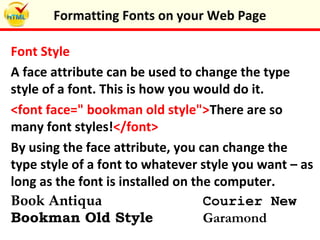
Font Style
A face attribute can be used to change the type
style of a font. This is how you would do it.
<font face=" bookman old style">There are so
many font styles!</font>
By using the face attribute, you can change the
type style of a font to whatever style you want – as
long as the font is installed on the computer.
Book Antiqua Courier New
Bookman Old Style Garamond
Formatting Fonts on your Web Page
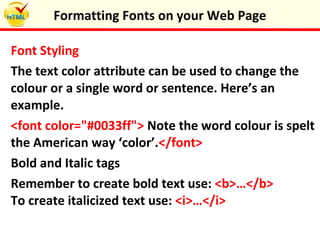
Font Styling
The text color attribute can be used to change the
colour or a single word or sentence. Here’s an
example.
<font color="#0033ff"> Note the word colour is spelt
the American way ‘color’.</font>
Bold and Italic tags
Remember to create bold text use: <b>…</b>
To create italicized text use: <i>…</i>
Formatting Fonts on your Web Page
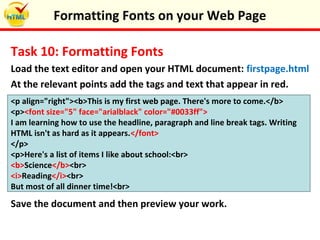
Task 10: Formatting Fonts
Load the text editor and open your HTML document: firstpage.html
At the relevant points add the tags and text that appear in red.
<p align="right"><b>This is my first web page. There's more to come.</b>
<p><font size="5" face="arialblack" color="#0033ff">
I am learning how to use the headline, paragraph and line break tags. Writing
HTML isn't as hard as it appears.</font>
</p>
<p>Here's a list of items I like about school:<br>
<b>Science</b><br>
<i>Reading</i><br>
But most of all dinner time!<br>
Save the document and then preview your work.
Formatting Fonts on your Web Page
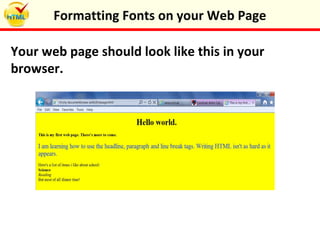
Your web page should look like this in your
browser.
Formatting Fonts on your Web Page
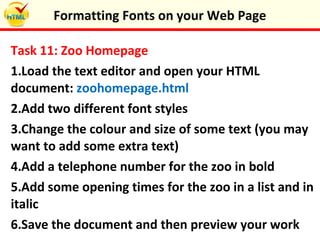
Task 11: Zoo Homepage
1.Load the text editor and open your HTML
document: zoohomepage.html
2.Add two different font styles
3.Change the colour and size of some text (you may
want to add some extra text)
4.Add a telephone number for the zoo in bold
5.Add some opening times for the zoo in a list and in
italic
6.Save the document and then preview your work
Formatting Fonts on your Web Page
Plenary: Tag Reflection
Make a list of all the tags that you can now use:
1.
2.
3.
4.
5.
6.
Formatting Fonts on your Web Page
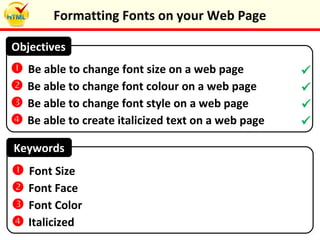
Keywords
 Be able to change font size on a web page
 Be able to change font colour on a web page
 Be able to change font style on a web page
 Be able to create italicized text on a web page
Objectives
 Font Size
 Font Face
 Font Color
 Italicized




Formatting Fonts on your Web Page

Formatting fonts on your web page

  • 1.
    Formatting Fonts onyour Web Page
  • 2.
    Starter Activity: Whatdo the following tags do? 1.<title> </title> 2.<h1> </h1> 3.<p> </p> 4.<br> 5.<h6> </h6> 6.<html> </html> Formatting Fonts on your Web Page
  • 3.
    In this lessonyou will learn how to change the colour, size and style of fonts using html. You will align a range of objects and change the colour of text and the background of your zoo homepage. Lesson Objectives  Be able to change font size on a web page  Be able to change font colour on a web page  Be able to change font style on a web page  Be able to create italicized text on a web page Formatting Fonts on your Web Page
  • 4.
    Fonts Different font stylesas well as several other font options can be applied by using the tag: <font>…</font> To change the size of some text within a sentence you can simply add the attribute size to the font tag. Here’s a coded example: This lesson is <font size=5> fantastic. </font> Best lesson of the day. There are seven levels of font size. Formatting Fonts on your Web Page
  • 5.
    Font Style A faceattribute can be used to change the type style of a font. This is how you would do it. <font face=" bookman old style">There are so many font styles!</font> By using the face attribute, you can change the type style of a font to whatever style you want – as long as the font is installed on the computer. Book Antiqua Courier New Bookman Old Style Garamond Formatting Fonts on your Web Page
  • 6.
    Font Styling The textcolor attribute can be used to change the colour or a single word or sentence. Here’s an example. <font color="#0033ff"> Note the word colour is spelt the American way ‘color’.</font> Bold and Italic tags Remember to create bold text use: <b>…</b> To create italicized text use: <i>…</i> Formatting Fonts on your Web Page
  • 7.
    Task 10: FormattingFonts Load the text editor and open your HTML document: firstpage.html At the relevant points add the tags and text that appear in red. <p align="right"><b>This is my first web page. There's more to come.</b> <p><font size="5" face="arialblack" color="#0033ff"> I am learning how to use the headline, paragraph and line break tags. Writing HTML isn't as hard as it appears.</font> </p> <p>Here's a list of items I like about school:<br> <b>Science</b><br> <i>Reading</i><br> But most of all dinner time!<br> Save the document and then preview your work. Formatting Fonts on your Web Page
  • 8.
    Your web pageshould look like this in your browser. Formatting Fonts on your Web Page
  • 9.
    Task 11: ZooHomepage 1.Load the text editor and open your HTML document: zoohomepage.html 2.Add two different font styles 3.Change the colour and size of some text (you may want to add some extra text) 4.Add a telephone number for the zoo in bold 5.Add some opening times for the zoo in a list and in italic 6.Save the document and then preview your work Formatting Fonts on your Web Page
  • 10.
    Plenary: Tag Reflection Makea list of all the tags that you can now use: 1. 2. 3. 4. 5. 6. Formatting Fonts on your Web Page
  • 11.
    Keywords  Be ableto change font size on a web page  Be able to change font colour on a web page  Be able to change font style on a web page  Be able to create italicized text on a web page Objectives  Font Size  Font Face  Font Color  Italicized     Formatting Fonts on your Web Page