PROPOSALS AND FORMALPROPOSALS AND FORMAL
REPORTSREPORTS
Amna A. Rehman
Understanding Business Proposals
Definition
A proposal is a persuasive document designed to
motivate the reader to spend, make, or save
money.
Proposals are written offers to solve problems, provide
services, or sell equipmentKinds
 Internal – May take the form of justification/recommendation
report
 External – Solicited (responding to RFP) or unsolicited
(prospecting for business)
 Formal – long, many parts
 Informal – shorter, six main parts
Important Terms
A request for proposal (RFP) is a solicitation, often made through a bidding
process, by an agency or company interested in procurement of a
commodity, service or valuable asset, to potential suppliers to submit
business proposals.
A request for proposal (RFP) is a solicitation, often made through a bidding
process, by an agency or company interested in procurement of a
commodity, service or valuable asset, to potential suppliers to submit
business proposals.
Proposals may be solicited or unsolicited. In a solicited proposal, a company
or agency advertises that it desires the solution to a problem. In most cases,
this company or agency sends out a request for proposals, often called an
RFP, that presents a problem which needs addressing.
A solicited proposal is when the customer asks for a proposal. They may ask
verbally or they may issue a written Request for Proposals (RFP). An
unsolicited proposal is when you send them a proposal they haven't even
asked for because you think they should buy from you or take some action.
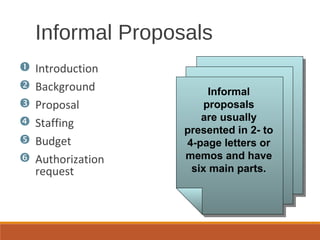
Informal
proposals
are usually
presented in 2- to
4-page letters or
memos and have
six main parts.
 Introduction
 Background
 Proposal
 Staffing
 Budget
 Authorization
request
Informal Proposals
Introduction
◦Explain why the proposal is being made.
◦Develop a persuasive “hook.” Suggest excellent results,
low cost, or exclusive resources. Identify a problem or
name a key issue or benefit.
Informal Proposals
Mary Ellen Guffey, Business
Communication: Process and
Product, 5e
CH. 14, SLIDE 6
Background, Problem
◦Discuss the significance of the proposal and its goals or
purposes.
◦For unsolicited proposals, convince the reader that a
problem exists.
◦For solicited proposals, show that you fully understand
the problem and its ramifications.
Informal Proposals
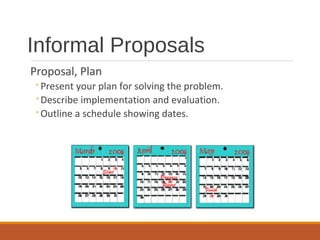
Informal Proposals
Proposal, Plan
◦Present your plan for solving the problem.
◦Describe implementation and evaluation.
◦Outline a schedule showing dates.
Staffing
◦Explain the specific credentials and expertise of
the key personnel for the project.
◦Show that your support staff and resources are
superior to those of the competition.
Informal Proposals
Budget
◦Itemize costs carefully. Proposals are contracts.
◦Present a deadline for the bid figures.
Informal Proposals
Introduction should provide “hook” to capture reader’s
interest.
Background section identifies problems and goals of
project.
Proposal discusses plan and schedule for solving
existing problem.
Staffing section describes credentials and expertise of
project leaders.
Budget indicates project costs.
Authorization asks for approval to proceed.
Summary - Informal
Proposals
Formal proposals include all the basic parts of informal
proposals but may have additional parts.
Possible additional parts:
◦Copy of RFP
◦Letter or memo of transmittal
◦Abstract and/or executive summary
◦Title page
◦Table of contents
◦List of figures
◦Appendix
Formal Proposals
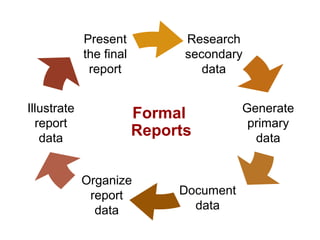
Research
secondary
data
Generate
primary
data
Illustrate
report
data
Organize
report
data
Document
data
Present
the final
report
Formal
Reports
Researching Secondary Data
Electronic Databases
Collections of magazine,
newspaper, journal articles
Examples
◦EBSCO Business Source Premier
◦Factiva
◦ABI/Inform
◦LexisNexis
Print Resources
 Books
 Periodicals
 Bibliographic
indexes such as
Reader’s Guide
Researching Secondary Data
The Web
Product data
Mission statements
Staff directories
Press releases
Company news
Article reprints
Employment information
Facts of all kinds
Blogs (weblogs) for consumer reviews and
opinions
Web Search Tips
and Techniques
Use two or three search
tools.
Know your search tool.
Understand case sensitivity
in keyword searches.
 Use quotation marks.
 Omit articles and
prepositions.
 Proofread your search
words.
 Keep trying.
 Consider searching
blogs, wikis, and
social networks.
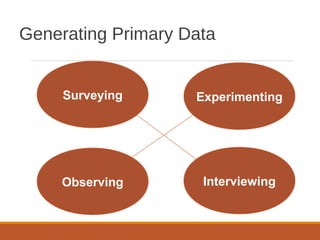
Generating Primary Data
Surveying
InterviewingObserving
Experimenting
Generating Primary Data
Surveying
 Develop questions, conduct trial.
 Work in person or online.
Interviewing
 Locate an expert.
 Consider posting an inquiry to an Internet newsgroup.
 Prepare for the interview.
 Maintain a professional attitude.
 Prepare objective, friendly questions.
 Watch the time.
 End graciously.
Generating Primary Data
Observing
 Be objective.
 Quantify observations.
Experimenting
 Develop rigorous research design.
 Pay careful attention to matching
experimental and control groups.
Documenting Data
What to document
Another person's ideas, opinions, examples, or
theory
Any facts, statistics, and graphics that are not
common knowledge
Quotations of another person's actual spoken or
written words
Paraphrases of another person's spoken or written
words
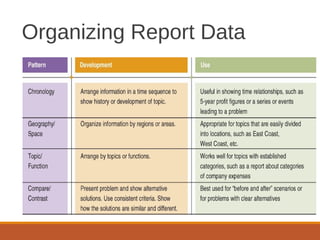
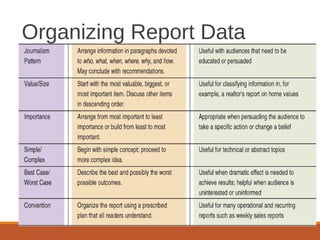
Organizing Report Data
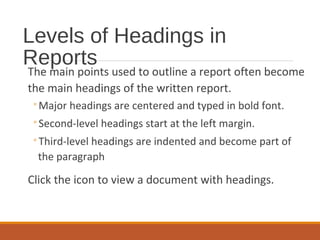
Levels of Headings in
Reports
The main points used to outline a report often become
the main headings of the written report.
◦Major headings are centered and typed in bold font.
◦Second-level headings start at the left margin.
◦Third-level headings are indented and become part of
the paragraph
Click the icon to view a document with headings.
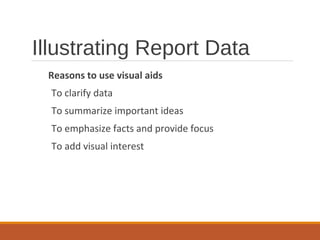
Illustrating Report Data
Reasons to use visual aids
To clarify data
To summarize important ideas
To emphasize facts and provide focus
To add visual interest
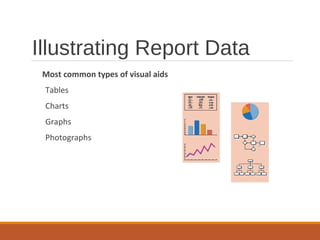
Illustrating Report Data
Most common types of visual aids
Tables
Charts
Graphs
Photographs
Matching Visual Aids
With Objectives
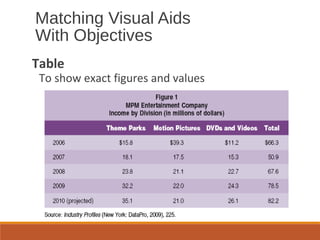
Table
To show exact figures and values
Matching Visual Aids
With Objectives
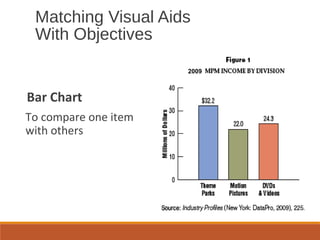
Bar Chart
To compare one item
with others
2009
Matching Visual Aids
With Objectives
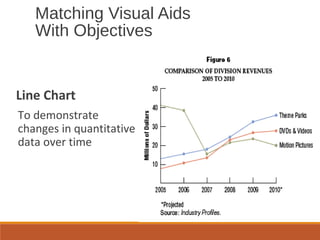
Line Chart
To demonstrate
changes in quantitative
data over time
Matching Visual Aids
With Objectives
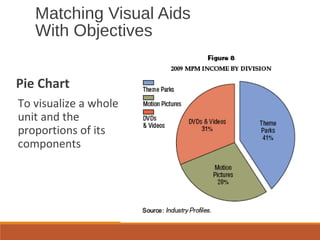
Pie Chart
To visualize a whole
unit and the
proportions of its
components
Matching Visual Aids
With Objectives
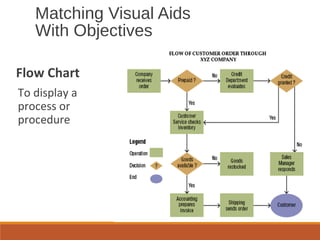
Flow Chart
To display a
process or
procedure
Matching Visual Aids
With Objectives
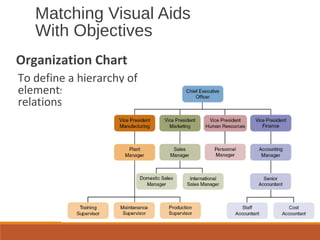
Organization Chart
To define a hierarchy of
elements or a set of
relationships.
Matching Visual Aids
With Objectives
Photograph, Map, Illustration
To achieve authenticity, to spotlight a location, or to
show an item in use.
Tips for Effective Use of Visual
Aids
Choose an appropriate visual aid to illustrate
your objective.
Clearly identify the contents of the visual aid
with a meaningful title and appropriate
labels.
Refer the reader to the visual aid by
discussing it in the text and mentioning its
location and figure number.
Tips for Effective Use of Visual
Aids
Locate the visual aid close to its reference in
the text.
Strive for vertical placement of visual aids.
Give credit to the source if appropriate.
Parts of a Formal Report
Introductory Parts
Title page
Letter of authorization
Letter of transmittal
Table of contents
Executive summary, abstract,
synopsis, or epitome.
Parts of a Formal Report
Body of Report
Introduction or background
Discussion of findings
Summary, conclusions, recommendations
Supplementary Parts of a Formal Report
 Footnotes or endnotes
 Bibliography
 Appendix
Title page
◦Balance the following lines:
◦ Name of the report in all caps
◦ Receiver’s name, title, and organization
◦ Author’s name, title, and organization
◦ Date submitted
Formal Report Components
Letter or memo of transmittal
◦Announce the topic and explain who authorized it.
◦Briefly describe the project and preview the conclusions –
if the reader is supportive.
◦Close by expressing appreciation for the assignment,
suggesting follow-up actions, acknowledging the help of
others, and offering to answer questions.
Formal Report Components
Table of contents
◦Show the beginning page number where each report
heading appears in the report.
◦Connect page numbers and headings with dots.
Formal Report Components
List of illustrations
◦Include a list of tables, illustrations, or figures.
◦Place the list on the same page as the table of
contents if possible.
Formal Report Components
Executive summary or abstract
◦Summarize the report purpose, findings, conclusions, and
recommendations.
◦Gauge the length of the summary by the length of the
report and by the organization’s practices.
Formal Report Components
Introduction
◦Explain the problem motivating the report.
◦Describe the problem’s background and significance.
◦Clarify the scope and limitations of the report.
◦Consider reviewing relevant literature.
◦Consider describing data sources, methods, and key terms.
◦Close by previewing the report’s organization.
Formal Report Components
Body
◦Discuss, analyze, and interpret the research
findings or proposed solution to the problem.
◦Arrange the findings in logical segments that
follow your outline.
◦Use clear, descriptive headings.
Formal Report Components
Conclusions and recommendations
◦Explain what the findings mean in relation to the
problem.
◦Make enumerated recommendations, if
requested.
◦Suggest actions for solving the problem.
Formal Report Components
Appendix
◦Include items of interest to some, but not all, readers,
such as data-gathering tools like questionnaires.
Formal Report Components
References and bibliography
◦If footnotes are not provided, list all references in a
section called “Notes,” “Works Cited,” or “References.”
◦Optionally, include a bibliography showing all the works
cited (and perhaps consulted) arranged alphabetically.
Formal Report Components

Formal reports

  • 1.
    PROPOSALS AND FORMALPROPOSALSAND FORMAL REPORTSREPORTS Amna A. Rehman
  • 2.
    Understanding Business Proposals Definition Aproposal is a persuasive document designed to motivate the reader to spend, make, or save money. Proposals are written offers to solve problems, provide services, or sell equipmentKinds  Internal – May take the form of justification/recommendation report  External – Solicited (responding to RFP) or unsolicited (prospecting for business)  Formal – long, many parts  Informal – shorter, six main parts
  • 3.
    Important Terms A requestfor proposal (RFP) is a solicitation, often made through a bidding process, by an agency or company interested in procurement of a commodity, service or valuable asset, to potential suppliers to submit business proposals. A request for proposal (RFP) is a solicitation, often made through a bidding process, by an agency or company interested in procurement of a commodity, service or valuable asset, to potential suppliers to submit business proposals. Proposals may be solicited or unsolicited. In a solicited proposal, a company or agency advertises that it desires the solution to a problem. In most cases, this company or agency sends out a request for proposals, often called an RFP, that presents a problem which needs addressing. A solicited proposal is when the customer asks for a proposal. They may ask verbally or they may issue a written Request for Proposals (RFP). An unsolicited proposal is when you send them a proposal they haven't even asked for because you think they should buy from you or take some action.
  • 4.
    Informal proposals are usually presented in2- to 4-page letters or memos and have six main parts.  Introduction  Background  Proposal  Staffing  Budget  Authorization request Informal Proposals
  • 5.
    Introduction ◦Explain why theproposal is being made. ◦Develop a persuasive “hook.” Suggest excellent results, low cost, or exclusive resources. Identify a problem or name a key issue or benefit. Informal Proposals
  • 6.
    Mary Ellen Guffey,Business Communication: Process and Product, 5e CH. 14, SLIDE 6 Background, Problem ◦Discuss the significance of the proposal and its goals or purposes. ◦For unsolicited proposals, convince the reader that a problem exists. ◦For solicited proposals, show that you fully understand the problem and its ramifications. Informal Proposals
  • 7.
    Informal Proposals Proposal, Plan ◦Presentyour plan for solving the problem. ◦Describe implementation and evaluation. ◦Outline a schedule showing dates.
  • 8.
    Staffing ◦Explain the specificcredentials and expertise of the key personnel for the project. ◦Show that your support staff and resources are superior to those of the competition. Informal Proposals
  • 9.
    Budget ◦Itemize costs carefully.Proposals are contracts. ◦Present a deadline for the bid figures. Informal Proposals
  • 10.
    Introduction should provide“hook” to capture reader’s interest. Background section identifies problems and goals of project. Proposal discusses plan and schedule for solving existing problem. Staffing section describes credentials and expertise of project leaders. Budget indicates project costs. Authorization asks for approval to proceed. Summary - Informal Proposals
  • 11.
    Formal proposals includeall the basic parts of informal proposals but may have additional parts. Possible additional parts: ◦Copy of RFP ◦Letter or memo of transmittal ◦Abstract and/or executive summary ◦Title page ◦Table of contents ◦List of figures ◦Appendix Formal Proposals
  • 12.
  • 13.
    Researching Secondary Data ElectronicDatabases Collections of magazine, newspaper, journal articles Examples ◦EBSCO Business Source Premier ◦Factiva ◦ABI/Inform ◦LexisNexis Print Resources  Books  Periodicals  Bibliographic indexes such as Reader’s Guide
  • 14.
    Researching Secondary Data TheWeb Product data Mission statements Staff directories Press releases Company news Article reprints Employment information Facts of all kinds Blogs (weblogs) for consumer reviews and opinions
  • 15.
    Web Search Tips andTechniques Use two or three search tools. Know your search tool. Understand case sensitivity in keyword searches.  Use quotation marks.  Omit articles and prepositions.  Proofread your search words.  Keep trying.  Consider searching blogs, wikis, and social networks.
  • 16.
  • 17.
    Generating Primary Data Surveying Develop questions, conduct trial.  Work in person or online. Interviewing  Locate an expert.  Consider posting an inquiry to an Internet newsgroup.  Prepare for the interview.  Maintain a professional attitude.  Prepare objective, friendly questions.  Watch the time.  End graciously.
  • 18.
    Generating Primary Data Observing Be objective.  Quantify observations. Experimenting  Develop rigorous research design.  Pay careful attention to matching experimental and control groups.
  • 19.
    Documenting Data What todocument Another person's ideas, opinions, examples, or theory Any facts, statistics, and graphics that are not common knowledge Quotations of another person's actual spoken or written words Paraphrases of another person's spoken or written words
  • 20.
  • 21.
  • 22.
    Levels of Headingsin Reports The main points used to outline a report often become the main headings of the written report. ◦Major headings are centered and typed in bold font. ◦Second-level headings start at the left margin. ◦Third-level headings are indented and become part of the paragraph Click the icon to view a document with headings.
  • 23.
    Illustrating Report Data Reasonsto use visual aids To clarify data To summarize important ideas To emphasize facts and provide focus To add visual interest
  • 24.
    Illustrating Report Data Mostcommon types of visual aids Tables Charts Graphs Photographs
  • 25.
    Matching Visual Aids WithObjectives Table To show exact figures and values
  • 26.
    Matching Visual Aids WithObjectives Bar Chart To compare one item with others 2009
  • 27.
    Matching Visual Aids WithObjectives Line Chart To demonstrate changes in quantitative data over time
  • 28.
    Matching Visual Aids WithObjectives Pie Chart To visualize a whole unit and the proportions of its components
  • 29.
    Matching Visual Aids WithObjectives Flow Chart To display a process or procedure
  • 30.
    Matching Visual Aids WithObjectives Organization Chart To define a hierarchy of elements or a set of relationships.
  • 31.
    Matching Visual Aids WithObjectives Photograph, Map, Illustration To achieve authenticity, to spotlight a location, or to show an item in use.
  • 32.
    Tips for EffectiveUse of Visual Aids Choose an appropriate visual aid to illustrate your objective. Clearly identify the contents of the visual aid with a meaningful title and appropriate labels. Refer the reader to the visual aid by discussing it in the text and mentioning its location and figure number.
  • 33.
    Tips for EffectiveUse of Visual Aids Locate the visual aid close to its reference in the text. Strive for vertical placement of visual aids. Give credit to the source if appropriate.
  • 34.
    Parts of aFormal Report Introductory Parts Title page Letter of authorization Letter of transmittal Table of contents Executive summary, abstract, synopsis, or epitome.
  • 35.
    Parts of aFormal Report Body of Report Introduction or background Discussion of findings Summary, conclusions, recommendations Supplementary Parts of a Formal Report  Footnotes or endnotes  Bibliography  Appendix
  • 36.
    Title page ◦Balance thefollowing lines: ◦ Name of the report in all caps ◦ Receiver’s name, title, and organization ◦ Author’s name, title, and organization ◦ Date submitted Formal Report Components
  • 37.
    Letter or memoof transmittal ◦Announce the topic and explain who authorized it. ◦Briefly describe the project and preview the conclusions – if the reader is supportive. ◦Close by expressing appreciation for the assignment, suggesting follow-up actions, acknowledging the help of others, and offering to answer questions. Formal Report Components
  • 38.
    Table of contents ◦Showthe beginning page number where each report heading appears in the report. ◦Connect page numbers and headings with dots. Formal Report Components
  • 39.
    List of illustrations ◦Includea list of tables, illustrations, or figures. ◦Place the list on the same page as the table of contents if possible. Formal Report Components
  • 40.
    Executive summary orabstract ◦Summarize the report purpose, findings, conclusions, and recommendations. ◦Gauge the length of the summary by the length of the report and by the organization’s practices. Formal Report Components
  • 41.
    Introduction ◦Explain the problemmotivating the report. ◦Describe the problem’s background and significance. ◦Clarify the scope and limitations of the report. ◦Consider reviewing relevant literature. ◦Consider describing data sources, methods, and key terms. ◦Close by previewing the report’s organization. Formal Report Components
  • 42.
    Body ◦Discuss, analyze, andinterpret the research findings or proposed solution to the problem. ◦Arrange the findings in logical segments that follow your outline. ◦Use clear, descriptive headings. Formal Report Components
  • 43.
    Conclusions and recommendations ◦Explainwhat the findings mean in relation to the problem. ◦Make enumerated recommendations, if requested. ◦Suggest actions for solving the problem. Formal Report Components
  • 44.
    Appendix ◦Include items ofinterest to some, but not all, readers, such as data-gathering tools like questionnaires. Formal Report Components
  • 45.
    References and bibliography ◦Iffootnotes are not provided, list all references in a section called “Notes,” “Works Cited,” or “References.” ◦Optionally, include a bibliography showing all the works cited (and perhaps consulted) arranged alphabetically. Formal Report Components