Operators, Loops,
Conditional
statements in C#
Table of contents
• Operators
 Arithmetic
 Conditional
 Logic
 Binary
 Operators Priority
• Conditional statements
 if
 if else
 goto
 switch
 break
 continue
Table of contents (1)
• Loops
 for
 while
 do while
 Foreach
• If we have time
 Arrays
 Strings
 Objects & structures
Operators in C#
Category Operators
Arithmetic + - * / % ++ --
Logical && || ^ !
Binary & | ^ ~ << >>
Comparison == != < > <= >=
Assignment = += -= *= /= %= &= |= ^= <<=
>>=
String concatenation +
Type conversion is as typeof
Other . [] () ?: new
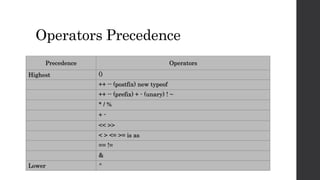
Operators Precedence
Precedence Operators
Highest ()
++ -- (postfix) new typeof
++ -- (prefix) + - (unary) ! ~
* / %
+ -
<< >>
< > <= >= is as
== !=
&
Lower ^
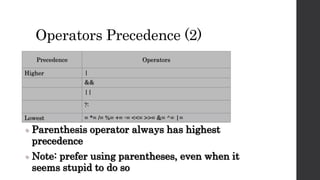
Operators Precedence (2)
Precedence Operators
Higher |
&&
||
?:
Lowest = *= /= %= += -= <<= >>= &= ^= |=
 Parenthesis operator always has highest
precedence
 Note: prefer using parentheses, even when it
seems stupid to do so
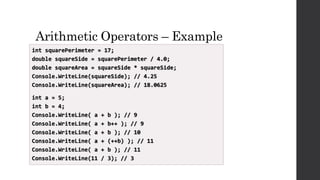
Arithmetic Operators – Example
int squarePerimeter = 17;
double squareSide = squarePerimeter / 4.0;
double squareArea = squareSide * squareSide;
Console.WriteLine(squareSide); // 4.25
Console.WriteLine(squareArea); // 18.0625
int a = 5;
int b = 4;
Console.WriteLine( a + b ); // 9
Console.WriteLine( a + b++ ); // 9
Console.WriteLine( a + b ); // 10
Console.WriteLine( a + (++b) ); // 11
Console.WriteLine( a + b ); // 11
Console.WriteLine(11 / 3); // 3
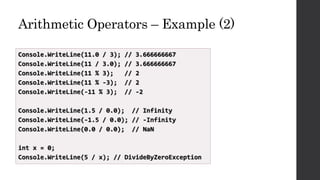
Arithmetic Operators – Example (2)
Console.WriteLine(11.0 / 3); // 3.666666667
Console.WriteLine(11 / 3.0); // 3.666666667
Console.WriteLine(11 % 3); // 2
Console.WriteLine(11 % -3); // 2
Console.WriteLine(-11 % 3); // -2
Console.WriteLine(1.5 / 0.0); // Infinity
Console.WriteLine(-1.5 / 0.0); // -Infinity
Console.WriteLine(0.0 / 0.0); // NaN
int x = 0;
Console.WriteLine(5 / x); // DivideByZeroException
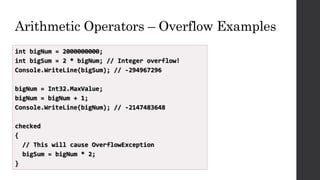
Arithmetic Operators – Overflow Examples
int bigNum = 2000000000;
int bigSum = 2 * bigNum; // Integer overflow!
Console.WriteLine(bigSum); // -294967296
bigNum = Int32.MaxValue;
bigNum = bigNum + 1;
Console.WriteLine(bigNum); // -2147483648
checked
{
// This will cause OverflowException
bigSum = bigNum * 2;
}
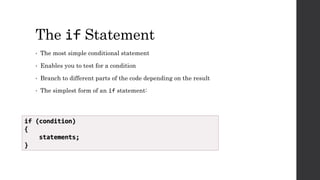
The if Statement
• The most simple conditional statement
• Enables you to test for a condition
• Branch to different parts of the code depending on the result
• The simplest form of an if statement:
if (condition)
{
statements;
}
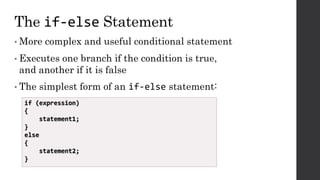
The if-else Statement
• More complex and useful conditional statement
• Executes one branch if the condition is true,
and another if it is false
• The simplest form of an if-else statement:
if (expression)
{
statement1;
}
else
{
statement2;
}
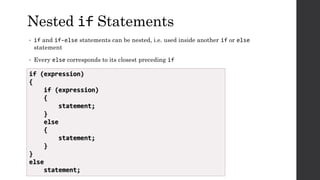
Nested if Statements
• if and if-else statements can be nested, i.e. used inside another if or else
statement
• Every else corresponds to its closest preceding if
if (expression)
{
if (expression)
{
statement;
}
else
{
statement;
}
}
else
statement;
Multiple if-else-if-else-…
• Sometimes we need to use another if-construction in the else block
 Thus else if can be used:
int ch = 'X';
if (ch == 'A' || ch == 'a')
{
Console.WriteLine("Vowel [ei]");
}
else if (ch == 'E' || ch == 'e')
{
Console.WriteLine("Vowel [i:]");
}
else if …
else …
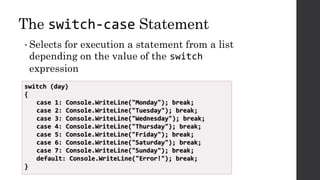
The switch-case Statement
• Selects for execution a statement from a list
depending on the value of the switch
expression
switch (day)
{
case 1: Console.WriteLine("Monday"); break;
case 2: Console.WriteLine("Tuesday"); break;
case 3: Console.WriteLine("Wednesday"); break;
case 4: Console.WriteLine("Thursday"); break;
case 5: Console.WriteLine("Friday"); break;
case 6: Console.WriteLine("Saturday"); break;
case 7: Console.WriteLine("Sunday"); break;
default: Console.WriteLine("Error!"); break;
}
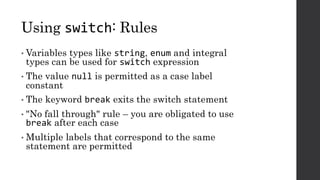
Using switch: Rules
• Variables types like string, enum and integral
types can be used for switch expression
• The value null is permitted as a case label
constant
• The keyword break exits the switch statement
• "No fall through" rule – you are obligated to use
break after each case
• Multiple labels that correspond to the same
statement are permitted
What Is Loop?
• A loop is a control statement that allows repeating execution of a block of
statements
 May execute a code block fixed number of times
 May execute a code block while given condition holds
 May execute a code block for each member of a collection
• Loops that never end are called an infinite loops
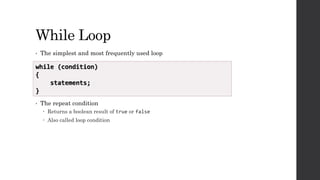
While Loop
• The simplest and most frequently used loop
• The repeat condition
 Returns a boolean result of true or false
 Also called loop condition
while (condition)
{
statements;
}
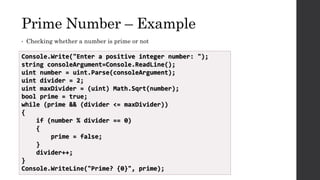
Prime Number – Example
• Checking whether a number is prime or not
Console.Write("Enter a positive integer number: ");
string consoleArgument=Console.ReadLine();
uint number = uint.Parse(consoleArgument);
uint divider = 2;
uint maxDivider = (uint) Math.Sqrt(number);
bool prime = true;
while (prime && (divider <= maxDivider))
{
if (number % divider == 0)
{
prime = false;
}
divider++;
}
Console.WriteLine("Prime? {0}", prime);
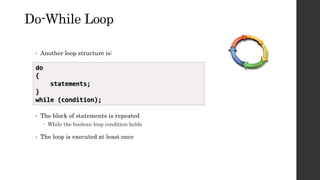
Do-While Loop
• Another loop structure is:
• The block of statements is repeated
 While the boolean loop condition holds
• The loop is executed at least once
do
{
statements;
}
while (condition);
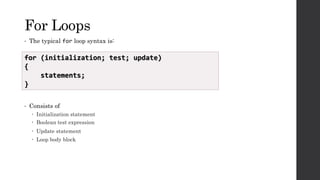
For Loops
• The typical for loop syntax is:
• Consists of
 Initialization statement
 Boolean test expression
 Update statement
 Loop body block
for (initialization; test; update)
{
statements;
}
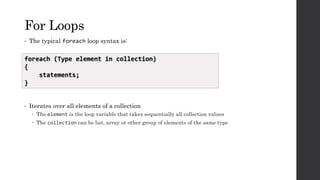
For Loops
• The typical foreach loop syntax is:
• Iterates over all elements of a collection
 The element is the loop variable that takes sequentially all collection values
 The collection can be list, array or other group of elements of the same type
foreach (Type element in collection)
{
statements;
}
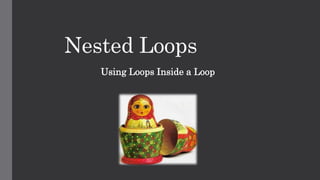
Nested Loops
Using Loops Inside a Loop
C# Jump Statements
• Jump statements are:
 break, continue, goto
• How continue works?
 In while and do-while loops jumps to the test expression
 In for loops jumps to the update expression
• To exit an inner loop use break
• To exit outer loops use goto with a label
 Avoid using goto! (it is considered harmful)
Execersises
1. Read 2 numbers from the console and output the bigger.
2. Read a number from the console and output if it is even or odd.
3. Read 3 numbers from the console and order them in an ascending order.
4. Output all odd numbers from 1 to 20.
5. Read a number from the console and output its factorial.
6. Check if a number is prime.
7. Calculate the product of all numbers in the interval [N..M].(Tip:Check
the input of the program.).
Пресметнете резултата от умножението на всички числа в интервала
[N:M]
8. Calculate N raised to power M using for-loop.
9. Print a triangle like the one below:
1
1 2
1 2 3
…..
1 2 … 50
10. Въведете едно число и изкарайте с цифрите в обратен ред.
Questions?
Thank you
Vladislav Hadzhiyski
Email: Vladislav.Hadzhiyski@gmail.com

Operators loops conditional and statements

  • 1.
  • 2.
    Table of contents •Operators  Arithmetic  Conditional  Logic  Binary  Operators Priority • Conditional statements  if  if else  goto  switch  break  continue
  • 3.
    Table of contents(1) • Loops  for  while  do while  Foreach • If we have time  Arrays  Strings  Objects & structures
  • 4.
    Operators in C# CategoryOperators Arithmetic + - * / % ++ -- Logical && || ^ ! Binary & | ^ ~ << >> Comparison == != < > <= >= Assignment = += -= *= /= %= &= |= ^= <<= >>= String concatenation + Type conversion is as typeof Other . [] () ?: new
  • 5.
    Operators Precedence Precedence Operators Highest() ++ -- (postfix) new typeof ++ -- (prefix) + - (unary) ! ~ * / % + - << >> < > <= >= is as == != & Lower ^
  • 6.
    Operators Precedence (2) PrecedenceOperators Higher | && || ?: Lowest = *= /= %= += -= <<= >>= &= ^= |=  Parenthesis operator always has highest precedence  Note: prefer using parentheses, even when it seems stupid to do so
  • 7.
    Arithmetic Operators –Example int squarePerimeter = 17; double squareSide = squarePerimeter / 4.0; double squareArea = squareSide * squareSide; Console.WriteLine(squareSide); // 4.25 Console.WriteLine(squareArea); // 18.0625 int a = 5; int b = 4; Console.WriteLine( a + b ); // 9 Console.WriteLine( a + b++ ); // 9 Console.WriteLine( a + b ); // 10 Console.WriteLine( a + (++b) ); // 11 Console.WriteLine( a + b ); // 11 Console.WriteLine(11 / 3); // 3
  • 8.
    Arithmetic Operators –Example (2) Console.WriteLine(11.0 / 3); // 3.666666667 Console.WriteLine(11 / 3.0); // 3.666666667 Console.WriteLine(11 % 3); // 2 Console.WriteLine(11 % -3); // 2 Console.WriteLine(-11 % 3); // -2 Console.WriteLine(1.5 / 0.0); // Infinity Console.WriteLine(-1.5 / 0.0); // -Infinity Console.WriteLine(0.0 / 0.0); // NaN int x = 0; Console.WriteLine(5 / x); // DivideByZeroException
  • 9.
    Arithmetic Operators –Overflow Examples int bigNum = 2000000000; int bigSum = 2 * bigNum; // Integer overflow! Console.WriteLine(bigSum); // -294967296 bigNum = Int32.MaxValue; bigNum = bigNum + 1; Console.WriteLine(bigNum); // -2147483648 checked { // This will cause OverflowException bigSum = bigNum * 2; }
  • 10.
    The if Statement •The most simple conditional statement • Enables you to test for a condition • Branch to different parts of the code depending on the result • The simplest form of an if statement: if (condition) { statements; }
  • 11.
    The if-else Statement •More complex and useful conditional statement • Executes one branch if the condition is true, and another if it is false • The simplest form of an if-else statement: if (expression) { statement1; } else { statement2; }
  • 12.
    Nested if Statements •if and if-else statements can be nested, i.e. used inside another if or else statement • Every else corresponds to its closest preceding if if (expression) { if (expression) { statement; } else { statement; } } else statement;
  • 13.
    Multiple if-else-if-else-… • Sometimeswe need to use another if-construction in the else block  Thus else if can be used: int ch = 'X'; if (ch == 'A' || ch == 'a') { Console.WriteLine("Vowel [ei]"); } else if (ch == 'E' || ch == 'e') { Console.WriteLine("Vowel [i:]"); } else if … else …
  • 14.
    The switch-case Statement •Selects for execution a statement from a list depending on the value of the switch expression switch (day) { case 1: Console.WriteLine("Monday"); break; case 2: Console.WriteLine("Tuesday"); break; case 3: Console.WriteLine("Wednesday"); break; case 4: Console.WriteLine("Thursday"); break; case 5: Console.WriteLine("Friday"); break; case 6: Console.WriteLine("Saturday"); break; case 7: Console.WriteLine("Sunday"); break; default: Console.WriteLine("Error!"); break; }
  • 15.
    Using switch: Rules •Variables types like string, enum and integral types can be used for switch expression • The value null is permitted as a case label constant • The keyword break exits the switch statement • "No fall through" rule – you are obligated to use break after each case • Multiple labels that correspond to the same statement are permitted
  • 16.
    What Is Loop? •A loop is a control statement that allows repeating execution of a block of statements  May execute a code block fixed number of times  May execute a code block while given condition holds  May execute a code block for each member of a collection • Loops that never end are called an infinite loops
  • 17.
    While Loop • Thesimplest and most frequently used loop • The repeat condition  Returns a boolean result of true or false  Also called loop condition while (condition) { statements; }
  • 18.
    Prime Number –Example • Checking whether a number is prime or not Console.Write("Enter a positive integer number: "); string consoleArgument=Console.ReadLine(); uint number = uint.Parse(consoleArgument); uint divider = 2; uint maxDivider = (uint) Math.Sqrt(number); bool prime = true; while (prime && (divider <= maxDivider)) { if (number % divider == 0) { prime = false; } divider++; } Console.WriteLine("Prime? {0}", prime);
  • 19.
    Do-While Loop • Anotherloop structure is: • The block of statements is repeated  While the boolean loop condition holds • The loop is executed at least once do { statements; } while (condition);
  • 20.
    For Loops • Thetypical for loop syntax is: • Consists of  Initialization statement  Boolean test expression  Update statement  Loop body block for (initialization; test; update) { statements; }
  • 21.
    For Loops • Thetypical foreach loop syntax is: • Iterates over all elements of a collection  The element is the loop variable that takes sequentially all collection values  The collection can be list, array or other group of elements of the same type foreach (Type element in collection) { statements; }
  • 22.
  • 23.
    C# Jump Statements •Jump statements are:  break, continue, goto • How continue works?  In while and do-while loops jumps to the test expression  In for loops jumps to the update expression • To exit an inner loop use break • To exit outer loops use goto with a label  Avoid using goto! (it is considered harmful)
  • 24.
    Execersises 1. Read 2numbers from the console and output the bigger. 2. Read a number from the console and output if it is even or odd. 3. Read 3 numbers from the console and order them in an ascending order. 4. Output all odd numbers from 1 to 20. 5. Read a number from the console and output its factorial. 6. Check if a number is prime. 7. Calculate the product of all numbers in the interval [N..M].(Tip:Check the input of the program.). Пресметнете резултата от умножението на всички числа в интервала [N:M]
  • 25.
    8. Calculate Nraised to power M using for-loop. 9. Print a triangle like the one below: 1 1 2 1 2 3 ….. 1 2 … 50 10. Въведете едно число и изкарайте с цифрите в обратен ред.
  • 26.
  • 27.
    Thank you Vladislav Hadzhiyski Email:Vladislav.Hadzhiyski@gmail.com

Editor's Notes

  • #23 (c) 2007 National Academy for Software Development - http://academy.devbg.org. All rights reserved. Unauthorized copying or re-distribution is strictly prohibited.*