Unit – II
Control Flow, Relational Expressions & Arrays: Conditional Branching Statements: if, if-
else, if- else–if, switch. Basic Loop Structures: while, do-while loops, for loop, nested loops,
The Break andContinue Statements, goto statement. Arrays: Introduction, Operations on
Arrays, One dimensional Array, Two dimensional Array, Multi dimensional arrays.
CONTROL STRUCTURES / STATEMENTS
C supports mainly three types of control statements.
I. Decision making statements
1) Simple if Statement
2) if – else Statement
3) Nested if-else statement
4) else – if Ladder
5) switch statement
II. Loop control statements
1) for Loop
2) while Loop
3) do-while Loop
III. Unconditional control statements
1) goto Statement
2) break Statement
3) continue Statement
Decision making statements
The Simple “if” Statement: If the expression returns true, then the statement-inside will be
executed, otherwise statement-inside is skipped and only the statement-outside is executed.
Syntax:
if(expression)
{
statement inside;
}
statement outside;
Example:
#include <stdio.h>
void main( )
{
int x, y;
x = 15;
y = 13;
if (x > y )
{
printf("x is greater than y");
}
}
Output:
x is greater than y
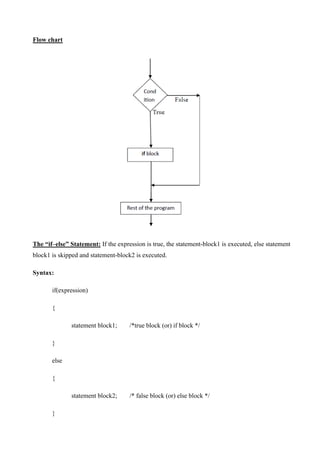
Flow chart
The “if–else” Statement: If the expression is true, the statement-block1 is executed, else statement
block1 is skipped and statement-block2 is executed.
Syntax:
if(expression)
{
statement block1; /*true block (or) if block */
}
else
{
statement block2; /* false block (or) else block */
}
Flow chart
Example:
#include <stdio.h>
void main( )
{
int x, y;
x = 15;
y = 18;
if (x > y )
{
printf("x is greater than y");
}
else
{
printf("y is greater than x");
}
}
The “Nested if-else” statement: Using of one if-else statement in another if-else statement is called
as nested if-else control statement.
if expression is false then statement-block3 will be executed, otherwise the execution
continues and enters inside the first if to perform the check for the next if block, where if expression
1 is true the statement-block1 is executed otherwise statement-block2 is executed.
Syntax:
if( expression )
{
if( expression1 )
{
statement block1;
}
else
{
statement block2;
}
}
else
{
statement block3;
}
Example:
#include <stdio.h>
void main( )
{
int a, b, c;
printf("Enter 3 numbers...");
scanf("%d%d%d",&a, &b, &c);
if(a > b)
{
if(a > c)
{
printf("a is the greatest");
}
else
{
printf("c is the greatest");
}
}
else
{
if(b > c)
{
printf("b is the greatest");
}
else
{
printf("c is the greatest");
}
}
}
Flow chart
The “else – if Ladder”:
• This is another way of putting if „s together when multiple decisions are involved.
• A multipath decision is a chain of if ‟s in which the statement associated with each else is an
if.
• Hence it forms a ladder called else–if ladder.
Syntax:
if(expression1)
{
statement block1;
}
else if(expression2)
{
statement block2;
}
else if(expression3 )
{
statement block3;
}
else
default statement;
Example:
#include <stdio.h>
void main( )
{
int a;
printf("Enter a number...");
scanf("%d", &a);
if(a%5 == 0 && a%8 == 0)
{
printf("Divisible by both 5 and 8");
}
else if(a%8 == 0)
{
printf("Divisible by 8");
}
else if(a%5 == 0)
{
printf("Divisible by 5");
}
else
{
printf("Divisible by none");
}
}
Flow chart
The “switch-case” statement:
• The switch statement is a multiway branch statement. It provides an easy way to dispatch
execution to different parts of code based on the value of the expression.
• Switch is a control statement that allows a value to change control of execution.
Syntax:
switch (expression)
{
case constant1:
// statements
break;
case constant2:
// statements
break;
.
.
default:
// default statements
}
• The expression is evaluated once and compared with the values of each case label.
• If there is a match, the corresponding statements after the matching label are executed.
• For example, if the value of the expression is equal to constant2, statements after case
constant2: are executed until break is encountered.
• If there is no match, the default statements are executed.
• If we do not use break, all statements after the matching label are executed.
• By the way, the default clause inside the switch statement is optional.
Example:
// Program to create a simple calculator
#include <stdio.h>
int main()
{
char operator;
double n1, n2;
printf("Enter an operator (+, -, *, /): ");
scanf("%c", &operator);
printf("Enter two operands: ");
scanf("%lf %lf",&n1, &n2);
switch(operator)
{
case '+':
printf("%.1lf + %.1lf = %.1lf",n1, n2, n1+n2);
break;
case '-':
printf("%.1lf - %.1lf = %.1lf",n1, n2, n1-n2);
break;
case '*':
printf("%.1lf * %.1lf = %.1lf",n1, n2, n1*n2);
break;
case '/':
printf("%.1lf / %.1lf = %.1lf",n1, n2, n1/n2);
break;
// operator doesn't match any case constant +, -, *, /
default:
printf("Error! operator is not correct");
}
return 0;
}
Output:
Enter an operator (+, -, *,): -
Enter two operands: 32.5
12.4
32.5 - 12.4 = 20.1
Flow chart
Loop Control Statements
Loop: A loop is defined as a block of statements which are repeatedly executed for certain number
of times.
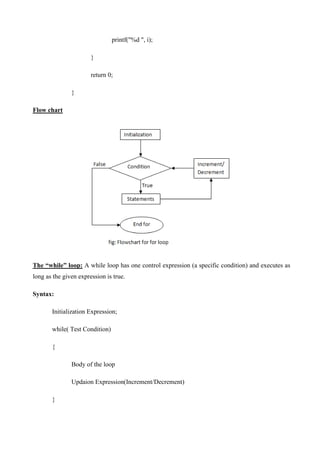
The “for” loop: A for loop is a repetition control structure that allows you to efficiently write a
loop that needs to execute a specific number of times.
The 3 actions are “initialize expression”, “Test Condition expression” and “updation
expression” ”
• The expressions are separated by Semi-Colons (;).
• The loop variable should be assigned with a starting and final value.
• Each time the updated value is checked by the loop itself.
• Increment / Decrement is the numerical value added or subtracted to the variable in each
round of the loop.
Syntax:
for(initialize expression; test condition; updation(increment/ decrement))
{
Statement-1;
Statement-2;
}
• The initialization sets a loop to an initial value. This statement is executed only once.
• The test condition is a relational expression that determines the number of iterations desired
or it determines when to exit from the loop.
• The for loop continues to execute as long as conditional test is satisfied.
• When the condition becomes false the control of the program exits from the body of for loop
and executes next statements after the body of the loop.
• The updation(increment or decrement operations) decides how to make changes in the loop.
Example:
// Print numbers from 1 to 10
#include <stdio.h>
int main()
{
int i;
for (i = 1; i < 11; ++i)
{
printf("%d ", i);
}
return 0;
}
Flow chart
The “while” loop: A while loop has one control expression (a specific condition) and executes as
long as the given expression is true.
Syntax:
Initialization Expression;
while( Test Condition)
{
Body of the loop
Updaion Expression(Increment/Decrement)
}
• The while is an entry – controlled loop statement.
• The test condition is evaluated and if the condition is true, then the body of the loop is
executed.
• The execution process is repeated until the test condition becomes false and the control is
transferred out of the loop.
• On exit, the program continues with the statement immediately after the body of the loop.
• The body of the loop may have one or more statements.
• The braces are needed only if the body contains two or more statements.
Example:
// Print numbers from 1 to 5
#include <stdio.h>
int main()
{
int i = 1;
while (i <= 5)
{
printf("%dn", i);
++i;
}
return 0;
}
Flow chart
The “ do-while “ loop:
• In do-while, the condition is checked at the end of the loop.
• The do-while loop will execute at least one time even if the condition is false initially.
• The do-while loop executes until the condition becomes false.
Syntax:
Initialization Expression;
do
{
Body of the loop
Updation Expression;
} while ( Test Condition);
Example:
//Write a program to print 10 to 20 numbers
#include <stdio.h>
int main ()
{
/* local variable definition */
int a = 10;
/* do loop execution */
do
{
printf("value of a: %dn", a);
a = a + 1;
}while( a <= 20 );
return 0;
}
Flow chart
The Nested Loops: Nested loop means a loop statement inside another loop statement. That is why
nested loops are also called as “loop inside loop“.
Syntax for Nested For loop
for( initialize ; test condition ; updation) /* outer loop */
{
for(initialize ; test condition ; updation) /* inner loop */
{
Body of loop;
}
}
Syntax for Nested While loop:
while(condition)
{
while(condition)
{
// statement of inside loop
}
// statement of outer loop
}
Syntax for Nested Do-While loop:
do
{
do
{
// statement of inside loop
}while(condition);
// statement of outer loop
}while(condition);
Unconditional Control Statements
The “ break ” Statement:
• A break statement terminates the execution of the loop and the control is transferred to the
statement immediately following the loop.
• i.e., the break statement is used to terminate loops or to exit from a switch.
• It can be used within a for, while, do-while, or switch statement.
• The break statement is written simply as break;
Syntax:
break;
Example:
switch (choice = = toupper(getchar( ))
{
case “R‟: printf(“Red”);
break;
case “W‟: printf(“White”);
break;
case “B‟: printf(“Blue”);
break;
default: printf(“Error”);
}
The “ continue “ Statement:
• The continue statement is used to bypass the remainder of the current pass through a loop.
• The loop does not terminate when a continue statement is encountered.
• Instead, the remaining loop statements are skipped and the computation proceeds directly to
the next pass through the loop.
• The continue statement can be included within a while, a do-while, a for statement.
• It is simply written as “continue”.
• The continue statement tells the compiler “Skip the following Statements and continue with
the next Iteration”.
• In “while‟ and “do‟ loops continue causes the control to go directly to the test – condition
and then to continue the iteration process.
Syntax:
Example:
Program to show the use of continue statement
# include<stdio.h>
void main( )
{
int i=1, num, sum =0;
for(i=0; i < 5; i ++)
{
printf(“ Enter an integer:”);
scanf( “%d”, &num);
if(num < 0)
{
printf(“you have entered a negative number”);
continue ; /* skip the remaining part of loop */
}
sum + = num;
}
printf(“The sum of the Positive Integers Entered = % d  n”, sum);
}
The “ goto” Statement:
• C supports the “goto‟ statement to branch unconditionally from one point to another in the
program.
• The goto requires a label in order to identify the place where the branch is to be made.
• A label is any valid variable name and must be followed by a colon( : ).
• The label is placed immediately before the statement where the control is to be transferred.
• The label can be any where in the program either before or after the goto label statement.
During running of a program, when a statement like “goto begin;” is met, the flow of control
will jump to the statement immediately following the label “begin:” this happens unconditionally.
• “goto‟ breaks the normal sequential execution of the program.
• If the “label:” is before the statement “goto label;” a loop will be formed and some statements
will be executed repeatedly. Such a jump is known as a „backward jump‟.
• If the “label:” is placed after the “goto label;” some statements will be skipped and the jump
is known as a “forward jump”.
Example:
Write a program to detect the entered number as to whether it is even or odd. Use goto statement.
# include<stdio.h>
# include<conio.h>
# include<stdlib.h>
void main( )
{
int x;
clrscr( );
printf(“Enter a Number:”);
scanf(“%d”, &x);
if(x % 2 = = 0)
goto even;
else
goto odd;
even:
printf(“n %d is Even Number”);
return;
odd:
printf(“ n %d is Odd Number”);
}
Arrays
• An array is collection of same data type elements in a single entity.
• An array is collection of homogeneous elements in a single variable.
• The fundamental data types, namely char, int, float, double are used to store only one value
at any given time.
• Hence these fundamental data types can handle limited amounts of data.
• To process such large amounts of data, we need a powerful data type that would facilitate
efficient storing, accessing and manipulation of data items.
• “C‟ supports a derived data type known as array that can be used for such applications.
• An array is a fixed size sequenced collection of elements of the same data type.
• It is simply grouping of like type data such as list of numbers, list of names etc.
• Individual values are called as elements.
• It allocates sequential memory locations.
Types Of Arrays:
We can use arrays to represent not only simple lists of values but also tables of data in
two or three or more dimensions.
• One – dimensional arrays
• Two – dimensional arrays
• Multidimensional arrays
One – Dimensional Array:
A list of items can be given one variable name using only one subscript and such a
variable is called a single – subscripted variable or a one – dimensional array.
Declaration of One-Dimensional Arrays:
• Like any other variables, arrays must be declared before they are used.
The general form of array declaration is
Syntax:
<datatype> <array_name>[sizeofarray];
• The datatype specifies the type of element that will be contained in the array, such as
int, float, or char.
• The size indicates the maximum number of elements that can be stored inside the array.
• The size of array should be a constant value.
Examples:
float height[50];
• Declares the height to be an array containing 50 real elements. Any subscripts 0 to 49
are valid.
int group[10];
• Declares the group as an array to contain a maximum of 10 integer constants.
char name[10];
• Declares the name as a character array (string) variable that can hold a maximum of 10
characters.
Ex: int number[10];
• The subscript should begin with number „0‟.
i.e. x[0].
• To represent a set of five numbers, say (35, 40, 20, 57, 19) by an array variable
“number”.
We may declare the variable “number” as
int number[5];
• Hence the computer reserves five storage locations as shown
number [0]
number [1]
number [2]
• The values to the array elements can be assigned as
number[0] = 35;
number[1] = 40;
number[2] = 20;
number[3] = 57;
number[4] = 19;
• This would cause the array number to store the values as
number[0]
number[1]
number[2]
number[3]
number[4]
Valid Statements:
• a = number[0] + 10;
• number[4] = number[0] + number[2];
35
40
20
57
19
• number[2] = x[5] + y[10];
• value[6] = number[i] * 3;
Example: Write a program to print bytes reserved for various types of data and space required
for storing them in memory using array.
# include<stdio.h>
# include<conio.h>
main ( )
{
int a[10];
char c[10];
float b[10];
clrscr( );
printf(“the type „int‟ requires %d bytes”, sizeof(int)); pirntf(“
n The type „char‟ requires %d bytes”, sizeof(char)); printf(“
n The type „float‟ requires %d bytes”, sizeof(float));
printf(“ n %d memory locations are reserved for ten „int‟ elements”, sizeof(a));
printf (“ n %d memory locations are reserved for ten „char‟ elements”,sizeof(c));
printf (“ n %d memory locations are reserved for ten „float‟ elements”,sizeof(b));
getch( );
}
Output:
The type „int‟ requires 2 bytes
The type „char‟ requires 1 bytes
The type „float‟ requires 4 bytes
20 memory locations are reserved for ten „int‟ elements 10
memory locations are reserved for ten „char‟ elements 40
memory locations are reserved for ten „float‟ elements.
Initialization of One – Dimensional Arrays:
• After an array is declared, its elements must be initialized. Otherwise they will contain
“garbage”.
• An array can be initialized at either of the following stages.
(i) At compile time
(ii) At run time.
(1) Compile Time Initialization:
We can initialize the elements of arrays in the same way as the ordinary
variables when they are declared.
The general form of initialization of array is
datatype array_name[size] = { list of values };
The values in the list are separated by commas.
Example:
int number[3] = {0,0,0};
• i.e., we will declare the variable number as an array of size 3 and will assign zero to
each element.
• If the number of values in the list is less than the number of elements, then only that
many elements will be initialized.
• The remaining elements will be set to zero automatically.
Ex:
float total[5] = { 0.0, 15.75, -10};
• The size may be omitted.
• In such cases, the compiler allocates enough space for all initialized elements.
Ex:
int counter [ ] = {1,1,1,1};
• This will declare the counter array to contain four elements with initial values 1.
• Character arrays may be initialized in a similar manner.
char name[]={„J‟,„o‟,„h‟,„n‟,„0‟};
• This declares the name to be an array of five characters initialized with the string “John”
ending with a null character.
• Alternative declaration is char name[ ] = “John”;
• Compile time initialization may be partial. i.e., the number of initializers may be less
than the declared size. In such cases the remaining elements are initialized to zero, if
the array type is numeric.And NULL if the type is char.
Ex: int number[5] = {10,20};
• Will initialize the first two elements to 10 & 20 respectively and the remaining elements
to zero.
Similarly
char city[5] = {„B‟};
will initialize the first element to „B‟ and the remaining four to NULL.
• If we have more initializers than the declared size, the compiler will produce an error.
int number[3] = {10,20,30,40};
will not work. It is illegal in C.
(2) Run Time Initialization:
• An array can be explicitly initialized at run time.
• This approach is usually applied for initializing long arrays.
Ex:
- - - - - -
- - - - - -
for(i=0; i<100; i++)
{
if (i<50)
sum [i] = 0.0;
else
sum [i]= 1.0;
}
• Here the first 50 elements of the array “sum” are initialized to zero.
• While remaining 50 elements are initialized to 1.0 at run time.
• We can also use a read function such as „scanf‟ to initialize an array.
Ex:
int x[3];
scanf(“ %d %d %d ”, &x[0], &x[1], &x[2]);
• This will initialize array elements with the values entered through the key board.
• Character arrays are called strings.
• There is a slight difference between an integer array and a character array.
• In character array NULL („0‟) character is automatically added at the end.
• In other types of arrays no character is placed at the end.
• Hence by using NULL character compiler detects the end of the character array.
Example-:Write a program to display character array with their address. #
include<stdio.h>
# include<conio.h>
void main( )
{
char name[10] = {„A‟, „R‟, „R‟, „A‟, „Y‟};
int i = 0;
clrscr( ) ;
printf(“ n character memory location n‟);
while(name[i] ! = „0‟)
{
printf(“ n [%c] t [%u]”, name[i], &name[i]);
i++;
}
}
Output:
Character Memory Location
[A] 4054
[R] 4055
[R] 4056
[A] 4057
[Y] 4058
Operations on Arrays
There are a number of operations that can be performed on an array which are:
1. Traversal
2. Insertion
3. Deletion
4. Searching
Traversal
Traversal means accessing each array element for a specific purpose, either to perform an
operation on them , counting the total number of elements or else using those values to calculate
some other result.
Example: Write a program to calculate the average marks of a particular student:
#include<stdio.h>
#include<conio.h>
int main()
{
clrscr();
int i, marks[5], n, sum = 0;
float avg;
printf("Enter the no.of subjects:n");
scanf("%d",&n);
printf("Enter the marks obtained in your %d subjectsn", n);
for(i=0;i<n;i++)
{
scanf("%d", &marks[i]);
}
for(i=0;i<n;i++)
{
sum = sum + marks[i];
}
avg = (sum / n);
printf("Average of marks is : %.2f n", avg);
return 0;
}
Output:
Enter the no.of subjects:
5
Enter the marks obtained in your 5 subjects
10
14
15
18
16
Average of marks is : 14.00
Insertion
Insert operation is to insert one or more data elements into an array. Based on the requirement,
a new element can be added at the beginning, end, or any given index of array.
Here, we see a practical implementation of insertion operation, where we add data at the end
of the array –
Example
#include <stdio.h>
main() {
int LA[] = {1,3,5,7,8};
int item = 10, k = 3, n = 5;
int i = 0, j = n;
printf("The original array elements are :n");
for(i = 0; i<n; i++) {
printf("LA[%d] = %d n", i, LA[i]);
}
n = n + 1;
while( j >= k) {
LA[j+1] = LA[j];
j = j - 1;
}
LA[k] = item;
printf("The array elements after insertion :n");
for(i = 0; i<n; i++) {
printf("LA[%d] = %d n", i, LA[i]);
}
}
Output
The original array elements are :
LA[0] = 1
LA[1] = 3
LA[2] = 5
LA[3] = 7
LA[4] = 8
The array elements after insertion :
LA[0] = 1
LA[1] = 3
LA[2] = 5
LA[3] = 10
LA[4] = 7
LA[5] = 8
Deletion
Deletion refers to removing an existing element from the array and re-organizing all elements
of an array.
Example
#include <stdio.h>
void main() {
int LA[] = {1,3,5,7,8};
int k = 3, n = 5;
int i, j;
printf("The original array elements are :n");
for(i = 0; i<n; i++) {
printf("LA[%d] = %d n", i, LA[i]);
}
j = k;
while( j < n) {
LA[j-1] = LA[j];
j = j + 1;
}
n = n -1;
printf("The array elements after deletion :n");
for(i = 0; i<n; i++) {
printf("LA[%d] = %d n", i, LA[i]);
}
}
Output
The original array elements are :
LA[0] = 1
LA[1] = 3
LA[2] = 5
LA[3] = 7
LA[4] = 8
The array elements after deletion :
LA[0] = 1
LA[1] = 3
LA[2] = 7
LA[3] = 8
Search
You can perform a search for an array element based on its value or its index.
Example
#include <stdio.h>
void main() {
int LA[] = {1,3,5,7,8};
int item = 5, n = 5;
int i = 0, j = 0;
printf("The original array elements are :n");
for(i = 0; i<n; i++) {
printf("LA[%d] = %d n", i, LA[i]);
}
while( j < n){
if( LA[j] == item ) {
break;
}
j = j + 1;
}
printf("Found element %d at position %dn", item, j+1);
}
Output
The original array elements are :
LA[0] = 1
LA[1] = 3
LA[2] = 5
LA[3] = 7
LA[4] = 8
Found element 5 at position 3
Two Dimensional Arrays
There could be situations where a table of values will have to be stored.
Consider a student table with marks in 3 subjects.
Student Mat Phy Chem.
Student # 1 89 77 84
Student # 2 98 89 80
Student # 3 75 70 82
Student # 4 60 75 80
Student # 5 84 80 75
• The above table contains a total of 15 values.
• We can think this table as a matrix consisting of 5 rows & 3 columns.
• Each row represents marks of student # 1 in all (different) subjects.
• Each column represents the subject wise marks of all students.
• In mathematics we represent a particular value in a matrix by using two subscripts such
as Vij.
• Here V denotes the entire matrix Vij refers to the value in “ i ”th row and “ j ”th column.
EXAMPLE:
In the above table V23 refers to the value „80‟.
• C allows us to define such tables of items by using two-dimensional arrays.
Definition:
A list of items can be given one variable name using two subscripts and such a variable
is called a two – subscripted variable or a two – dimensional array.
Two – Dimensional arrays can be declared as.
• The above table can be defined in „C‟ as
int V[5][3];
Representation of two Dimensional array in memory.
<data type> <array name>[row size] [column size] ;
column -0
[0] [0]
column-1
[0] [1]
column -2
[0] [2]
Row. 0 89 77 84
[1] [0] [1] [1] [1] [2]
Row. 1 98 89 80
[2] [0] [2] [1] [2] [2]
Row. 2
[3] [0] [3] [1] [3] [2]
Row. 3
[4] [0] [4] [1] [4] [2]
Row. 4
Initializing Two- Dimensional Arrays:
• Like the one-dimensional arrays, two-dimensional arrays may be initialized by
following their declaration with a list of initial values enclosed in braces.
int table[2] [3] = {0,0,0,1,1,1};
• This initializes the elements of first row to zero and the second row to one.
• This initialization is done row by row.
• The above statement can be equivalently written as
75 70 82
60 75 80
84 80 75
int table[2][3] = {0,0,0},{1,1,1} ;
we can also initialize a two – dimensional array in the form of a matrix as shown.
int table[2][3] = {
{0,0,0},
{1,1,1}
};
Commas are required after each brace that closes of a row, except in case of last row.
• If the values are missing in an initializer, they are automatically set to zero.
Ex: int table [2] [3] = {
{1,1}, 1 1 0
{2} 2 0 0
};
This will initialize the first two elements of the first row to one,
• The first element of the second row to two and all other elements to zero.
• When all the elements are to be initialized to zero, the following short-cut method may
be used.
int m[3][5] = { {0}, {0}, {0}};
• The first element of each row is explicitly initialized to zero while the other elements
are automatically initialized to zero.
• The following statement will also achieve the same result
int m[3][5] = { 0, 0 };
(1) Write a program to display the elements of two dimensional array.
# include<stdio.h>
# include<conio.h>
void main( )
{
int i,j;
int a[3][3] = { { 1,2,3}, {4,5,6}, {7,8,9}};
clrscr( );
printf(“elements of an array n n”);
for( i=0; i<3; i++)
{
for ( j=0; j<3; j++)
printf (“%dt”, a[ i ][ j ]);
} /* end of inner for loop */
printf(“n”);
} /* end of outer for loop */
getch( );
} /* end of main() function */
Output:
Elements of an Array
1 2 3
4 5 6
7 8 9
(2) Write a program to display 2-Dimensional array elements together with their
addresses.
# include<stdio.h>
# include<conio.h>
void main( )
{
int i,j;
int a[3][3] = {1,2,3{,{4,5,6},{7,8,9} ;
clrscr( );
printf(“Array Elements and address n n”);
printf(“col-0 col -1 col-2 n”);
prinf(“  n”);
printf(“Row 0t”)
for( i=0; i<3; i++)
{
for( j=0; j<3; j++)
printf(“%d [%u]”, a[ i ][ j ], &a[ i ][ j ]);
printf(“ n Row %d ”, i+1);
}
getch( );
}
Output:
Array Elements and address
Col – 0 col – 1 col -2
Row 0 1 [4052] 2[4054] 3[4056]
Row 1 4 [4058] 5[4060] 6[4062]
Row 2 7 [4064] 8 [4066] 9[4068]
MULTI – DIMENSIONAL ARRAY:
A list of items can be given one variable name using more than two subscripts and such a
variable is called Multi – dimensional array.
Three Dimensional Array:
A list of items can be given one variable name using three subscripts and such a
variable is called Three – dimensional array.
Declaration of Three-Dimensional Arrays :
Syntax:
<datatype> <array_name>[sizeofno.oftwoDimArray] [sizeofrow]
[sizeofcolom];The datatype specifies the type of elements that will be contained in the
array, such as int, float, or char.
Initializing Three- Dimensional Arrays:
Like the one-dimensional arrays, three-dimensional arrays may be initialized by
following their declaration with a list of initial values enclosed in braces.
int table[2][2][3] = {0,0,0,1,1,1,6,6,6,7,7,7};
This initializes the elements of first two dimensional(matrix) first row to zero‟s andthe
second row to one‟s and second matrix elements are first row to six‟s and thesecond
row to seven‟s.
This initialization is done row by row.
The above statement can be equivalently written as
int table[2][3] = { {0,0,0},{1,1,1} , {0,0,0},{1,1,1} }
we can also initialize a two – dimensional array in the form of a matrix as shown.
int table[2][3] = {{{0,0,0},{1,1,1}},{{6,6,6},{7,7,7}}};
PROBLEM SOLVING USING NOW PPSC- UNIT -2.pdf

PROBLEM SOLVING USING NOW PPSC- UNIT -2.pdf

  • 1.
    Unit – II ControlFlow, Relational Expressions & Arrays: Conditional Branching Statements: if, if- else, if- else–if, switch. Basic Loop Structures: while, do-while loops, for loop, nested loops, The Break andContinue Statements, goto statement. Arrays: Introduction, Operations on Arrays, One dimensional Array, Two dimensional Array, Multi dimensional arrays. CONTROL STRUCTURES / STATEMENTS C supports mainly three types of control statements. I. Decision making statements 1) Simple if Statement 2) if – else Statement 3) Nested if-else statement 4) else – if Ladder 5) switch statement II. Loop control statements 1) for Loop 2) while Loop 3) do-while Loop III. Unconditional control statements 1) goto Statement 2) break Statement 3) continue Statement Decision making statements
  • 2.
    The Simple “if”Statement: If the expression returns true, then the statement-inside will be executed, otherwise statement-inside is skipped and only the statement-outside is executed. Syntax: if(expression) { statement inside; } statement outside; Example: #include <stdio.h> void main( ) { int x, y; x = 15; y = 13; if (x > y ) { printf("x is greater than y"); } } Output: x is greater than y
  • 3.
    Flow chart The “if–else”Statement: If the expression is true, the statement-block1 is executed, else statement block1 is skipped and statement-block2 is executed. Syntax: if(expression) { statement block1; /*true block (or) if block */ } else { statement block2; /* false block (or) else block */ }
  • 4.
    Flow chart Example: #include <stdio.h> voidmain( ) { int x, y; x = 15; y = 18; if (x > y ) { printf("x is greater than y");
  • 5.
    } else { printf("y is greaterthan x"); } } The “Nested if-else” statement: Using of one if-else statement in another if-else statement is called as nested if-else control statement. if expression is false then statement-block3 will be executed, otherwise the execution continues and enters inside the first if to perform the check for the next if block, where if expression 1 is true the statement-block1 is executed otherwise statement-block2 is executed. Syntax: if( expression ) { if( expression1 ) { statement block1; } else { statement block2; } }
  • 6.
    else { statement block3; } Example: #include <stdio.h> voidmain( ) { int a, b, c; printf("Enter 3 numbers..."); scanf("%d%d%d",&a, &b, &c); if(a > b) { if(a > c) { printf("a is the greatest"); } else { printf("c is the greatest"); } } else { if(b > c) {
  • 7.
    printf("b is thegreatest"); } else { printf("c is the greatest"); } } } Flow chart The “else – if Ladder”:
  • 8.
    • This isanother way of putting if „s together when multiple decisions are involved. • A multipath decision is a chain of if ‟s in which the statement associated with each else is an if. • Hence it forms a ladder called else–if ladder. Syntax: if(expression1) { statement block1; } else if(expression2) { statement block2; } else if(expression3 ) { statement block3; } else default statement; Example: #include <stdio.h> void main( )
  • 9.
    { int a; printf("Enter anumber..."); scanf("%d", &a); if(a%5 == 0 && a%8 == 0) { printf("Divisible by both 5 and 8"); } else if(a%8 == 0) { printf("Divisible by 8"); } else if(a%5 == 0) { printf("Divisible by 5"); } else { printf("Divisible by none"); } } Flow chart
  • 10.
    The “switch-case” statement: •The switch statement is a multiway branch statement. It provides an easy way to dispatch execution to different parts of code based on the value of the expression. • Switch is a control statement that allows a value to change control of execution. Syntax: switch (expression) { case constant1: // statements break;
  • 11.
    case constant2: // statements break; . . default: //default statements } • The expression is evaluated once and compared with the values of each case label. • If there is a match, the corresponding statements after the matching label are executed. • For example, if the value of the expression is equal to constant2, statements after case constant2: are executed until break is encountered. • If there is no match, the default statements are executed. • If we do not use break, all statements after the matching label are executed. • By the way, the default clause inside the switch statement is optional. Example: // Program to create a simple calculator #include <stdio.h> int main() { char operator; double n1, n2; printf("Enter an operator (+, -, *, /): "); scanf("%c", &operator); printf("Enter two operands: "); scanf("%lf %lf",&n1, &n2);
  • 12.
    switch(operator) { case '+': printf("%.1lf +%.1lf = %.1lf",n1, n2, n1+n2); break; case '-': printf("%.1lf - %.1lf = %.1lf",n1, n2, n1-n2); break; case '*': printf("%.1lf * %.1lf = %.1lf",n1, n2, n1*n2); break; case '/': printf("%.1lf / %.1lf = %.1lf",n1, n2, n1/n2); break; // operator doesn't match any case constant +, -, *, / default: printf("Error! operator is not correct"); } return 0; } Output: Enter an operator (+, -, *,): - Enter two operands: 32.5 12.4 32.5 - 12.4 = 20.1
  • 13.
    Flow chart Loop ControlStatements Loop: A loop is defined as a block of statements which are repeatedly executed for certain number of times. The “for” loop: A for loop is a repetition control structure that allows you to efficiently write a loop that needs to execute a specific number of times. The 3 actions are “initialize expression”, “Test Condition expression” and “updation expression” ” • The expressions are separated by Semi-Colons (;). • The loop variable should be assigned with a starting and final value. • Each time the updated value is checked by the loop itself.
  • 14.
    • Increment /Decrement is the numerical value added or subtracted to the variable in each round of the loop. Syntax: for(initialize expression; test condition; updation(increment/ decrement)) { Statement-1; Statement-2; } • The initialization sets a loop to an initial value. This statement is executed only once. • The test condition is a relational expression that determines the number of iterations desired or it determines when to exit from the loop. • The for loop continues to execute as long as conditional test is satisfied. • When the condition becomes false the control of the program exits from the body of for loop and executes next statements after the body of the loop. • The updation(increment or decrement operations) decides how to make changes in the loop. Example: // Print numbers from 1 to 10 #include <stdio.h> int main() { int i; for (i = 1; i < 11; ++i) {
  • 15.
    printf("%d ", i); } return0; } Flow chart The “while” loop: A while loop has one control expression (a specific condition) and executes as long as the given expression is true. Syntax: Initialization Expression; while( Test Condition) { Body of the loop Updaion Expression(Increment/Decrement) }
  • 16.
    • The whileis an entry – controlled loop statement. • The test condition is evaluated and if the condition is true, then the body of the loop is executed. • The execution process is repeated until the test condition becomes false and the control is transferred out of the loop. • On exit, the program continues with the statement immediately after the body of the loop. • The body of the loop may have one or more statements. • The braces are needed only if the body contains two or more statements. Example: // Print numbers from 1 to 5 #include <stdio.h> int main() { int i = 1; while (i <= 5) { printf("%dn", i); ++i; } return 0; } Flow chart
  • 17.
    The “ do-while“ loop: • In do-while, the condition is checked at the end of the loop. • The do-while loop will execute at least one time even if the condition is false initially. • The do-while loop executes until the condition becomes false. Syntax: Initialization Expression; do { Body of the loop Updation Expression; } while ( Test Condition); Example: //Write a program to print 10 to 20 numbers
  • 18.
    #include <stdio.h> int main() { /* local variable definition */ int a = 10; /* do loop execution */ do { printf("value of a: %dn", a); a = a + 1; }while( a <= 20 ); return 0; } Flow chart
  • 19.
    The Nested Loops:Nested loop means a loop statement inside another loop statement. That is why nested loops are also called as “loop inside loop“. Syntax for Nested For loop for( initialize ; test condition ; updation) /* outer loop */ { for(initialize ; test condition ; updation) /* inner loop */ { Body of loop; } } Syntax for Nested While loop: while(condition) { while(condition) { // statement of inside loop } // statement of outer loop } Syntax for Nested Do-While loop: do {
  • 20.
    do { // statement ofinside loop }while(condition); // statement of outer loop }while(condition); Unconditional Control Statements The “ break ” Statement: • A break statement terminates the execution of the loop and the control is transferred to the statement immediately following the loop. • i.e., the break statement is used to terminate loops or to exit from a switch. • It can be used within a for, while, do-while, or switch statement. • The break statement is written simply as break; Syntax: break; Example: switch (choice = = toupper(getchar( )) { case “R‟: printf(“Red”); break; case “W‟: printf(“White”); break; case “B‟: printf(“Blue”); break;
  • 21.
    default: printf(“Error”); } The “continue “ Statement: • The continue statement is used to bypass the remainder of the current pass through a loop. • The loop does not terminate when a continue statement is encountered. • Instead, the remaining loop statements are skipped and the computation proceeds directly to the next pass through the loop. • The continue statement can be included within a while, a do-while, a for statement. • It is simply written as “continue”. • The continue statement tells the compiler “Skip the following Statements and continue with the next Iteration”. • In “while‟ and “do‟ loops continue causes the control to go directly to the test – condition and then to continue the iteration process. Syntax:
  • 22.
    Example: Program to showthe use of continue statement # include<stdio.h> void main( ) { int i=1, num, sum =0; for(i=0; i < 5; i ++) { printf(“ Enter an integer:”); scanf( “%d”, &num); if(num < 0) { printf(“you have entered a negative number”); continue ; /* skip the remaining part of loop */ } sum + = num; } printf(“The sum of the Positive Integers Entered = % d n”, sum); } The “ goto” Statement: • C supports the “goto‟ statement to branch unconditionally from one point to another in the program.
  • 23.
    • The gotorequires a label in order to identify the place where the branch is to be made. • A label is any valid variable name and must be followed by a colon( : ). • The label is placed immediately before the statement where the control is to be transferred. • The label can be any where in the program either before or after the goto label statement. During running of a program, when a statement like “goto begin;” is met, the flow of control will jump to the statement immediately following the label “begin:” this happens unconditionally. • “goto‟ breaks the normal sequential execution of the program. • If the “label:” is before the statement “goto label;” a loop will be formed and some statements will be executed repeatedly. Such a jump is known as a „backward jump‟. • If the “label:” is placed after the “goto label;” some statements will be skipped and the jump is known as a “forward jump”. Example: Write a program to detect the entered number as to whether it is even or odd. Use goto statement. # include<stdio.h> # include<conio.h>
  • 24.
    # include<stdlib.h> void main() { int x; clrscr( ); printf(“Enter a Number:”); scanf(“%d”, &x); if(x % 2 = = 0) goto even; else goto odd; even: printf(“n %d is Even Number”); return; odd: printf(“ n %d is Odd Number”); }
  • 25.
    Arrays • An arrayis collection of same data type elements in a single entity. • An array is collection of homogeneous elements in a single variable. • The fundamental data types, namely char, int, float, double are used to store only one value at any given time. • Hence these fundamental data types can handle limited amounts of data. • To process such large amounts of data, we need a powerful data type that would facilitate efficient storing, accessing and manipulation of data items. • “C‟ supports a derived data type known as array that can be used for such applications. • An array is a fixed size sequenced collection of elements of the same data type. • It is simply grouping of like type data such as list of numbers, list of names etc. • Individual values are called as elements. • It allocates sequential memory locations. Types Of Arrays: We can use arrays to represent not only simple lists of values but also tables of data in two or three or more dimensions. • One – dimensional arrays • Two – dimensional arrays • Multidimensional arrays One – Dimensional Array: A list of items can be given one variable name using only one subscript and such a variable is called a single – subscripted variable or a one – dimensional array. Declaration of One-Dimensional Arrays:
  • 26.
    • Like anyother variables, arrays must be declared before they are used. The general form of array declaration is Syntax: <datatype> <array_name>[sizeofarray]; • The datatype specifies the type of element that will be contained in the array, such as int, float, or char. • The size indicates the maximum number of elements that can be stored inside the array. • The size of array should be a constant value. Examples: float height[50]; • Declares the height to be an array containing 50 real elements. Any subscripts 0 to 49 are valid. int group[10]; • Declares the group as an array to contain a maximum of 10 integer constants. char name[10]; • Declares the name as a character array (string) variable that can hold a maximum of 10 characters. Ex: int number[10]; • The subscript should begin with number „0‟. i.e. x[0]. • To represent a set of five numbers, say (35, 40, 20, 57, 19) by an array variable “number”.
  • 27.
    We may declarethe variable “number” as int number[5]; • Hence the computer reserves five storage locations as shown number [0] number [1] number [2] • The values to the array elements can be assigned as number[0] = 35; number[1] = 40; number[2] = 20; number[3] = 57; number[4] = 19; • This would cause the array number to store the values as number[0] number[1] number[2] number[3] number[4] Valid Statements: • a = number[0] + 10; • number[4] = number[0] + number[2]; 35 40 20 57 19
  • 28.
    • number[2] =x[5] + y[10]; • value[6] = number[i] * 3; Example: Write a program to print bytes reserved for various types of data and space required for storing them in memory using array. # include<stdio.h> # include<conio.h> main ( ) { int a[10]; char c[10]; float b[10]; clrscr( ); printf(“the type „int‟ requires %d bytes”, sizeof(int)); pirntf(“ n The type „char‟ requires %d bytes”, sizeof(char)); printf(“ n The type „float‟ requires %d bytes”, sizeof(float)); printf(“ n %d memory locations are reserved for ten „int‟ elements”, sizeof(a)); printf (“ n %d memory locations are reserved for ten „char‟ elements”,sizeof(c)); printf (“ n %d memory locations are reserved for ten „float‟ elements”,sizeof(b)); getch( ); } Output: The type „int‟ requires 2 bytes The type „char‟ requires 1 bytes The type „float‟ requires 4 bytes 20 memory locations are reserved for ten „int‟ elements 10
  • 29.
    memory locations arereserved for ten „char‟ elements 40 memory locations are reserved for ten „float‟ elements. Initialization of One – Dimensional Arrays: • After an array is declared, its elements must be initialized. Otherwise they will contain “garbage”. • An array can be initialized at either of the following stages. (i) At compile time (ii) At run time. (1) Compile Time Initialization: We can initialize the elements of arrays in the same way as the ordinary variables when they are declared. The general form of initialization of array is datatype array_name[size] = { list of values }; The values in the list are separated by commas. Example: int number[3] = {0,0,0}; • i.e., we will declare the variable number as an array of size 3 and will assign zero to each element. • If the number of values in the list is less than the number of elements, then only that many elements will be initialized. • The remaining elements will be set to zero automatically. Ex: float total[5] = { 0.0, 15.75, -10}; • The size may be omitted.
  • 30.
    • In suchcases, the compiler allocates enough space for all initialized elements. Ex: int counter [ ] = {1,1,1,1}; • This will declare the counter array to contain four elements with initial values 1. • Character arrays may be initialized in a similar manner. char name[]={„J‟,„o‟,„h‟,„n‟,„0‟}; • This declares the name to be an array of five characters initialized with the string “John” ending with a null character. • Alternative declaration is char name[ ] = “John”; • Compile time initialization may be partial. i.e., the number of initializers may be less than the declared size. In such cases the remaining elements are initialized to zero, if the array type is numeric.And NULL if the type is char. Ex: int number[5] = {10,20}; • Will initialize the first two elements to 10 & 20 respectively and the remaining elements to zero. Similarly char city[5] = {„B‟}; will initialize the first element to „B‟ and the remaining four to NULL. • If we have more initializers than the declared size, the compiler will produce an error. int number[3] = {10,20,30,40}; will not work. It is illegal in C. (2) Run Time Initialization: • An array can be explicitly initialized at run time. • This approach is usually applied for initializing long arrays.
  • 31.
    Ex: - - -- - - - - - - - - for(i=0; i<100; i++) { if (i<50) sum [i] = 0.0; else sum [i]= 1.0; } • Here the first 50 elements of the array “sum” are initialized to zero. • While remaining 50 elements are initialized to 1.0 at run time. • We can also use a read function such as „scanf‟ to initialize an array. Ex: int x[3]; scanf(“ %d %d %d ”, &x[0], &x[1], &x[2]); • This will initialize array elements with the values entered through the key board.
  • 32.
    • Character arraysare called strings. • There is a slight difference between an integer array and a character array. • In character array NULL („0‟) character is automatically added at the end. • In other types of arrays no character is placed at the end. • Hence by using NULL character compiler detects the end of the character array. Example-:Write a program to display character array with their address. # include<stdio.h> # include<conio.h> void main( ) { char name[10] = {„A‟, „R‟, „R‟, „A‟, „Y‟}; int i = 0; clrscr( ) ; printf(“ n character memory location n‟); while(name[i] ! = „0‟) { printf(“ n [%c] t [%u]”, name[i], &name[i]); i++; } }
  • 33.
    Output: Character Memory Location [A]4054 [R] 4055 [R] 4056 [A] 4057 [Y] 4058 Operations on Arrays There are a number of operations that can be performed on an array which are: 1. Traversal 2. Insertion 3. Deletion 4. Searching Traversal Traversal means accessing each array element for a specific purpose, either to perform an operation on them , counting the total number of elements or else using those values to calculate some other result. Example: Write a program to calculate the average marks of a particular student: #include<stdio.h> #include<conio.h> int main() { clrscr();
  • 34.
    int i, marks[5],n, sum = 0; float avg; printf("Enter the no.of subjects:n"); scanf("%d",&n); printf("Enter the marks obtained in your %d subjectsn", n); for(i=0;i<n;i++) { scanf("%d", &marks[i]); } for(i=0;i<n;i++) { sum = sum + marks[i]; } avg = (sum / n); printf("Average of marks is : %.2f n", avg); return 0; } Output: Enter the no.of subjects: 5 Enter the marks obtained in your 5 subjects 10
  • 35.
    14 15 18 16 Average of marksis : 14.00 Insertion Insert operation is to insert one or more data elements into an array. Based on the requirement, a new element can be added at the beginning, end, or any given index of array. Here, we see a practical implementation of insertion operation, where we add data at the end of the array – Example #include <stdio.h> main() { int LA[] = {1,3,5,7,8}; int item = 10, k = 3, n = 5; int i = 0, j = n; printf("The original array elements are :n"); for(i = 0; i<n; i++) { printf("LA[%d] = %d n", i, LA[i]); } n = n + 1; while( j >= k) { LA[j+1] = LA[j];
  • 36.
    j = j- 1; } LA[k] = item; printf("The array elements after insertion :n"); for(i = 0; i<n; i++) { printf("LA[%d] = %d n", i, LA[i]); } } Output The original array elements are : LA[0] = 1 LA[1] = 3 LA[2] = 5 LA[3] = 7 LA[4] = 8 The array elements after insertion : LA[0] = 1 LA[1] = 3 LA[2] = 5 LA[3] = 10 LA[4] = 7 LA[5] = 8 Deletion Deletion refers to removing an existing element from the array and re-organizing all elements of an array. Example #include <stdio.h>
  • 37.
    void main() { intLA[] = {1,3,5,7,8}; int k = 3, n = 5; int i, j; printf("The original array elements are :n"); for(i = 0; i<n; i++) { printf("LA[%d] = %d n", i, LA[i]); } j = k; while( j < n) { LA[j-1] = LA[j]; j = j + 1; } n = n -1; printf("The array elements after deletion :n"); for(i = 0; i<n; i++) { printf("LA[%d] = %d n", i, LA[i]); } } Output The original array elements are : LA[0] = 1
  • 38.
    LA[1] = 3 LA[2]= 5 LA[3] = 7 LA[4] = 8 The array elements after deletion : LA[0] = 1 LA[1] = 3 LA[2] = 7 LA[3] = 8 Search You can perform a search for an array element based on its value or its index. Example #include <stdio.h> void main() { int LA[] = {1,3,5,7,8}; int item = 5, n = 5; int i = 0, j = 0; printf("The original array elements are :n"); for(i = 0; i<n; i++) { printf("LA[%d] = %d n", i, LA[i]); } while( j < n){ if( LA[j] == item ) {
  • 39.
    break; } j = j+ 1; } printf("Found element %d at position %dn", item, j+1); } Output The original array elements are : LA[0] = 1 LA[1] = 3 LA[2] = 5 LA[3] = 7 LA[4] = 8 Found element 5 at position 3 Two Dimensional Arrays There could be situations where a table of values will have to be stored. Consider a student table with marks in 3 subjects. Student Mat Phy Chem. Student # 1 89 77 84 Student # 2 98 89 80 Student # 3 75 70 82 Student # 4 60 75 80
  • 40.
    Student # 584 80 75 • The above table contains a total of 15 values. • We can think this table as a matrix consisting of 5 rows & 3 columns. • Each row represents marks of student # 1 in all (different) subjects. • Each column represents the subject wise marks of all students. • In mathematics we represent a particular value in a matrix by using two subscripts such as Vij. • Here V denotes the entire matrix Vij refers to the value in “ i ”th row and “ j ”th column. EXAMPLE: In the above table V23 refers to the value „80‟. • C allows us to define such tables of items by using two-dimensional arrays. Definition: A list of items can be given one variable name using two subscripts and such a variable is called a two – subscripted variable or a two – dimensional array. Two – Dimensional arrays can be declared as. • The above table can be defined in „C‟ as int V[5][3]; Representation of two Dimensional array in memory. <data type> <array name>[row size] [column size] ;
  • 41.
    column -0 [0] [0] column-1 [0][1] column -2 [0] [2] Row. 0 89 77 84 [1] [0] [1] [1] [1] [2] Row. 1 98 89 80
  • 42.
    [2] [0] [2][1] [2] [2] Row. 2 [3] [0] [3] [1] [3] [2] Row. 3 [4] [0] [4] [1] [4] [2] Row. 4 Initializing Two- Dimensional Arrays: • Like the one-dimensional arrays, two-dimensional arrays may be initialized by following their declaration with a list of initial values enclosed in braces. int table[2] [3] = {0,0,0,1,1,1}; • This initializes the elements of first row to zero and the second row to one. • This initialization is done row by row. • The above statement can be equivalently written as 75 70 82 60 75 80 84 80 75
  • 43.
    int table[2][3] ={0,0,0},{1,1,1} ; we can also initialize a two – dimensional array in the form of a matrix as shown. int table[2][3] = { {0,0,0}, {1,1,1} }; Commas are required after each brace that closes of a row, except in case of last row. • If the values are missing in an initializer, they are automatically set to zero. Ex: int table [2] [3] = { {1,1}, 1 1 0 {2} 2 0 0 }; This will initialize the first two elements of the first row to one, • The first element of the second row to two and all other elements to zero. • When all the elements are to be initialized to zero, the following short-cut method may be used. int m[3][5] = { {0}, {0}, {0}}; • The first element of each row is explicitly initialized to zero while the other elements are automatically initialized to zero. • The following statement will also achieve the same result
  • 44.
    int m[3][5] ={ 0, 0 }; (1) Write a program to display the elements of two dimensional array. # include<stdio.h> # include<conio.h> void main( ) { int i,j; int a[3][3] = { { 1,2,3}, {4,5,6}, {7,8,9}}; clrscr( ); printf(“elements of an array n n”); for( i=0; i<3; i++) { for ( j=0; j<3; j++) printf (“%dt”, a[ i ][ j ]); } /* end of inner for loop */ printf(“n”); } /* end of outer for loop */ getch( ); } /* end of main() function */ Output: Elements of an Array
  • 45.
  • 46.
    7 8 9 (2)Write a program to display 2-Dimensional array elements together with their addresses. # include<stdio.h> # include<conio.h> void main( ) { int i,j; int a[3][3] = {1,2,3{,{4,5,6},{7,8,9} ; clrscr( ); printf(“Array Elements and address n n”); printf(“col-0 col -1 col-2 n”); prinf(“ n”); printf(“Row 0t”) for( i=0; i<3; i++) { for( j=0; j<3; j++) printf(“%d [%u]”, a[ i ][ j ], &a[ i ][ j ]); printf(“ n Row %d ”, i+1); } getch( );
  • 47.
    } Output: Array Elements andaddress Col – 0 col – 1 col -2 Row 0 1 [4052] 2[4054] 3[4056] Row 1 4 [4058] 5[4060] 6[4062]
  • 48.
    Row 2 7[4064] 8 [4066] 9[4068] MULTI – DIMENSIONAL ARRAY: A list of items can be given one variable name using more than two subscripts and such a variable is called Multi – dimensional array. Three Dimensional Array: A list of items can be given one variable name using three subscripts and such a variable is called Three – dimensional array. Declaration of Three-Dimensional Arrays : Syntax: <datatype> <array_name>[sizeofno.oftwoDimArray] [sizeofrow] [sizeofcolom];The datatype specifies the type of elements that will be contained in the array, such as int, float, or char. Initializing Three- Dimensional Arrays: Like the one-dimensional arrays, three-dimensional arrays may be initialized by following their declaration with a list of initial values enclosed in braces. int table[2][2][3] = {0,0,0,1,1,1,6,6,6,7,7,7}; This initializes the elements of first two dimensional(matrix) first row to zero‟s andthe second row to one‟s and second matrix elements are first row to six‟s and thesecond row to seven‟s. This initialization is done row by row. The above statement can be equivalently written as int table[2][3] = { {0,0,0},{1,1,1} , {0,0,0},{1,1,1} } we can also initialize a two – dimensional array in the form of a matrix as shown. int table[2][3] = {{{0,0,0},{1,1,1}},{{6,6,6},{7,7,7}}};