
Presented by : SAPNA SHARMA
   A flow chart is a graphical
    representation of the sequence of
    operation for the solution of a problem.


   Flow chart use boxes of different shapes
    to denote different types of instruction.
   First think of the main line of logic , then
    incorporate details .

   Do not give every details on the flow chart.

   Statement in the flow chart symbols should be
    précis and easy to understand .

   Use discripted variable names .
   Go from left to right and top to bottom while
    constructive flowchart

   If a new flow charting page is needed it is
    recommended that the flow chart be broken at an
    input or output point. Moreover properly labeled
    connectors should be used to link the portion of the
    flow chart on different pages.
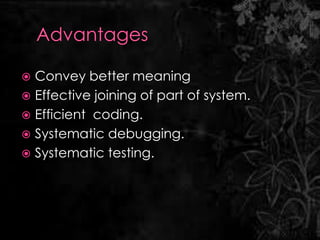
 Convey better meaning
 Effective joining of part of system.
 Efficient coding.
 Systematic debugging.
 Systematic testing.
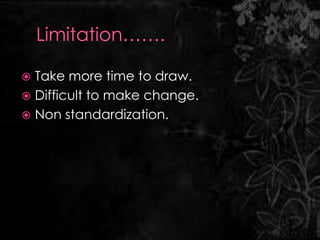
 Take more time to draw.
 Difficult to make change.
 Non standardization.
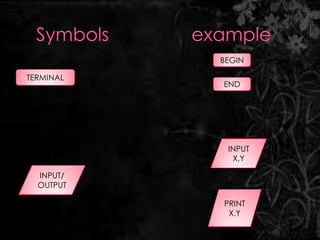
BEGIN

TERMINAL
           END


            INPUT
             X,Y

  INPUT/
  OUTPUT

           PRINT
            X,Y
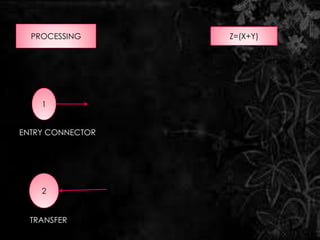
PROCESSING      Z=(X+Y)


    1


ENTRY CONNECTOR


    2


  TRANSFER
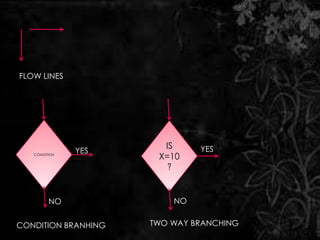
FLOW LINES


                       IS     YES
               YES
   CONDITION
                      X=10
                        ?


         NO              NO


CONDITION BRANHING   TWO WAY BRANCHING
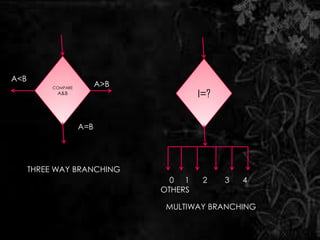
A<B
           COMPARE
                           A>B
            A&B
                                          I=?


                     A=B


      THREE WAY BRANCHING
                                   0 1     2    3   4
                                 OTHERS

                                  MULTIWAY BRANCHING
   An algorithms is define as a finite
    sequence of instruction defining the
    solution of a particular problem, where
    each instruction is numbered.
PROBLEM………….
.

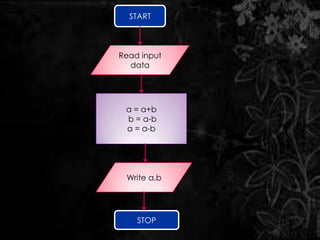
 Draw a flow chart that swap two
 numbers without using third
 variable?
START


Read input
  data


 a = a+b
 b = a-b
 a = a-b


 Write a,b


    STOP
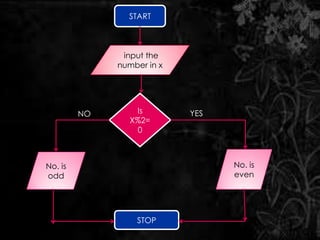
Write a program to determine entered
number is even or odd.
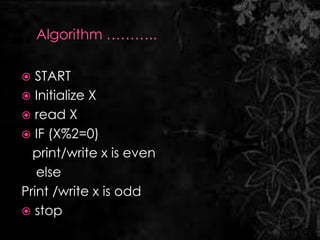
  START
 Initialize X
 read X
 IF (X%2=0)
  print/write x is even
   else
Print /write x is odd
 stop
START


               input the
              number in x


         NO       Is        YES
                 X%2=
                  0


No. is                            No. is
odd                               even


                  STOP
Flow chart

Flow chart

  • 1.
    Presented by :SAPNA SHARMA
  • 2.
    A flow chart is a graphical representation of the sequence of operation for the solution of a problem.  Flow chart use boxes of different shapes to denote different types of instruction.
  • 3.
    First think of the main line of logic , then incorporate details .  Do not give every details on the flow chart.  Statement in the flow chart symbols should be précis and easy to understand .  Use discripted variable names .
  • 4.
    Go from left to right and top to bottom while constructive flowchart  If a new flow charting page is needed it is recommended that the flow chart be broken at an input or output point. Moreover properly labeled connectors should be used to link the portion of the flow chart on different pages.
  • 5.
     Convey bettermeaning  Effective joining of part of system.  Efficient coding.  Systematic debugging.  Systematic testing.
  • 6.
     Take moretime to draw.  Difficult to make change.  Non standardization.
  • 7.
    BEGIN TERMINAL END INPUT X,Y INPUT/ OUTPUT PRINT X,Y
  • 8.
    PROCESSING Z=(X+Y) 1 ENTRY CONNECTOR 2 TRANSFER
  • 9.
    FLOW LINES IS YES YES CONDITION X=10 ? NO NO CONDITION BRANHING TWO WAY BRANCHING
  • 10.
    A<B COMPARE A>B A&B I=? A=B THREE WAY BRANCHING 0 1 2 3 4 OTHERS MULTIWAY BRANCHING
  • 11.
    An algorithms is define as a finite sequence of instruction defining the solution of a particular problem, where each instruction is numbered.
  • 12.
    PROBLEM…………. . Draw aflow chart that swap two numbers without using third variable?
  • 13.
    START Read input data a = a+b b = a-b a = a-b Write a,b STOP
  • 14.
    Write a programto determine entered number is even or odd.
  • 15.
     START Initialize X  read X  IF (X%2=0) print/write x is even else Print /write x is odd  stop
  • 16.
    START input the number in x NO Is YES X%2= 0 No. is No. is odd even STOP