Computer Studies
STORAG
E
DEVICES
PowerPoint Presentation
PRESENTATI
ON
OVERVIEW
Storage
‌
•Basic Units Of Data Storage
‌
•Data Access Methods
Magnetic Disks
•Hard Disk
‌
•Floppy Disk or Diskette
‌
•Zip Disk
‌
•Super Disk
Optical Disk
‌
•CD
‌
•DVD
‌
•Blu-Ray Disk
Flash Memory Storage
‌
•Solid State Drives
‌
•USB Flash Drives
‌
•Memory Cards
WHAT IS STORAGE
Computer data storage, often called storage or memory, is a technology consisting of
computer components and recording media used to retain digital data. It is a core
function and fundamental component of computers
Storage is required for following reason:
The main memory is temporary memory. the storage is required to store data and
programs permanently.
uThe capacity is limited. The storage is required to store a large amount of data and
program
Software engineering applies engineering principles to the design, development,
testing, and maintenance of software systems. It emphasizes systematic approaches to
software development, ensuring that projects are completed on time and within budget
while meeting quality and performance standards. Key practices in software
engineering include requirements analysis, software design, coding, testing, and
deployment. Effective collaboration, project management, and communication are
essential for successful software engineering projects, which range from small-scale
applications to large-scale enterprise systems.
BASIC UNIT OF DATA
STORAGE
DATA ACCESS
METHODS
Different methods of accessing data are following:
1-Random access memory 2-Sequential access memory
1-Random access memory:
Direct (out of sequence or random) access by a computer (CPU) means that
data can be retrieved directly from any location on a storage medium in any
order. More precisely called Direct Access.A random-access data file enables
you to read or write information anywhere in the file.
All storage devices used today are random access devices:
>CD/DVD Drives
>USB Flash Drives
2-SEQUENTIAL ACCESS MEMORY
(SAM)
Sequential access memory (SAM) is a class of data
storage devices that read stored data in a sequence.
Magnetic sequential access memory is typically used
for secondary storage in general-purpose
computers due to their higher density at lower cost
compared to RAM, as well as resistance to wear and
non-volatility.
Examples of SAM devices still in use include:
> Hard Disks
> CD-ROMs
> Magnetic tapes
MAGNE
TIC
DISKS
A magnetic disk is a storage device that uses a
magnetization process to write, rewrite and access data. It
is covered with a magnetic coating and stores data in the
form of tracks, spots and sectors. Tracks form circles on
the surface of a magnetic disk. Each track on a disc is
divided into two sectors. Each sector typically stores up to
512 bytes of data.
Hard disks, zip disks and floppy disks are common
examples of magnetic disks.
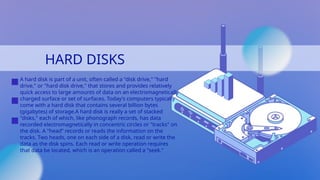
HARD DISKS
A hard disk is part of a unit, often called a "disk drive," "hard
drive," or "hard disk drive," that stores and provides relatively
quick access to large amounts of data on an electromagnetically
charged surface or set of surfaces. Today's computers typically
come with a hard disk that contains several billion bytes
(gigabytes) of storage.A hard disk is really a set of stacked
"disks," each of which, like phonograph records, has data
recorded electromagnetically in concentric circles or "tracks" on
the disk. A "head” records or reads the information on the
tracks. Two heads, one on each side of a disk, read or write the
data as the disk spins. Each read or write operation requires
that data be located, which is an operation called a "seek."
HARD DISK
PERFORMANCE
The following factors affect the performance of
hard disc
✔SEEK TIME
It is also called positioning performance. It is time
required by read/write head to reach the correct
location on the disk. It is measured in
milliseconds.
✔SPINDLE SPEED
It is also called transfer performance. It is the
speed at which the drive transfers data. It is
measured in revolutions per minute (RPM).
✔LATENCY
It is the time required by the spinning platter to
bring the desired data to read/write head. It is
measured in milliseconds.
EXTERNAL AND REMOVABLE
HARD DISK
An external hard disk is a separate hard disk that is connected to
USB port or FireWire port on system unit. The advantage of
external hard disk is that it can be installed without opening the
system unit. The storage capacity of external hard disk is upto4TB
and more.
ADVANTAGES
SOME important advantages are as following.
✔These can be used to transfer large number of files from one
place to another.
✔These disk can store large number of audio and video files
easily.
✔These disk can be used to backup important files or entire
internal hard disk.
01/15
DISK
CACHE
Disk caching is often used to speed up magnetic hard
drive performance. Today’s hard drives typically use a
disk cache consisting of memory chips that is located
on circuit board inside the hard drive case. The
computer copies the requested data to the disk cache
any time the hard drive is accessed.
FLOPPY DISKS
» Floppy disks are also known as Diskette.
» Floppy disk is a portable magnetic storage device.
» A floppy disk can store up to 1.44 Mb of data which is equivalent to
around 300 pages of A4 text.
»They used to be the ideal storage device for transferring small files from
home to work/school or from one office computer to another. But
nowadays, many files contain graphics that are larger than the size of the
floppy disk so it is not commonly used now a days.
» All disks must be formatted before data can be written to the disk.
Formatting divides the disk up into sections or sectors onto which data
files are stored.
Advantages
✔Portable - small and lightweight ,inexpensive
✔Useful for transferring small files between home and school
✔Can be used many times
DISADVANTAGES
✔Not very strong - easy to damage
✔Data can be erased if the disk comes into
contact with a magnetic field
✔Quite slow to access and retrieve data when
compared to a hard disk
✔Can transport viruses from one machine to
another
✔Small storage capacity
FLASH MEMORY
STORAGE
Flash memory is a solid-state chip that maintains stored data without any external
power source. It is commonly used in portable electronics and removable storage
devices, and to replace computer hard drive
Flash memory is widely use in smart phone, digital camera , portable media player
Types of flash memory:
❒Solid state drives
The newest flash memory application, SSDs can replace a computer's hard drive.
They have no moving parts, so mechanical failure is near zero. Solid-state drives are
quieter and smaller than hard drives, and they provide faster response, access and
boot-up times but consume much less power and run cooler.
ADVANTAGE
S
DISADVANT
AGES
✔Provide faster data access and data transfer.
✔They do not generate noise.
✔Security – allowing a very quick scan of all data
stored.
✔Some of the storage devices are waterproof.
Disadvantages:
✔Price – solid state drives are more expensive than
magnetic hard drive.
✔Recovery of data in case of failure can be more
difficult than magnetic hard drive
❒USB FLASH
DRIVE
USB flash drive is a flash memory storage drive also are called thumb drives, jump
drives, pen drives, key drives, tokens, or simply USB drives.
A small, portable flash memory card that plugs into a computer USB port and
functions as a portable hard drive. USB flash drives are touted as being easy-to-use
as they are small enough to be carried in a pocket and can plug into any computer
with a USB drive. USB flash drives have less storage capacity than an external hard
drive, but they are smaller and more durable because they do not contain any
internal moving parts.
WIRELES
S
FLASH
DRIVE
Wireless flash drive is used to store
and share data wirelessly across
mobile devices and computers. It is
portable and very easy to use It
connects wirelessly up to eight drives
and stream video at the same time via
Wi-Fi. Wireless flash drives are
available in 16GB, 32GB and 64GB
Example: SanDisk Connect
MEMORY CARDS
A memory card or flash card is an electronic flash memory data storage used for storing digital information.
These are commonly used in portable electronic devices, such as digital cameras, mobile phones, laptop
computers, tablets, MP3 players and video game consoles.
A memory card can be inserted into a slot on computer or mobile device. However a card reader can be
attached to a computer if it does not have a slot.
Types:
❒ Compact Flash (CF)
Invented by SanDisk Corporation in 1994, CompactFlash cards can support 3.3V and 5V operation and can switch
between the two, in contrast to other small-form factor flash memory cards that can operate only at one voltage.
The storage capacity of compact flash can be from 8GB to 512GB.
05
SD CARD
SD cards are used in many small portable devices such as digital video
camcorders, digital cameras, handheld computers, audio players and mobile
phones.SD Memory Cards are now available in capacities between 16 Megabytes
and 1 Gigabyte, and still growing. It provide a storage capacity up to 32GB.
06
MEMORY STICK MEDIA
Memory Stick is a removable flash memory card format, launched by Sony and
is also used in general to describe the whole family of Memory Sticks. In
addition to the original Memory Stick, this family includes the Memory Stick
PRO, a revision that allows greater maximum storage capacity and faster file
transfer speeds. Another type of memory stick is called Memory Stick Micro
(M2) with storage capacity of 2GB to 4GB.
OPTICAL DISC
Optical disc is a form of removable storage. It includes CDs ,
DVDs and blue ray discs, Optical drives use a laser to read
and write data on optical disc. The laser stands for Light
Amplification through Stimulated Emission of Radiation.
Laser beam writes on the surface by creating small pit
(hole) in the disc. Optical disc commonly store data in single
track. Optical disc storage capacity is from 700 MB to
several GB.The main catagories of optical disc are CD and
DVD
09
CDstands for Compact Disc. It is mainly used to store photos, audio and computer software. CDs are
available in three types which are read only recordable and rewriteable. Different types of CDs are as
follows.
1-CD-ROM
CD-ROM stands for Compact DISC Read-Only Memory. The data stored on CD-ROM can only be read.
It cannot be deleted or changed. It can store up to 700MB of data.
USES OF CD-ROM
CR-ROM is mostly used to store photos and audios.
It is often used to distribute new application software and games.
ADVANTGES OF CD-ROM
✔It is the least expensive way to store data and information.
✔CD-ROM discs are durable and easy to handle.
DISTAVANTAGES OF CD-ROM
✔The data cannot be edited.
✔It retrieves data and information more slowly than magnetic hard disk.
CD
CD
2-CD-R
CD-R stands for CD Recordable. The user can write data on CD-R only once but can
read it many times. The data written on CD-R cannot be erased. CD-R drives are
known as CD burners. The process of recording data on CD-R is called burning. CD-R
is known as WORM (Write Once Read Many).
3-CD-RW
CD-RW stands for Compact Disc Rewriteable. It is also known as erasable optical
disc. The most common type erasable and rewritable optical disc is magneto-optical
disc.
DVD
DVD stands for Digital Video Disc. The storage capacity of DVD is much
greater than CD. It can store up to 17 GB of data. DVDs are available in
three types which are read-only , recordable and rewritable.
TYPES:
1-DVD-ROM
DVD-ROM stands for Digital Video Disc Read Only Memory. It is high
capacity optical disc that the users can only read but not write or erase.
2-DVD-R
DVD-R stands for Digital Video Disc Recordable. It is similar to CD-R disc.
The written data cannot be erased.
3-DVD-RW
DVD-RW stands for Digital Video Disc Rewritable. The user can write data on CD-RW
many times by erasing the existing contents.
BLU-RAY DISC
Blu-Ray disc is a new and more expensive DVD format. It provides higher capacity
and better quality than standards DVDs especially for high-definition video. It can
store up to 100 GB of data.
THANK
YOU!
FOR
LISTENING

computer studies power point presentation on Storage devices.pptx

  • 1.
  • 2.
    PRESENTATI ON OVERVIEW Storage ‌ •Basic Units OfData Storage ‌ •Data Access Methods Magnetic Disks •Hard Disk ‌ •Floppy Disk or Diskette ‌ •Zip Disk ‌ •Super Disk Optical Disk ‌ •CD ‌ •DVD ‌ •Blu-Ray Disk Flash Memory Storage ‌ •Solid State Drives ‌ •USB Flash Drives ‌ •Memory Cards
  • 3.
    WHAT IS STORAGE Computerdata storage, often called storage or memory, is a technology consisting of computer components and recording media used to retain digital data. It is a core function and fundamental component of computers Storage is required for following reason: The main memory is temporary memory. the storage is required to store data and programs permanently. uThe capacity is limited. The storage is required to store a large amount of data and program
  • 4.
    Software engineering appliesengineering principles to the design, development, testing, and maintenance of software systems. It emphasizes systematic approaches to software development, ensuring that projects are completed on time and within budget while meeting quality and performance standards. Key practices in software engineering include requirements analysis, software design, coding, testing, and deployment. Effective collaboration, project management, and communication are essential for successful software engineering projects, which range from small-scale applications to large-scale enterprise systems. BASIC UNIT OF DATA STORAGE
  • 5.
    DATA ACCESS METHODS Different methodsof accessing data are following: 1-Random access memory 2-Sequential access memory 1-Random access memory: Direct (out of sequence or random) access by a computer (CPU) means that data can be retrieved directly from any location on a storage medium in any order. More precisely called Direct Access.A random-access data file enables you to read or write information anywhere in the file. All storage devices used today are random access devices: >CD/DVD Drives >USB Flash Drives
  • 6.
    2-SEQUENTIAL ACCESS MEMORY (SAM) Sequentialaccess memory (SAM) is a class of data storage devices that read stored data in a sequence. Magnetic sequential access memory is typically used for secondary storage in general-purpose computers due to their higher density at lower cost compared to RAM, as well as resistance to wear and non-volatility. Examples of SAM devices still in use include: > Hard Disks > CD-ROMs > Magnetic tapes
  • 7.
    MAGNE TIC DISKS A magnetic diskis a storage device that uses a magnetization process to write, rewrite and access data. It is covered with a magnetic coating and stores data in the form of tracks, spots and sectors. Tracks form circles on the surface of a magnetic disk. Each track on a disc is divided into two sectors. Each sector typically stores up to 512 bytes of data. Hard disks, zip disks and floppy disks are common examples of magnetic disks.
  • 8.
    HARD DISKS A harddisk is part of a unit, often called a "disk drive," "hard drive," or "hard disk drive," that stores and provides relatively quick access to large amounts of data on an electromagnetically charged surface or set of surfaces. Today's computers typically come with a hard disk that contains several billion bytes (gigabytes) of storage.A hard disk is really a set of stacked "disks," each of which, like phonograph records, has data recorded electromagnetically in concentric circles or "tracks" on the disk. A "head” records or reads the information on the tracks. Two heads, one on each side of a disk, read or write the data as the disk spins. Each read or write operation requires that data be located, which is an operation called a "seek."
  • 9.
    HARD DISK PERFORMANCE The followingfactors affect the performance of hard disc ✔SEEK TIME It is also called positioning performance. It is time required by read/write head to reach the correct location on the disk. It is measured in milliseconds. ✔SPINDLE SPEED It is also called transfer performance. It is the speed at which the drive transfers data. It is measured in revolutions per minute (RPM). ✔LATENCY It is the time required by the spinning platter to bring the desired data to read/write head. It is measured in milliseconds.
  • 10.
    EXTERNAL AND REMOVABLE HARDDISK An external hard disk is a separate hard disk that is connected to USB port or FireWire port on system unit. The advantage of external hard disk is that it can be installed without opening the system unit. The storage capacity of external hard disk is upto4TB and more. ADVANTAGES SOME important advantages are as following. ✔These can be used to transfer large number of files from one place to another. ✔These disk can store large number of audio and video files easily. ✔These disk can be used to backup important files or entire internal hard disk. 01/15
  • 11.
    DISK CACHE Disk caching isoften used to speed up magnetic hard drive performance. Today’s hard drives typically use a disk cache consisting of memory chips that is located on circuit board inside the hard drive case. The computer copies the requested data to the disk cache any time the hard drive is accessed.
  • 12.
    FLOPPY DISKS » Floppydisks are also known as Diskette. » Floppy disk is a portable magnetic storage device. » A floppy disk can store up to 1.44 Mb of data which is equivalent to around 300 pages of A4 text. »They used to be the ideal storage device for transferring small files from home to work/school or from one office computer to another. But nowadays, many files contain graphics that are larger than the size of the floppy disk so it is not commonly used now a days. » All disks must be formatted before data can be written to the disk. Formatting divides the disk up into sections or sectors onto which data files are stored. Advantages ✔Portable - small and lightweight ,inexpensive ✔Useful for transferring small files between home and school ✔Can be used many times
  • 13.
    DISADVANTAGES ✔Not very strong- easy to damage ✔Data can be erased if the disk comes into contact with a magnetic field ✔Quite slow to access and retrieve data when compared to a hard disk ✔Can transport viruses from one machine to another ✔Small storage capacity
  • 14.
    FLASH MEMORY STORAGE Flash memoryis a solid-state chip that maintains stored data without any external power source. It is commonly used in portable electronics and removable storage devices, and to replace computer hard drive Flash memory is widely use in smart phone, digital camera , portable media player Types of flash memory: ❒Solid state drives The newest flash memory application, SSDs can replace a computer's hard drive. They have no moving parts, so mechanical failure is near zero. Solid-state drives are quieter and smaller than hard drives, and they provide faster response, access and boot-up times but consume much less power and run cooler.
  • 15.
    ADVANTAGE S DISADVANT AGES ✔Provide faster dataaccess and data transfer. ✔They do not generate noise. ✔Security – allowing a very quick scan of all data stored. ✔Some of the storage devices are waterproof. Disadvantages: ✔Price – solid state drives are more expensive than magnetic hard drive. ✔Recovery of data in case of failure can be more difficult than magnetic hard drive
  • 16.
    ❒USB FLASH DRIVE USB flashdrive is a flash memory storage drive also are called thumb drives, jump drives, pen drives, key drives, tokens, or simply USB drives. A small, portable flash memory card that plugs into a computer USB port and functions as a portable hard drive. USB flash drives are touted as being easy-to-use as they are small enough to be carried in a pocket and can plug into any computer with a USB drive. USB flash drives have less storage capacity than an external hard drive, but they are smaller and more durable because they do not contain any internal moving parts.
  • 17.
    WIRELES S FLASH DRIVE Wireless flash driveis used to store and share data wirelessly across mobile devices and computers. It is portable and very easy to use It connects wirelessly up to eight drives and stream video at the same time via Wi-Fi. Wireless flash drives are available in 16GB, 32GB and 64GB Example: SanDisk Connect
  • 18.
    MEMORY CARDS A memorycard or flash card is an electronic flash memory data storage used for storing digital information. These are commonly used in portable electronic devices, such as digital cameras, mobile phones, laptop computers, tablets, MP3 players and video game consoles. A memory card can be inserted into a slot on computer or mobile device. However a card reader can be attached to a computer if it does not have a slot. Types: ❒ Compact Flash (CF) Invented by SanDisk Corporation in 1994, CompactFlash cards can support 3.3V and 5V operation and can switch between the two, in contrast to other small-form factor flash memory cards that can operate only at one voltage. The storage capacity of compact flash can be from 8GB to 512GB. 05
  • 19.
    SD CARD SD cardsare used in many small portable devices such as digital video camcorders, digital cameras, handheld computers, audio players and mobile phones.SD Memory Cards are now available in capacities between 16 Megabytes and 1 Gigabyte, and still growing. It provide a storage capacity up to 32GB. 06 MEMORY STICK MEDIA Memory Stick is a removable flash memory card format, launched by Sony and is also used in general to describe the whole family of Memory Sticks. In addition to the original Memory Stick, this family includes the Memory Stick PRO, a revision that allows greater maximum storage capacity and faster file transfer speeds. Another type of memory stick is called Memory Stick Micro (M2) with storage capacity of 2GB to 4GB.
  • 20.
    OPTICAL DISC Optical discis a form of removable storage. It includes CDs , DVDs and blue ray discs, Optical drives use a laser to read and write data on optical disc. The laser stands for Light Amplification through Stimulated Emission of Radiation. Laser beam writes on the surface by creating small pit (hole) in the disc. Optical disc commonly store data in single track. Optical disc storage capacity is from 700 MB to several GB.The main catagories of optical disc are CD and DVD 09
  • 21.
    CDstands for CompactDisc. It is mainly used to store photos, audio and computer software. CDs are available in three types which are read only recordable and rewriteable. Different types of CDs are as follows. 1-CD-ROM CD-ROM stands for Compact DISC Read-Only Memory. The data stored on CD-ROM can only be read. It cannot be deleted or changed. It can store up to 700MB of data. USES OF CD-ROM CR-ROM is mostly used to store photos and audios. It is often used to distribute new application software and games. ADVANTGES OF CD-ROM ✔It is the least expensive way to store data and information. ✔CD-ROM discs are durable and easy to handle. DISTAVANTAGES OF CD-ROM ✔The data cannot be edited. ✔It retrieves data and information more slowly than magnetic hard disk. CD CD
  • 22.
    2-CD-R CD-R stands forCD Recordable. The user can write data on CD-R only once but can read it many times. The data written on CD-R cannot be erased. CD-R drives are known as CD burners. The process of recording data on CD-R is called burning. CD-R is known as WORM (Write Once Read Many). 3-CD-RW CD-RW stands for Compact Disc Rewriteable. It is also known as erasable optical disc. The most common type erasable and rewritable optical disc is magneto-optical disc.
  • 23.
    DVD DVD stands forDigital Video Disc. The storage capacity of DVD is much greater than CD. It can store up to 17 GB of data. DVDs are available in three types which are read-only , recordable and rewritable. TYPES: 1-DVD-ROM DVD-ROM stands for Digital Video Disc Read Only Memory. It is high capacity optical disc that the users can only read but not write or erase. 2-DVD-R DVD-R stands for Digital Video Disc Recordable. It is similar to CD-R disc. The written data cannot be erased.
  • 24.
    3-DVD-RW DVD-RW stands forDigital Video Disc Rewritable. The user can write data on CD-RW many times by erasing the existing contents. BLU-RAY DISC Blu-Ray disc is a new and more expensive DVD format. It provides higher capacity and better quality than standards DVDs especially for high-definition video. It can store up to 100 GB of data.
  • 25.