 Introduction
 Developing a Program
 Program Development Life Cycle
 Algorithm
 Flowchart
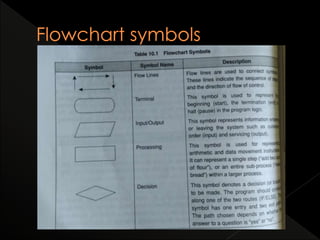
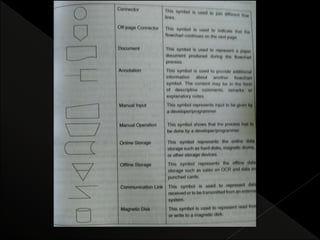
› Flowchart Symbols,
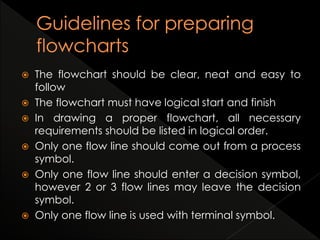
› Guidelines for Preparing Flowcharts,
 Benefits and Limitations of Flowcharts
 Computer works on set of instruction called
computer program, which clearly specify the ways
to carry out the task.
 Users communicate with the computer using a
language understood by it.
 Developing a program
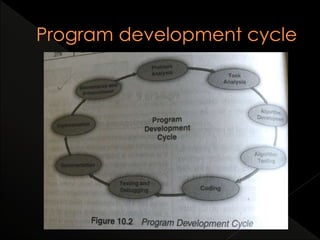
 Program development cycle
 A program consists of a series of instructions that a
computer processes to perform the required
operation.
 It also includes some fixed data required to
perform the instructions and process of defining the
instructions and data.
 A programmer must determine three basic
rudiments:
› The instructions to be performed.
› The order in which those instructions are to be performed.
› The data required to perform those instructions.
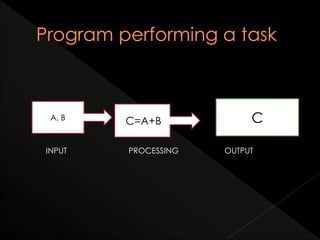
C=A+BA, B C
INPUT PROCESSING OUTPUT
 Before starting the process of writing a program,
the programmer has to determine the problem
that has to be solved.
 The process of solving the problem runs in a loop.
 Program development cycle, It includes several
phase
 There are 9 stages. Explained below.
 Problem analysis:
› The problem is analyzed precisely and completely.
› Based on the understanding, the programmer will know
about the scope within which the problem needs to be
developed.
 Task analysis
› After analysis of the problem, the developer needs to
develop solutions for various given problem.
› From those, an optimal solution is chosen, which can be
solve comfortably and economically.
 Algorithm development
› After selecting appropriate solution, an algorithm has to
be developed to depict the basic logic of the selected
solution.
› An algorithm is represented by a flowchart, decision tables
and pseudo codes
› Makes the program logic clear and help in coding.
 Algorithm testing
› Before converting algorithm into code, it has to be tested
for accuracy.
› Main purpose is to identify major logical errors at early
stage
› Ensures that algorithm is true one
 Coding
› After meeting all design considerations, the actual coding
of the program takes place in chosen programming
language.
› Depending upon the application domain , available
resources application programming language is chosen.
 Testing and debugging
› Its common that initial program to contain errors.
› A program compiler and programmer-designed test data
machine tests the code for syntax errors.
› Depending on the complexity of the program, several
rounds of testing may be required.
 Documentation
› Once the program is free from all kinds of errors, it is the
duty of the programmer to document it appropriately.
› These documents should be supplied to program users.
› It also helps another person to understand the program
clearly.
 Implementation
› After documentation, the program is installed on the end
users machine and user is also provided with all essential
documents in order to understand how to program works.
› The implementation can be viewed as the final testing
because only after using the program the user can point
out the drawback and report to the developers.
 Maintenance and enhancement
› After the program has been implemented, it should be
properly maintained by taking care of changing
requirements of its users and the system.
› It generates user feedback, the program cycle continues
as the program is modified or reconstructed to meet the
changing needs.
 Basic tool to develop the problem solving logic.
 An algorithm is defined as a finite sequence of
explicit instructions that when provided with a set
of input values produces an output and then
terminates.
 Conditions for an algorithm
› Steps must be unambiguous
› Finite number of steps.
› Can steps that repeat no. of times until task is completed.
› It should be general
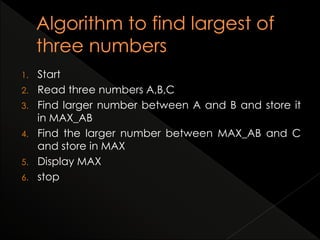
1. Start
2. Read three numbers A,B,C
3. Find larger number between A and B and store it
in MAX_AB
4. Find the larger number between MAX_AB and C
and store in MAX
5. Display MAX
6. stop
 A flowchart is a pictorial representation of an
algorithm in which steps are drawn in the form of
different shapes of boxes and logical flow
indicated by interconnected arrows.
 Boxes represent operations and arrows represent
the sequence in which operations are
implemented.
 Purpose of flowchart is to help the programmer in
understanding the logic of the program.
 It outlines the general procedure.
 Visual way of representing the information flow of
program
 The flowchart should be clear, neat and easy to
follow
 The flowchart must have logical start and finish
 In drawing a proper flowchart, all necessary
requirements should be listed in logical order.
 Only one flow line should come out from a process
symbol.
 Only one flow line should enter a decision symbol,
however 2 or 3 flow lines may leave the decision
symbol.
 Only one flow line is used with terminal symbol.
 Write briefly within symbols
 Incase of complex flowcharts, connector symbols
are reduced the number of flow lines.
 Intersection of flow lines must be avoided.
 It is used to test the validity if the flowchart by
passing through it with normal/unusual test data.
 Makes logic clear
› provides pictorial representation of the task, which makes
the logic easier to understand
› The symbols are connected in such a way that they show
the movement of information through the system clearly.
› Even a person with less knowledge about the flowchart
can trace the flowchart and understand the logic.
 Communication
› Flowchart are better way of communication of the logic
of the program.
› Graphical representation is more effective than actual
code.
 Effective analysis
› With flowchart, problem can be effectively analyzed.
› Analysis is done by a person who does not know about
programming language.
 Useful in coding
› Act as blueprint or guides for the programmer to code the
program
› Once flowchart is ready, programmers can easily code
the program , the programmer will know where to end
and where to start.
› As a result, error free programs are coded in a faster rate.
 Proper testing and debugging
› helps in detecting errors , as the developers know exactly
what the logic should do.
› Programmers can test it with various inputs to handle as
situations.
 Appropriate documentation
› Serve as very good program documentation tool.
› They can take help of the documentation to know what
the program actually does and how to use the program.
 Complex
› When program is very large, flowcharts may run for pages
together and making hard to follow.
› They become large very quickly and difficult to represent
 Costly
› Flowcharts are useful when problem solving logic of
straightforward and not very lengthy.
› Flowcharts are to be drawn for huge applications , the
time and cost factor of program development.
 Difficult to modify
› Any changes or modifications to flowchart usually requires
redrawing the entire logic again
› Redrawing a complex flowchart, is a complex task.
 No update
› Usually programs are updated regularly
› In case of large programs, update of flow charts may not
take place.
› The logic used in the flowchart may not match with the
actual program’s logic
› This defeats the main purpose of the flowchart.

FIT-Unit3 chapter 1 -computer program

  • 2.
     Introduction  Developinga Program  Program Development Life Cycle  Algorithm  Flowchart › Flowchart Symbols, › Guidelines for Preparing Flowcharts,  Benefits and Limitations of Flowcharts
  • 3.
     Computer workson set of instruction called computer program, which clearly specify the ways to carry out the task.  Users communicate with the computer using a language understood by it.  Developing a program  Program development cycle
  • 4.
     A programconsists of a series of instructions that a computer processes to perform the required operation.  It also includes some fixed data required to perform the instructions and process of defining the instructions and data.  A programmer must determine three basic rudiments: › The instructions to be performed. › The order in which those instructions are to be performed. › The data required to perform those instructions.
  • 5.
    C=A+BA, B C INPUTPROCESSING OUTPUT
  • 6.
     Before startingthe process of writing a program, the programmer has to determine the problem that has to be solved.  The process of solving the problem runs in a loop.  Program development cycle, It includes several phase  There are 9 stages. Explained below.
  • 8.
     Problem analysis: ›The problem is analyzed precisely and completely. › Based on the understanding, the programmer will know about the scope within which the problem needs to be developed.
  • 9.
     Task analysis ›After analysis of the problem, the developer needs to develop solutions for various given problem. › From those, an optimal solution is chosen, which can be solve comfortably and economically.  Algorithm development › After selecting appropriate solution, an algorithm has to be developed to depict the basic logic of the selected solution. › An algorithm is represented by a flowchart, decision tables and pseudo codes › Makes the program logic clear and help in coding.
  • 10.
     Algorithm testing ›Before converting algorithm into code, it has to be tested for accuracy. › Main purpose is to identify major logical errors at early stage › Ensures that algorithm is true one  Coding › After meeting all design considerations, the actual coding of the program takes place in chosen programming language. › Depending upon the application domain , available resources application programming language is chosen.
  • 11.
     Testing anddebugging › Its common that initial program to contain errors. › A program compiler and programmer-designed test data machine tests the code for syntax errors. › Depending on the complexity of the program, several rounds of testing may be required.  Documentation › Once the program is free from all kinds of errors, it is the duty of the programmer to document it appropriately. › These documents should be supplied to program users. › It also helps another person to understand the program clearly.
  • 12.
     Implementation › Afterdocumentation, the program is installed on the end users machine and user is also provided with all essential documents in order to understand how to program works. › The implementation can be viewed as the final testing because only after using the program the user can point out the drawback and report to the developers.  Maintenance and enhancement › After the program has been implemented, it should be properly maintained by taking care of changing requirements of its users and the system. › It generates user feedback, the program cycle continues as the program is modified or reconstructed to meet the changing needs.
  • 13.
     Basic toolto develop the problem solving logic.  An algorithm is defined as a finite sequence of explicit instructions that when provided with a set of input values produces an output and then terminates.  Conditions for an algorithm › Steps must be unambiguous › Finite number of steps. › Can steps that repeat no. of times until task is completed. › It should be general
  • 14.
    1. Start 2. Readthree numbers A,B,C 3. Find larger number between A and B and store it in MAX_AB 4. Find the larger number between MAX_AB and C and store in MAX 5. Display MAX 6. stop
  • 15.
     A flowchartis a pictorial representation of an algorithm in which steps are drawn in the form of different shapes of boxes and logical flow indicated by interconnected arrows.  Boxes represent operations and arrows represent the sequence in which operations are implemented.  Purpose of flowchart is to help the programmer in understanding the logic of the program.  It outlines the general procedure.  Visual way of representing the information flow of program
  • 18.
     The flowchartshould be clear, neat and easy to follow  The flowchart must have logical start and finish  In drawing a proper flowchart, all necessary requirements should be listed in logical order.  Only one flow line should come out from a process symbol.  Only one flow line should enter a decision symbol, however 2 or 3 flow lines may leave the decision symbol.  Only one flow line is used with terminal symbol.
  • 19.
     Write brieflywithin symbols  Incase of complex flowcharts, connector symbols are reduced the number of flow lines.  Intersection of flow lines must be avoided.  It is used to test the validity if the flowchart by passing through it with normal/unusual test data.
  • 20.
     Makes logicclear › provides pictorial representation of the task, which makes the logic easier to understand › The symbols are connected in such a way that they show the movement of information through the system clearly. › Even a person with less knowledge about the flowchart can trace the flowchart and understand the logic.  Communication › Flowchart are better way of communication of the logic of the program. › Graphical representation is more effective than actual code.
  • 21.
     Effective analysis ›With flowchart, problem can be effectively analyzed. › Analysis is done by a person who does not know about programming language.  Useful in coding › Act as blueprint or guides for the programmer to code the program › Once flowchart is ready, programmers can easily code the program , the programmer will know where to end and where to start. › As a result, error free programs are coded in a faster rate.
  • 22.
     Proper testingand debugging › helps in detecting errors , as the developers know exactly what the logic should do. › Programmers can test it with various inputs to handle as situations.  Appropriate documentation › Serve as very good program documentation tool. › They can take help of the documentation to know what the program actually does and how to use the program.
  • 23.
     Complex › Whenprogram is very large, flowcharts may run for pages together and making hard to follow. › They become large very quickly and difficult to represent  Costly › Flowcharts are useful when problem solving logic of straightforward and not very lengthy. › Flowcharts are to be drawn for huge applications , the time and cost factor of program development.
  • 24.
     Difficult tomodify › Any changes or modifications to flowchart usually requires redrawing the entire logic again › Redrawing a complex flowchart, is a complex task.  No update › Usually programs are updated regularly › In case of large programs, update of flow charts may not take place. › The logic used in the flowchart may not match with the actual program’s logic › This defeats the main purpose of the flowchart.