TCP1231 Computer Programming I

                    FIST
             Multimedia University


  Computer Programming I             1
Academicians
Lecturers
  Dr. Md Shohel Sayeed
            ITB R 2003
            Ext 3296
  Dr. Cheah Wooi Ping       For consultation hour,
            ITB R 2002       please refer to the
            Ext 3315/4113      FIST’s website


  Computer Programming I             2
Notes
Attendance… 80% no compromise
Read slides… before come to the class
Plagiarism… I know all your code
Exercise… you have to do a LOT
Problem… come to see me


  Computer Programming I       3
Objectives
To help students achieve a reasonable level
 of competence in both problem solving and
 writing computer programs using C++
 programming language.
To encourage students to appreciate the
 value of adopting good programming style
 and taking a structured modular approach
 to the design of programs.


  Computer Programming I        4
Skills expected to be acquired
Problem solving and software development
  using C++ language
The use of a range of software tools and
  packages (compiler, development
  environment, debugger, word processor)
Practical skills in an operating system
  environment (Windows) and the use of the
  internet and online resources


  Computer Programming I        5
Course Outline
Lec1 – Introduction to computing and programming
Lec2 – Algorithms and Problem Solving
Lec3 – C++ Basics (Part I)
Lec4 – C++ Basics (Part II)
Lec5 – More Flow of Control
Lec6 – Procedural Abstraction (function part 1)
Lec7 – Modular Design and functions (functions part 2)
      + Namespaces and separate compilation
Lec8 – Arrays
Lec9 – Introduction to Classes and Structures
Lec10 – Array & Strings & Vectors
Lec11 – Pointers
Lec12 – Pointers and Dynamic Arrays
Lec12 – I/O Streams and Files

    Computer Programming I                               6
Coursework and Examinations
Final Exam (40%)
Coursework (60%)
  20% Lab Test (20%)
  20% Assignments (5%+15%)
          There will be 2 interviews for Assignment 1 & 2 .
  20% Mid-Term Test (20%)


  Computer Programming I                  7
Resources
 Textbook
   Walter Savitch, 2012, Problem Solving with C++
    (Eighth Edition), Addison Wesley
 Reference
    Frank L. Friedman, “Problem Solving, Abstraction,
     and Design Using C++”, Sixth Edition, Pearson
    Deitel, C++ How to Program(Fifth Edition), Pearson
    Horstmann, Budd, “Big C++”, 2nd Edition, Wiley
    Tony Graddis, Barret Krupnow, Starting Out with C+
     +, Addison Wesley


   Computer Programming I                8
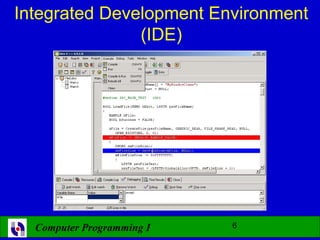
Integrated Development Environment
               (IDE)


  Computer Programming I   9
Lecture 1
          Introduction
                to
     Computers & Programming


Computer Programming I      10
Overview
   Computer systems
   Programming languages
   Compiler
   Linker


    Computer Programming I     11
Computer System
 A computer program is…
   A set of instructions for a computer to follow

 Computer software is …
   The collection of programs used by a computer
     • Includes:
           » Editors
           » Translators
           » System Managers


  Computer Programming I               12
Hardware
 Three main classes of computers

   PCs (Personal Computer)
     • Relatively small used by one person at a time

   Workstation
     • Larger and more powerful than a PC

   Mainframe
     • Still larger
     • Requires support staff
     • Shared by multiple users

  Computer Programming I                          13
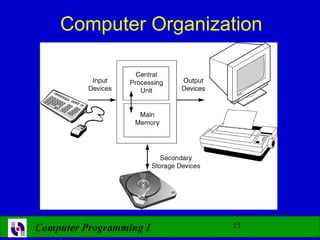
Computer Organization


Computer Programming I   14
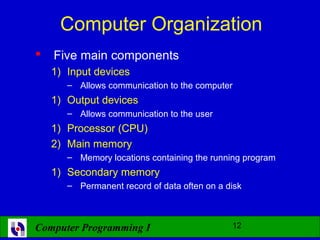
Computer Organization
   Five main components
    1) Input devices
       – Allows communication to the computer
    1) Output devices
       – Allows communication to the user
    1) Processor (CPU)
    2) Main memory
       – Memory locations containing the running program
    1) Secondary memory
       – Permanent record of data often on a disk


Computer Programming I                        15
Computer Memory
 Main Memory
   Long list of memory locations
     • Each contains zeros and ones
     • Can change during program execution
   Binary Digit or Bit
     • A digit that can only be zero or one
   Byte
     • Each memory location has eight bits
   Address
     • Number that identifies a memory location
  Computer Programming I                      16
Secondary Memory
 Main memory stores instructions and
  data while a program is running.
 Secondary memory
   Stores instructions and data between sessions
   A file stores data or instructions in
    secondary memory


  Computer Programming I            17
Memory Access
 Random Access
   Usually called RAM
     • Computer can directly access any memory location

 Sequential Access
   Data is generally found by searching through
    other items first
     • More common in secondary memory


  Computer Programming I                 18
The Processor
 Typically called the CPU
   Central Processing Unit
   Follows program instructions
   Typical capabilities of CPU include:

        add
        subtract
        multiply
        divide
        move data from location to location

  Computer Programming I              19
Computer Software
 The operating system
     Allows us to communicate with the computer
     Is a program
     Allocates the computer’s resources
     Responds to user requests to run other
      programs

 Common operating systems include…
   UNIX    Linux DOS
    Windows Macintosh VMS
  Computer Programming I              20
High-level Languages
 Common programming languages include …

  C C++ Java       Pascal Visual Basic    FORTRAN
   COBOL Lisp      Scheme Ada

 These high – level languages
   Resemble human languages
   Are designed to be easy to read and write
   Use more complicated instructions than
     the CPU can follow
   Must be translated to zeros and ones for the CPU
    to execute a program

  Computer Programming I                  21
Low-level Languages
 An assembly language command such as

               ADD X Y Z

  might mean add the values found at x and y
  in memory, and store the result in location z.

 Assembly language must be translated to
  machine language (zeros and ones)
      0110 1001 1010 1011
 The CPU can follow machine language

  Computer Programming I               22
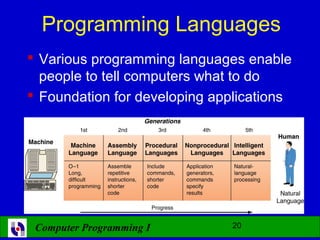
Programming Languages
 Various programming languages enable
  people to tell computers what to do
 Foundation for developing applications


 Computer Programming I        23
Programming Languages
 Machine Language (first generation)
    The computer’s ‘native language’
    Composed of binary digits (0s, 1s)
       Eg. 0110   1001 1010 1011
    The only language that computers understand
 Assembly Language (second generation)
    One-to-one correspondence to machine language
    Somewhat more user-friendly than machine
     language (mnemonic rather than binary digits)
       Eg. ADD X Y Z
    Assembler – program that translates an assembly
     language program into machine language

  Computer Programming I                  24
Programming Languages
 Procedural Languages (third generation)
    One instruction translates into many machine
     language instructions
    Programs describe the computer’s processing
     step-by-step
    Closer to natural language; uses common words
     rather than abbreviated mnemonics
    Examples: C, C++, Java, Fortran, QuickBasic
    Compiler - translates the entire program at once
    Interpreter - translates and executes one source
     program statement at a time


 Computer Programming I                   25
Programming Languages
 Nonprocedural Languages (fourth generation)
    Allows the user to specify the desired result without
     having to specify the detailed procedures needed
     for achieving the result
   Example: – database query language - SQL
   Can be used by non technical users
 Natural Language Programming Languages
  (fifth generation (intelligent) languages)
    Translates natural languages into a structured,
     machine-readable form
    Are extremely complex and experimental


 Computer Programming I                        26
Current Programming Languages
 Object-Oriented Programming Languages (OOP)
   based on objects – packaging data and the
    instructions about what to do with that data together
   Examples: Java, C++

 Visual Programming Languages
   Used within a graphical environment
   Examples : Visual Basic and Visual C++
   Popular to non technical users.


 Computer Programming I                    27
Current Programming Languages
 Hypertext Markup Language (HTML)
   standard language used in World Wide Web
   contains text, images, and other types of
    information such as data files, audio, video, and
    executable computer programs
 Extensible Markup Language (XML)
   Improved on web document functionality
 Virtual Reality Modeling Language (VRML)
   a file format for describing three-dimensional
    (3D) interactive worlds and objects
   can be used with the World Wide Web
   Computer Programming I               28
Compilers
 Translate high-level language to
  machine language

   Source code
     • The original program in a high level language
   Object code
     • The translated version in machine language


  Computer Programming I                   29
Linkers
 Some programs we use are already compiled
   Their object code is available for us to use
   For example: Input and output routines

 A Linker combines
   The object code for the programs we write
                      and
   The object code for the pre-compiled routines
                      into
   The machine language program the CPU can run


  Computer Programming I                     30

Computer Programming - Lecture 1

  • 1.
    TCP1231 Computer ProgrammingI FIST Multimedia University Computer Programming I 1
  • 2.
    Academicians Lecturers Dr.Md Shohel Sayeed ITB R 2003 Ext 3296 Dr. Cheah Wooi Ping For consultation hour, ITB R 2002 please refer to the Ext 3315/4113 FIST’s website Computer Programming I 2
  • 3.
    Notes Attendance… 80% nocompromise Read slides… before come to the class Plagiarism… I know all your code Exercise… you have to do a LOT Problem… come to see me Computer Programming I 3
  • 4.
    Objectives To help studentsachieve a reasonable level of competence in both problem solving and writing computer programs using C++ programming language. To encourage students to appreciate the value of adopting good programming style and taking a structured modular approach to the design of programs. Computer Programming I 4
  • 5.
    Skills expected tobe acquired Problem solving and software development using C++ language The use of a range of software tools and packages (compiler, development environment, debugger, word processor) Practical skills in an operating system environment (Windows) and the use of the internet and online resources Computer Programming I 5
  • 6.
    Course Outline Lec1 –Introduction to computing and programming Lec2 – Algorithms and Problem Solving Lec3 – C++ Basics (Part I) Lec4 – C++ Basics (Part II) Lec5 – More Flow of Control Lec6 – Procedural Abstraction (function part 1) Lec7 – Modular Design and functions (functions part 2) + Namespaces and separate compilation Lec8 – Arrays Lec9 – Introduction to Classes and Structures Lec10 – Array & Strings & Vectors Lec11 – Pointers Lec12 – Pointers and Dynamic Arrays Lec12 – I/O Streams and Files Computer Programming I 6
  • 7.
    Coursework and Examinations FinalExam (40%) Coursework (60%) 20% Lab Test (20%) 20% Assignments (5%+15%) There will be 2 interviews for Assignment 1 & 2 . 20% Mid-Term Test (20%) Computer Programming I 7
  • 8.
    Resources  Textbook  Walter Savitch, 2012, Problem Solving with C++ (Eighth Edition), Addison Wesley  Reference  Frank L. Friedman, “Problem Solving, Abstraction, and Design Using C++”, Sixth Edition, Pearson  Deitel, C++ How to Program(Fifth Edition), Pearson  Horstmann, Budd, “Big C++”, 2nd Edition, Wiley  Tony Graddis, Barret Krupnow, Starting Out with C+ +, Addison Wesley Computer Programming I 8
  • 9.
    Integrated Development Environment (IDE) Computer Programming I 9
  • 10.
    Lecture 1 Introduction to Computers & Programming Computer Programming I 10
  • 11.
    Overview  Computer systems  Programming languages  Compiler  Linker Computer Programming I 11
  • 12.
    Computer System  Acomputer program is…  A set of instructions for a computer to follow  Computer software is …  The collection of programs used by a computer • Includes: » Editors » Translators » System Managers Computer Programming I 12
  • 13.
    Hardware  Three mainclasses of computers  PCs (Personal Computer) • Relatively small used by one person at a time  Workstation • Larger and more powerful than a PC  Mainframe • Still larger • Requires support staff • Shared by multiple users Computer Programming I 13
  • 14.
  • 15.
    Computer Organization  Five main components 1) Input devices – Allows communication to the computer 1) Output devices – Allows communication to the user 1) Processor (CPU) 2) Main memory – Memory locations containing the running program 1) Secondary memory – Permanent record of data often on a disk Computer Programming I 15
  • 16.
    Computer Memory  MainMemory  Long list of memory locations • Each contains zeros and ones • Can change during program execution  Binary Digit or Bit • A digit that can only be zero or one  Byte • Each memory location has eight bits  Address • Number that identifies a memory location Computer Programming I 16
  • 17.
    Secondary Memory  Mainmemory stores instructions and data while a program is running.  Secondary memory  Stores instructions and data between sessions  A file stores data or instructions in secondary memory Computer Programming I 17
  • 18.
    Memory Access  RandomAccess  Usually called RAM • Computer can directly access any memory location  Sequential Access  Data is generally found by searching through other items first • More common in secondary memory Computer Programming I 18
  • 19.
    The Processor  Typicallycalled the CPU  Central Processing Unit  Follows program instructions  Typical capabilities of CPU include: add subtract multiply divide move data from location to location Computer Programming I 19
  • 20.
    Computer Software  Theoperating system  Allows us to communicate with the computer  Is a program  Allocates the computer’s resources  Responds to user requests to run other programs  Common operating systems include…  UNIX Linux DOS Windows Macintosh VMS Computer Programming I 20
  • 21.
    High-level Languages  Commonprogramming languages include … C C++ Java Pascal Visual Basic FORTRAN COBOL Lisp Scheme Ada  These high – level languages  Resemble human languages  Are designed to be easy to read and write  Use more complicated instructions than the CPU can follow  Must be translated to zeros and ones for the CPU to execute a program Computer Programming I 21
  • 22.
    Low-level Languages  Anassembly language command such as ADD X Y Z might mean add the values found at x and y in memory, and store the result in location z.  Assembly language must be translated to machine language (zeros and ones) 0110 1001 1010 1011  The CPU can follow machine language Computer Programming I 22
  • 23.
    Programming Languages  Variousprogramming languages enable people to tell computers what to do  Foundation for developing applications Computer Programming I 23
  • 24.
    Programming Languages  MachineLanguage (first generation)  The computer’s ‘native language’  Composed of binary digits (0s, 1s)  Eg. 0110 1001 1010 1011  The only language that computers understand  Assembly Language (second generation)  One-to-one correspondence to machine language  Somewhat more user-friendly than machine language (mnemonic rather than binary digits)  Eg. ADD X Y Z  Assembler – program that translates an assembly language program into machine language Computer Programming I 24
  • 25.
    Programming Languages  ProceduralLanguages (third generation)  One instruction translates into many machine language instructions  Programs describe the computer’s processing step-by-step  Closer to natural language; uses common words rather than abbreviated mnemonics  Examples: C, C++, Java, Fortran, QuickBasic  Compiler - translates the entire program at once  Interpreter - translates and executes one source program statement at a time Computer Programming I 25
  • 26.
    Programming Languages  NonproceduralLanguages (fourth generation)  Allows the user to specify the desired result without having to specify the detailed procedures needed for achieving the result Example: – database query language - SQL Can be used by non technical users  Natural Language Programming Languages (fifth generation (intelligent) languages)  Translates natural languages into a structured, machine-readable form  Are extremely complex and experimental Computer Programming I 26
  • 27.
    Current Programming Languages Object-Oriented Programming Languages (OOP)  based on objects – packaging data and the instructions about what to do with that data together  Examples: Java, C++  Visual Programming Languages  Used within a graphical environment  Examples : Visual Basic and Visual C++  Popular to non technical users. Computer Programming I 27
  • 28.
    Current Programming Languages Hypertext Markup Language (HTML)  standard language used in World Wide Web  contains text, images, and other types of information such as data files, audio, video, and executable computer programs  Extensible Markup Language (XML)  Improved on web document functionality  Virtual Reality Modeling Language (VRML)  a file format for describing three-dimensional (3D) interactive worlds and objects  can be used with the World Wide Web Computer Programming I 28
  • 29.
    Compilers  Translate high-levellanguage to machine language  Source code • The original program in a high level language  Object code • The translated version in machine language Computer Programming I 29
  • 30.
    Linkers  Some programswe use are already compiled  Their object code is available for us to use  For example: Input and output routines  A Linker combines  The object code for the programs we write and  The object code for the pre-compiled routines into  The machine language program the CPU can run Computer Programming I 30