How Many Slaves? Parallel Execution and the Magic of 2 Doug Burns [email_address] http://oracledoug.com
Introduction Introduction What is the Magic of ‘2’? What Tests? Test Scripts and Tools Test Results When is a Conclusion …
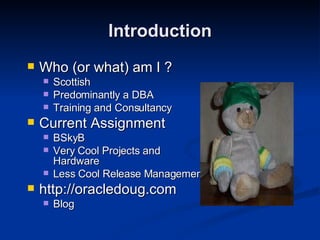
Introduction Who (or what) am I ? Scottish Predominantly a DBA Training and Consultancy Current Assignment BSkyB Very Cool Projects and Hardware Less Cool Release Management http://oracledoug.com Blog
Why Parallel Execution? Increasing Volumes of Data Increasing User Expectations More Powerful Hardware Parallel Execution (PX) splits a single large task into multiple smaller tasks which are handled by separate processes running concurrently. Full Table Scans Sorts Index Creation, Direct Path inserts etc … Introduction
Previous Paper Suck It Dry – Tuning Parallel Execution http://oracledoug.com/px.html  (.doc & .pdf) Reviewer comments on parallel_max_servers Debate about parallel_adaptive_multi_user Something about the Magic of ‘2’ Talked about Hardware, but nothing specific ‘ Sometimes when faced with a slow i/o subsystem you might find that higher degrees of parallelism are useful because the CPUs are spending more time waiting for i/o to complete’ Introduction
Always set customer expectation levels I hope you didn’t come here looking for answers! Or lots of detail http://oracledoug.com/px_slaves.pdf  (or.doc) An interesting story, nonetheless A framework for your own tests A glance at some results Introduction
Introduction Introduction What is the Magic of ‘2’? What Tests? Test Scripts and Tools Test Results When is a Conclusion …
Batch Queue Management and the Magic of ‘2’  Cary Millsap (2000) - available at hotsos.com How many batch processes to execute per CPU? 2.  Well, a range of values really, between 1 and 1.8? Most recent work expands on this CPU-intensive batch jobs per CPU <2 (nearer to 1) I/O-intensive batch jobs per CPU >2 CPU and I/O request durations are exactly equal (rare) - CPU * 2 Misconfiguration could change everything What is a batch job anyway? What is The Magic of ‘2’?
What is The Magic of ‘2’? Oracle 10.2 Docs mention the Magic of ‘2’ PARALLEL_THREADS_PER_CPU  enables you to adjust for hardware configurations with I/O subsystems that are slow relative to the CPU speed and for application workloads that perform few computations relative to the amount of data involved .  If the system is neither CPU-bound nor I/O-bound, then the PARALLEL_THREADS_PER_CPU value should be increased. This increases the default DOP and allow better utilization of hardware resources.  The default for PARALLEL_THREADS_PER_CPU on most platforms is  two .  However, the default for machines with relatively slow I/O subsystems can be  as high as eight .
What Tests? Introduction What is the Magic of ‘2’? What Tests? Test Scripts and Tools Test Results When is a Conclusion …
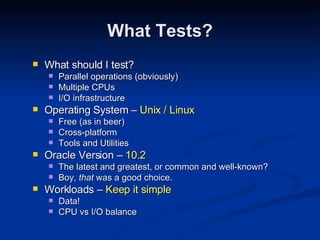
What should I test? Parallel operations (obviously) Multiple CPUs I/O infrastructure Operating System –  Unix / Linux Free (as in beer) Cross-platform Tools and Utilities Oracle Version –  10.2 The latest and greatest, or common and well-known? Boy,  that  was a good choice. Workloads –  Keep it simple Data! CPU vs I/O balance What Tests?
First attempt Full Table scan of a 2 million row table PCTFREE 90 expanded it to 2.8Gb Small enough for all platforms Big enough to exercise the I/O subsystem properly NOT! EMC took 7 seconds. Second attempt Full Table scan of 8 million row table PCTFREE 90 expanded it to 10Gb Too big for the little PC now! (Used 1/8 of the data) Solved most problems But too I/O intensive (More on this later) What Tests?
Third attempt FTS plus a Hash Join and Sort of two 8 million row tables PCTFREE 90 expanded them to over 10Gb Unsuitable for the PC, used 1/8 data again Started to produce more interesting results Multi-user tests More on these later 8 new 1 million row tables PCTFREE 90 expanded them to 147Mb each What Tests?
What Tests? The Test Process will be much easier if you have Enough Time Appropriate Hardware A Dedicated Assistant A Pleasant Working Environment Two out of Four ain’t bad …
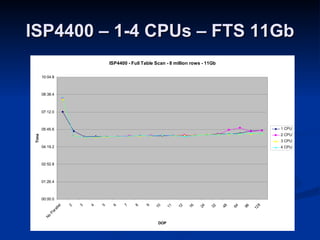
Intel Single-CPU PC –  Tulip PC White Box Linux – Kernel 2.6.9 1 x 550Mhz Pentium 3 768Mb RAM Single 20Gb IDE Intel SMP Server –  Intel ISP4400 (SRKA4) White Box Linux – Kernel 2.6.9 4 x 700Mhz Pentium 3 Xeon 3.5Gb RAM 4 x Seagate Cheetah U-160 SCSI Software RAID-0 (256Kb stripe) Separate system/software disk Enable/Disable CPUs by editing grub.conf £300 on eBay including all HDD and shipping What Tests?
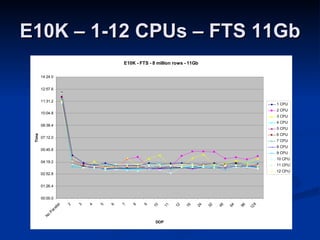
Enterprise SMP server –  Sun E10K Solaris 8 12 x 400Mhz SPARC 12Gb RAM EMC Symmetrix 8730 via Brocade SAN 5 x Hard Disk Slices (Hypers) in RAID 1+0 (960Kb stripe) Enable/Disable CPUs using psradm Yes,  really !  We had some spare kit kicking around. (Thanks, Mike) DBA Lessons #1 - Always be nice to System and Storage Administrators #2 – Work for companies with a lot of money What Tests?
Test Scripts and Tools Introduction What is the Magic of ‘2’? What Tests? Test Scripts and Tools Test Results When is a Conclusion …
Test Scripts and Tools init.ora  Disabled parallel_adaptive_multi_user Set parallel_max_servers to 512 I forgot to increase this a couple of times A stupid mistake in the paper (and an important lesson) Parallel_max_servers=512 keeps defaulting to 385? processes=400 ! Setup scripts To be able to recreate environment easily setup1.sql – Tablespaces, user account and privs setup2.sql – Create two 8 million row / 11Gb tables setup3.sql – Create eight 1 million row / 147Mb tables.
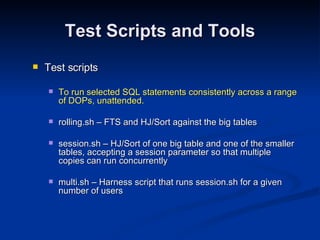
Test Scripts and Tools Test scripts To run selected SQL statements consistently across a range of DOPs, unattended. rolling.sh – FTS and HJ/Sort against the big tables session.sh – HJ/Sort of one big table and one of the smaller tables, accepting a session parameter so that multiple copies can run concurrently multi.sh – Harness script that runs session.sh for a given number of users
Test Scripts and Tools Information Collection Simple log file SQL statements Output Timings Autotrace v$pq_tqstat query after each statement 10046 Trace File Consolidated version, using client_id and trcsess tkprof output too Watch the overhead in disk space and trcsess run time! System Statistics
Test Scripts and Tools Operating System Statistics Resource Usage Bottlenecks Long-running tests – likely to be a lot of data! ORCA/orcallator http://www.orcaware.com/orca Go for the latest development tarball, which includes procallator for Linux statistics collection Easy configuration to generate HTML output Pretty graphs! Lots of them in the paper, but not here.
Test Results Introduction What is the Magic of ‘2’? What Tests? Test Scripts and Tools Test Results When is a Conclusion …
PC – 1 CPU – 1.3Gb
ISP4400 – 1-4 CPUs – FTS 11Gb
ISP4400 – 1-4 CPUs – HJ 22Gb
E10K – 1-12 CPUs – FTS 11Gb
E10K – 1-12 CPUs – HJ 22Gb
Multi-user Tests First attempt  Hash Join/Sort statement only 170Mb Tables – 128,000 rows (PCTFREE 90) Between 1 and 12 concurrent users, noparallel to DOP 4 Showed how quickly PX response drops off with multiple users Then I noticed something strange in the V$PQ_TQSTAT output Slaves weren’t doing much work. What’s that sound I can hear? PCTFREE 90 - lots of disk I/O (largely empty blocks) Very small data volumes feeding into later stages of the plan! Mmmmm …. Perhaps that doesn’t test the CPUs too well
Multi-user Tests
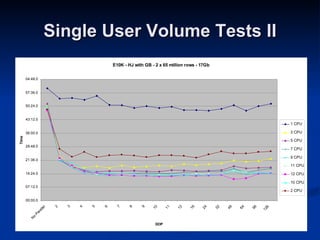
Doh! If the CPUs weren’t working hard enough on the multi-user tests, then … I should re-run the Single User/Volume Tests
Single User Volume Tests II
When is a Conclusion … Introduction What is the Magic of ‘2’? What Tests? Test Scripts and Tools Test Results When is a Conclusion …
…  not a Conclusion? When it contains lots of mights, maybes and coulds? When you’ve been testing the wrong thing? IF you’re the only user of the server  and  it has more than one CPU  and  enough disks  then You should definitely give PX at a DOP of 2 a try Benefit from the direct path I/O, not the parallelism? _serial_direct_read=true Benefits diminish rapidly If using an unsuitable disk configuration, like these tests Then again, I think a lot of people  are When is a Conclusion …
The only way to know for  sure  is to test  your  SQL, with  your  data with a range of DOPs Then choose something below the apparent optimum? Parallel Execution loves hardware But it’s not just about having loads of kit You need to have the right  balance  of CPU, Memory and I/O bandwidth Bottlenecks will become apparent more quickly Don’t use it for online Unless it’s a handful of users With a predictable maximum number of concurrent activities Set parallel_adaptive_multi_user to TRUE? (10g default) You must explain it to your users! When is a Conclusion …
More things to try Bigger stripe widths and filesystem options ( DONE ) Different extent and block sizes ( DONE ) Disk-separated data files and Hash Partitioned Tables Hardware RAID Different Automatic PGA Management Settings Oracle’s Default  PX Parameter Values Different SQL What have I started ?!? What price an old EMC Symmetrix on eBay? Do you think Scottish Power do 3-phase power for domestic customers? How will I explain the  noise  to Housemates and Partner! When is a Conclusion …
The scripts are there http://oracledoug.com/px_slaves.doc Tailor them to your needs. Improve them! Let me know your results – I’m interested. Including details of your environment Data creation scripts Your SQL When is a Conclusion …
How Many Slaves? Parallel Execution and the Magic of 2 Doug Burns [email_address] http://oracledoug.com

How Many Slaves (Ukoug)

  • 1.
    How Many Slaves?Parallel Execution and the Magic of 2 Doug Burns [email_address] http://oracledoug.com
  • 2.
    Introduction Introduction Whatis the Magic of ‘2’? What Tests? Test Scripts and Tools Test Results When is a Conclusion …
  • 3.
    Introduction Who (orwhat) am I ? Scottish Predominantly a DBA Training and Consultancy Current Assignment BSkyB Very Cool Projects and Hardware Less Cool Release Management http://oracledoug.com Blog
  • 4.
    Why Parallel Execution?Increasing Volumes of Data Increasing User Expectations More Powerful Hardware Parallel Execution (PX) splits a single large task into multiple smaller tasks which are handled by separate processes running concurrently. Full Table Scans Sorts Index Creation, Direct Path inserts etc … Introduction
  • 5.
    Previous Paper SuckIt Dry – Tuning Parallel Execution http://oracledoug.com/px.html (.doc & .pdf) Reviewer comments on parallel_max_servers Debate about parallel_adaptive_multi_user Something about the Magic of ‘2’ Talked about Hardware, but nothing specific ‘ Sometimes when faced with a slow i/o subsystem you might find that higher degrees of parallelism are useful because the CPUs are spending more time waiting for i/o to complete’ Introduction
  • 6.
    Always set customerexpectation levels I hope you didn’t come here looking for answers! Or lots of detail http://oracledoug.com/px_slaves.pdf (or.doc) An interesting story, nonetheless A framework for your own tests A glance at some results Introduction
  • 7.
    Introduction Introduction Whatis the Magic of ‘2’? What Tests? Test Scripts and Tools Test Results When is a Conclusion …
  • 8.
    Batch Queue Managementand the Magic of ‘2’ Cary Millsap (2000) - available at hotsos.com How many batch processes to execute per CPU? 2. Well, a range of values really, between 1 and 1.8? Most recent work expands on this CPU-intensive batch jobs per CPU <2 (nearer to 1) I/O-intensive batch jobs per CPU >2 CPU and I/O request durations are exactly equal (rare) - CPU * 2 Misconfiguration could change everything What is a batch job anyway? What is The Magic of ‘2’?
  • 9.
    What is TheMagic of ‘2’? Oracle 10.2 Docs mention the Magic of ‘2’ PARALLEL_THREADS_PER_CPU enables you to adjust for hardware configurations with I/O subsystems that are slow relative to the CPU speed and for application workloads that perform few computations relative to the amount of data involved . If the system is neither CPU-bound nor I/O-bound, then the PARALLEL_THREADS_PER_CPU value should be increased. This increases the default DOP and allow better utilization of hardware resources. The default for PARALLEL_THREADS_PER_CPU on most platforms is two . However, the default for machines with relatively slow I/O subsystems can be as high as eight .
  • 10.
    What Tests? IntroductionWhat is the Magic of ‘2’? What Tests? Test Scripts and Tools Test Results When is a Conclusion …
  • 11.
    What should Itest? Parallel operations (obviously) Multiple CPUs I/O infrastructure Operating System – Unix / Linux Free (as in beer) Cross-platform Tools and Utilities Oracle Version – 10.2 The latest and greatest, or common and well-known? Boy, that was a good choice. Workloads – Keep it simple Data! CPU vs I/O balance What Tests?
  • 12.
    First attempt FullTable scan of a 2 million row table PCTFREE 90 expanded it to 2.8Gb Small enough for all platforms Big enough to exercise the I/O subsystem properly NOT! EMC took 7 seconds. Second attempt Full Table scan of 8 million row table PCTFREE 90 expanded it to 10Gb Too big for the little PC now! (Used 1/8 of the data) Solved most problems But too I/O intensive (More on this later) What Tests?
  • 13.
    Third attempt FTSplus a Hash Join and Sort of two 8 million row tables PCTFREE 90 expanded them to over 10Gb Unsuitable for the PC, used 1/8 data again Started to produce more interesting results Multi-user tests More on these later 8 new 1 million row tables PCTFREE 90 expanded them to 147Mb each What Tests?
  • 14.
    What Tests? TheTest Process will be much easier if you have Enough Time Appropriate Hardware A Dedicated Assistant A Pleasant Working Environment Two out of Four ain’t bad …
  • 15.
    Intel Single-CPU PC– Tulip PC White Box Linux – Kernel 2.6.9 1 x 550Mhz Pentium 3 768Mb RAM Single 20Gb IDE Intel SMP Server – Intel ISP4400 (SRKA4) White Box Linux – Kernel 2.6.9 4 x 700Mhz Pentium 3 Xeon 3.5Gb RAM 4 x Seagate Cheetah U-160 SCSI Software RAID-0 (256Kb stripe) Separate system/software disk Enable/Disable CPUs by editing grub.conf £300 on eBay including all HDD and shipping What Tests?
  • 16.
    Enterprise SMP server– Sun E10K Solaris 8 12 x 400Mhz SPARC 12Gb RAM EMC Symmetrix 8730 via Brocade SAN 5 x Hard Disk Slices (Hypers) in RAID 1+0 (960Kb stripe) Enable/Disable CPUs using psradm Yes, really ! We had some spare kit kicking around. (Thanks, Mike) DBA Lessons #1 - Always be nice to System and Storage Administrators #2 – Work for companies with a lot of money What Tests?
  • 17.
    Test Scripts andTools Introduction What is the Magic of ‘2’? What Tests? Test Scripts and Tools Test Results When is a Conclusion …
  • 18.
    Test Scripts andTools init.ora Disabled parallel_adaptive_multi_user Set parallel_max_servers to 512 I forgot to increase this a couple of times A stupid mistake in the paper (and an important lesson) Parallel_max_servers=512 keeps defaulting to 385? processes=400 ! Setup scripts To be able to recreate environment easily setup1.sql – Tablespaces, user account and privs setup2.sql – Create two 8 million row / 11Gb tables setup3.sql – Create eight 1 million row / 147Mb tables.
  • 19.
    Test Scripts andTools Test scripts To run selected SQL statements consistently across a range of DOPs, unattended. rolling.sh – FTS and HJ/Sort against the big tables session.sh – HJ/Sort of one big table and one of the smaller tables, accepting a session parameter so that multiple copies can run concurrently multi.sh – Harness script that runs session.sh for a given number of users
  • 20.
    Test Scripts andTools Information Collection Simple log file SQL statements Output Timings Autotrace v$pq_tqstat query after each statement 10046 Trace File Consolidated version, using client_id and trcsess tkprof output too Watch the overhead in disk space and trcsess run time! System Statistics
  • 21.
    Test Scripts andTools Operating System Statistics Resource Usage Bottlenecks Long-running tests – likely to be a lot of data! ORCA/orcallator http://www.orcaware.com/orca Go for the latest development tarball, which includes procallator for Linux statistics collection Easy configuration to generate HTML output Pretty graphs! Lots of them in the paper, but not here.
  • 22.
    Test Results IntroductionWhat is the Magic of ‘2’? What Tests? Test Scripts and Tools Test Results When is a Conclusion …
  • 23.
    PC – 1CPU – 1.3Gb
  • 24.
    ISP4400 – 1-4CPUs – FTS 11Gb
  • 25.
    ISP4400 – 1-4CPUs – HJ 22Gb
  • 26.
    E10K – 1-12CPUs – FTS 11Gb
  • 27.
    E10K – 1-12CPUs – HJ 22Gb
  • 28.
    Multi-user Tests Firstattempt Hash Join/Sort statement only 170Mb Tables – 128,000 rows (PCTFREE 90) Between 1 and 12 concurrent users, noparallel to DOP 4 Showed how quickly PX response drops off with multiple users Then I noticed something strange in the V$PQ_TQSTAT output Slaves weren’t doing much work. What’s that sound I can hear? PCTFREE 90 - lots of disk I/O (largely empty blocks) Very small data volumes feeding into later stages of the plan! Mmmmm …. Perhaps that doesn’t test the CPUs too well
  • 29.
  • 30.
    Doh! If theCPUs weren’t working hard enough on the multi-user tests, then … I should re-run the Single User/Volume Tests
  • 31.
  • 32.
    When is aConclusion … Introduction What is the Magic of ‘2’? What Tests? Test Scripts and Tools Test Results When is a Conclusion …
  • 33.
    … nota Conclusion? When it contains lots of mights, maybes and coulds? When you’ve been testing the wrong thing? IF you’re the only user of the server and it has more than one CPU and enough disks then You should definitely give PX at a DOP of 2 a try Benefit from the direct path I/O, not the parallelism? _serial_direct_read=true Benefits diminish rapidly If using an unsuitable disk configuration, like these tests Then again, I think a lot of people are When is a Conclusion …
  • 34.
    The only wayto know for sure is to test your SQL, with your data with a range of DOPs Then choose something below the apparent optimum? Parallel Execution loves hardware But it’s not just about having loads of kit You need to have the right balance of CPU, Memory and I/O bandwidth Bottlenecks will become apparent more quickly Don’t use it for online Unless it’s a handful of users With a predictable maximum number of concurrent activities Set parallel_adaptive_multi_user to TRUE? (10g default) You must explain it to your users! When is a Conclusion …
  • 35.
    More things totry Bigger stripe widths and filesystem options ( DONE ) Different extent and block sizes ( DONE ) Disk-separated data files and Hash Partitioned Tables Hardware RAID Different Automatic PGA Management Settings Oracle’s Default PX Parameter Values Different SQL What have I started ?!? What price an old EMC Symmetrix on eBay? Do you think Scottish Power do 3-phase power for domestic customers? How will I explain the noise to Housemates and Partner! When is a Conclusion …
  • 36.
    The scripts arethere http://oracledoug.com/px_slaves.doc Tailor them to your needs. Improve them! Let me know your results – I’m interested. Including details of your environment Data creation scripts Your SQL When is a Conclusion …
  • 37.
    How Many Slaves?Parallel Execution and the Magic of 2 Doug Burns [email_address] http://oracledoug.com